Forced SSO Session Fixation
The SSO login flow lacked anti-CSRF protection on the final approval endpoint, allowing an attacker to fixate a session identifier and force a victim's browser to complete the SSO flow. By polling the approval endpoint with the victim's request ID, the attacker could obtain a valid session token and log in as the victim.
 Published on infosecwriteups.com
During a recent project, I encountered an interesting small issue that allowed for a one-click account takeover by fixating a session identifier and forcing a victim’s browser to initiate the first steps of a Single Sign-On (SSO) flow. This vulnerability was possible due to the absence of anti-CSRF token verification.
The full write-up lives on its author's site
It belongs to its author, so we link to it rather than copy it. The other two tabs are our own rewrites, checked against it.
Context
During a project, the researcher found a small issue that allowed a one-click account takeover by fixating a session identifier and forcing a victim's browser to initiate the first steps of a Single Sign-On (SSO) flow. The vulnerability was possible because anti-CSRF token verification was absent.

The target is a login page that offers a "Log in with SSO" feature. The SSO flow involves an identity provider (IdP) and a service provider, similar to signing in with Google, where requests are sent to google.com. The flow's final step issues a session token to the user.
Setup
The report does not describe specific accounts, roles, tools or versions. The write-up shows the attacker opening the environment URL and copying the "Log in with SSO" button link. The exploitation scenario uses an "Attacker" and a "Victim" as two separate parties, and the attacker runs a self-written exploit script.
Finding it
The login page exhibited the "Log in with SSO" feature:
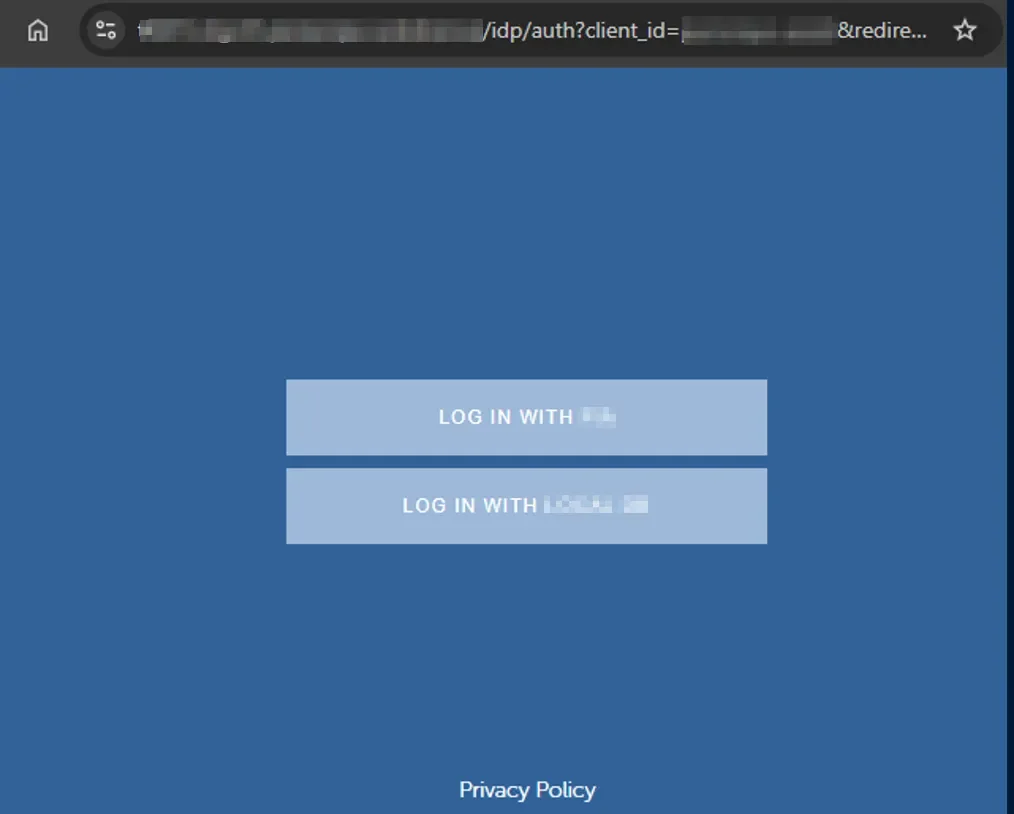
Upon investigating the SSO flow, the researcher discovered the following sequence of steps:
- Initiation of SSO process by clicking the button: GET request to /idp/auth/mid-oidc?req=[UNIQUE_ID]&redirect_uri=[REDIRECT_URI]
- SSO Service Provider process Multiple requests made on the service provider domain, akin to signing in with Google where requests are sent to google.com. If the user was previously signed in, actions are performed automatically.
- Hitting callback URL After authorization on the Service Provider side, a request to a callback URL is made: GET /idp/callback?code=[STUFF]&state=[STUFF]. However, this is not a last step, that returns the session token, one more additonal step was required.
- Issue a session token Request to get the session token. GET /idp/approval?req=[UNIQUE_ID]
The UNIQUE_ID value is the same as was on the first step. This means that if you know this value, you could hit this method and get a session. As no anti-CSRF protection was present, it was possible to perform a session fixation.
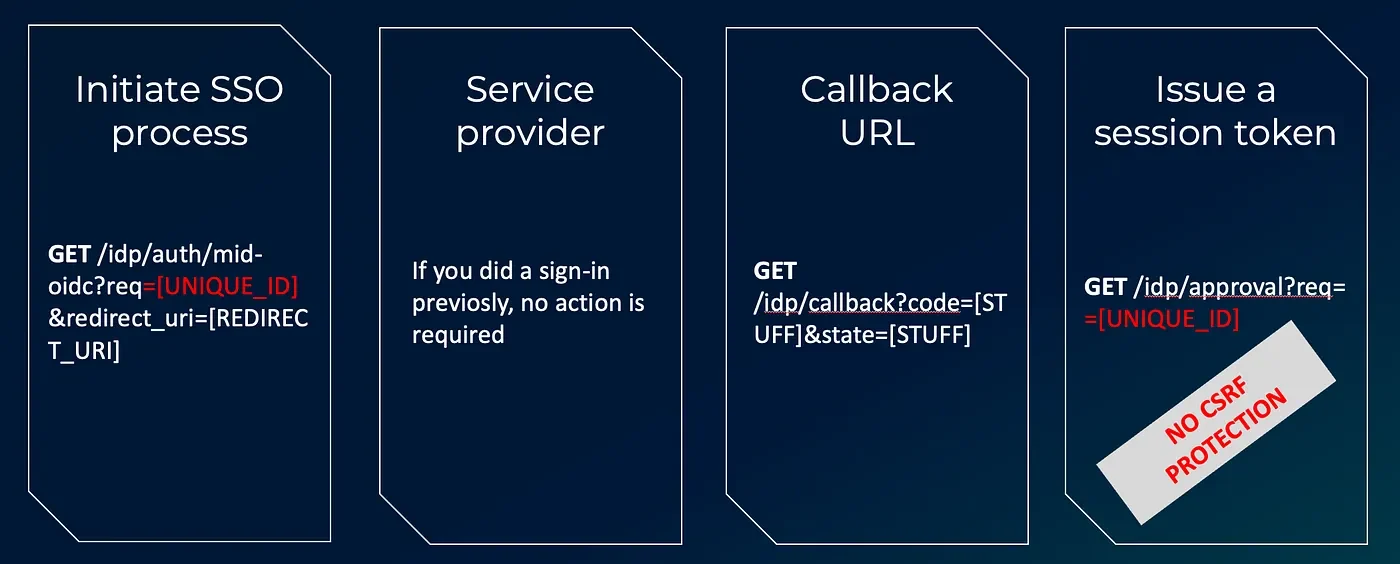
The key observation is that the req value used at the start of the flow is reused at the final step that issues the session token. Because that final endpoint did not verify an anti-CSRF token, knowing the req value was enough to obtain a session through it.
Exploitation
Step 1: Extract the SSO button link
An "Attacker" opens the environment URL on their machine and extracts the "Log in with SSO" button link:
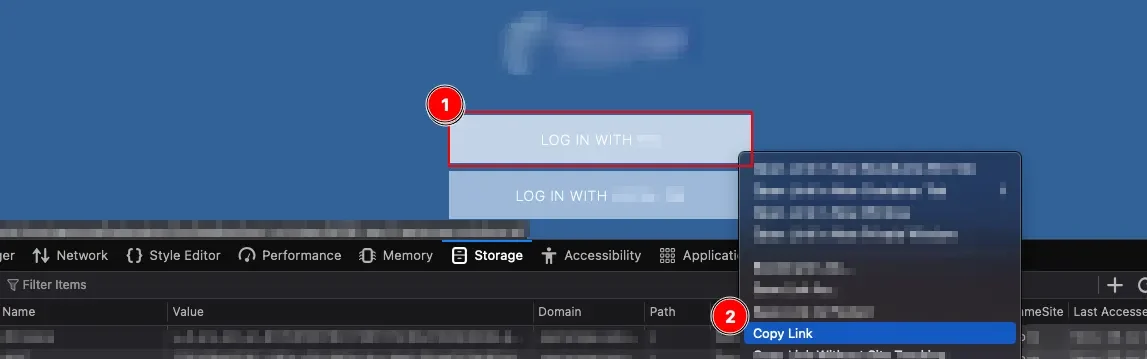
Step 2: Extract the req parameter and start the exploit
From the copied link, the attacker extracts the "req" parameter and starts the self-written exploit:

Step 3: Send the link to the victim
The attacker then sends the link containing the "req" parameter to the "Victim".
Upon opening the link in the browser, the "Victim" encounters an error message:
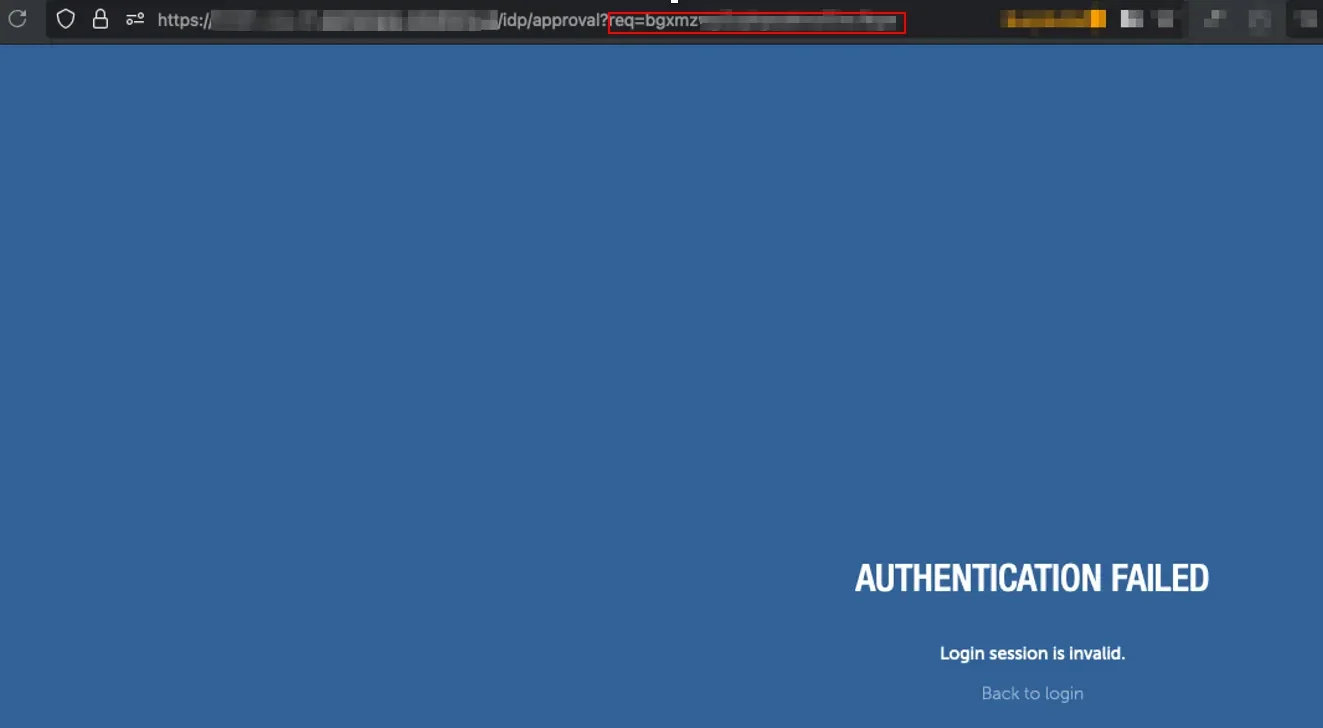
Step 4: Obtain the session token
The malicious script executed by the attacker utilizes 10 threads to make multiple requests to the /idp/approval?req={req}.
Initially, the server responses to these requests are 500 errors. However, when the victim initiates the SSO flow, but before handling the request to the "approval" URL, all subsequent requests to the mentioned endpoint return a valid link with a session token.
As a result of the exploit, the "Attacker" obtains the session URL and can complete the login flow, effectively logging in as the "Victim":

By directly visiting the returned URL, the attacker finishes the login flow and logs in as "Victim".
Root cause
The final step of the SSO flow, GET /idp/approval?req=[UNIQUE_ID], issues a session token and accepts the same req value that was generated at the first step. There is no anti-CSRF token verification on that endpoint, so possession of the req value is sufficient to obtain a session. Because the req value is exposed in the initial SSO link, an attacker can learn it before the victim uses it, then poll the approval endpoint until the victim's flow reaches the point where the endpoint returns a valid session link. The session is therefore obtainable by anyone who knows the req value, which is the fixation.
The report states that the absence of anti-CSRF token verification is what made the vulnerability possible. The lack of validation of the session identifier at each step of the SSO process, and the absence of rate limiting on /idp/approval, are the conditions the remediation section addresses.
Impact
An attacker who obtains the req value from the SSO link can send that link to a victim and, once the victim initiates the SSO flow, obtain a valid session link and log in as the victim. The report describes this as a one-click account takeover. The attack depends on the victim opening the link and the attacker polling the approval endpoint while the victim's flow is in progress. The report does not state which users or roles are affected beyond the victim who completes the flow.
Fix
The report lists the following remediation steps:
- Implementing Anti-CSRF Protection.
- Validating Session Identifier at each step of the SSO process to prevent fixation.
- Applying rate limiting on the /idp/approval endpoint to prevent rapid and unauthorized requests for session tokens.
Variants to test
- Reused flow identifiers at token-issuing endpoints. Look for SSO or OAuth-style flows where a value from the initial authorisation request (such as
req,stateor a similar identifier) is accepted again at a later endpoint that issues a session. A positive result is that the later endpoint returns a session token or session link when called with only that identifier and no CSRF token. - Missing anti-CSRF checks on the final step. Test whether the endpoint that issues the session accepts requests without a CSRF token or origin check. A positive result is a successful session issuance from a cross-site context or from a script that did not participate in the flow.
- Race between victim flow and attacker polling. Reproduce the pattern of polling the approval endpoint with multiple threads while a victim completes the flow. A positive result is a transition from error responses to a valid session link once the victim's flow reaches the approval step.
- Rate limiting on token endpoints. Send repeated requests to the session-issuing endpoint and observe whether the server throttles or blocks them. A positive result for the attacker is that the endpoint continues to respond without rate limiting, allowing rapid polling.
- Session identifier binding. Check whether the session issued at the end of the flow is bound to the browser or client that started it. A positive result is that a session obtained by one client can be used by another, which is the fixation condition.
What happened, in plain words
A security researcher was working on a project and found a small but serious flaw in a login page. The flaw let an attacker take over someone else's account when the victim opened a crafted link. The trick was to fix a session identifier in advance and then make the victim's browser start the first steps of a Single Sign-On (SSO) flow. The whole thing worked because the application did not check an anti-CSRF token.
Before going further, a few everyday ideas will help.
- A session is what a website uses to remember that you are logged in. When you sign in, the server gives your browser a small piece of text, often called a session token or session identifier. Your browser sends it back with every request, like a cloakroom ticket that proves the coat is yours. If someone else gets your ticket, they can collect your coat.
- Single Sign-On (SSO) is a way to log in to one site using an account you already have somewhere else, for example "Log in with Google". You are sent to the other company to prove who you are, then sent back to the first site, which trusts that proof and logs you in. The company that checks your identity is called the identity provider (IdP). The site you actually want to use is the service provider.
- CSRF stands for Cross-Site Request Forgery. It is when a malicious page makes your browser send a request to another site while you are logged in there, without you meaning to. The usual defence is an anti-CSRF token: a secret value that the real page includes in its forms and requests, which an attacker's page cannot guess. If the server checks that token, requests that lack it are refused.
- Session fixation is a specific attack. Instead of stealing a session after you log in, the attacker plants a session identifier they already know, and then gets your browser to use it. When you log in, the server upgrades that same identifier to a logged-in session. The attacker, who knew the identifier all along, now holds a logged-in session too.
- An API endpoint is simply a web address on a server that does a particular job when it receives a request, such as "start a login" or "give me a session". You can think of it as a service counter with a name: you walk up to the right counter and ask for the thing it handles.
- A GET request is the ordinary kind of request your browser makes when you open a link. The details of what you are asking for can be placed in the address itself, after a question mark, as name=value pairs. Those pairs are called parameters.
The login page
The login page had a "Log in with SSO" feature:
That button is the entry point. Clicking it does not log you in directly. It starts a conversation between the service provider (the site you are visiting) and the identity provider (the site that confirms who you are).
Investigating the SSO flow
By watching what happened when the button was clicked, the researcher found that the flow runs in four steps.
-
Starting the SSO process by clicking the button. The browser sends a GET request to:
Line by line:
GETis the ordinary request type used when you open a link./idp/auth/mid-oidcis the address of the endpoint that begins the SSO process. Everything after the?is parameters.req=[UNIQUE_ID]is a unique value generated for this particular login attempt; think of it as a reference number written on a form so the clerk can find your paperwork later.redirect_uri=[REDIRECT_URI]tells the server where to send the browser back to once the identity check is done. The researcher took this step to see how a login begins and what values the browser carries into it. -
The service provider process. Several requests are made on the service provider's domain, in the same way that signing in with Google sends requests to google.com. If the user was already signed in there, those actions happen automatically, without the user typing anything. The researcher followed these requests to understand the whole chain, not just the first link.
-
Reaching the callback URL. After the identity provider has authorised the user, the browser is sent to a callback address:
GET /idp/callback?code=[STUFF]&state=[STUFF]
Line by line: /idp/callback is the address the identity provider sends you back to. code=[STUFF] is a short-lived code proving the identity check succeeded. state=[STUFF] is a value meant to tie the returning browser to the login attempt that started it, so that a reply cannot be replayed into someone else's attempt. The important observation here is that this is not the last step. It does not hand out the session token. One more step was needed.
- Issuing a session token. The final request gets the session token:
GET /idp/approval?req=[UNIQUE_ID]
Line by line: /idp/approval is the endpoint that actually produces the session. req=[UNIQUE_ID] is the same unique value that appeared in step 1. That is the heart of the problem. If you know this value, you can call this endpoint and receive a session. No anti-CSRF protection was present, so a session fixation was possible.
The key observation is that the req value from the start of the flow is reused at the final step that issues the session token. Because that final endpoint did not verify an anti-CSRF token, knowing the req value was enough to obtain a session through it. In everyday terms: the reference number written on the form at the front desk is also all the back desk asks for before handing over the keys. Anyone who saw the number can collect the keys.
Exploitation
Step 1: Extract the SSO button link
An "Attacker" opens the environment URL on their machine and extracts the "Log in with SSO" button link:
The attacker does this to learn the shape of the link and, in particular, to see the req value that the site generates. That value is the reference number the whole attack depends on.
Step 2: Extract the req parameter and start the exploit
From the copied link, the attacker extracts the "req" parameter and starts the self-written exploit:
Why this step: the attacker now holds the reference number. The exploit script will use it to keep asking the approval endpoint for a session, over and over, until the server is willing to hand one out.
Step 3: Send the link to the victim
The attacker then sends the link containing the "req" parameter to the "Victim".
Upon opening the link in the browser, the "Victim" encounters an error message:
The victim sees an error message after opening the link. The victim sees a confusing message, but behind the scenes the login process has begun with the identifier the attacker already knows.
Step 4: Obtain the session token
The malicious script run by the attacker uses 10 threads to make many requests to the /idp/approval?req={req} endpoint. A thread here just means one of several workers doing the same job at the same time; ten threads means ten workers knocking on the door repeatedly instead of one.
At first, the server answers these requests with 500 errors. A 500 is the server saying "something went wrong on my side". The original does not explain why the server returns 500 errors at first.
Then the victim's flow reaches the approval step. From that moment, all further requests to the endpoint return a valid link with a session token. The attacker's workers were already knocking, so one of them receives the link.
As a result of the exploit, the "Attacker" obtains the session URL and can complete the login flow, effectively logging in as the "Victim":
By directly visiting the returned URL, the attacker finishes the login flow and logs in as "Victim".
In plain words: the attacker kept asking "is my session ready yet?" until the answer changed from "no" to "here is your session". Because the attacker knew the reference number, the attacker could collect the session.
Root cause
The final step of the SSO flow, GET /idp/approval?req=[UNIQUE_ID], issues a session token and accepts the same req value that was generated at the first step. There is no anti-CSRF token verification on that endpoint, so possession of the req value is enough to obtain a session. Because the req value is exposed in the initial SSO link, an attacker can learn it before the victim uses it, then poll the approval endpoint until the victim's flow reaches the point where the endpoint returns a valid session link. The session is therefore obtainable by anyone who knows the req value, which is the fixation.
The report states that the absence of anti-CSRF token verification is what made the vulnerability possible. The lack of validation of the session identifier at each step of the SSO process, and the absence of rate limiting on /idp/approval, are the conditions the remediation section addresses. Rate limiting means a server refusing to answer too many requests in a short time, like a ticket desk that only serves one person per minute.
Impact
An attacker who obtains the req value from the SSO link can send that link to a victim and, once the victim starts the SSO flow, obtain a valid session link and log in as the victim. The report describes this as a one-click account takeover. The attack depends on the victim opening the link and the attacker polling the approval endpoint while the victim's flow is in progress. The report does not state which users or roles are affected beyond the victim who completes the flow.
Fix
The report lists the following remediation steps:
- Implementing Anti-CSRF Protection.
- Validating Session Identifier at each step of the SSO process to prevent fixation.
- Applying rate limiting on the /idp/approval endpoint to prevent rapid and unauthorized requests for session tokens.
Variants to test
- Reused flow identifiers at token-issuing endpoints. Look for SSO or OAuth-style flows where a value from the initial authorisation request (such as
req,stateor a similar identifier) is accepted again at a later endpoint that issues a session. A positive result is that the later endpoint returns a session token or session link when called with only that identifier and no CSRF token. - Missing anti-CSRF checks on the final step. Test whether the endpoint that issues the session accepts requests without a CSRF token or origin check. A positive result is a successful session issuance from a cross-site context or from a script that did not take part in the flow.
- Race between victim flow and attacker polling. Reproduce the pattern of polling the approval endpoint with multiple threads while a victim completes the flow. A positive result is a transition from error responses to a valid session link once the victim's flow reaches the approval step.
- Rate limiting on token endpoints. Send repeated requests to the session-issuing endpoint and observe whether the server throttles or blocks them. A positive result for the attacker is that the endpoint continues to respond without rate limiting, allowing rapid polling.
- Session identifier binding. Check whether the session issued at the end of the flow is bound to the browser or client that started it. A positive result is that a session obtained by one client can be used by another, which is the fixation condition.
Glossary
- Session: the state a website keeps to remember that you are logged in, identified by a token your browser sends with each request.
- Session token / session identifier: the piece of text that proves a session belongs to you, like a cloakroom ticket.
- Single Sign-On (SSO): logging in to one site using an account from another, for example "Log in with Google".
- Identity provider (IdP): the service that checks who you are during SSO.
- Service provider: the site you want to use, which trusts the identity provider's confirmation.
- CSRF (Cross-Site Request Forgery): tricking a logged-in browser into sending a request to another site without the user meaning to.
- Anti-CSRF token: a secret value included in legitimate requests so the server can tell real requests from forged ones.
- Session fixation: planting a session identifier the attacker already knows, then getting the victim to log in with it so the attacker shares the logged-in session.
- Account takeover: gaining control of someone else's account.
- API endpoint: a named web address on a server that performs a specific job when it receives a request.
- GET request: the ordinary request type used when opening a link, with details placed in the address after a question mark.
- Parameter: a name=value pair in a request, such as
req=[UNIQUE_ID]. reqparameter: the unique value generated at the start of the SSO flow and reused at the approval step.redirect_uri: the address the browser is sent back to after the identity check.- Callback URL: the address the identity provider sends the browser to after authorising the user.
code: a short-lived value proving the identity check succeeded.state: a value meant to tie the returning browser to the login attempt that started it.- 500 error: a server response meaning something went wrong on the server side.
- Thread: one of several workers doing a job at the same time; ten threads means ten simultaneous workers.
- Polling: repeatedly asking a server the same question until the answer changes.
- Rate limiting: a server refusing to answer too many requests in a short period.
- Origin check: a server check that a request came from the site it is supposed to come from.
- OAuth-style flow: a login flow built on the same pattern of an initial authorisation request, a callback and a token.