Piercing the veil: Server Side Request Forgery to NIPRNet access
Two outdated Jira instances were vulnerable to server-side request forgery, allowing an attacker to make the server request internal and cloud metadata endpoints. This enabled access to sensitive AWS instance information and internal Department of Defense networks, including NIPRNet.
 Published on medium.com
Security
The full write-up lives on its author's site
It belongs to its author, so we link to it rather than copy it. The other two tabs are our own rewrites, checked against it.
Context
During reconnaissance of military websites as part of the Department of Defence's vulnerability disclosure programme, I noticed two websites that were running Jira, the issue tracking web application. At the time I wrote them off, because I was not aware of any exploits for them.
The endpoint takes a URL supplied by the caller and makes a server-side request to it. That is the behaviour that can be turned into server side request forgery (SSRF).
Setup
No accounts, roles or special tooling were needed to reach the vulnerable endpoint. The two Jira instances were publicly reachable military websites. The only precondition was that the OAuth icon endpoint was exposed and still vulnerable. I also used Burp Collaborator to observe requests that the target made to a server I controlled.
Finding it
Later, while looking at my Twitter feed, I saw a tweet discussing a server side request forgery vulnerability being actively exploited in Jira. After reading about it I immediately revisited the two Jira instances I had found earlier to see whether I could exploit them with this technique.
Exploitation
Step 1: Confirm the endpoint fetches a URL
I probed the first website by asking it to visit google.com through the endpoint. The full URL looked like this:
https://website.mil/plugins/servlet/oauth/users/icon-uri?consumerUri=http://google.com
Google being loaded indicated to me that the instance was still vulnerable.
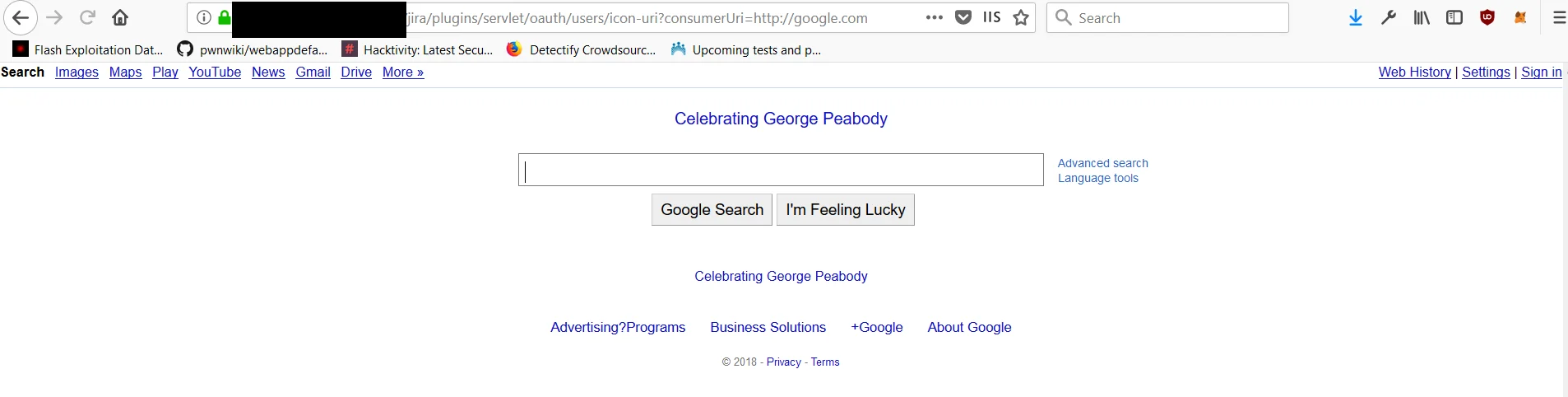
Step 2: Query the AWS metadata endpoint
I learned from a blog post by Brett Buerhaus that any AWS instance can query an IP address and receive information related to that instance, and even account information. I then checked the local host name through the AWS metadata endpoint:
http://[redacted]/latest/meta-data/local-hostname/
I was able to see the host name, which proved access to the cloud server metadata.

Step 3: Try for credentials, then other metadata
From there I attempted to grab credentials for the AWS instance:
http://[redacted]/latest/meta-data/iam/security-credential
I was sadly unable to do so. After reading the AWS documentation I began querying for other sensitive data that could be extracted from the endpoint, such as:
http://[redacted]/latest/dynamic/instance-identity/document
That document reveals the private IP, account ID, server information and similar details. I made a report immediately.
Step 4: Stop, report, then escalate with permission
I stopped all testing straight away because I did not want to break any rules of engagement, and quickly sent in a report about my findings. Soon after, I heard back from the triage member and let them know I was going to attempt to escalate the vulnerability to prove the maximum severity. They initially marked the report as a medium severity vulnerability, but I felt it was a critical issue given what I could do so far. With permission in hand, I got to work on pivoting and exploiting the endpoint to its fullest extent.
Step 5: Port scan the local host
I started by simply port scanning the local host to see whether there were any protocols I could invoke. I tested the following ports, respectively:
- 21 (FTP)
- 22 (SSH)
- 80 (Web)
- 443 (SSL Web)
- 8080 (Proxy)
What made testing this endpoint quite easy was that I could see various errors occurring, which helped me probe their server and network. This is considered error based SSRF.
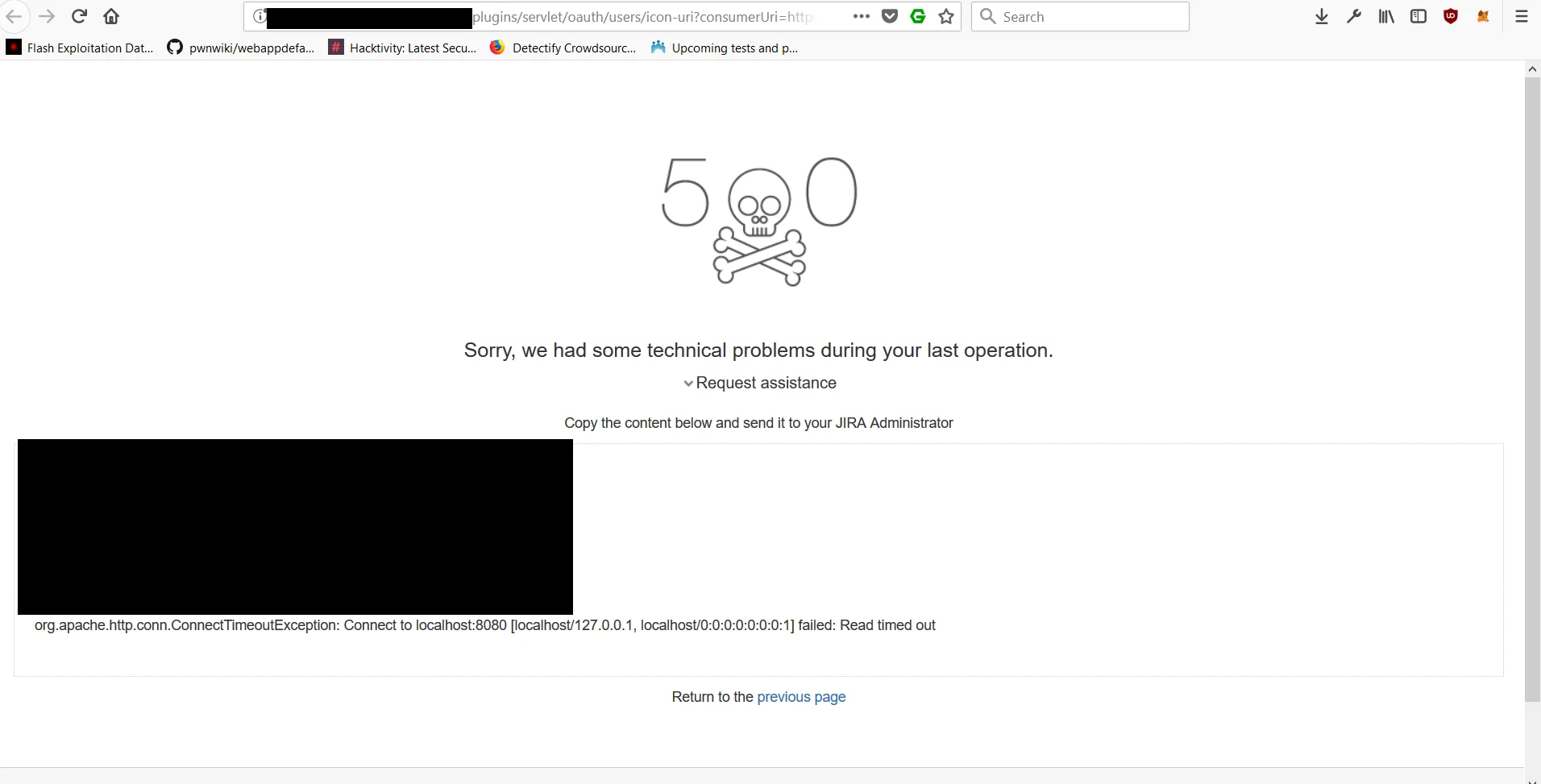
Step 6: Try other protocols
I then checked different protocols to cover all my bases:
gopher://(File Distribution)dict://(dictionary network protocol)ftp://(File Transfer Protocol)file://(File URI Scheme)ldap://(Lightweight Directory Access Protocol)
None of this resulted in anything, as they did not support any of the protocols I attempted.
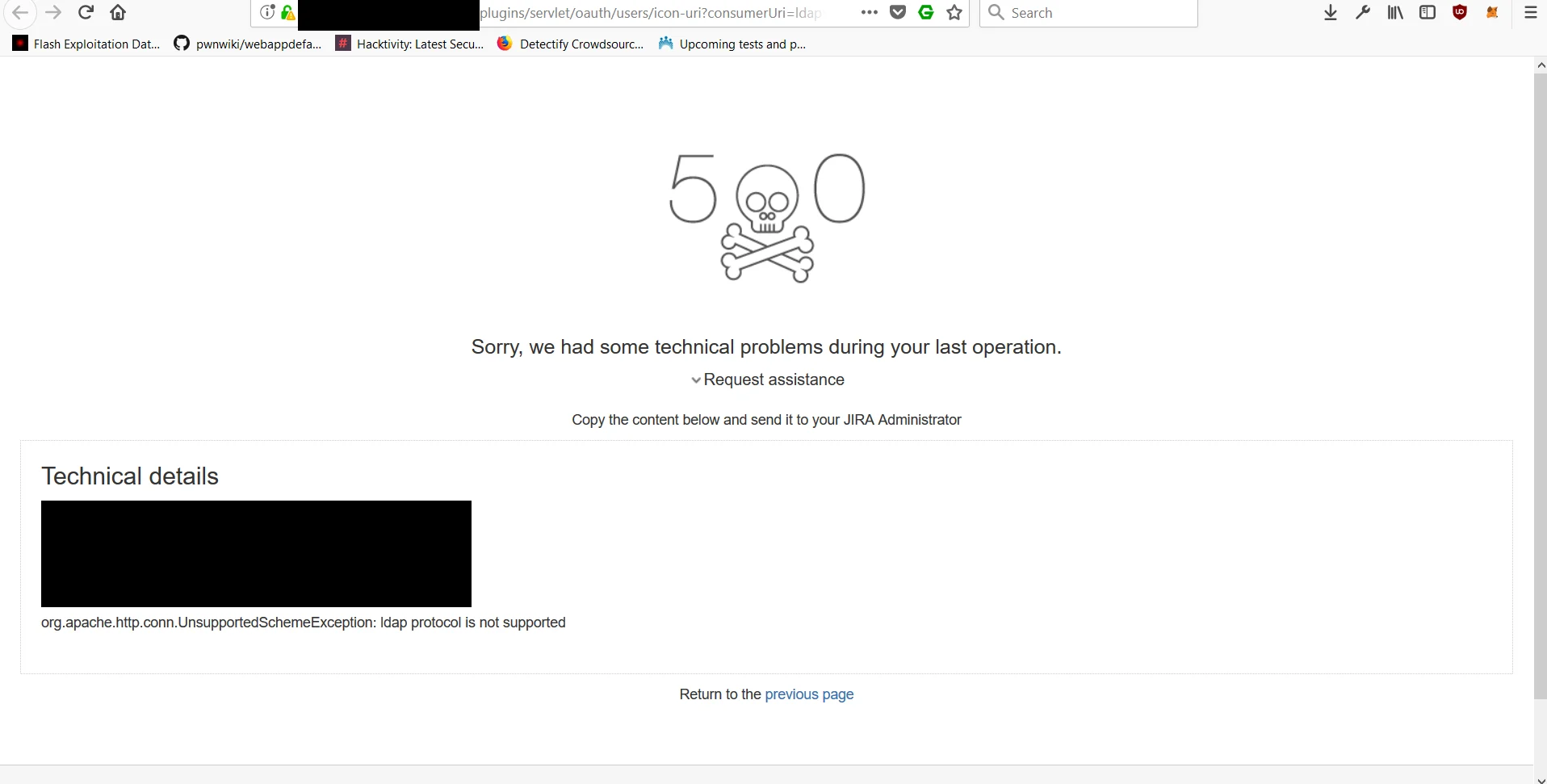
Step 7: Reach internal DoD services
After documenting all of this information for the report, I remembered a presentation by researcher James Kettle called 'Cracking the Lens: Targeting HTTP's Hidden Attack-Surface', which mentioned being able to access the DoD intranet or hidden internal services that are only accessible from a DoD IP or from a DoD service. During the video presentation he shows two such websites that could be accessed if the attacker IP is coming from the DoD.
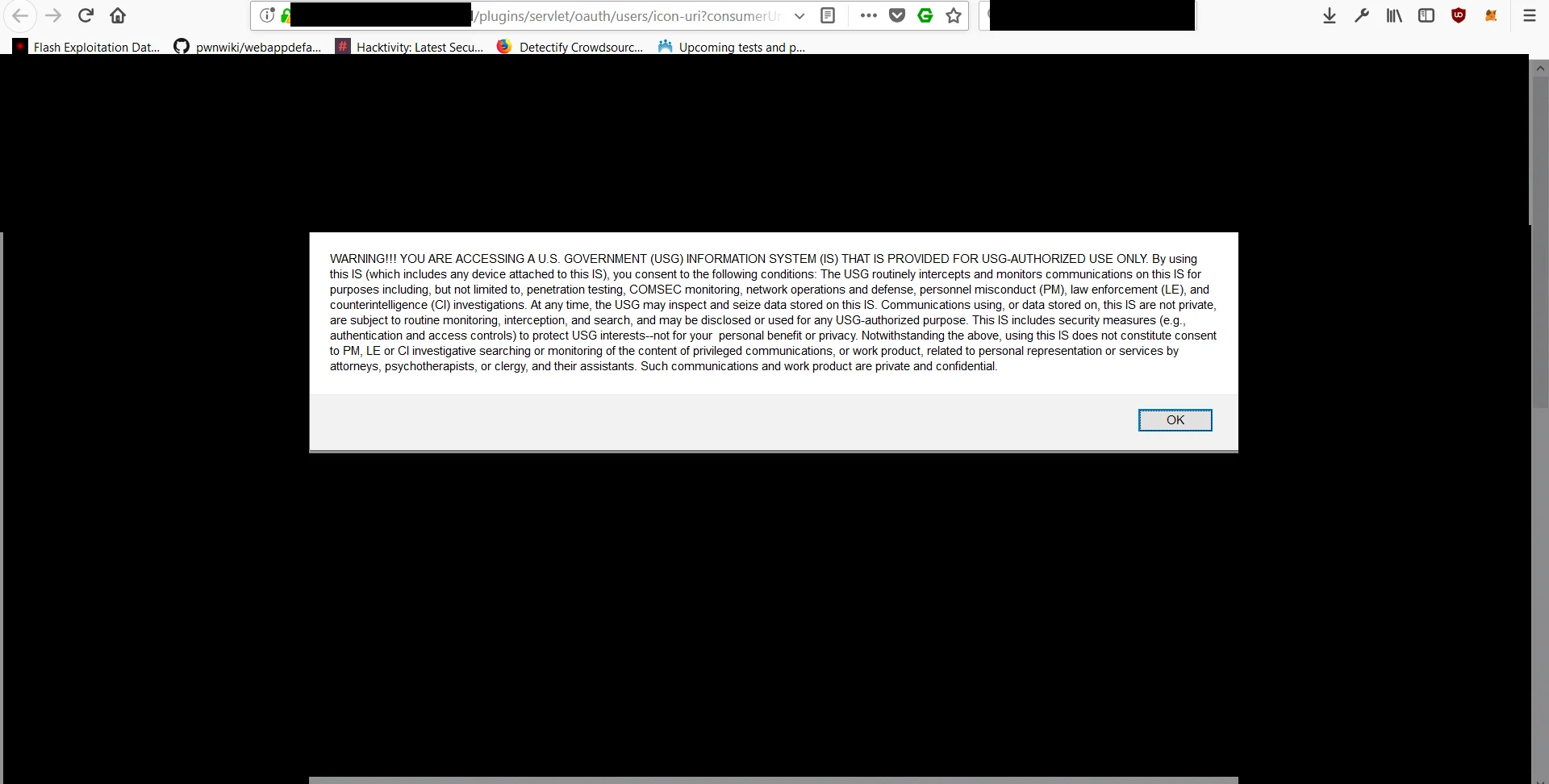
After searching for the article he mentioned and finding those sites quite easily, I queried both of them to see the results. The results were quite clear: access to these internal websites. The first website I queried displayed a USG warning, while the other website simply timed out. I also discovered other intranet web services during the course of this test. Through this I was able to access NIPRNet, the non-classified internal protocol network used to handle information too sensitive to be internet facing, and it was confirmed that I had accessed it. I will not disclose the internal services or websites I discovered because of their sensitivity.
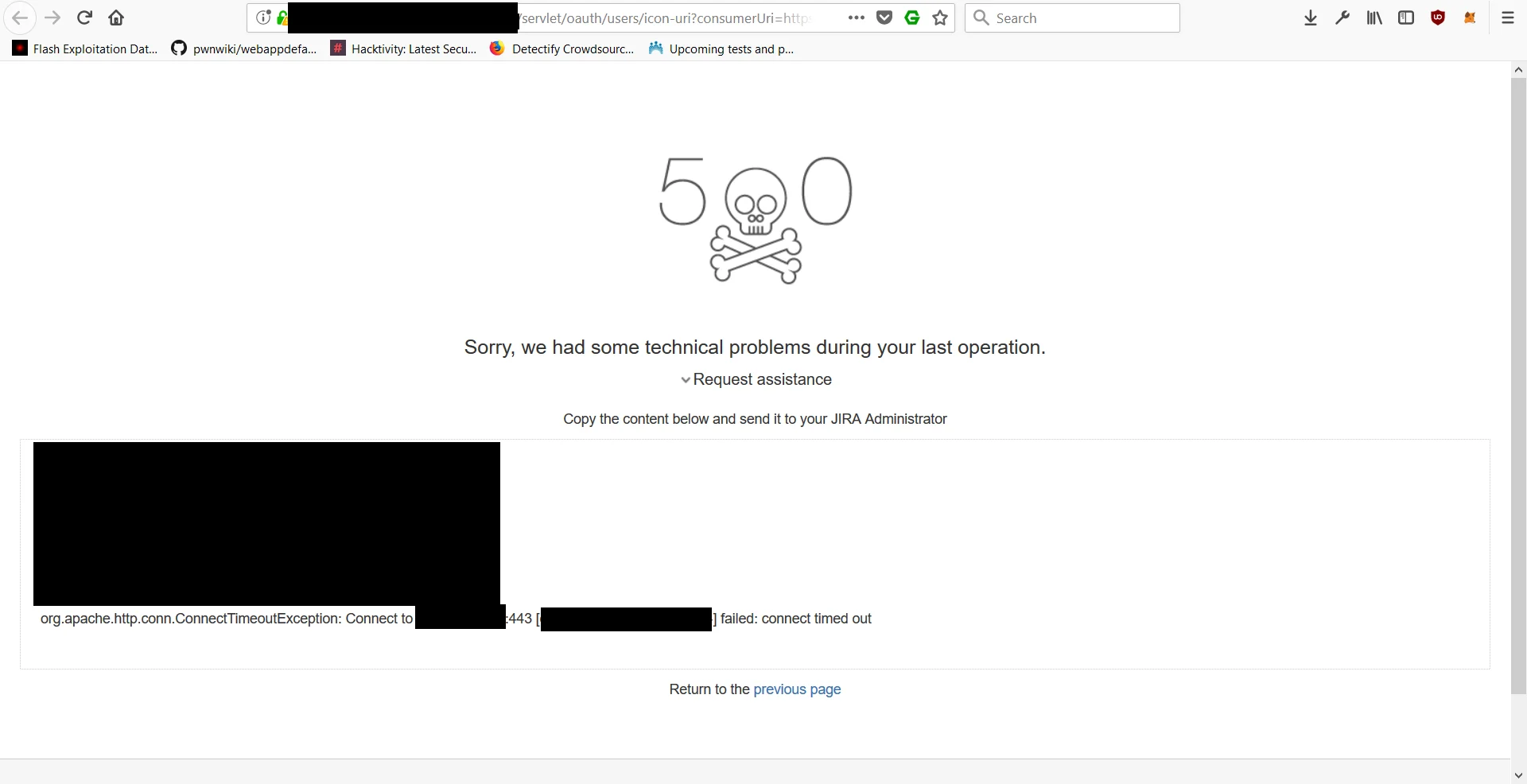
Step 8: The second Jira instance
The second Jira website I discovered was surprisingly harder to exploit. It did not give me the verbose errors that the first one did. I ended up discovering that I could assess whether certain ports existed internally based on response time. For example, querying port 22 resulted in a 1,000 ms response time, whereas querying port 21 resulted in a 10,000 ms response time. I could not figure out any supported protocols because of the lack of verbose errors, though I ended up focusing on the key point of this article, accessing NIPRNet.
I also used Burp Collaborator to see what type of information was being leaked when the target requested data from a server I controlled. What I noticed from the request headers was that they were leaking sensitive information, including an X-Forwarded-For header that leaked an internal IP. I queried all the IPs that interacted with my Burp Collaborator server link as well, to see if anything odd happened. Nothing did, besides a timeout error. At this point I also discovered that I was not able to query AWS metadata on this endpoint, though I was able to query the intranet IPs and DoD servers just as I did with the first website.
The severity of both reports was increased to critical after I reported my findings.
Step 9: Revisiting two earlier low severity reports
Later on, I revisited two low severity SSRF vulnerabilities I had previously discovered and reported earlier that year, hoping to increase their severity with what I had learned. These two vulnerabilities leveraged a web application filter by abusing an HTTP connect request for querying specific IPs. The request was very simple: we submitted CONNECT IP and could then enumerate services through this method. We could also have abused the host header to perform an authentication request to an internal or external IP, for example militarywebsite.mil@internal_IP.
Upon revisiting them, I discovered I could perform blind server side request forgery by querying internal IPs or services, which resulted in the page telling me the operation timed out, an SSL error, or some variation of it. The reports were increased to medium severity after the fact.
Additional tips on exploiting Atlassian SSRF
During my research of these exploits and while discovering bug bounty targets using them, I found that in certain instances a stack error would occur during exploitation and leak various sensitive information. I have not really found the source of why it happens in some instances but not others. You can typically trigger it by using an incomplete HTTP protocol such as http://, or, as I initially discovered it, by using http://[::]. Information that is leaked includes the database IP, version of the database, plugins being used, OS, architecture of the OS, and so on.
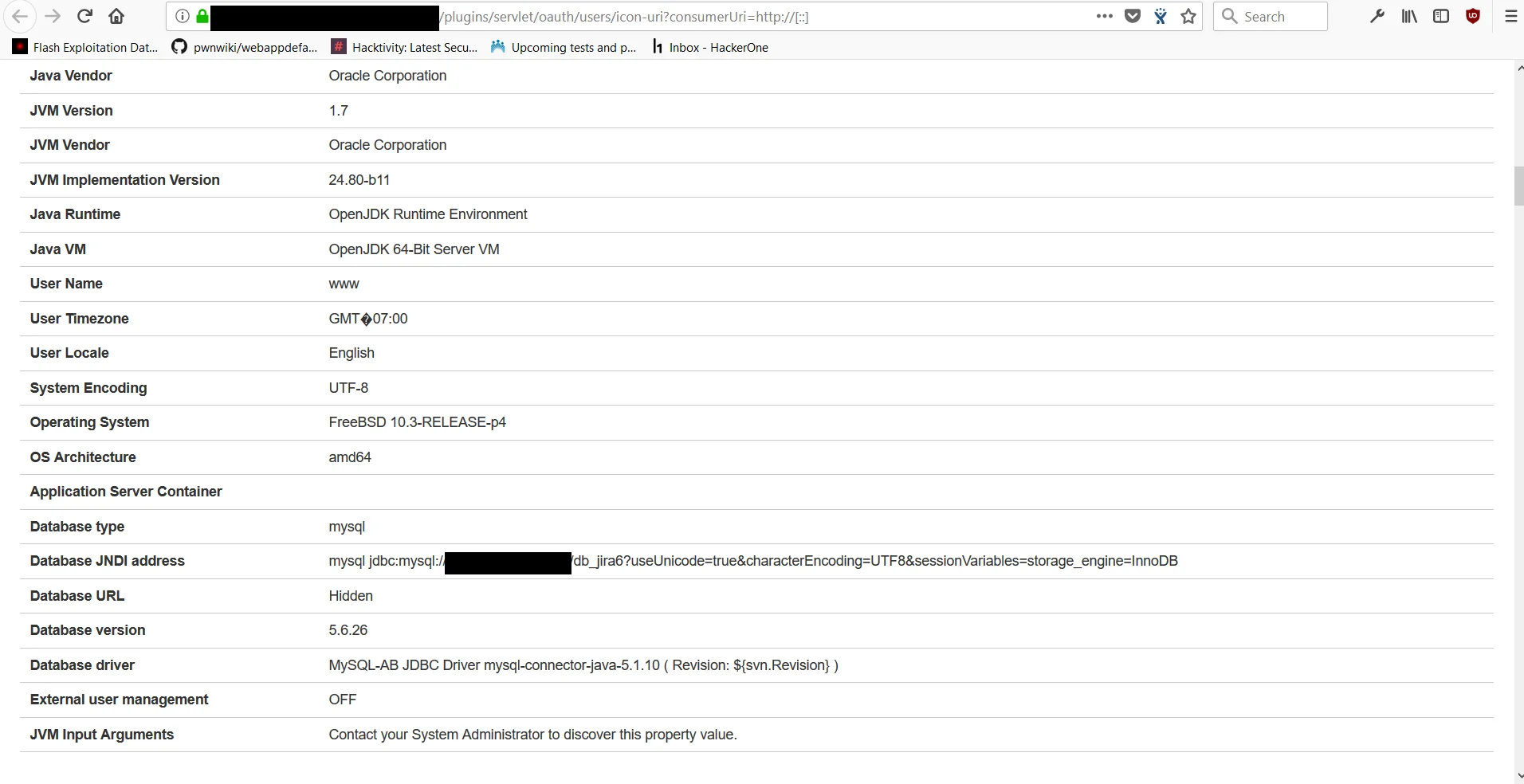
You can still exploit the website when you get this verbose stack trace. I also noticed that sometimes the website would have links to other Atlassian instances; I learned this during my testing of one asset. They had a Confluence instance on a different sub-domain, which I discovered because of a drop-down menu listing other instances they use, and it was also vulnerable.
Root cause
The report does not describe the code-level fix or the exact validation that was missing.
Impact
An attacker could use these vulnerable websites to access internally accessible Department of Defence instances. On the first instance this included the AWS metadata service, which would have revealed the account ID, private IP and other private configuration information related to the server and associated account. Through the endpoint I reached NIPRNet and other intranet web services. This could have led to sensitive data compromise and possible disruption of mission critical assets.
Fix
The disclosed reports are at:
https://hackerone.com/reports/330860
https://hackerone.com/reports/326043
Variants to test
- Supply a URL pointing at
http://[redacted]/latest/meta-data/local-hostname/in any parameter that fetches a remote resource. A positive result is the instance host name coming back in the response. - Supply
http://[redacted]/latest/dynamic/instance-identity/document. - Supply an incomplete protocol such as
http://orhttp://[::]. A positive result is a verbose stack trace leaking the database IP, database version, plugins, OS or architecture. - Point the parameter at a Burp Collaborator link and inspect the incoming request headers. A positive result is an
X-Forwarded-Forheader carrying an internal IP. - Query internal ports and compare response times.
- Try
gopher://,dict://,ftp://,file://andldap://in the parameter. A positive result is any of these protocols being honoured by the server. - Look for drop-down menus or links that list other Atlassian instances on different sub-domains, then test the same endpoint there. A positive result is the same SSRF behaviour on the sibling instance.
What happened, in plain words
A security researcher was looking at websites belonging to the U.S. Department of Defence (DoD) as part of a bug bounty programme. A bug bounty programme is an arrangement where an organisation invites outside people to look for security weaknesses in its systems and report them, often for a reward, instead of attacking it secretly. During that work she noticed two military websites that were running Jira.
Jira is a popular web application made by Atlassian for tracking issues and tasks: teams use it to record bugs, to-do items and projects. That fetching is done by the server, not by your browser. This detail is the heart of the whole story.
When a server fetches a URL on your behalf, and it does not check carefully where that URL points, an attacker can make the server fetch things the attacker could never reach directly. That weakness is called server side request forgery, or SSRF. A simple comparison: imagine a building where visitors cannot enter the basement, but the receptionist will happily walk down and bring back anything you ask for. If you can convince the receptionist to fetch a file from the basement, you have effectively been in the basement yourself. The receptionist here is the Jira server, and the request you slip to it is the URL in the consumerUri parameter.
At first the researcher ignored the two Jira sites, because she did not know of any way to exploit them. Later she saw a tweet about an SSRF vulnerability being actively exploited in Jira. She went straight back to the two instances she had found and tested them with that technique. The first one turned out to be vulnerable, and through it she reached cloud server metadata, internal DoD services and NIPRNet, the non-classified internal network the DoD uses for information too sensitive to sit on the public internet. The second instance was harder but still reachable. Both reports were eventually raised to critical severity.
This article walks through the same steps she took, in the same order, explaining each idea from scratch.
The feature that made it possible
Jira's OAuth icon endpoint is the piece of the application at the centre of this write-up. OAuth is a way for one website to be given limited permission to act on another service on your behalf, without you handing over your password; you have probably seen "Sign in with Google" or "Sign in with Facebook" buttons, which use it.
That is the behaviour that becomes SSRF.
Setup
No accounts, roles or special tooling were needed to reach the vulnerable endpoint. The two Jira instances were publicly reachable military websites. The only precondition was that the OAuth icon endpoint was exposed and still vulnerable.
The researcher also used Burp Collaborator. Burp is a well-known tool for intercepting and inspecting web traffic; Burp Collaborator is a companion service that gives you a unique address you control, so that when a target server makes a request to it you can see that request arrive, along with details such as the headers it carried. A header is a small piece of extra information sent alongside a web request or response, such as the browser type or the address the request was forwarded from. Think of Collaborator as a mailbox you own: if the target posts a letter to it, you can read the envelope and see what the sender wrote on it.
Finding it
While looking at her Twitter feed, the researcher saw a tweet discussing a server side request forgery vulnerability being actively exploited in Jira. After reading about it she immediately revisited the two Jira instances she had found earlier, to see whether she could exploit them with this technique. The lesson for a beginner: a known vulnerability in a widely used product is worth checking against every instance of that product you have already spotted, because many organisations run old, unpatched copies.
Exploitation
Step 1: Confirm the endpoint fetches a URL
She probed the first website by asking it to visit google.com through the endpoint. The full URL looked like this:
https://website.mil/plugins/servlet/oauth/users/icon-uri?consumerUri=http://google.com
Line by line:
https://website.milis the address of the Jira server. The.milending is the top-level domain reserved for the U.S. military./plugins/servlet/oauth/users/icon-uriis the path to the icon feature inside Jira. A path is the part of a URL that says which page or function you want on that server.?starts the query string, the part of a URL that carries parameters, which are named values passed to the page.consumerUri=http://google.comis the parameter. Its name isconsumerUriand its value ishttp://google.com. The server is being asked to fetch Google's home page as if it were an icon image.
Why this step: Google is a harmless, well-known destination. If the response comes back showing Google's page, the server really did make the request on her behalf, which proves the endpoint is still vulnerable. Google being loaded indicated to her that the instance was still vulnerable.
Step 2: Query the AWS metadata endpoint
She learned from a blog post by Brett Buerhaus that any AWS instance can query an IP address and receive information related to that instance, and even account information. AWS is Amazon Web Services, a cloud provider where organisations rent virtual servers instead of owning physical machines. Each rented server, called an instance, can ask a special internal address for facts about itself: its name, its network details, and sometimes temporary credentials. That special address is the instance metadata service, and it lives at [redacted], an address that only means something from inside the instance.
She then checked the local host name through the AWS metadata endpoint:
http://[redacted]/latest/meta-data/local-hostname/
Line by line:
http://is the protocol, the set of rules for how the request is sent.[redacted]is the metadata address. It is a link-local address, meaning it is only reachable from the machine itself or its immediate local network, never from the public internet./latest/meta-data/local-hostname/is the path that asks for the instance's own host name.
Why this step: if the Jira server can be made to fetch this address, the answer comes back through the vulnerable endpoint, and the attacker learns the server's internal name. She was able to see the host name, which proved access to the cloud server metadata.
Step 3: Try for credentials, then other metadata
From there she attempted to grab credentials for the AWS instance:
http://[redacted]/latest/meta-data/iam/security-credential
Line by line:
- The address and protocol are the same as before.
/latest/meta-data/iam/security-credentialis the path that, on some AWS setups, returns temporary access keys for the instance's IAM role. IAM stands for Identity and Access Management, AWS's system for deciding who may do what. Credentials here means the keys that prove identity, like a username and password but for programs.
Why this step: if those keys came back, an attacker could use them to act as the server inside AWS, which would be far more serious than reading a host name. She was sadly unable to do so.
After reading the AWS documentation she began querying for other sensitive data that could be extracted from the endpoint, such as:
http://[redacted]/latest/dynamic/instance-identity/document
Line by line:
/latest/dynamic/instance-identity/documentis a path that returns a small document describing the instance.
That document reveals the private IP, account ID, server information and similar details. A private IP is an address used only inside a private network, not routable on the public internet; an account ID identifies the AWS account that owns the instance. She made a report immediately.
Step 4: Stop, report, then escalate with permission
She stopped all testing straight away because she did not want to break any rules of engagement. Rules of engagement are the terms a bug bounty programme sets out: what you may test, what you must not touch, and how you must behave. A triage member is the person on the organisation's side who first reads a report, checks it is real and decides how serious it is.
She quickly sent in a report about her findings. Soon after, she heard back from the triage member and let them know she was going to attempt to escalate the vulnerability to prove the maximum severity. They initially marked the report as a medium severity vulnerability, but she felt it was a critical issue given what she could do so far. Severity is a ranking of how much damage a weakness could cause; critical is the top of the usual scale. With permission in hand, she got to work on pivoting and exploiting the endpoint to its fullest extent. Pivoting means using one foothold to reach further into a network, the way you might use a first door to get to a corridor and then to other rooms.
Step 5: Port scan the local host
She started by simply port scanning the local host to see whether there were any protocols she could invoke. A port is a numbered doorway on a machine: one program listens on one number, another on another. A port scan means trying those doorways to see which are open. The local host means the machine itself, seen from its own point of view. A protocol is a set of rules for a kind of conversation, such as web traffic or file transfer.
She tested the following ports, respectively:
- 21 (FTP)
- 22 (SSH)
- 80 (Web)
- 443 (SSL Web)
- 8080 (Proxy)
What each one is:
- 21 is the usual port for FTP, the File Transfer Protocol, an older way of moving files between machines.
- 22 is the usual port for SSH, Secure Shell, a way to log in to a machine remotely and run commands.
- 80 is the usual port for ordinary web traffic.
- 443 is the usual port for web traffic protected by SSL/TLS, the encryption that puts the S in HTTPS.
- 8080 is a common alternative web port, often used by proxies. A proxy is a middleman server that forwards requests on behalf of someone else.
What made testing this endpoint quite easy was that she could see various errors occurring, which helped her probe their server and network. This is considered error based SSRF: the server's own error messages tell you what happened on the inside, so you learn about the internal network without ever seeing it directly.
Step 6: Try other protocols
She then checked different protocols to cover all her bases:
gopher://(File Distribution)dict://(dictionary network protocol)ftp://(File Transfer Protocol)file://(File URI Scheme)ldap://(Lightweight Directory Access Protocol)
What each one is:
gopher://is an old protocol for distributing documents and menus of links; it is rarely used today but is popular in SSRF attacks because it lets an attacker craft very precise requests.dict://is a protocol for looking words up in a dictionary server.ftp://is the file transfer protocol again, this time named in a URL.file://is a way of naming a file on the local disk rather than something on a network.ldap://is the protocol used to talk to directory servers, which store users, groups and similar records.
Why this step: if the server accepts any of these, the attacker can do more than fetch web pages. None of this resulted in anything, as they did not support any of the protocols she attempted.
Step 7: Reach internal DoD services
After documenting all of this information for the report, she remembered a presentation by researcher James Kettle called 'Cracking the Lens: Targeting HTTP's Hidden Attack-Surface'. It mentioned being able to access the DoD intranet or hidden internal services that are only accessible from a DoD IP or from a DoD service. An intranet is a private network inside an organisation, like a company's internal website that only staff can open. A DoD IP here means an address that belongs to the DoD, so a service can decide to answer only requests coming from such an address.
During the video presentation he shows two such websites that could be accessed if the attacker IP is coming from the DoD. After searching for the article he mentioned and finding those sites quite easily, she queried both of them to see the results. The results were quite clear: access to these internal websites. The first website she queried displayed a USG warning, while the other website simply timed out. USG stands for United States Government; such a warning is the banner shown on government systems reminding users that the system is monitored and restricted. A timeout means the request was sent but no answer came back in time.
She also discovered other intranet web services during the course of this test. Through this she was able to access NIPRNet, the non-classified internal protocol network used to handle information too sensitive to be internet facing, and it was confirmed that she had accessed it. She will not disclose the internal services or websites she discovered because of their sensitivity.
Step 8: The second Jira instance
The second Jira website she discovered was surprisingly harder to exploit. It did not give her the verbose errors that the first one did. Verbose here means talkative: the first server described in detail what went wrong, the second said little.
She ended up discovering that she could assess whether certain ports existed internally based on response time. For example, querying port 22 resulted in a 1,000 ms response time, whereas querying port 21 resulted in a 10,000 ms response time. A millisecond, ms, is one thousandth of a second, so 1,000 ms is one second and 10,000 ms is ten seconds. The idea: a closed or filtered port makes the server wait and then give up, so the delay itself is a signal. This is called blind SSRF, where you cannot see the response but you can still infer what is happening from side effects such as timing.
She could not figure out any supported protocols because of the lack of verbose errors, though she ended up focusing on the key point of this article, accessing NIPRNet.
She also used Burp Collaborator to see what type of information was being leaked when the target requested data from a server she controlled. What she noticed from the request headers was that they were leaking sensitive information, including an X-Forwarded-For header that leaked an internal IP. X-Forwarded-For is a header that proxies add to record the original address a request came from; if it carries an internal address, that address has just been revealed to the attacker.
She queried all the IPs that interacted with her Burp Collaborator server link as well, to see if anything odd happened. Nothing did, besides a timeout error. At this point she also discovered that she was not able to query AWS metadata on this endpoint, though she was able to query the intranet IPs and DoD servers just as she did with the first website.
The severity of both reports was increased to critical after she reported her findings.
Step 9: Revisiting two earlier low severity reports
Later on, she revisited two low severity SSRF vulnerabilities she had previously discovered and reported earlier that year, hoping to increase their severity with what she had learned. These two vulnerabilities leveraged a web application filter by abusing an HTTP connect request for querying specific IPs. A filter here is a piece of software that inspects and controls traffic. An HTTP connect request is a request that asks a proxy to open a tunnel to a given address, which is how HTTPS traffic usually passes through proxies.
The request was very simple: they submitted CONNECT IP and could then enumerate services through this method. Enumerate means to list things one by one, here the services reachable behind the proxy. They could also have abused the host header to perform an authentication request to an internal or external IP, for example militarywebsite.mil@internal_IP. The host header is the part of a request that names the site being asked for; the user@host form is a way of writing a username in front of an address, which some software misreads.
Upon revisiting them, she discovered she could perform blind server side request forgery by querying internal IPs or services, which resulted in the page telling her the operation timed out, an SSL error, or some variation of it. An SSL error is a failure in the encrypted handshake between client and server. The reports were increased to medium severity after the fact.
Additional tips on exploiting Atlassian SSRF
Atlassian is the company that makes Jira, and also Confluence, a separate product for shared documentation and wikis. During her research of these exploits and while discovering bug bounty targets using them, she found that in certain instances a stack error would occur during exploitation and leak various sensitive information. A stack trace is the list of internal steps a program was taking when it failed; developers use it to debug, but if it is shown to outsiders it hands them a map of the system.
She has not really found the source of why it happens in some instances but not others. You can typically trigger it by using an incomplete HTTP protocol such as http://, or, as she initially discovered it, by using http://[::]. An incomplete or odd URL confuses the software enough that it fails and shows its error page.
Information that is leaked includes the database IP, version of the database, plugins being used, OS, architecture of the OS, and so on. A database is the organised store where an application keeps its data; a plugin is an add-on that extends the application; the OS is the operating system, such as Linux or Windows; the architecture is the kind of processor the machine uses.
You can still exploit the website when you get this verbose stack trace. She also noticed that sometimes the website would have links to other Atlassian instances; she learned this during her testing of one asset. An asset here means a system or domain belonging to the target. They had a Confluence instance on a different sub-domain, which she discovered because of a drop-down menu listing other instances they use, and it was also vulnerable. A sub-domain is a name that sits under a main domain, like wiki.example.com under example.com.
Root cause
A loopback address is one that points back at the same machine, usually [redacted] or ::1. The report does not describe the code-level fix or the exact validation that was missing.
Impact
An attacker could use these vulnerable websites to access internally accessible Department of Defence instances. On the first instance this included the AWS metadata service, which would have revealed the account ID, private IP and other private configuration information related to the server and associated account. Through the endpoint she reached NIPRNet and other intranet web services. This could have led to sensitive data compromise and possible disruption of mission critical assets.
Fix
The disclosed reports are at:
https://hackerone.com/reports/330860
https://hackerone.com/reports/326043
Variants to test
- Supply a URL pointing at
http://[redacted]/latest/meta-data/local-hostname/in any parameter that fetches a remote resource. A positive result is the instance host name coming back in the response. - Supply
http://[redacted]/latest/dynamic/instance-identity/document. - Supply an incomplete protocol such as
http://orhttp://[::]. A positive result is a verbose stack trace leaking the database IP, database version, plugins, OS or architecture. - Point the parameter at a Burp Collaborator link and inspect the incoming request headers. A positive result is an
X-Forwarded-Forheader carrying an internal IP. - Query internal ports and compare response times.
- Try
gopher://,dict://,ftp://,file://andldap://in the parameter. A positive result is any of these protocols being honoured by the server. - Look for drop-down menus or links that list other Atlassian instances on different sub-domains, then test the same endpoint there. A positive result is the same SSRF behaviour on the sibling instance.
Glossary
- SSRF (server side request forgery): a weakness where an attacker makes a server send a request to an address of the attacker's choosing, including addresses the attacker cannot reach directly.
- Bug bounty programme: an arrangement where an organisation invites outsiders to find and report security weaknesses, often for a reward.
- Rules of engagement: the terms of a bug bounty programme that say what may and may not be tested.
- Jira: Atlassian's web application for tracking issues, tasks and projects.
- Atlassian: the company that makes Jira and Confluence.
- Confluence: Atlassian's web application for shared documentation and wikis.
- OAuth: a way for one service to be given limited permission to act on another on a user's behalf, without sharing the password.
- Endpoint: a specific address inside a web application that performs a particular function.
- Parameter: a named value passed to a web page in the URL, after the
?. - Query string: the part of a URL after
?that carries parameters. - Path: the part of a URL that names the page or function on the server.
- URL: the address of something on the web.
- Protocol: a set of rules for a kind of network conversation, such as HTTP or FTP.
- HTTP: the protocol used for web pages and web requests.
- HTTPS: HTTP protected by encryption.
- Header: extra information sent alongside a web request or response, such as the browser type or forwarding address.
- Host header: the header that names the site being requested.
- X-Forwarded-For: a header proxies add to record the original address a request came from.
- AWS: Amazon Web Services, a cloud provider that rents virtual servers.
- Instance: a single virtual server in a cloud provider.
- Instance metadata service: a special internal address,
[redacted], from which an instance can ask for facts about itself, including sometimes credentials. - Link-local address: an address reachable only from the local machine or its immediate network.
- Private IP: an address used only inside a private network, not routable on the public internet.
- Loopback address: an address that points back at the same machine, such as
[redacted]or::1. - IAM: Identity and Access Management, AWS's system for deciding who may do what.
- Credentials: keys or passwords that prove identity.
- Account ID: the identifier of the cloud account that owns an instance.
- Port: a numbered doorway on a machine that a program listens on.
- Port scan: trying a range of ports to see which are open.
- Local host: the machine itself, seen from its own point of view.
- FTP: File Transfer Protocol, an older way of moving files between machines.
- SSH: Secure Shell, a way to log in to a machine remotely and run commands.
- SSL/TLS: the encryption that protects HTTPS traffic.
- Proxy: a middleman server that forwards requests on behalf of someone else.
- Gopher: an old protocol for distributing documents and menus, often abused in SSRF.
- DICT: a protocol for looking words up in a dictionary server.
- File URI scheme: a way of naming a file on the local disk rather than on a network.
- LDAP: Lightweight Directory Access Protocol, used to talk to directory servers holding users and groups.
- Intranet: a private network inside an organisation.
- NIPRNet: the DoD's non-classified internal network, used for information too sensitive to be internet facing.
- USG: United States Government.
- Timeout: a request that got no answer in time.
- Error based SSRF: SSRF where the server's own error messages reveal what happened inside.
- Blind SSRF: SSRF where you cannot see the response, so you infer what happened from side effects such as timing.
- Millisecond (ms): one thousandth of a second.
- Burp: a tool for intercepting and inspecting web traffic.
- Burp Collaborator: a companion service that gives you an address you control, so you can see requests a target makes to it.
- Stack trace: the list of internal steps a program was taking when it failed.
- Database: the organised store where an application keeps its data.
- Plugin: an add-on that extends an application.
- OS: operating system, such as Linux or Windows.
- Architecture: the kind of processor a machine uses.
- Sub-domain: a name that sits under a main domain, such as
wiki.example.comunderexample.com. - Asset: a system or domain belonging to the target of a test.
- Severity: a ranking of how much damage a weakness could cause.
- Critical: the top of the usual severity scale.
- Triage: the first review of a report, where it is checked and ranked.
- Pivoting: using one foothold to reach further into a network.
- Enumerate: to list things one by one.
- HTTP connect request: a request asking a proxy to open a tunnel to a given address.
- Filter: software that inspects and controls traffic.
- JSON: a common text format for structured data.
- IPv6: the newer version of the internet addressing system.
- Reconnaissance: the early phase of looking around a target to find what it runs and where.



