VMware Carbon Black Cloud Workload Appliance
The VMware Carbon Black Cloud Workload Appliance had an authentication bypass where a URL-encoded path segment let an unauthenticated attacker reach an internal token-generation API and obtain a super-user JWT. Separately, vRealize Operations had an unauthenticated SSRF that leaked the maintenanceAdmin credentials, which could then be used to reset the admin password or upload a web shell via path traversal, leading to remote code execution.
 Published on swarm.ptsecurity.com
Last year we found a lot of exciting vulnerabilities in VMware products. The vendor was notified and they have since been patched.
The full write-up lives on its author's site
It belongs to its author, so we link to it rather than copy it. The other two tabs are our own rewrites, checked against it.
Context
This write-up covers two pieces of VMware software that were researched together. The first is the VMware Carbon Black Cloud Workload Appliance, an on-premise appliance that links an organisation's infrastructure to VMware Carbon Black Cloud, the endpoint protection platform. The appliance exposes an administrative console, and the goal of the first part of the research was to reach that console without valid credentials.
The second target is VMware vRealize Operations Manager, automation software whose API was investigated for methods reachable without authentication. Chaining what was found there led to remote code execution.
Both sets of issues were reported to VMware and have since been patched. The research produced 9 CVEs of varying severities in total. This article covers the authentication bypass in Carbon Black Cloud Workload Appliance (CVE-2021-21978) and the exploit chain in vRealize Operations (CVE-2021-21975, CVE-2021-22023, CVE-2021-21983).
Setup
The Carbon Black Cloud Workload Appliance is hosted on-premise. The components involved are shown below.
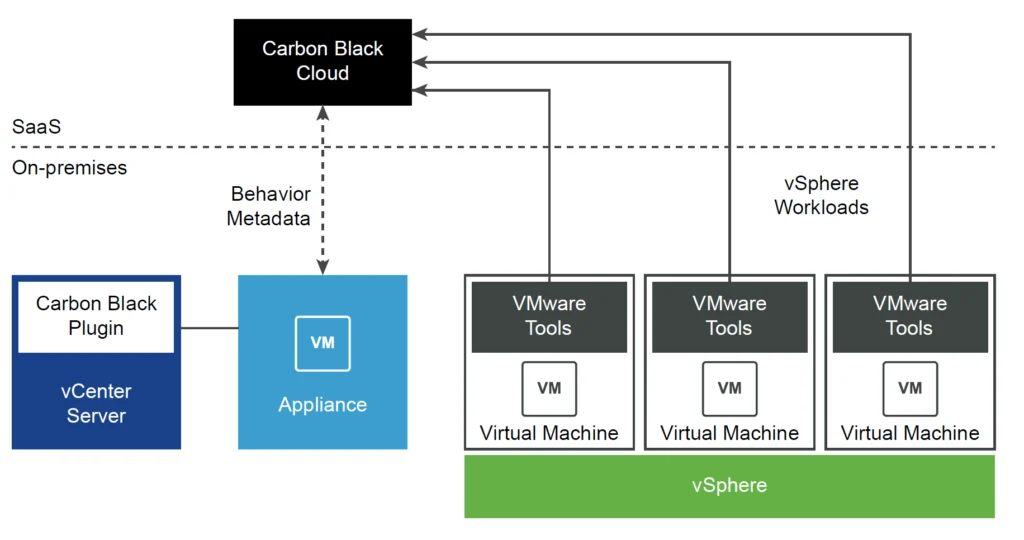
Carbon Black Cloud Workload Components
Reconnaissance started by checking which ports were listening on [redacted] with the netstat command. That revealed a web application on port 443.
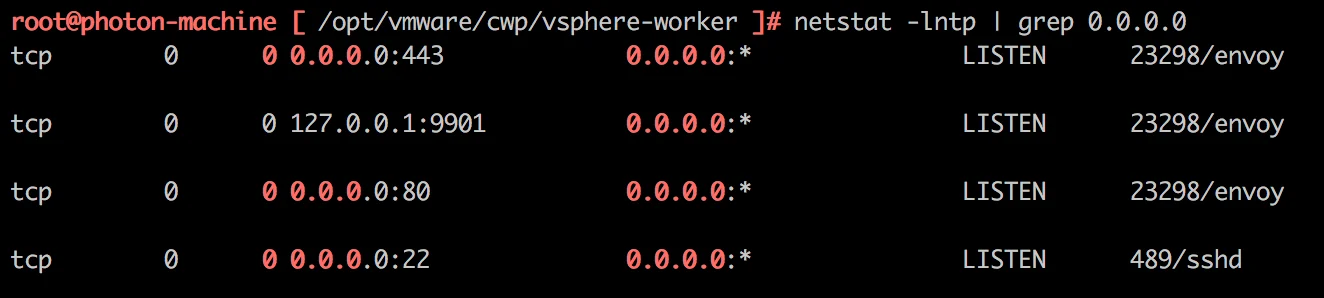
Output of netstat command
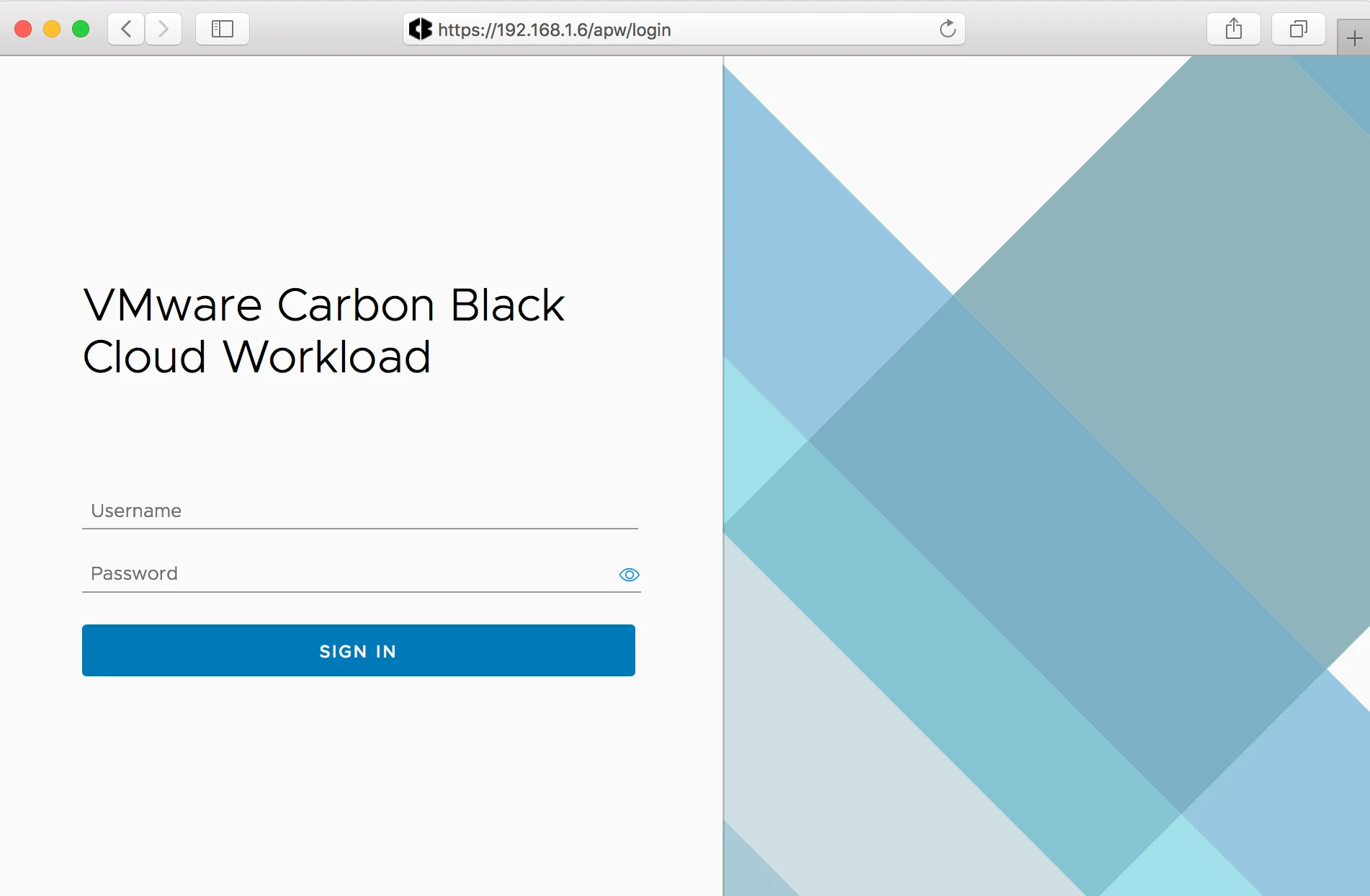
Application login page
The front-end server turned out to be an Envoy proxy server. Its configuration file showed that further requests are proxied to tomcat-based microservices. The excerpt below is from /opt/vmware/cwp/appliance-gateway/conf/cwp-appliance-gateway.yaml:
node:
  cluster: cwp_appliance
  id: cwp-appliance-v1-2020
static_resources:
  clusters:
    -
      connect_timeout: 5s
      hosts:
        -
          socket_address:
            address: "[redacted]"
            port_value: 3030
      lb_policy: round_robin
      name: service_vsw
      type: LOGICAL_DNS
    -
      connect_timeout: 5s
      hosts:
        -
          socket_address:
            address: "[redacted]"
            port_value: 3020
      lb_policy: round_robin
      name: service_apw
      type: LOGICAL_DNS
    -
      connect_timeout: 5s
      hosts:
        -
          socket_address:
            address: "[redacted]"
            port_value: 3010
      lb_policy: round_robin
      name: service_acs
      type: LOGICAL_DNS

Discovery of Java services utilizing netstat command
Finding it
The application.yml configuration file for the service called service_acs, which runs on port 3010, showed that a role-based access model from the Java Spring framework is implemented:
// application.yml
rbacpolicy:
  role:
  - name: SERVICE_USER
    description: This role gives you access to all administration related work
    default: DENY
    permissions:
     - '*:*'

  - name: APPLIANCE_USER
    description: This role gives you access to all administration related work
    default: DENY
    permissions:
     - 'acs:getToken'
     - 'acs:getServiceToken'
     - 'apw:getApplianceDetails'
     - 'apw:getApplianceSettings'
     - 'apw:getNetworkConf'
…
A cursory examination of the role policy raised several questions: what is a service user, why does it have unlimited capabilities, and what does the getServiceToken API method do?
The getServiceToken method was the starting point. Its description in the source code reads "Generate JWT Token for Service Request", meaning that every time an application needs authentication for an internal API method call, it accesses this API and receives an authorization token. The excerpt below is from TokenGeneratorApi.java:
@ApiOperation(
      value = "Generate JWT Token for Service Request",
      nickname = "getServiceToken",
      notes = "",
      response = AccessTokenDTO.class,
      tags = {"TokenGenerator"}
   )
   @ApiResponses({@ApiResponse(
   code = 200,
   message = "OK",
   response = AccessTokenDTO.class
…
   @RequestMapping(
      value = {"/api/v1/service-token/{serviceName}"},
      produces = {"application/json"},
      method = {RequestMethod.GET}
   )
   ResponseEntity<AccessTokenDTO> getServiceToken(@ApiParam(value = "name of the service which is requesting token",required = true) @PathVariable("serviceName") String serviceName);
Exploitation
Step 1: obtain a service token from the internal network
Accessing the service attached to port 3010 from the internal network returned a JWT token.
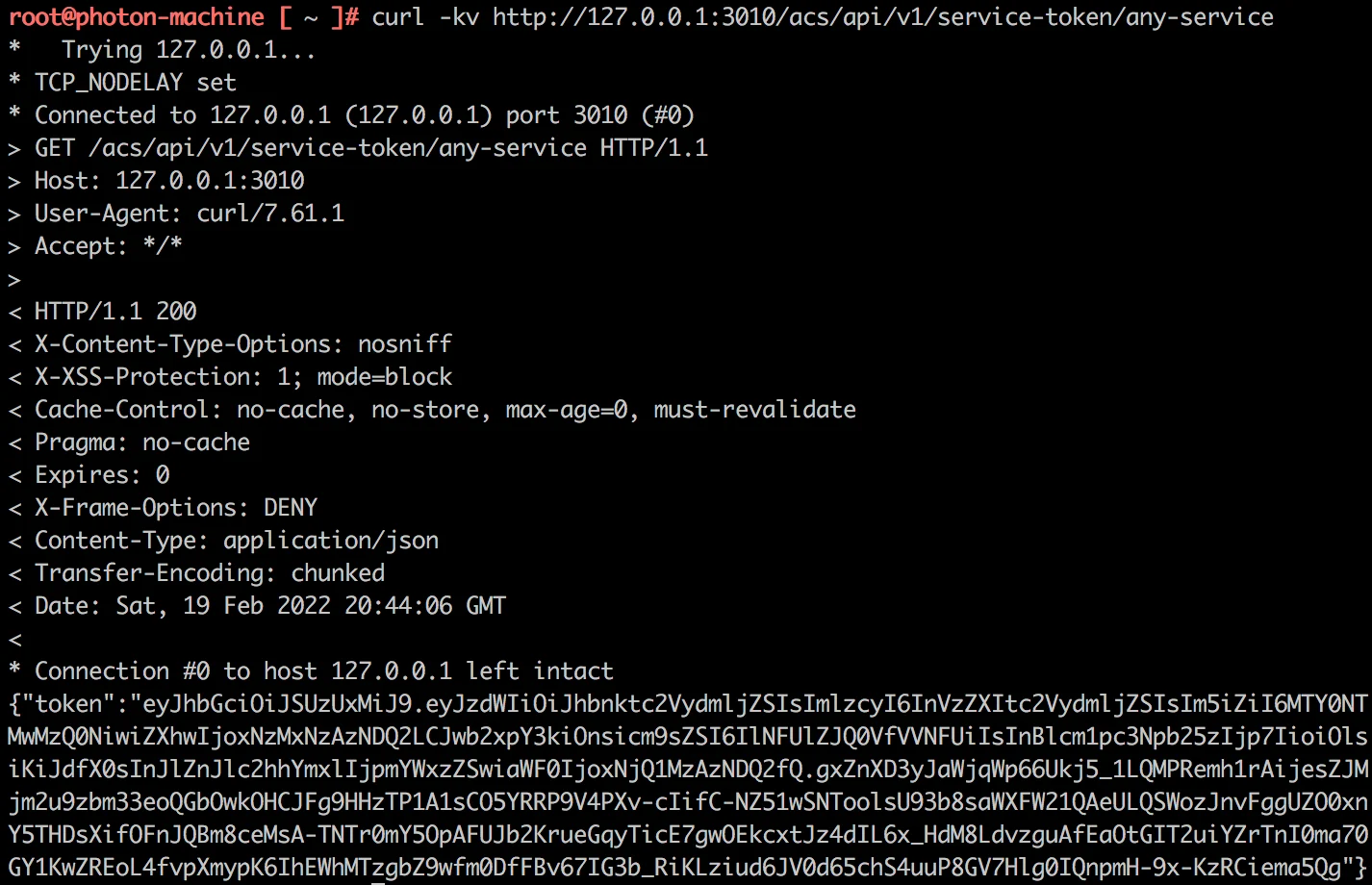
Accessing Java Service API method using cURL
Decoding the JWT payload showed that the token belongs to the service user role, with the wildcard permission set:
{
  "sub": "any-service",
  "iss": "user-service",
  "nbf": 1645303446,
  "exp": 1731703446,
  "policy": {
    "role": "SERVICE_USER",
    "permissions": {
      "*": [
        "*"
      ]
    }
  },
  "refreshable": false,
  "iat": 1645303446
}
Step 2: try the same request through Envoy
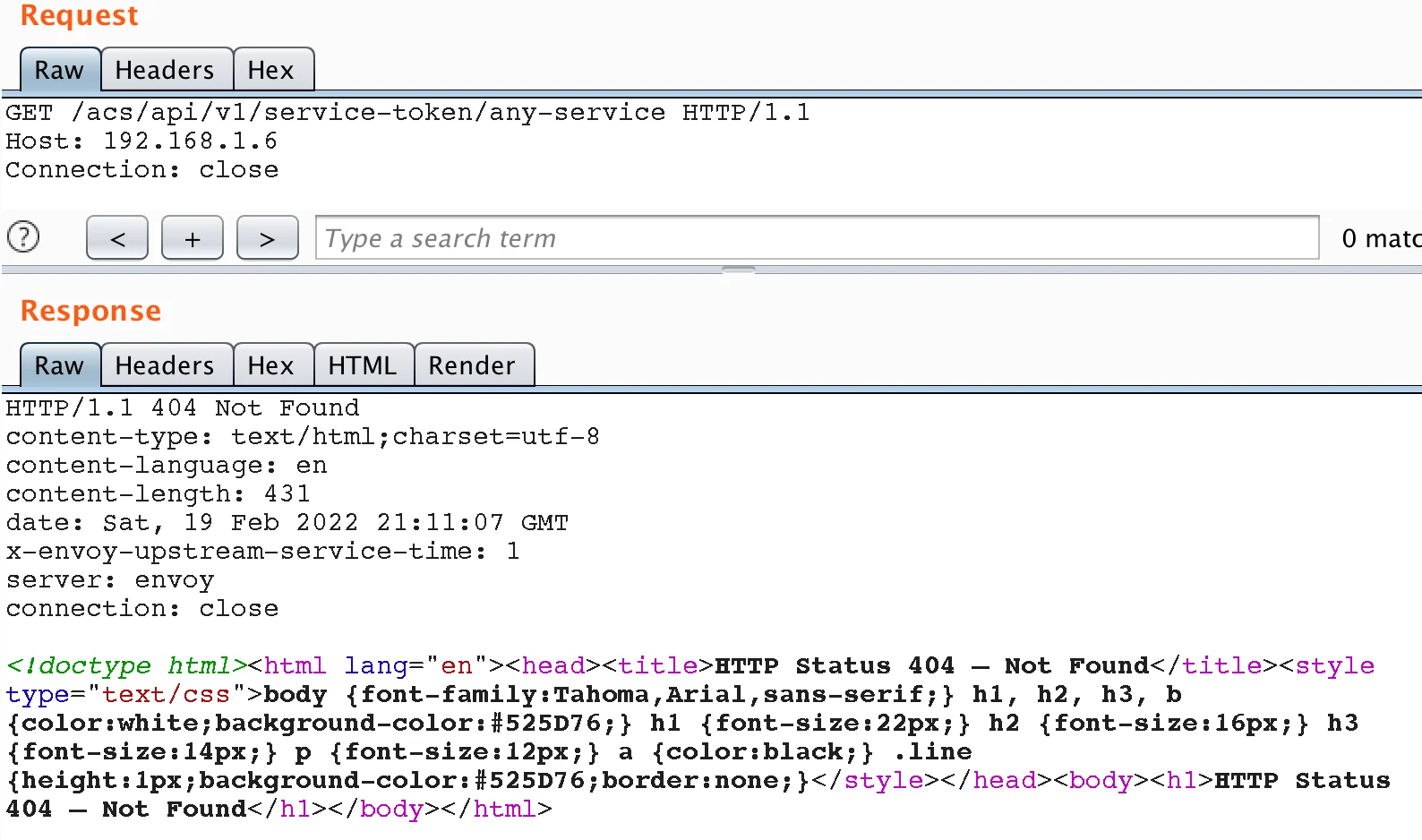
Being able to generate a token for a super-user without authentication looked very tempting, so the same trick was attempted externally, through the Envoy server.
Attempt to get service token by accessing Envoy server
That attempt failed, although the other API methods of the Java service were available. The next step was to understand how proxying to internal services is organised and which mechanisms are responsible for routing.
When Envoy is used as a front-end server, the routing table can be generated dynamically using the Route Discovery API. Inside the backend service, entities such as DiscoveryRequest from the io.envoyproxy.envoy.api package describe the configuration of routes. An example of creating a /admin/ router using the Envoy API:
public String routeDiscovery(final DiscoveryRequest discoveryRequest) {
      ...
      Route admin = Route.newBuilder().setMatch(RouteMatch.newBuilder().setPrefix("/admin/").build()).setRoute(RouteAction.newBuilder().setCluster("admin_cluster").setHostRewrite(this.hostName).build())
      Builder virtualHostOrBuilder = VirtualHost.newBuilder().setName("backend").addDomains("*");
      virtualHostOrBuilder.addRoutes(admin);
      VirtualHost virtualHost = virtualHostOrBuilder.build();
      RouteConfiguration routeConfiguration = RouteConfiguration.newBuilder().setName("route").addVirtualHosts(virtualHost).build();
      DiscoveryResponse discoveryResponse = DiscoveryResponse.newBuilder().setVersionInfo("1").addResources(Any.pack(routeConfiguration)).build();
      TypeRegistry typeRegistry = TypeRegistry.newBuilder().add(DiscoveryResponse.getDescriptor()).add(ClusterLoadAssignment.getDescriptor()).add(RouteConfiguration.getDescriptor()).build();
      String response = null;
      ...
      try {
         response = JsonFormat.printer().usingTypeRegistry(typeRegistry).print(discoveryResponse);
      } catch (InvalidProtocolBufferException err) {
         log.error("Error while serializing response", err);
      }

      return response;
   }
The concrete routing rules in the Java service are in EnvoyXDSServiceImpl.java:
package com.vmware.cwp.appliance.applianceworker.service.impl;

@Component
public class EnvoyXDSServiceImpl implements EnvoyXDSService {
...
   public String routeDiscovery(final DiscoveryRequest discoveryRequest) {
...
Route service_token_block = Route.newBuilder()
   .setMatch(RouteMatch.newBuilder()
   .setPrefix("/acs/api/v1/service-token").build())
   .setRoute(RouteAction.newBuilder().setCluster("service_vsw")
   .setPrefixRewrite("/no_cloud").build()).build();

...
Route acs = Route.newBuilder()
   .setMatch(RouteMatch.newBuilder()
   .setPrefix("/acs/").build())
   .setRoute(RouteAction.newBuilder()
   .setCluster("service_acs")
   .setHostRewrite(applianceIPv4Address).build()).build();
...
When the URL /acs/api/v1/service-token is encountered, the application forwards the request to the stub page instead of passing it to the service for processing. At the same time, any URL prefixed with /acs/* is forwarded to the backend. The task therefore became bypassing the blacklist while still satisfying the whitelist conditions.
Step 3: bypass the blacklist with URL encoding
A special feature of the Envoy server is required for this. The documentation contains an interesting point: the Envoy server has disabled normalization by default.

Excerpt from Envoy documentation

Excerpt from Envoy documentation
Despite the recommendations of the Envoy developers not to forget to enable this property when working with RBAC filters, the default value often remains unchanged, as it is in this case. Disabled normalization means that the URLs /acs/api/v1/service-token/rand and /acs/api/v1/%73ervice-token/rand are treated by the Envoy API as non-identical strings, although after normalization by another server, such as tomcat, the URLs are treated as identical again.
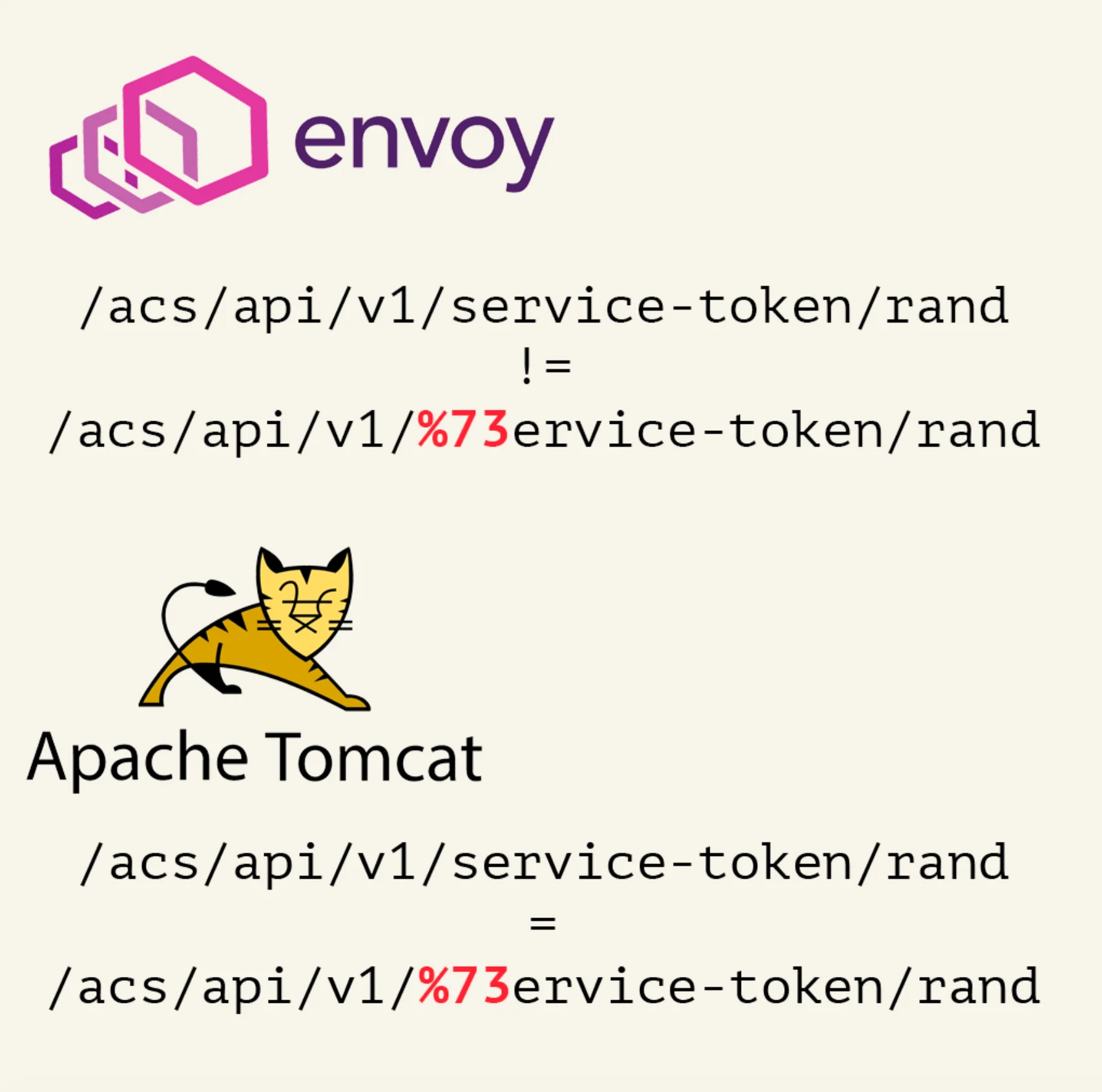
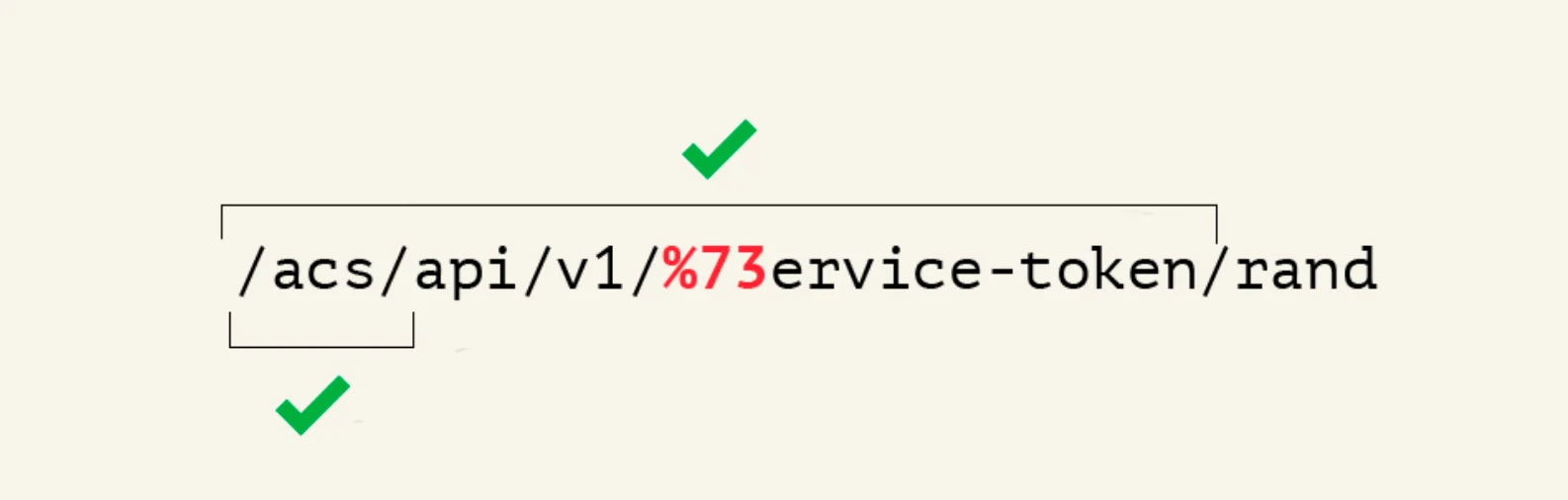
Changing at least one character in the API-method name to its URL representation bypasses the blacklist without violating the whitelist conditions.
A modified request was sent and returned a service token.
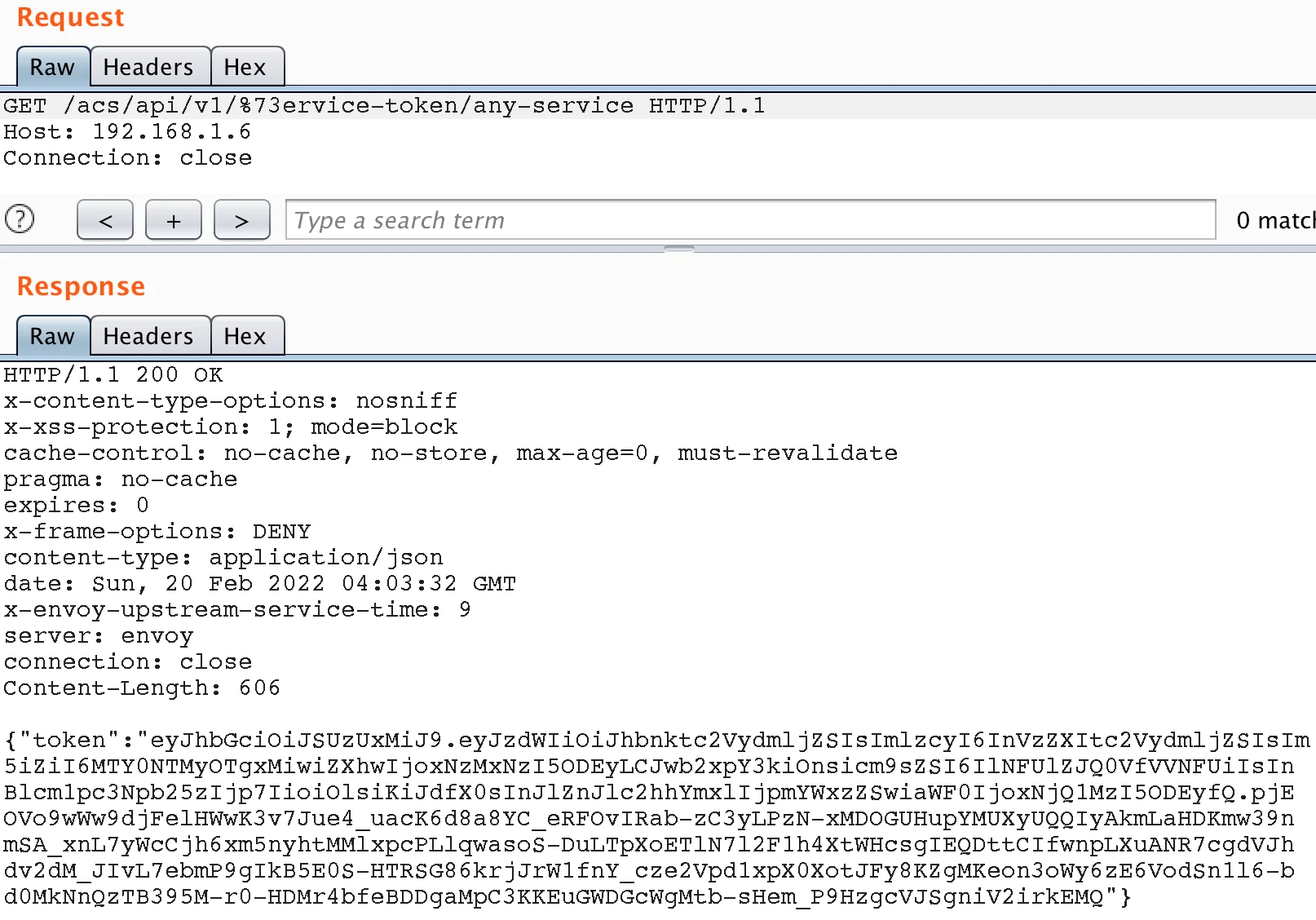
At this point the service token with super-user privileges was in hand, granting administrator powers over the software.
Step 4: SSRF in vRealize Operations Manager
The second part of the research started with the Operations Manager API, where a couple of methods were available without authentication. These included /casa/nodes/thumbprints, which takes an address as a user parameter. Specifying the address of a remote server under the researchers' control as the parameter produced a GET request from the Operations Manager instance with the URL path /casa/node/thumbprint.
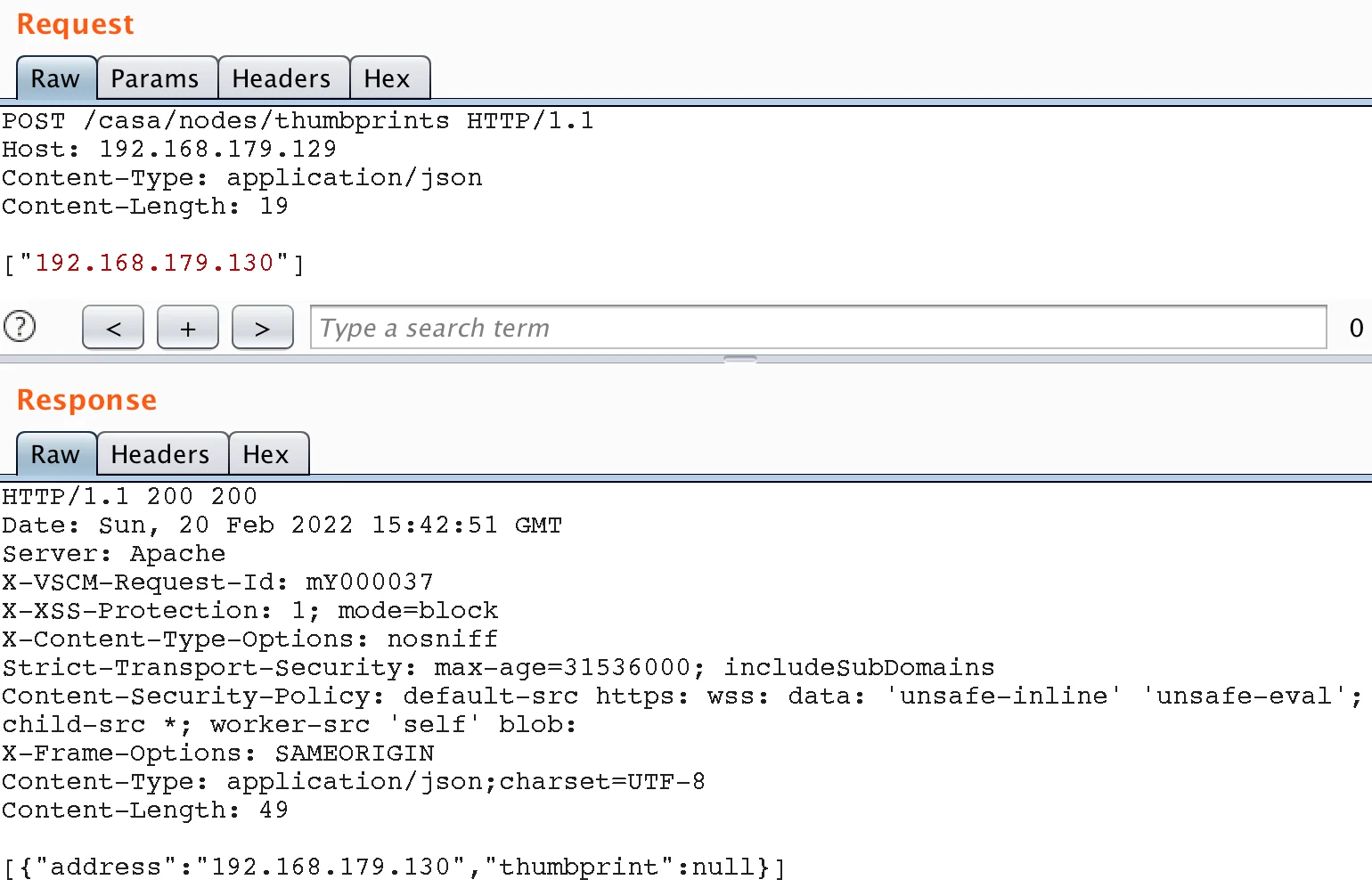
Attempting to perform SSRF

GET request in remote server logs
To control the URL path completely, the ? symbol can be added to cut off the path that the application normally concatenates. A request with a custom path was sent:
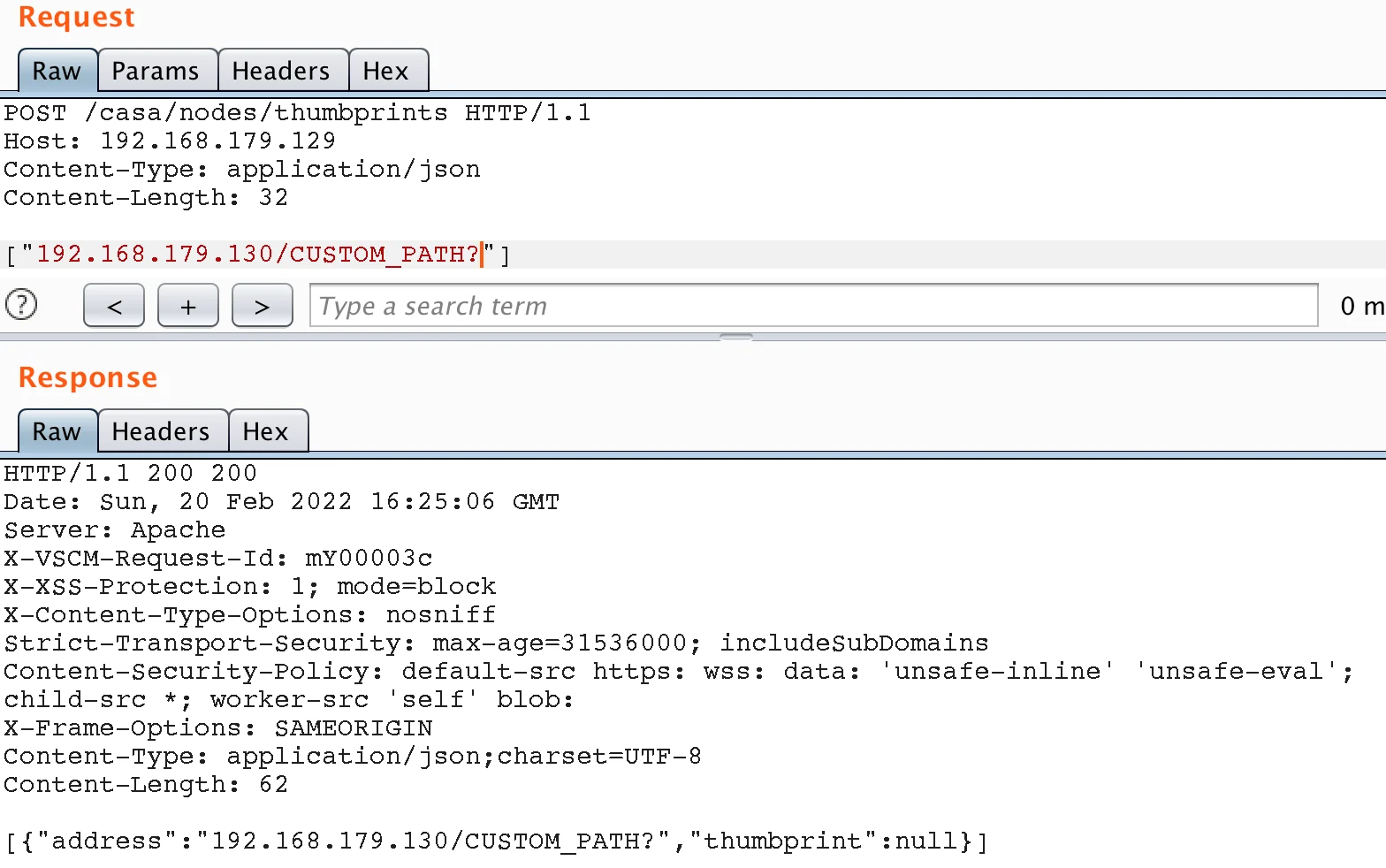
Performing SSRF with arbitrary path

GET request in remote server logs
As a result, any GET request could be made on behalf of the application, including to internal resources.
Step 5: read the administrator password hash
With the ability to make GET requests to internal resources, requests were made to API methods available only to an authorised user. One example is the API method for synchronizing passwords between nodes. Calling it returns the administrator password hash in two different hashing algorithms, sha256 and sha512.
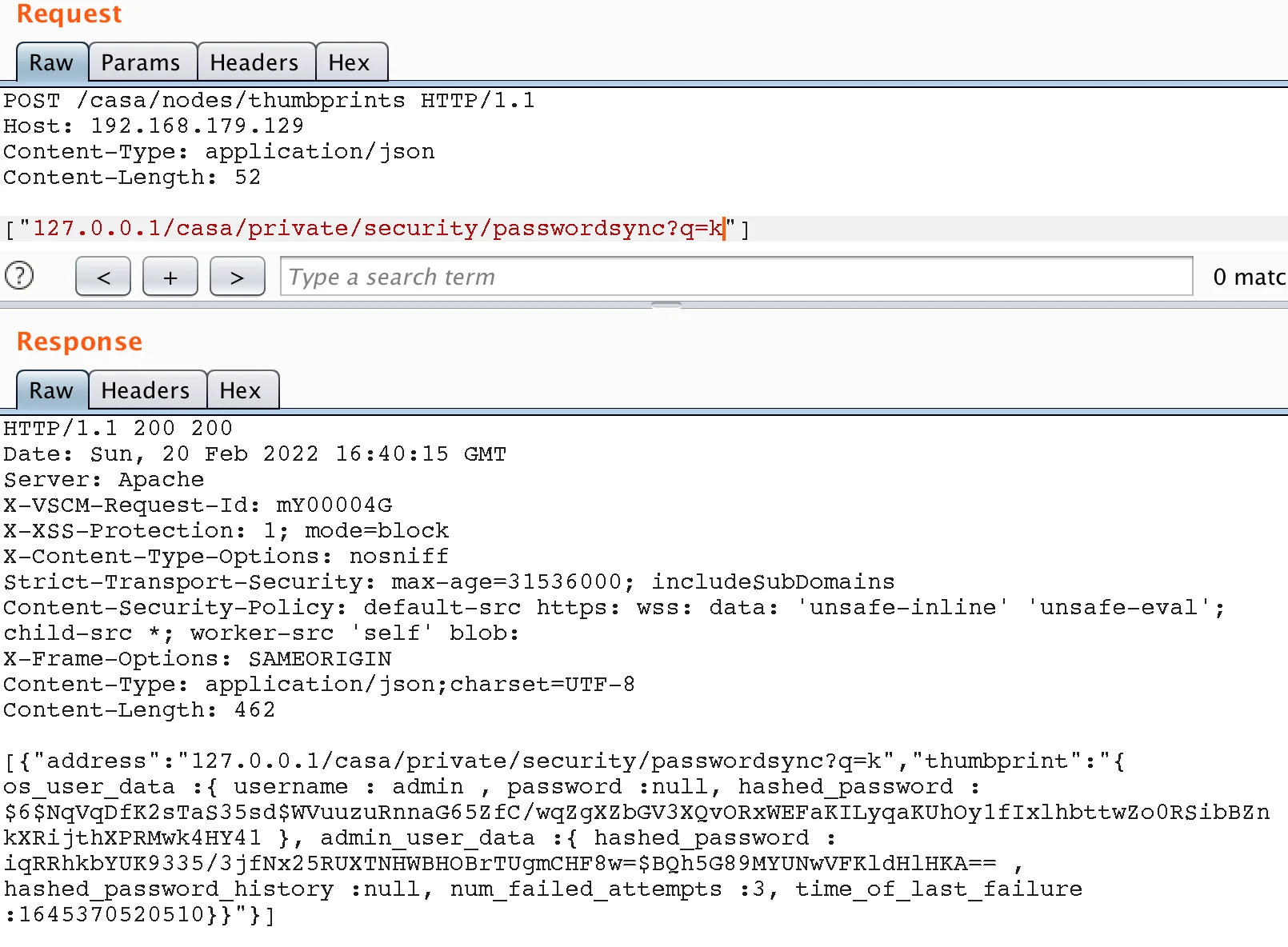
Obtaining administrator password hash via replication functionality
The sha family of algorithms is not recommended for password hashing and can be cracked with high chances of success. Since the administrator in the application corresponds to the system admin user on the server, a system with an SSH server in keyless mode of operation allows connecting to the server and gaining access to the command shell. For sensitive data such as a password, slow hash functions are the better practice.
Step 6: leak the credentials used for internal API calls
Because the shell route above is not fully guaranteed, the research continued. The way SSRF reaches API methods that require authentication is worth noting. Several mechanisms could provide this functionality, and in this case not the best approach was chosen: every time the API is accessed by the application, it adds a basic authentication header to the request. To extract the credentials from the header, an SSRF request was sent to a remote sniffer that outputs the contents of the HTTP request:
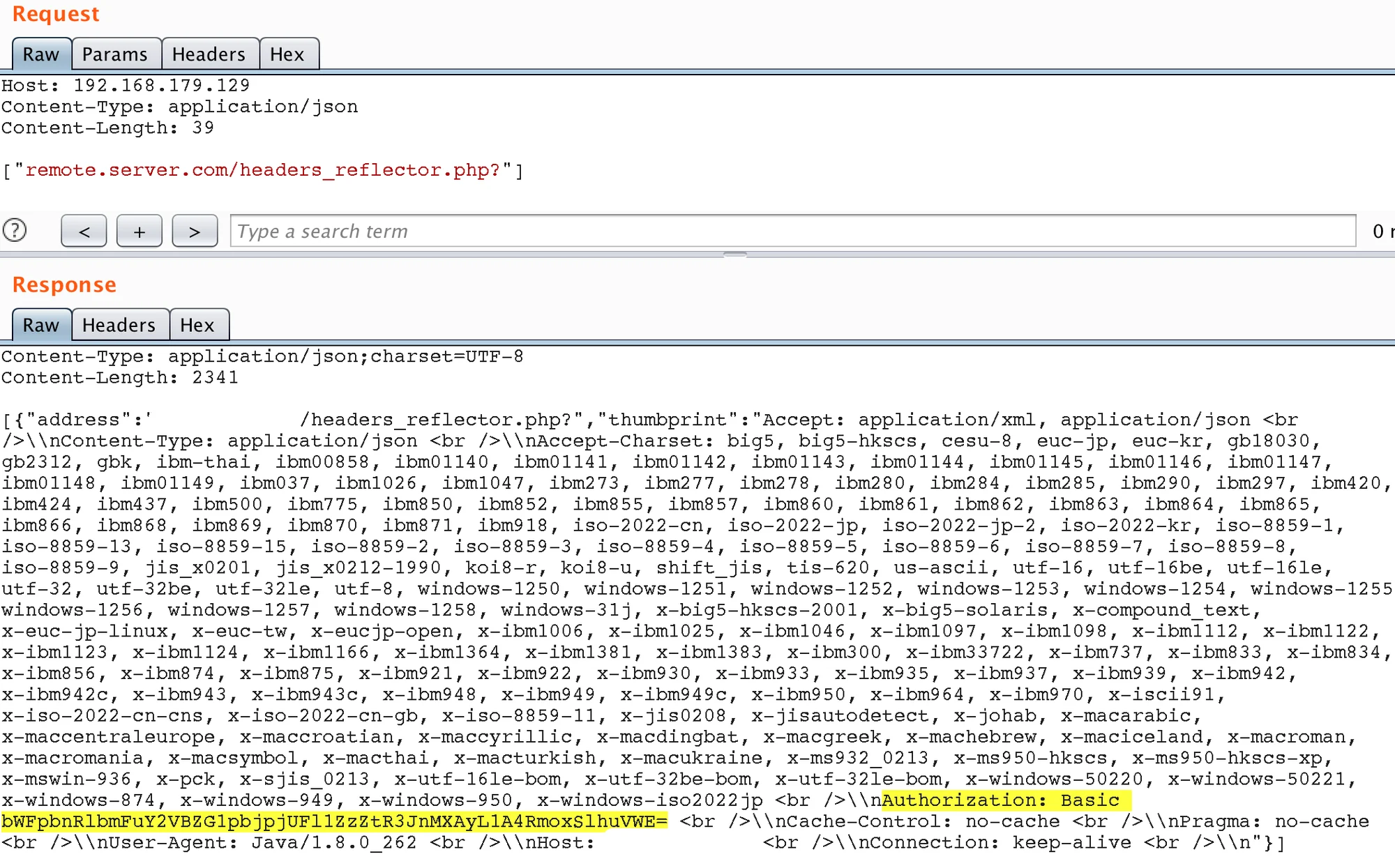
Extracting credentials with HTTP request sniffer.
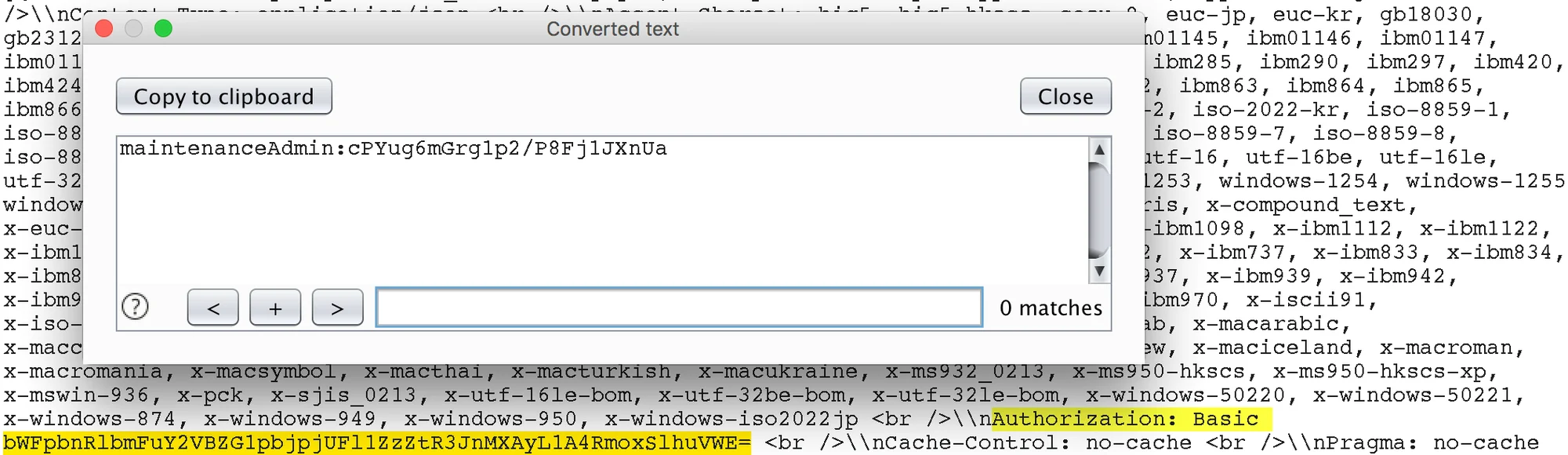
maintenanceAdmin user credentials
The application uses the maintenanceAdmin user to access the API. Those credentials were then used to access the protected API methods directly, without SSRF.
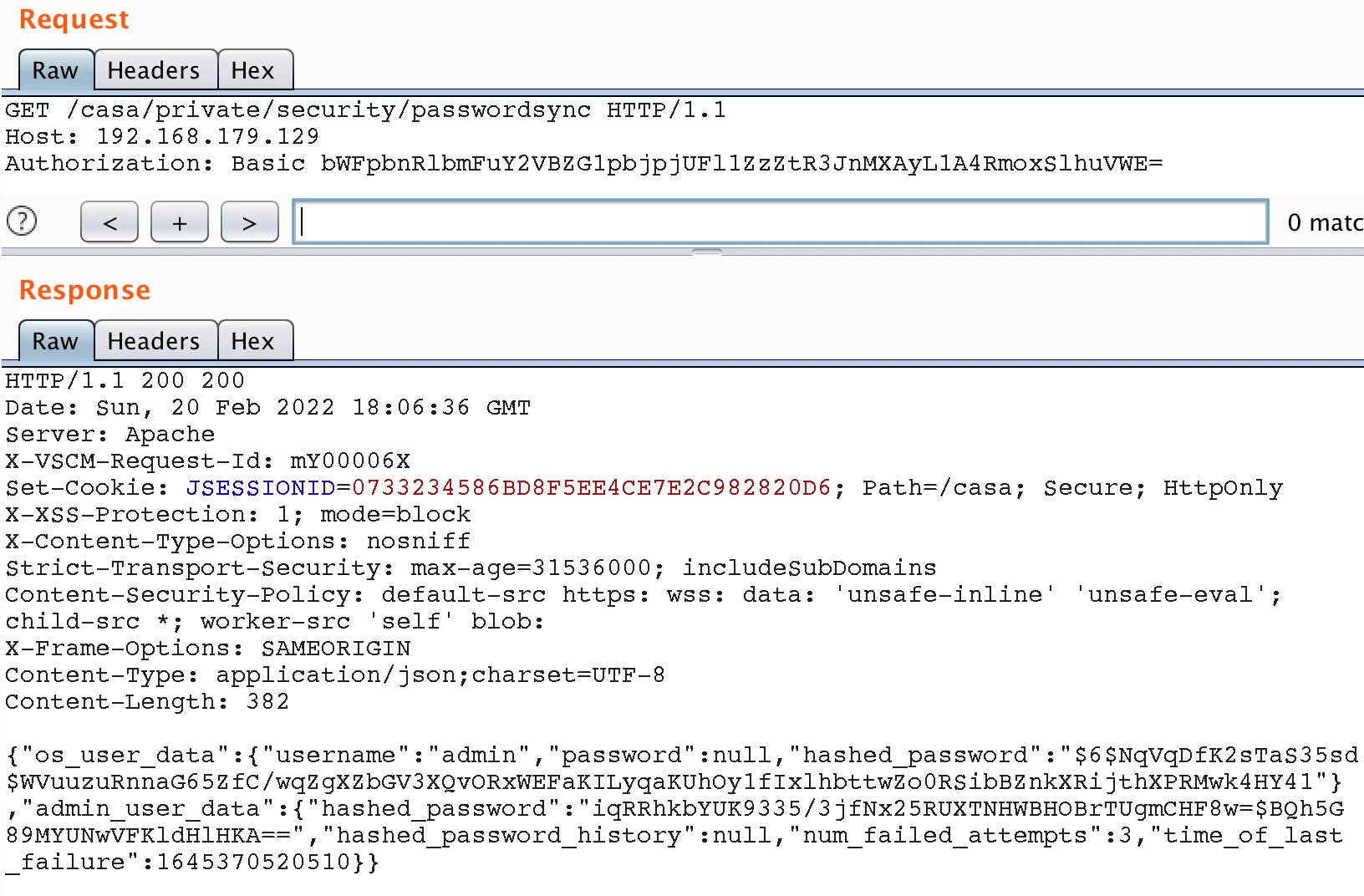
Verifying that account is up and running
With super-user privileges, only one step remained to take control of the server. Reviewing all the API methods revealed two ways to access the shell.
Step 7: RCE by password reset
The first and rough approach resets the password for the administrative user with the PUT /casa/os/slice/user API method. This method changes the password for users without additional verification such as the current password. Since the admin user of the same name exists in the system, connecting to the system with that account over SSH is straightforward.
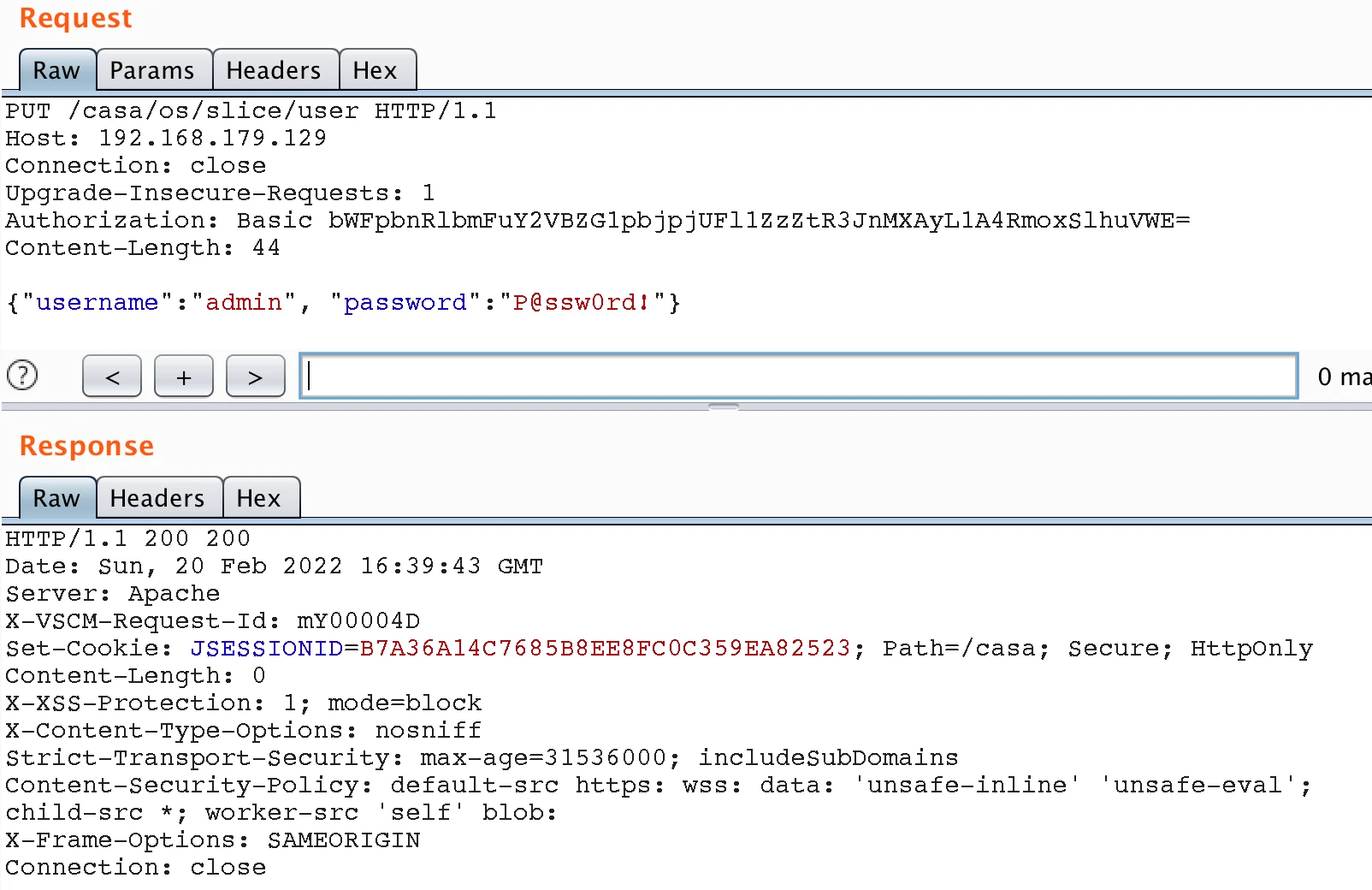
Changing administrator password
If SSH is disabled, it can simply be enabled using one of the API methods.
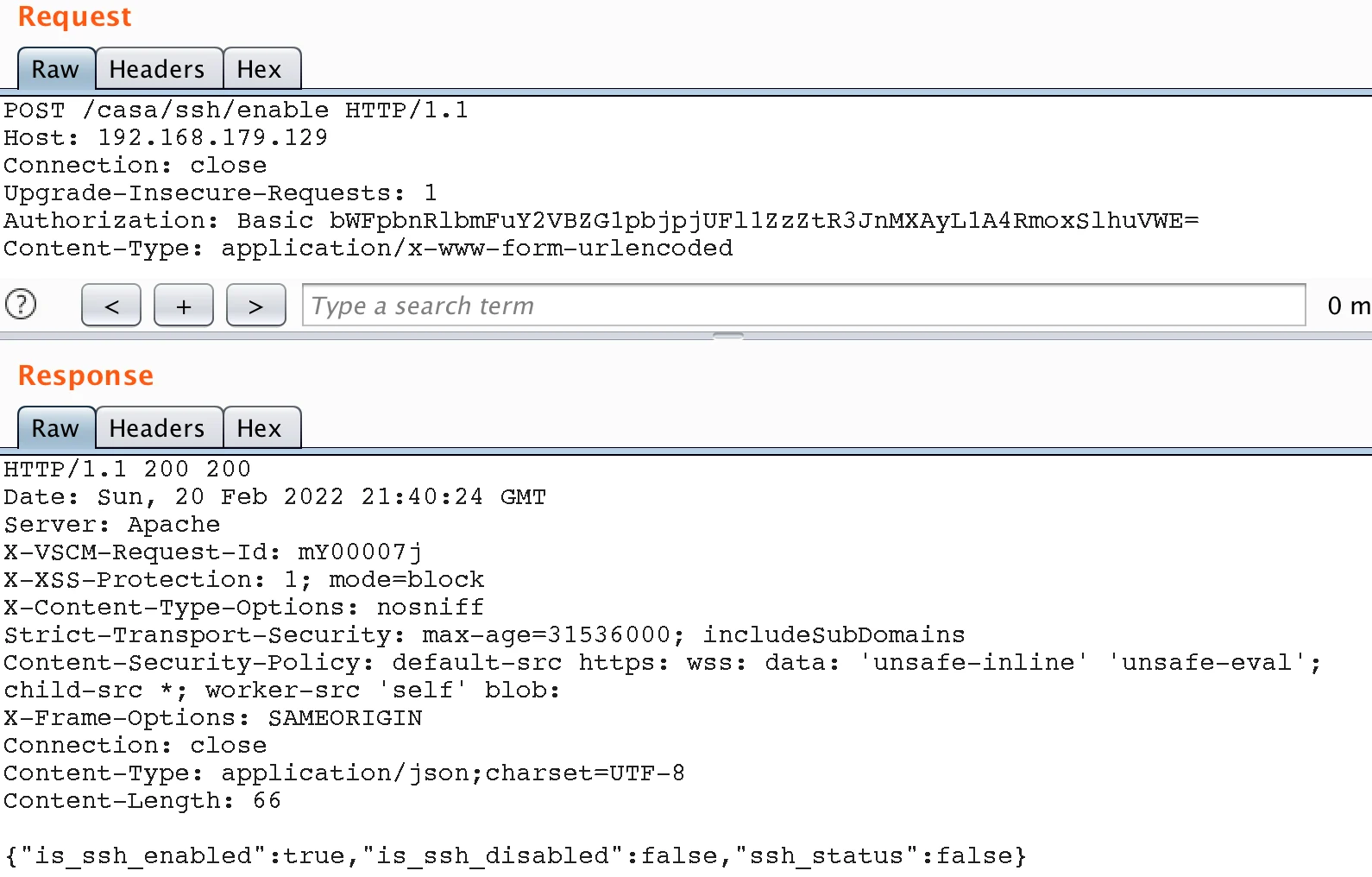
Enabling SSH server
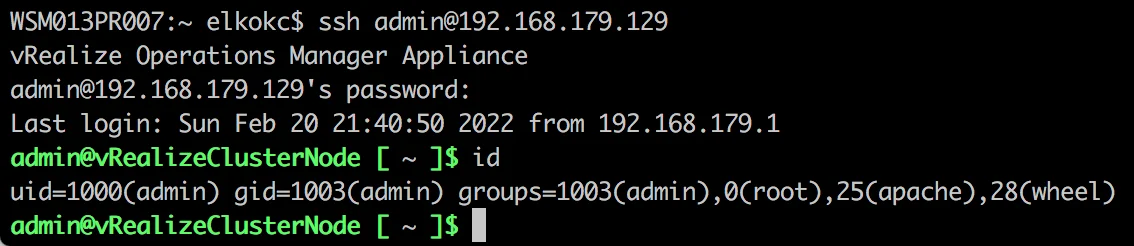
Connecting via ssh to vROps server
Step 8: RCE by path traversal
Resetting the administrator password can disrupt the customer's workflow during a penetration test. As an alternative, a web shell can be loaded via a path-traversal attack using the /casa/private/config/slice/ha/certificate API method. A lightweight JSP shell uploaded to the web directory of the server serves as the web shell.
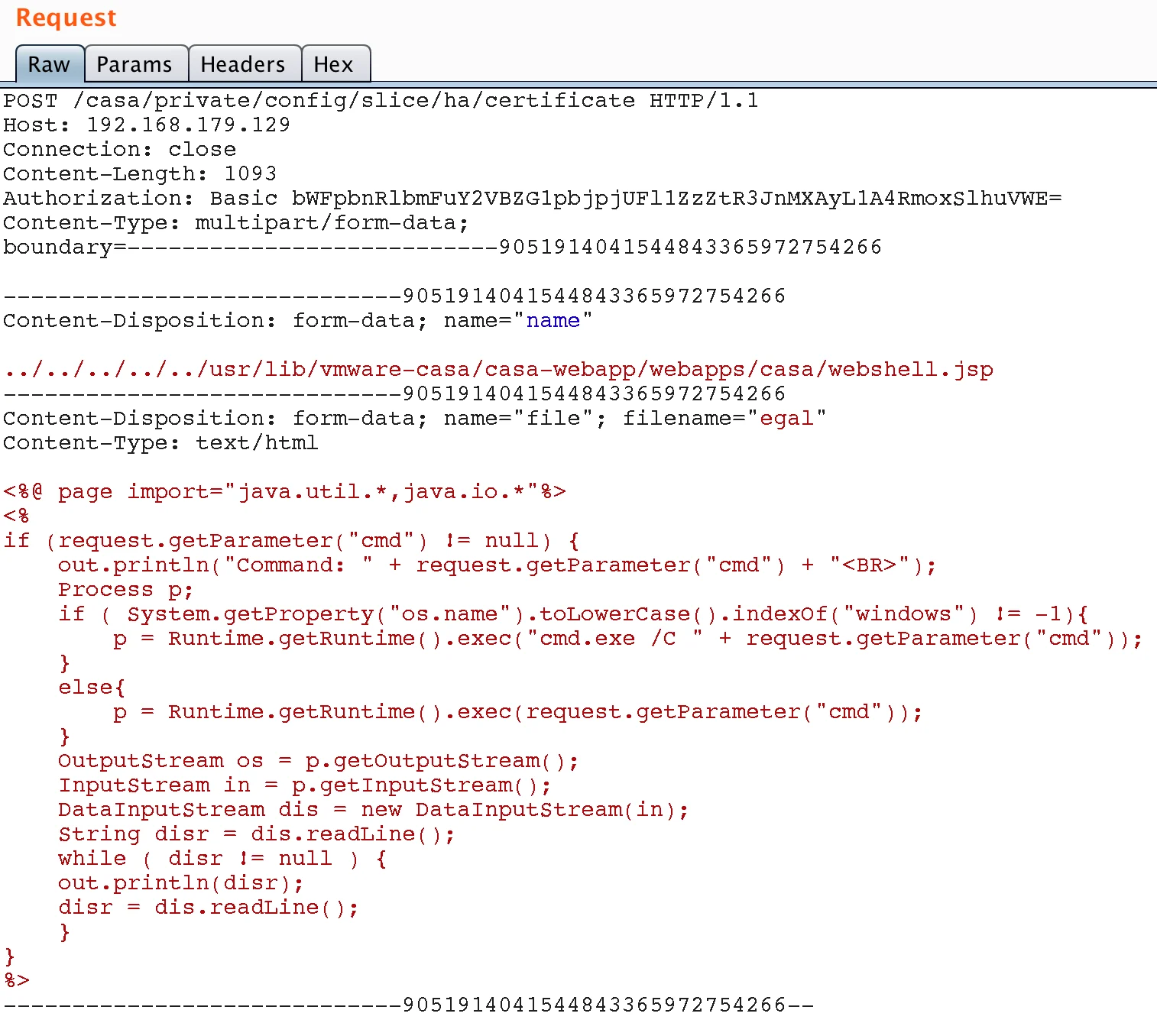
Exploiting path-traversal attack
After uploading, the shell is accessed at https://vROps.host/casa/webshell.jsp, passing the command in the cmd parameter.
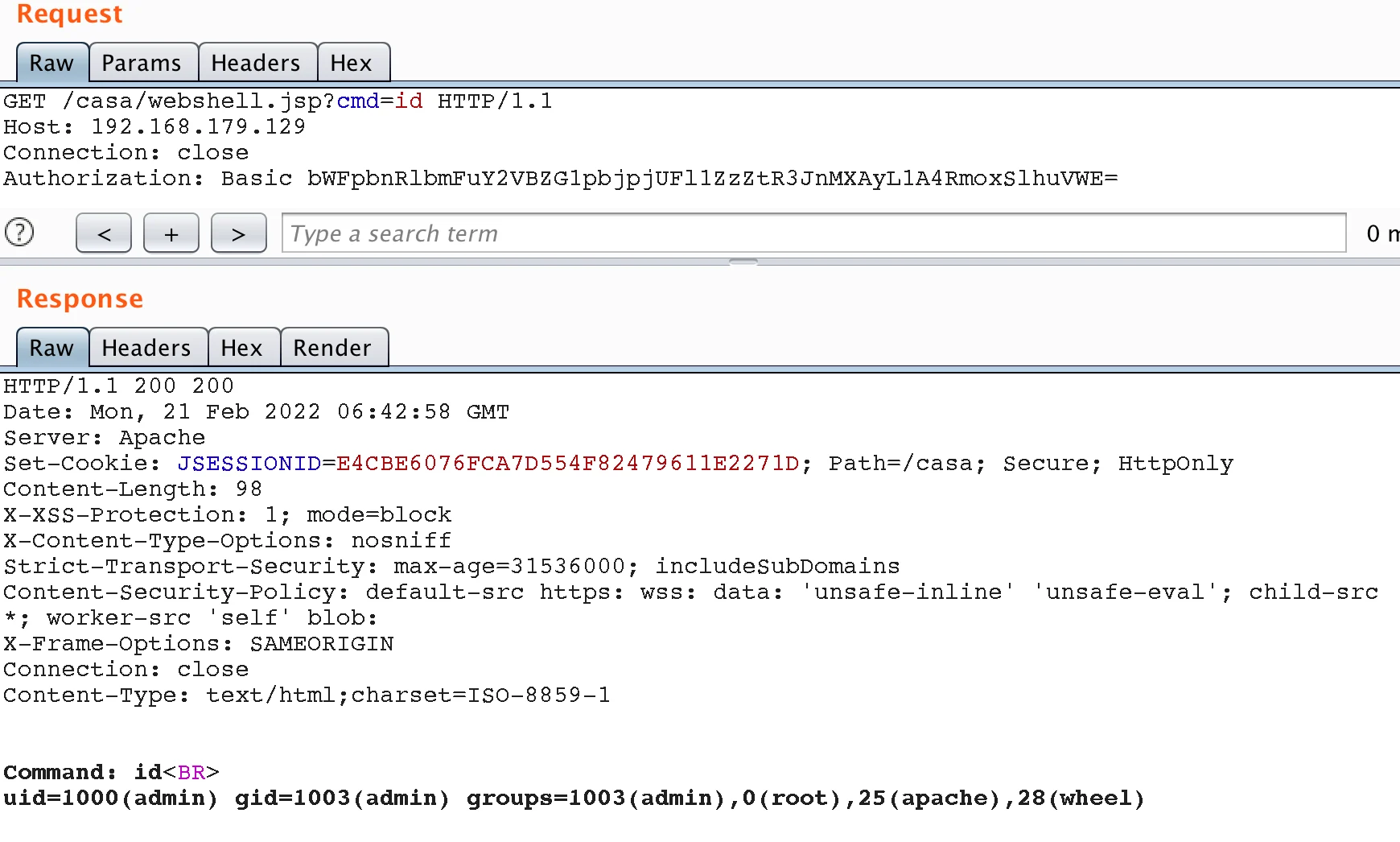
Execution of id command on the vROps server
Root cause
The Carbon Black Cloud Workload Appliance issue is a routing filter mismatch. The Envoy route configuration blocks the exact prefix /acs/api/v1/service-token and forwards everything under /acs/ to the backend service. Because Envoy has normalization disabled by default, a percent-encoded character in the method name (%73 for s) does not match the blocked prefix, while tomcat normalises the URL back to the blocked path and routes it to the real handler. The blacklist and the whitelist are evaluated on different representations of the same URL, so a single encoded character satisfies both. The Envoy documentation recommends enabling normalization when working with RBAC filters, but the default value remained unchanged here.
In vRealize Operations Manager, the /casa/nodes/thumbprints method accepts a user-supplied address and performs a server-side request to it without authentication. The application also attaches a basic authentication header to its own API calls, so pointing the SSRF at an attacker-controlled server discloses the maintenanceAdmin credentials. The password-synchronisation method returns the administrator hash in sha256 and sha512, which are fast hashes and therefore weak for password storage. The PUT /casa/os/slice/user method changes a user's password without requiring the current password, and the /casa/private/config/slice/ha/certificate method is vulnerable to path traversal, allowing a JSP shell to be written into the web directory.
Impact
On the Carbon Black Cloud Workload Appliance, the authentication bypass gives access to the administrative console with a service token carrying the SERVICE_USER role and its *:* permission set, which grants administrator powers over the software.
On vRealize Operations Manager, the unauthenticated SSRF allows any GET request on behalf of the application, including to internal resources. From there, the administrator password hash can be obtained, and the maintenanceAdmin credentials can be leaked. With those privileges, an attacker can reset the administrator password and connect over SSH, or upload a JSP web shell through path traversal and execute commands. The password reset approach can disrupt the customer's workflow during a penetration test, so path traversal was found as an alternative approach. The password-hash route is not fully guaranteed, and it relies on an SSH server in keyless mode of operation.
Fix
VMware was notified and the vulnerabilities have since been patched. The specific code changes are not described in the report.
Variants to test
- Encoded characters in blocked prefixes. On any Envoy-fronted application with a prefix blacklist, replace one character of the blocked path with its percent-encoded form, for example
%73fors. A positive result is a response from the backend handler instead of the stub page. - Normalisation mismatches between proxy and backend. Compare how the front-end and the backend normalise paths (case, dot segments, double encoding, semicolons). A positive result is a request that the proxy treats as one path and the backend as another.
- Unauthenticated methods that take a URL or address. Look for API methods reachable without authentication that accept a host or URL parameter. A positive result is an inbound request from the target to a server you control.
- Path truncation with
?. When the application concatenates a fixed path to your input, add?to cut it off. A positive result is a request to your server with exactly the path you supplied. - Credential leakage through SSRF. Point the SSRF at a request sniffer and inspect headers. A positive result is an
Authorizationheader or other credentials sent by the application. - Password change without current password. Test user-update methods for missing verification of the existing password. A positive result is a successful password change for another account.
- Path traversal in file-upload or certificate methods. Supply traversal sequences in file names or paths. A positive result is a file written outside the intended directory, for example a JSP shell reachable over HTTP.
- Fast password hashes. Where hashes are exposed, check the algorithm. A positive result is a sha-family hash that can be cracked offline with high chances of success.
What happened, in plain words
A security researcher spent time poking at two pieces of software made by VMware. Both are tools that companies install on their own computers (called "on-premise") to help run their IT. The researcher found ways to get into them without knowing any password, and in the second case, to run his own commands on the server. He told VMware, VMware fixed the problems, and later he wrote down how it all worked so other people could learn from it.
This article walks through that story slowly. If you have never done security work before, that is fine. Every strange word gets explained the first time it appears, and there is a glossary at the end. You only need to know how to use a browser and a computer.
Two ideas come up constantly, so let us get them out of the way first.
What is a server? A server is just a computer whose job is to answer requests from other computers. When you open a website, your browser asks a server for a page, and the server sends it back. Companies run servers on their own networks, and those servers often hold sensitive things.
What is an API? Think of a restaurant. The menu is the list of things you are allowed to ask for, and the waiter is the thing that carries your request to the kitchen. An API (Application Programming Interface) is the menu plus the waiter for a piece of software: a fixed list of requests that one program can send to another, each with a name and a set of ingredients it accepts. A request like GET /casa/nodes/thumbprints is one item on that menu. GET is the type of request that means "give me something"; the part after it is the address of the item.
What is a token? When you log in to a website, the server needs a way to remember that you already proved who you are, because the web itself forgets everything between one click and the next. So the server hands your browser a small piece of text, called a token (or a cookie), and your browser shows it on every later request. It works like a cloakroom ticket: you hand in your coat, you get a ticket, and the ticket is enough to get the coat back. Anyone holding the ticket gets the coat, which is exactly why stealing tokens is a popular attack.
What is authentication? Authentication is simply the act of proving who you are, usually with a username and password. An "authentication bypass" is a bug that lets you skip that proof entirely and be treated as a logged-in user anyway.
The two targets
The first target is the VMware Carbon Black Cloud Workload Appliance. Carbon Black Cloud is an endpoint protection platform, which is a fancy way of saying antivirus and security software for the computers employees use. The appliance is a machine a company installs in its own data centre; it acts as the link between the company's own infrastructure and VMware's cloud service. It has an administrative console, a web page where an administrator logs in to manage it. The goal of the first part of the research was to reach that console without valid credentials.
Carbon Black Cloud Workload Components
The second target is VMware vRealize Operations Manager, automation software that companies use to keep an eye on how their systems are performing. The researcher looked at its API for requests that could be made without logging in. Chaining several of those findings together led all the way to running commands on the server, which is called remote code execution (RCE).
Both sets of problems were reported to VMware and have since been patched. The research produced 9 CVEs in total, of varying severities. A CVE is a public catalogue number for a known security flaw, so people can talk about a specific bug unambiguously. This article covers the authentication bypass in Carbon Black Cloud Workload Appliance (CVE-2021-21978) and the exploit chain in vRealize Operations (CVE-2021-21975, CVE-2021-22023, CVE-2021-21983).
Setup: looking around first
Before attacking anything, a researcher looks around, the same way a burglar might walk past a house noting which windows are open. This stage is called reconnaissance.
One basic tool is the netstat command, which lists the network connections a computer is listening on. A "port" is a numbered doorway on a computer: one program answers on door 443, another on door 3010, and so on. The address [redacted] means "all the network interfaces on this machine", so checking it shows every doorway that is open to the outside world.
Running that check revealed a web application on port 443. Port 443 is the standard doorway for secure websites (the ones whose addresses start with https://).
Output of netstat command
Application login page
The front-end server, the one that first receives visitors, turned out to be an Envoy proxy server. A proxy is a receptionist: every request arrives at the receptionist, who looks at where it is going and forwards it to the right department inside. Envoy is a popular piece of software for playing that receptionist role. Its configuration file showed that requests are forwarded on to tomcat-based microservices. Tomcat is a program that runs Java web applications, and a microservice is a small program that does one job. The excerpt below is from /opt/vmware/cwp/appliance-gateway/conf/cwp-appliance-gateway.yaml:
node:
  cluster: cwp_appliance
  id: cwp-appliance-v1-2020
static_resources:
  clusters:
    -
      connect_timeout: 5s
      hosts:
        -
          socket_address:
            address: "[redacted]"
            port_value: 3030
      lb_policy: round_robin
      name: service_vsw
      type: LOGICAL_DNS
    -
      connect_timeout: 5s
      hosts:
        -
          socket_address:
            address: "[redacted]"
            port_value: 3020
      lb_policy: round_robin
      name: service_apw
      type: LOGICAL_DNS
    -
      connect_timeout: 5s
      hosts:
        -
          socket_address:
            address: "[redacted]"
            port_value: 3010
      lb_policy: round_robin
      name: service_acs
      type: LOGICAL_DNS
Line by line, in plain words:
node:starts the section describing this particular Envoy instance.cluster: cwp_applianceandid: cwp-appliance-v1-2020are just names for it.static_resources:means the following list is fixed in the file rather than generated on the fly.clusters:begins the list of internal destinations Envoy can forward to.- The first entry has
connect_timeout: 5s, so Envoy gives up after five seconds if the destination does not answer. hosts:withaddress: "[redacted]"andport_value: 3030says the destination is the same machine ([redacted] always means "this computer") on doorway 3030.lb_policy: round_robinmeans if there were several copies, requests would take turns.name: service_vswis the label for this destination.- The second entry is the same pattern for
service_apwon port 3020. - The third entry is the same pattern for
service_acson port 3010.
So the receptionist knows three internal departments, and one of them, service_acs, sits behind door 3010.
Discovery of Java services utilizing netstat command
Finding it: a role with unlimited power
Next the researcher read the application.yml configuration file for service_acs, the service on port 3010. It showed that a role-based access model from the Java Spring framework is implemented. "Role-based access" means each user is given a role, like a job title, and the role decides what that user may do. The file looked like this:
// application.yml
rbacpolicy:
  role:
  - name: SERVICE_USER
    description: This role gives you access to all administration related work
    default: DENY
    permissions:
     - '*:*'

  - name: APPLIANCE_USER
    description: This role gives you access to all administration related work
    default: DENY
    permissions:
     - 'acs:getToken'
     - 'acs:getServiceToken'
     - 'apw:getApplianceDetails'
     - 'apw:getApplianceSettings'
     - 'apw:getNetworkConf'
…
Line by line:
rbacpolicy:starts the section that defines who may do what. RBAC stands for role-based access control.role:begins the list of roles.- The first role is named
SERVICE_USER. Its description says it gives access to all administration related work. default: DENYmeans that anything not explicitly allowed is refused. That is a good habit in security: say no unless you said yes.permissions:lists what the role may do. Here it is'*:*', where the star is a wildcard meaning "anything". So this role may do anything at all.- The second role,
APPLIANCE_USER, also denies by default, but its permissions are a short list of specific actions:acs:getToken,acs:getServiceToken,apw:getApplianceDetails,apw:getApplianceSettings,apw:getNetworkConf. The part before the colon is the area, the part after is the action. - The
…means the file continues with more entries that were not shown.
Reading this raised several questions: what is a service user, why does it have unlimited capabilities, and what does the getServiceToken API method do?
The researcher started with getServiceToken. Its description in the source code reads "Generate JWT Token for Service Request". A JWT (JSON Web Token) is a token that carries its own information inside it, in a readable format, rather than being a random string the server has to look up. The description means that every time an application needs to prove itself for an internal API call, it asks this method and receives an authorisation token. The excerpt below is from TokenGeneratorApi.java:
@ApiOperation(
      value = "Generate JWT Token for Service Request",
      nickname = "getServiceToken",
      notes = "",
      response = AccessTokenDTO.class,
      tags = {"TokenGenerator"}
   )
   @ApiResponses({@ApiResponse(
   code = 200,
   message = "OK",
   response = AccessTokenDTO.class
…
   @RequestMapping(
      value = {"/api/v1/service-token/{serviceName}"},
      produces = {"application/json"},
      method = {RequestMethod.GET}
   )
   ResponseEntity<AccessTokenDTO> getServiceToken(@ApiParam(value = "name of the service which is requesting token",required = true) @PathVariable("serviceName") String serviceName);
Line by line:
@ApiOperation(...)is a label that documents the method for anyone reading the API description.valueis the human-readable summary,nicknameis the short name,responsesays what kind of answer comes back.@ApiResponses({@ApiResponse(code = 200, message = "OK", ...documents the successful answer: code 200 is the standard HTTP code for "it worked".@RequestMapping(...)is the important part: it says which address triggers this method.value = {"/api/v1/service-token/{serviceName}"}is the address, and{serviceName}is a blank to be filled in with the name of the service asking for a token.produces = {"application/json"}says the answer is formatted as JSON, a common text format for data.method = {RequestMethod.GET}says this is a GET request, the kind used to fetch something.- The last line declares the method itself, named
getServiceToken, taking theserviceNamefrom the address and returning anAccessTokenDTO, which is the object holding the token.
Exploitation
Step 1: obtain a service token from the internal network
Accessing the service attached to port 3010 from the internal network returned a JWT token. "From the internal network" matters: the researcher was asking from inside, where the receptionist's rules do not apply, to see what the service would hand out.
Accessing Java Service API method using cURL
Decoding the JWT payload showed that the token belongs to the service user role, with the wildcard permission set:
{
  "sub": "any-service",
  "iss": "user-service",
  "nbf": 1645303446,
  "exp": 1731703446,
  "policy": {
    "role": "SERVICE_USER",
    "permissions": {
      "*": [
        "*"
      ]
    }
  },
  "refreshable": false,
  "iat": 1645303446
}
Line by line:
subis short for subject, meaning who the token is about. Here it isany-service.issis the issuer, who created the token:user-service.nbfmeans "not before": the token is not valid before that moment, given as a number of seconds since 1 January 1970 (a common way computers count time).expis the expiry: after that moment the token stops working.policydescribes what the holder may do.roleisSERVICE_USER, andpermissionscontains"*": ["*"], the wildcard again, meaning everything.refreshable: falsesays the token cannot be renewed.iatmeans "issued at", the moment the token was created.
In short: a token that can do anything, obtained from the internal network.
Step 2: try the same request through Envoy
Being able to generate a token for a super-user without authentication looked very tempting, so the same trick was attempted externally, through the Envoy server, the way a real outsider would reach it.
Attempt to get service token by accessing Envoy server
That attempt failed, although the other API methods of the Java service were available. So the receptionist was blocking this particular request but forwarding others. The next step was to understand how proxying to internal services is organised and which mechanisms are responsible for routing. Routing means deciding, for each incoming request, which internal department should handle it.
When Envoy is used as a front-end server, the routing table can be generated dynamically using the Route Discovery API. Instead of a fixed list in a file, the internal service can send Envoy a fresh list of routes whenever it likes. Inside the backend service, entities such as DiscoveryRequest from the io.envoyproxy.envoy.api package describe the configuration of routes. A package here is just a folder-like grouping of code. An example of creating a /admin/ router using the Envoy API:
public String routeDiscovery(final DiscoveryRequest discoveryRequest) {
      ...
      Route admin = Route.newBuilder().setMatch(RouteMatch.newBuilder().setPrefix("/admin/").build()).setRoute(RouteAction.newBuilder().setCluster("admin_cluster").setHostRewrite(this.hostName).build())
      Builder virtualHostOrBuilder = VirtualHost.newBuilder().setName("backend").addDomains("*");
      virtualHostOrBuilder.addRoutes(admin);
      VirtualHost virtualHost = virtualHostOrBuilder.build();
      RouteConfiguration routeConfiguration = RouteConfiguration.newBuilder().setName("route").addVirtualHosts(virtualHost).build();
      DiscoveryResponse discoveryResponse = DiscoveryResponse.newBuilder().setVersionInfo("1").addResources(Any.pack(routeConfiguration)).build();
      TypeRegistry typeRegistry = TypeRegistry.newBuilder().add(DiscoveryResponse.getDescriptor()).add(ClusterLoadAssignment.getDescriptor()).add(RouteConfiguration.getDescriptor()).build();
      String response = null;
      ...
      try {
         response = JsonFormat.printer().usingTypeRegistry(typeRegistry).print(discoveryResponse);
      } catch (InvalidProtocolBufferException err) {
         log.error("Error while serializing response", err);
      }

      return response;
   }
Line by line:
public String routeDiscovery(final DiscoveryRequest discoveryRequest)declares a method that takes a request describing what Envoy wants to know, and returns text.Route admin = Route.newBuilder()...builds one routing rule.setMatch(RouteMatch.newBuilder().setPrefix("/admin/").build())says the rule applies to any address starting with/admin/.setRoute(RouteAction.newBuilder().setCluster("admin_cluster").setHostRewrite(this.hostName).build())says such requests go to the destination calledadmin_cluster, with the host name rewritten.VirtualHost virtualHostOrBuilder = VirtualHost.newBuilder().setName("backend").addDomains("*");starts a group of rules namedbackendthat applies to any domain, again thanks to the star.virtualHostOrBuilder.addRoutes(admin);adds the rule above to that group.VirtualHost virtualHost = virtualHostOrBuilder.build();finishes building the group.RouteConfiguration routeConfiguration = RouteConfiguration.newBuilder().setName("route").addVirtualHosts(virtualHost).build();wraps the group in a complete routing configuration namedroute.DiscoveryResponse discoveryResponse = DiscoveryResponse.newBuilder().setVersionInfo("1").addResources(Any.pack(routeConfiguration)).build();packages the configuration as a reply to Envoy, labelled version 1.TypeRegistry typeRegistry = ...prepares a list of the kinds of objects that may appear in the reply, so they can be converted to text correctly.String response = null;prepares an empty variable to hold the final text.- The
tryblock converts the reply into JSON text withJsonFormat.printer(). If that conversion fails, thecatchblock logs an error instead of crashing. return response;hands the text back.
The concrete routing rules in the Java service are in EnvoyXDSServiceImpl.java:
package com.vmware.cwp.appliance.applianceworker.service.impl;

@Component
public class EnvoyXDSServiceImpl implements EnvoyXDSService {
...
   public String routeDiscovery(final DiscoveryRequest discoveryRequest) {
...
Route service_token_block = Route.newBuilder()
   .setMatch(RouteMatch.newBuilder()
   .setPrefix("/acs/api/v1/service-token").build())
   .setRoute(RouteAction.newBuilder().setCluster("service_vsw")
   .setPrefixRewrite("/no_cloud").build()).build();

...
Route acs = Route.newBuilder()
   .setMatch(RouteMatch.newBuilder()
   .setPrefix("/acs/").build())
   .setRoute(RouteAction.newBuilder()
   .setCluster("service_acs")
   .setHostRewrite(applianceIPv4Address).build()).build();
...
Line by line:
package com.vmware.cwp.appliance.applianceworker.service.impl;says which folder-like group this code belongs to.@Componentis a label telling the Java Spring framework to manage this class automatically.public class EnvoyXDSServiceImpl implements EnvoyXDSService {declares the class, and says it fulfils the contract namedEnvoyXDSService.public String routeDiscovery(final DiscoveryRequest discoveryRequest) {is the same kind of method as before, the one that produces routing rules.Route service_token_block = Route.newBuilder()...builds the blocking rule.setPrefix("/acs/api/v1/service-token")matches any address starting with that text.setCluster("service_vsw")sends it to theservice_vswdestination, andsetPrefixRewrite("/no_cloud")rewrites the address to/no_cloud, a stub page rather than the real service.Route acs = Route.newBuilder()...builds the general rule.setPrefix("/acs/")matches any address starting with/acs/, andsetCluster("service_acs")sends it to the real service on port 3010.
So when the URL /acs/api/v1/service-token is encountered, the application forwards the request to the stub page instead of passing it to the service for processing. At the same time, any URL prefixed with /acs/* is forwarded to the backend. The task therefore became bypassing the blacklist while still satisfying the whitelist conditions. A blacklist is a list of things that are forbidden; a whitelist is a list of things that are allowed. Here the forbidden thing is the exact token address, and the allowed thing is anything under /acs/.
Step 3: bypass the blacklist with URL encoding
A special feature of the Envoy server is required for this. The documentation contains an interesting point: the Envoy server has disabled normalization by default.
Excerpt from Envoy documentation
Excerpt from Envoy documentation
Normalisation is the process of tidying up an address into one standard form before comparing it. A simple everyday comparison: "Main Street" and "main street" are the same street to a human, but a computer comparing the raw text sees two different strings. Normalisation is what makes the computer treat them as the same. In web addresses, characters can also be written in an encoded form: %73 is simply another way of writing the letter s. A normalising server would decode %73 back to s before comparing.
Despite the recommendations of the Envoy developers not to forget to enable this property when working with RBAC filters, the default value often remains unchanged, as it is in this case. Disabled normalisation means that the URLs /acs/api/v1/service-token/rand and /acs/api/v1/%73ervice-token/rand are treated by the Envoy API as non-identical strings, although after normalisation by another server, such as tomcat, the URLs are treated as identical again.
Changing at least one character in the API-method name to its URL representation bypasses the blacklist without violating the whitelist conditions.
A modified request was sent and returned a service token.
At this point the service token with super-user privileges was in hand, granting administrator powers over the software. The receptionist compared the raw text, saw something that did not match the forbidden address, and forwarded it; the department behind the receptionist tidied the address up, saw the forbidden address, and answered it anyway.
Step 4: SSRF in vRealize Operations Manager
The second part of the research started with the Operations Manager API, where a couple of methods were available without authentication. These included /casa/nodes/thumbprints, which takes an address as a user parameter. Specifying the address of a remote server under the researchers' control as the parameter produced a GET request from the Operations Manager instance with the URL path /casa/node/thumbprint.
This class of bug is called Server-Side Request Forgery, or SSRF. The name sounds complicated but the idea is simple. Imagine a company receptionist who will, on request, phone any number you give them and read out what the person on the other end says. You cannot phone the bank yourself, but the receptionist can, and the receptionist trusts you. SSRF is the same: you give the server an address, the server fetches it for you, and because the request comes from the server, it can reach places you could not reach yourself, such as internal systems.
Attempting to perform SSRF
GET request in remote server logs
To control the URL path completely, the ? symbol can be added to cut off the path that the application normally concatenates. Concatenate means to glue together: the application was taking the address you gave and sticking a fixed path on the end. In a web address, the ? marks the start of extra parameters and ends the path, so anything after it is no longer treated as part of the path. A request with a custom path was sent:
Performing SSRF with arbitrary path
GET request in remote server logs
As a result, any GET request could be made on behalf of the application, including to internal resources.
Step 5: read the administrator password hash
With the ability to make GET requests to internal resources, requests were made to API methods available only to an authorised user. One example is the API method for synchronising passwords between nodes. Nodes here are the individual servers that make up the system; they keep their passwords in step with each other. Calling it returns the administrator password hash in two different hashing algorithms, sha256 and sha512.
A hash is what you get when you put a password through a one-way blender: the same password always produces the same scrambled output, but you cannot turn the output back into the password. Systems store hashes instead of passwords so that a stolen database does not hand over the passwords directly. The catch is that an attacker can guess passwords, hash each guess, and see if it matches. Fast blenders make that guessing cheap.
Obtaining administrator password hash via replication functionality
The sha family of algorithms is not recommended for password hashing and can be cracked with high chances of success. Since the administrator in the application corresponds to the system admin user on the server, a system with an SSH server in keyless mode of operation allows connecting to the server and gaining access to the command shell. SSH is a way to log in to another computer's command line over the network; "keyless" here means it can be reached without a separate key. For sensitive data such as a password, slow hash functions are the better practice, because they make each guess expensive.
Step 6: leak the credentials used for internal API calls
Because the shell route above is not fully guaranteed, the research continued. The way SSRF reaches API methods that require authentication is worth noting. Several mechanisms could provide this functionality, and in this case not the best approach was chosen: every time the API is accessed by the application, it adds a basic authentication header to the request. A header is a small labelled line attached to a request, like the return address on an envelope. Basic authentication is a simple scheme where the username and password are placed in one of those headers.
To extract the credentials from the header, an SSRF request was sent to a remote sniffer that outputs the contents of the HTTP request. A sniffer here is just a server the researcher controls that writes down everything it receives.
Extracting credentials with HTTP request sniffer.
maintenanceAdmin user credentials
The application uses the maintenanceAdmin user to access the API. Those credentials were then used to access the protected API methods directly, without SSRF.
Verifying that account is up and running
With super-user privileges, only one step remained to take control of the server. Reviewing all the API methods revealed two ways to access the shell.
Step 7: RCE by password reset
The first and rough approach resets the password for the administrative user with the PUT /casa/os/slice/user API method. PUT is the request type used to update something. This method changes the password for users without additional verification such as the current password. That is like a bank that lets anyone change your PIN as long as they know your account number, without asking for the old PIN. Since the admin user of the same name exists in the system, connecting to the system with that account over SSH is straightforward.
Changing administrator password
If SSH is disabled, it can simply be enabled using one of the API methods.
Enabling SSH server
Connecting via ssh to vROps server
Step 8: RCE by path traversal
Resetting the administrator password can disrupt the customer's workflow during a penetration test. A penetration test is an authorised break-in, done to find problems before criminals do, and it should not leave the customer's systems in a mess. As an alternative, a web shell can be loaded via a path-traversal attack using the /casa/private/config/slice/ha/certificate API method. A web shell is a small program uploaded to a server that lets the attacker run commands through the browser. Path traversal is a trick where a file path containing .. is used to climb out of the folder the application intended and write somewhere else, the way ../ in a folder address means "go up one level". A lightweight JSP shell uploaded to the web directory of the server serves as the web shell; JSP is a page format that the tomcat server can run as code.
Exploiting path-traversal attack
After uploading, the shell is accessed at https://vROps.host/casa/webshell.jsp, passing the command in the cmd parameter.
Execution of id command on the vROps server
Root cause
The Carbon Black Cloud Workload Appliance issue is a routing filter mismatch. The Envoy route configuration blocks the exact prefix /acs/api/v1/service-token and forwards everything under /acs/ to the backend service. Because Envoy has normalisation disabled by default, a percent-encoded character in the method name (%73 for s) does not match the blocked prefix, while tomcat normalises the URL back to the blocked path and routes it to the real handler. The blacklist and the whitelist are evaluated on different representations of the same URL, so a single encoded character satisfies both. The Envoy documentation recommends enabling normalisation when working with RBAC filters, but the default value remained unchanged here.
In vRealize Operations Manager, the /casa/nodes/thumbprints method accepts a user-supplied address and performs a server-side request to it without authentication. The application also attaches a basic authentication header to its own API calls, so pointing the SSRF at an attacker-controlled server discloses the maintenanceAdmin credentials. The password-synchronisation method returns the administrator hash in sha256 and sha512, which are fast hashes and therefore weak for password storage. The PUT /casa/os/slice/user method changes a user's password without requiring the current password, and the /casa/private/config/slice/ha/certificate method is vulnerable to path traversal, allowing a JSP shell to be written into the web directory.
Impact
On the Carbon Black Cloud Workload Appliance, the authentication bypass gives access to the administrative console with a service token carrying the SERVICE_USER role and its *:* permission set, which grants administrator powers over the software.
On vRealize Operations Manager, the unauthenticated SSRF allows any GET request on behalf of the application, including to internal resources. From there, the administrator password hash can be obtained, and the maintenanceAdmin credentials can be leaked. With those privileges, an attacker can reset the administrator password and connect over SSH, or upload a JSP web shell through path traversal and execute commands. The password reset approach can disrupt the customer's workflow during a penetration test, so path traversal was found as an alternative approach. The password-hash route is not fully guaranteed, and it relies on an SSH server in keyless mode of operation.
Fix
VMware was notified and the vulnerabilities have since been patched. The research resulted in 9 CVEs of varying severities, each report handled by the VMware Security Response Center team. The specific code changes are not described in the report.
Variants to test
If you want to look for similar problems in software you are allowed to test, these are the ideas worth trying, each with the sign that tells you it worked:
- Encoded characters in blocked prefixes. On any Envoy-fronted application with a prefix blacklist, replace one character of the blocked path with its percent-encoded form, for example
%73fors. A positive result is a response from the backend handler instead of the stub page. - Normalisation mismatches between proxy and backend. Compare how the front-end and the backend normalise paths (case, dot segments, double encoding, semicolons). A positive result is a request that the proxy treats as one path and the backend as another.
- Unauthenticated methods that take a URL or address. Look for API methods reachable without authentication that accept a host or URL parameter. A positive result is an inbound request from the target to a server you control.
- Path truncation with
?. When the application concatenates a fixed path to your input, add?to cut it off. A positive result is a request to your server with exactly the path you supplied. - Credential leakage through SSRF. Point the SSRF at a request sniffer and inspect headers. A positive result is an
Authorizationheader or other credentials sent by the application. - Password change without current password. Test user-update methods for missing verification of the existing password. A positive result is a successful password change for another account.
- Path traversal in file-upload or certificate methods. Supply traversal sequences in file names or paths. A positive result is a file written outside the intended directory, for example a JSP shell reachable over HTTP.
- Fast password hashes. Where hashes are exposed, check the algorithm. A positive result is a sha-family hash that can be cracked offline with high chances of success.
Glossary
- API (Application Programming Interface): a fixed list of requests one program can send to another, each with a name and the inputs it accepts.
- Authentication: proving who you are, usually with a username and password.
- Authentication bypass: a bug that lets someone be treated as a logged-in user without proving who they are.
- Authorisation: deciding what a proven user is allowed to do.
- Basic authentication: a simple scheme where the username and password are placed in a request header.
- Blacklist: a list of things that are forbidden.
- CVE: a public catalogue number for a known security flaw.
- Concatenate: to glue two pieces of text together end to end.
- Credentials: the username and password (or similar) used to log in.
- Endpoint protection platform: security software that protects the computers employees use.
- Envoy: a popular proxy server that receives requests and forwards them to internal services.
- GET: the request type used to fetch something.
- Hash: the scrambled output of a one-way function applied to a password; the same input always gives the same output, but the output cannot be turned back into the input.
- Header: a small labelled line attached to a request or response, like the return address on an envelope.
- HTTP: the language browsers and servers use to exchange requests and responses.
- JSON: a common text format for data, built from names and values.
- JSP: a page format that a Java web server such as tomcat can run as code.
- JWT (JSON Web Token): a token that carries its own information inside it in readable form.
- Microservice: a small program that does one job, with several of them making up a larger application.
- netstat: a command that lists the network connections a computer is listening on.
- Node: one individual server in a system made of several servers.
- Normalisation: tidying an address into one standard form before comparing it.
- On-premise: installed and run on the customer's own computers rather than in a vendor's cloud.
- Path traversal: a trick where a file path containing
..climbs out of the intended folder. - Penetration test: an authorised break-in carried out to find problems before criminals do.
- Port: a numbered doorway on a computer that a program listens on.
- Proxy: a server that receives requests and forwards them to the right internal service, like a receptionist.
- PUT: the request type used to update something.
- RBAC (role-based access control): giving each user a role, like a job title, and letting the role decide what they may do.
- RCE (remote code execution): running your own commands on someone else's server over the network.
- Reconnaissance: the looking-around stage before an attack, noting what is exposed.
- Role: a named set of permissions, such as
SERVICE_USER. - Routing: deciding which internal service should handle each incoming request.
- Server: a computer whose job is to answer requests from other computers.
- Sniffer: a server you control that records everything sent to it.
- SSH: a way to log in to another computer's command line over the network.
- SSRF (Server-Side Request Forgery): a bug where the server fetches an address you supply, letting you reach places you could not reach yourself.
- Token: a piece of text a server hands out after login and expects back on later requests, like a cloakroom ticket.
- Tomcat: a program that runs Java web applications.
- Web shell: a small program uploaded to a server that lets an attacker run commands through the browser.
- Whitelist: a list of things that are allowed.
- Wildcard: a star character used to mean "anything".


