CVE-2022–36446 — Webmin 1.996 — Remote Code Execution (RCE — Authenticated) During Install New Packages
Webmin's package installation feature passed a user-supplied package name into a shell command without sanitisation, allowing an authenticated attacker to execute arbitrary commands as root.
 Published on medium.com
While doing Red Teaming recently, I noticed that one of our customers had a software called “Webmin” installed in their inventory. I knew what Webmin was and what it did, but I had never researched how it worked.
The full write-up lives on its author's site
It belongs to its author, so we link to it rather than copy it. The other two tabs are our own rewrites, checked against it.
Context
Webmin is a web-based server management control panel for Unix-like systems. It lets an administrator configure operating system internals such as users, disk quotas, services and configuration files, and manage open-source applications such as the Apache HTTP Server, PHP or MySQL.
The researcher came across Webmin in a customer's inventory during red teaming. He had never looked into how it worked, so he installed it locally and started reading the source. The target of the research is the Software Package Updates module, which lives under the /package-updates/ folder and is the part of the interface an administrator uses to update installed packages or install new ones.
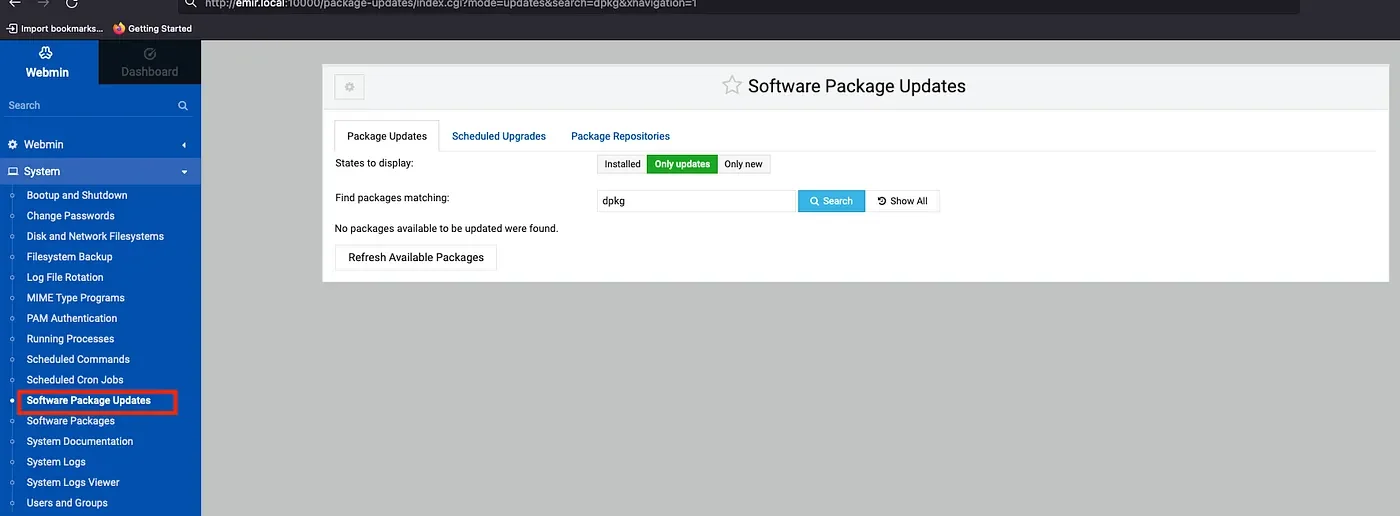
The screenshot shows the "Software Package Updates" module in the Webmin web interface, the entry point for everything that follows.
Setup
The only precondition the report states is access: to exploit the vulnerability, the user must have access to the "Software Package Updates" module. The testing was done on an Ubuntu system, which matters because the package manager decides which library file handles the command construction. No Webmin version, account type or tooling beyond a source editor with a search feature is given in the text.
Finding it
The first file worth reading in the module is update.cgi. When you update a package or install a new one, the request carries a u parameter, and that parameter is handled in update.cgi.
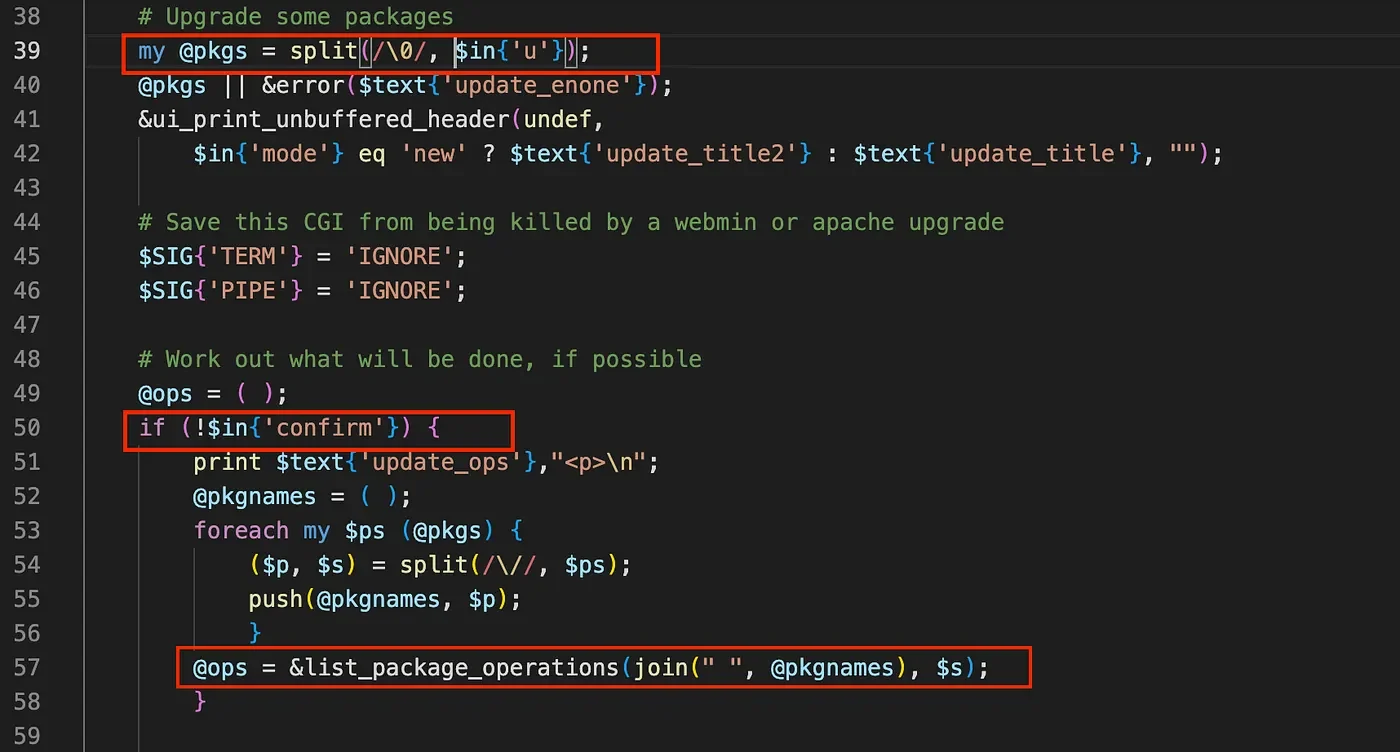
The file takes the u parameter (line 39), which specifies the package name, from the user, and checks whether the confirm parameter (line 50) is present in the request. If confirm is absent, it calls list_package_operations() with the pkgnames variable, which stores the package names (line 57).
list_package_operations() is not defined in update.cgi. The top of the file includes package-updates-lib.pl (line 4).

In package-updates-lib.pl the function is defined at line 408.
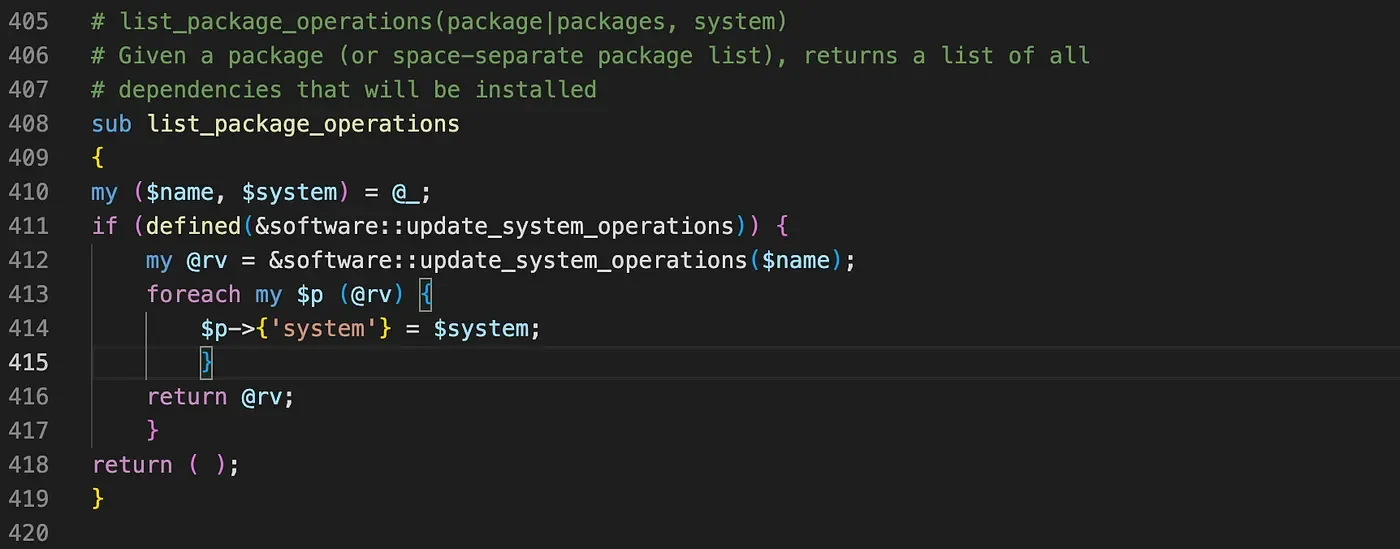
That function passes the value of $name, the package name, to update_system_operations() in the software file at line 412. Searching the codebase for that function name turns up two definitions: apt-lib.pl and yum-lib.pl. The naming convention says which is which: apt-lib.pl drives the apt package manager, yum-lib.pl drives yum. Both do the same job, only the commands differ, and since the test system is Ubuntu, apt-lib.pl is the file to read.
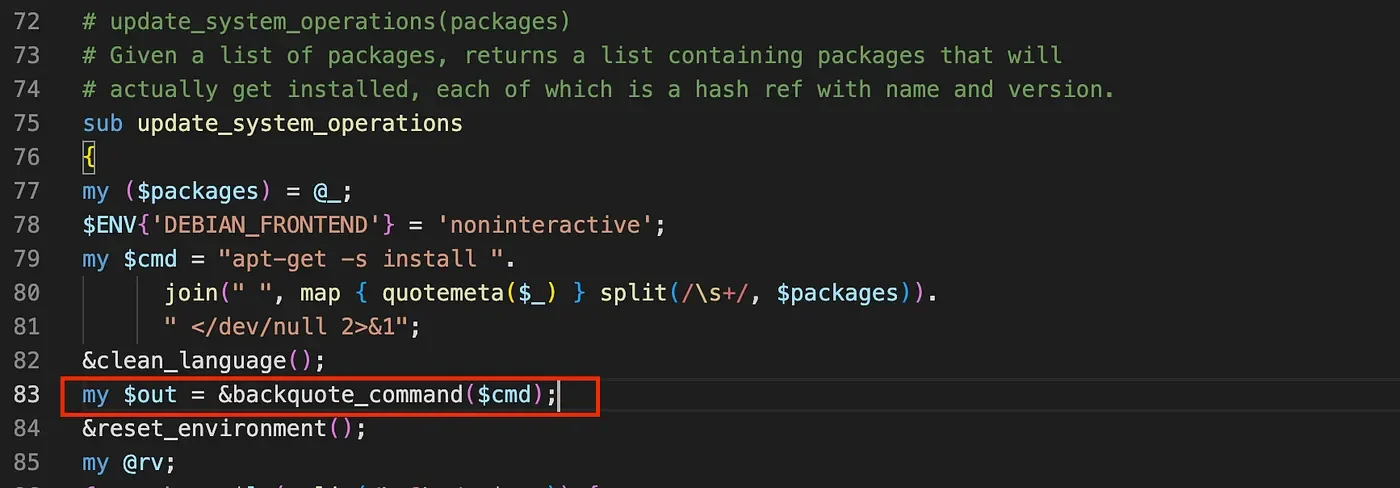
In apt-lib.pl, update_system_opeartions() is defined at line 75, and this is where commands start being run on the system. The commands go through &backquote_command(). By naming convention the researcher expected that function to sanitise what it runs and to block command injection from the user. That path looked closed.
Exploitation
The interesting case is the one where confirm is sent. The earlier analysis covered requests without confirm; now the researcher goes back to update.cgi and looks at what happens when the parameter is present.
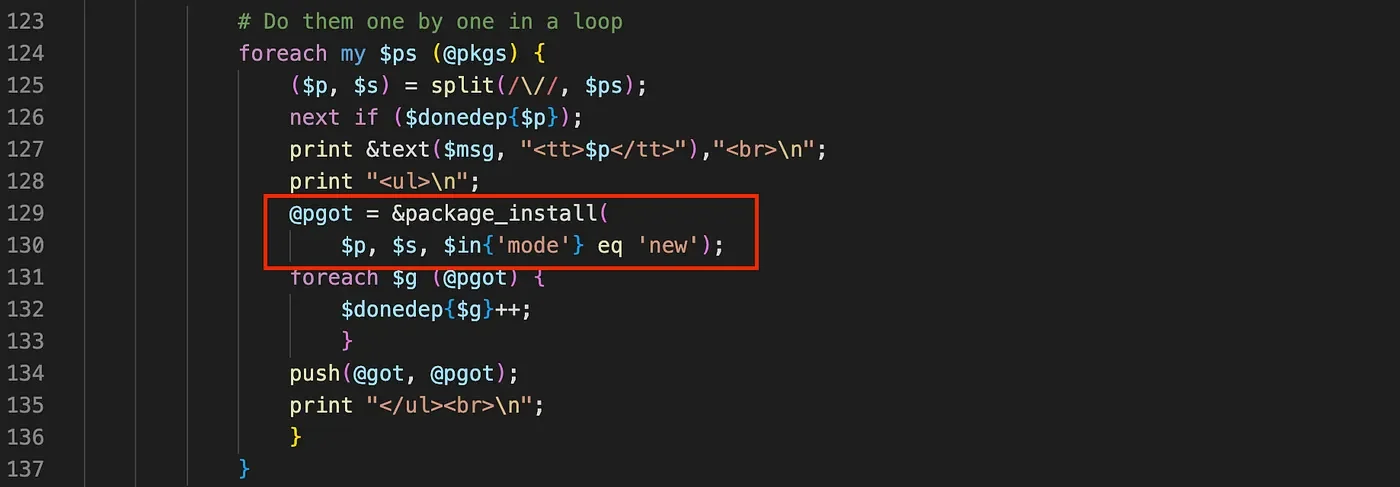
In update.cgi, outside the if block that checks confirm, there is a branch for installing a package that calls package_install() at line 129. Following that call into package-updates-lib.pl:
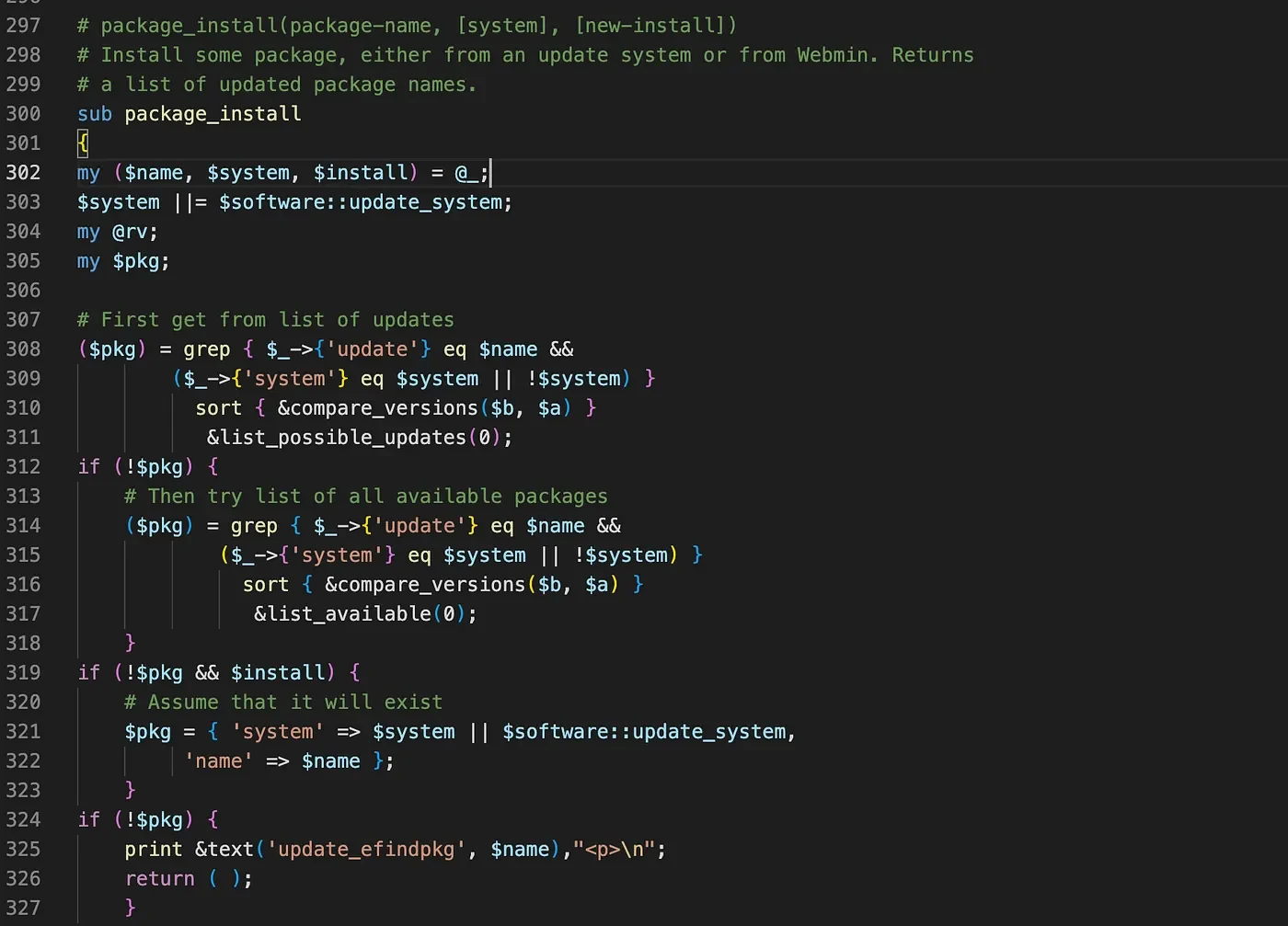
The function is defined at line 300. It is fairly long, but further down, at line 345, it calls update_system_install() with the $name variable, which is the package name supplied by the user. As established, that family of functions is defined in apt-lib.pl, so the next stop is that file again.
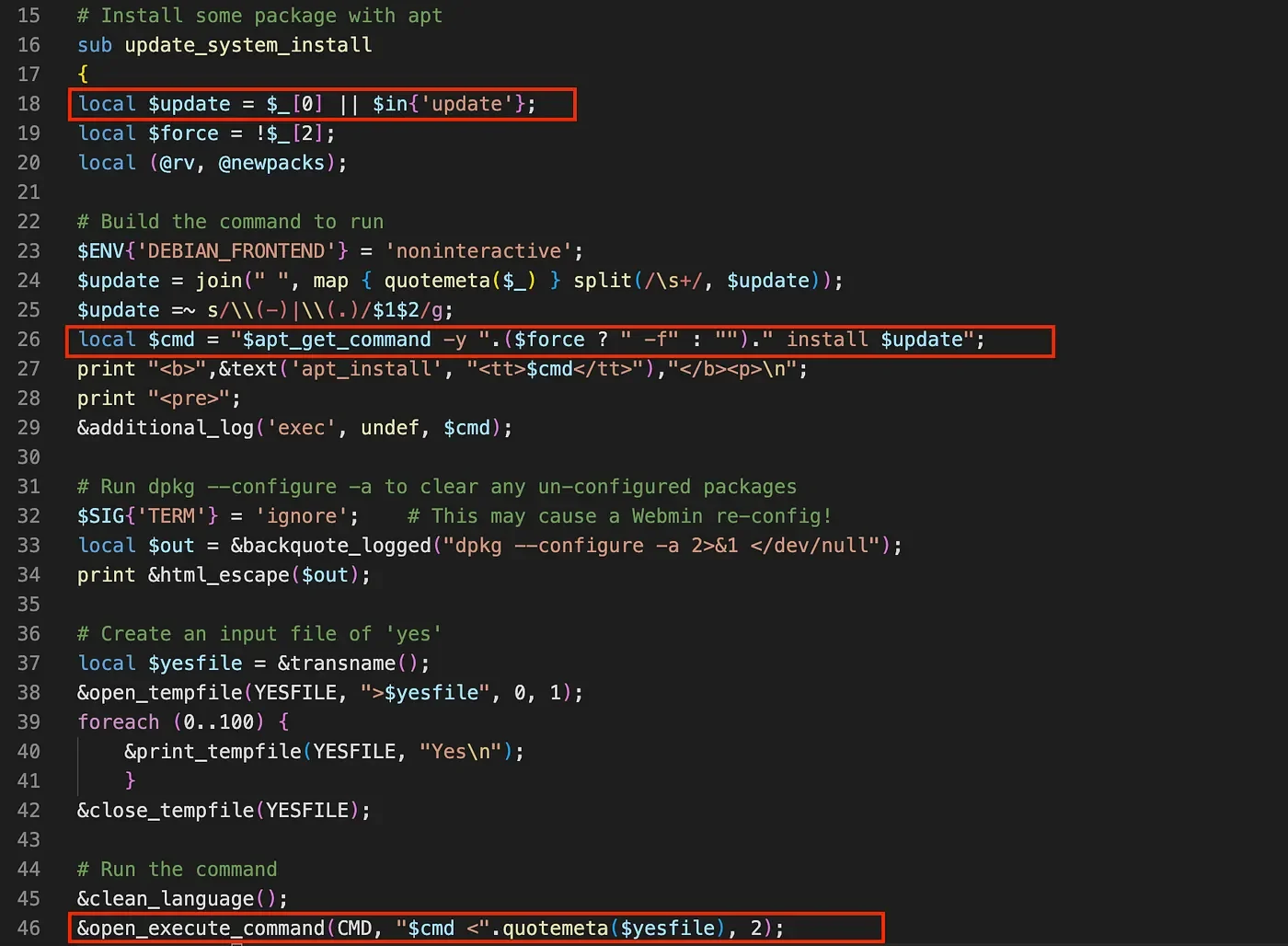
Reading apt-lib.pl, at line 18 the first parameter of the function, the package name the user sent, is assigned to a variable called $update. At line 26 that variable is placed into the command with no validation, in the shape of apt-get -y install user_controlled_variable. At line 46 the command is executed directly on the system, again with no control mechanism.
That gives the full chain: send a new package installation request with the confirm parameter and put a command to run in the package name. The command runs with root privileges.
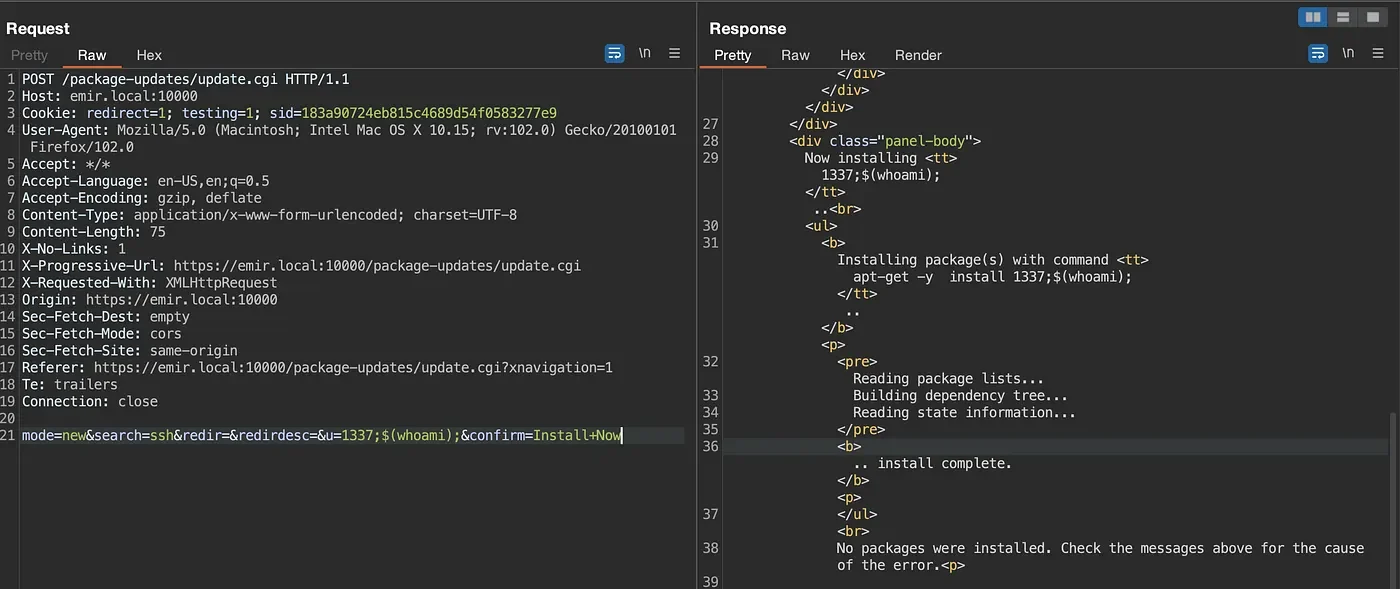
The screenshot is captioned as the HTTP request for exploiting the vulnerability.

The second screenshot is captioned as the commands running on the system after the request.
Root cause
The mistake is in apt-lib.pl: the user-controlled package name is interpolated straight into a shell command (apt-get -y install ...) and executed, with no escaping or validation at either point. The backquote_command() wrapper used on the update_system_operations() path does not protect the update_system_install() path, which is reached only when confirm is supplied. The confirm check in update.cgi therefore does not act as a security boundary; it merely selects a different code path, and that path is the unsafe one.
Impact
An attacker who can reach the "Software Package Updates" module can run arbitrary commands on the host with root privileges. The precondition is access to that module, so the vulnerability turns a Webmin account with that permission into full control of the underlying system. The report does not state which Webmin versions are affected, nor whether the module is reachable by lower-privileged users in a default configuration.
Fix
The report does not describe a patch or the code change that was made.
Variants to test
- Test the
yum-lib.plcounterpart ofupdate_system_install()on a yum-based host. A positive result is a package name containing shell metacharacters that produces command output or a side effect on the system. - Test the
update_system_operations()path (noconfirmparameter) on both package managers, since the report only establishes thatbackquote_command()looked safe by naming convention. A positive result is command execution through that path as well. - Test other Webmin modules that accept package or file names and shell out to system tools. A positive result is a request parameter that reaches a command line without escaping.
- Test whether an account with access to the module but without full administrative rights can reach the same request. A positive result is command execution from that lower-privileged session.
What happened, in plain words
A security researcher was working on a red team engagement. Red teaming is a job where security people pretend to be attackers, with permission, to find out how far they could get inside a company's systems. While looking through what a customer had installed, the researcher noticed a piece of software called Webmin.
Webmin is a control panel that runs in a web browser. Think of it like the settings app on a phone, but for a whole server: instead of tapping through menus to change your ringtone, an administrator opens Webmin in a browser to create user accounts, manage disk space, start and stop services, and edit configuration files. It can also manage other programs such as the Apache web server, PHP or MySQL. Because it controls so much, Webmin is a very interesting target: whoever controls Webmin usually controls the whole machine behind it.
The researcher knew what Webmin was for but had never looked at how it works inside. So he installed a copy on his own machine and started reading its code. That is a common way to start: you cannot break something you do not understand, and reading the code is how you understand it.
The result of that reading was a serious bug. In one part of Webmin, the Software Package Updates module, a value typed by the user (the name of a package to install) was passed straight into a command that the server runs, without being checked. By putting extra characters into that package name, an attacker could make the server run their own commands, with the highest level of permission on the machine (called root).
This kind of bug is called remote code execution, or RCE: someone sitting at another computer can make the server run code of their choosing. The specific mechanism is OS command injection: the attacker's text is smuggled into a command meant for the operating system's command line.
The screenshot shows the "Software Package Updates" module inside the Webmin web interface. This is the screen an administrator uses to update installed software or install new software, and it is the entry point for everything that follows.
Some background before we start
A few ideas come up again and again below, so here they are from zero.
A server and a browser. When you open a website, your browser sends a request over the network to a server, and the server sends back a page. Webmin works the same way: the administrator's browser talks to a Webmin program running on the server.
A module. Webmin is not one giant program. It is split into modules, each one a folder of files that handles one job: one module for users, one for disks, one for software packages. The module in this story is called "Software Package Updates" and its files live in a folder named /package-updates/.
A package. On Linux, software is usually installed in bundles called packages. A package manager is the tool that fetches and installs them. On Ubuntu the package manager is called apt, and the command used to install something is apt-get install <name>. On other Linux systems a different manager called yum is used. Webmin supports both, which is why the code has two similar files, one per package manager.
Source code and .cgi / .pl files. The files the researcher reads are plain text files containing the program. A .cgi file is a script that a web server runs when a particular web address is requested; a .pl file is a library, a file of shared functions that other files can use. A function is a named block of code that does one job; when another part of the program needs that job done, it "calls" the function by name and hands it some values, called parameters or arguments.
A parameter in a request. When you fill in a form on a website and press submit, the browser sends the values you typed to the server. Each value has a name. In a web address these look like ?name=value&other=value. The code on the server reads them by name. In this story the important names are u (the package name) and confirm (a flag saying "yes, I really mean it").
Command injection. The server sometimes needs to run an operating system command, for example apt-get install something. If the program builds that command by gluing together fixed text and text supplied by the user, and the user's text contains special characters that the command line treats as instructions (like ;, | or backticks), the user can append their own command. The server then runs it as if the administrator had typed it. That is command injection: the attacker injects commands into a command.
Root. On Linux, every process runs with a set of permissions. The most powerful account is called root, and it can do anything: read any file, change any setting, install or remove anything. If injected commands run as root, the attacker effectively owns the machine.
Sanitising. To prevent injection, a program can sanitise user input: check it, clean it, or escape special characters so they are treated as ordinary text rather than instructions. When code does not sanitise, it is vulnerable.
A note on credit. The researcher thanks his friend Numan Türle for help throughout the research.
Setup
The report states one precondition: to exploit the vulnerability, the user must have access to the "Software Package Updates" module. In other words, you need a Webmin login that is allowed to open that part of the interface. The testing was done on an Ubuntu system. That detail matters because the operating system decides which package manager, and therefore which library file, builds the command. The report does not give a Webmin version, an account type, or any tool beyond a source code editor with a search feature.
Finding it
The researcher starts with the file update.cgi, because that is the script the web server runs when someone uses the module. When you update a package or install a new one, the request carries a u parameter, and update.cgi is where that parameter is handled.
The screenshot shows the relevant part of /package-updates/update.cgi.
Here is what the researcher reads in that file, step by step:
- On line 39, the file takes the
uparameter from the user. This is the package name. - On line 50, it checks whether the
confirmparameter is present in the request. - If
confirmis absent, it calls a function namedlist_package_operations(), passing it a variable calledpkgnames, which stores the package names (line 57).
Why does this matter? Because the code takes two different routes depending on whether confirm was sent. The researcher follows the first route first, the one without confirm.
list_package_operations() is not defined in update.cgi itself. At the top of the file, line 4, another file is included: package-updates-lib.pl. "Included" means "pull this other file in and use its functions here". So the definition must be in that library file.
The screenshot shows the top of /package-updates/update.cgi, where package-updates-lib.pl is included on line 4.
In package-updates-lib.pl, the function is defined at line 408.
The screenshot shows /package-updates/package-updates-lib.pl around that definition.
That function passes the value of $name, the package name, to another function called update_system_operations(), in a file named software, at line 412. So the chain continues: one function hands the package name to the next.
To find where update_system_operations() is defined, the researcher uses the search feature of his code editor to look for the name across all the files. Two definitions turn up: one in apt-lib.pl and one in yum-lib.pl. The names tell you which is which: apt-lib.pl drives the apt package manager, yum-lib.pl drives yum. Both do the same job, only the commands differ. Since the test machine is Ubuntu, apt-lib.pl is the file to read.
The screenshot shows /software/apt-lib.pl.
In apt-lib.pl, update_system_opeartions() is defined at line 75, and this is where commands start being run on the system. The commands go through a function called &backquote_command(). From the name, the researcher expected that this function safely controls whatever it runs and stops a user from injecting commands. On this route, the door looked closed.
Exploitation
The interesting case is the other route: the one where confirm is sent. The earlier analysis covered requests without confirm. Now the researcher goes back to update.cgi and looks at what happens when the parameter is present.
The screenshot shows /package-updates/update.cgi.
In update.cgi, outside the if block that checks confirm, there is a branch for installing a package. That branch calls package_install() at line 129. Following that call into package-updates-lib.pl:
The screenshot shows /package-updates/package-updates-lib.pl around the package_install() function.
The function is defined at line 300. It is fairly long, but further down, at line 345, it calls update_system_install() with the $name variable, which is the package name supplied by the user. As established earlier, that family of functions is defined in apt-lib.pl, so the next stop is that file again.
Reading apt-lib.pl, the researcher finds three things:
- At line 18, the first parameter of the function, the package name the user sent, is assigned to a variable called
$update. - At line 26, that variable is placed into the command with no validation, in the shape of
apt-get -y install user_controlled_variable. - At line 46, the command is executed directly on the system, again with no control mechanism.
In plain words: the program takes text typed by the user, drops it into a command line, and runs it. Nothing checks whether the text is really a package name. If the text contains command line special characters, the operating system will treat them as instructions.
That gives the full chain. Send a new package installation request with the confirm parameter, and put a command to run in the package name. The command runs with root privileges.
The screenshot is captioned as the HTTP request for exploiting the vulnerability.
The second screenshot is captioned as the commands running on the system after the request.
Root cause
The mistake is in apt-lib.pl: the user-controlled package name is inserted straight into a shell command (apt-get -y install ...) and executed, with no escaping or validation at either point. The backquote_command() wrapper used on the update_system_operations() path does not protect the update_system_install() path, which is reached only when confirm is supplied. The confirm check in update.cgi therefore does not act as a security boundary. It merely selects a different code path, and that path is the unsafe one.
Impact
An attacker who can reach the "Software Package Updates" module can run arbitrary commands on the host with root privileges. The precondition is access to that module, so the vulnerability turns a Webmin account with that permission into full control of the underlying system. The report does not state which Webmin versions are affected, nor whether the module is reachable by lower-privileged users in a default configuration.
Fix
Variants to test
- Test the
yum-lib.plcounterpart ofupdate_system_install()on a yum-based host. A positive result is a package name containing shell metacharacters that produces command output or a side effect on the system. - Test the
update_system_operations()path (noconfirmparameter) on both package managers, since the report only establishes thatbackquote_command()looked safe by naming convention. A positive result is command execution through that path as well. - Test other Webmin modules that accept package or file names and shell out to system tools. A positive result is a request parameter that reaches a command line without escaping.
- Test whether an account with access to the module but without full administrative rights can reach the same request. A positive result is command execution from that lower-privileged session.
Glossary
- apt: the package manager on Ubuntu and other Debian-based Linux systems; it installs, updates and removes software packages.
- backquote_command(): a function in Webmin used to run a system command; the researcher expected it to sanitise what it runs.
- CGI: a script that a web server runs when a particular web address is requested;
.cgifiles are of this kind. - Command injection: a bug where text supplied by a user is inserted into an operating system command and executed, so the user can add their own commands.
- confirm parameter: a value in the request that tells Webmin the user really wants to install a package; its presence selects a different code path.
- CVE: a public identifier for a known security vulnerability, so people can refer to it unambiguously.
- Function: a named block of code that does one job and can be called from elsewhere in the program.
- Library file: a file of shared functions that other files include and use;
.plfiles here. - Module: one part of Webmin, stored in its own folder, that handles one job such as software updates.
- Package: a bundle of software that a package manager installs, updates or removes.
- Package manager: the tool that installs and updates packages, such as
aptoryum. - Parameter: a named value sent in a web request, or a value handed to a function.
- Payload: the text an attacker sends to trigger the bug; here, the package name containing extra commands.
- Red teaming: authorised simulated attacking, done to find weaknesses before real attackers do.
- Remote code execution (RCE): a bug that lets someone on another machine make the server run code of their choosing.
- Request: the message a browser sends to a server asking for a page or an action.
- Root: the most powerful account on a Linux system; it can do anything.
- Sanitise: to check or clean user input so that special characters cannot be treated as instructions.
- Shell: the program on Linux that reads and runs typed commands; it is what interprets special characters.
- Source code: the human-readable text of a program.
- u parameter: the request value that carries the package name in the Software Package Updates module.
- update.cgi: the script in the
/package-updates/folder that handles package update and install requests. - Webmin: a web-based control panel for managing Unix-like servers from a browser.
- yum: a package manager used on some Linux systems, such as Red Hat-based ones.



