Insecure Local Data Storage : Application stores data using a binary sqlite database
The LinkedIn Android app stored user data in a local SQLite database file without encryption. An attacker with access to the device's filesystem could read that data, which the report frames as a privacy violation.
 Originally disclosed on HackerOne
- Fixed in 21 months
- Paid in 21 months
- Disclosed after 22 months
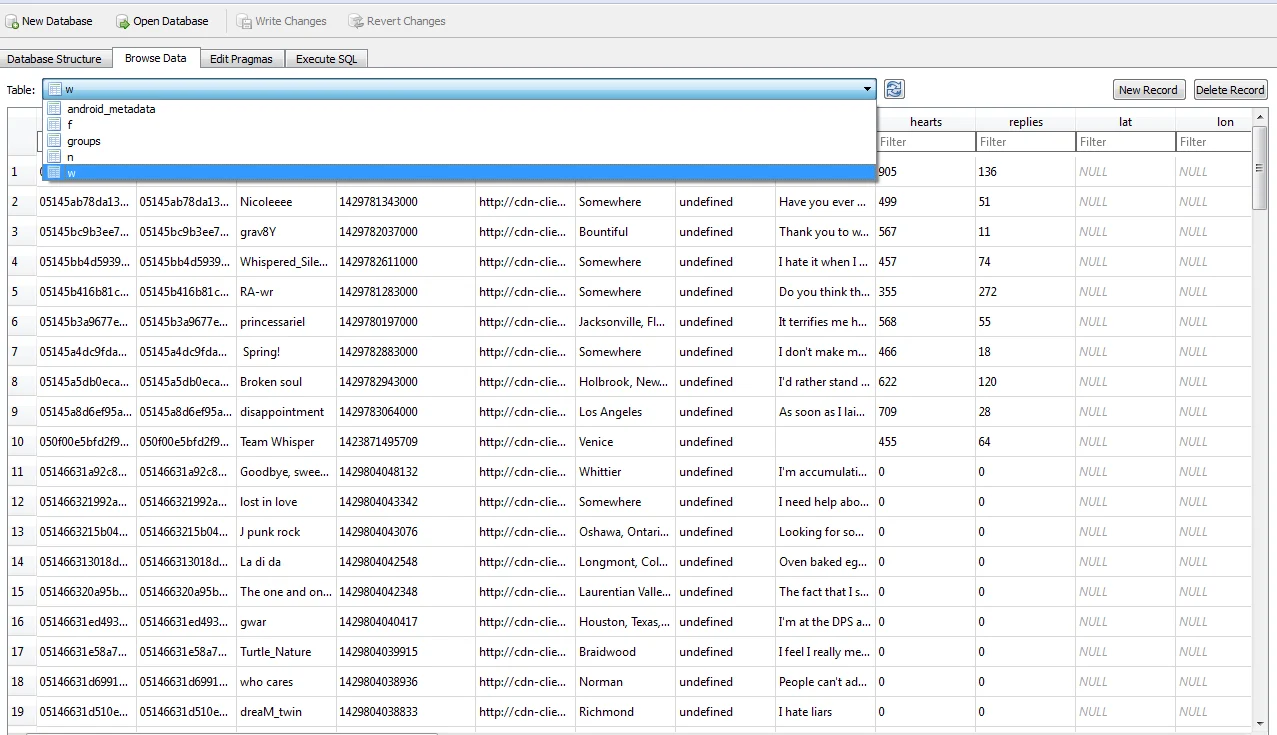
Android provides several options for developers to save persistent application data. The local DB should store data depending on whether the data should be private to your application or accessible to other applications and users. In any case, sensible data always have to be encrypted to avoid privacy violation. Linkedin App keeps user data in a SQLite database
w.db
OWASP: Insecure Storage
OWASP: Insecure Data Storage
Attachments
What the report shows
The feature under examination is the application's local data storage on Android. The researcher's starting point is the platform's own guidance: Android offers several ways for developers to persist application data, and the choice of storage should depend on whether the data is private to the application or shared with other applications and users. The report adds that sensitive data should always be encrypted to avoid a privacy violation.
The finding is that the application keeps user data in a SQLite database. The report names the file:
w.db
That is the whole of the technical detail: a database file on the device holding user data, with no encryption described. The researcher classifies the issue against two OWASP categories, insecure storage and insecure data storage, and attaches a single screenshot.
The screenshot is captioned SQLite_-_PlainText.png and sits under the report's attachments heading.
The report records a bounty of 50.00 USD. It does not give a severity rating or a CVSS score, and it does not describe a fix or a retest.
Root cause
The report states that the application keeps user data in a SQLite database and that sensitive data should be encrypted. The report repeats Android's guidance that the storage choice should depend on whether data is private or shared, and that sensitive data should be encrypted. The mistake is therefore at the storage layer rather than in any single endpoint or parameter.
Impact
The report's framing is that sensitive data must be encrypted to avoid a privacy violation. What the report does not do is demonstrate a path from that file to an attacker. On a stock, non-rooted device an application's private data directory is not readable by other applications, so the practical exposure depends on the device state and on what else can reach the file. The report leaves that chain unstated, and it should be read as an insecure storage finding rather than a proven data breach.
How this kind of bug works
Mobile applications persist data in several places: shared preferences, SQLite databases, internal files, the cache directory, and external storage. Each has a different exposure profile. Internal storage is sandboxed per application, external storage is world readable on older Android versions, and backups can copy application data off the device entirely.
Insecure storage happens when data that deserves protection is written somewhere with weaker protection than it needs, or in a form that can be read without a key. A SQLite database is a plain file: anyone who can open it can read every row. Encryption at rest, whether through a library that encrypts the database or through field level encryption with keys held in the Android keystore, changes that. So does keeping sensitive values out of local storage altogether and fetching them when needed.
The bug class is common because the default APIs are convenient and unencrypted, and because developers reasonably assume the sandbox is enough. It becomes serious when the data includes credentials, tokens, message content or personal information, and when the threat model includes lost devices, rooted devices, malicious applications with elevated privileges, or backup extraction.
How to test for it
- Obtain a test build or the published application and install it on a device or emulator you control. A rooted device or an emulator with root access makes the private data directory reachable.
- Exercise the application so it caches the data you care about: log in, open conversations, sync, and let background jobs run.
- Inspect the application's data directory. Look for
.db,.sqliteand.db-walfiles, shared preference XML files, and anything under the cache and files directories. - Pull the files and open databases with the
sqlite3command line tool or a GUI browser. Check whether tables contain readable values for the fields you expect to be sensitive. - Check external storage and the backup configuration as separate paths: whether the application writes to shared storage, and whether it permits backup of its data.
- Record the exact file path, the table and column names, and a redacted sample of the values, then tie each value back to an action you took in the application so the data's origin is unambiguous.
A positive result is a file you can read, containing values that map to real user data and that the application treats as private. Common false positives are values that are already public, identifiers that carry no sensitivity, encrypted blobs you have mistaken for plain text, and data that only exists because your test device is rooted, where the report does not explain why that state is reachable in the threat model. Another frequent mistake is reporting the mere presence of a database file without showing what is inside it.
How it is fixed
Use an encrypted database or encrypt sensitive fields before writing them, with keys protected by the platform keystore. Keep secrets out of local storage where possible and hold them in memory for the session. Disable backups of sensitive data or exclude the relevant files from backup. Avoid external storage for anything private. Clear cached data on logout, and review what is written to logs and crash reports as part of the same exercise.
Hunting notes
This class hides in messaging, email, banking, health and enterprise applications, anywhere a session token or personal record is cached for offline use. Recon signals include an application that advertises offline mode, a large local cache, or sync features, and any published build you can install and exercise. Showing impact means connecting a readable value to a concrete consequence: a session token that still works, a message body that was meant to be private, or a credential that unlocks another system. Programs accept these reports far more readily when the evidence includes the file path, the redacted contents, and the step in the application that produced them.
What happened, in plain words
This report is about an Android app and where it keeps your data on the phone itself. Android gives app developers several ways to save data so it survives after the app is closed. The choice of method should depend on whether the data is meant to stay private to the app or be shared with other apps and users. The report's position is that sensitive data should always be encrypted, so that a privacy violation cannot happen.
The researcher found that the app stores user data in a SQLite database. SQLite is a small, self-contained database engine: think of it as a single spreadsheet file that an app can read and write without needing a separate database server. The report names the file:
w.db
That is the whole of the technical detail: a database file on the device holding user data, with no encryption described. The researcher files the issue under two OWASP categories, insecure storage and insecure data storage. OWASP is a well-known non-profit project that publishes guidance on application security, and these categories are its labels for data kept somewhere too weak or in a readable form.
A single screenshot is attached as evidence.
The screenshot is captioned SQLite_-_PlainText.png and sits under the report's attachments heading. Plain text here means exactly what it sounds like: anyone who can open the file can read the values, the same way you can read a text document, with no password or key in the way.
The report records a bounty of 50.00 USD. It does not give a severity rating or a CVSS score, and it does not describe a fix or a retest.
In general, how this kind of bug works
Mobile apps save data in several places: shared preferences (small key-value stores), SQLite databases, internal files, the cache directory, and external storage such as a shared SD card. Each has a different exposure profile. Internal storage is sandboxed per app, meaning the operating system keeps one app's files away from other apps. External storage was world readable on older Android versions. Backups can copy app data off the device entirely.
Insecure storage happens when data that deserves protection is written somewhere with weaker protection than it needs, or in a form that can be read without a key. A useful comparison is leaving your passport on the kitchen table instead of in a locked drawer: the house may be locked, but anyone already inside, or anyone who gets a copy of the key, can pick it up. A SQLite database is a plain file, so anyone who can open it can read every row. Encryption at rest, whether through a library that encrypts the database or through field-level encryption with keys held in the Android keystore, changes that. So does keeping sensitive values out of local storage altogether and fetching them when needed.
The bug class is common because the default APIs are convenient and unencrypted, and because developers reasonably assume the sandbox is enough. It becomes serious when the data includes credentials, tokens, message content or personal information, and when the threat model includes lost devices, rooted devices, malicious apps with elevated privileges, or backup extraction. A token, in this context, is a short string that proves you are logged in, a bit like a cloakroom ticket: whoever holds it can collect your coat.
How to test for it
- Obtain a test build or the published app and install it on a device or emulator you control. A rooted device or an emulator with root access makes the private data directory reachable. Root access means the highest level of permission on the system, able to read any file.
- Exercise the app so it caches the data you care about: log in, open conversations, sync, and let background jobs run. This matters because the file only contains what the app has actually written.
- Inspect the app's data directory. Look for
.db,.sqliteand.db-walfiles, shared preference XML files, and anything under the cache and files directories. The.db-walfile is a write-ahead log, a companion file where SQLite records changes before merging them into the main database. - Pull the files and open databases with the
sqlite3command line tool or a GUI browser. Check whether tables contain readable values for the fields you expect to be sensitive. A table is a grid of rows and columns inside the database. - Check external storage and the backup configuration as separate paths: whether the app writes to shared storage, and whether it permits backup of its data.
- Record the exact file path, the table and column names, and a redacted sample of the values, then tie each value back to an action you took in the app so the data's origin is unambiguous. Redacted means the sensitive parts are blanked out, so the report proves the point without exposing a real person's data.
A positive result is a file you can read, containing values that map to real user data and that the app treats as private. Common false positives are values that are already public, identifiers that carry no sensitivity, encrypted blobs you have mistaken for plain text, and data that only exists because your test device is rooted, where the report does not explain why that state is reachable in the threat model. Another frequent mistake is reporting the mere presence of a database file without showing what is inside it.
How it is fixed
Use an encrypted database or encrypt sensitive fields before writing them, with keys protected by the platform keystore. Keep secrets out of local storage where possible and hold them in memory for the session. Disable backups of sensitive data or exclude the relevant files from backup. Avoid external storage for anything private. Clear cached data on logout, and review what is written to logs and crash reports as part of the same exercise.
Where to look for it
This class hides in messaging, email, banking, health and enterprise apps, anywhere a session token or personal record is cached for offline use. Recon signals include an app that advertises offline mode, a large local cache, or sync features, and any published build you can install and exercise. Showing impact means connecting a readable value to a concrete consequence: a session token that still works, a message body that was meant to be private, or a credential that unlocks another system. Programs accept these reports far more readily when the evidence includes the file path, the redacted contents, and the step in the app that produced them.
Glossary
- Android: the mobile operating system made by Google, used on many phones and tablets.
- App sandbox: the operating system rule that keeps one app's private files away from other apps.
- Backup extraction: copying an app's saved data off the device through the system backup feature.
- Bounty: a payment a company makes to a researcher who reports a valid security issue.
- Cache: a store of data kept for speed, so the app does not have to fetch it again.
- CVSS: a standard scoring system for rating the severity of a security issue.
- Encryption: scrambling data with a key so that only someone holding the key can read it.
- Encryption at rest: encrypting data while it is stored, as opposed to while it is being sent.
- External storage: shared storage on a device, such as an SD card, that other apps may also reach.
- False positive: a finding that looks like a problem but is not one on closer inspection.
- Internal storage: the private area of a device where an app keeps its own files.
- Keystore: the Android component that stores cryptographic keys securely on the device.
- OWASP: a non-profit project that publishes guidance and categories for application security.
- Plain text: data stored in readable form, with no encryption applied.
- Redacted: with sensitive parts removed or blanked out.
- Root access: the highest permission level on a device, able to read any file.
- Shared preferences: a small key-value store Android apps use for simple settings and data.
- SQLite: a small database engine that keeps all data in a single file.
- Table: a grid of rows and columns inside a database.
- Threat model: a description of who might attack a system and how.
- Token: a short string that proves identity or permission, such as a logged-in session.
- Write-ahead log: a companion file where SQLite records changes before merging them into the main database.