Wordpress 4.7.2 - Two XSS in Media Upload when file too large.
WordPress interpolated an uploaded file's name into an error message without escaping it, then appended that message to the page as HTML. An attacker could craft a filename containing markup so that a victim uploading it would run script inside the administrator's control panel.

- Triaged in 3 hours
- Fixed in 3 months
- Paid in 4 months
- Disclosed after 5 months
Description
An attacker can inject a malicious script in to the filename which a victim tries to upload leading to XSS inside the administrators control panel.
Two different "file to large" cases end up in interpolating the file name and appending it into DOM unsanitized leading to XSS.
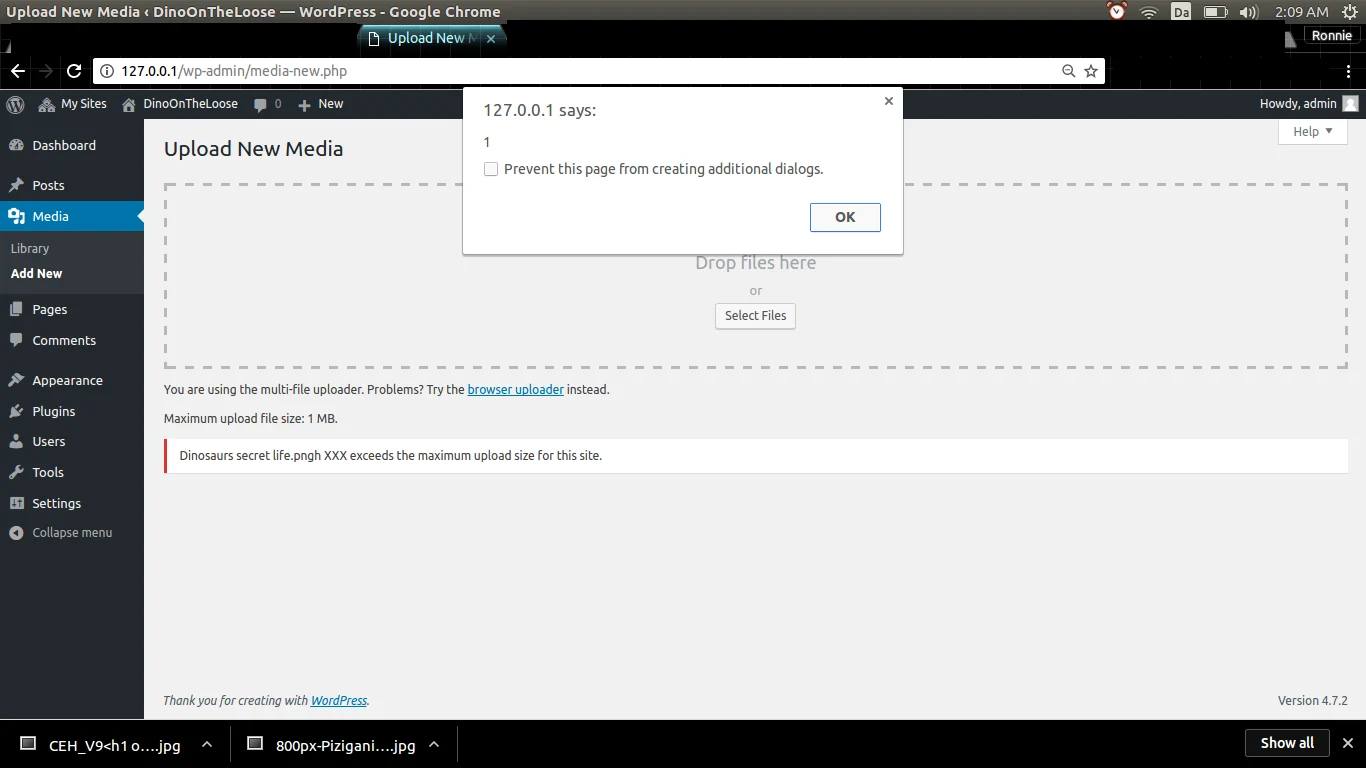
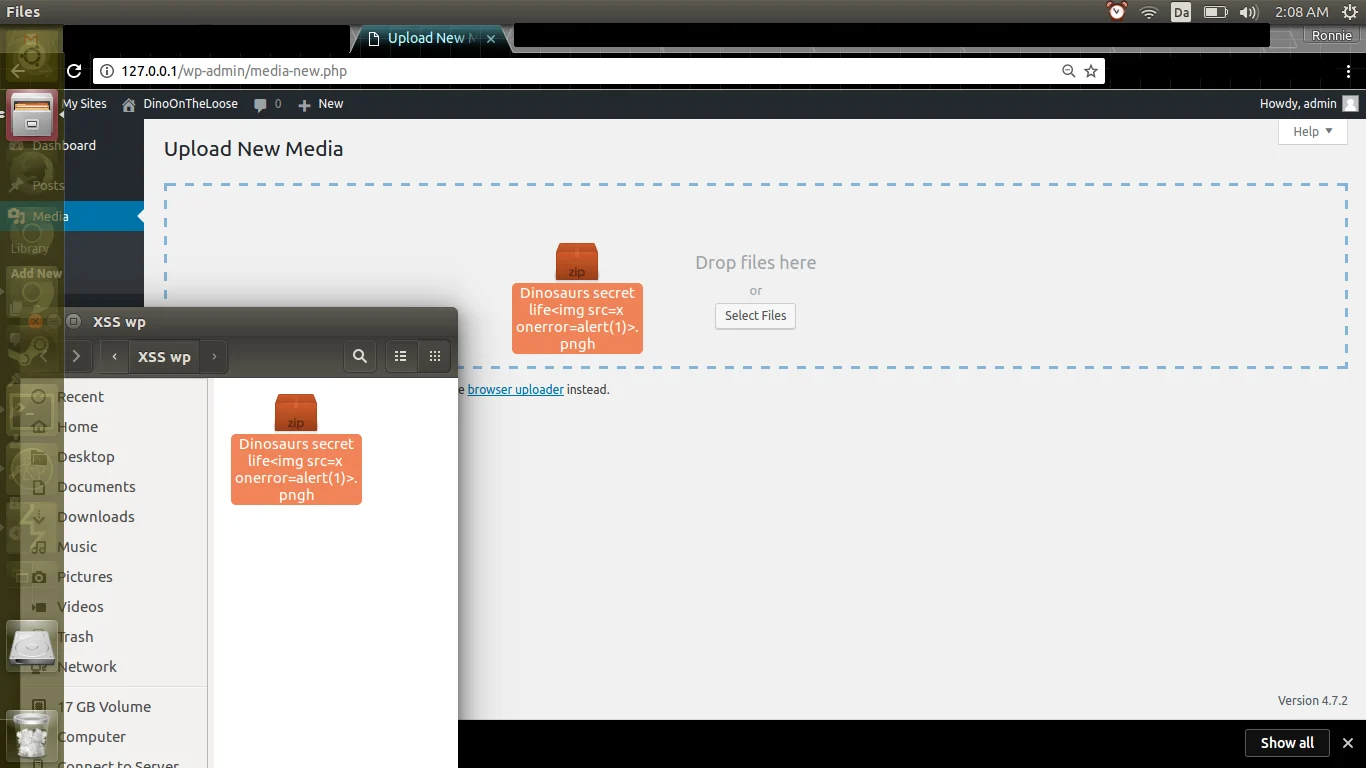
I have attached pictures of one of the cases, in the attached case the file was 12.4 MB, in a freshly installed environment. For reproduction note that any file type can be used (.jar whatever) as the vuln happens before the type is validated.
PoC
Create a 20MB file called
Dinosaurs secret life<img src=x onerror=alert(1)>.png
Goto your wordpress site http://127.0.0.1/wp-admin/media-new.php and dragndrop or use file manager or choose the file via. the "Select Files" button.
A error will appear with ... exceeds the maximum upload size for this site. along with a alert box to display that the payload has been executed.
Details on XSS
The file script-loader.php prepares an array of messages for use later.
	// error message for both plupload and swfupload
	$uploader_l10n = array(
                ...
		'file_exceeds_size_limit' => __('%s  exceeds the maximum upload size for this site.'),
		'big_upload_failed' => __('Please try uploading this file with the %1$sbrowser uploader%2$s.'),
		...
	);
The payload will be injected into the %s in the key file_exceeds_size_limit.
This happens because the $uploader_l10n is passed to handlers.min.js (non minified version shown)
and interpolated without escaping the value previously.
First the value passes trough a error case
// $uploader_l10n
case plupload.FILE_SIZE_ERROR:
			uploadSizeError(uploader, fileObj); // fileObj contains the filename payload in name attribute.
			break;
....
if ( max > hundredmb && fileObj.size > hundredmb )
				wpFileError( fileObj, pluploadL10n.big_upload_failed.replace('%1$s', '<a class="uploader-html" href="#">').replace('%2$s', '</a>') );
and lastely interpolated and appended to the dom.
function uploadSizeError( up, file, over100mb ) {
	var message;

	if ( over100mb )
		message = pluploadL10n.big_upload_queued.replace('%s', file.name) + ' ' + pluploadL10n.big_upload_failed.replace('%1$s', '<a class="uploader-html" href="#">').replace('%2$s', '</a>');
	else
		message = pluploadL10n.file_exceeds_size_limit.replace('%s', file.name);


	jQuery('#media-items').append('<div id="media-item-' + file.id + '" class="media-item error"><p>' + message + '</p></div>');
	up.removeFile(file);
}
The critical lines are
message = pluploadL10n.big_upload_queued.replace('%s', file.name) + ' ' + pluploadL10n.big_upload_failed.replace('%1$s', '<a class="uploader-html" href="#">').replace('%2$s', '</a>');
	else
		message = pluploadL10n.file_exceeds_size_limit.replace('%s', file.name);
Suggested fix:
Remove the filename or escape safely in context.
Attachments
Not written yet. The AI write-up for this report has not been written yet. The Original tab links to the source.
How it worked
Root cause
The file name was substituted into a localisation string and appended to the DOM as HTML without escaping, so markup in the name was treated as code.
Impact
An attacker could run script in an administrator's control panel session, but only if the victim uploads the crafted file.
What the attacker needed
Victim uploads the crafted file; file exceeds the upload size limit; access to the admin media upload page
The fix
The file name should be removed from the message or escaped safely for the HTML context before being appended.
How it was found
- Create an oversized file whose name contains markup.
- Open the media upload page in the WordPress admin area.
- Upload the file via drag-and-drop or the file selector.
- The size-limit error appears and the script in the name runs.
Explained by bugbounty.wiki with AI from the original and checked against quotes from it; it can still be wrong. Read the original before relying on a detail.
Not written yet. The AI write-up for this report has not been written yet. The Original tab links to the source.
When you upload a file, the site shows an error message that includes the file's name. This report found that the name was inserted into the page as if it were part of the page's code, so a name containing a script tag would run as code in the browser. That lets an attacker run their own script in an administrator's session if the admin uploads the file.
What is XSS?
Script an attacker supplies runs in another user's browser, on the target's origin, with that user's session.





