XSS via unicode characters in upload filename
WordPress did not properly sanitise uploaded filenames containing Unicode characters, causing the filename to become '-1' and be rendered as HTML. An attacker with upload privileges could upload a file with a script payload in its name, and when an administrator visited the file's page, the script would execute, potentially leading to privilege escalation.

- Triaged in 22 hours
- Fixed in 3.5 years
- Paid in 2.3 years
- Disclosed after 3.8 years
Wordpress has a vulnerability that could lead to javascript execution and (thus) privileged escalation via an admin visiting the wrong page via specially crafted JavaScript. Unicode characters are escaped by javascript but they are not escaped serverside. I've checked the latest version (4.6.1) at the time of writing this report and it is vulnerable.
Steps to reproduce:
- You will need a way to bypass javacsript in a post request. For purposes of this report I'll assume the free firefox plugin tamperdata is used.
- You will need an installation of wordpress with the capability of uploading files.
- Create a blank image file with a javascript alert i.e <script> alert('XSS') </script> and name the file a valid image extension such as .png
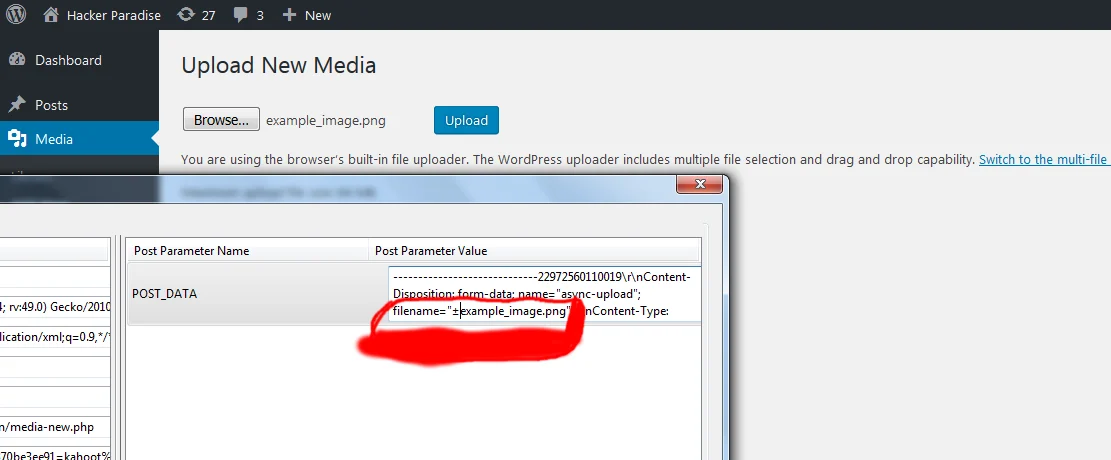
- In wordpress, go to the file upload screen on the side bar (Media -> Add new). Activate tamperdata and click upload. Use a special Unicode character at the begining of the filename. Note that for this step all that is required is upload privileged - see https://codex.wordpress.org/Roles_and_Capabilities
- The image page will be called "-1" visit that page. It will render as HTML.
Note that an image could be specially crafted with a 0-sized iframe and upon an administrator visiting the page could redirect via javascript to create another user account leading to privilege escalation.
Here is my explanation for the bug:
Unicode characters are not escaped server-side, but they appear to be escaped client side which can be bypassed. This can be shown by trying to upload a file with a unicode character and seeing the "Â" character before it. For example: "±myfile.png" would become "±myfile.png" - this was tested with tamperdata by watching the image field.
In wordpress\wp-admin\includes\file.php there is a function called "_wp_handle_upload" Ideally, this is where special characters should be escaped or dealt with. That functon calls "wp_unique_filename" which then calls "sanitize_file_name" which the return value is a number instead of a filename.
If a file with a valid file extension is given such as "myfile.png" intended behavior is that it will save the file. If it is given twice, then it will be named myfile-1.png and so on. However, because a special character can make a return value of 0 from the unique_filename function, it will result in "-1" being the file name. If another file is uploaded it will be called "-2" if it is in the same year and month folder. For example: "wordpress\wp-content\uploads\2016\10" if there is already a "-1" file there and a month passes -1 would go in the next folder. "wordpress\wp-content\uploads\2016\11"
Apache normally prevents javascript execution from images, however a filename such as "-1" will render text which can execute javascript.
The best mitigation would be to check for special characters in the _wp_handle_upload function.
(I'm new to writing hackerone reports, hopefully this is clear enough.)
Attachments
Not written yet. The AI write-up for this report has not been written yet. The Original tab links to the source.
How it worked
Root cause
Likely the filename sanitisation function returned a numeric value instead of a string when a Unicode character was present, and the resulting filename was not HTML-escaped before being displayed.
Impact
An attacker with upload privileges could execute JavaScript in an administrator's browser, potentially leading to privilege escalation by creating a new user account.
What the attacker needed
WordPress with file upload capability; Attacker has upload privileges; Victim (admin) visits the uploaded file's page
The fix
The upload handling function should check for and properly escape special characters in filenames.
How it was found
- Use a tool to intercept and modify the upload request.
- Have a WordPress installation where you can upload files.
- Create an image file containing JavaScript and give it a valid image extension.
- Go to the media upload screen, intercept the request, and add a special Unicode character at the start of the filename.
- Visit the page for the uploaded file, which will be named '-1', and it will render as HTML.
Explained by bugbounty.wiki with AI from the original and checked against quotes from it; it can still be wrong. Read the original before relying on a detail.
Not written yet. The AI write-up for this report has not been written yet. The Original tab links to the source.
When you upload a file to a website, the site usually cleans up the filename to make it safe. Here, a special character in the filename confused the cleanup code, so the file ended up with a name like '-1'. The site then showed that name as a web page without escaping it, so any code in the filename could run in the browser of anyone who viewed it, including an administrator.
What is XSS?
Script an attacker supplies runs in another user's browser, on the target's origin, with that user's session.




