[$10,000] Google Jules — The Silent Code Heist - Stealing Github Codes Remotely
The GitHub account linking flow on Google Jules accepted an OAuth code without validating a CSRF state token, so an attacker could link their own GitHub account to a victim's Jules profile. Once linked, code the victim later wrote or pushed through Jules could be sent to the attacker's repository.

Bug Bounty Tips
The full write-up lives on its author's site
It belongs to its author, so we link to it rather than copy it. The other two tabs are our own rewrites, checked against it.
Context
Google Jules (jules.google.com) is a platform where developers can write, manage and push code directly to their repositories. To make code syncing seamless, the platform lets users link their GitHub accounts, so work done in Jules can be pushed to GitHub.
That GitHub linking step is an OAuth flow. When you connect a third-party service via OAuth, the application is supposed to issue a unique, unpredictable CSRF token, typically a state parameter bound to your session. That token ensures an attacker cannot trick your browser into linking their account instead of yours. The issue described here is that Jules did not do this, and the result was a $10,000 bounty on the Google VRP.
Setup
The only tooling the researcher mentions is Burp Suite, kept running in the background to intercept traffic while walking through the GitHub linking process. No versions, browser details or account configuration beyond that are given.
Finding it
The researcher clicked the Connect GitHub button with Burp Suite intercepting, and looked at the request that tied GitHub to the Jules account:
GET /auth/github?code=6e75932d1de9e0a049&state=currentJulesAuthUser%3D0 HTTP/2Host: jules.google.com
Two things stood out. The state parameter was entirely static (currentJulesAuthUser%3D0), and the server backend completely ignored it. There was no CSRF token validating that the user initiating the link was the one actually authorising it. The application was blindly accepting any valid GitHub OAuth code parameter passed via a simple GET request.
Exploitation
Because the request lacked CSRF protection, an attacker could manipulate the flow to quietly link their GitHub account to an unsuspecting victim's Google Jules account.
Step 1: Capture the code
The attacker opens https://jules.google.com and clicks "Connect GitHub" in his own browser, then authorises the app.
Step 2: Intercept the OAuth code
The attacker intercepts his own generated GitHub OAuth code.
Step 3: Build the trap
The attacker takes that OAuth code and constructs a malicious link containing it:
https://jules.google.com/auth/github?code=ATTACKER_OAUTH_CODE&state=currentJulesAuthUser%3D0
The code is the attacker's own valid GitHub OAuth code; the state is the same static value seen in the intercepted request.
Step 4: Send to the victim
The attacker tricks the victim into opening the link.
Step 5: Silent linkage
The victim opened the URL and nothing happened: the page only said to "Sign in to GitHub", and the victim closed the tab. Despite that, the attacker's GitHub account was now silently linked to the victim's Google Jules profile.
Step 6: Code heist
If the victim later uses Jules to write, edit or push code, those private source files get pushed straight to the attacker's connected GitHub repository, leaking valuable source code and proprietary commands.
Root cause
The OAuth linking endpoint accepted a GitHub code supplied by anyone, over a plain GET request, without a per-session, unpredictable state value that the backend actually verifies. The state parameter existed in the URL but was a fixed string (currentJulesAuthUser%3D0) and was ignored server-side, so it provided no binding between the browser making the request and the account being linked. Any valid GitHub OAuth code was therefore enough to attach that GitHub account to whichever Jules session sent it.
Impact
An attacker who obtains a valid GitHub OAuth code for their own account can link it to a victim's Jules profile by getting the victim to open a crafted URL. From then on, code the victim writes, edits or pushes through Jules is pushed to the attacker's GitHub repository, leaking private source code and proprietary commands. The victim sees no confirmation: in the described flow the page only asked them to sign in to GitHub, and the linkage happened anyway.
Fix
The report does not describe the specific change Google made. The standard fix for this class of bug is to issue a unique, unpredictable state value bound to the user's session for each OAuth link attempt, and have the backend verify it before accepting the code.
- Static or absent
stateon OAuth callbacks. Intercept the callback request for any "Connect <provider>" flow and check whetherstatechanges per session and per attempt. A positive result is a fixed value, a value the server accepts after being altered, or nostateat all, with the account still linked. - Server-side verification of
state. Replay a callback URL with astatefrom a different session or a modified value. A positive result is a successful link despite the mismatch. - Account-linking endpoints outside OAuth. Look for any GET endpoint that binds an external identity (GitHub, GitLab, SSO, chat integrations) to the current account. A positive result is a link completing from a cross-site request with no token.
- Silent success UI. After a suspected CSRF link, check whether the UI shows an error or a sign-in prompt while the backend has already stored the link. A positive result is state changing even though the page suggests nothing happened.

What happened, in plain words
A security researcher found a flaw in Google Jules, a website at jules.google.com where developers can write and manage code and push it to their GitHub repositories. The flaw let an attacker quietly attach their own GitHub account to a victim's Jules account. From then on, any code the victim wrote, edited or pushed through Jules could end up in the attacker's GitHub repository. The researcher reported it through Google's bug bounty programme, the Google VRP, and was paid $10,000.
This article walks through the whole thing from the beginning, assuming you have never read a security report before. Every technical word is explained the first time it appears, and there is a glossary at the end.
Some background first
What Google Jules is
jules.google.com is a platform where developers can write, manage and push code directly to their repositories. A repository (often shortened to repo) is simply a folder of project files kept online, usually on GitHub, with a history of every change. Think of it as a shared drive for a software project, with a logbook.
To make code syncing seamless, Jules lets users link their GitHub accounts, so work done in Jules can be pushed to GitHub. Linking means telling Jules: this GitHub account belongs to me, please send my code there.
What OAuth is
That GitHub linking step is an OAuth flow. OAuth is a way for one website to get limited permission to act on another website on your behalf, without ever seeing your password. A familiar everyday comparison: when a hotel reception keeps your key card and lets the cleaner into your room, you did not give the cleaner your house keys. OAuth is the key card system.
In an OAuth flow, the website you are connecting (here, GitHub) hands out a short-lived code. The connecting site (here, Jules) sends that code back to GitHub, and GitHub confirms which account it belongs to. The code is like a claim ticket at a cloakroom: whoever holds the ticket can collect the coat.
What a CSRF token is, and what CSRF means
CSRF stands for Cross-Site Request Forgery. It is a class of bug where an attacker makes your browser send a request to a website you are already logged into, without you meaning to. Your browser automatically attaches your login cookie (a small piece of data the site stored in your browser to remember you), so the website thinks the request came from you.
Everyday comparison: a signed blank cheque. If a bank accepts any cheque with your signature, and someone tricks you into signing one, they can fill in the amount later. A CSRF token is the anti-forgery measure: a unique, unpredictable value that the website issues for your session and checks when the request comes back. If the value is missing or wrong, the request is refused.
When you connect a third-party service via OAuth, the application is supposed to issue a unique, unpredictable CSRF token, typically a state parameter bound to your session. That token ensures an attacker cannot trick your browser into linking their account instead of yours. The issue described here is that Jules did not do this, and the result was a $10,000 bounty on the Google VRP.
Setup
The only tooling the researcher mentions is Burp Suite, kept running in the background to intercept traffic while walking through the GitHub linking process. Burp Suite is a program that sits between your browser and the internet and lets you pause, read and edit each request before it is sent. Think of a postal worker who lets you open every envelope before it leaves.
No versions, browser details or account configuration beyond that are given.
Finding it
The researcher clicked the Connect GitHub button with Burp Suite intercepting, and looked at the request that tied GitHub to the Jules account:
GET /auth/github?code=6e75932d1de9e0a049&state=currentJulesAuthUser%3D0 HTTP/2Host: jules.google.com
Line by line, in plain words:
GETis the type of request. It means "please give me this page". It is the same kind of request your browser makes when you type an address and press Enter. The important part is that it is a simple read request, not a form submission with extra protection./auth/githubis the path on the server: the part of the site that handles the GitHub connection.?code=6e75932d1de9e0a049is the OAuth code, the cloakroom ticket described above. It is the value GitHub issued so Jules can confirm which GitHub account is being connected.&state=currentJulesAuthUser%3D0is thestateparameter, the value that is supposed to be the anti-CSRF token.%3Dis how a browser writes an equals sign inside a URL, so this decodes tocurrentJulesAuthUser=0.HTTP/2is the version of the web protocol used for the conversation.Host: jules.google.comtells the server which website the request is for. One server can host many sites, so the request names the one it wants.
Two things stood out. The state parameter was entirely static (currentJulesAuthUser%3D0), and the server backend completely ignored it. Static means it never changes: every user, every attempt, the same string. A real CSRF token should be different every time and impossible to guess, like a fresh random password per visit. A fixed value is like a hotel that gives every guest the same room key.
There was no CSRF token validating that the user initiating the link was the one actually authorising it. The application was blindly accepting any valid GitHub OAuth code parameter passed via a simple GET request. In other words, the cloakroom accepted any ticket without checking who was holding it.
Exploitation
Because the request lacked CSRF protection, an attacker could manipulate the flow to quietly link their GitHub account to an unsuspecting victim's Google Jules account.
Step 1: Capture the code
The attacker opens https://jules.google.com and clicks "Connect GitHub" in his own browser, then authorises the app. Why: the attacker needs a real, valid OAuth code, and the only way to get one is to go through the normal flow with his own GitHub account. He is not breaking GitHub; he is using it as intended, for himself.
Step 2: Intercept the OAuth code
The attacker intercepts his own generated GitHub OAuth code. Why: the code is sent in a request, and with Burp Suite in the middle the attacker can read it before it reaches Jules. He now holds a valid claim ticket for his own GitHub account.
Step 3: Build the trap
The attacker takes that OAuth code and constructs a malicious link containing it:
https://jules.google.com/auth/github?code=ATTACKER_OAUTH_CODE&state=currentJulesAuthUser%3D0
Line by line:
https://jules.google.comis the real Jules website, so the link looks legitimate./auth/githubis the same connection endpoint as before.code=ATTACKER_OAUTH_CODEis where the attacker's own captured code goes. In the real link it would be the actual code value; here it is written as a placeholder.state=currentJulesAuthUser%3D0is copied unchanged from the intercepted request, because that is the only value the server ever sees anyway.
The code is the attacker's own valid GitHub OAuth code; the state is the same static value seen in the intercepted request. Nothing in the link is bound to the victim. That last point is the heart of the bug: the link contains no information that ties it to the person who will open it, so it works for anyone.
Step 4: Send to the victim
The attacker tricks the victim into opening the link.
Step 5: Silent linkage
The victim opened the URL and nothing happened: the page only said to "Sign in to GitHub", and the victim closed the tab. Despite that, the attacker's GitHub account was now silently linked to the victim's Google Jules profile. This is what makes the bug dangerous: the visible page suggested the attempt had failed, so the victim had no reason to be suspicious, while the server had already stored the link.
Step 6: Code heist
If the victim later uses Jules to write, edit or push code, those private source files get pushed straight to the attacker's connected GitHub repository, leaking valuable source code and proprietary commands. Pushing means sending local changes up to the online repository. Because Jules now believes the attacker's GitHub account is the victim's, every push goes to the wrong place, and the attacker can read it.
Root cause
The OAuth linking endpoint accepted a GitHub code supplied by anyone, over a plain GET request, without a per-session, unpredictable state value that the backend actually verifies. The state parameter existed in the URL but was a fixed string (currentJulesAuthUser%3D0) and was ignored server-side, so it provided no binding between the browser making the request and the account being linked. Any valid GitHub OAuth code was therefore enough to attach that GitHub account to whichever Jules session sent it.
In everyday terms: the guard was at the door but never looked at the badge. The badge was the same for everyone, and the guard did not check it anyway.
Impact
An attacker who obtains a valid GitHub OAuth code for their own account can link it to a victim's Jules profile by getting the victim to open a crafted URL. From then on, code the victim writes, edits or pushes through Jules is pushed to the attacker's GitHub repository, leaking private source code and proprietary commands. The victim sees no confirmation: in the described flow the page only asked them to sign in to GitHub, and the linkage happened anyway.
Fix
The report does not describe the specific change Google made. The standard fix for this class of bug is to issue a unique, unpredictable state value bound to the user's session for each OAuth link attempt, and have the backend verify it before accepting the code.
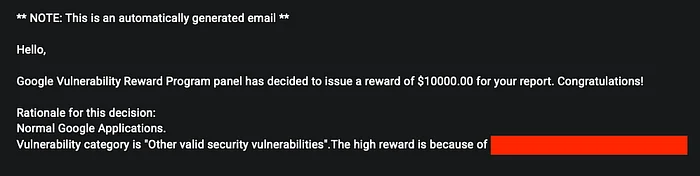
Reply from Google security Team:
Variants to test
Each one is a small experiment you can run with a browser and an intercepting tool.
- Static or absent
stateon OAuth callbacks. Intercept the callback request for any "Connect <provider>" flow and check whetherstatechanges per session and per attempt. A positive result is a fixed value, a value the server accepts after being altered, or nostateat all, with the account still linked. Why: if the value never changes, it cannot prove anything about who is making the request. - Server-side verification of
state. Replay a callback URL with astatefrom a different session or a modified value. A positive result is a successful link despite the mismatch. Why: a token that is present but never checked is decoration, not protection. - Account-linking endpoints outside OAuth. Look for any GET endpoint that binds an external identity (GitHub, GitLab, SSO, chat integrations) to the current account. A positive result is a link completing from a cross-site request with no token. Why: the same mistake can appear anywhere two accounts are joined.
- Silent success UI. After a suspected CSRF link, check whether the UI shows an error or a sign-in prompt while the backend has already stored the link. A positive result is state changing even though the page suggests nothing happened. Why: the page you see is not always the whole story, and a misleading message makes the bug much harder for a victim to notice.
Glossary
- API: a defined way for one piece of software to talk to another, like a service counter with fixed forms you can submit.
- Backend: the part of a website that runs on the server and makes decisions; the part you do not see in your browser.
- Bug bounty: a programme that pays people for reporting security flaws responsibly instead of exploiting them.
- Burp Suite: a tool that sits between your browser and a website so you can pause, read and edit requests.
- Cookie: a small piece of data a website stores in your browser so it can recognise you on later visits, such as keeping you logged in.
- CSRF (Cross-Site Request Forgery): a bug where an attacker makes your browser send a request to a site you are logged into, without your intent.
- CSRF token: a unique, unpredictable value issued per session and checked by the server to prove a request really came from you.
- Endpoint: a specific address on a server that performs a specific action, such as
/auth/github. - GET request: the basic kind of web request used to fetch a page; its parameters are visible in the URL.
- GitHub: an online service for storing and sharing code repositories.
- Google VRP: Google's Vulnerability Reward Program, which pays for security reports about Google products.
- Host header: the part of a request that names which website on a server is being addressed.
- HTTP/2: a version of the protocol browsers and servers use to exchange web requests and responses.
- OAuth: a system that lets one website get limited permission to act on another site on your behalf, without sharing your password.
- OAuth code: a short-lived value issued during an OAuth flow that identifies which account is being connected.
- Parameter: a named value attached to a request, such as
codeorstatein a URL. - Push: sending changes from your local copy of a project up to an online repository.
- Repository (repo): an online folder of project files with a history of every change.
- Session: the period during which a website remembers you as logged in.
- SSO (Single Sign-On): a system that lets one login work across several services.
stateparameter: the OAuth field meant to carry the anti-CSRF token that ties a connection attempt to your session.- Static value: a value that never changes between users or attempts, and so cannot prove anything about identity.
- URL encoding: writing special characters in a URL in a coded form, such as
%3Dfor an equals sign.