$12,000 for one GraphQL field: unauthenticated RCE on the servers that build Firefox
An unauthenticated GraphQL endpoint passed a user-supplied filter object directly to the sift library, which supported a $where operator that executed arbitrary JavaScript. An attacker could run shell commands and read environment variables, leading to full compromise of the Taskcluster instance used for Firefox CI.
 Published on pawanjswal.medium.com
Cybersecurity
The full write-up lives on its author's site
It belongs to its author, so we link to it rather than copy it. The other two tabs are our own rewrites, checked against it.
Context
Taskcluster is the CI system Mozilla uses to build and ship Firefox. Its web-server component exposes a GraphQL API at /graphql. One of the query arguments on that API, filter, is a free-form JSON object: whatever JSON a client sends is passed, unmodified, to the JavaScript library sift, which implements MongoDB-style query filters against in-memory arrays.
The write-up is based on HackerOne report #3782701, disclosed by researcher griffinf to Mozilla. All technical credit belongs to griffinf.
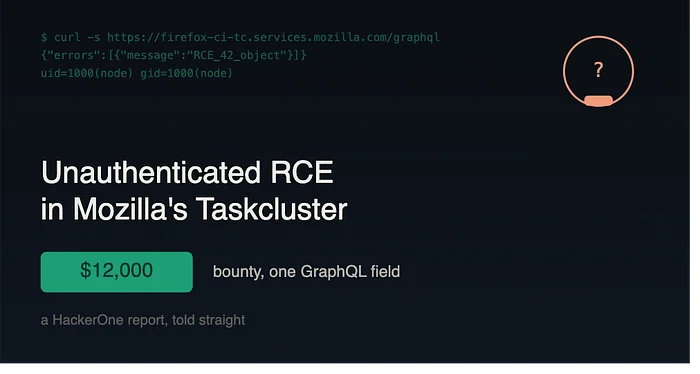
The headline finding: no login, no token and no special header were needed. A curl request against the production endpoint, with no login of any kind, returned proof that attacker-supplied code had executed inside the Node.js process.
Setup
Three things together made the bug exploitable:
- The
filterargument reachessiftwithout validation or stripping. - The installed sift version (17.1.3) supports the
$whereoperator, which evaluates a string as code, and theCSP_ENABLEDenvironment variable that would make sift refuse string$wherevalues was never set on the deployment. - The credentials layer lets requests without an
Authorizationheader continue as anonymous, and the built-in anonymous role onfirefox-ci-tccarries real scopes:auth:expand-scopes,auth:list-roles,auth:current-scopesandhooks:list-hooks:*.
All proof-of-concept steps were run unauthenticated against the live production endpoint. The researcher later confirmed the same vulnerability on a second instance, community-tc.
Finding it
The entry point is a public GraphQL endpoint whose filter argument is an open JSON scalar. That argument is handed to sift, and sift supports $where. $where does not merely filter data: it runs code. The report frames the bug as a filter argument nobody validated, rather than something hidden several layers deep.
Exploitation
Step 1: prove code execution with a harmless payload
The researcher sent a $where payload designed to compute a value on the server and throw it back as an error message: something like RCE_, followed by the result of a server-side multiplication, followed by the type of a Node-specific global. The response confirmed the calculation had actually happened on the server, and that the code was running inside an object of type "object", i.e. Node's process global. That ruled out the payload being parsed as inert data: it was executing.
The error channel that made this readable is the error formatter in services/web-server/src/servers/formatError.js, which forwards err.message straight to the client.
Step 2: escalate to shell commands
Using the same $where injection point, the researcher had the server run a shell command and return its output through the same error channel. The response came back as:
uid=1000(node) gid=1000(node) groups=1000(node)
So it was not just JavaScript execution: the process could spawn processes and read the filesystem. This was confirmed further with a passwd-file read showing the container's user list.
Step 3: read the process environment
With arbitrary Node code execution, reading process.env was trivial. The dump included:
- live Postgres connection strings;
- the deployment's own Taskcluster access token;
- database column-encryption keys;
- Pulse message queue credentials;
- OAuth client secrets for the login flow;
- a session secret that was, verbatim, the placeholder string
FIXME, still sitting in production.
The researcher confirmed the exact same vulnerability on a second instance, community-tc.
Root cause
The filter goes straight into sift, unmodified
From services/web-server/src/utils/sift.js:
import sift from 'sift';export default (filter, array) => { if (!array) return []; return filter ? array.filter(sift(filter)) : array;};
Whatever JSON the client sends as filter becomes sift(filter) with the default operator set. Nothing gets stripped and nothing gets validated.
Sift turns a $where string into actual code
From sift 17.1.3:
const $where = (params, ownerQuery, options) => { let test; if (isFunction(params)) { test = params; } else if (!process.env.CSP_ENABLED) { test = new Function("obj", "return " + params); } else { throw new Error(`In CSP mode, sift does not support strings in "$where" condition`); } return new EqualsOperation((b) => test.bind(b)(b), ownerQuery, options);};
CSP_ENABLED is meant to make sift refuse a string $where outright. On this deployment the variable was never set, so instead of throwing, sift wraps the supplied string in new Function(...) and runs it, once per element of the array being filtered.
The resolver runs without authentication
The credentials layer at services/web-server/src/servers/credentials.js calls next() when there is no Authorization header. It does not reject the request; it lets it through as anonymous. The filter argument then flows through the normal resolver and loader path:
Query.expandScopes(scopes, filter) -> loaders/scopes.js : auth.expandScopes({ scopes }) then sift(filter, expandedScopes)
The same pattern appears for roles, listRoleIds, hookGroups, hooks and currentScopes. It is a shape the whole API repeats, not a one-off.
The anonymous role has exactly the scopes needed
On firefox-ci-tc, the built-in anonymous role grants auth:expand-scopes, auth:list-roles, auth:current-scopes and hooks:list-hooks:*. The upstream call inside the loader therefore succeeds even for a caller who never authenticated. Sift then runs on the result and the $where function fires.
expandScopes was the most reliable trigger because the upstream handler just echoes back whatever scopes you send it. An attacker does not need any roles or hooks to already exist on the instance: asking for something like assume:anonymous back guarantees a non-empty array to filter.
Impact
The report calls this total compromise of the instance, including the one running Firefox CI. One unauthenticated POST to /graphql led to cluster-level credential access. Specifically:
- Database access, both directions. Live read and write Postgres credentials for the Taskcluster database.
- A deployment-level access token. Combined with database access, this effectively hands over the entire Taskcluster instance.
- OAuth client secrets. Auth0 on the Firefox CI instance, GitHub OAuth on the community instance, enough to attack the login flow itself.
- A broken session secret.
SESSION_SECRETwasFIXMEin production, meaning session cookies could be forged offline, independent of the RCE entirely. - Database encryption keys.
DB_CRYPTO_KEYSdecrypts whatever the app has stored encrypted at the column level. - Message queue credentials. Pulse access, which is Taskcluster's internal event bus.
Because the vulnerable pattern lives in Taskcluster's main branch, the report notes this is not a Mozilla-only problem: any organisation running Taskcluster inherited the same exposure, and an upstream security advisory accompanied the fix.
Fix
The report ranks its recommendations by preference, strongest first:
- Stop running sift on untrusted input entirely. Map the GraphQL
filteronto an allowlist of fields and comparison operators and apply filtering directly, or push filtering down into the upstream service instead. - If sift has to stay, restrict what it can do. Build the query tester with a restricted operator set that excludes
$where, and reject any$-prefixed key that is not explicitly supported before sift ever touches it. - Fix it at the input layer. Reject
$whereat validation, and givefiltera real, typed GraphQL input instead of an open JSON scalar.
The report is clear that setting CSP_ENABLED is not a real fix, just a fragile flag that happens to change sift's behaviour. On top of the core fix, it recommends setting an actual SESSION_SECRET instead of the literal placeholder, and running the web-server under a sandbox that blocks child-process spawning, so a future JS execution bug does not automatically mean shell access too.
Variants to test
- Open-ended JSON filter arguments. Anywhere an API accepts free-form JSON and hands it to a library such as sift, mingo or similar, check which operators that library supports before assuming it is just data filtering. A positive result is a
$where(or equivalent code-evaluating operator) that executes and returns a computed value through an error message or response field. - Auth middleware that continues instead of rejecting. Send requests with no
Authorizationheader and inspect what comes back, not just whether the request is rejected. A positive result is a 200 with data returned as an anonymous principal, rather than a 401. - Anonymous roles with real scopes. Audit the default anonymous role on each deployment. A positive result is a default role granting scopes that reach upstream services and return non-empty arrays.
- Error messages as an exfiltration channel. Look for formatters that forward
err.messageto the client. A positive result is attacker-controlled text (a computed value, command output, file contents) appearing verbatim in the response. - Placeholder secrets in production. Search environment dumps for literal placeholders such as
FIXME. A positive result is a live deployment using a placeholder as a real secret, which allows offline forgery of session cookies.
What happened, in plain words
Mozilla builds Firefox, the browser. Building a browser is a huge job: thousands of files have to be compiled, tested and packaged, over and over, every day. Mozilla does not do that by hand. It uses a computer system called Taskcluster, which is a CI system. CI stands for continuous integration: a set of servers that automatically fetch the code, build it, run the tests and produce the finished product. Think of it as a factory line that runs by itself, and the finished cars are Firefox releases.
Those factory servers are exactly the kind of machine you would expect to be locked down: internal, authenticated, boring in the good way.
A security researcher called griffinf found that this was not true. He could send a single request to one of those servers, from anywhere on the internet, without logging in, without a password, without a token, and without any special header, and make the server run code of his choosing. A header is a small piece of extra information that travels with every web request, such as the name of the browser or the format of the data being sent. A token is a long random string that proves who you are, a bit like a wristband at a festival: show it and you are let in. Here, no wristband was needed.
The whole thing was reported to Mozilla through HackerOne, a platform where researchers report bugs to companies and get paid for it. The report is number #3782701, and the bounty was $12,000, which is the reward a company gives for a valid security report. All technical credit belongs to griffinf.
The image above is captioned: HackerOne report #3782701, unauthenticated RCE in Taskcluster, $12,000 bounty. RCE stands for remote code execution: the ability to make someone else's computer run your code, from a distance. Unauthenticated means without proving who you are.
What makes this story interesting is that the bug was not buried deep. It was a public GraphQL endpoint that happily ran a string as JavaScript. We will unpack every one of those words below.
The pieces you need to know first
Before the walkthrough, here is the vocabulary, explained from zero.
API. An API is a way for one program to ask another program to do something. A restaurant comparison works well: the kitchen is the server, you are the client, and the menu plus the waiter is the API. You do not walk into the kitchen yourself; you pick something from the menu, the waiter carries it in, and the kitchen sends back a plate. In web terms, your browser (or a tool like curl) sends a request to a specific address, and the server sends back data.
Endpoint. The specific address on the menu. A website has many: one for logging in, one for listing your files, one for searching. Here the endpoint is /graphql.
GraphQL. A style of API where the client describes exactly what data it wants, in a query, and the server returns precisely that shape. Instead of many fixed addresses, there is usually one address that accepts queries. Each query has a name and can take arguments, which are the inputs you supply, like the search terms on a shopping site.
JSON. A text format for structured data, made of curly braces, names and values. It is how programs exchange information in a way both sides can read. A JSON object looks like {"name": "value"}.
curl. A command-line tool for sending web requests. You type a command in a terminal, it sends the request, and it prints the server's answer. It is the equivalent of typing an address into a browser, but for APIs rather than pages.
Node.js. A program that runs JavaScript outside a browser. Many web servers are written in it. When we say code ran "inside the Node.js process", we mean it ran inside the running server program itself, with all the server's own powers.
Environment variables. Settings handed to a program when it starts, kept in a list called the environment. They are how a server learns things like the address of its database and the passwords to reach it. Think of them as the notes taped inside a factory's control room: not visible from the street, but everything the factory needs to operate.
Database. Organised storage for data. Here it is Postgres, a common database product. A connection string is the full address plus username plus password needed to reach it.
Credentials and secrets. Anything that proves identity or unlocks access: passwords, tokens, keys. A secret is a credential that must never be seen by outsiders.
OAuth. A system that lets you log in to a site using another account, for example "log in with GitHub". The site is given a client secret, a password-like string it uses to talk to the login provider.
Session and session cookie. When you log in to a website, the server gives your browser a small piece of data, the session cookie, so it can recognise you on the next page. The cookie is signed with a session secret, a key only the server knows, so that nobody can forge one. If that key is weak or known, anyone can create a cookie that claims to be any user.
Scope. A permission, written as a short label. auth:list-roles means "may list roles". A role is a bundle of scopes that can be handed to a user or a machine.
Anonymous. Not logged in. Many systems still let anonymous visitors do a few things, through a built-in anonymous role.
Resolver and loader. In a GraphQL server, the resolver is the function that produces the answer to one field of a query. A loader is a helper the resolver calls to fetch data from another service.
Library. A bundle of code written by someone else that your program uses instead of writing everything itself. sift is such a library.
The vulnerability class. This bug is a code injection, specifically through a query filter. The idea: a program takes text from an outsider and treats it as instructions instead of as plain data. The everyday comparison is a form where you write your name, and instead of printing your name the clerk follows whatever instruction you wrote in the box. The fix in general is to keep data and instructions strictly apart.
So what was actually broken?
Taskcluster is the CI system Mozilla uses to build Firefox. Its web-server component exposes a GraphQL API at /graphql, and one of its query arguments, filter, is just a free-form JSON object. Free-form means the server accepts any JSON at all, with no fixed list of allowed fields.
That filter gets handed to a JavaScript library called sift, which lets you write MongoDB-style query filters against in-memory arrays. MongoDB is a database whose query language is written as JSON-like objects, and sift copies that style so you can filter a plain JavaScript array with the same syntax. Sift is popular. Sift is also, in this version, dangerous, because it supports a $where operator. An operator is a special keyword that changes what a query does. And $where does not just filter data. It runs code.
The report is blunt about the blast radius: reading the server's environment variables was enough to walk away with database credentials, the deployment's own access token, OAuth client secrets, and the encryption keys protecting the database. Not partial access. The report calls it total compromise of the instance, including the one running Firefox CI.
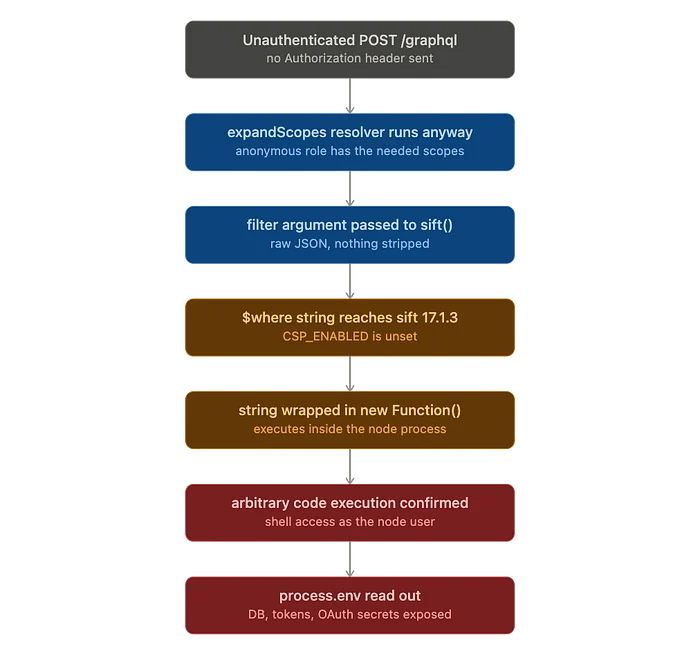
The diagram above shows the root cause chain from report #3782701, from gray (the request) to red (the compromise).
Root cause walkthrough
Here is the chain, piece by piece, straight from the report. Each piece is a small piece of code, and after each one we will read it line by line.
1. The filter goes straight into sift, unmodified
From services/web-server/src/utils/sift.js:
import sift from 'sift';export default (filter, array) => { if (!array) return []; return filter ? array.filter(sift(filter)) : array;};
Line by line:
import sift from 'sift';loads the sift library so the file can use it. It is like bringing a tool onto the workbench.export default (filter, array) => {defines the function this file offers to the rest of the program. It takes two inputs:filter, which is whatever the client sent, andarray, the list of items to filter.if (!array) return [];if there is no list at all, return an empty list. A small guard.return filter ? array.filter(sift(filter)) : array;this is the important line. If a filter was supplied, take the array and keep only the items that match, using sift to decide. If no filter was supplied, return the array untouched.
Why this matters: whatever JSON the client sends as filter becomes sift(filter) with the default operator set. Nothing gets stripped. Nothing gets validated. The outsider's text goes straight into the tool.
2. Sift turns a $where string into actual code
From sift 17.1.3:
const $where = (params, ownerQuery, options) => { let test; if (isFunction(params)) { test = params; } else if (!process.env.CSP_ENABLED) { test = new Function("obj", "return " + params); } else { throw new Error(`In CSP mode, sift does not support strings in "$where" condition`); } return new EqualsOperation((b) => test.bind(b)(b), ownerQuery, options);};
Line by line:
const $where = (params, ownerQuery, options) => {defines what happens when a query uses the$whereoperator.paramsis the value the client attached to it.let test;prepares a variable to hold the test that will be applied to each item.if (isFunction(params)) { test = params; }if the client sent an actual function, use it directly. This branch is for code that already lives inside the server.} else if (!process.env.CSP_ENABLED) { test = new Function("obj", "return " + params);if the client sent a string, and the environment variableCSP_ENABLEDis not set, build a brand-new function out of that string.new Functionis a JavaScript feature that turns text into runnable code. The text is glued afterreturn, so whatever the client wrote becomes the body of a function that is then called on each item.} else { throw new Error(...); }ifCSP_ENABLEDis set, refuse and throw an error instead. CSP here refers to Content Security Policy, a browser mechanism for restricting what code may run; sift reuses the idea as a switch.return new EqualsOperation((b) => test.bind(b)(b), ownerQuery, options);wraps the test so sift can apply it to each element of the array.
There is a safety switch here. CSP_ENABLED is supposed to make sift refuse a string $where outright. But on this deployment, that variable was never set. So instead of throwing, sift wraps whatever string you send in new Function(...) and runs it, once per element of the array it is filtering. The safety catch existed but nobody had flipped it on.
3. You do not even need to be logged in for the resolver to run
The credentials layer at services/web-server/src/servers/credentials.js calls next() when there is no Authorization header. It does not reject the request. It just lets it through as anonymous. In a web framework, next() means "carry on to the next step". So a request with no identity is not turned away; it is waved through as a guest.
The filter argument then flows through the normal resolver and loader path:
Query.expandScopes(scopes, filter) -> loaders/scopes.js : auth.expandScopes({ scopes }) then sift(filter, expandedScopes)
Reading this chain:
Query.expandScopes(scopes, filter)is the GraphQL query being run. It takes the scopes you asked about and your filter.-> loaders/scopes.js : auth.expandScopes({ scopes })shows that the resolver calls a loader, which asks the authentication service to expand the scopes you supplied.then sift(filter, expandedScopes)shows that the answer from that service is then passed, together with your filter, into sift. That is where the$wherecode runs.
Same pattern shows up for roles, listRoleIds, hookGroups, hooks, and currentScopes. It is not a one-off. It is a shape the whole API repeats: take a filter from the caller, fetch some data, run sift on it.
4. The anonymous role has exactly the scopes needed
On firefox-ci-tc, the built-in anonymous role grants auth:expand-scopes, auth:list-roles, auth:current-scopes, and hooks:list-hooks:*. That means the upstream call inside the loader succeeds even for a caller who never authenticated. Sift then runs on the result, and the $where function fires.
The expandScopes query turned out to be the most reliable trigger, because the upstream handler just echoes back whatever scopes you send it. So an attacker does not need any roles or hooks to already exist on the instance. They can guarantee a non-empty array to filter just by asking for something like assume:anonymous back. This is a subtle but crucial point: sift only runs your code once per item in the array, so the array must not be empty. By asking the server to echo a scope you already know, you make sure there is at least one item.
One more detail that made exploitation easy to confirm: the error formatter in services/web-server/src/servers/formatError.js forwards err.message straight to the client. When code throws an error, the error carries a message. Normally a server hides that message from outsiders, because it can reveal internals. Here it was passed through verbatim. That gave the researcher a clean, readable output channel for whatever the injected function threw. In effect, the error message became a printer: the attacker's code could compute something and throw it, and the server would hand the result back.
The proof-of-concept steps
The report walks through this in three stages, all unauthenticated, all against the live production endpoint. A proof of concept is a small, safe demonstration that a bug is real, without doing damage.
Step one: prove code execution with something harmless
The researcher sent a $where payload built to compute a value on the server and throw it back as an error message, something like RCE_ followed by the result of a server-side multiplication, followed by the type of a Node-specific global. A global is a variable that is available everywhere in a program without being declared. In Node, process is such a global: it represents the running program and holds its environment.
Why this step: before doing anything risky, you want to know that your text is really being executed and not merely stored or ignored. A multiplication is harmless, and its result cannot be guessed from outside, so if the answer comes back correct, the server really did the maths. The type check adds a second proof: if the server reports the type of the object as "object", the code is running in the context of Node's process global, not in some sandbox.
The response confirmed the calculation had actually happened on the server, and confirmed the code was running inside an object of type "object", i.e. Node's process global. That ruled out any possibility the payload was just being parsed as inert data. It was executing.
Step two: escalate to shell commands
Using the same $where injection point, the researcher had the server run a shell command and return its output through the same error channel. A shell is the program that runs commands on a computer, the same kind of thing you use in a terminal. The response came back as:
uid=1000(node) gid=1000(node) groups=1000(node)
This is the output of the id command, which tells you which user account the current process is running as. Reading it:
uid=1000(node)means the user ID is 1000 and the account name isnode.gid=1000(node)means the primary group ID is 1000 and the group is also callednode.groups=1000(node)lists the groups the account belongs to, here just the one.
Why this step: JavaScript execution alone could still be limited. Running a shell command proves the process can start other programs, which is a much bigger power. The output also tells the researcher which account the server runs as, which matters for what it can read and write.
So it was not just executing JavaScript: it had access to spawn processes and read the filesystem. This was confirmed further with a passwd-file read showing the container's user list. The passwd file is a standard file on Linux systems that lists user accounts. A container is a lightweight, isolated environment in which an application runs, a bit like a shipping container for software: self-contained, but sharing the same machine.
Step three: read out the process environment
With write access to arbitrary Node code, reading process.env was trivial. process.env is the object that holds all environment variables, the notes taped inside the control room. This is where the report stops being "cool bug" and becomes "here is how you take the whole thing over." The dump included:
- live Postgres connection strings;
- the deployment's own Taskcluster access token;
- database column-encryption keys;
- Pulse message queue credentials;
- OAuth client secrets for the login flow;
- a session secret that was, verbatim, the placeholder string
FIXME, still sitting in production.
Why this step: environment variables are where servers keep the keys to everything else. Once you can read them, you no longer need to break anything else; you simply use the keys the server was given.
The researcher confirmed the exact same vulnerability on a second instance, community-tc. An instance is one running copy of a system.
Why this was full compromise
- Database access, both directions. Live read and write Postgres credentials for the Taskcluster database. Read means you can look at everything stored; write means you can change or delete it.
- A deployment-level access token. Combined with database access, this effectively hands over the entire Taskcluster instance. A token like this is the master key for the deployment's own API.
- OAuth client secrets. Auth0 on the Firefox CI instance, GitHub OAuth on the community instance, enough to attack the login flow itself. Auth0 and GitHub are identity providers, services that handle logins.
- A broken session secret.
SESSION_SECRETwasFIXMEin production, meaning session cookies could be forged offline, independent of the RCE entirely. Offline means without touching the server at all: if you know the signing key, you can create a valid-looking cookie on your own laptop. - Database encryption keys.
DB_CRYPTO_KEYSdecrypts whatever the app has stored encrypted at the column level. Column level means individual fields in the database are encrypted, not the whole disk. - Message queue credentials. Pulse access, which is Taskcluster's internal event bus. A message queue is how different parts of a system pass messages to each other; access to it means you can listen in or inject messages.
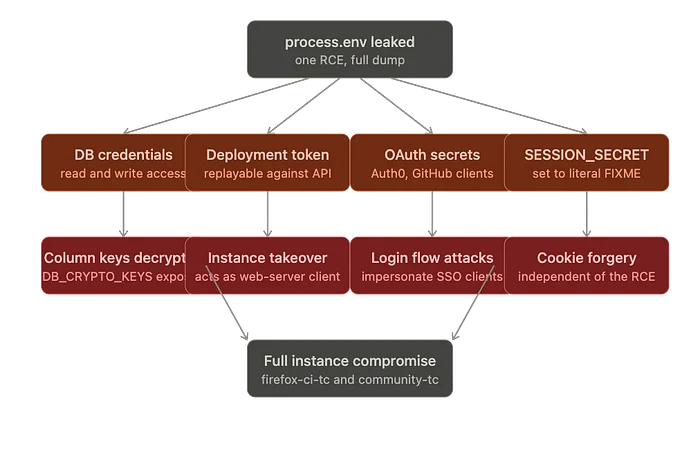
The diagram above shows how one leaked environment on report #3782701 branches into database, API, OAuth and session access.
Stack all of that up and the report's own framing is accurate: one unauthenticated POST to /graphql led to cluster-level credential access, which led to full compromise of the Taskcluster instance that Firefox's own CI runs on. A POST is simply the type of web request used to send data to a server, as opposed to a GET, which asks for a page.
The fix
The report ranks its own recommendations by preference, strongest first:
- Stop running sift on untrusted input entirely. Map the GraphQL
filteronto an allowlist of fields and comparison operators, and apply filtering directly, or push filtering down into the upstream service instead. An allowlist is a list of things that are permitted, and everything else is refused. The everyday comparison is a guest list at a door: if your name is not on it, you do not get in. - If sift has to stay, restrict what it can do. Build the query tester with a restricted operator set that excludes
$where, and reject any$-prefixed key that is not explicitly supported before sift ever touches it. The$prefix is how sift marks its special operators, so filtering on it is a simple way to catch them all. - Fix it at the input layer. Reject
$whereat validation, and givefiltera real, typed GraphQL input instead of an open JSON scalar. A scalar is a GraphQL type for a single simple value; an open JSON scalar accepts anything, which is the root of the problem. A typed input says exactly which fields and which kinds of value are allowed.
The report is also clear that setting CSP_ENABLED is not a real fix, just a fragile flag that happens to change sift's behaviour. A flag is a setting that switches a behaviour on or off; relying on one that nobody has set is not protection. On top of the core fix, it recommends setting an actual SESSION_SECRET instead of the literal placeholder, and running the web-server under a sandbox that blocks child-process spawning, so a future JS execution bug does not automatically mean shell access too. A sandbox is a restricted environment that limits what a program may do, like a playpen.
Because the vulnerable pattern lives in Taskcluster's main branch, the report notes this is not a Mozilla-only problem. Any organisation running Taskcluster inherited the same exposure, and an upstream security advisory accompanied the fix. An advisory is a public notice telling users of a product to update because of a security issue.
Takeaways for other hunters
- A "free-form JSON filter" argument is a red flag by itself. Anywhere an API accepts open-ended JSON and hands it to a library like sift, mingo, or similar, go check what operators that library supports before assuming it is just data filtering. Mingo is another library in the same style.
- Check what "unauthenticated" actually returns, not just whether it is rejected. The auth middleware here did not reject missing tokens, it silently continued as anonymous. That is a very different failure mode than a 401, and it is easy to miss if you only test the happy path. A 401 is the standard web answer meaning "you are not authorised". Middleware is code that sits between the incoming request and the application, like a receptionist.
- Anonymous roles deserve their own audit. The whole exploit chain depended on the anonymous role having real scopes. A default role with real permissions is often more dangerous than a misconfigured authenticated one, because nobody thinks to review it. An audit is a careful review.
- Error messages are a data exfiltration channel. Forwarding
err.messageto the client feels harmless until someone controls what gets thrown. Exfiltration means getting data out of a system. - A placeholder secret in production is its own vulnerability.
SESSION_SECRET=FIXMEsitting in a live deployment is worth flagging even when you find it while looking for something else entirely. A placeholder is a stand-in value left in during development, meant to be replaced before going live.
Glossary
- Advisory: a public notice telling users of a product to update because of a security issue.
- Allowlist: a list of things that are permitted, with everything else refused.
- Anonymous: not logged in, with no identity proven.
- API: a defined way for one program to ask another program to do something or return data.
- Audit: a careful review of a system's settings or permissions.
- Auth0: an identity provider, a service that handles logins for other sites.
- Bounty: a reward a company pays for a valid security report.
- CI (continuous integration): servers that automatically build and test software whenever code changes.
- Client secret: a password-like string an application uses to talk to a login provider.
- Column-level encryption: encrypting individual fields in a database rather than the whole disk.
- Connection string: the full address, username and password needed to reach a database.
- Container: a lightweight, isolated environment in which an application runs.
- Cookie: a small piece of data a website stores in your browser so it can recognise you later.
- Credentials: anything that proves identity or unlocks access, such as passwords, tokens or keys.
- CSP (Content Security Policy): a mechanism for restricting what code may run; here reused by sift as a switch.
- curl: a command-line tool for sending web requests and printing the response.
- Database: organised storage for data, here Postgres.
- Endpoint: the specific address of an API, such as
/graphql. - Environment variables: settings handed to a program at startup, often including secrets.
- Exfiltration: getting data out of a system without permission.
- Flag: a setting that switches a behaviour on or off.
- Free-form: accepting any structure at all, with no fixed list of allowed fields.
- Global: a variable available everywhere in a program without being declared, such as Node's
process. - GraphQL: an API style where the client describes exactly what data it wants in a query.
- HackerOne: a platform where researchers report bugs to companies and receive rewards.
- Header: extra information sent with a web request, such as the browser name or the data format.
- Instance: one running copy of a system.
- JSON: a text format for structured data made of names and values.
- Library: a bundle of code written by someone else that a program uses.
- Loader: in a GraphQL server, a helper a resolver calls to fetch data from another service.
- Message queue: a system that passes messages between parts of a system.
- Middleware: code that sits between an incoming request and the application.
- Mingo: a JavaScript library for MongoDB-style queries, similar to sift.
- MongoDB: a database whose query language is written as JSON-like objects.
- Node.js: a program that runs JavaScript outside a browser, often used for web servers.
- OAuth: a system that lets you log in to a site using another account, such as GitHub.
- Operator: a special keyword in a query that changes what the query does, such as
$where. - Passwd file: a standard Linux file listing user accounts.
- Placeholder: a stand-in value left in during development, meant to be replaced before going live.
- POST: the type of web request used to send data to a server.
- Proof of concept: a small, safe demonstration that a bug is real.
- Pulse: Taskcluster's internal event bus, a message queue.
- RCE (remote code execution): making someone else's computer run your code, from a distance.
- Resolver: in a GraphQL server, the function that produces the answer to one field of a query.
- Role: a bundle of permissions that can be given to a user or a machine.
- Sandbox: a restricted environment that limits what a program may do.
- Scalar: a GraphQL type for a single simple value; an open JSON scalar accepts anything.
- Scope: a permission, written as a short label such as
auth:list-roles. - Secret: a credential that must never be seen by outsiders.
- Session: the server's memory of who you are across several requests, usually tied to a cookie.
- Session secret: the key used to sign session cookies so they cannot be forged.
- Shell: the program that runs commands on a computer.
- sift: a JavaScript library that filters arrays using MongoDB-style queries.
- Taskcluster: Mozilla's CI system, used to build and ship Firefox.
- Token: a long random string that proves who you are.
- Unauthenticated: without proving who you are.
- Upstream: the other service that a server calls to get data.
- Vulnerability: a weakness in software that an attacker can use.
- 401: the standard web answer meaning "you are not authorised".




