$20,300 Bounties from a 200 Hour Hacking Challenge
 Published on blog.voorivex.team
This is where the beginners immediately stop and skip. We are not saying that we are a professional one, However, we but the way we think could give us a chance to work on the program, it was so challenging for us and we didn't consider the amount of bounty as a success result, but a learning and working process.
The full write-up lives on its author's site
It belongs to its author, so we link to it rather than copy it. The other two tabs are our own rewrites, checked against it.
Context
This is a write-up of a 200 hour collaborative bug bounty challenge by Mohammad Zaheri (@mzaherii) and Mohammad Nikouei (@NikoueiMohammad), published on the Voorivex team blog on 4 March 2024. The report does not name the program, because the researchers say they had not been granted permission to do so. It also does not give the target's real hostnames, versions or product names: the requests shown use placeholders such as www.target.com, test.target.tld and target.com, and the reconnaissance examples are illustrated with Apple as a stand-in company.
The stated goal was not a bounty figure but a fixed time budget: 200 hours in total, 100 per person. The researchers say they tracked their time daily with the Toggl Track application. The final payout was $20,300, received after roughly five months of report triage. The report frames itself as a share of both mindset and technical detail for beginners and mid-level hunters.
The vulnerabilities described span several different assets of the same program: an unauthenticated Swagger UI on a test subdomain, two time-based SQL injections, a PII leak reached by changing the HTTP method and adding a header, a stored XSS that bypassed CSP, an IDOR on an employee-facing demo domain, and a WPEngine configuration file disclosure. A short list of further findings is given without technical detail.
Setup
- Two hunters working as a pair, 200 hours total, 100 hours each.
- Roughly 10 hours (5 each) were spent choosing the program before any testing began.
- The program selection criteria were: a wide scope covering both old and modern architectures and programming languages, a good payout time, and a professional triage team.
- The researchers say they were additionally motivated by seeing the hunter
todayisnewat first place on the leaderboard. - Tools named in the report:
curl,jq,tr,unfurl,tlsx, crt.sh, shodan, censys, ipip.net, and Toggl Track for time keeping. - No account roles are described for most findings. The IDOR section required signing up on an employee demo domain with a company email address, which the researchers say they were able to do and which produced an activation email.
- The report does not state any software versions.
Finding it
Program choice
The researchers describe program selection as one of the hardest phases. They preferred wide-scoped programs because more assets means more chance of a vulnerability, and because a wide scope spans legacy and modern code.
Reconnaissance approach
The listed techniques were:
- Certificate search
- Leveraging IP to asset discovery
- Using CSP headers
- Google dorks
- Using Google Analytics IDs
- Static and dynamic DNS brute force
- OSINT
Certificate search beyond Common Name
The report notes that most hunters search certificates on Common Name only, while a certificate has other fields such as Organization. It points to shodan and censys as sites that search the net and save certificates, and says there may be other alternatives. Because the program cannot be named, the example is built on Apple:
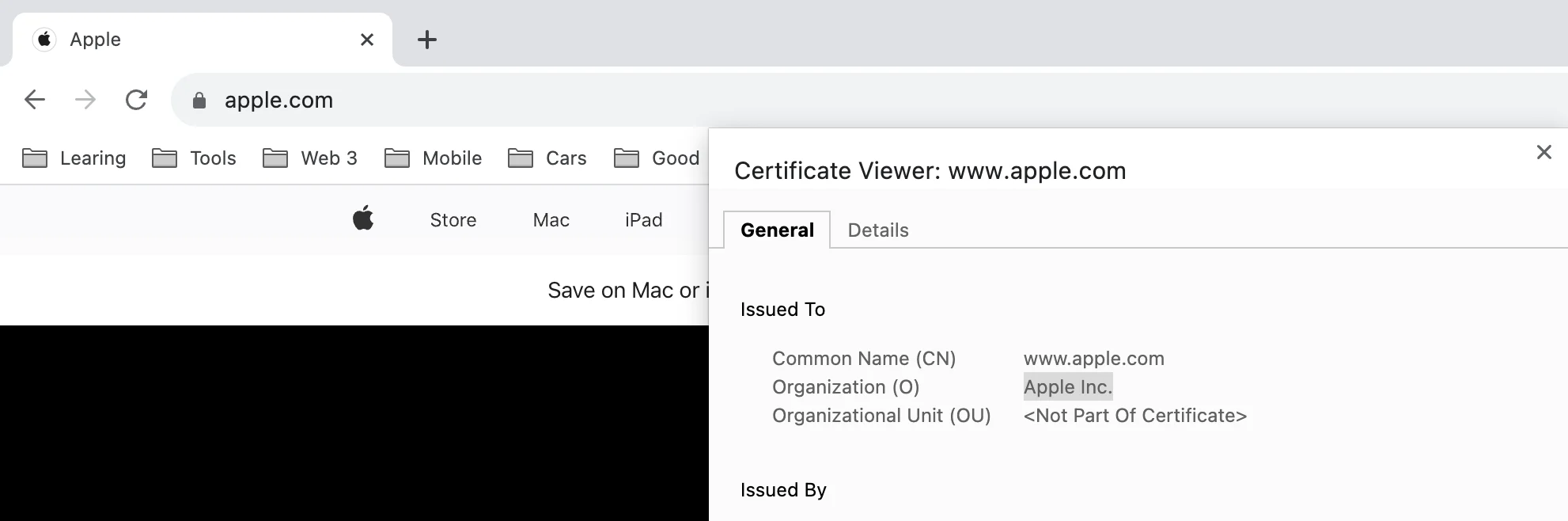
The image relates to the certificate search example using Apple. The following command enumerates root domains for that organization:
curl -s "https://crt.sh/?O=Apple%20Inc.&output=json" | jq -r ".[].common_name" | tr A-Z a-z | unfurl format %r.%t | sort -u | tee apple.cert.txt
The pipeline queries crt.sh with the O= (Organization) parameter and JSON output, extracts every common_name, lowercases it, reduces each name to its root domain with unfurl format %r.%t, de-duplicates with sort -u, and writes the result to apple.cert.txt while also printing it.
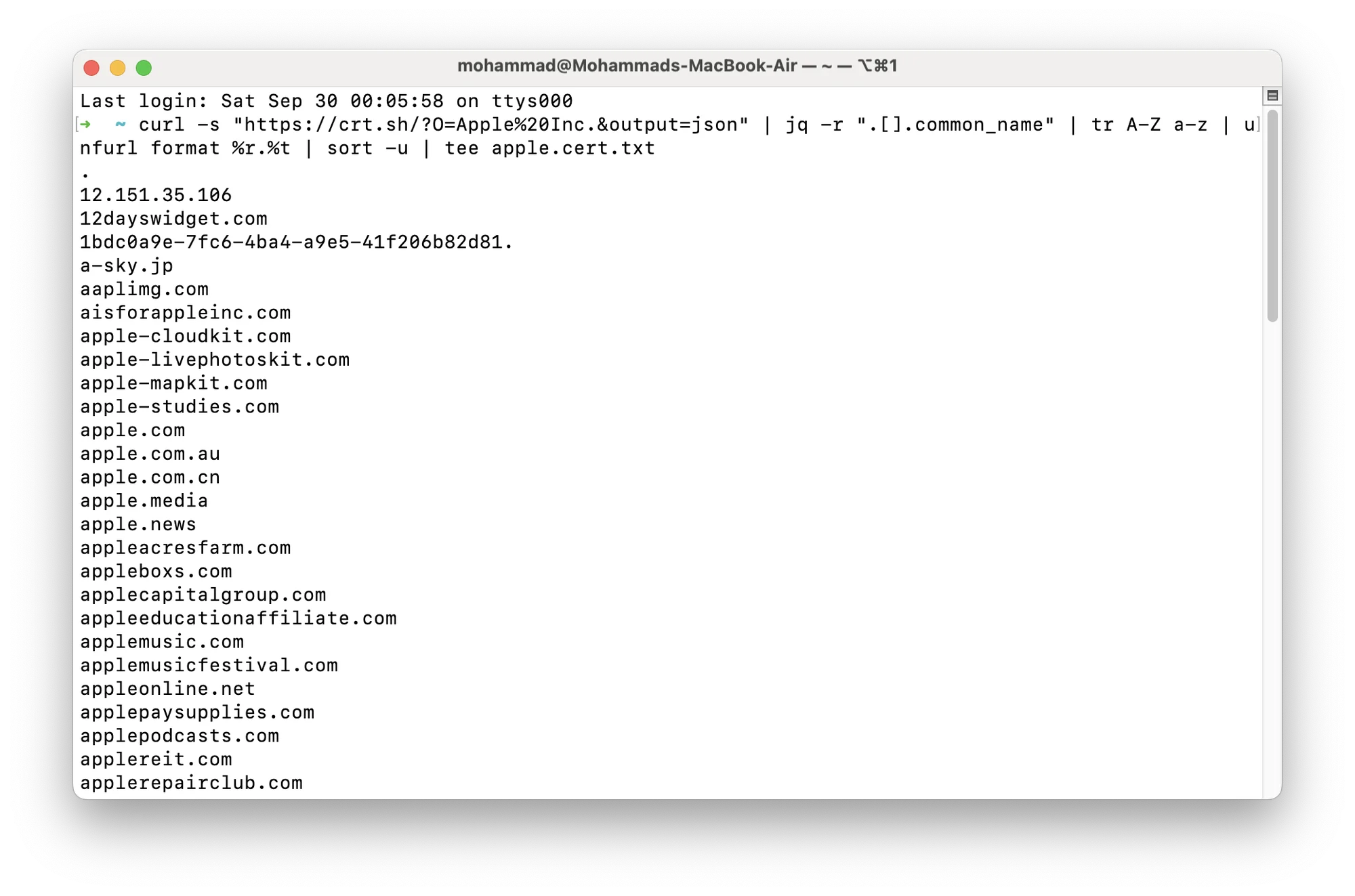
The second image shows the resulting list of Apple root domains produced by that command.
IP to asset discovery
The report explains that a company may own CIDRs whose registered owner name is vague, but the CIDR still carries a sign of the company, for example Apple in the ASN name. It names ipip.net as a favourite way to find IPs, CIDRs and ASNs.
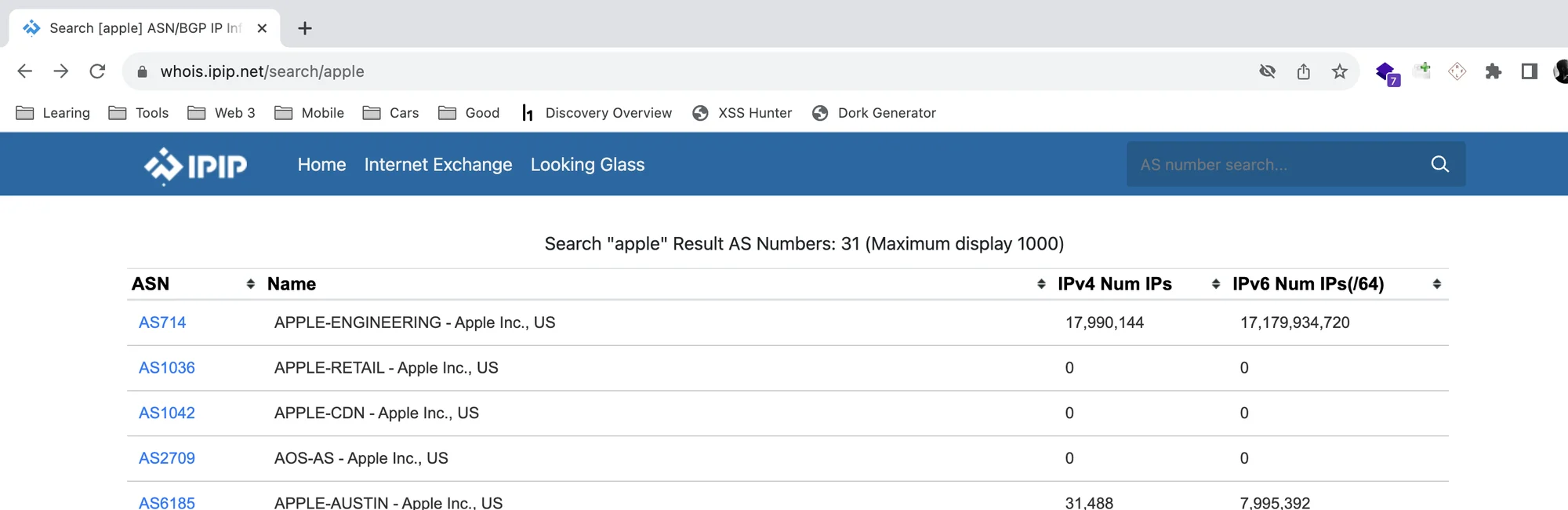
The image relates to using ipip.net to find IPs, CIDRs and ASNs. The researchers then scanned all CIDRs, ASNs and IPs belonging to the company, extracted certificate information, and found further domains. The command given for pulling alternative names and common names is:
echo AS714 | tlsx -san -cn -silent -resp-only
tlsx is fed an ASN, asked for subject alternative names (-san) and common names (-cn), in silent mode, returning only responses.
OSINT and the blog
After technical discovery, the pair turned to OSINT, reading company news without a specific target in mind. The milestone was a company news blog. In one blog post they noticed a domain of the form championscompany.com that was absent from their recon results. They then checked all 5,000 of the company's blog posts manually and found 60 interesting domains that were not in their recon results.
Exploitation
Step 1: Unauthenticated Swagger UI leaking PII
The test.target.tld subdomain was found through static DNS brute force, literally by trying the test keyword. On it, an authentication-less Swagger UI was serving on port 5000. The UI listed approximately 100 APIs that appeared to be protected by authentication. The researchers tested each one individually. Exactly 10 turned out to be open, and 2 of those were leaking PII.
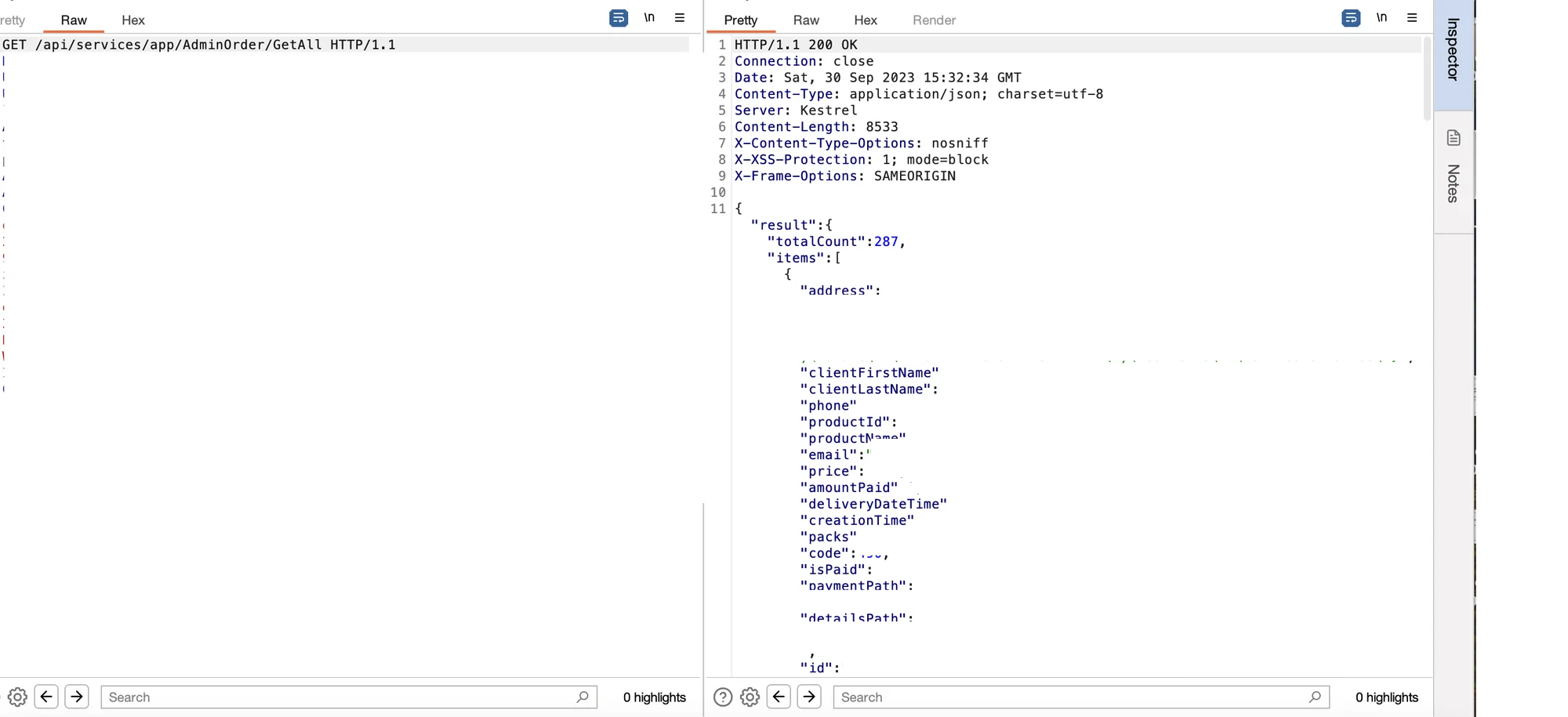
The image relates to the open Swagger UI on port 5000. The report does not reproduce the endpoint paths or the leaked fields.
Step 2: Two time-based SQL injections
The researchers argue that threat modelling matters more than blind spraying: once the target's context is understood, test cases can be prepared deliberately. Their heuristic: if the application is not modern (legacy) and loads fields from the database, in this case a country select, test time-based payloads on those fields. They found two SQL injections with this payload:
1'XOR(SELECT CASE WHEN(1234=1234) THEN SLEEP(7) ELSE 0 END)XOR'Z
The payload closes the string with ', then uses XOR with a CASE that is always true (1234=1234) to trigger SLEEP(7), and closes with XOR'Z so the surrounding expression stays syntactically valid. A response delayed by about seven seconds indicates the injected expression executed.

The image relates to the first SQL injection.

The image relates to the second SQL injection.
Step 3: All PII leakage by method and header change
The researchers first tried the common approach of changing a numeric ID in a request to fetch another user's information, and received a 403. They then switched the method to PATCH, a tactic they say some hunters use, and that did not work either. The successful step was adding a specific header, Accept: application/json, which produced a 200 OK.
The original request observed while browsing the application was:
GET /users/58158 HTTP/2
Host: www.target.com
Cookie: x
Content-Length: 0
Sec-Ch-Ua:
After changing the numeric ID the response was 403. The bypass attempt was:
PATCH /users/58158 HTTP/2
Host: www.target.com
Cookie: x
Content-Length: 0
Sec-Ch-Ua:
Accept: application/json
The result:

The image shows the result after the method was switched to PATCH and Accept: application/json was added.
Step 4: Stored XSS with a CSP bypass
The researchers note that any editor accepting text is worth testing for XSS, and that regex filtering of dangerous tags should not discourage a tester. On the target they found a posts field, where users can write post notes like Twitter. The application had a CSP, so a bypass was needed. The payload used was:
xss<script/src="https://www.google.com/complete/search?client=chrome&q=hello&callback=alert#1"> "></script>
The payload uses HTML entity encoding (.) for the dots in the hostname, so the filter sees an encoded string while the browser resolves the host, and it loads Google's complete/search JSONP endpoint with callback=alert, so the JSONP response calls alert. The trailing "></script> closes the surrounding markup.

The image relates to the stored XSS payload used to bypass CSP.
Step 5: Employee demo domain, signup bypass and IDOR
During reconnaissance the pair found a domain containing the word demo, of the form companydemonew.com. The domain only offered login or signup, and signup required a company email address.
The image relates to the demo domain that required a company email address. The researchers say they signed up with a company email address, were able to bypass the signup process, and received an activation email.
Because the domain was not publicly accessible, they expected post-authentication vulnerabilities, and found one quickly. Changing the numeric ID from 35 to 36 revealed a significant IDOR.
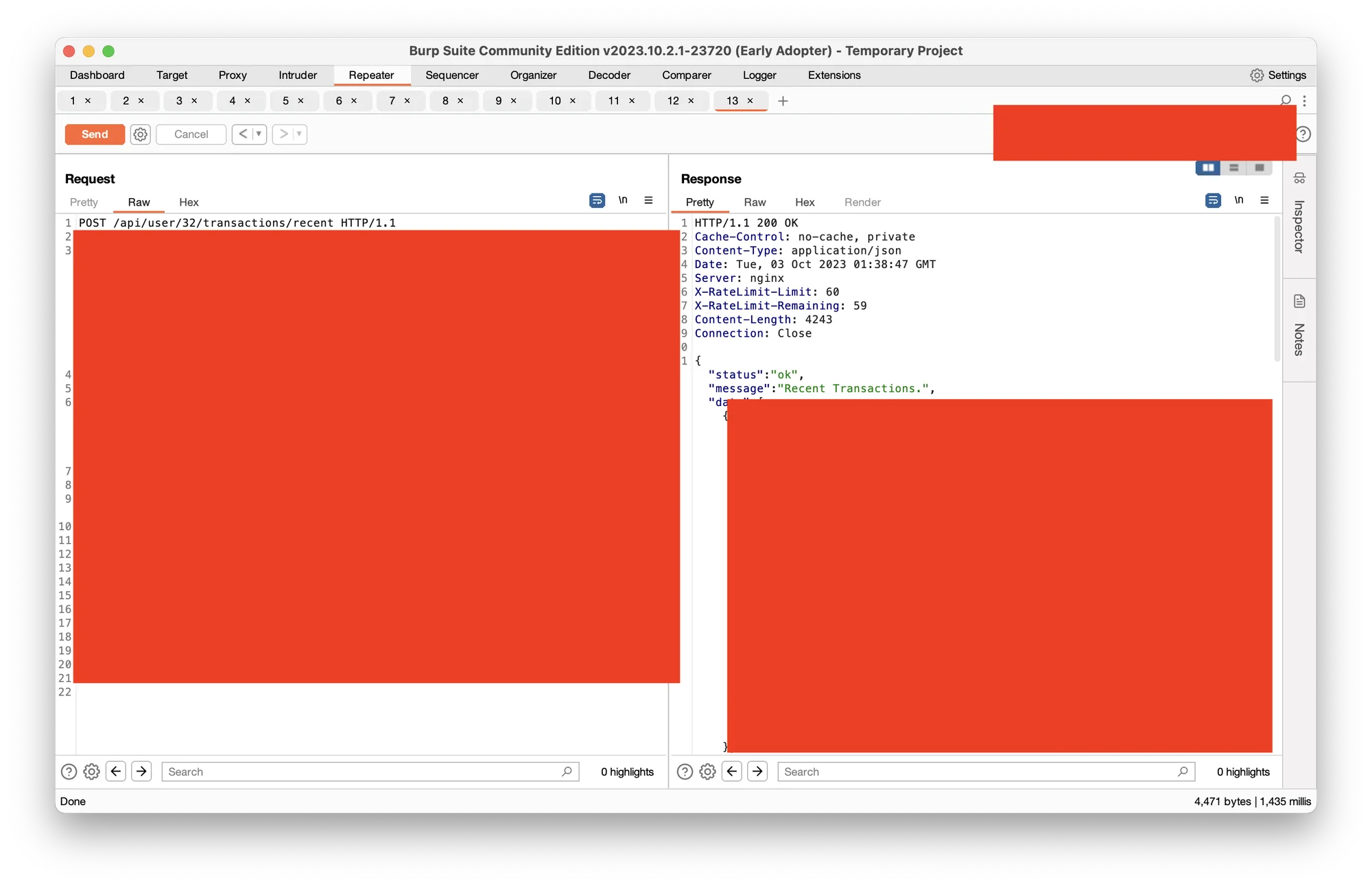
The image relates to the IDOR found by changing the numeric ID.
The result:

The image shows the result of the changed ID.
Step 6: WPEngine configuration file
The researchers contrast public wordlists with a custom one, and say their private wordlist found the WPEngine config file at:
https://target.com/_wpeprivate/config.json
Result:

The image shows the exposed config.json. The report does not list the credential names or values.
Other findings
The report lists further issues without technical detail:
- x2 Database Credentials Leakage
- x1 Account Takeover
- x10 Reflected XSS
- x2 Information Disclosure
- x2 Business Logic
- x2 Subdomain Takeover
Time and payout
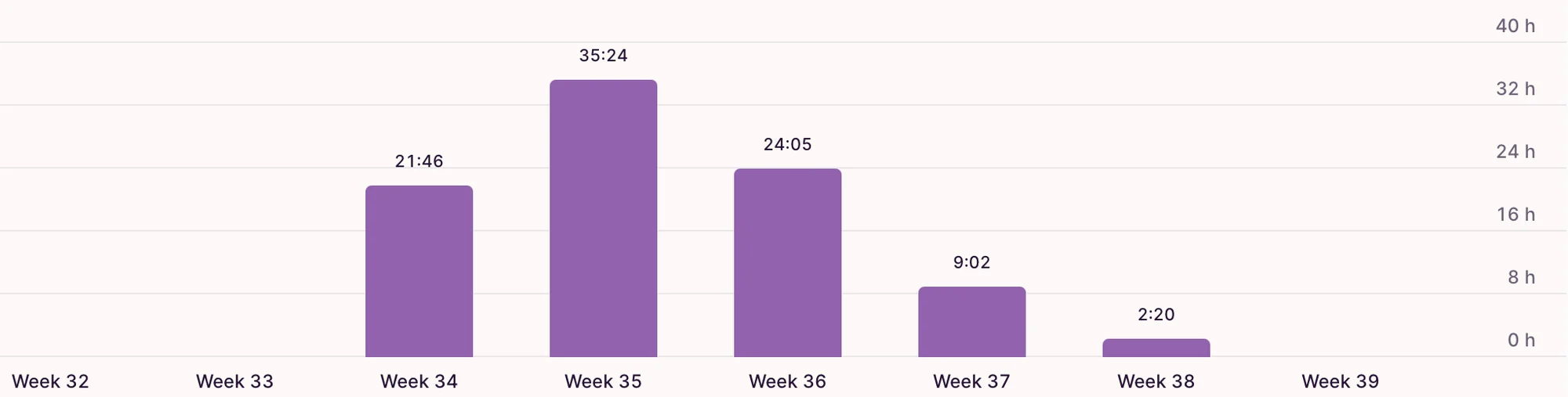
The image shows the Toggl Track results. The pair spent around 200 hours, 100 per person. After pausing and waiting almost five months for open reports to be processed, they earned $20,300.
Root cause
The report does not include source code or vendor explanations, so the following is inferred from the behaviour described.
- Swagger UI on port 5000: an API documentation interface was reachable without authentication on a test subdomain, and a subset of the documented endpoints did not enforce the authentication the documentation implied. Likely the test environment was deployed without the gateway or middleware that protects production.
- SQL injection: user-supplied values from select fields were concatenated into SQL rather than parameterised, so a string-terminating quote plus a boolean
XORexpression could inject aSLEEP. The legacy nature of the application is the researchers' own stated precondition. - PII leak via PATCH plus
Accept: application/json: the authorisation check appears to have been applied to theGETroute only, or to have depended on the response format. Switching the method and asking for JSON reached a handler that returned the record without an ownership check. The report does not confirm the mechanism. - Stored XSS: the input filter blocked dangerous tags by pattern, but did not normalise HTML entities, and the CSP allowed a JSONP endpoint on a third-party domain that could execute script.
- IDOR: the resource was fetched by a numeric identifier with no check that the authenticated user owned it, so incrementing 35 to 36 returned another tenant's transaction data.
- WPEngine config: the
_wpeprivatedirectory was served publicly, exposingconfig.jsonwith credentials.
Impact
The report's own framing is that these were findings on a wide-scoped program, and it does not assign severities or CVSS scores.
- The open Swagger endpoints leaked PII from 2 of 10 open APIs, out of roughly 100 documented.
- The method and header change returned PII for arbitrary numeric user IDs, subject to holding a valid session cookie.
- The stored XSS executed in the context of the posts feature, bypassing CSP, so it could run script for viewers of a post.
- The IDOR exposed transaction data after changing the numeric ID from 35 to 36, and the demo domain was reachable by signing up with a company email address.
- The WPEngine config file was exposed, and the report separately lists two database credential leaks.
- The additional list includes an account takeover, ten reflected XSS, two information disclosures, two business logic issues and two subdomain takeovers.
Fix
Based on the findings, the fixes would be:
- Remove or authenticate the Swagger UI on test infrastructure, and enforce authentication on every documented endpoint rather than relying on the documentation's claim.
- Replace string concatenation in the country select queries with parameterised statements.
- Apply the ownership check to every HTTP method that reaches the user record, and not only to
GET; do not let theAcceptheader select a less protected handler. - Normalise HTML entities before tag filtering, and tighten the CSP so third-party JSONP endpoints cannot execute script.
- Enforce object-level authorisation on the numeric ID used for transactions.
- Block public access to
_wpeprivateand rotate any credentials inconfig.json.
Variants to test
- Certificate search by Organization. Run the crt.sh command with the target's organization name instead of Apple. A positive result is a list of root domains, including ones absent from your existing asset list.
- ASN to certificate names. Feed a target ASN to
tlsx -san -cn -silent -resp-only. A positive result is hostnames you had not enumerated. - Blog and news mining. Read the target's blog posts and collect every domain mentioned. A positive result is a domain that does not appear in your recon output, as with
championscompany.comand the 60 domains found among 5,000 posts. - Swagger on non-standard ports. Brute force
teststyle subdomains and check port 5000 for a Swagger UI. A positive result is a UI that loads without authentication; then test each documented endpoint individually for missing auth. - Time-based SQLi on select fields. On legacy applications, submit
1'XOR(SELECT CASE WHEN(1234=1234) THEN SLEEP(7) ELSE 0 END)XOR'Zin country or similar select parameters. A positive result is a response delayed by about seven seconds. - Method and header switching on IDOR. Take a request that returns 403 after changing the numeric ID, switch to
PATCH, and addAccept: application/json. A positive result is a 200 OK with another user's data. - Entity-encoded JSONP XSS. Submit
xss<script/src="https://www.google.com/complete/search?client=chrome&q=hello&callback=alert#1"> "></script>in a posts field with a CSP. A positive result is the JSONP callback executing. - Demo domain signup. Look for domains containing
demothat require a company email. A positive result is receiving an activation email and reaching post-authentication features, then testing numeric IDs such as 35 to 36 for IDOR. - Private wordlist for config files. Request paths such as
/_wpeprivate/config.json. A positive result is a JSON file containing credentials.
What happened, in plain words
Two security researchers, Mohammad Zaheri (@mzaherii) and Mohammad Nikouei (@NikoueiMohammad), set themselves a challenge: spend 200 hours in total (100 hours each) hunting for security bugs in a single company's bug bounty program. A bug bounty program is a deal in which a company says: if you find a security problem in our systems and report it to us responsibly, we will pay you a reward (the bounty). The pair wrote up what they did on the Voorivex team blog on 4 March 2024.
The report does not name the company. The researchers say they were not given permission to name it. So every real hostname is replaced with a placeholder such as www.target.com, test.target.tld or target.com, and the reconnaissance examples are illustrated with Apple as a stand-in company. The report also does not give software versions or product names.
The goal was not a money figure but a time budget: 200 hours, tracked daily with an app called Toggl Track. In the end they earned $20,300, which arrived after roughly five months of waiting while the company's triage team (the people who read and sort incoming bug reports) processed everything.
The bugs they describe cover several different parts of the same program: an API documentation page left open on a test subdomain, two SQL injections, a leak of personal data reached by changing the HTTP method and adding a header, a stored cross-site scripting bug that got around a browser security policy, an IDOR (a bug where changing an ID number shows you someone else's data) on an employee demo site, and an exposed configuration file. A short list of further findings is given without technical detail.
This beginner version walks through the same steps in the same order, explains every concept from zero, and copies every request and payload exactly as the original shows it.
Setup
- Two hunters working as a pair, 200 hours total, 100 hours each.
- About 10 hours (5 each) went on choosing the program before any testing started.
- They picked programs with a wide scope (many domains and systems), covering both old and modern architectures and programming languages, with a good payout time and a professional triage team.
- They say they were also motivated by seeing a hunter called
todayisnewat first place on the leaderboard. A leaderboard here is a public ranking of bug bounty hunters by points or earnings. - Tools named in the report:
curl,jq,tr,unfurl,tlsx, crt.sh, shodan, censys, ipip.net, and Toggl Track for time keeping. Each is explained where it first appears below. - For most findings no account roles are described. The IDOR section required signing up on an employee demo domain with a company email address, which the researchers say they managed to do, and which produced an activation email.
- The report does not state any software versions.
Finding it
Program choice
The researchers describe choosing a program as one of the hardest phases. Think of it like picking which building to inspect for fire hazards: a bigger building with more rooms gives you more places to look, but also more work. They preferred wide-scoped programs because more assets means more chance of a vulnerability, and because a wide scope spans both legacy (old) and modern code. Old code is often where simple mistakes survive for years.
Reconnaissance approach
Reconnaissance (recon) means mapping out what the company owns on the internet before you start testing. You cannot test a door you do not know exists. The techniques they listed were:
- Certificate search
- Leveraging IP to asset discovery
- Using CSP headers
- Google dorks
- Using Google Analytics IDs
- Static and dynamic DNS brute force
- OSINT
A few of these need explaining straight away. A certificate is the digital ID card a website presents so browsers can prove it is really that site; certificates are public and are logged, which makes them a goldmine for finding hostnames. DNS is the internet's phone book: it turns a name like example.com into an IP address (the numeric address of a server). DNS brute force means trying a long list of likely names (test, dev, mail, and so on) to see which ones exist. OSINT means open-source intelligence: information anyone can find publicly, such as news articles, blog posts and social media. A Google dork is a carefully crafted search query that makes Google surface things that were not meant to be prominent. A CSP header is a security instruction a website sends to the browser; we will meet it properly in the XSS section.
Certificate search beyond Common Name
The report notes that most hunters search certificates on the Common Name field only. A certificate has several fields; Common Name is the main hostname it was issued for, and Organization is the company the certificate was issued to. Searching by organization can reveal hostnames that a common-name search misses. The report points to shodan and censys as sites that search the net and save certificates, and says there may be other alternatives. Because the program cannot be named, the example is built on Apple:
The image relates to the certificate search example using Apple. crt.sh is a free public search engine over certificate logs. The following command enumerates root domains for that organization:
curl -s "https://crt.sh/?O=Apple%20Inc.&output=json" | jq -r ".[].common_name" | tr A-Z a-z | unfurl format %r.%t | sort -u | tee apple.cert.txt
Line by line, in plain words:
curl -s "https://crt.sh/?O=Apple%20Inc.&output=json"asks the crt.sh website a question.curlis a command-line tool for fetching web pages.-smeans silent: do not print progress noise. The URL containsO=Apple%20Inc., whereOstands for Organization and%20is how a space is written inside a URL.output=jsonasks for the answer in JSON, a plain-text data format that looks like{"key": "value"}and is easy for programs to read.- The vertical bar
|is a pipe: it takes the output of the command on the left and hands it to the command on the right. Think of it as passing a bucket along a line of workers. jq -r ".[].common_name"usesjq, a tool for picking values out of JSON..[]means every item in the list, and.common_namemeans the common-name field of each item.-rmeans raw output, without quotes around each value.tr A-Z a-ztranslates uppercase letters to lowercase, soApple.COMandapple.combecome the same string and can be de-duplicated later.unfurl format %r.%tusesunfurl, a tool that takes URLs and hostnames apart.%r.%tmeans: print the root domain (the registered domain, such asapple.com) plus the top-level domain (the ending, such as.com). This collapseswww.apple.comandstore.apple.comintoapple.com.sort -usorts the lines and keeps only unique ones, removing duplicates.tee apple.cert.txtwrites the result to a file calledapple.cert.txtwhile also showing it on screen.teeis named after the T-shaped pipe fitting that splits a flow in two.
The second image shows the resulting list of Apple root domains produced by that command.
IP to asset discovery
The report explains that a company may own CIDRs whose registered owner name is vague, but the CIDR still carries a sign of the company, for example Apple in the ASN name. Two terms: a CIDR is a block of IP addresses written like [redacted]/24, meaning a range of addresses owned together. An ASN (Autonomous System Number) is a number that identifies a network on the internet, and the name attached to it often reveals the company. The report names ipip.net as a favourite way to find IPs, CIDRs and ASNs.
The image relates to using ipip.net to find IPs, CIDRs and ASNs. The researchers then scanned all CIDRs, ASNs and IPs belonging to the company, extracted certificate information, and found further domains. The command given for pulling alternative names and common names is:
echo AS714 | tlsx -san -cn -silent -resp-only
Line by line:
echo AS714prints the textAS714.AS714is an ASN written in the usual form: the letters AS followed by the number. Here it is used as an example, the same way Apple was used as an example company.- The pipe
|passes that text to the next tool. tlsxis a tool that connects to servers and reads their TLS certificates. TLS is the encryption layer behind HTTPS, and the certificate is the ID card mentioned earlier.-sanasks for subject alternative names. A certificate can list several hostnames it is valid for; these extra names are the SANs.-cnasks for the common name as well.-silentsuppresses extra output, and-resp-onlyreturns only the responses, that is, only the hostnames found, without decoration.
So the whole line means: take this network number, look at the certificates of the servers in it, and print every hostname those certificates mention. Those hostnames are new assets to test.
OSINT and the blog
After technical discovery, the pair turned to OSINT, reading company news without a specific target in mind. The milestone was a company news blog. In one blog post they noticed a domain of the form championscompany.com that was absent from their recon results. They then checked all 5,000 of the company's blog posts manually and found 60 interesting domains that were not in their recon results.
The lesson for a beginner: technical tools only find what is technically discoverable. A human reading a news post can spot a domain that no scanner knew about. It is like finding a spare key mentioned in a letter rather than by trying every lock.
Exploitation
Step 1: Unauthenticated Swagger UI leaking PII
The test.target.tld subdomain was found through static DNS brute force, literally by trying the test keyword. A subdomain is a name in front of the main domain, like test in test.example.com. Developers often create test environments and forget they are reachable from the internet.
On that subdomain, an authentication-less Swagger UI was serving on port 5000. Two concepts: Swagger UI is a web page that lists and documents a service's APIs and often lets you try them from the browser. An API (application programming interface) is the set of doors a program offers to other programs: each endpoint is one door, with an address and a defined way of asking. Authentication means proving who you are, usually with a login. "Authentication-less" means no login was required to open the page. A port is a numbered channel on a server; port 5000 is just a number some development tools use by default, and seeing it is a hint that a development service is exposed.
The UI listed approximately 100 APIs that appeared to be protected by authentication. The researchers tested each one individually. Exactly 10 turned out to be open, and 2 of those were leaking PII. PII means personally identifiable information: names, addresses, phone numbers, anything that identifies a real person.
The image relates to the open Swagger UI on port 5000. The report does not reproduce the endpoint paths or the leaked fields.
Why this step was taken: a documentation page that loads without a login is a map of the company's internal doors. The documentation claims the doors are locked, but documentation is not enforcement. Testing each endpoint one by one is slow and boring, but it is the only way to know which doors are actually locked.
Step 2: Two time-based SQL injections
The researchers argue that threat modelling matters more than blind spraying. Threat modelling means thinking about how the application works and where its weak points logically are before firing off tests. Blind spraying means throwing random attack strings at everything and hoping. Once the target's context is understood, test cases can be prepared deliberately.
Their heuristic: if the application is not modern (legacy) and loads fields from the database, in this case a country select, test time-based payloads on those fields. A database is where an application stores its data, and SQL is the language used to ask it questions. SQL injection is when user input is pasted into a database question in a way that lets the user change the question itself. A time-based injection is one where the attacker cannot see the answer directly, so instead they make the database pause for a fixed number of seconds; if the page takes that long to respond, the injection worked. It is like asking a locked room a yes/no question and agreeing that one knock means yes and silence means no.
They found two SQL injections with this payload:
1'XOR(SELECT CASE WHEN(1234=1234) THEN SLEEP(7) ELSE 0 END)XOR'Z
Line by line, in plain words:
1'is a value followed by a single quote. In SQL, text values are wrapped in single quotes, so this quote is an attempt to end the text early and start writing code.XORis a logical operator meaning exclusive or: the result is true when exactly one side is true. Attackers use it because it lets them glue an expression into the surrounding query without breaking it.SELECT CASE WHEN(1234=1234) THEN SLEEP(7) ELSE 0 ENDis a database question.CASE WHENis an if-then: if the condition is true, do the first thing, otherwise do the second.1234=1234is always true, so the database runsSLEEP(7), which pauses for seven seconds.ELSE 0is the fallback that never runs here.XOR'Zcloses the expression and supplies a final text value so the rest of the original query still makes sense.
If the page takes about seven seconds longer than usual to answer, the injected expression ran, which proves the input reached the database as code.
The image relates to the first SQL injection.
The image relates to the second SQL injection.
Why this step was taken: a country dropdown is a field whose options come from the database. If the application is old, the value chosen in the dropdown may be pasted straight into the SQL query. That makes it a natural place to test.
Step 3: All PII leakage by method and header change
The researchers first tried the common approach of changing a numeric ID in a request to fetch another user's information, and received a 403. A 403 is the HTTP status code for forbidden: the server understood the request but refused it. HTTP is the protocol browsers and servers use to talk, and every request has a method, a verb saying what you want to do. GET means give me something; PATCH means change part of something.
They then switched the method to PATCH, a tactic they say some hunters use, and that did not work either. The successful step was adding a specific header, Accept: application/json, which produced a 200 OK. A header is a line of extra information attached to a request, like the notes on an envelope. Accept tells the server which format the client would like back; application/json means the JSON data format. A 200 OK is the status code for success.
The original request observed while browsing the application was:
GET /users/58158 HTTP/2
Host: www.target.com
Cookie: x
Content-Length: 0
Sec-Ch-Ua:
Line by line:
GET /users/58158 HTTP/2is the request line: methodGET, path/users/58158(the user record with ID 58158), and protocol versionHTTP/2.Host: www.target.comsays which website on the server is being asked for. One server can host many sites, so the hostname picks one.Cookie: xcarries a cookie. A cookie is a small piece of data the browser stores for a site and sends back on every request; it is usually how a site remembers that you are logged in. Here the real value is replaced withx.Content-Length: 0says the request body is empty.Sec-Ch-Ua:is a header that normally describes the browser; here it is empty.
After changing the numeric ID the response was 403. The bypass attempt was:
PATCH /users/58158 HTTP/2
Host: www.target.com
Cookie: x
Content-Length: 0
Sec-Ch-Ua:
Accept: application/json
Line by line:
PATCH /users/58158 HTTP/2is the same path but with the method changed toPATCH.Host,Cookie,Content-LengthandSec-Ch-Uaare unchanged.Accept: application/jsonis the new line: please answer in JSON.
The result:
The image shows the result after the method was switched to PATCH and Accept: application/json was added.
Why this step was taken: the first attempt showed that the server checked something and said no. Changing the method and the requested format is a way of asking the same question through a different door, in case the check was only fitted to the first door. The report does not confirm why this worked; it only records that it did.
Step 4: Stored XSS with a CSP bypass
The researchers note that any editor accepting text is worth testing for XSS, and that regex filtering of dangerous tags should not discourage a tester. XSS (cross-site scripting) is when an attacker gets their own code to run inside another user's browser on the target site. Stored XSS means the malicious text is saved on the server, for example in a post, and runs for everyone who later views it. A regex (regular expression) is a pattern-matching rule; a filter using one might block anything containing <script.
On the target they found a posts field, where users can write post notes like Twitter. The application had a CSP, so a bypass was needed. A CSP (Content Security Policy) is a header a site sends telling the browser which sources of code are allowed to run. It is like a guest list at a door: even if someone sneaks a script tag in, the browser refuses to run code from a source not on the list. The payload used was:
xss<script/src="https://www.google.com/complete/search?client=chrome&q=hello&callback=alert#1"> "></script>
Line by line, in plain words:
xssis just text, a marker so the tester can see the payload in the page.<script/src="...">is a script tag written with a slash instead of a space. Browsers are forgiving about this; a simple filter looking for<scriptwith a space may not match it.https://www.google.com/...is the address of the script..is an HTML entity for a dot. The browser decodes it to.before fetching, so the address becomeswww.google.com, but a filter reading the raw text sees no dots and may not recognise the hostname./complete/search?client=chrome&q=hello&callback=alertis a Google endpoint that returns JSON, and withcallback=alertit wraps the JSON in a call to a function namedalert. This pattern is called JSONP: instead of returning pure data, the server returns code that calls the named function. Because the script comes from Google, a domain the CSP may trust, the browser runs it, and the functionalertpops up a dialog box.#1is a fragment, ignored by the server.">closes the attribute and tag of whatever markup surrounded the payload."></script>closes the surrounding markup so the page structure stays valid.
The image relates to the stored XSS payload used to bypass CSP. A gadget here means an existing, trusted endpoint that can be abused to run code.
Why this step was taken: the posts field is a place where text is saved and shown to other people, which is exactly the shape of a stored XSS. The CSP made a plain script tag useless, so the tester looked for a trusted source that would run code for them.
Step 5: Employee demo domain, signup bypass and IDOR
During reconnaissance the pair found a domain containing the word demo, of the form companydemonew.com. The domain only offered login or signup, and signup required a company email address. A demo domain is a demonstration copy of a product, often given to prospective customers, and often less hardened than the real thing.
The image relates to the demo domain that required a company email address. The researchers say they signed up with a company email address, were able to bypass the signup process, and received an activation email.
Because the domain was not publicly accessible, they expected post-authentication vulnerabilities, and found one quickly. Post-authentication means bugs that only appear after you are logged in. Changing the numeric ID from 35 to 36 revealed a significant IDOR. IDOR (insecure direct object reference) is when a site uses a simple identifier, such as a number, to point at a record, and does not check that the logged-in user is allowed to see that particular record. It is like a hotel where room keys are numbered and the receptionist hands you key 35, but nothing stops you from trying key 36.
The image relates to the IDOR found by changing the numeric ID.
The result:
The image shows the result of the changed ID. A tenant here means a separate customer organisation whose data lives in the same system.
Why this step was taken: a demo site that requires a company email suggests the company believes only its own people and customers can get in. If you can get in anyway, the features behind the login become fair game, and numeric IDs are the classic place to look for missing ownership checks.
Step 6: WPEngine configuration file
The researchers contrast public wordlists with a custom one, and say their private wordlist found the WPEngine config file at:
https://target.com/_wpeprivate/config.json
Line by line:
https://target.comis the site, with the real name replaced by a placeholder./_wpeprivate/is a directory path. WPEngine is a hosting service for WordPress sites, and this path is associated with it in the report.config.jsonis a configuration file in JSON format. Configuration files often hold settings and credentials.
A wordlist is a long list of common file and directory names that a tool tries one after another, like trying every key on a keyring. A public wordlist is one everyone has, so defenders can block those names. A custom wordlist is one the tester built themselves, so it contains names the defenders did not think of.
Result:
The image shows the exposed config.json. The report does not list the credential names or values.
Why this step was taken: configuration files are meant to be read by the server, not by visitors. If one is reachable in a browser, it can hand over the keys to the whole system.
Other findings
The report lists further issues without technical detail:
- x2 Database Credentials Leakage
- x1 Account Takeover
- x10 Reflected XSS
- x2 Information Disclosure
- x2 Business Logic
- x2 Subdomain Takeover
A quick note on the terms: reflected XSS is like stored XSS, except the malicious text is not saved; it is bounced straight back in the response to a crafted link. Account takeover means gaining control of someone else's account. Information disclosure means exposing data that should have stayed private. Subdomain takeover is when a subdomain points at a service that no longer exists, and someone else can claim that service and serve their own content under the company's name.
Time and payout
The image shows the Toggl Track results. The pair spent around 200 hours, 100 per person. After pausing and waiting almost five months for open reports to be processed, they earned $20,300.
Root cause
The report does not include source code or vendor explanations, so the following is inferred from the behaviour described. Root cause means the underlying reason a bug exists, as opposed to the symptom you see.
- Swagger UI on port 5000: an API documentation interface was reachable without authentication on a test subdomain, and a subset of the documented endpoints did not enforce the authentication the documentation implied. Likely the test environment was deployed without the gateway or middleware that protects production. A gateway or middleware is a shared layer that every request passes through, where checks like login can be applied in one place.
- SQL injection: user-supplied values from select fields were concatenated into SQL rather than parameterised, so a string-terminating quote plus a boolean
XORexpression could inject aSLEEP. Concatenated means glued together as text; parameterised means passed as separate values that the database treats as data, never as code. The legacy nature of the application is the researchers' own stated precondition. - PII leak via PATCH plus
Accept: application/json: the authorisation check appears to have been applied to theGETroute only, or to have depended on the response format. Switching the method and asking for JSON reached a handler that returned the record without an ownership check. The report does not confirm the mechanism. Authorisation means deciding whether an identified user is allowed to do a particular thing; it comes after authentication. - Stored XSS: the input filter blocked dangerous tags by pattern, but did not normalise HTML entities, and the CSP allowed a JSONP endpoint on a third-party domain that could execute script. Normalise means converting different spellings of the same thing into one standard form before checking it.
- IDOR: the resource was fetched by a numeric identifier with no check that the authenticated user owned it, so incrementing 35 to 36 returned another tenant's transaction data.
- WPEngine config: the
_wpeprivatedirectory was served publicly, exposingconfig.jsonwith credentials.
Impact
The report's own framing is that these were findings on a wide-scoped program, and it does not assign severities or CVSS scores. CVSS is a standard scoring system for how serious a vulnerability is; the report does not use it.
- The open Swagger endpoints leaked PII from 2 of 10 open APIs, out of roughly 100 documented.
- The method and header change returned PII for arbitrary numeric user IDs, subject to holding a valid session cookie. A session cookie is the cookie that proves you are logged in.
- The stored XSS executed in the context of the posts feature, bypassing CSP, so it could run script for viewers of a post.
- The IDOR exposed transaction data after changing the numeric ID from 35 to 36, and the demo domain was reachable by signing up with a company email address.
- The WPEngine config file was exposed, and the report separately lists two database credential leaks.
- The additional list includes an account takeover, ten reflected XSS, two information disclosures, two business logic issues and two subdomain takeovers.
Fix
Based on the findings, the fixes would be:
- Remove or authenticate the Swagger UI on test infrastructure, and enforce authentication on every documented endpoint rather than relying on the documentation's claim.
- Replace string concatenation in the country select queries with parameterised statements.
- Apply the ownership check to every HTTP method that reaches the user record, and not only to
GET; do not let theAcceptheader select a less protected handler. - Normalise HTML entities before tag filtering, and tighten the CSP so third-party JSONP endpoints cannot execute script.
- Enforce object-level authorisation on the numeric ID used for transactions.
- Block public access to
_wpeprivateand rotate any credentials inconfig.json. Rotate means replace a credential with a new one, because the old one must be assumed compromised.
Variants to test
These are the same techniques written as exercises you could try on a program you are allowed to test. Never test a system without permission.
- Certificate search by Organization. Run the crt.sh command with the target's organization name instead of Apple. A positive result is a list of root domains, including ones absent from your existing asset list.
- ASN to certificate names. Feed a target ASN to
tlsx -san -cn -silent -resp-only. A positive result is hostnames you had not enumerated. - Blog and news mining. Read the target's blog posts and collect every domain mentioned. A positive result is a domain that does not appear in your recon output, as with
championscompany.comand the 60 domains found among 5,000 posts. - Swagger on non-standard ports. Brute force
teststyle subdomains and check port 5000 for a Swagger UI. A positive result is a UI that loads without authentication; then test each documented endpoint individually for missing auth. - Time-based SQLi on select fields. On legacy applications, submit
1'XOR(SELECT CASE WHEN(1234=1234) THEN SLEEP(7) ELSE 0 END)XOR'Zin country or similar select parameters. A positive result is a response delayed by about seven seconds. - Method and header switching on IDOR. Take a request that returns 403 after changing the numeric ID, switch to
PATCH, and addAccept: application/json. A positive result is a 200 OK with another user's data. - Entity-encoded JSONP XSS. Submit
xss<script/src="https://www.google.com/complete/search?client=chrome&q=hello&callback=alert#1"> "></script>in a posts field with a CSP. A positive result is the JSONP callback executing. - Demo domain signup. Look for domains containing
demothat require a company email. A positive result is receiving an activation email and reaching post-authentication features, then testing numeric IDs such as 35 to 36 for IDOR. - Private wordlist for config files. Request paths such as
/_wpeprivate/config.json. A positive result is a JSON file containing credentials.
Glossary
- 200 OK: the HTTP status code meaning the request succeeded.
- 403: the HTTP status code meaning forbidden; the server understood but refused.
- Account takeover: gaining control of another person's account.
- API: a defined set of doors a program offers to other programs, each with an address and a way of asking.
- ASN: Autonomous System Number, a number identifying a network on the internet, often named after its owner.
- Authentication: proving who you are, usually by logging in.
- Authorisation: deciding whether an identified user is allowed to do a particular thing.
- Bug bounty program: a scheme where a company pays researchers for responsibly reported security bugs.
- Certificate: the digital ID card a website presents to prove its identity; public and logged.
- CIDR: a written range of IP addresses owned together, such as
[redacted]/24. - Common Name: the main hostname a certificate was issued for.
- Concatenation: gluing pieces of text together, which is dangerous when one piece is user input going into SQL.
- Cookie: a small piece of data a browser stores for a site and sends back on every request, often used to remember a login.
- CSP: Content Security Policy, a header telling the browser which sources of code may run.
- crt.sh: a free public search engine over certificate logs.
- curl: a command-line tool for fetching web pages and APIs.
- CVSS: a standard scoring system for vulnerability severity; not used in this report.
- Database: where an application stores its data.
- DNS: the internet's phone book, turning names into IP addresses.
- DNS brute force: trying a long list of likely subdomain names to see which exist.
- Demo domain: a demonstration copy of a product, often less hardened than the real thing.
- Gateway / middleware: a shared layer every request passes through, where checks like login can be applied in one place.
- Gadget: an existing trusted endpoint abused to run code.
- Google dork: a crafted search query that surfaces things not meant to be prominent.
- Header: a line of extra information attached to an HTTP request or response.
- HTTP: the protocol browsers and servers use to talk.
- HTTP method: the verb of a request, such as
GET(fetch) orPATCH(partially change). - IDOR: insecure direct object reference, where a simple identifier points at a record without an ownership check.
- Impact: the harm a vulnerability could cause.
- Information disclosure: exposing data that should have stayed private.
- IP address: the numeric address of a machine on a network.
- ipip.net: a site used in the report to look up IPs, CIDRs and ASNs.
- jq: a command-line tool for picking values out of JSON.
- JSON: a plain-text data format of keys and values, easy for programs to read.
- JSONP: a technique where a server returns code that calls a named function instead of pure data.
- Legacy: old software, often where simple mistakes survive for years.
- Normalise: convert different spellings of the same thing into one standard form before checking it.
- OSINT: open-source intelligence, information anyone can find publicly.
- Parameterised query: a database query where user values are passed separately and treated as data, never as code.
- PATCH: an HTTP method meaning change part of a resource.
- PII: personally identifiable information, data that identifies a real person.
- Pipe (
|): passes the output of one command as input to the next. - Port: a numbered channel on a server; port 5000 is a common development default.
- Post-authentication: bugs that only appear after logging in.
- Reconnaissance (recon): mapping out what a company owns on the internet before testing.
- Reflected XSS: XSS where the malicious text is bounced straight back in a response rather than saved.
- Regex: a pattern-matching rule used by filters.
- Root cause: the underlying reason a bug exists.
- Rotate: replace a credential with a new one because the old one must be assumed compromised.
- Session cookie: the cookie that proves you are logged in.
- shodan / censys: sites that search the internet and save data such as certificates.
- SLEEP: a database function that pauses for a given number of seconds, used to confirm time-based injection.
- SQL: the language used to ask a database questions.
- SQL injection: user input pasted into a database question in a way that lets the user change the question.
- Stored XSS: XSS where the malicious text is saved on the server and runs for later viewers.
- Subdomain: a name in front of the main domain, such as
testintest.example.com. - Subdomain takeover: claiming a service that a subdomain still points at, and serving content under the company's name.
- Swagger UI: a web page that documents a service's APIs and often lets you try them.
- tee: a command that writes output to a file while also showing it.
- Tenant: a separate customer organisation whose data lives in the same system.
- Threat modelling: thinking about how an application works and where its weak points logically are before testing.
- Time-based injection: an injection confirmed by making the server pause, rather than by seeing data.
- TLS: the encryption layer behind HTTPS, whose certificates identify servers.
- tlsx: a tool that reads TLS certificates to find hostnames.
- Toggl Track: a time-tracking application the researchers used daily.
- Triage team: the people who read and sort incoming bug reports.
- tr: a command-line tool that translates characters, used here to lowercase text.
- unfurl: a tool that takes URLs and hostnames apart into their parts.
- Wordlist: a long list of common names a tool tries one after another.
- XOR: a logical operator that is true when exactly one side is true.
- XSS: cross-site scripting, getting attacker code to run inside another user's browser on the target site.



