2FA Bypass via Google Identity & OAuth Login
The application used Google Identity Platform for authentication and enforced 2FA after login. An attacker with a victim's password could obtain an ID token via the Identity Toolkit API, change the account email to their own, then log in via Google OAuth to bypass 2FA and gain full account access.
Sharat Kaikolamthuruthil Follow
 Published on medium.com
This write-up is about another 2FA bypass that I was able to find on a private program. The application was using third party service for authentication.
The full write-up lives on its author's site
It belongs to its author, so we link to it rather than copy it. The other two tabs are our own rewrites, checked against it.
Context
This write-up covers a two-factor authentication bypass found on a private program. The application did not implement authentication itself: it delegated sign-in to a third-party service, specifically Google Cloud Platform's Identity Platform. Users authenticate through that service and are then redirected by the application to a 2FA verification page.
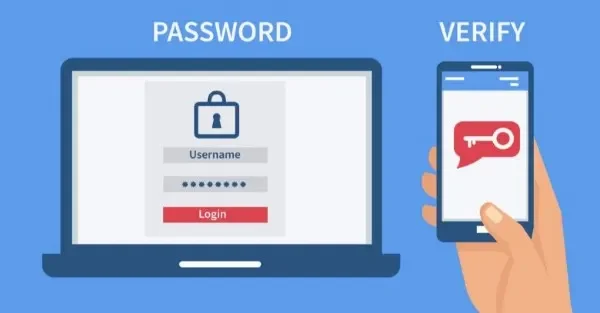
The interesting part is the split between the two layers. Identity Platform issues the credentials (an ID token) and the application then decides whether the user still has to pass a second factor. The bypass lives in the gap between those two decisions.
Setup
The report does not describe the tooling beyond curl, and no versions are given. The preconditions are what matter:
- A target application that uses Google Identity Platform for authentication.
- A victim account that is 2FA enabled, with a known email and password (the report uses
[redacted]with passwordpass@1234). - An attacker-controlled Google account, in this case a Gmail address (
[redacted]). - The application offers Google OAuth as an alternative login method.
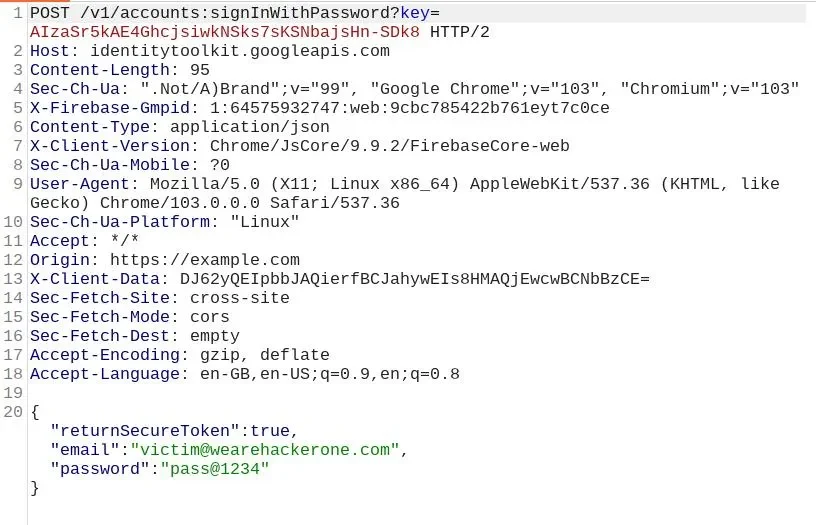
After a normal authentication the application redirects the user to the 2FA verification page. That redirect is the only thing standing between a valid password and a fully authenticated session.
Finding it
The researcher noticed that the application's own 2FA gate sits after the identity provider has already handed out a usable credential. Identity Platform's REST API exposes account operations that accept an ID token directly, and the application's 2FA page does not appear to be the only path into the account. If the token can be obtained and then used to change the account's email address, the second factor can be sidestepped entirely, because the attacker can then log in through the OAuth route with an identity they control.
Exploitation
Step 1: obtain the victim's ID token
The Identity Platform toolkit endpoint accepts an email and password and returns a token. The researcher calls it directly with curl:
The key query parameter is the project's public API key, signInWithPassword is the password grant, and returnSecureToken: true asks for the token in the response. The response contains the victim's ID token.
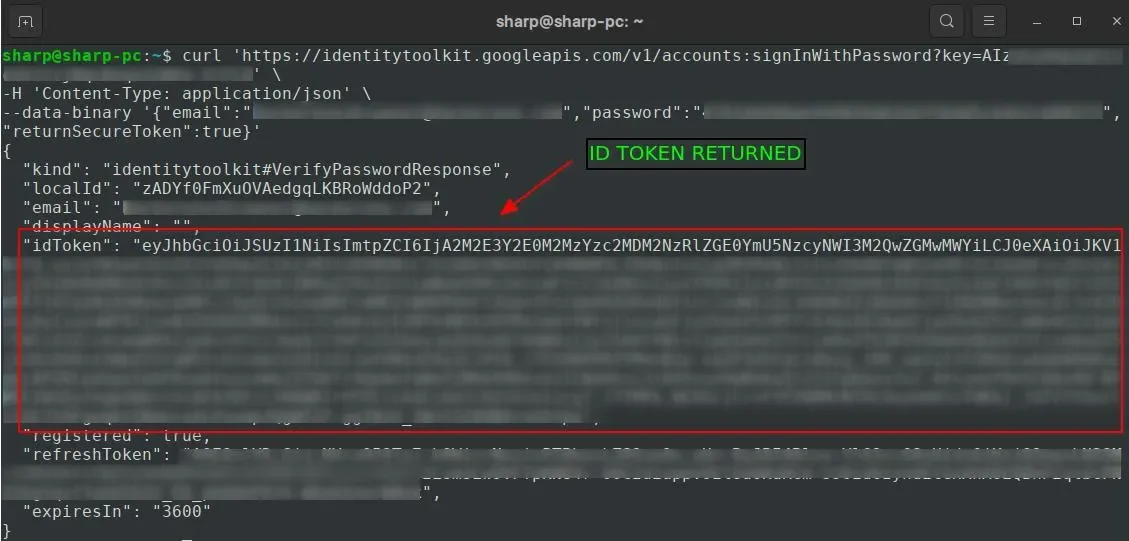
This is the first important observation: the password alone is enough to get a token from the identity provider. The application's 2FA page is a separate step from the identity provider's API.
Step 2: change the account email to the attacker's address
With the token in hand, the researcher calls the account update endpoint and rewrites the account's email to the attacker's Gmail address:
curl 'https://identitytoolkit.googleapis.com/v1/accounts:update?key=[redacted]' \
-H 'Content-Type: application/json' \
--data-binary \
'{"idToken":"[redacted].eyJyTRHsasdhasdjhsakdhaksjdaskjdsakdnkkcnm-[redacted];sdjas;dj;sajdlasjd;kajsd.DbRLQU1bhwWOMQ9e-[redacted]-[redacted]-m0UfOP-[redacted]-VqnnCe64yPjhV4sAvuJ1uDGA-_z-IMRJO9aJ7f0jTmU-WNzIRwQlTEgCOeWONkwHe-qJSX2Ph1z9QQRyEsoaDLgIuOw9lciw","email":"[redacted]","returnSecureToken":true}'
The idToken field carries the token from step 1, which authorises the change. The email field is the new address, the attacker's Gmail account. returnSecureToken: true asks for a fresh token in the response. The report does not show the response body, only that the update succeeds.
Step 3: log in through Google OAuth
Because the account's email is now [redacted], the attacker signs in with that Google account and its password. The attacker logs in with [redacted] and its password, which grants full access to the victim's account. The 2FA implementation is bypassed.

Root cause
The application's 2FA check is enforced only in its own login flow, after the identity provider has already issued a valid ID token. The identity provider's REST API is reachable directly, so the password grant returns a token without the application's second factor ever being consulted. That token is then powerful enough to change the account's email address, and once the email points at an identity the attacker controls, the OAuth login path authenticates the attacker as the victim without any second factor.
In other words, the second factor protects one entry point (the application's own login page) while the account's identity can be rewritten through another (the identity provider's API).
Impact
An attacker who knows a victim's password can gain complete access to a 2FA enabled account by moving it to an attacker-controlled email. The precondition is knowledge of the password, so this is a bypass of the second factor rather than of authentication as a whole. The report states that because the attacker could gain complete access to the victim's account, it was triaged as a High severity bug.
Fix
Based on the mechanism, the fixes would be to stop treating an identity provider token as sufficient on its own, to require the second factor before any account-mutating operation such as an email change, and to re-check the 2FA state whenever the account's email or linked identity changes. Restricting or rotating the public API key would not help on its own, since the key is public by design; the enforcement has to sit on the account operations.
Variants to test
- Call the identity provider's
signInWithPasswordendpoint directly on other applications that use the same service, and see whether the returned token is accepted by the application's backend without a 2FA step. A positive result is a token that grants access to account data or account-changing endpoints. - Try
accounts:updatewith a token from a 2FA enabled account and change the email to an address you control. A positive result is a successful response and a subsequent OAuth login that lands in the victim's account. - Look for other account-mutating operations on the identity provider API (password change, profile update) that accept the token, and check whether any of them lets you take over the account without the second factor.
- Check whether the application invalidates existing sessions or tokens when the email changes. If it does not, the same primitive may work even where the OAuth path is not offered.
- Test alternative login methods (other OAuth providers, magic links) for the same trust assumption: an identity linked by email that the application accepts without re-verifying the second factor.
What happened, in plain words
This is the story of a two-factor authentication bypass found on a private bug bounty program. Two-factor authentication, usually shortened to 2FA, is the second lock on a door: after you type your password, the site asks for something else, such as a code from your phone, before it lets you in. The idea is that a stolen password alone is not enough to get into your account.
In this case the application did not build its own login system. It outsourced sign-in to a third-party service, Google Cloud Platform's Identity Platform. Think of it like a building that hires a security company to check IDs at the door: the application trusts Google to say who you are, and then adds its own extra check (the 2FA page) afterwards.
The researcher found that a token from Google's service could be used to change the account's email address. Google's service would hand out a credential, called an ID token, to anyone who knew the email and password. That token was powerful enough to change the account's email address. Once the email address pointed at the attacker's own Gmail account, the attacker could log in through the application's Google OAuth option and land inside the victim's account, with no second factor ever being asked for.
The write-up walks through the whole chain: getting the token, using it to rewrite the email, and then logging in through Google. It ends with the note that the bug was triaged as High severity because the attacker could gain complete access to the victim's account.
The pieces you need to know
Before following the steps, a few ideas come up again and again. None of them require any security background.
API. An API (application programming interface) is a way for one piece of software to talk to another. A useful comparison is a restaurant: the menu is the API. You do not walk into the kitchen and cook; you pick an item from the menu, the kitchen prepares it, and the waiter brings it back. On the web, an API is usually a URL you send a request to, and it sends back data. Google's Identity Platform exposes such an API, and anyone who knows the URL and the right parameters can call it directly, without going through the application's own web pages.
Token. A token is a short string of characters that proves you have already logged in. Think of a cloakroom ticket: you hand in your coat, you get a ticket, and later the ticket is enough to get the coat back. You do not have to prove who you are again. An ID token is the ticket Google's service issues after a successful sign-in. Whoever holds it can act as that user towards the service.
OAuth. OAuth is a standard that lets a website log you in through another company, for example "Sign in with Google". Instead of giving the website your Google password, Google confirms your identity to the website. The application in this report offered Google OAuth as an alternative login method alongside the normal email and password form.
curl. curl is a command-line tool for sending web requests. You can think of it as a browser without the window: you type the address and the data, and it prints the response. The researcher used it to talk to Google's API directly, skipping the application's own pages.
2FA bypass. A bypass means going around a control rather than breaking it. The second factor here was not cracked; it was simply never reached, because the attacker took a different route into the account.
The setup
The report does not describe any tooling beyond curl, and it gives no software versions. What matters are the conditions that had to be true for the attack to work:
- The target application uses Google Identity Platform for authentication.
- There is a victim account with 2FA enabled, and the attacker knows its email and password. The report uses
[redacted]with the passwordpass@1234. - The attacker has a Google account of their own, in this case a Gmail address,
[redacted]. - The application offers Google OAuth as an alternative way to log in.
After a normal sign-in, the application redirects the user to a 2FA verification page. That redirect is the only thing standing between a correct password and a fully logged-in session. If you can get past that page, or avoid it entirely, the second factor has done nothing.
How the researcher found it
The key observation was about ordering. The application's own 2FA gate sits after the identity provider has already handed out a usable credential. Google's Identity Platform has a public REST API with account operations that accept an ID token directly. That means the application's 2FA page is not the only road into the account: you can talk to Google's API yourself and get a token without ever loading that page.
From there the chain is simple. If you can get a token with just the password, and that token lets you change the account's email address, then you can point the account at an email you control. Once the account's email is yours, you can log in through the OAuth route as yourself, and the application will treat you as the victim. The second factor is sidestepped entirely, because the attacker never needs to pass it.
Step 1: get the victim's ID token
The Identity Platform toolkit endpoint accepts an email and password and returns a token. The researcher called it directly with curl:
Line by line:
curlis the tool sending the request. Everything after it describes what to send and where.- The URL
https://identitytoolkit.googleapis.com/v1/accounts:signInWithPasswordis the address of Google's sign-in operation. The part after the colon,signInWithPassword, is the name of the operation: sign in with a password. ?key=[redacted]is a query parameter. Thekeyis the project's public API key. It identifies which Google project is being used. It is public by design, so seeing it in a request is not a secret leak.-H 'Content-Type: application/json'tells the server that the body of the request is formatted as JSON, a common text format for structured data.--data-binary '{...}'is the body itself. It contains three fields:emailis the account to sign in as,passwordis that account's password, andreturnSecureToken: trueasks the server to include the token in its response.
The response contains the victim's ID token.
This is the first important observation: the password alone is enough to get a token from the identity provider. The application's 2FA page is a separate step, and this API call does not go through it. The researcher did not need to break the second factor; the token was obtained without it.
Step 2: change the account email to the attacker's address
With the token in hand, the researcher called the account update endpoint and rewrote the account's email to the attacker's Gmail address:
curl 'https://identitytoolkit.googleapis.com/v1/accounts:update?key=[redacted]' \
-H 'Content-Type: application/json' \
--data-binary \
'{"idToken":"[redacted].eyJyTRHsasdhasdjhsakdhaksjdaskjdsakdnkkcnm-[redacted];sdjas;dj;sajdlasjd;kajsd.DbRLQU1bhwWOMQ9e-[redacted]-[redacted]-m0UfOP-[redacted]-VqnnCe64yPjhV4sAvuJ1uDGA-_z-IMRJO9aJ7f0jTmU-WNzIRwQlTEgCOeWONkwHe-qJSX2Ph1z9QQRyEsoaDLgIuOw9lciw","email":"[redacted]","returnSecureToken":true}'
Line by line:
- The URL
https://identitytoolkit.googleapis.com/v1/accounts:updateis the address of Google's account update operation. The name after the colon,update, says what it does: change account details. - The same public
keyquery parameter identifies the project, exactly as in step 1. -H 'Content-Type: application/json'again says the body is JSON.--data-binarycarries the body. TheidTokenfield holds the token from step 1, and that token is what authorises the change: it proves the request comes from someone who signed in as the victim. Theemailfield is the new address, the attacker's Gmail account.returnSecureToken: trueasks for a fresh token in the response.
The report does not show the response body, only that the update succeeds. The important point is that the token from step 1 was accepted as permission to change the account's email address, with no second factor involved.
Step 3: log in through Google OAuth
The application offers Google OAuth as an alternative login method. Because the account's email is now [redacted], the attacker signs in with that Google account and its password. The application treats the login as belonging to the victim's account and grants full access. The 2FA implementation is bypassed.
Notice why this works. The account's email is now [redacted], so the attacker signs in with that Google account. When the attacker logs in with Google, Google confirms that the person really is [redacted]. The application sees that email on the victim's account and lets the person in. The second factor was never consulted, because the OAuth path did not ask for it.
Why it worked
The application's 2FA check is enforced only in its own login flow, after the identity provider has already issued a valid ID token. Google's REST API is reachable directly, so the password grant returns a token without the application's second factor ever being consulted. That token is then powerful enough to change the account's email address. Once the email points at an identity the attacker controls, the OAuth login path authenticates the attacker as the victim without any second factor.
Put another way: the second factor protects one entry point, the application's own login page, while the account's identity can be rewritten through another, the identity provider's API.
What an attacker could do
An attacker who knows a victim's password can gain complete access to a 2FA enabled account by moving it to an email they control. The precondition is knowledge of the password, so this is a bypass of the second factor rather than of authentication as a whole: the password still had to be known.
The report states that because the attacker could gain complete access to the victim's account, it was triaged as a High severity bug.
How it should be fixed
Based on the mechanism, the fixes would be to stop treating an identity provider token as sufficient on its own, to require the second factor before any account-mutating operation such as an email change, and to re-check the 2FA state whenever the account's email or linked identity changes. Restricting or rotating the public API key would not help on its own, since the key is public by design. The enforcement has to sit on the account operations.
Other places to look for the same pattern
- Call the identity provider's
signInWithPasswordendpoint directly on other applications that use the same service, and see whether the returned token is accepted by the application's backend without a 2FA step. A positive result is a token that grants access to account data or account-changing endpoints. - Try
accounts:updatewith a token from a 2FA enabled account and change the email to an address you control. A positive result is a successful response and a subsequent OAuth login that lands in the victim's account. - Look for other account-mutating operations on the identity provider API, such as password change or profile update, that accept the token, and check whether any of them lets you take over the account without the second factor.
- Check whether the application invalidates existing sessions or tokens when the email changes. If it does not, the same primitive may work even where the OAuth path is not offered.
- Test alternative login methods, such as other OAuth providers or magic links, for the same trust assumption: an identity linked by email that the application accepts without re-verifying the second factor.
Glossary
- 2FA (two-factor authentication): a login that requires two different proofs, usually a password plus a code from a phone or app.
- 2FA bypass: getting into an account without passing the second factor, by going around the check rather than breaking it.
- API (application programming interface): a defined way for software to talk to software, usually a URL you send a request to and get data back from.
- API key: a public identifier for a project that is included in requests to an API; it identifies the project, not the user.
- Authentication: proving who you are, typically with a username and password.
- Authorization: deciding what an authenticated user is allowed to do.
- Bug bounty program: a scheme where organisations pay researchers for reporting security bugs.
- Content-Type: an HTTP header that says what format the body of a request is in, for example JSON.
- curl: a command-line tool for sending web requests and printing the responses.
- Email grant / password grant: an API operation that exchanges an email and password for a token.
- Google Cloud Platform: Google's collection of cloud services, one of which is Identity Platform.
- Google Identity Platform: a Google service that handles sign-in for applications, issuing credentials such as ID tokens.
- Gmail: Google's email service; a Gmail address is a Google account.
- High severity: a rating meaning the bug has serious impact, here because it allowed full account takeover.
- HTTP header: extra information sent alongside a web request, such as the format of the body.
- ID token: a credential issued after sign-in that proves the holder's identity to the service.
- Identity provider: a service that authenticates users on behalf of other applications.
- JSON: a text format for structured data, made of field names and values.
- OAuth: a standard that lets a site log you in through another company, such as "Sign in with Google".
- Private program: a bug bounty program that is not open to the public; only invited researchers can take part.
- Query parameter: the part of a URL after a
?, made of names and values, such askey=.... - Redirect: when a server sends your browser to a different page, here the 2FA verification page after login.
- REST API: an API built around URLs and standard HTTP methods, where each URL represents an operation or resource.
- Root cause: the underlying reason a bug exists, as opposed to its visible symptom.
- Session: the period during which a site remembers that you are logged in.
- Token: a string that proves you have already logged in, so you do not have to send your password again.
- Triaged: reviewed and classified by the program, here as High severity.
- Victim: the account the attacker is trying to take over.

