3 Easy cash via cache
Three web applications cached responses that contained a logged-in user's sensitive details, because the cache treated crafted URLs as static files while the origin server still returned the account data. An attacker could request such a URL and later retrieve another user's cached information from a shared cache.
 Published on medium.com
Hello everybody, Today I will talk about 3 cache bugs in 3 different BBP which lead to 3 bounties 💵
The full write-up lives on its author's site
It belongs to its author, so we link to it rather than copy it. The other two tabs are our own rewrites, checked against it.
Context
This write-up covers three separate web cache deception findings on three different bug bounty programs, each of which paid a bounty. The first was on a public Bugcrowd program, the second on a public Hackenproof program (a Web3 site), and the third on a private Web3 program. In all three cases the target served user-specific data from an endpoint that the cache layer treated as dynamic, and the trick was to make the same response look like a static file to the cache.
The author points readers who are unfamiliar with the technique to a separate article on cache deception before continuing.
Setup
For each target the precondition was the same: a normal user account on the site, and a browser (or a second browser) to check whether a response served to one user was later served to another. The first target had a subdomain with its own user-role registration flow. The second was a Web3 site on Hackenproof. The third was a private Web3 site that the author was told about by someone else, who ran the testing and reporting.
No specific tooling, versions or special configuration are described beyond the browser and the ability to read response headers.
Finding it
The common signal in all three cases is the Cf-cache-status response header. When the endpoint returning user data was requested directly, the header read DYNAMIC, meaning Cloudflare did not consider the URL eligible for caching. That is the correct behaviour for a personalised response. The bug appears when a small change to the path flips that header to MISS (and on a repeat request to HIT) while the body still contains the user's data. Once a response is cached and contains personal data, any other user who requests the same URL receives that data.
Exploitation
First bug: appending a static extension
- Create an account on the subdomain, which has its own type of user-role registration.
- Notice that the endpoint below exposes an object called
window.current_user, which retrieves sensitive user information such asuser_id,emailandphone.
https://subdomain.target.com/gb/account/
- The response carries the header
Cf-cache-status: Dynamic, which means Cloudflare did not consider the URL eligible for caching. - Append
/test.cssto the path:
https://subdomain.target.com/gb/account/test.css
The response is a "Page not found" page, but the Cf-cache-status header changes from DYNAMIC to MISS.
- Do not assume there is no bug because of the 404. Look at the source code of the "Page not found" page: the
window.current_userobject is still present and still contains all the user information. - Open the same URL in a different browser and confirm that the data is still there.
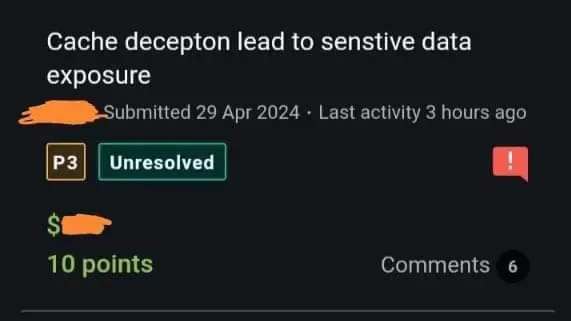
The bug was reported and rated P3.
Second bug: path confusion with a semicolon
- Create an account on the Hackenproof Web3 target.
- Notice the API endpoint below, which retrieves all user information. Its response carries
Cf-cache-status: DYNAMIC.
https://www.target.com/-/x/us/us/open/user/get
- Try appending a static extension:
https://www.target.com/-/x/us/us/open/user/get/test.css
The Cf-cache-status changes from DYNAMIC to MISS, but the response is a 404 page that leaks no sensitive data.
- Instead of a slash, use a semicolon:
https://www.target.com/-/x/us/us/open/user/get;test.css
The response now includes all the user information and also carries Cf-cache-status: MISS. Sending the same request again changes the header from MISS to HIT, which means the response came from the cache server rather than the origin server.
The author's explanation: this is path confusion. The server treats ; as a parameter delimiter the way it treats ?, so it returns the response for the /get endpoint and ignores ;test.css. The cache server, on the other hand, treats /get;test.css as a static CSS file and caches the content.
- Open the URL in a different browser and confirm that the data is still there.
- The same bug affected another subdomain:
https://global.target.com
The bug was reported and rated Medium (6.9).
Third bug: encoded traversal out of a cached path
The author was told by someone on Facebook about a private Web3 program that caches every request except those under /_api/*, and was asked whether a cache deception bug was possible. The testing and reporting were done by that person; the author notes there is no image of the bounty because it was not shared with him. He was told it was accepted as P3, was given 35 dollars, and was then unfriended on Facebook without explanation.
- Create an account.
- Notice that the site returns every response with
Cf-Cache-Status: HIT, except the endpoint that returns user data, which returnsCf-Cache-Status: DYNAMIC:
/_api/ucenter/user-info
- Request the following path:
/any-cached-endpoint%2F../_api/ucenter/user-info
The response contains the content of /_api/ucenter/user-info, but with Cf-Cache-Status: MISS. Sending it again changes the header to Cf-Cache-Status: HIT.
The author's explanation: the server decodes the URL https://target.com/any-cached-endpoint%2F../_api/ucenter/user-info, performs the sequence traversal, and returns the content of https://target.com/_api/ucenter/user-info. The cache, however, treats the URL as if /_api/ucenter/user-info sits under /any-cached-endpoint/, and caches it.
- Open the URL in a different browser to confirm that the data is still there.
Root cause
All three findings come from a disagreement between the origin server and the cache about what the URL means. The origin resolves the path to the sensitive endpoint (ignoring the appended .css, treating ; as a parameter delimiter, or decoding %2F and collapsing ../), while the cache sees a path that looks static or sits under a cacheable prefix and stores the response. Because the response body is personalised and the cache key does not distinguish users, the stored copy is served to anyone who requests the same URL.
Impact
In each case the crafted URL returned the account data when opened in a different browser.: user_id, email, phone and the rest of the window.current_user object in the first case, all user information from the API in the second, and the user-info response in the third. The first was rated P3, the second Medium (6.9), and the third was accepted as P3.
Fix
No fix is described for any of the three programs.
Variants to test
- Append a static extension to a personalised endpoint (
/account/test.css) and check whetherCf-cache-statusmoves fromDYNAMICtoMISSwhile the body still contains user data. A positive result is a 404 page whose source still carries the user object. - Use a semicolon instead of a slash (
/get;test.css) where the origin treats;as a parameter delimiter. A positive result is the full user data withMISSon the first request andHITon the second. - Use an encoded slash and traversal under a cacheable prefix (
/any-cached-endpoint%2F../_api/ucenter/user-info). A positive result is the protected endpoint's content returned withMISSthenHIT. - In every case, repeat the request from a different browser or session and confirm the same personal data comes back.
What happened, in plain words
This is a story about three separate bug bounty findings, all of the same kind: web cache deception. Each one paid a bounty. The first was on a public Bugcrowd program, the second on a public Hackenproof program (a Web3 site), and the third on a private Web3 program. In all three, the website had a page or API that returned personal data about the logged-in user. Normally the cache layer (Cloudflare) knew not to store that response, because it was marked as dynamic. The trick was to change the URL slightly so that the cache thought it was looking at a static file (like an image or a CSS file) and stored the response anyway. Once stored, anyone who requested the same URL got the victim's data.
Before diving in, if you have never heard of cache deception, the author suggests reading a separate article on the topic (link in the original). In short: a cache is a temporary storage that sits between you and the website's real server. It saves copies of responses so that future requests can be served faster. If a cache mistakenly saves a page that contains someone's private information, then other people can see that information by requesting the same URL.

First bug: adding a fake CSS file
This was on a public Bugcrowd program. There was a subdomain, subdomain.target.com, which had its own registration flow for a different type of user role. The author created an account there.
Step 1: Create an account
Just like signing up on any website. This gives you a logged-in session, so the site will show your personal data.
Step 2: Find the endpoint that returns your data
The author noticed that the page at:
https://subdomain.target.com/gb/account/
contained a JavaScript object called window.current_user. That object holds sensitive information about the logged-in user, such as user_id, email, and phone. In plain terms, the page's source code includes your personal details so that the page can display them. If an attacker can get that page, they can read your details.
Step 3: Check the cache header
The response from that URL included the header Cf-cache-status: Dynamic. The Cf-cache-status header is set by Cloudflare (a popular CDN and cache provider) and tells you whether the response was served from cache or not. Dynamic means Cloudflare did not consider this URL eligible for caching. That is the correct behaviour for a personalised page: it should never be stored and reused for other users.
Step 4: Try adding a static file extension
The author appended /test.css to the path, making the URL:
https://subdomain.target.com/gb/account/test.css
The server responded with a "Page not found" (404) page. But the Cf-cache-status header changed from DYNAMIC to MISS. MISS means the cache did not have a copy and had to fetch it from the origin server. The important part is that the cache now considered the URL cacheable, because it ended in .css, which looks like a static file.
Step 5: Look at the source of the 404 page
Do not assume there is no bug just because you got a 404. The author viewed the source code of that "Page not found" page and found that the window.current_user object was still present and still contained all the user information. So even though the page looked like an error, the personal data was embedded in it.
Step 6: Confirm from a different browser
The author opened the same URL in a different browser and confirmed that the data was still there. That proves the response was cached and served to anyone, not just to the logged-in user.
The bug was reported and rated P3 (a low-to-medium severity on Bugcrowd's scale).
Second bug: using a semicolon to confuse the path
This was on a public Hackenproof program, a Web3 website. Web3 refers to decentralised applications, often involving cryptocurrency, but the bug is the same kind of cache issue.
Step 1: Create an account
As before, sign up to get a logged-in session.
Step 2: Find the API endpoint that returns user info
The author found this API endpoint:
https://www.target.com/-/x/us/us/open/user/get
An API (Application Programming Interface) is a way for programs to talk to each other. Here, it is a URL that returns data (likely in JSON format) rather than a web page. This endpoint retrieves all user information. Its response had Cf-cache-status: DYNAMIC, meaning Cloudflare did not cache it.
Step 3: Try appending a static extension
First, the author tried the same trick as before:
https://www.target.com/-/x/us/us/open/user/get/test.css
The Cf-cache-status changed from DYNAMIC to MISS, but the response was a 404 page that did not leak any sensitive data. So this simple extension trick did not work here.
Step 4: Use a semicolon instead of a slash
Next, the author tried:
https://www.target.com/-/x/us/us/open/user/get;test.css
This time the response included all the user information and also had Cf-cache-status: MISS. When the same request was sent again, the header changed from MISS to HIT. HIT means the response came from the cache server, not from the origin server. So the cache had stored the personal data.
The author explains this as "path confusion": the origin server treats the semicolon ; as a parameter delimiter, just like it treats ?. So the server ignores ;test.css and returns the response for the /get endpoint. But the cache server sees /get;test.css and thinks it is a static CSS file, so it caches the content.
Step 5: Confirm from a different browser
The author opened the URL in a different browser and confirmed the data was still there.
Step 6: Check another subdomain
The same bug also affected another subdomain:
https://global.target.com
The bug was reported and rated Medium (6.9).
Third bug: encoded traversal out of a cached path
This one was on a private Web3 program. Someone on Facebook told the author about a private program that cached every request except those under /_api/*, and asked if a cache deception bug was possible. The testing and reporting were done by that person; the author notes there is no image of the bounty because it was not shared with him. He was told it was accepted as P3, was given 35 dollars, and was then unfriended on Facebook without explanation.
Step 1: Create an account
As before.
Step 2: Notice the caching behaviour
The site returned every response with Cf-Cache-Status: HIT, except the endpoint that returns user data, which returned Cf-Cache-Status: DYNAMIC. That endpoint was:
/_api/ucenter/user-info
So the cache was configured to skip anything under /_api/.
Step 3: Use an encoded slash and traversal
The author requested this path:
/any-cached-endpoint%2F../_api/ucenter/user-info
Here, %2F is the URL-encoded form of a slash /. The sequence ../ means "go up one directory". So the path tries to trick the server into thinking it is under /any-cached-endpoint/ but then traverses up and into /_api/ucenter/user-info.
The response contained the content of /_api/ucenter/user-info, but with Cf-Cache-Status: MISS. Sending it again changed the header to Cf-Cache-Status: HIT.
The author explains: the server decodes the URL, performs the sequence traversal, and returns the content of https://target.com/_api/ucenter/user-info. But the cache treats the URL as if /_api/ucenter/user-info sits under /any-cached-endpoint/, and caches it.
Step 4: Confirm from a different browser
The author opened the URL in a different browser to confirm the data was still there.
Why this works
All three bugs come from a disagreement between the origin server and the cache about what the URL means. The origin server resolves the path to the sensitive endpoint (by ignoring the appended .css, treating ; as a parameter delimiter, or decoding %2F and collapsing ../), while the cache sees a path that looks static or sits under a cacheable prefix and stores the response. Because the response body is personalised and the cache key does not distinguish users, the stored copy is served to anyone who requests the same URL.
Impact
In each case the crafted URL returned the account data when opened in a different browser.: user_id, email, phone and the rest of the window.current_user object in the first case, all user information from the API in the second, and the user-info response in the third. The first was rated P3, the second Medium (6.9), and the third was accepted as P3.
Fix
No fix is described for any of the three programs.
Variants to test
- Append a static extension to a personalised endpoint (
/account/test.css) and check whetherCf-cache-statusmoves fromDYNAMICtoMISSwhile the body still contains user data. A positive result is a 404 page whose source still carries the user object. - Use a semicolon instead of a slash (
/get;test.css) where the origin treats;as a parameter delimiter. A positive result is the full user data withMISSon the first request andHITon the second. - Use an encoded slash and traversal under a cacheable prefix (
/any-cached-endpoint%2F../_api/ucenter/user-info). A positive result is the protected endpoint's content returned withMISSthenHIT. - In every case, repeat the request from a different browser or session and confirm the same personal data comes back.
Glossary
- API: A set of rules that allows different software programs to communicate with each other. Often a URL that returns data in a structured format like JSON.
- Cache: A temporary storage that saves copies of responses so future requests can be served faster.
- Cache deception: An attack where an attacker tricks a cache into storing a personalised response by making the URL look like a static file, then retrieves that response to steal data.
- CDN: Content Delivery Network, a system of distributed servers that cache and deliver content to users.
- Cloudflare: A popular CDN and security service that provides caching and protection.
- CSS: Cascading Style Sheets, a language used to style web pages. Files ending in
.cssare often cached as static assets. - CVSS: Common Vulnerability Scoring System, a standard for rating the severity of security vulnerabilities.
- Dynamic: In the context of caching, a response that is not cached because it is personalised or changes frequently.
- Endpoint: A specific URL or URI that an application exposes for communication.
- HIT: A cache status indicating the response was served from the cache.
- MISS: A cache status indicating the response was not in the cache and had to be fetched from the origin server.
- Origin server: The actual server that hosts the website and generates responses.
- Path confusion: A situation where different components (like the origin server and the cache) interpret the same URL path differently.
- P3: A priority or severity rating on some bug bounty platforms, typically indicating a low-to-medium severity.
- Parameter delimiter: A character (like
?or;) that separates the main URL from parameters. - URL encoding: A way to represent special characters in a URL using percent-encoding, e.g.
%2Ffor/. - Web3: A term for a decentralised web based on blockchain technology.
- window.current_user: A JavaScript object that holds information about the currently logged-in user.



