3 Vulnerabilities worth $2500 | by Hacking articles
The application allowed users to set their profile picture URL to an arbitrary external address, which the server fetched. This led to SSRF, stored XSS via an SVG file, and a denial-of-service when changing the password to null.

infosecwriteups.com
Published on infosecwriteups.com
Vulnerability
The full write-up lives on its author's site
It belongs to its author, so we link to it rather than copy it. The other two tabs are our own rewrites, checked against it.
Context
The target was a contact information management web application. Users log in with their Google account and the application fetches their contact information from that account, so contacts remain accessible from anywhere even if the phone is lost. A premium tier adds features such as syncing contacts from multiple Google accounts and scanning and saving business cards as contacts. There is also a referral feature: users refer friends and receive premium features for free.
The referral page lives at https://app.redacted.com/refer/YOUR_REFERRAL_CODE and displays the referring user's profile picture. Profile pictures are uploaded through the account settings: the user picks an image from their device, the image is uploaded to img.redacted.com, and pressing save stores the image together with the other profile details.
Three issues were reported: a server-side request forgery in the profile picture upload, a stored cross-site scripting through an SVG served from the image host, and a denial of service in the change password endpoint. The author reports earning a bounty for the three.
Setup
- An account on the application, created by the researcher.
- Burp Suite, with a Burp Collaborator payload used as an out-of-band listener.
- A second device to open the referral link as a victim would.
- An ngrok server to host a proof-of-concept SVG file.
- No specific product version is given in the report.
Finding it
After working through a checklist of common issues, the researcher focused on the profile picture upload. IDOR, SQLi, DoS and some other attacks were tried there first. The upload flow is two steps: the file goes to img.redacted.com, then a save action persists the image and the other details. The interesting part is that the image reference is a URL, which the application fetches.
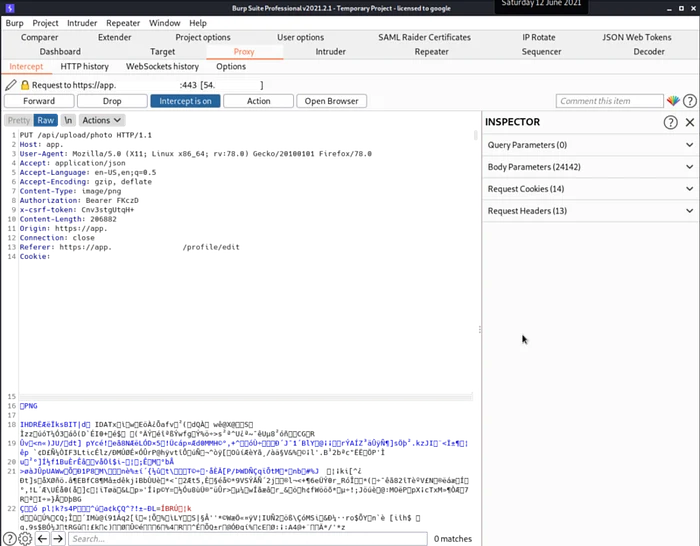
The upload step, where the user selects a picture from the device.
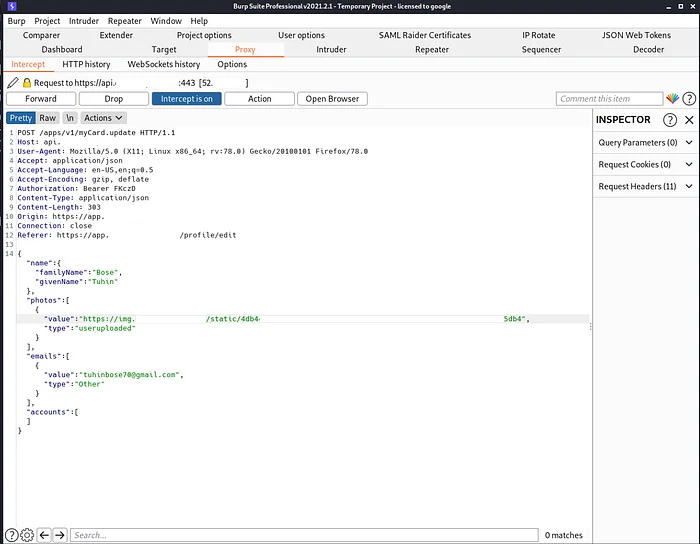
The save step, after which the image and other details are stored.
Exploitation
Step 1: SSRF in the profile picture URL
The URL supplied for the profile picture was replaced with a Burp Collaborator payload. The Collaborator received a request, and the source IP belonged to the application's back-end load balancer. The researcher tried to push the SSRF further but found no way to do so, and reported the behaviour on its own.
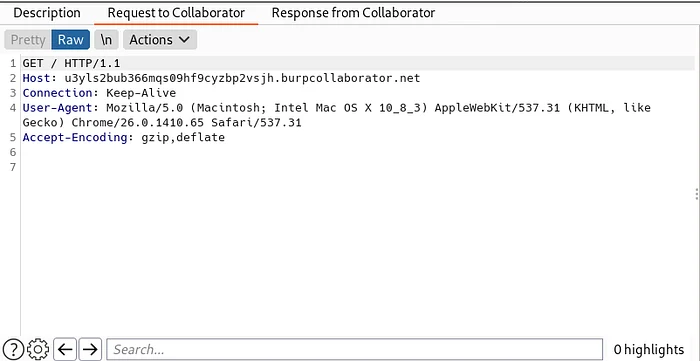
The Collaborator interaction triggered by the replaced profile picture URL.

The reply to the first report.
Step 2: Leaking visitor data through the referral page
While testing the referral feature, the researcher noticed that the referral URL at https://app.redacted.com/refer/YOUR_REFERRAL_CODE renders the referring user's profile picture.
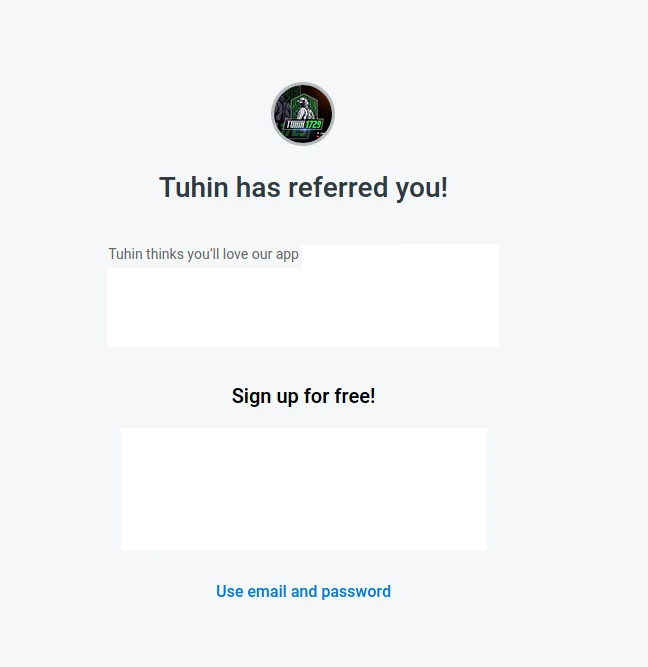
The referral page showing the profile picture of the referring user.
Combining this with the first finding, the profile picture link was replaced with the Burp Collaborator URL, and the referral page was opened from another device. The Collaborator received an HTTP request containing the device's IP address, browser information and device model.
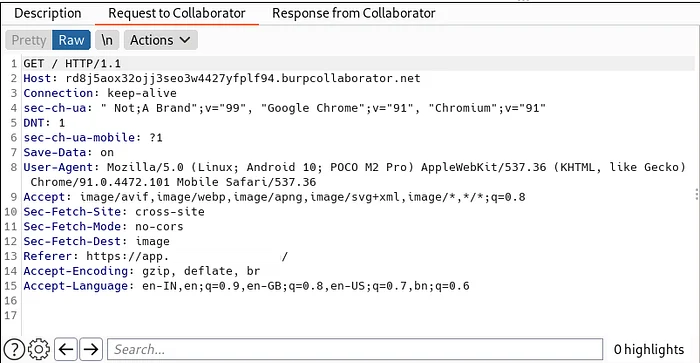
The request received on the Collaborator, carrying the visiting device's IP address, browser information and device model.
The attack scenario, as described in the report:
- The attacker saves their profile picture from their Burp Collaborator URL.
- The attacker sends their referral link to the victim.
- The victim opens the referral URL. Because the link belongs to a subdomain of the target, the victim is expected to open it, and their private information is sent to the attacker.
Step 3: Stored XSS through an SVG on the image host
A poc.svg file was hosted on the ngrok server with the following content:
<?xml version="1.0" standalone="no"?><!DOCTYPE svg PUBLIC "-//W3C//DTD SVG 1.1//EN" "http://www.w3.org/Graphics/SVG/1.1/DTD/svg11.dtd"><svg version="1.1" baseProfile="full" xmlns="http://www.w3.org/2000/svg"><polygon id="triangle" points="0,0 0,50 50,0" fill="#009900" stroke="#004400"/><script type="text/javascript">alert(document.domain);</script></svg>
The profile picture URL was replaced with the URL of that file, https://xyz.ngrok.io/poc.svg. Right-clicking the profile picture and copying the URL showed that it had become https://img.redacted.com/static/XXX, meaning the application had fetched the SVG from the researcher's server and was now serving it from its own image host. Opening that link in the browser executed the script.
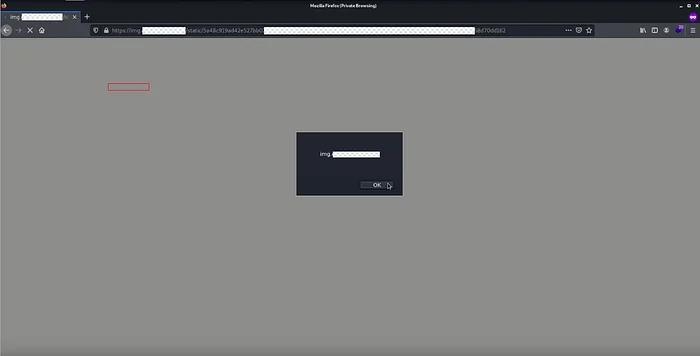
The script in the SVG executing when the image host URL is opened.
A proof of concept was prepared and reported.
Step 4: DoS in the change password endpoint
The change password request looks like this:
POST /api/oauth.updatePassword HTTP/1.1Host: app.redacted.comUser-Agent: Mozilla/5.0 (X11; Linux x86_64; rv:78.0) Gecko/20100101 Firefox/78.0Accept: application/jsonAccept-Language: en-US,en;q=0.5Accept-Encoding: gzip, deflateAuthorization: Bearer D5FC5XXXXx-csrf-token: uXvbmXXXXContent-Type: application/jsonContent-Length: 56Origin: https://app.redacted.comConnection: closeReferer: https://app.redacted.com/accountCookie: XYZ=ABC; PQR=DSPH{"password":"NewPassword","revokeSessions":true,"client":"ABWeb"}
The body carries the new password, a flag to revoke existing sessions and a client identifier. The request is authenticated with a bearer token and a CSRF token header.
After trying some other attacks, the password was changed to null. The response took 30,460 milliseconds and ended in a 504 Gateway Time-out, which the researcher describes as a DoS.
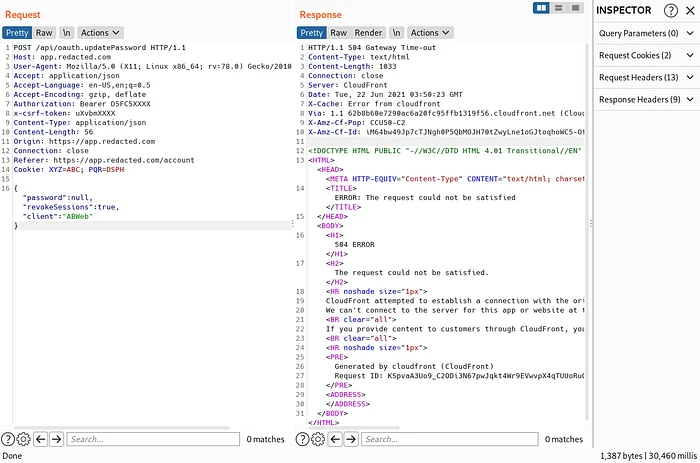
The change password request with a null password, showing the 30,460 ms response time and the 504 Gateway Time-out.
Root cause
The profile picture field accepts an arbitrary URL and the server fetches it, with no restriction on the destination. That is the SSRF: the request originates from the application's back-end load balancer. The application fetched the SVG from the researcher's server and served it from img.redacted.com, so an SVG containing a script executed on that origin. The referral page then renders the stored image, which turns the SSRF into a way to collect data from anyone who opens a referral link.
Sending a null password to the change password endpoint produced a 30,460 ms response and a 504 Gateway Time-out. The report does not describe the server-side cause.
Impact
- SSRF: requests can be made from the application's back-end load balancer to arbitrary destinations. In this case the researcher found no way to escalate it beyond the out-of-band interaction.
- Data leakage: anyone who opens an attacker's referral link has their IP address, browser information and device model sent to the attacker, because the link is on a subdomain of the target and is likely to be trusted.
- Stored XSS: script in an attacker-supplied SVG executes on the image host origin when the served file is opened.
- DoS: a null password in the change password request produces a 30,460 ms response and a 504 Gateway Time-out.
Fix
The report does not state which fixes were applied. The changes that would address the findings are: restrict the profile picture fetch to an allowlist of destinations and block requests to internal addresses and link-local ranges; sanitise or re-encode fetched images, or refuse active content such as SVG, before serving them from the image host; and validate the password field server-side so a null value is rejected before any processing that can hang.
Variants to test
- Point the profile picture URL at an internal address such as a metadata endpoint or an admin interface and look for content reflected back in the stored image. A positive result is a response body or image that contains internal data.
- Upload an SVG with a script and check whether the image host serves it with a content type that allows script execution. A positive result is the script running when the mirrored URL is opened.
- Place the attacker-controlled image URL in other places that render user content, such as public profiles, share pages or referral pages, and watch the Collaborator for requests from visitors. A positive result is an interaction containing the visitor's IP address or user agent.
- Send a null or empty password to other account endpoints, such as password reset or email change, and watch response times. A positive result is a request that hangs until a gateway timeout.
- Try other active file types through the same fetch-and-mirror path, such as HTML or XML, and check what content type the image host returns. A positive result is a document rendered as active content on the image host origin.
What happened, in plain words
A security researcher spent some time testing a website that helps people manage their contacts. He found three separate problems in it and reported them. The company paid him a bounty, which is a reward that some companies offer to people who find and report security bugs in their products instead of abusing them.
The three problems were:
-
The website could be tricked into fetching a web address of the attacker's choosing. This is called server-side request forgery, or SSRF. The website's own server makes the request, not the attacker's computer, so the attacker can make the server talk to places the attacker cannot reach directly.
-
A file the attacker uploaded could run a small program in the browser of anyone who opened it. This is called cross-site scripting, or XSS. The program ran on the website's own image server.
-
Sending an empty password to the change password feature made the server hang for about thirty seconds and then give up. This is called denial of service, or DoS: the service stops responding properly.
The researcher combined the first problem with the referral page to collect information about anyone who clicked a referral link. The report does not say exactly how much money was paid, only that it was a bounty.
The product and its features
The website is a contact information management service. You log in with your Google account, and the site copies your contacts from that Google account so you can see them from any device, even if you lose your phone. There is a paid tier called premium that adds extras: syncing contacts from more than one Google account, and scanning business cards to save them as contacts. There is also a referral feature: you invite friends with a personal link, and if they join you get premium features for free.
Two parts of the site matter for this story:
- The profile picture upload. In your account settings you pick an image from your computer, the image is uploaded to a separate image server at
img.redacted.com, and when you press save, the image and your other profile details are stored. - The referral page. It lives at
https://app.redacted.com/refer/YOUR_REFERRAL_CODEand shows the profile picture of the person who made the referral.
A few words that will come up constantly:
- A URL is a web address, like
https://example.com/page. Your browser uses it to know where to go. - A server is the computer that runs the website. When you visit a page, your browser asks the server for it and the server sends it back.
- An endpoint is one specific address on a server that does one specific job, for example the address that handles changing your password. Think of a large office building: the building is the server, and each department's door is an endpoint.
- An API is the set of endpoints a program uses to talk to a server without a human clicking buttons. It is like a service counter: you hand over a request in a fixed format and get an answer in a fixed format.
- A cookie is a small piece of text your browser stores for a website and sends back with every request to that site. It is how the site recognises you between page loads, a bit like a wristband at an event.
- A token is a string of characters that proves who you are, similar to a cookie but usually sent in a header rather than stored automatically. Think of it as a temporary pass card.
- A header is a line of extra information attached to a request or response, such as what type of content is being sent or who is asking.
- A request body is the part of a request that carries data, for example the new password you want to set.
The tools the researcher used
- An account on the application, which he created himself.
- Burp Suite, a program that sits between your browser and the website and lets you see and change every request. It is like an interception desk for post: you can read each letter and rewrite it before it is delivered.
- Burp Collaborator, a feature of Burp Suite that gives you a unique web address you control. If anything on the internet contacts that address, Burp records it. This is called an out-of-band listener: you learn about a request that did not come back to your browser directly. Think of it as a PO box you can watch: if a letter arrives, you know someone sent it.
- A second device, to open the referral link the way a victim would.
- ngrok, a service that makes a folder on your own computer reachable from the internet through a temporary public address. It is useful for hosting a small test file.
The report gives no product version numbers.
Finding it
The researcher worked through a checklist of common security problems. On the profile picture upload he first tried IDOR, SQLi, DoS and some other attacks. None of those are explained in detail in the report, but the names mean:
- IDOR (insecure direct object reference): changing an identifier in a request, such as a user number, to see whether you can reach someone else's data.
- SQLi (SQL injection): putting database commands into input fields to see whether the site passes them to its database.
- DoS (denial of service): making a feature work so hard or wait so long that it stops responding.
Then he looked at how the upload actually works. It has two steps. First the file goes to img.redacted.com. Then a save action stores the image together with the other profile details. The important detail is that the image reference is a URL, and the application fetches that URL itself and stores what it gets back.
The upload step, where the user selects a picture from the device.
The save step, after which the image and other details are stored.
Why does this matter? Because if the site fetches any URL you give it, you can give it a URL that points at your own server. Then you can watch whether the site's server actually connects to you. That is the seed of the first vulnerability.
Exploitation
Step 1: SSRF in the profile picture URL
What SSRF is. Server-side request forgery means you make the website's server send a request to an address you choose. The request comes from the server, not from your browser, so it can reach places your browser cannot: internal machines, internal services, or a listener you control. A simple comparison: you cannot walk into the post room of a company, but if the company will post a letter to any address you write on an envelope, you can make it post a letter to your own house and learn that it did.
The researcher replaced the URL used for the profile picture with a Burp Collaborator payload. The Collaborator received a request. He checked the source IP address of that request and found it belonged to the application's back-end load balancer. A load balancer is a machine that sits in front of several servers and spreads incoming traffic between them; it is part of the site's own infrastructure, not the researcher's.
He tried to push the SSRF further, for example to reach internal services, but found no way to do so. He reported the behaviour on its own.
The Collaborator interaction triggered by the replaced profile picture URL.
The reply to the first report.
Why this step was taken. The upload field accepted a URL and the server fetched it. That is exactly the condition SSRF needs. The Collaborator proves the fetch happened and shows where it came from.
Step 2: Leaking visitor data through the referral page
While testing the referral feature, the researcher noticed that the referral URL at https://app.redacted.com/refer/YOUR_REFERRAL_CODE displays the referring user's profile picture.
The referral page showing the profile picture of the referring user.
He combined this with the first finding. He changed his profile picture link to his Burp Collaborator URL, then opened the referral page from another device. The Collaborator received an HTTP request containing the device's IP address, browser information and device model.
The request received on the Collaborator, carrying the visiting device's IP address, browser information and device model.
Why this works. The referral page loads the profile picture. The profile picture is not stored on the site; it is a URL the site fetches. So when anyone opens the referral page, the site fetches the attacker's URL, and the attacker's listener sees the request. The request carried the device's IP address, browser information and device model.
The attack scenario, as described in the report:
- The attacker saves their profile picture from their Burp Collaborator URL.
- The attacker sends their referral link to the victim.
- The victim opens the referral URL. Because the link belongs to a subdomain of the target, the victim is expected to open it, and their private information is sent to the attacker.
A subdomain is a part of a larger domain name, for example app.redacted.com is a subdomain of redacted.com. People tend to trust a link that carries the name of a site they know, which is why the referral link is likely to be opened.
Step 3: Stored XSS through an SVG on the image host
What XSS is. Cross-site scripting means getting a website to deliver a small program, written in JavaScript, to someone else's browser, and having that browser run it as if the website itself had written it. JavaScript is the language browsers use to make pages interactive. If an attacker can get their JavaScript to run on a site's page, it runs with that site's permissions.
What an SVG is. SVG is an image format that is actually written in a text markup language, similar to HTML. Unlike a JPEG or PNG, an SVG file can contain a <script> element, and browsers will run it. That is why an SVG is a dangerous file type to accept from users.
What stored XSS is. Stored means the malicious content is saved on the server and served to later visitors, rather than being reflected back only to the person who sent it. It is like leaving a note in a public place: everyone who comes by reads it.
The researcher hosted a poc.svg file on his ngrok server with the following content:
<?xml version="1.0" standalone="no"?><!DOCTYPE svg PUBLIC "-//W3C//DTD SVG 1.1//EN" "http://www.w3.org/Graphics/SVG/1.1/DTD/svg11.dtd"><svg version="1.1" baseProfile="full" xmlns="http://www.w3.org/2000/svg"><polygon id="triangle" points="0,0 0,50 50,0" fill="#009900" stroke="#004400"/><script type="text/javascript">alert(document.domain);</script></svg>
Line by line, in plain words:
<?xml version="1.0" standalone="no"?>declares that this is an XML document. XML is a general text format for structured data; SVG is a kind of XML.<!DOCTYPE svg PUBLIC ...>says which standard the document follows, here the SVG 1.1 standard.<svg version="1.1" baseProfile="full" xmlns="http://www.w3.org/2000/svg">opens the SVG image and sets its version and namespace. The namespace tells the browser which vocabulary the tags belong to.<polygon id="triangle" points="0,0 0,50 50,0" fill="#009900" stroke="#004400"/>draws a green triangle. This is the harmless visible part of the image.<script type="text/javascript">alert(document.domain);</script>is the payload.alert(document.domain)opens a pop-up showing the domain of the page that is running the script.document.domainis the browser's way of naming the site the script is running on. Seeing the pop-up proves the script ran and shows on which site.</svg>closes the image.
He replaced his profile picture URL with the URL of that file, https://xyz.ngrok.io/poc.svg. Then he right-clicked the profile picture and copied the URL. It had become https://img.redacted.com/static/XXX. That means the application had fetched the SVG from his server and was now serving it from its own image host.
He pasted that link into his browser and the script ran.
The script in the SVG executing when the image host URL is opened.
Why this matters. The script now runs on img.redacted.com, a domain the site owns. Anything that trusts that domain can be affected. The report does not describe any further exploitation beyond the pop-up proof.
He prepared a proof of concept and reported it. A proof of concept is a minimal demonstration that a bug is real, usually the smallest action that shows the effect.
Step 4: DoS in the change password endpoint
The change password request looks like this:
POST /api/oauth.updatePassword HTTP/1.1Host: app.redacted.comUser-Agent: Mozilla/5.0 (X11; Linux x86_64; rv:78.0) Gecko/20100101 Firefox/78.0Accept: application/jsonAccept-Language: en-US,en;q=0.5Accept-Encoding: gzip, deflateAuthorization: Bearer D5FC5XXXXx-csrf-token: uXvbmXXXXContent-Type: application/jsonContent-Length: 56Origin: https://app.redacted.comConnection: closeReferer: https://app.redacted.com/accountCookie: XYZ=ABC; PQR=DSPH{"password":"NewPassword","revokeSessions":true,"client":"ABWeb"}
Line by line, in plain words:
POST /api/oauth.updatePassword HTTP/1.1is the request line.POSTis the method used when you are sending data to the server./api/oauth.updatePasswordis the endpoint.HTTP/1.1is the version of the protocol.Host: app.redacted.comnames the site the request is for.User-Agent: Mozilla/5.0 (X11; Linux x86_64; rv:78.0) Gecko/20100101 Firefox/78.0says which browser and operating system sent the request. Servers often use this to decide how to respond.Accept: application/jsonsays the client expects JSON back. JSON is a text format for structured data, like a very simple form of writing down lists and key-value pairs.Accept-Language: en-US,en;q=0.5says the client prefers English.Accept-Encoding: gzip, deflatesays the client can accept compressed responses.Authorization: Bearer D5FC5XXXXis the token that proves the user is logged in.Bearermeans "whoever holds this token is authorised". The value is redacted here.x-csrf-token: uXvbmXXXXis a CSRF token. CSRF stands for cross-site request forgery: an attack where another site makes your browser send a request to this site without your knowledge. The token is a value the site gives your browser and expects back, so a request from another site will not have it. The value is redacted here.Content-Type: application/jsonsays the body is JSON.Content-Length: 56says the body is 56 bytes long.Origin: https://app.redacted.comsays which site the request came from. Browsers add this automatically.Connection: closeasks the server to close the connection after this request.Referer: https://app.redacted.com/accountsays which page the request was made from.Cookie: XYZ=ABC; PQR=DSPHcarries the site's cookies. The values are redacted here.- The body
{"password":"NewPassword","revokeSessions":true,"client":"ABWeb"}is JSON.passwordis the new password.revokeSessionsis a flag that, when true, logs out existing sessions, which is a sensible security measure after a password change.clientidentifies which client application is making the request.
After trying some other attacks, he tried to change the password to null. Null here means an empty or missing value rather than a real password. The response took 30,460 milliseconds and ended in a 504 Gateway Time-out, which he describes as a DoS.
The change password request with a null password, showing the 30,460 ms response time and the 504 Gateway Time-out.
What a 504 Gateway Time-out is. A gateway is a machine in front of the application that forwards requests to it. When the application does not answer within a set time, the gateway gives up and returns 504. Thirty seconds is a long time for a password change, and it suggests the server was stuck waiting on something.
Why this matters. A single request made the server hang for about thirty seconds before the gateway timed out.
Root cause
The profile picture field accepts any URL and the server fetches it, with no restriction on where it points. That is the SSRF: the request comes from the application's back-end load balancer. The application fetched the SVG from the researcher's server and served it from img.redacted.com. So an SVG containing a script becomes stored XSS on that origin. The referral page then displays the stored image, which turns the SSRF into a way to collect data from anyone who opens a referral link.
Sending a null password to the change password endpoint produced a 30,460 ms response and a 504 Gateway Time-out.
Impact
- SSRF: requests can be made from the application's back-end load balancer to arbitrary destinations. In this case the researcher found no way to escalate it beyond the out-of-band interaction.
- Data leakage: anyone who opens an attacker's referral link has their IP address, browser information and device model sent to the attacker, because the link is on a subdomain of the target and is likely to be trusted.
- Stored XSS: script in an attacker-supplied SVG executes on the image host origin when the copied file is opened.
- DoS: a null password in the change password request produces a 30,460 ms response and a 504 Gateway Time-out.
Fix
The changes that would address the findings are: restrict the profile picture fetch to an allowlist of destinations and block requests to internal addresses and link-local ranges; sanitise or re-encode fetched images, or refuse active content such as SVG, before serving them from the image host; and validate the password field server-side so a null value is rejected before any processing that can hang.
An allowlist is a list of things that are permitted, with everything else refused. Link-local addresses are a special range used for communication on a local network segment, not on the public internet.
Variants to test
- Point the profile picture URL at an internal address such as a metadata endpoint or an admin interface and look for content reflected back in the stored image. A positive result is a response body or image that contains internal data.
- Upload an SVG with a script and check whether the image host serves it with a content type that allows script execution. A positive result is the script running when the copied URL is opened.
- Place the attacker-controlled image URL in other places that render user content, such as public profiles, share pages or referral pages, and watch the Collaborator for requests from visitors. A positive result is an interaction containing the visitor's IP address or user agent.
- Send a null or empty password to other account endpoints, such as password reset or email change, and watch response times. A positive result is a request that hangs until a gateway timeout.
- Try other active file types through the same fetch-and-copy path, such as HTML or XML, and check what content type the image host returns. A positive result is a document rendered as active content on the image host origin.
Timeline
- June 6, 2021: reported the first vulnerability.
- June 6, 2021: asked for impact.
- June 8, 2021: discovered and reported the exploitation of the vulnerability.
- June 8, 2021: reported the second vulnerability.
- June 11, 2021: reported the third vulnerability.
- June 13, 2021: triaged. Triaged means the company accepted the report as valid and started handling it.
- June 15, 2021: replied with the bounty email.
Glossary
- API: the set of endpoints a program uses to talk to a server, with fixed request and response formats.
- Allowlist: a list of permitted items, with everything else refused.
- Bounty: a reward paid by a company to someone who reports a security bug in its product.
- Burp Collaborator: a Burp Suite feature that gives you a unique address and records any request sent to it, so you can detect out-of-band interactions.
- Burp Suite: a tool that sits between your browser and a website so you can inspect and modify requests.
- Cookie: a small piece of text a browser stores for a site and sends back with each request, used to recognise you.
- CSRF: cross-site request forgery, an attack where another site makes your browser send a request to a site without your knowledge; a CSRF token is a value the site expects back to prove the request came from its own pages.
- DoS: denial of service, making a service stop responding properly.
- Endpoint: one specific address on a server that performs one specific job.
- Header: a line of extra information attached to a request or response.
- IDOR: insecure direct object reference, changing an identifier to reach data that belongs to someone else.
- Impact: the real-world harm a vulnerability could cause.
- JavaScript: the programming language browsers run to make pages interactive.
- JSON: a text format for structured data, made of keys and values.
- Link-local: an address range used for communication on a local network segment, not on the public internet.
- Load balancer: a machine in front of several servers that spreads incoming traffic between them.
- Null: an empty or missing value, as opposed to a real one.
- Out-of-band: learning about a request through a separate channel, such as a listener you control, rather than through the normal response.
- Proof of concept: a minimal demonstration that a bug is real.
- Request body: the part of a request that carries data, such as a new password.
- Server: the computer that runs a website and answers requests.
- SSRF: server-side request forgery, making a website's server send a request to an address you choose.
- Stored XSS: cross-site scripting where the malicious content is saved on the server and served to later visitors.
- Subdomain: a part of a larger domain name, such as
app.redacted.comunderredacted.com. - SVG: an image format written in a text markup language, which can contain scripts.
- Token: a string of characters that proves who you are, usually sent in a header.
- Triaged: accepted by the company as a valid report and put into its handling process.
- URL: a web address, such as
https://example.com/page. - XSS: cross-site scripting, getting a website to deliver JavaScript to someone else's browser and having it run with that site's permissions.
- 504 Gateway Time-out: the response a gateway returns when the application behind it does not answer in time.



