5 Real World XSS Bypasses I Discovered in 2026
The article describes five real-world XSS bypasses discovered in 2026, including bypassing WAF and server-side character restrictions with URL encoding, exploiting HTML metadata from a remote document, manipulating MIME type in a file viewer, using an embed element with a data: URL, and bypassing uppercase transformation with HTML entities. An attacker could execute JavaScript in victims' browsers in these scenarios.

medium.com
Published on medium.com
Cybersecurity
The full write-up lives on its author's site
It belongs to its author, so we link to it rather than copy it. The other two tabs are our own rewrites, checked against it.
Context
This is a collection of five XSS cases found during 2026 across enterprise penetration testing projects, VDP programmes and bug bounty programmes. The targets are not named and no programme details are given. Each case is a different feature: a reflection point behind a WAF and a Tomcat front end, a URL preview feature that fetches remote HTML metadata, a file upload with a dedicated viewer, an image display built on <embed>, and a reflection point that uppercases its input.
The point of the article is not the payloads themselves but why the obvious payload failed in each case and which layer of the stack had to be understood before execution was possible.
Setup
No accounts, roles, tool versions or credentials are described. The only infrastructure the author mentions is a server under his own control, used in the second case to host HTML documents that the target would fetch. In the first case he did some WAF fingerprinting before changing approach. In the fourth case he notes that results can depend on the browser and that the browser and exact testing conditions should be documented when reporting.
Finding it
Case 1: reflection that survives encoding but not the URI parser
Basic reflection testing started with:
"<test
The input came back in the page source without significant encoding, which looked promising. Common XSS payloads did not execute. After several attempts and some WAF fingerprinting, a pattern appeared: some payloads returned 403 Forbidden, while others made the application itself return an error instead of the usual WAF block. One payload that produced the second, different behaviour was:
['XSS'].map(alert)
That difference was the clue. Part of the restriction was not the WAF at all but how the server stack processed the URI. Apache Tomcat can reject certain special characters in URI components when they are not appropriately encoded, and it exposes options such as relaxedQueryChars and relaxedPathChars to control some of those restrictions.
Case 2: a URL preview that fetches attacker HTML
The application let users supply a URL, for example the address of a personal website, and then retrieved content from that URL and extracted metadata to build a preview or description, in the same way messaging platforms and social networks build link previews from a page title or description.
To test it, the author hosted a simple HTML file on his own server:
<head> <meta name="viewport" content="test123"></head>
He submitted the URL of that file instead of a normal website URL. If test123 appeared in the generated preview or in the page source, data from the external document was reaching the application's output. Retrieving metadata alone does not prove XSS; the question is whether that data ends up in an executable HTML context. The author notes that a complete, valid HTML document is better for testing, but the minimal example is enough to demonstrate the concept.
Case 3: a viewer that trusts a type parameter
The application had a file upload feature accepting files such as PNG images. A PNG containing an XSS payload does not execute by itself: arbitrary text inside a file with a .png extension is not interpreted as HTML just because of the extension.
The interesting detail was that after upload, the file was displayed through a dedicated viewer, and the file type was specified in the URL. For example:

Case 4: an <embed> whose src is controllable
The application used the <embed> element to display an image. The request looked similar to:

The page source contained an element similar to:

Because the src value was controllable, the question became whether the MIME type inside the data: URL could be changed from image/png to something else.
Case 5: input converted to uppercase
On this target, user input was automatically converted entirely to uppercase before being reflected into the page source. Submitting:

produced:

At first glance this looked capable of breaking common payloads. For example:

would effectively become:

The reasoning is that HTML treats tag and attribute names without regard to letter casing, while JavaScript treats identifiers differently, so turning alert into ALERT stops the original expression from working. The author also tried different encoding techniques, including Unicode representations and HTML character references, but the initial approaches did not give the wanted result.
Exploitation
Step 1: URL-encode the brackets
Instead of sending [ and ] directly, the author URL-encoded them:
%5B%27XSS%27%5D.map(alert)
The payload then executed successfully. The lesson drawn is that a 403 does not automatically mean the WAF is the only obstacle: the difference between WAF behaviour and server-side URI parsing restrictions has to be established, and the exact layer rejecting the payload identified.
Step 2: put the payload in the fetched metadata
Once test123 was confirmed to be retrieved from the external HTML document and reflected in the application's output, the file on the author's server was changed to carry an XSS payload inside the metadata:
<head> <meta name="viewport" content="<img src=1 onerror=alert(`xss`)">"></head>
The URL of the modified document was submitted again. If the application retrieves the metadata and inserts it into its HTML output without proper sanitisation, the payload is interpreted as HTML markup rather than plain text, and the XSS fires.
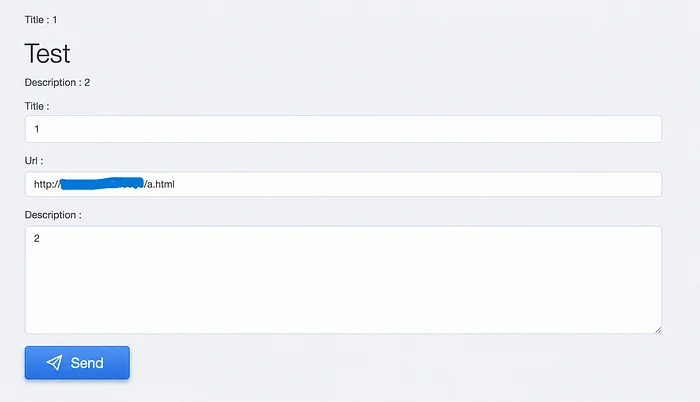
The entry point here is not a search box or form field. The application fetches an attacker-controlled URL, extracts part of its HTML metadata, places that data into its own output, and lets the browser interpret it as HTML. The author stresses that when testing URL-based functionality the whole data flow matters, not just direct user input, and cites OWASP's point that output encoding must match the context in which data is rendered.
Step 3: upload HTML as .png, then change the type
A file with a .png extension was created, but instead of image data it contained HTML with an XSS payload:

After upload, the viewer displayed it using:

The parameter was then changed manually to:

The request became:

Because the viewer trusted the type parameter when deciding how to serve the uploaded content, the stored content was interpreted as HTML and the payload executed. The author is explicit that the vulnerability is not "uploading a PNG containing XSS" but a chain of insecure behaviours:
Upload arbitrary content ↓File stored with .png extension ↓File exposed through a viewer ↓Viewer trusts user-controlled MIME type ↓type=image/png → type=text/html ↓Browser interprets content as HTML ↓XSS
Step 4: switch the data: URL to an SVG payload
The general syntax of a data: URL is:

So one payload worth testing in this context is:

Here text/html declares that the content of the data: URL is HTML. The payload that actually worked in this test, however, was:

The Base64 portion represents content equivalent to an SVG element containing an event handler. The final request looked like this:

and it resulted in JavaScript execution. The takeaway is that when user input lands directly in the src attribute of an element such as <embed>, testing should not stop at conventional http:// URLs or expected image formats: data: schemes and MIME type manipulation open a different attack surface. The <embed> element uses src as the URL of the embedded resource, so validation of attacker-controlled URLs matters. The author also notes that exact behaviour can depend on the browser and how embedded content and MIME types are handled, so the browser and testing conditions should be documented in a report.
Step 5: use HTML character references in an event handler
Rather than keep fighting the uppercase transformation in the same context, the author moved to an image element and its error-handling mechanism, which gave a different execution path. The test payload was:

After the application converted the input to uppercase, it appeared in the source as:

Unlike the earlier payload, this one executed. HTML character references are decoded while the HTML is parsed, so the event handler receives the decoded value:

The uppercase transformation does not harm the tag or attribute names, and changing the case of the hexadecimal characters inside the character references does not stop them from being decoded.
Root cause
Each case has its own mistake:
- URI parsing, not just WAF. The server stack rejected unencoded special characters in URI components. Encoding the brackets let the payload through, so the blocking was partly a parsing restriction rather than a security control.
- Metadata rendered as HTML. Data fetched from an external document was inserted into the application's output without sanitisation or context-appropriate encoding, so it became markup instead of text.
- Viewer trusts a client-supplied MIME type. The stored file was served according to a
typeparameter the user controls, soimage/pngcould be turned intotext/html. - User input in the
srcof<embed>. The application accepted adata:URL with an attacker-chosen MIME type and payload, and the browser rendered it. - Case transformation mistaken for a fix. Uppercasing breaks JavaScript identifiers but not HTML parsing, and HTML character references survive it, so the transformation never addressed the underlying output-context problem.
Impact
In the cases where the payloads were confirmed, the outcome was JavaScript execution in the context of the target application, which is the standard XSS impact: acting as the victim in that origin. The author does not describe specific data, accounts or privileges affected, and does not assign severity. Case 2 requires the application to fetch an attacker-controlled URL and to place the extracted metadata into executable HTML. Case 3 requires the ability to upload a file and access the viewer. Case 4 depends on the browser and on how the embedded content and MIME type are handled. Case 5 requires the reflection to land in an HTML context where an event handler can be used.
Fix
The author does not state what any of the applications changed. The measures implied by his analysis are:
- Encode output according to the context in which it is rendered, including metadata pulled from remote documents, so it stays text rather than markup.
- Do not let a user-controlled parameter decide how stored content is served; derive
Content-Typefrom validated, server-side knowledge of the file. - Validate and restrict URLs placed into
srcattributes, includingdata:URLs and their MIME types. - Do not treat case transformation as sanitisation; identify the output context and check whether the transformation actually affects the syntax the browser interprets.
Variants to test
- Encoded special characters against Tomcat-fronted apps. Send a payload containing
[,],'both raw and percent-encoded. A positive result is execution with the encoded form where the raw form returns403or an application error. - URL preview and metadata fetchers. Host a page with a unique marker in a
<meta>tag, submit its URL, and look for the marker in the preview or source. Then place an<img src=1 onerror=...>inside the metadata. A positive result is the marker appearing unencoded and the handler firing. - Upload viewers with a type parameter. Upload HTML content under an image extension, then change the
typeparameter totext/html. A positive result is the browser rendering the stored content as HTML. <embed>anddata:URLs. Wherever input reaches asrcattribute, trydata:text/html,...and Base64-encoded SVG with an event handler. A positive result is script execution, recorded together with the browser used.- Uppercasing reflections. Submit a payload using HTML character references inside an event handler, for example on an image error path, and check the uppercased source. A positive result is execution despite the transformation.
Conclusion
The common thread across all five cases is that finding XSS is more than locating a reflection and sending a payload. It requires knowing where the data is placed, which layer of the stack processes it, what encoding or transformation is applied, and how the browser finally parses the result. URL encoding, server-side URI parsing, HTML metadata, MIME types, data: URLs, <embed>, HTML entities, event handlers and case transformation all played a part.
What happened, in plain words
Over the course of 2026, while testing other people's websites during paid security projects, vulnerability disclosure programmes (VDPs) and bug bounty programmes, Hossein Zarei found several cross-site scripting (XSS) bugs. He picked five that were unusual and wrote them up.
XSS is a class of bug where a website takes something an attacker controls and puts it into a page in a way that the browser treats as code rather than as harmless text. When that happens, the attacker's JavaScript runs inside the victim's browser, on the victim's site, with the victim's logged-in session. That is why it matters: the script can read what the page can read and do what the page can do.
The article is not a bag of ready-made payloads. Its point is that in each of the five cases the obvious payload failed, and the author had to work out which part of the system was stopping it before he could get code to run. A payload, in this context, is simply the piece of text you send to a website hoping it will be treated as code.
A quick word on the layers involved, because the whole article is about layers. When you type an address into a browser, the browser sends a request to a server. Along the way and inside the server, several separate programs handle that request: a firewall-like filter (a WAF, web application firewall) may inspect it, a web server program may parse the address, and the application code itself may transform the data. Each of these can block or change your input for its own reasons. Telling them apart is the skill being taught here.

The five cases, in the order the article covers them:
- A place where input was reflected back into the page, but a filter and the server's own address parsing got in the way.
- A feature that fetches a URL you give it and builds a preview from the page's metadata.
- A file upload with a viewer that decides how to display the file from a value in the URL.
- An image displayed with an HTML element called
<embed>, where the image address could be swapped for adata:URL. - A place where the site converted all input to uppercase, which broke the usual payload but not one built from HTML character references.
The ideas you need before we start
A few terms come up constantly, so here they are from zero.
HTML is the language web pages are written in. It is made of tags like <img> (an image) and <a> (a link), and tags can carry attributes, which are settings written inside the tag, such as src="picture.png" (where the image lives) or onerror="..." (what to do if loading fails).
JavaScript is the programming language browsers run. If a page contains JavaScript, the browser executes it. alert(...) is the simplest JavaScript command: it pops up a box with a message. Security testers use it because a popup is unmistakable proof that code ran.
A reflection is when a website takes something you sent and prints it back into the page it returns to you. A search box that shows "results for: your words" is a reflection. Reflections are where XSS usually starts, but a reflection alone is not a bug: it only becomes one if the browser treats the reflected text as code.
Encoding is a way of writing characters so they cannot be mistaken for something else. For example, %5B is the encoded form of the character [ and %5D is ]. This is called percent-encoding or URL encoding, and it exists because addresses (URLs) can only safely contain a limited set of characters. Think of it like spelling out a letter over the phone: "B for Bravo" means the same letter, but nothing in the conversation can confuse it with another word.
A WAF (web application firewall) is a filter that sits in front of a website and looks at incoming requests for patterns that look like attacks. It can block a request with a 403 Forbidden response, which is the standard HTTP status code for "you are not allowed".
Apache Tomcat is a program that runs Java web applications. Among other things it parses the address (URI) of each incoming request, and it can refuse addresses containing certain characters unless they are encoded. It has settings called relaxedQueryChars and relaxedPathChars that control which characters it will tolerate. You do not need to know Tomcat to follow the article; you only need to know that the server program itself, not just the WAF, can reject a request.
Metadata is information about a page rather than the page's visible content: its title, its description, and special <meta> tags that tell browsers and social networks how to present the page. When you paste a link into a chat app and it shows a little card with a title and picture, the app fetched the page and read its metadata.
A MIME type (also called a content type) is a label saying what kind of data something is: image/png for a PNG picture, text/html for a web page, image/svg+xml for an SVG image. Browsers decide how to display data largely from this label. If a file full of HTML is labelled text/html, the browser will render it as a web page, scripts and all.
A data: URL is a way of putting the content itself inside the address instead of pointing at a file on a server. The general shape is data:<type>;<encoding>,<the data>. So a data: URL can carry a whole web page or image inline.
Base64 is a way of writing arbitrary data using only ordinary letters, digits and a couple of symbols, so it can travel safely inside text such as a URL. It is not encryption; anyone can decode it.
SVG is an image format written in markup, like HTML. Because it is markup, an SVG can contain event handlers, which are snippets of JavaScript that run when something happens (an image fails to load, the mouse moves, and so on).
HTML character references (also called HTML entities) are codes that stand for a character. a means the letter a, because 61 is its hexadecimal (base-16) code. The browser converts these codes into the real characters while it reads the page, before any JavaScript sees them. This detail is the key to the fifth case.
Case sensitivity means whether capital and small letters are treated as different. HTML ignores case in tag and attribute names: <IMG> and <img> are the same tag. JavaScript does not ignore case in names: alert and ALERT are different things, and only the first exists.
With those in hand, here are the five cases.
Case 1: the filter was not the only thing in the way
The author started, as testers usually do, by sending a harmless-looking piece of text to see whether it came back in the page:
"<test
Line by line: this is a double quote, a less-than sign, and the word test. The quote and the angle bracket are the two characters that matter most in HTML: a quote can end an attribute value, and < can start a tag. Sending them is a cheap way to see whether the site escapes them (turns them into harmless codes) or passes them through untouched.
The input came back in the page source without significant encoding. In other words, the site printed the quote and the < exactly as sent. That looked promising: if the site does not neutralise those characters, there is a chance to build a real tag.
But the usual XSS payloads did not run. So the author did some WAF fingerprinting, which means probing the filter to learn what it is and what it dislikes, the way you might tap a wall in different places to find where it is hollow. A pattern appeared. Some payloads got 403 Forbidden, the standard "blocked" answer. Others made the application itself return an error instead of the usual WAF block. Two different failure messages usually mean two different causes.
One payload that produced the second, different behaviour was:
['XSS'].map(alert)
Line by line: ['XSS'] is a list containing one piece of text, 'XSS'. .map(...) is a JavaScript method that runs a function once for each item in the list. alert is the popup function. So this asks JavaScript to call alert for the item 'XSS', which would show a popup. It is a compact way to trigger a popup without writing the word alert( followed directly by a quote, which many filters look for.
That different error was the clue. Part of the restriction was not the WAF at all, but how the server stack processed the address of the request. Apache Tomcat, as mentioned, can reject certain special characters in the address when they are not encoded, and it has options such as relaxedQueryChars and relaxedPathChars to loosen those rules.
So instead of sending [ and ] directly, the author URL-encoded them:
%5B%27XSS%27%5D.map(alert)
Line by line: %5B is [, %27 is ', %5D is ]. Decoded, this is exactly the same payload as before: ['XSS'].map(alert). The only change is that the awkward characters travel in their encoded spelling, so the server's address parser has nothing to object to. The application then decodes them back to the original characters when it handles the request.
The payload then executed successfully.
The lesson the author draws: a 403 does not automatically mean the WAF is the only obstacle. You have to work out which layer in the chain is rejecting your payload. Think of a parcel returned to sender: it might have been stopped by customs, or it might have been refused by the building's own mailroom. The label on the box tells you which.
Case 2: a preview feature that fetches pages for you
The second case was in a feature that builds previews from URLs. Users could give the application a URL, for example the address of their personal website, and the application would fetch content from that address and pull out metadata to make a preview or description. This is the same behaviour you see in messaging apps and social networks: paste a link, get a card with the page title and description.
Why this is interesting: the application is now making requests on your behalf to a server you choose. If you choose your own server, you control what it fetches.
To test it, the author hosted a simple HTML file on a server under his control:
<head> <meta name="viewport" content="test123"></head>
Line by line: <head> opens the part of an HTML document that holds information about the page rather than visible content. <meta ...> is a tag carrying metadata. name="viewport" labels this particular piece of metadata as the viewport setting (normally used to tell mobile browsers how to scale the page). content="test123" is the value, and here it is a unique marker chosen by the author. </head> closes the head section. The point of test123 is that it is a word that would never appear on the target site by accident, so if it shows up there, it came from this file.
He then gave the URL of this file to the target application instead of a normal website address. If test123 appeared in the generated preview or in the page source, that would prove data from the external document was reaching the application's output.
Retrieving metadata is not a bug by itself. The question is whether that data ends up somewhere the browser will treat as HTML. The author cites OWASP, a well-known source of web security guidance, on the point that output encoding must match the context in which data is rendered: text going into an HTML body, into an attribute, or into JavaScript each needs different treatment.
For testing, a complete and valid HTML document is better, but the minimal example above is enough to demonstrate the idea.
Once test123 was confirmed to be coming through, the file on the author's server was changed to carry a payload inside the metadata:
<head> <meta name="viewport" content="<img src=1 onerror=alert(`xss`)">"></head>
Line by line: the same <meta> tag, but now the content value contains an <img> tag. src=1 tells the browser to load an image from the address 1, which does not exist. onerror=alert(xss) is an event handler: when the image fails to load, the browser runs the JavaScript alert(xss), which shows a popup containing the text xss. The backticks are just another way of writing a text value in JavaScript. The trailing "> closes the attribute and the tag as the surrounding HTML expects.
The URL of the modified document was submitted again. If the application takes the metadata and inserts it into its own HTML output without sanitising it (cleaning it) or encoding it for that context, the payload is read as HTML markup rather than plain text, the image fails to load, and the popup appears.
What makes this case interesting is that the entry point is not a search box or a form field. The application fetches an attacker-controlled URL, extracts part of its HTML metadata, places that data into its own output, and lets the browser interpret it as HTML. When testing anything URL-based, the whole journey of the data matters, not just what you type directly into the page.
Case 3: an upload viewer that believes a value in the URL
The third application had a file upload feature accepting files such as PNG images. A PNG containing an XSS payload does not execute by itself: text inside a file with a .png extension is not treated as HTML just because of the extension. The extension is a name, not an instruction.
The interesting detail was what happened after upload. The file was displayed through a dedicated viewer, and the file type was specified in the URL. For example:
So the viewer was told, in the address itself, what kind of file to show. That is the weak point: if the viewer believes that value, and the value is under the user's control, the user can change what kind of file the browser thinks it is looking at.
The author created a file with a .png extension, but instead of image data it contained HTML with an XSS payload:
After uploading, the viewer displayed it using:
He then changed the parameter by hand to:
The request became:
Because the viewer trusted the type parameter when deciding how to serve the stored content, the stored content was now interpreted as HTML, and the payload executed. The file never changed; only the label in the URL did. It is like a restaurant that decides how to cook a dish purely from what the customer writes on the order slip.
The author is explicit that the vulnerability is not "uploading a PNG containing XSS". It is a chain of insecure behaviours:
Upload arbitrary content ↓File stored with .png extension ↓File exposed through a viewer ↓Viewer trusts user-controlled MIME type ↓type=image/png → type=text/html ↓Browser interprets content as HTML ↓XSS
Read the chain top to bottom: you upload whatever you like; the server saves it under a .png name; a viewer makes it available; the viewer takes the MIME type from the user; the type is switched from image/png to text/html; the browser renders the stored bytes as a web page; the script runs. Every link in that chain had to be present. When testing uploads, do not stop at checking which extensions are allowed. Ask how the file is served afterwards, how its Content-Type is decided, whether a viewer is involved, and whether any user-controlled value can influence how the file is interpreted.
Case 4: an <embed> element and a data: URL
The fourth application used the <embed> element to display an image. <embed> is an HTML tag that tells the browser to load an external resource, such as a picture or a document, at that spot on the page. The address of the resource goes in its src attribute.
The request looked similar to:
The page source contained an element similar to:
Because the src value was controllable, the question became whether the MIME type inside the data: URL could be changed from image/png to something else. If the browser is told the embedded content is HTML, it will render it as HTML.
The general syntax of a data: URL is:
So one payload worth testing in this context is:
Here text/html declares that the content of the data: URL is HTML. The browser is being asked to embed a web page inside the page.
The payload that actually worked in this test, however, was:
The Base64 portion of this payload represents content equivalent to an SVG element containing an event handler. In plain terms: the address carries an image written in markup, and that markup includes a snippet of JavaScript that runs when something happens. The Base64 portion represents content equivalent to an SVG element containing an event handler, and the payload resulted in JavaScript execution.
The final request looked like this:
and it resulted in JavaScript execution.
The takeaway: when user input lands directly in the src attribute of an element such as <embed>, do not limit testing to ordinary http:// addresses or expected image formats. data: URLs and MIME type manipulation open a different attack surface. The <embed> element uses src as the address of the embedded resource, so checking attacker-controlled addresses matters. The author also notes that exact behaviour can depend on the browser and on how embedded content and MIME types are handled, so the browser and the exact testing conditions should be recorded when reporting this kind of issue.
Case 5: uppercase input, and why it did not save the site
On this target, user input was automatically converted entirely to uppercase before being reflected into the page source. Submitting:
produced:
At first glance this looked capable of breaking common payloads. For example:
would effectively become:
The reasoning is that HTML treats tag and attribute names without regard to letter casing, while JavaScript treats names differently, so turning alert into ALERT stops the original expression from working. The tag still works, but the function name no longer exists. The site's transformation was therefore enough to break the straightforward approach.
The author also tried other encoding techniques, including Unicode representations and HTML character references, but the first attempts did not give the wanted result.
Rather than keep fighting in the same context, he moved to a different HTML context: an image element and its error-handling mechanism. This gave a different execution path that was not affected in the same way by the uppercase transformation. The test payload was:
After the application converted the input to uppercase, it appeared in the source as:
Unlike the earlier payload, this one executed. The reason is that HTML character references are decoded while the HTML is being parsed, so the event handler receives the decoded value:
In other words, the browser reads the codes and turns them into the real characters before the JavaScript runs. The uppercase transformation does not harm the tag or attribute names, and changing the case of the hexadecimal characters inside the character references does not stop them from being decoded. The site had changed the spelling of the payload without changing what the browser ultimately understood.
The lesson: when a simple sanitisation or transformation breaks a payload, do not immediately assume XSS is no longer possible. First identify the output context, then work out whether the transformation actually affects the final syntax the browser interprets.
Why each of these worked
Each case has its own root cause:
- Address parsing, not just the WAF. The server stack rejected unencoded special characters in the address. Encoding the brackets let the payload through, so the blocking was partly a parsing restriction rather than a security control.
- Metadata rendered as HTML. Data fetched from an external document was inserted into the application's output without sanitisation or context-appropriate encoding, so it became markup instead of text.
- The viewer trusts a user-supplied MIME type. The stored file was served according to a
typeparameter the user controls, soimage/pngcould be turned intotext/html. - User input in the
srcof<embed>. The application accepted adata:URL with an attacker-chosen MIME type and payload, and the browser rendered it. - Case transformation mistaken for a fix. Uppercasing breaks JavaScript names but not HTML parsing, and HTML character references survive it, so the transformation never addressed the underlying output-context problem.
What the impact was
In the cases where the payloads were confirmed, the outcome was JavaScript execution in the context of the target application, which is the standard XSS impact: the script acts as the victim within that site. The author does not describe specific data, accounts or privileges affected, and does not assign a severity.
Each case also has its own preconditions. Case 2 requires the application to fetch an attacker-controlled URL and to place the extracted metadata into executable HTML. Case 3 requires the ability to upload a file and reach the viewer. Case 4 depends on the browser and on how the embedded content and MIME type are handled. Case 5 requires the reflection to land in an HTML context where an event handler can be used.
How to fix it
The author does not state what any of the applications changed. The measures implied by his analysis are:
- Encode output according to the context in which it is rendered, including metadata pulled from remote documents, so it stays text rather than markup.
- Do not let a user-controlled parameter decide how stored content is served; derive
Content-Typefrom validated, server-side knowledge of the file. - Validate and restrict URLs placed into
srcattributes, includingdata:URLs and their MIME types. - Do not treat case transformation as sanitisation; identify the output context and check whether the transformation actually affects the syntax the browser interprets.
Things to try on your own targets
- Encoded special characters against Tomcat-fronted apps. Send a payload containing
[,],'both raw and percent-encoded. A positive result is execution with the encoded form where the raw form returns403or an application error. - URL preview and metadata fetchers. Host a page with a unique marker in a
<meta>tag, submit its URL, and look for the marker in the preview or source. Then place an<img src=1 onerror=...>inside the metadata. A positive result is the marker appearing unencoded and the handler firing. - Upload viewers with a type parameter. Upload HTML content under an image extension, then change the
typeparameter totext/html. A positive result is the browser rendering the stored content as HTML. <embed>anddata:URLs. Wherever input reaches asrcattribute, trydata:text/html,...and Base64-encoded SVG with an event handler. A positive result is script execution, recorded together with the browser used.- Uppercasing reflections. Submit a payload using HTML character references inside an event handler, for example on an image error path, and check the uppercased source. A positive result is execution despite the transformation.
Conclusion
The common thread across all five cases is that finding XSS is more than locating a reflection and sending a payload. It requires knowing where the data is placed, which layer of the stack processes it, what encoding or transformation is applied, and how the browser finally parses the result. URL encoding, server-side address parsing, HTML metadata, MIME types, data: URLs, <embed>, HTML entities, event handlers and case transformation all played a part.
Glossary
- 403 Forbidden: the standard HTTP status code meaning the server refused to fulfil the request.
- Apache Tomcat: a program that runs Java web applications and parses incoming request addresses.
- Attribute: a setting written inside an HTML tag, such as
srcoronerror. - Base64: a way of writing arbitrary data using ordinary characters so it can travel inside text such as a URL; not encryption.
- Bug bounty programme: a scheme where organisations pay researchers for reporting security bugs.
- Character reference (HTML entity): a code such as
athat stands for a character and is converted by the browser while parsing HTML. - Content-Type / MIME type: a label saying what kind of data something is, such as
image/pngortext/html. data:URL: an address that carries the content itself inline instead of pointing at a file on a server.<embed>: an HTML tag that tells the browser to load an external resource at that spot, with its address in thesrcattribute.- Encoding: rewriting characters in a safe form, such as
%5Bfor[. - Event handler: a snippet of JavaScript attached to an element that runs when something happens, such as an image failing to load.
- Hexadecimal: base-16 counting, used in character references and other technical contexts.
- HTML: the markup language web pages are written in, made of tags and attributes.
- JavaScript: the programming language browsers execute.
- Metadata: information about a page, such as its title, description and
<meta>tags. - Payload: the piece of text or code sent to a target hoping it will be treated as code.
- Percent-encoding (URL encoding): writing characters as
%followed by their code so they can travel safely in an address. - Reflection: when a site prints input back into the page it returns.
- Sanitisation: cleaning input so dangerous parts cannot be interpreted as code.
src: the HTML attribute that holds the address of an external resource such as an image.- SVG: an image format written in markup, which can contain event handlers.
- URI: the technical term for an address on the web; a URL is a kind of URI.
- VDP (vulnerability disclosure programme): a scheme for reporting security bugs, typically without payment.
- WAF (web application firewall): a filter in front of a website that blocks requests matching attack patterns.
- XSS (cross-site scripting): a bug where attacker-controlled data is interpreted as code by a victim's browser on a site, letting the attacker's script act as the victim there.




