A $1000 Bounty
A directory brute-force scan found a publicly reachable Java deployment descriptor (web.xml) that exposed Java classes, J2EE libraries, properties files with credentials and private API keys. The same exposure was found at roughly forty other URLs, and the reporter was paid a bounty for the disclosure.
 Published on gauravnarwani.com
Greetings Everyone. Firstly, a small introduction about me.
The full write-up lives on its author's site
It belongs to its author, so we link to it rather than copy it. The other two tabs are our own rewrites, checked against it.
Context
This is the story of my first $1000 bug, found on a private Bugcrowd program, and of why I treat reconnaissance as the most important step in bug hunting. The program had four domain names in scope, which cannot be disclosed; throughout the report I refer to them as example.com, example2.com, example3.com and example4.com. There were no subdomains in scope, so subdomain enumeration was not part of this hunt. The scan turned up a web.xml deployment descriptor reachable over HTTP.
A web.xml file is the deployment descriptor of a Java web application. It normally lives under the WEB-INF directory, which the servlet container is supposed to protect: clients should never be able to fetch anything inside WEB-INF directly. When it is served anyway, it can describe servlet mappings, classes, J2EE jar libraries and properties files, and those in turn can reference credentials and private API keys.
Setup
The only tool used for discovery was dirb, the directory brute-forcer that ships with Kali. I chose it over alternatives for three reasons: it is easy to use, it is accurate relative to dirsearch and gobuster, and it is recursive, so unlike gobuster it does not stop at a 301 status code and keeps finding sub-directories. Its drawbacks are that it works by brute force and that its execution time depends on the size of the wordlist.
Two notes I would give anyone repeating this:
- Read the given problem statement carefully. Ignoring it is a common mistake and leads to reporting an out-of-scope vulnerability.
- Pick a target that is less visited, which most of the time means a subdomain. Here there were no subdomains, so I targeted the other domains in scope instead.
Finding it
I started dirb against each of the four in-scope domains, with the default wordlist, spread over three terminals. The usage of the tool is:
Dirb <url_base> [<wordlist_file(s)>] [options]
where <url_base> is the base URL to scan and <wordlist_file(s)> is a list of word files (wordfile1, wordfile2, wordfile3...). The options I list as commonly used are:
-X <extensions>/-x <exts_file>: append each word with these extensions.-z <milisecs>: add a millisecond delay, keeping in mind it can cause excessive flood.-i: use case-insensitive search.-N <nf_code>: ignore responses with this HTTP code.
The examples given for the tool are:
dirb http://url/directory/ (Simple Test)
dirb http://url/ -X .html (Test files with '.html' extension)
dirb http://url/ /usr/share/dirb/wordlists/vulns/apache.txt (Test with apache.txt wordlist)
dirb https://secure_url/ (Simple Test with SSL)
The scans I ran were:
dirb https://example.com
dirb https://example2.com
dirb https://example3.com
dirb https://example4.com
While the scans ran, I checked the responses with status code 200 for anything interesting, and captured requests in Burp so that Burp could spider through the application.
After the scan of https://example.com, I found a URL returning status code 200:
https://example.com/en-US///WEB-INF/web.xml
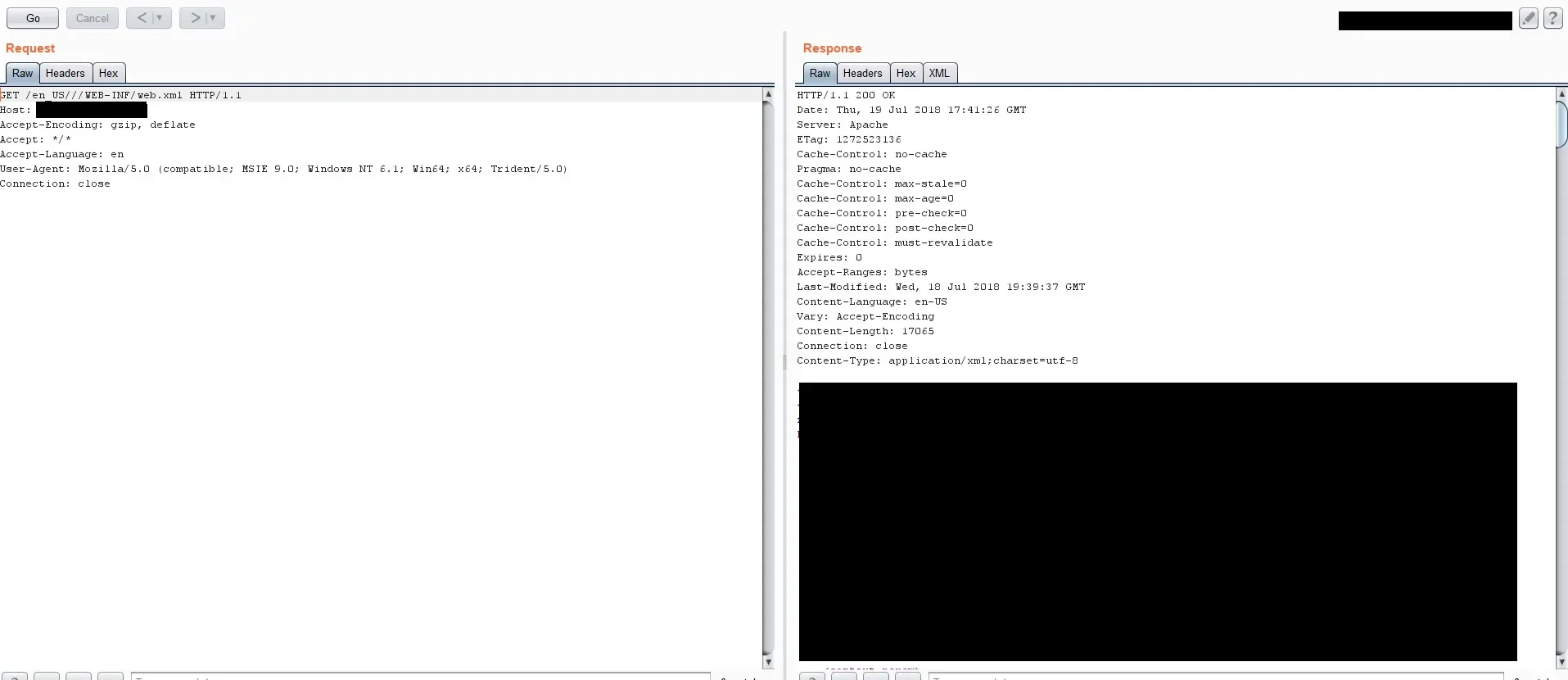
The screenshot shows the web.xml file disclosing Java classes, J2EE jar libraries and private API keys. I copied the URL into my browser and waited for the response. The XML file came back and revealed Java classes, source code, J2EE jar libraries, properties files with sensitive credentials and, most importantly, private API keys.
Exploitation
Step 1: Fetch the deployment descriptor
A single GET request to the discovered path returned the file:
https://example.com/en-US///WEB-INF/web.xml
WEB-INF is meant to be inaccessible to clients, yet this path returned the descriptor. The response body was the XML descriptor itself, containing Java classes, source code references, J2EE jar libraries, properties files with sensitive credentials and private API keys.
Step 2: Install the J2EE Extender in Burp
Because the file referenced Java classes, I installed the J2EE Extender in Burp, which helps find more paths of this kind.
Step 3: Spider, then active scan
I captured a request in Burp and started the spider. After 10 to 15 minutes of spidering I started active scanning. After around an hour of active scanning I had found around 40 URLs with the same directory and file named web.xml or web.xml.xhtml. I gathered all of these URLs, sent a GET request to each and captured screenshots. I had also started documenting the report on Bugcrowd.
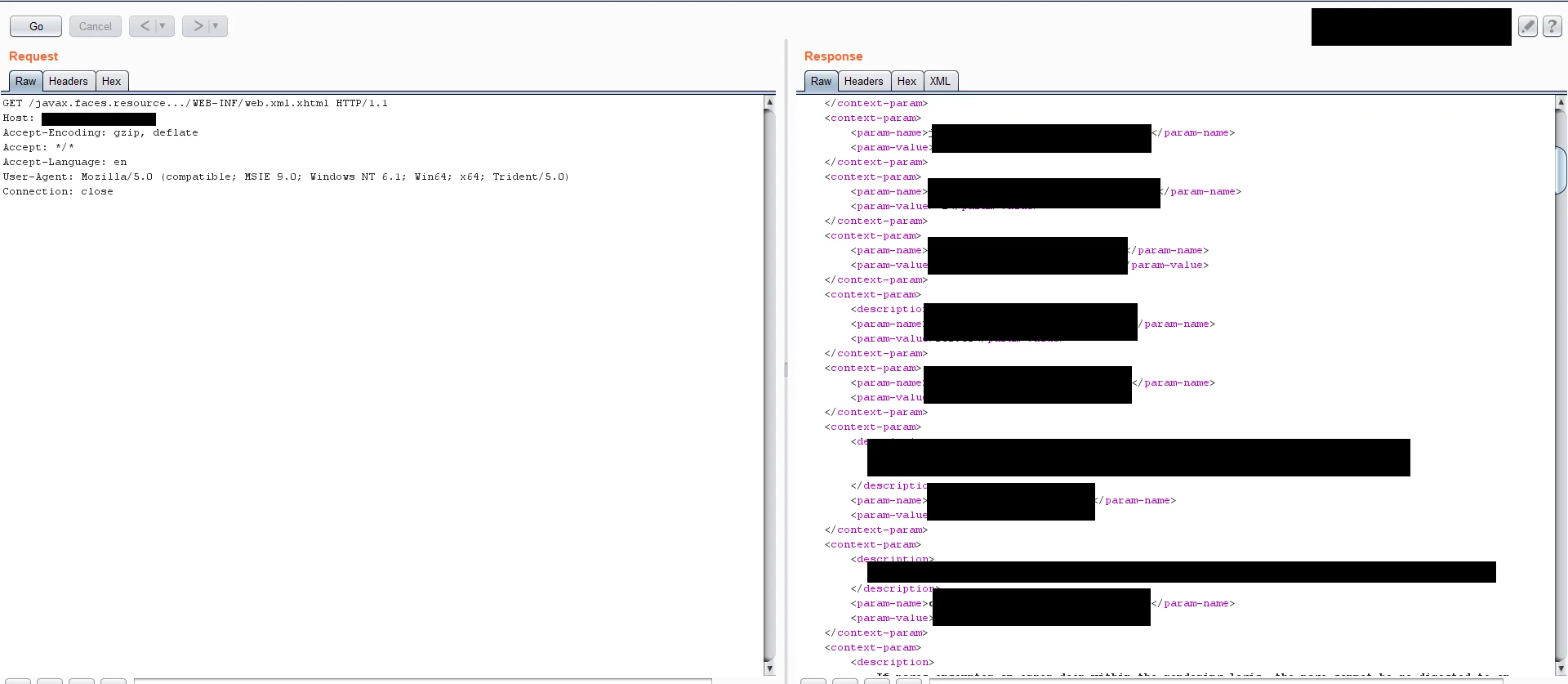
The second screenshot shows a web.xml.xhtml file disclosing Java classes and private API keys.
Timeline
The bug was triaged overnight and the bounty was paid within three days:
| Date | Event |
|---|---|
| 20th July | Submission created |
| 20th July | Bug triaged |
| 23rd July | Bounty awarded, $1000 |
| 6th August | Bug resolved |
Root cause
The application served its own deployment descriptor, and other files of the same kind, over HTTP. WEB-INF contents are supposed to be blocked by the servlet container. The report does not identify which of these it was. Once the descriptor is readable, everything it references, including properties files with credentials and private API keys, is exposed with it.
Impact
The exposed files revealed Java classes, source code, J2EE jar libraries, properties files with sensitive credentials and private API keys. The files were served in response to a plain GET request. The report does not say what those keys granted access to or whether they were used further; the impact described is the disclosure itself. Around 40 further URLs with the same file were found, so the exposure was not a single stray file.
Fix
The report records that the bug was resolved on 6th August but does not describe the change that was made.
Variants to test
- Run a recursive directory brute-forcer against every in-scope host, not just the main one, and look for 200 responses to paths such as
WEB-INF/web.xml. A positive result is an XML deployment descriptor in the response body. - Try the same file with path variations: repeated slashes, a locale or language segment in front of
WEB-INF, and the.xhtmlextension seen here. A positive result is the same descriptor content returned under a path the container should have blocked. - When a descriptor is found, read it for servlet mappings, class names, jar libraries and referenced properties files, then request those properties files directly. A positive result is a properties file containing credentials or API keys.
- Feed the discovered paths into Burp with the J2EE Extender installed, spider, then active scan, and collect every URL that returns the same file. A positive result is a set of additional URLs serving
web.xmlorweb.xml.xhtml.
What happened, in plain words
Imagine you run a small shop and keep a folder of internal paperwork in a back room. The door to that room is supposed to be locked, and only staff should ever see what is inside. One day a visitor tries a slightly odd route through the building, the door swings open, and they find not just a list of what is in the room but also the keys to the safe. That is essentially what happened here, but on a website.
A security researcher was taking part in a bug bounty programme. A bug bounty programme is a scheme where an organisation invites independent researchers to look for security problems in its systems and pays them for reporting what they find, instead of punishing them. This particular programme was private, meaning you have to be invited to take part, and it covered four domain names. A domain name is the part of a web address after the https://, such as example.com. The real names cannot be disclosed, so throughout this article they are written as example.com, example2.com, example3.com and example4.com.
The researcher used a free tool to guess the names of files and folders on those websites, a technique called directory brute forcing. One of the guesses turned out to be a real file that should never have been reachable from the public internet: a configuration file called web.xml. That file is meant to be kept in a protected folder called WEB-INF, and the web server is supposed to refuse any request for anything inside it. Here the server did not refuse. It handed the file over, and the file listed internal details of the application, including private API keys.
An API key is a long secret string that lets a piece of software prove who it is when it talks to another service, a bit like a password that one program uses to log in to another. If someone else gets hold of it, they may be able to act as that program. The researcher then used other tools to look for more copies of the same file, found around 40 more addresses, and reported everything. The report was triaged (checked and accepted as valid) overnight, a $1000 bounty was paid within three days, and the problem was fixed a couple of weeks later.
This article walks through the same steps in the same order, explaining each idea from scratch. You only need to be comfortable using a browser and a computer to follow it.
Background: why this kind of hunt starts with looking around
Before any of the technical steps, the researcher makes a point that applies to every hunt: reconnaissance, often shortened to recon, is the most important step. Recon means finding out what exists on a target before you start poking at it: which addresses respond, which folders and files are present, which parts of the application are less obvious. It is like walking around a building and noting every door and window before trying any of them, rather than rattling the front door and giving up.
The programme had four domain names in scope. "In scope" means the organisation has explicitly authorised testing on those names and nothing else. Testing anything outside the scope is not allowed, even if it is technically possible, and a report about an out-of-scope system will normally be rejected. There were no subdomains in scope. A subdomain is a name that sits in front of the main domain, such as shop.example.com in front of example.com. Because there were none, the usual step of hunting for subdomains was skipped, and the researcher went straight to the four domains that were listed.
The scan turned up a web.xml file, which belongs to a Java web application. Java is a programming language, and a Java web application is a program written in Java that runs on a web server and produces web pages or data for visitors. Java web applications are packaged in a particular way, and one of the files in that package is called web.xml.
What web.xml is, and why it should never be public
A web.xml file is the deployment descriptor of a Java web application. Think of it as the wiring diagram and settings sheet for the application: it tells the server which pieces of code handle which web addresses, which libraries the application depends on, and where to find other configuration files. It normally lives inside a folder called WEB-INF.
WEB-INF is special. The software that runs the Java application, called the servlet container, is supposed to protect it: a visitor's browser should never be able to download anything from inside WEB-INF directly. The reason is simple: everything in there is internal plumbing, not public content. If the container does serve it anyway, the descriptor can reveal servlet mappings (which code answers which address), class names, J2EE jar libraries (J2EE is an older name for the Java platform for enterprise applications, and a jar is a bundled library of Java code), and references to properties files. A properties file is a plain text file of settings, often including usernames, passwords and API keys.
So the whole finding rests on one failure: a file that was meant to be locked away was handed out over ordinary HTTP, the protocol browsers use to fetch web pages.
Setup: the tool and the rules
The only tool used for discovery was dirb. dirb is a directory brute-forcer: it takes a long list of common file and folder names, called a wordlist, and tries each one against a web address to see which ones exist. It ships with Kali, a Linux distribution that comes with many security tools pre-installed. You do not need to install anything extra to get dirb if you are using Kali.
The researcher chose dirb over two alternatives, dirsearch and gobuster, for three reasons:
- It is easy to use.
- It is accurate relative to those two alternatives.
- It is recursive. Recursive means that when it finds a folder, it goes into that folder and starts guessing names inside it too.
gobuster, by contrast, stops when it sees a 301 status code. A status code is a number a web server sends back with every response to say what happened; 301 means "this address has moved permanently, look over there". Stopping at a 301 means you may miss everything inside the folder you just found.
Its drawbacks are honest ones: it works by brute force, meaning it simply tries many guesses rather than reasoning about the site, and its running time depends on how big the wordlist is. A bigger wordlist means more guesses and a longer wait.
Two pieces of advice are given for anyone repeating this:
- Read the problem statement carefully. The problem statement is the programme's description of what is in scope and what rules apply. Ignoring it is a common mistake and leads to reporting an out-of-scope vulnerability, which wastes everyone's time and earns nothing.
- Pick a target that is less visited, which most of the time means a subdomain. Less-visited parts of a system tend to be less carefully maintained. Here there were no subdomains, so the researcher targeted the other domains in scope instead.
Finding it: running the scans
The researcher started dirb against each of the four in-scope domains, using the default wordlist, spread over three terminals. A terminal is a text window where you type commands. Spreading the work over three terminals simply means running several scans at once so the waiting is shorter.
The general way to use the tool is:
Dirb <url_base> [<wordlist_file(s)>] [options]
Line by line, in plain words:
Dirbis the name of the program you are running.<url_base>is the base web address to scan, for examplehttps://example.com. The angle brackets are a placeholder: you replace them with your own value, you do not type the brackets.[<wordlist_file(s)>]is optional (that is what the square brackets mean) and is the list of word files to use, written aswordfile1, wordfile2, wordfile3...if you have more than one. A word file is just a text file with one candidate name per line.[options]is optional too, and covers the switches that change how the tool behaves.
The options listed as commonly used are:
-X <extensions>/-x <exts_file>: append each word with these extensions. For example, with-X .html, the tool will also tryabout.htmlwhen the wordlist containsabout. This matters because a file may only exist with a particular ending.-z <milisecs>: add a millisecond delay between requests, keeping in mind it can cause excessive flood. A flood means sending so many requests that the server is overwhelmed, which is both rude and potentially harmful.-i: use case-insensitive search. This meansWeb.xmlandweb.xmlare treated as the same guess, which helps on servers that do not care about capitalisation.-N <nf_code>: ignore responses with this HTTP code. If you are not interested in a particular kind of answer, you can tell the tool to hide it so the output is easier to read.
The examples given for the tool are:
dirb http://url/directory/ (Simple Test)
dirb http://url/ -X .html (Test files with '.html' extension)
dirb http://url/ /usr/share/dirb/wordlists/vulns/apache.txt (Test with apache.txt wordlist)
dirb https://secure_url/ (Simple Test with SSL)
Line by line:
dirb http://url/directory/ (Simple Test)runs the tool against a specific folder on a plain HTTP address. The text in brackets is a comment describing the example, not part of the command.dirb http://url/ -X .html (Test files with '.html' extension)runs the tool against the root of the site and adds.htmlto every guess, so it looks for web pages rather than bare names.dirb http://url/ /usr/share/dirb/wordlists/vulns/apache.txt (Test with apache.txt wordlist)runs the tool with a specific wordlist file, here one that comes withdirband contains names related to Apache, a common web server.dirb https://secure_url/ (Simple Test with SSL)runs the tool against an HTTPS address. HTTPS is HTTP with encryption, the padlock you see in a browser. The tool handles it the same way.
The scans actually run were:
dirb https://example.com
dirb https://example2.com
dirb https://example3.com
dirb https://example4.com
Each line starts the same tool against a different in-scope domain, using the default wordlist. Running all four is the point: the programme listed four domains, so all four deserve a look, not just the main one.
While the scans ran, the researcher checked the responses with status code 200 for anything interesting. Status code 200 means "OK, here is the content". Most guesses will come back as 404, meaning "not found", so the 200s are the ones worth reading. Requests were also captured in Burp. Burp is short for Burp Suite, a tool that sits between your browser and the website and lets you record, inspect and replay the requests and responses. Capturing requests this way lets Burp's spider do more work later. A spider is an automated crawler: it follows links it finds in pages, like a spider following threads, to map out the site.
After the scan of https://example.com, one URL came back with status code 200:
https://example.com/en-US///WEB-INF/web.xml
The screenshot shows the web.xml file disclosing Java classes, J2EE jar libraries and private API keys. In other words, the response body was the descriptor itself, and it listed internal code and secrets.
The researcher copied that URL into a browser and waited for the response. The XML file came back and revealed Java classes, source code, J2EE jar libraries, properties files with sensitive credentials and, most importantly, private API keys. XML is a text format for structured data, using tags in angle brackets, a bit like HTML but for data rather than pages. Seeing it in the browser confirms the file is being served in response to a plain request.
Exploitation: what was done with the finding
Step 1: Fetch the deployment descriptor
A single GET request to the discovered path returned the file:
https://example.com/en-US///WEB-INF/web.xml
A GET request is the ordinary kind of request a browser makes when you type an address or click a link: it asks the server to send back the content at that address. There is nothing clever in the request itself; the clever part is the address.
WEB-INF is meant to be inaccessible to clients, yet this path returned the descriptor. A proxy here means a server that sits in front of the application and forwards requests to it, often applying its own rules on the way. Protection rules are often written to match simple patterns, and an unusual path shape can fail to match them. The en-US part looks like a language or locale segment, the kind of thing a site uses to serve different languages. The response body was the XML descriptor itself, containing Java classes, source code references, J2EE jar libraries, properties files with sensitive credentials and private API keys.
Step 2: Install the J2EE Extender in Burp
Because the file referenced Java classes, the researcher installed the J2EE Extender in Burp. An extender in Burp is an add-on that gives the tool extra abilities. This one helps find more paths of this kind, that is, more addresses that expose Java application internals. The extender helps find more paths of this kind.
Step 3: Spider, then active scan
A request was captured in Burp and the spider was started. The spider follows links and records every address it reaches, building a map of the application. After 10 to 15 minutes of spidering, active scanning was started. Active scanning means Burp sends its own test requests to the addresses it has found, looking for known patterns of misconfiguration and weakness, rather than just reading pages. The pause matters: you let the spider finish mapping first so the active scan has a full list of addresses to work with.
After around an hour of active scanning, around 40 URLs had been found with the same directory and file named web.xml or web.xml.xhtml. The .xhtml ending is a variant of the same kind of file, and it was exposed in the same way. All of these URLs were gathered, a GET request was sent to each, and screenshots were captured. The report was also being documented on Bugcrowd, the bug bounty platform hosting the programme. Documenting as you go is good practice: it keeps the evidence together and makes the final report easier to write.
The second screenshot shows a web.xml.xhtml file disclosing Java classes and private API keys. The same kind of content, reached through a slightly different file name.
Timeline
The bug was triaged overnight and the bounty was paid within three days:
| Date | Event |
|---|---|
| 20th July | Submission created |
| 20th July | Bug triaged |
| 23rd July | Bounty awarded, $1000 |
| 6th August | Bug resolved |
Triaged means the programme's team looked at the report, confirmed it was real and in scope, and passed it on for fixing. Resolved means the problem was fixed.
Root cause
The application served its own deployment descriptor, and other files of the same kind, over HTTP. WEB-INF contents are supposed to be blocked by the servlet container. The report does not identify which of these it was. Once the descriptor is readable, everything it references, including properties files with credentials and private API keys, is exposed with it.
In everyday terms: the back room was supposed to be locked, and either the lock was never fitted on that particular door or the odd route walked straight past it. Either way, the paperwork inside was readable, and the paperwork pointed to the safe keys.
Impact
The exposed files revealed Java classes, source code, J2EE jar libraries, properties files with sensitive credentials and private API keys. The files were served in response to a plain GET request. Authentication means proving who you are, usually by logging in; here no login was needed at all. The report does not say what those keys granted access to or whether they were used further; the impact described is the disclosure itself. Around 40 further URLs with the same file were found, so the exposure was not a single stray file.
Fix
The report records that the bug was resolved on 6th August but does not describe the change that was made. Rotating a key means replacing it with a new one and disabling the old one, because once a secret has been visible to outsiders you have to assume it is no longer secret.
Variants to test
If you want to look for the same kind of problem on a programme you are authorised to test, these are the variations worth trying. Each one is a small change on the same idea.
- Run a recursive directory brute-forcer against every in-scope host, not just the main one, and look for 200 responses to paths such as
WEB-INF/web.xml. A positive result is an XML deployment descriptor in the response body. Recursive matters because the file may sit inside a folder the tool has to discover first. - Try the same file with path variations: repeated slashes, a locale or language segment in front of
WEB-INF, and the.xhtmlextension seen here. A positive result is the same descriptor content returned under a path the container should have blocked. The point of the variations is that protection rules often match exact text, and a slightly different path can slip past them while still reaching the same file. - When a descriptor is found, read it for servlet mappings, class names, jar libraries and referenced properties files, then request those properties files directly. A positive result is a properties file containing credentials or API keys. The descriptor is a map; the properties files are where the secrets often sit.
- Feed the discovered paths into Burp with the J2EE Extender installed, spider, then active scan, and collect every URL that returns the same file. A positive result is a set of additional URLs serving
web.xmlorweb.xml.xhtml. This is how one finding becomes a complete picture of the exposure.
Glossary
- API key: a secret string that lets one piece of software prove its identity to another service, like a password used between programs.
- Active scanning: sending test requests to addresses a tool has already found, to look for known weaknesses, rather than only reading pages.
- Authentication: proving who you are, usually by logging in.
- Bug bounty programme: a scheme where an organisation invites researchers to find and report security problems in exchange for payment.
- Burp (Burp Suite): a tool that sits between your browser and a website so you can record, inspect and replay requests and responses.
- Class (Java class): a named unit of Java code; seeing class names in a file reveals how the application is built.
- Deployment descriptor: the configuration file of a Java web application, here
web.xml, describing how the application is wired together. - Directory brute forcing: guessing many common file and folder names against a web address to discover which ones exist.
- dirb: a directory brute-forcing tool that ships with Kali and is recursive.
- Domain name: the part of a web address after
https://, such asexample.com. - Extender (Burp extender): an add-on that gives Burp extra abilities.
- GET request: the ordinary request a browser makes to ask a server for the content at an address.
- HTTPS: HTTP with encryption, shown by the padlock in a browser.
- HTTP: the protocol browsers and servers use to exchange web pages and data.
- In scope: explicitly authorised for testing by the programme.
- J2EE: an older name for the Java platform for enterprise applications.
- Jar (J2EE jar library): a bundled library of Java code.
- Java: a programming language; a Java web application is a program written in it that runs on a web server.
- Kali: a Linux distribution that comes with many security tools pre-installed.
- Locale segment: a part of a web address indicating language or region, such as
en-US. - Out of scope: not authorised for testing; reporting a problem there will normally be rejected.
- Private programme: a bug bounty programme you have to be invited to take part in.
- Properties file: a plain text file of settings, often containing usernames, passwords and API keys.
- Proxy: a server that sits in front of an application and forwards requests to it, often applying its own rules.
- Reconnaissance (recon): finding out what exists on a target before testing it.
- Recursive: able to go into a folder it has found and keep guessing names inside it.
- Resolved: fixed.
- Rotate (a key): replace a secret with a new one and disable the old one, because an exposed secret can no longer be trusted.
- Servlet container: the software that runs a Java web application and is supposed to protect
WEB-INF. - Servlet mapping: the rule that says which piece of code answers which web address.
- Spider: an automated crawler that follows links to map out a site.
- Status code: a number a server sends with every response to say what happened, such as 200 for OK, 301 for moved, 404 for not found.
- Subdomain: a name in front of a main domain, such as
shop.example.com. - Terminal: a text window where you type commands.
- Triaged: checked and accepted as valid by the programme's team.
- Vulnerability: a weakness in a system that can be used to cause harm or gain unauthorised access.
- WEB-INF: the protected folder in a Java web application that clients should never be able to download from.
- web.xml: the deployment descriptor of a Java web application, normally kept inside
WEB-INF. - Wordlist: a text file of candidate names, one per line, used by a brute-forcing tool.
- XML: a text format for structured data using tags in angle brackets.




