Web server fingerprinting
An unusual error page on a subdomain returned a server-generated 404 that disclosed the Microsoft .NET Framework version, ASP.NET version, and the website's server path. An attacker could use this version and path information to plan further attacks against the application.
 Published on gauravnarwani.com
Hello guys, today we are going to talk about a very interesting vulnerability which I found on a private program. The vulnerability leaked the detailed server version when visiting an unusual error page.
The full write-up lives on its author's site
It belongs to its author, so we link to it rather than copy it. The other two tabs are our own rewrites, checked against it.
Context
The target was a three-tier web application: a presentation tier (front end and user interface), an application tier holding the functional logic, and a data tier of databases. It had various subdomains in scope. The program did not allow information disclosure, so the domain is referred to here as example.com and the subdomains as sub1.example.com, sub2.example.com and sub3.example.com.
The feature at the centre of the write-up is the application's handling of requests for pages that do not exist. Normally, a request for a missing path on sub1.example.com was answered with a 301 redirect to a custom page-not-found page. The finding is that certain unusual paths instead produced the web server's own 404 page, and that page disclosed detailed server information.
Setup
The researcher worked against sub1.example.com and later checked similar pages on other subdomains. The tools used were Burp Suite's Intruder for directory brute-forcing, with a set of directory brute-forcing payloads, and the write-up notes that dirb is a better tool for directory brute-forcing but that Intruder was used to get results faster. No account, role or special precondition is described.
Finding it
While testing sub1.example.com, the researcher found that banner grabbing was allowed and leaked the server as Microsoft-IIS/8.5. Banner grabbing on its own is treated as P5 (Informative) on platforms such as HackerOne and Bugcrowd, so reporting only the server version would have affected the average severity. More detail was needed alongside the server version.
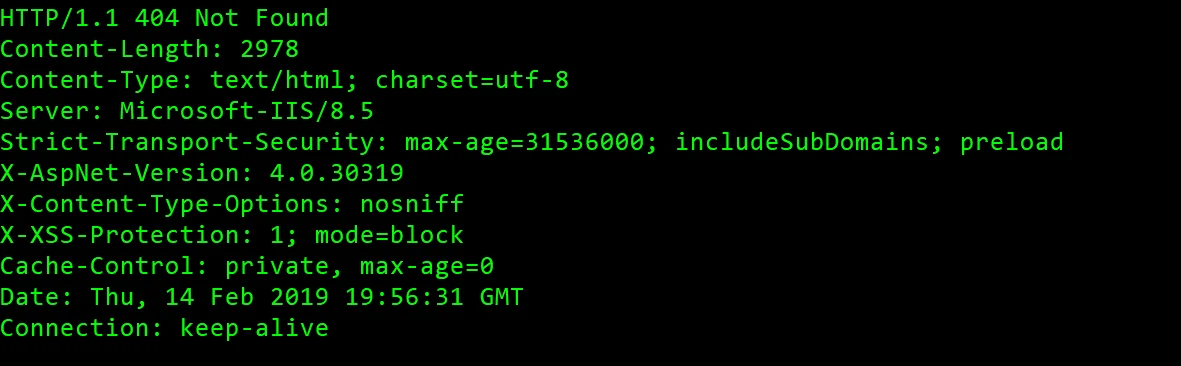
The image shows the banner grabbing result that identified the server as Microsoft-IIS/8.5.
Exploitation
Step 1: Brute-force directories and watch the response codes
A few directory brute-forcing payloads were run through Burp Suite Intruder. The site had its own response to page-not-found errors: it redirected the user to a custom page-not-found page with a 301 response. The 6000 payloads fired line by line would normally show a 301 response code redirecting to the custom 404 page.
Step 2: Spot the payload that behaves differently
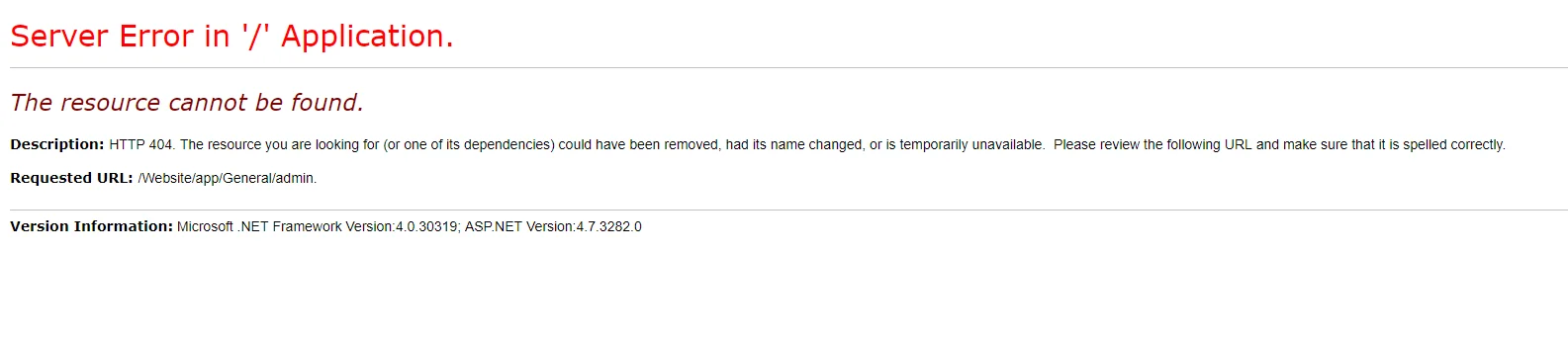
After approximately 2000 payloads had been fired, one payload did not redirect to the custom 404 page but returned a 404 page of the server itself. The requested URL was:
https://sub1.example.com/General/admin
(A full stop at the end.)

The image shows the server's own 404 page returned for that path.
Step 3: Read what the error page discloses
The page leaked the Microsoft .NET Framework version as well as the ASP.NET version, and also the path of the website from its server.
Step 4: Look for the same page on other subdomains
A similar page was found in some other subdomains.
2nd URL:
https://sub2.example.com/%252e%252e%5c%252e%252e%5c%2fetc%2fpasswd..%5c%2fetc%2fpasswd
3rd URL:
https://sub3.example.com/%252e%252e%5c%252e%252e%5c%2fetc%2fpasswd%2e%2e%5c%2fetc%2fpasswd
Step 5: Report
The server banner, together with the leaked Microsoft .NET Framework version and ASP.NET version, was reported to the program. The bug was triaged within a day and a bounty of $241.93 was given.
Root cause
The application normally catches requests for missing pages and redirects them to a custom 404 page with a 301. The /General/admin path was not handled by that custom error handling and fell through to the web server's own 404 page. That page leaked the .NET Framework version, the ASP.NET version and the path of the website on the server. The custom 404 handling therefore masked the problem for ordinary requests but did not cover every path.
Impact
An attacker who can reach these error pages learns the exact Microsoft .NET Framework and ASP.NET versions in use and the path of the website on the server. That information helps in selecting known vulnerabilities and exploits for the identified versions and in understanding the server layout. The report does not describe any further exploitation beyond this information disclosure.
Fix
The report does not state what was changed. The measure implied by the finding is to disable detailed error pages on the server so that its own 404 responses do not reveal framework versions or the site path, and to make sure the custom error handling covers the paths that currently bypass it.
Variants to test
- Send requests for paths that are likely to bypass custom error handling, such as a directory name followed by a common page name (for example /General/admin). A positive result is a response that is not the usual 301 to the custom 404 page but the server's own error page.
- Send encoded traversal-style paths such as the ones above, with double-encoded dots, backslashes and an /etc/passwd suffix. A positive result is the same detailed server error page on other hosts.
- Compare response codes across a large wordlist in Intruder and filter out the normal 301 responses. A positive result is any outlier status or body that reveals version strings or filesystem paths.
- Check the Server header first for banner grabbing, then look for a page that discloses more than the header does. A positive result is a body containing framework versions or a physical path.
#BugBountyTip
Payload running in lot of contexts. No script tags so greater chance of evasion from a WAF.
javascript:"/*'/*`/*--><html \" onmouseover=/*<svg/*/onload=alert()//>
Other payload from @LooseSecurity bypassing a lot of WAFs:
<iframe src="%0Aj%0Aa%0Av%0Aa%0As%0Ac%0Ar%0Ai%0Ap%0At%0A%3Aalert(0)">
What happened, in plain words
A security researcher was testing a website that a company had invited people to test, in exchange for a reward if they found something real. The website was made of several parts, and the researcher was allowed to look at several of its subdomains. A subdomain is a smaller address that belongs to the main site: if the main site is example.com, then shop.example.com or mail.example.com are subdomains. In this article the real names are hidden, so the main site is called example.com and three of its subdomains are called sub1.example.com, sub2.example.com and sub3.example.com.
The researcher noticed that the web server, the program that sends web pages to visitors, was telling anyone who asked which software and which version it was running. That kind of leak is called banner grabbing, and on its own it is considered very minor: the bug bounty platforms HackerOne and Bugcrowd treat it as P5, which is their lowest, "informative" level. Reporting only that would have dragged down the researcher's average severity score, the number that platforms use to judge how serious a person's reports tend to be. So the researcher kept digging, looking for something that would reveal more.
The digging paid off. By asking the site for thousands of page addresses that probably did not exist, the researcher found that the site normally sent visitors to its own friendly "page not found" page, but that a few unusual addresses skipped that and landed on the web server's own error page instead. That error page was far too chatty: it showed the exact version of Microsoft .NET Framework and of ASP.NET (two pieces of Microsoft software used to build and run websites), and it also showed the folder path where the website lives on the server. The same kind of page turned up on two other subdomains.
The researcher reported the server version together with the leaked framework versions. The report was triaged, meaning a person on the programme's side checked it and accepted it as valid, within a day, and a bounty of $241.93 was paid.
Background: what banner grabbing is
Before the story, a short introduction to web server fingerprinting, which is also called banner grabbing.
When you visit a website, your browser and the web server have a short conversation. The server sends back not only the page but also a set of small labels called headers, which are lines of information about the response. One of those headers is called Server, and it is supposed to say which software is answering. Fingerprinting means reading that header, and other clues, to work out what software and version is running on the other side.
Why does that matter? Because every version of every server program has its own history of known bugs. If you know that a server runs a particular old version, you can look up which known problems affect that version and which attacks are known to work against it. Knowing the type of server also changes how you test: different server programs react differently to the same request, so the tester adapts.
There is no single magic request that identifies a server. Different versions of the same software often answer the same way to one command, so a tester sends several different commands and compares the answers against a database of known signatures, the way you might recognise a person by several habits rather than one. The more commands you send, the more accurate the guess.
A simple example from the write-up shows what a response looks like:
HTTP/1.1 200 OK
Server: Microsoft-IIS/5.0
Expires: Yours, 17 Jun 2003 01:41: 33 GMT
Date: Mon, 16 Jun 2003 01:41: 33 GMT
Content-Type: text/HTML
Accept-Ranges: bytes
Last-Modified: Wed, 28 May 2003 15:32: 21 GMT
ETag: b0aac0542e25c31: 89d
Content-Length: 7369
Line by line, in plain words:
HTTP/1.1 200 OKis the status line.200 OKmeans "here is the page you asked for".Server: Microsoft-IIS/5.0is the label that gives the game away: the server software is Microsoft IIS, version 5.0.ExpiresandDateare timestamps telling the browser when the page was produced and when it should be considered out of date.Content-Type: text/HTMLsays the body is an HTML page, the language web pages are written in.Accept-Ranges: bytestells the browser it may download the file in pieces.Last-Modifiedsays when the file last changed.ETagis a short fingerprint of the file's contents, used by browsers to avoid downloading the same thing twice.Content-Length: 7369says the body is 7369 bytes long.
So from one header, the Server field, a reader can tell the server is probably Microsoft-IIS/5.0. And even when the server name is hidden, each server program has its own habits, its own way of answering, so a careful observer can often still work out what is behind the curtain.
The case study: a chatty error page
The application under test was a three-tier web application. "Three-tier" means it is built in three layers: a presentation tier (the front end, the part you see and click), an application tier (the logic that decides what to do), and a data tier (the databases where information is stored). It had various subdomains in scope, meaning the programme had said those subdomains were fair game to test. The programme did not allow information disclosure, so the real domain is replaced here with example.com.
Let us take one subdomain, sub1.example.com. While testing it, the researcher found that banner grabbing was allowed and leaked the server as Microsoft-IIS/8.5. That is a bug, but as noted above it is treated as P5 (Informative) on platforms such as HackerOne and Bugcrowd. Reporting only the server version would have affected the average severity, so more details were needed alongside it.
The image shows the banner grabbing result that identified the server as Microsoft-IIS/8.5.
Finding it: brute-forcing directories
To find more, the researcher went looking for pages and folders that were not linked anywhere, by trying lots of likely names. This is called directory brute-forcing: you take a long list of common folder and file names and ask the server for each one in turn, watching how it answers. It is like trying every key on a big ring in a lock, one after another, and noticing which one turns differently.
The write-up notes that dirb is a better tool for directory brute-forcing, but that a few directory brute-forcing payloads were used in the Intruder of Burp Suite to get results much faster. Burp Suite is a program that sits between your browser and the website so you can see and change every request; Intruder is its feature for sending the same request many times with one part swapped out each time, which is exactly what brute-forcing needs.
The site had its own response to page-not-found errors: it would redirect the user to a custom page-not-found page with a redirect response of 301. A 301 is the status code a server uses to say "this address has moved, go here instead". So for a missing page, the site did not simply say "not found"; it bounced the visitor to a friendly page of its own.
The 6000 payloads which were fired line by line would normally show a 301 response code redirecting to the 404 custom page. After approximately 2000 payloads fired, there was one payload which did not redirect to a custom 404 page, but a 404 page of the server. That difference is the whole trick: when you send thousands of requests, you are not reading every answer, you are looking for the one that breaks the pattern.
The requested URL was as follows:
https://sub1.example.com/General/admin
(A full stop at the end.)
In plain words: the researcher asked for a folder called General and a page called admin inside it. That address was not handled by the site's friendly error page. Instead the request fell through to the web server itself, which answered with its own 404 page. A 404 is the standard status code for "not found".
The image shows the server's own 404 page returned for that path.
What the error page gave away
The page leaked Microsoft .NET Framework version as well as ASP.NET Version, and also the path of the website from its server. In plain words: the error page printed the exact versions of two Microsoft pieces of software, and it printed the folder location of the website on the machine, something like a home address for the files. Neither of those should be visible to a visitor.
The same page on other subdomains
A similar page was found in some other subdomains.
2nd URL:
https://sub2.example.com/%252e%252e%5c%252e%252e%5c%2fetc%2fpasswd..%5c%2fetc%2fpasswd
3rd URL:
https://sub3.example.com/%252e%252e%5c%252e%252e%5c%2fetc%2fpasswd%2e%2e%5c%2fetc%2fpasswd
On the web, some characters cannot appear directly in an address, so they are written as a percent sign followed by two characters. %25 is an encoded percent sign, %2e is an encoded dot, %5c is an encoded backslash, and %2f is an encoded forward slash. The sequence .. means "go up one folder", and /etc/passwd is a well-known file on Linux systems that lists user accounts.
Reporting it
The server banner along with the leaked Microsoft .NET Framework version as well as ASP.NET Version was reported to the program. The bug was triaged within a day and a bounty of $241.93 was given for this bug.
Why it happened
The site normally catches requests for missing pages and sends them to its own friendly page with a 301. But the path /General/admin was not caught by that custom handling and fell through to the web server's own 404 page. That page leaked the .NET Framework version, the ASP.NET version and the path of the website on the server. So the custom error handling hid the problem for ordinary requests but did not cover every path.
What an attacker could do with it
Someone who can reach these error pages learns the exact Microsoft .NET Framework and ASP.NET versions in use and the path of the website on the server. That helps in choosing known vulnerabilities and exploits for those versions, and in understanding how the server is laid out. The report does not describe any further exploitation beyond this information disclosure.
How to fix it
The report does not state what was changed. The measure the finding points to is to switch off detailed error pages on the server, so that its own 404 responses do not reveal framework versions or the site path, and to make sure the custom error handling covers the paths that currently slip past it.
Things to try yourself
- Send requests for paths that are likely to slip past custom error handling, such as a folder name followed by a common page name (for example
/General/admin). A positive result is a response that is not the usual 301 to the custom 404 page but the server's own error page. - Send encoded traversal-style paths such as the ones above, with double-encoded dots, backslashes and an
/etc/passwdsuffix. A positive result is the same detailed server error page on other hosts. - Compare response codes across a large wordlist in Intruder and filter out the normal 301 responses. A positive result is any outlier status or body that reveals version strings or filesystem paths.
- Check the
Serverheader first for banner grabbing, then look for a page that discloses more than the header does. A positive result is a body containing framework versions or a physical path.
Bug bounty tip
Payload running in lot of contexts. No script tags so greater chance of evasion from a WAF. A WAF, a web application firewall, is a filter that sits in front of a website and blocks requests that look like attacks; a payload is the piece of text you send to try to trigger a behaviour.
javascript:"/*'/*`/*--><html \" onmouseover=/*<svg/*/onload=alert()//>
In plain words: this line is a script payload written to be confusing to read. It starts with javascript:, which tells a browser to run what follows as code, then uses comment markers and broken tags to try to slip past filters that look for obvious script tags. The alert() at the end is the classic test: if a box pops up, the code ran.
Other payload from @LooseSecurity bypassing a lot of WAFs:
<iframe src="%0Aj%0Aa%0Av%0Aa%0As%0Ac%0Ar%0Ai%0Ap%0At%0A%3Aalert(0)">
In plain words: this one hides the word javascript: inside an iframe, a frame that loads another page inside the current one. The %0A codes are encoded line breaks and %3A is an encoded colon, so the filter sees a jumble of characters rather than the obvious word it is looking for. If the browser decodes it and runs it, alert(0) pops up.
Glossary
- Subdomain: a smaller address that belongs to a main domain, such as shop.example.com under example.com.
- Web server: the program that receives requests from browsers and sends back pages and files.
- Header: a line of extra information sent along with a web request or response, such as the server name or the content type.
- Banner grabbing: reading the server's headers, especially the
Serverheader, to learn which software and version it runs. - Fingerprinting: working out what software, version or system is behind a service by studying how it answers.
- Signature: a known pattern of behaviour or response used to recognise a particular piece of software.
- P5 (Informative): the lowest severity level on bug bounty platforms, for findings that are real but carry little risk.
- Severity: a rating of how serious a bug is.
- Average severity: the running average of the severity of a researcher's accepted reports on a platform.
- Bug bounty platform: a website such as HackerOne or Bugcrowd where companies list programmes and researchers submit findings.
- Triaged: checked and accepted as valid by the programme's team.
- Bounty: the money paid to a researcher for a valid finding.
- Three-tier web application: a site built in three layers: presentation (what you see), application (the logic) and data (the databases).
- Information disclosure: a bug where the site reveals information it should keep private, such as software versions or file paths.
- Directory brute-forcing: trying a long list of likely folder and file names to find ones that are not linked publicly.
- Payload: the piece of text or data you send in a request to try to trigger a particular behaviour.
- Burp Suite: a tool that sits between your browser and a website so you can inspect and modify requests.
- Intruder: the part of Burp Suite that sends the same request many times, swapping one part each time.
- dirb: a tool for directory brute-forcing.
- Status code: the three-digit number a server sends to say how a request went, such as 200 for OK, 301 for moved, 404 for not found.
- 301: a status code meaning the address has moved and the browser should go elsewhere.
- 404: a status code meaning the requested page was not found.
- Custom 404 page: a friendly page-not-found page that a site shows instead of the server's default one.
- Microsoft .NET Framework: a Microsoft software platform used to build and run applications, whose version number can matter for known bugs.
- ASP.NET: Microsoft's framework for building web applications on top of .NET.
- Physical path: the folder location of the website's files on the server's disk.
- Percent encoding: writing characters in a web address as a percent sign plus two characters, such as
%2efor a dot. - Traversal: using
..sequences to try to climb out of a folder and reach files elsewhere on the system. - /etc/passwd: a well-known file on Linux systems that lists user accounts.
- WAF: a web application firewall, a filter in front of a site that blocks requests that look like attacks.
- iframe: an HTML element that loads one page inside another.
- alert(): a JavaScript function that shows a pop-up box, often used to prove that code ran.




