A $5000 Account Takeover
The application's password change flow relied on the client-side HTTP response to determine whether the OTP was valid. An attacker could intercept the invalid OTP response and modify it to appear successful, thereby bypassing OTP verification and taking over the account.

Bug Bounty
The full write-up lives on its author's site
It belongs to its author, so we link to it rather than copy it. The other two tabs are our own rewrites, checked against it.
Context
This is a write-up of an account takeover that paid $5000, found on what the author describes as the highest paying bug bounty program. The program is not named. The bug type is account takeover via OTP, in a password reset flow that verifies a one-time password before letting the user set a new password.
The author does not describe the product, the platform or the exact endpoint beyond the captured request and its responses. What the report does show is the behaviour of the reset flow: a correct OTP produces a verified response, a wrong OTP produces an error response, and the client decides which section to render based on that response.
Setup
The report gives no account setup, no tooling and no versions. The only precondition visible from the steps is an account whose password reset can be triggered, so that the OTP verification request can be captured and replayed. The author frames the work as a checklist of test cases rather than a single scripted attack.
Finding it
The author's approach was to look for something with business impact and to work through a set of test cases around the OTP mechanism:
- Case sensitiveness. Check whether quotes or a forward slash work on a parameter, or produce any output in the response.
- Character types the OTP supports. It can be only digits, only alphabets, or alphanumeric.
- Number of invalid OTP attempts. Verify that after temporary blocking of the email account, the system does not send the one-time password.
- Response behaviour. Capture the request and study how the application shows the result in its response.
The author notes these are a few of many possible test cases. The finding came out of test case 4: the difference between the response to a valid OTP and the response to an invalid one, and what the client does with each.
Exploitation
Step 1: capture the verified response
The first step is to submit a correct OTP and look at the response the application returns when verification succeeds.
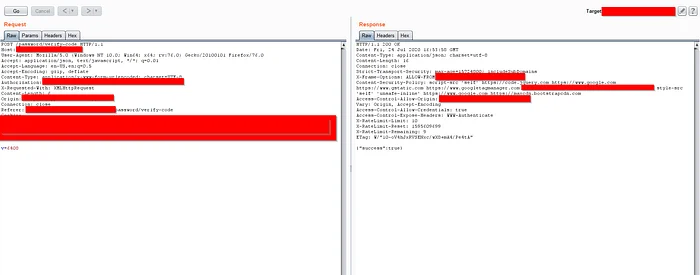
The screenshot is labelled Verified Response: it shows the response the application gives when the OTP is correct.
Step 2: capture the invalid OTP response
Next, submit a wrong OTP and look at the response for that case.
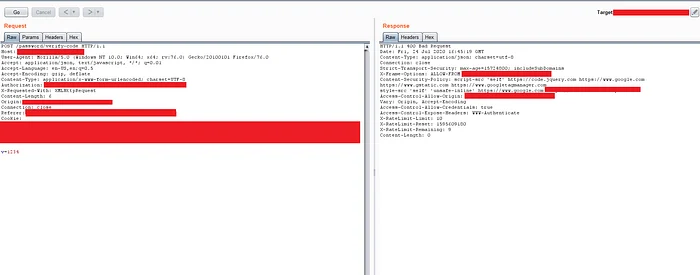
This gives the second data point: the response the application returns when the OTP is wrong.
Step 3: swap the responses
The technique is then to take the 200 OK response from the valid case and use it in place of the 400 response from the invalid case, forwarding it to the client. The author's description of the result is that the change password section arrives on the console.
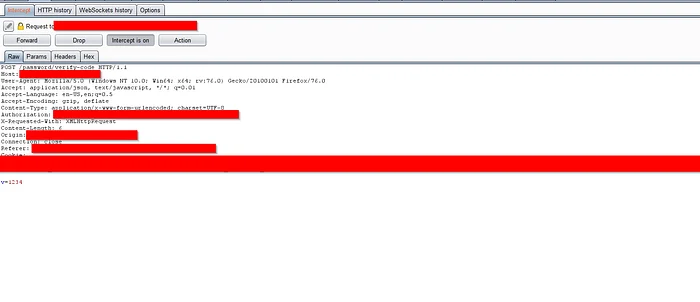
Invalid OTP Request: the request carrying the wrong OTP and the error response it produces.
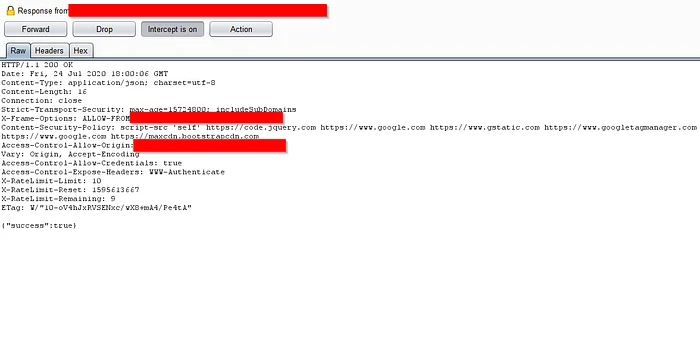
Make it too valid response: the same exchange with the successful response substituted for the error response.
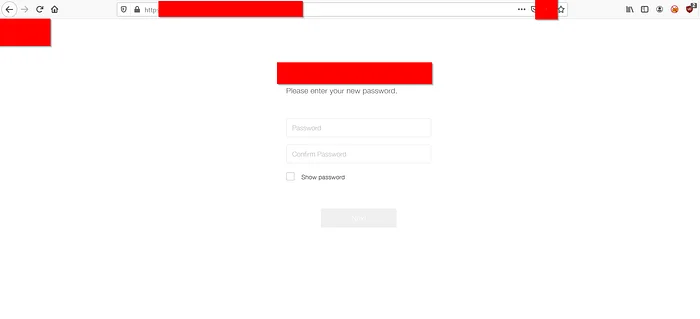
With the successful response in place, the client renders the change password section even though the OTP that was submitted was wrong. From there the password can be changed without knowing the OTP, which is the account takeover.
The report does not include the raw request or response bodies, so the exact status codes, fields and headers involved are not shown here. What it does state is the mechanism: a 200 OK response from the valid case, a 400 response from the invalid case, and the client trusting the substituted 200.
Root cause
The client decides whether to show the change password section from the response it receives. Substituting the successful response makes the client display the next step. The report does not describe what the server does with the subsequent password change.
Likely the verification state is held only on the client, or the change password request does not carry a server-issued proof that verification happened, so the server has nothing to check against. The report does not describe the server-side code, so this is an inference from the observed behaviour. The attempt-limiting and blocking checks in test case 3 do not help here, because the attack does not need to guess the OTP at all.
Impact
An attacker who can reach the OTP verification step for a victim's account can make the client show the change password section without a valid OTP, which the author describes as an account takeover. The finding earned a $5000 bounty.
Fix
The report's recommendation is to use a nonce on every single request, with a link to a definition of nonce for background. The report recommends using a nonce on every single request.
Variants to test
- Response substitution on other multi-step flows. Capture the success response from a step (OTP, email verification, security question) and substitute it for the failure response. A positive result is the client advancing to the next step, such as a password change form, when the step was not actually passed.
- Direct call to the next step. After a failed OTP, call the change password endpoint directly. A positive result is the password changing without a valid OTP.
- Character set of the OTP. Test whether the OTP accepts only digits, only alphabets, or alphanumeric, and whether unexpected characters are accepted or reflected. A positive result is acceptance of input outside the intended set.
- Case sensitivity and special characters. Try quotes and a forward slash on the OTP parameter and watch for output in the response. A positive result is any reflection or change in behaviour.
- Attempt limits and blocking. Submit invalid OTPs repeatedly and check whether the account is temporarily blocked and whether the system still sends a new OTP after blocking. A positive result is an OTP still being issued after the block.
- Nonce reuse. If a nonce is introduced, replay the same nonce across requests. A positive result is the second request being accepted.
What happened, in plain words
A security researcher found a way to take over someone's account on a bug bounty program that paid $5000. The attack did not require guessing a one-time password (OTP). Instead, it relied on how the website's password reset flow decided whether to show the "change password" form. By swapping a failure response for a success response, the researcher could make the website display the form and then set a new password, even though the OTP was wrong.
The report walks through a few test cases around OTPs and then focuses on the fourth: capturing the request and studying the responses. The key insight is that the client shows the next step based on the response it receives, and substituting the success response makes it display the change password section.
Background: what is an OTP and why does it matter?
An OTP (one-time password) is a short code, often 4 to 8 digits, that is sent to your email or phone and is valid for a single use or a short time. It is a second factor: something you have (your email inbox or phone) in addition to something you know (your password). Websites use OTPs in password reset flows to make sure that the person requesting the reset actually controls the email address or phone number associated with the account.
In a typical reset flow:
- You enter your email address and ask to reset your password.
- The server sends an OTP to that email address.
- You enter the OTP on a verification page.
- If the OTP is correct, the server lets you set a new password.
If an attacker can skip step 3 or trick the system into thinking the OTP was correct, they can set a new password and take over the account. That is called account takeover (ATO).
The test cases
The author approached the OTP mechanism with a checklist of things to try. These are common checks when you are testing a reset flow. Here is what each one means and why you would do it.
-
Case sensitiveness. Check if quotes or a forward slash work on a parameter, or if they produce any output in the response. This tests whether the application handles special characters safely. If a quote or slash changes the response, it might indicate that the input is being interpreted in a query or command, which could lead to injection attacks. Even if it does not, any reflection of input can be a clue.
-
Character types the OTP supports. Find out if the OTP is only digits, only letters, or a mix. This tells you the size of the search space. If the OTP is only 4 digits, there are 10,000 possibilities; if it is alphanumeric and longer, brute-forcing becomes impractical. Knowing the character set helps you understand whether rate limiting is the only protection.
-
Number of invalid OTP attempts. Check how many times you can submit a wrong OTP before the account is temporarily blocked. Also verify that after blocking, the system does not send a new OTP. If it does, an attacker could keep requesting new OTPs and trying again, bypassing the block. This is about rate limiting and lockout policies.
-
Response behaviour. Capture the request that submits the OTP and study how the application shows the result in its response. This is where the actual bug was found: by comparing the response for a correct OTP with the response for an incorrect one, and seeing what the client does with each.
The author notes these are just a few of many possible test cases. The finding came from test case 4.
Step-by-step exploitation
Step 1: capture the verified response
The first step is to submit a correct OTP and look at the response the application returns when verification succeeds. You need to see what a successful response looks like so you can recognise it later.
The screenshot is labelled Verified Response. It shows the response the application gives when the OTP is correct. In a real test, you would use your browser's developer tools (press F12) or an intercepting proxy like Burp Suite or OWASP ZAP to capture the HTTP response. The response likely contains a status code (200 OK) and some body that tells the client the OTP was valid.
Step 2: capture the invalid OTP response
Next, submit a wrong OTP and look at the response for that case. This gives you the second data point: what the application returns when the OTP is wrong.
Typically, an invalid OTP produces an error response, often with status code 400 Bad Request or 401 Unauthorized, and a message like "Invalid OTP". The client (the web page or app) reads this response and decides not to show the change password form.
Step 3: swap the responses
The technique is to take the 200 OK response from the valid case and use it in place of the 400 response from the invalid case, forwarding it to the client. In other words, you intercept the server's error response and replace it with the successful response you captured earlier. The author's description of the result is that the change password section arrives on the console.
Invalid OTP Request: the request carrying the wrong OTP and the error response it produces. This is what the exchange looks like before tampering.
Make it too valid response: the same exchange with the successful response substituted for the error response. Here, the client receives a 200 OK and a body that indicates success, so it proceeds to show the change password form.
With the successful response in place, the client renders the change password section even though the OTP that was submitted was wrong, which the author describes as an account takeover.
The report does not include the raw request or response bodies, so the exact status codes, fields and headers involved are not shown here. What it does state is the mechanism: a 200 OK response from the valid case, a 400 response from the invalid case, and the client trusting the substituted 200.
Why this works: root cause
The client decides whether to show the change password section from the response it receives. Substituting the successful response makes the client display the next step. The report does not describe what the server does with the subsequent password change.
Likely the verification state is held only on the client, or the change password request does not carry a server-issued proof that verification happened, so the server has nothing to check against. The report does not describe the server-side code, so this is an inference from the observed behaviour. The attempt-limiting and blocking checks in test case 3 do not help here, because the attack does not need to guess the OTP at all.
Impact
An attacker who can reach the OTP verification step for a victim's account can make the client show the change password section without a valid OTP, which the author describes as an account takeover. The finding earned a $5000 bounty.
Fix
The report's recommendation is to use a nonce on every single request, with a link to a definition of nonce for background. A nonce is a number used once: a unique, unpredictable value that the server generates and ties to a specific session or action. The report recommends using a nonce on every single request.
Variants to test
If you want to look for similar issues, here are some variations to try. Each one describes what to do and what a positive result looks like.
-
Response substitution on other multi-step flows. Capture the success response from a step (OTP, email verification, security question) and substitute it for the failure response. A positive result is the client advancing to the next step, such as a password change form, when the step was not actually passed.
-
Direct call to the next step. After a failed OTP, call the change password endpoint directly. A positive result is the password changing without a valid OTP.
-
Character set of the OTP. Test whether the OTP accepts only digits, only alphabets, or alphanumeric, and whether unexpected characters are accepted or reflected. A positive result is acceptance of input outside the intended set.
-
Case sensitivity and special characters. Try quotes and a forward slash on the OTP parameter and watch for output in the response. A positive result is any reflection or change in behaviour.
-
Attempt limits and blocking. Submit invalid OTPs repeatedly and check whether the account is temporarily blocked and whether the system still sends a new OTP after blocking. A positive result is an OTP still being issued after the block.
-
Nonce reuse. If a nonce is introduced, replay the same nonce across requests. A positive result is the second request being accepted.
Glossary
- Account takeover (ATO): a type of attack where an attacker gains unauthorised access to someone else's account, often by changing the password or email address.
- Bug bounty program: a program run by an organisation that rewards security researchers for finding and reporting vulnerabilities in their systems.
- Business impact: the potential harm a vulnerability could cause to an organisation, such as financial loss, data breach, or reputational damage.
- Client: the software (like a web browser or mobile app) that sends requests to a server and displays the results to the user.
- Developer tools: built-in features in web browsers (usually opened with F12) that let you inspect network requests, responses, and page elements.
- Endpoint: a specific URL or URI where an API or web service can be accessed.
- HTTP response: the message a server sends back to a client after receiving a request, containing a status code and often a body.
- Intercepting proxy: a tool like Burp Suite or OWASP ZAP that sits between your browser and the server, allowing you to view and modify requests and responses.
- Nonce: a number used once; a unique, unpredictable value generated for a single use, often to prevent replay attacks.
- One-time password (OTP): a short code valid for a single use or short time, used as a second factor in authentication.
- Parameter: a variable in a request, often part of the URL or body, that carries data to the server.
- Rate limiting: a technique to control how many requests a client can make in a given time period, to prevent abuse.
- Replay attack: an attack where a valid data transmission is maliciously or fraudulently repeated or delayed.
- Request: a message sent by a client to a server asking for a resource or action.
- Response substitution: an attack where an attacker replaces a legitimate response with a different one, often to trick the client into a different state.
- Root cause: the fundamental reason a vulnerability exists, as opposed to its symptoms.
- Session: a period of interaction between a user and a system, often identified by a session ID stored in a cookie.
- Status code: a three-digit number in an HTTP response indicating the result of the request (e.g. 200 OK, 400 Bad Request).
- Temporary blocking: a security measure that temporarily locks an account or IP address after a number of failed attempts.
- Verification state: the condition of having successfully completed a verification step, such as entering a correct OTP.
- Vulnerability: a weakness in a system that can be exploited to compromise its security.



