A Case Study of API Vulnerabilities - Part 2, and Empty Heads
The API allowed an attacker to perform SSRF with control over headers and path, but not the domain. By setting the Host header and using path traversal in the path parameter, the attacker could access internal virtual hosts and explore beyond the intended routing.

This blog post is a more general one than my usual posts. I'll try and cover two things; an SSRF bug in an API, and a cool productivity system I use.
The full write-up lives on its author's site
It belongs to its author, so we link to it rather than copy it. The other two tabs are our own rewrites, checked against it.
Context
This post covers two unrelated things: an SSRF bug found in an API, and a personal productivity system. The SSRF section is the technical part. The researcher found it during an in-person collaboration with bendtheory while visiting him in the US. The program is not named, deliberately, to preserve its anonymity, so there is no target host, product name or feature name to give here beyond the fact that it was an API with an SSRF-capable request feature.
The technique at the centre of the bug is Secondary Context Path Traversal, a term the researcher credits to Sam Curry and his Starbucks write-up. The post recommends reading that article first, on the basis that it is a useful tool in the modern web landscape.
Setup
The report does not describe accounts, roles, tooling or versions. The relevant precondition is the shape of the SSRF primitive itself, which is set out in the next section.
Finding it
The primitive had three properties that together made it interesting:
- The researcher could perform SSRF and set the headers and the body of the request.
- The researcher could not set the domain.
- The researcher could specify the path, and could navigate to a variety of internal routes using certain keywords in the request instead.
Setting the Host header in the SSRF request allowed switching between internal virtual hosts.
The second half is the path parameter. Combining it with path traversal allowed climbing out of the internal routing. From that point the virtual hosts could be explored with far more freedom than the fixed set of keywords allowed. Triggering errors also revealed exactly where in the path the request had landed, and in some cases those errors leaked the type of software in use. That combination is what makes it a controllable secondary context path traversal: the researcher could see their position in the path and steer from it.
Exploitation
The report does not include the individual requests or responses for this bug, so the steps below describe the mechanics rather than reproducing traffic.
Step 1: establish the SSRF primitive
Use the feature that performs server-side requests. The post notes that read SSRF can occur via webhook testing functionality. Confirm that headers and body are attacker-controlled while the domain is fixed by the server.
Step 2: switch virtual hosts with the Host header
Set the Host header in the SSRF request to select a different internal virtual host. The request still goes to the server-chosen destination, but the virtual host that handles it changes.
Step 3: reach internal routes by keyword
Use the keywords the internal routing understands to navigate to internal routes, since the domain itself cannot be set.
Step 4: climb out with path traversal in the path parameter
Put traversal sequences in the path parameter to escape the internal routing. Once outside it, the virtual hosts can be explored without being limited to the keyword routes.
Step 5: use errors to map position and software
Trigger errors to observe where in the path the request ended up. In some cases the error also disclosed the type of software in use, which helps decide what to try next.
Root cause
The design lets the caller control the Host header and the path while the server controls the domain. Traversal sequences in the path parameter allowed climbing out of the internal routing. Traversal sequences in the path parameter break that assumption, and the Host header lets the caller pick which internal virtual host receives the escaped request. The report does not describe the proxy configuration or code, so the exact implementation mistake is not stated; the mechanism above is what the primitive and the traversal imply.
Impact
The researcher could reach internal virtual hosts and internal routes that the feature was not meant to expose, and could explore them beyond the fixed keyword routes. Error messages revealed position in the path and, in some cases, the software in use.
Fix
Based on the mechanism, the fix would be to stop trusting caller-supplied path and Host values in the server-side request, for example by normalising and constraining the path to the intended prefix and by not letting the caller choose the virtual host. The report does not confirm that any of this was done.
Variants to test
- Read SSRF with header and body control. Look for webhook testing, URL preview or import features. A positive result is a request you can shape but whose domain you cannot set.
- Host header switching. Set
Hostto candidate internal virtual hostnames and compare responses. A positive result is a different response body or error for the same destination. - Keyword routes. Try the routing keywords the internal service understands. A positive result is reaching an internal route without knowing its domain.
- Traversal in the path parameter. Add traversal sequences to the path. A positive result is a response from outside the intended routing prefix.
- Error-based mapping. Send malformed paths and read the errors. A positive result is an error that shows your position in the path or names the software in use.
Empty Heads
The second half of the post is a productivity system, unrelated to the bug. It manages the two resources productivity systems always manage together, tasks and time, and it accounts for how your brain is feeling on a given day rather than only for how tasks are organised. Frameworks like PARA are good for organising tasks but do not consider the individual.
The starting question is whether you are capable of coherent thought today. Projects are subdivided into tasks that require a functioning brain cell and tasks that do not, and two priority lists are maintained:
- Yes Brain: the priority-list of tasks that require a functioning brain cell
- No Brain: the priority-list of tasks that do not require a functioning brain cell
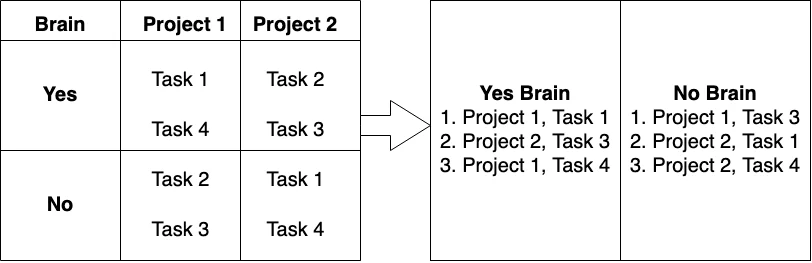
The point is not to ignore high-effort critical tasks or to advocate laziness. There is a distinction between being lazy and doing the tasks that suit your current energy levels. Forcing yourself to do tasks when you are not in the right frame of mind causes burnout. Do the Yes Brain tasks when motivated and the No Brain tasks when not, and if your mood changes during the day, schedule accordingly. A few hours of No Brain is not wasted time. The system need not be limited to two stages of awakeness either: when the researcher's eyes get tired, he listens to something instead.
The system originated with the researcher's girlfriend, who developed Yes Brain / No Brain to choose which book to read and visualised it in quadrants or grids. He developed it to the general case and added priority and scheduling. He quotes Sun Tzu: "He will win, who knows when to fight and when not to fight." Anyone who created a similar system before is invited to ping him on Twitter so he can cite them.
Extra
The researcher says he will be travelling a lot that summer and is open to in-person collaboration:
- Turkey (July 10th-17th)
- Las Vegas (August 2nd-15th, for H1-702 and Def Con)
- Milan, Bern, Frankfurt, Hamburg, Copenhagen (August 21st-28th)
- Singapore (September 24-25, for BountyCon)
Reach out on Twitter if you want to hang out.
What happened, in plain words
A security researcher found a bug in an API. An API is the part of a website or service that other programs talk to, rather than the part a person clicks on in a browser. Think of a restaurant: the dining room is the website you see, and the kitchen door where orders are passed through is the API. The bug let the researcher make the server fetch things on its behalf, and then steer those fetches into places the feature was never meant to reach.
The class of bug is called SSRF, short for Server-Side Request Forgery. In plain terms, a server is a computer that runs a service and answers requests from other computers. SSRF means you trick that server into making a request for you, to a destination of your choosing. A simple everyday comparison: you cannot get into a locked office building yourself, but you can ask the receptionist to walk down the corridor and read out what is on a particular door. If the receptionist does not check where you are sending them, you can learn about rooms you were never allowed into.
The researcher found this during an in-person collaboration with another researcher, bendtheory, while visiting him in the US. The program that ran the bug is not named, on purpose, to keep it anonymous. So there is no target host, product name or feature name to give beyond the fact that it was an API with a feature that could make server-side requests.
The technique at the centre of the bug is called Secondary Context Path Traversal. The researcher credits the term to Sam Curry and his Starbucks write-up, and recommends reading that article first, because it is a useful tool in the modern web landscape.
The two ideas you need first
Before the bug makes sense, two ideas need explaining from zero.
Path traversal. A path is the part of a web address that points to a particular place, like the folders in a filing cabinet. On the web, .. means "go up one level", the same way it does in a file system. If a program takes a path from you and does not check it, you can put .. sequences in it to climb out of the folder you were supposed to stay in and look at neighbouring folders. Imagine a hotel clerk who is told to fetch a document from room 101, and you write "room 101, then up one floor, then room 205" on the slip. If the clerk follows the slip literally, they end up somewhere you were not allowed.
Virtual hosts. One physical server can answer for many different website names. When a request arrives, the server looks at the Host header to decide which site the request is for. A header is a small labelled line of information that travels with every web request, like the address and return address on an envelope. The Host header is the line that says which website name the request is asking for. So one machine can host many sites, and the Host header picks which one answers.
Setup
The report does not describe accounts, roles, tooling or versions. The relevant precondition is the shape of the SSRF itself, which is set out next.
Finding it
The SSRF had three properties that together made it interesting:
- The researcher could perform SSRF and set the headers and the body of the request.
- The researcher could not set the domain.
- The researcher could specify the path, and could navigate to a variety of internal routes using certain keywords in the request instead.
A domain is the name of a site, like example.com. The body is the main content of a request, the way the letter inside an envelope is the content. So the researcher could write the letter and choose some of the envelope labels, but could not choose the address the envelope was sent to. Instead, the server chose the destination, and the researcher could only pick from a set of keywords the internal routing understood.
Setting the Host header in the SSRF request allowed switching between internal virtual hosts. That is the first half of the technique. The server still decides where to send the request, but the Host header still selects which virtual host answers it. Going back to the hotel: you cannot choose which building the clerk walks to, but you can choose which reception desk inside that building they speak to.
The second half is the path parameter. A parameter is a named value you pass along with a request, like a field on a form. Combining the path parameter with path traversal allowed climbing out of the internal routing. From that point the virtual hosts could be explored with far more freedom than the fixed set of keywords allowed. Triggering errors also revealed exactly where in the path the request had landed, and in some cases those errors leaked the type of software in use. That combination is what makes it a controllable secondary context path traversal: the researcher could see their position in the path and steer from it, rather than guessing blindly.
Exploitation
The report does not include the individual requests or responses for this bug, so the steps below describe the mechanics rather than reproducing traffic.
Step 1: establish the SSRF
Use the feature that performs server-side requests. The post notes that read SSRF can occur via webhook testing functionality. A webhook is a way for one service to notify another by sending it a request automatically; a webhook testing feature lets you try that out, and if it does not check where it sends the request, it becomes an SSRF. A read SSRF is one where you can make the server fetch information and you can see the result, as opposed to one where you can only make it send something without seeing the answer.
Confirm that headers and body are attacker-controlled while the domain is fixed by the server. In other words, check that you can shape the request but not choose its destination. This step matters because everything that follows depends on that exact shape: control of the envelope labels and the letter, but not the address.
Step 2: switch virtual hosts with the Host header
Set the Host header in the SSRF request to select a different internal virtual host. The request still goes to the server-chosen destination, but the virtual host that handles it changes. This step is taken because the fixed destination is only half the story: many sites live on the same machine, and the Host header is the switch between them.
Step 3: reach internal routes by keyword
Use the keywords the internal routing understands to navigate to internal routes, since the domain itself cannot be set. A route is a particular path a service recognises and acts on, like a named corridor inside the building. This step is taken because the keywords are the only doors the routing will open when you cannot name a domain.
Step 4: climb out with path traversal in the path parameter
Put traversal sequences in the path parameter to escape the internal routing. Once outside it, the virtual hosts can be explored without being limited to the keyword routes. This is the core of the technique: the keywords are a short list of allowed destinations, and traversal turns that short list into the whole building.
Step 5: use errors to map position and software
Trigger errors to observe where in the path the request ended up. In some cases the error also disclosed the type of software in use, which helps decide what to try next. This step is taken because, when you are climbing around a building you cannot see, the error messages are the signs on the walls telling you which floor you are on.
Root cause
The design lets the caller control the Host header and the path while the server controls the domain. Traversal sequences in the path parameter allowed climbing out of the internal routing. A prefix is the fixed beginning of a path, the part the routing expects every request to start with. Traversal sequences in the path parameter break that assumption, and the Host header lets the caller pick which internal virtual host receives the escaped request. The report does not describe the proxy configuration or code, so the exact implementation mistake is not stated; the mechanism above is what the primitive and the traversal imply.
Impact
The researcher could reach internal virtual hosts and internal routes that the feature was not meant to expose, and could explore them beyond the fixed keyword routes. Error messages revealed position in the path and, in some cases, the software in use.
Fix
Based on the mechanism, the fix would be to stop trusting caller-supplied path and Host values in the server-side request, for example by normalising and constraining the path to the intended prefix and by not letting the caller choose the virtual host. Normalising means tidying a path into a standard form before checking it, so that .. tricks cannot slip past the check. The report does not confirm that any of this was done.
Variants to test
If you want to look for this kind of bug yourself, these are the things to try. Each one lists what a positive result looks like.
- Read SSRF with header and body control. Look for webhook testing, URL preview or import features. A positive result is a request you can shape but whose domain you cannot set.
- Host header switching. Set
Hostto candidate internal virtual hostnames and compare responses. A positive result is a different response body or error for the same destination. - Keyword routes. Try the routing keywords the internal service understands. A positive result is reaching an internal route without knowing its domain.
- Traversal in the path parameter. Add traversal sequences to the path. A positive result is a response from outside the intended routing prefix.
- Error-based mapping. Send malformed paths and read the errors. A positive result is an error that shows your position in the path or names the software in use.
Empty Heads
The second half of the post is a productivity system, unrelated to the bug. It manages the two resources productivity systems always manage together, tasks and time, and it accounts for how your brain is feeling on a given day rather than only for how tasks are organised. Frameworks like PARA are good for organising tasks but do not consider the individual.
The starting question is whether you are capable of coherent thought today. Projects are subdivided into tasks that require a functioning brain cell and tasks that do not, and two priority lists are maintained:
- Yes Brain: the priority-list of tasks that require a functioning brain cell
- No Brain: the priority-list of tasks that do not require a functioning brain cell
The point is not to ignore high-effort critical tasks or to advocate laziness. There is a distinction between being lazy and doing the tasks that suit your current energy levels. Forcing yourself to do tasks when you are not in the right frame of mind causes burnout. Do the Yes Brain tasks when motivated and the No Brain tasks when not, and if your mood changes during the day, schedule accordingly. A few hours of No Brain is not wasted time. The system need not be limited to two stages of awakeness either: when the researcher's eyes get tired, he listens to something instead.
The system originated with the researcher's girlfriend, who developed Yes Brain / No Brain to choose which book to read and visualised it in quadrants or grids. He developed it to the general case and added priority and scheduling. He quotes Sun Tzu: "He will win, who knows when to fight and when not to fight." Anyone who created a similar system before is invited to ping him on Twitter so he can cite them.
Extra
The researcher says he will be travelling a lot that summer and is open to in-person collaboration:
- Turkey (July 10th-17th)
- Las Vegas (August 2nd-15th, for H1-702 and Def Con)
- Milan, Bern, Frankfurt, Hamburg, Copenhagen (August 21st-28th)
- Singapore (September 24-25, for BountyCon)
Reach out on Twitter if you want to hang out.
Glossary
- API: the part of a service that other programs talk to, rather than the part a person clicks on in a browser.
- Body: the main content of a request, the way the letter inside an envelope is the content.
- Domain: the name of a site, such as
example.com. - Header: a small labelled line of information that travels with a web request, like the address and return address on an envelope.
- Host header: the header that says which website name a request is asking for, so one machine can answer for many sites.
- Normalising: tidying a path into a standard form before checking it, so that
..tricks cannot slip past the check. - Parameter: a named value passed along with a request, like a field on a form.
- Path: the part of a web address that points to a particular place, like the folders in a filing cabinet.
- Path traversal: using
..sequences in a path to climb out of the folder you were supposed to stay in. - Prefix: the fixed beginning of a path that the routing expects every request to start with.
- Read SSRF: an SSRF where you can make the server fetch information and you can see the result.
- Route: a particular path a service recognises and acts on, like a named corridor inside a building.
- Secondary Context Path Traversal: a technique where path traversal is used inside a request that a server makes on your behalf, to climb out of the routing it was meant to stay within.
- Server: a computer that runs a service and answers requests from other computers.
- SSRF (Server-Side Request Forgery): tricking a server into making a request for you, to a destination of your choosing.
- Virtual host: one of several website names that a single physical server can answer for, selected by the
Hostheader. - Webhook: a way for one service to notify another by sending it a request automatically.




