A Photo Upload Field, a Stolen Metadata Token, and Three Weeks of Silence
A profile photo upload feature accepted a URL and made the server fetch it without restriction, so an attacker could point it at the server's own internal metadata endpoint and receive temporary cloud credentials. With those valid credentials the attacker reached an S3 bucket and customer database, then disabled activity logging for about 90 minutes, and the breach went unnoticed for three weeks.
 Published on medium.com
Mitre Attack
The full write-up lives on its author's site
It belongs to its author, so we link to it rather than copy it. The other two tabs are our own rewrites, checked against it.
Context
An application accepted a profile photo by letting the user paste a URL. The server then fetched whatever URL it was given. The only validation was a check that the input was a URL. The feature was intended to pull a photo off the internet on the user's behalf.
The article is framed as a cloud security internship exercise: each week of the internship was turned into a concept, the hands-on work behind it, and an incident that shows why it matters. The incident described is a photo-upload breach, mapped against MITRE ATT&CK rather than written up as a narrative.
Setup
The report does not describe a test environment, accounts, roles, tooling versions or a reproduction. The mapping work was done in the MITRE ATT&CK Navigator, plotting each stage of the incident against its tactic and technique. The incident is presented as a real breach that the author mapped.
Finding it
The weakness is in the design of the upload feature. "Fetch any URL" does not only mean pulling a photo off the internet. It also means the server can be pointed at itself. Nobody had considered that second reading.
One submission was not a photo link at all. It was the address of the server's own internal metadata service, the internal endpoint that hands out temporary security credentials for whatever role the server runs as. The application fetched it exactly like any other URL.
Exploitation
Step 1: Initial Access through the URL fetch
One submission was the address of the instance metadata service rather than a photo link. The server made the request on the attacker's behalf. In ATT&CK terms this is exploiting a public-facing application: the unrestricted URL-fetch feature.
Step 2: Credential Access through the metadata service
The application fetched the metadata address exactly like any other URL and handed the temporary credentials back to the attacker. The application handed those credentials straight back to the attacker, the same way it would have handed back an image. This is a Credential Access technique: valid, temporary credentials obtained without any authentication bypass at all.
Step 3: Login with real credentials
The attacker logged in using the stolen credentials. Because the credentials were real, there was no password to guess, no MFA to bypass and no privilege escalation required. No anomaly detection fired. The login looked exactly like the company's own systems operating normally.
Step 4: Discovery and Collection
Using the stolen identity, the attacker explored what it could reach. They found an S3 bucket holding years of photos and a full customer database, and exfiltrated it.
Step 5: Defence Impairment
The same role also had permission to modify logging configuration. The attacker disabled the activity log for roughly 90 minutes while working, then quietly re-enabled it. The breach went unnoticed for three weeks.
The chain in ATT&CK terms
Walking the incident through ATT&CK's structure makes the shape of the failure clearer than a narrative alone. The framework is organised into four levels:
- Tactics are the why: the attacker's goal at a given stage, such as Initial Access, Persistence or Lateral Movement.
- Techniques are the how: the specific method used to reach that goal, such as phishing or exploiting a public-facing application.
- Sub-techniques narrow that further, for example a spearphishing attachment versus a spearphishing link.
- Procedures are the exact implementation: the specific tool, malware or command a real attacker or group used.
ATT&CK splits into separate matrices for different environments: Enterprise (Windows, Linux and so on), Mobile (iOS and Android) and ICS (industrial control systems).
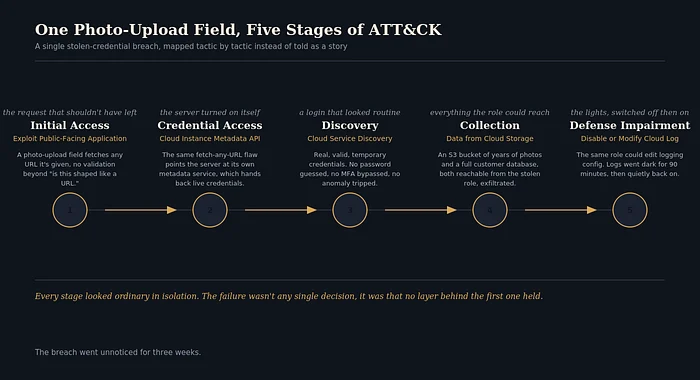
The mapped chain for this incident runs as follows:
| Stage | ATT&CK tactic | What happened |
|---|---|---|
| 1 | Initial Access | Exploiting a public-facing application: the unrestricted URL-fetch feature |
| 2 | Credential Access | Reaching the instance metadata service through the same request capability, obtaining valid temporary credentials |
| 3 | (login) | Using the real credentials, with no privilege escalation and no anomaly detection |
| 4 | Discovery and Collection | Exploring what the stolen identity could reach, finding an S3 bucket with years of photos and a full customer database, and exfiltrating it |
| 5 | Defence Impairment | Disabling the activity log for roughly 90 minutes, then re-enabling it |
Root cause
The application fetched arbitrary URLs supplied by users, with no validation beyond "is this a URL?". That gave the server's own network position to the attacker, including the instance metadata service. The metadata service then returned temporary credentials for the server's role, and the application returned them to the requester.
Defence in depth should have stopped the damage at the next layer. The server should not have been able to reach its own metadata service in the first place. Even if it could, the role behind it should not have had access to nearly everything it touched. Instead, every layer behind the first one gave way just as easily.
The role's permissions compounded the problem in two ways: it could reach an S3 bucket holding years of photos and a full customer database, and it could modify logging configuration. That last permission is what allowed the activity log to be disabled and quietly re-enabled.
Impact
An attacker who can submit a URL to the upload field can obtain the server role's temporary credentials and log in as that role. From there, under the conditions seen in this incident, they can reach an S3 bucket containing years of photos and a full customer database, exfiltrate it, and disable the activity log for the duration of the work.
Because the credentials were real, the login required no password guessing, no MFA bypass and no privilege escalation, and it tripped no anomaly detection. The activity looked like the application's own legitimate traffic.
Fix
The report does not describe a fix that was applied. The lessons it draws are about where controls should have sat:
- The server should not be able to reach its own metadata service. Blocking that path removes the Credential Access step even when the URL fetch is abused.
- The role behind the server should not have access to nearly everything it touches. Scoping the role limits what a stolen identity can reach.
- Access to logging configuration should be locked down, so the identity that touches sensitive data cannot also switch the logs off.
Variants to test
These follow from the failure modes in the incident. The report does not test them; they are the same questions applied elsewhere.
- URL-fetch features that reach internal addresses. Submit the address of the instance metadata service into any server-side fetch feature (photo upload by URL, link preview, import from URL, webhook tester). A positive result is a response containing temporary credentials for the server's role.
- Over-broad instance roles. After obtaining credentials, enumerate what the identity can reach. A positive result is access to storage buckets or databases beyond what the feature needs.
- Logging permissions on the same role. Check whether the identity that touches sensitive data can also modify logging configuration. A positive result is the ability to disable an activity log and re-enable it.
- Detection coverage. Map detection rules to the techniques in the chain to check monitoring coverage, and run gap analysis to identify which techniques current tools cannot see. A positive result is a stage in the chain with no detection at all.
The author's own checklist for applying this to an environment:
- What is exposed to the outside world: any public API, login page or upload form?
- Would input validation actually stop the relevant Initial Access techniques, or has it just never been tested?
- What is that exposed thing connected to, and if someone got through it, what else could they reach?
- What could a stolen identity actually do?
- If these credentials leaked right now, how much damage is possible, and would anyone notice?
- Does logging catch this, and can the same role that touches sensitive data also switch the logs off?
What stands out
Mapped this way, each individual decision looks ordinary in isolation. Accepting a URL for a photo upload seems reasonable. Giving a server's IAM role broad access seems convenient during development. Not locking down who can touch logging settings seems like a minor detail. None of these, on its own, reads as a glaring mistake.
The failure is what should have happened between them. A breach is rarely one dramatic failure. It is usually several ordinary, individually forgivable decisions, each one assuming the next layer would catch what it missed.
What happened, in plain words
A website let people set their profile photo by pasting in a web address (a URL) instead of uploading a file. The website's server would then go and fetch whatever was at that address and use it as the photo. The only check it made was whether the text looked like a URL. Nothing else.
That sounds harmless, but it hides a second meaning. "Go and fetch this address" does not only mean "go out to the internet and grab a picture". It also means "go wherever this address points, including places inside the company's own network". Nobody had thought about that second meaning.
Someone submitted an address that was not a photo at all. It was the address of the server's own internal metadata service, which hands out temporary security credentials for whatever role that server runs as. The website fetched it just like any other URL, and then handed the credentials back to the person who submitted the address, as if they were a picture.
With those credentials the attacker logged in. There was no password to guess, no second factor to get around, and nothing that looked unusual to any monitoring system. The login looked exactly like the company's own systems doing their normal work.
The rest of this article walks through that chain step by step, using a public framework called MITRE ATT&CK that security teams use to describe how attacks unfold. The author of the write-up did this mapping as part of a cloud security internship, turning each week into a concept, the hands-on work behind it, and an incident that shows why it matters. The incident is presented as a real breach that was mapped.
The idea behind the framework
Before the incident itself, it helps to know what MITRE ATT&CK is, because the whole write-up is organised around it.
ATT&CK is a structured map of how attackers actually move through a system. Think of it like a catalogue of known moves in a game: not a list of specific bad people, but a shared vocabulary so that everyone describes the same action the same way. It is organised into four levels:
- Tactics are the why: the attacker's goal at a given stage, like Initial Access, Persistence, or Lateral Movement.
- Techniques are the how: the specific method used to reach that goal, such as phishing or exploiting a public-facing application.
- Sub-techniques narrow that further into a specific variant, like a spearphishing attachment versus a spearphishing link.
- Procedures are the exact implementation: the specific tool, malware, or command a real attacker or group actually used.
A simple comparison: a tactic is "get into the building", a technique is "through a window", a sub-technique is "through a ground-floor window left open", and a procedure is "with a screwdriver, at 2am, by this particular group". Each level gets more specific.
The framework also splits into separate matrices for different environments: Enterprise (Windows, Linux, and so on), Mobile (iOS/Android), and ICS (industrial control systems). A matrix here just means a big grid of tactics and techniques you can look things up in.
In practice, security teams use it for a handful of distinct things: mapping detection rules to specific techniques to check monitoring coverage, structuring red-team exercises around real adversary behaviour instead of generic scans, categorising known threat actor groups by the techniques they historically use, and running gap analysis to identify which techniques your current tools simply cannot see. Gap analysis means comparing what you would like to detect against what you actually can detect, and writing down the holes.
The author's way of applying this to their own environment is not as an attack plan but as an honest checklist. For each stage of a real attack chain, they would ask:
- What is exposed to the outside world? Any public API, login page, or upload form?
- Would my input validation actually stop the relevant Initial Access techniques, or has it just never been tested?
- What is that exposed thing connected to, and if someone got through it, what else could they reach?
- What could a stolen identity actually do?
- If these credentials leaked right now, how much damage is possible, and would I even notice?
- Does my logging catch this, and can the same role that touches sensitive data also switch the logs off?
Walking through an environment stage by stage this way turns a vague sense of security into a specific, checkable list. It is the difference between "I think we are probably fine" and a list of questions with yes or no answers.
The build: mapping a real incident
The author picked a real incident and mapped its complete attack chain using the MITRE ATT&CK Navigator, a free tool for plotting stages on the ATT&CK grid. Every stage was placed against its actual tactic and technique rather than written up as a story.
The value of doing this concretely, instead of describing an incident in prose, is that it forces a decision at every step: exactly which tactic does this action serve, and exactly which technique or sub-technique describes it. That is a different, more precise exercise than just knowing generally that "an attacker got in and stole some data". It is like the difference between saying "the parcel went missing somewhere" and drawing the exact route it took, with a note at each stop.
The incident: the chain, mapped
The photo-upload breach described at the start was one of the incidents the author mapped. Walking it through ATT&CK's structure makes the shape of the failure much clearer than a narrative alone.
Here is the same chain as a table, so you can follow it stage by stage:
| Stage | ATT&CK tactic | What happened |
|---|---|---|
| 1 | Initial Access | Exploiting a public-facing application: the unrestricted URL-fetch feature |
| 2 | Credential Access | Reaching the instance metadata service through the same request capability, obtaining valid temporary credentials |
| 3 | (login) | Using the real credentials, with no privilege escalation and no anomaly detection |
| 4 | Discovery and Collection | Exploring what the stolen identity could reach, finding an S3 bucket with years of photos and a full customer database, and exfiltrating it |
| 5 | Defence Impairment | Disabling the activity log for roughly 90 minutes, then re-enabling it |
Stage 1: getting in through the photo field
Initial Access came through exploiting a public-facing application: the unrestricted URL-fetch feature. Initial Access is simply the tactic of getting a first foothold. A public-facing application is any piece of software on the internet that anyone can send requests to, like a login page or, in this case, a photo upload form.
The feature was intended to pull a photo off the internet on the user's behalf. The only validation was a check that the input was a URL. Validation here means checking input before acting on it, the way a bouncer checks that the name on your ticket matches your ID. Checking "is this a URL?" is a very weak check: it confirms the shape of the text, not where the text points.
Stage 2: stealing credentials from the server's own metadata service
From there, the attacker used that same request capability to reach the instance metadata service. This is a Credential Access technique, meaning the goal at this stage was to obtain credentials, the things that prove who you are to a system.
The instance metadata service is an internal endpoint that hands out temporary security credentials for whatever role that server runs as. Two ideas need unpacking here.
First, a role. In cloud computing, a server does not usually log in with a username and password. Instead it is given an identity, called a role, and that identity carries a set of permissions: what this server is allowed to read, write or change. It is like a staff badge that opens certain doors and not others.
Second, the metadata service. Every cloud server can ask a special internal address for information about itself, including temporary credentials for its role. Those credentials expire after a while, which is why they are called temporary.
The application fetched that internal address exactly like any other URL, and handed the credentials straight back to the attacker, the same way it would have handed back an image. This is Credential Access without any authentication bypass at all: nothing was cracked or tricked, the server simply gave its own keys away because it was asked nicely.
Stage 3: logging in with real credentials
Because those credentials were real, the subsequent login required no privilege escalation and tripped no anomaly detection. It looked exactly like the application's own legitimate traffic.
Privilege escalation means finding a way to get more permissions than you started with. The attacker did not need to: the stolen identity already had plenty. Anomaly detection means systems that watch for behaviour that does not fit the normal pattern, like a login from an unusual place or at an unusual time. Nothing fired, because from the outside the login was indistinguishable from the company's own systems doing their job.
Stage 4: looking around and taking the data
From there came Discovery and Collection. Discovery is the tactic of exploring what you can reach once you are inside. Collection is gathering up the things you want to take. The attacker explored what the stolen identity could reach, found an S3 bucket holding years of photos and a full customer database, and exfiltrated it.
An S3 bucket is cloud storage, essentially a folder in the cloud that holds files. Exfiltration means copying data out of the environment to somewhere the attacker controls.
Stage 5: turning off the cameras
The final step was Defence Impairment: the same role also had permission to modify logging configuration, so the attacker disabled the activity log for roughly 90 minutes while working, then quietly re-enabled it. The breach went unnoticed for three weeks.
Defence Impairment is the tactic of weakening the victim's own defences, and here it meant switching off the record of what was happening. An activity log is the diary a system keeps of who did what and when. Disabling it for 90 minutes and then quietly switching it back on is like pausing a security camera during the robbery and pressing record again afterwards.
Why it worked
The application fetched arbitrary URLs supplied by users, with no validation beyond "is this a URL?". That gave the server's own network position to the attacker, including the instance metadata service. The metadata service then returned temporary credentials for the server's role, and the application returned them to the requester.
Defence in depth should have stopped the damage at the next layer. Defence in depth means arranging several independent protections so that if one fails, the next one still holds, like a castle with a moat, a wall and a locked inner door. The server should not have been able to reach its own metadata service in the first place. Even if it could, the role behind it should not have had access to nearly everything it touched. Instead, every layer behind the first one gave way just as easily.
The role's permissions compounded the problem in two ways: it could reach an S3 bucket holding years of photos and a full customer database, and it could modify logging configuration. That last permission is what allowed the activity log to be disabled and quietly re-enabled.
What the damage amounts to
An attacker who can submit a URL to the upload field can obtain the server role's temporary credentials and log in as that role. From there, under the conditions seen in this incident, they can reach an S3 bucket containing years of photos and a full customer database, exfiltrate it, and disable the activity log for the duration of the work.
Because the credentials were real, the login required no password guessing, no MFA bypass and no privilege escalation, and it tripped no anomaly detection. MFA means multi-factor authentication, the second proof of identity beyond a password, such as a code on your phone. The activity looked like the application's own legitimate traffic.
What should have been in place
The write-up does not describe a fix that was applied. The lessons it draws are about where controls should have sat:
- The server should not be able to reach its own metadata service. Blocking that path removes the Credential Access step even when the URL fetch is abused.
- The role behind the server should not have access to nearly everything it touches. Scoping the role limits what a stolen identity can reach.
- Access to logging configuration should be locked down, so the identity that touches sensitive data cannot also switch the logs off.
Each of these is a separate lock on a separate door. Any one of them would have broken the chain at that point.
The same questions, applied elsewhere
The following follow from the failure modes in the incident. The write-up does not test them; they are the same questions applied elsewhere.
- URL-fetch features that reach internal addresses. Submit the address of the instance metadata service into any server-side fetch feature (photo upload by URL, link preview, import from URL, webhook tester). A positive result is a response containing temporary credentials for the server's role. A link preview is what shows a thumbnail when you paste a URL into a chat app; a webhook tester is a tool that receives automated messages from other services. All of them make a server fetch an address on your behalf, which is the same shape of feature as the photo upload.
- Over-broad instance roles. After obtaining credentials, enumerate what the identity can reach. A positive result is access to storage buckets or databases beyond what the feature needs. Enumerate means list out, one by one, everything that is reachable.
- Logging permissions on the same role. Check whether the identity that touches sensitive data can also modify logging configuration. A positive result is the ability to disable an activity log and re-enable it.
- Detection coverage. Map detection rules to the techniques in the chain to check monitoring coverage, and run gap analysis to identify which techniques current tools cannot see. A positive result is a stage in the chain with no detection at all.
The author's own checklist for applying this to an environment:
- What is exposed to the outside world: any public API, login page or upload form?
- Would input validation actually stop the relevant Initial Access techniques, or has it just never been tested?
- If these credentials leaked right now, how much damage is possible, and would anyone notice?
- Does logging catch this, and can the same role that touches sensitive data also switch the logs off?
An API is the way one piece of software talks to another, a set of addresses and rules for asking for things. A public API is one that anyone on the internet can send requests to.
What stands out
Mapped this way, each individual decision looks ordinary in isolation. Accepting a URL for a photo upload seems reasonable. Giving a server's IAM role broad access seems convenient during development. Not locking down who can touch logging settings seems like a minor detail. None of these, on its own, reads as a glaring mistake.
IAM stands for identity and access management, the system that decides who is allowed to do what. The failure is what should have happened between these decisions. A breach is rarely one dramatic failure. It is usually several ordinary, individually forgivable decisions, each one assuming the next layer would catch what it missed.
Glossary
- URL: the address of something on a network or the internet, like
https://example.com/photo.jpg. - Server: a computer that runs software and answers requests from other computers.
- Validation: checking input before acting on it, for example confirming that text is a URL.
- Public-facing application: software on the internet that anyone can send requests to.
- Instance metadata service: an internal service on a cloud server that hands out information about the server, including temporary credentials for its role.
- Role: a cloud identity given to a server, carrying a set of permissions.
- Credentials: the things that prove who you are to a system, such as a password or a temporary token.
- Temporary credentials: credentials that expire after a set time.
- Token: a piece of data that stands in for proof of identity, so you do not have to send a password every time.
- MITRE ATT&CK: a public, structured catalogue of attacker tactics and techniques.
- Tactic: the attacker's goal at a stage of an attack, such as Initial Access.
- Technique: the specific method used to reach a goal, such as exploiting a public-facing application.
- Sub-technique: a narrower variant of a technique.
- Procedure: the exact implementation a real attacker or group used.
- Matrix: the grid in ATT&CK that lists tactics and techniques for a given environment.
- ATT&CK Navigator: a tool for plotting stages of an attack onto the ATT&CK matrix.
- Initial Access: the tactic of getting a first foothold in a system.
- Credential Access: the tactic of obtaining credentials.
- Discovery: the tactic of exploring what is reachable from inside.
- Collection: the tactic of gathering the data you want to take.
- Defence Impairment: the tactic of weakening the victim's own defences, such as switching off logging.
- Privilege escalation: gaining more permissions than you started with.
- Anomaly detection: monitoring that flags behaviour which does not fit the normal pattern.
- MFA: multi-factor authentication, a second proof of identity beyond a password.
- S3 bucket: cloud storage that holds files.
- Exfiltration: copying data out of an environment to somewhere the attacker controls.
- Activity log: the record a system keeps of who did what and when.
- Defence in depth: layering independent protections so that if one fails, the next still holds.
- IAM: identity and access management, the system that decides who may do what.
- API: the way one piece of software talks to another.
- Gap analysis: comparing what you want to detect against what you actually can detect, and listing the holes.
- Red team: a team that plays the attacker to test defences.
- Threat actor group: a named group of attackers tracked by the techniques they use.
- ICS: industrial control systems, the computers that run physical equipment.



