A step-by-step walk-through of an Invalid Endpoint
A Django application was left with DEBUG mode enabled, so a request to a non-existent path returned the default error page that disclosed the full URL configuration. One of the listed paths exposed a view that revealed credentials for an S3 bucket, Jira, FTP and an admin account.
 Published on medium.com
I’ve been meaning to write about this for a while. It all started back in Mar 2019 when a new, Private, Vulnerability Disclosure Program was launched on HackerOne.
The full write-up lives on its author's site
It belongs to its author, so we link to it rather than copy it. The other two tabs are our own rewrites, checked against it.
Context
In March 2019 a new, private vulnerability disclosure program was launched on HackerOne. The researcher was invited to take part on 2 July 2019. The scope was limited, and the work described here concerns a sub-domain of that program, apisandbox.example.com, which served a simple status page returning the message ok when visited.
The application behind that host was built on the Django framework. The feature that matters for this write-up is Django's handling of a request for a path that does not exist: when no custom 404.html template is present, Django renders the default "Not Found" message from django.views.defaults.page_not_found(). Under certain settings that default page carries far more than a 404 message.
Setup
The tooling was minimal:
- A Google Image search using one of the program's sub-domains, to surface hosts.
- Manual research into the technology stack in use, which identified Django.
- dirsearch, run with a curated custom wordlist, against the discovered host.
No accounts, roles or special versions are described beyond this.
Finding it
A Google Image search using one of the program's sub-domains was the starting point; the researcher then found apisandbox.example.com. Visiting it returned only a status page with the message ok, so the researcher looked into which stack the host depended on and found Django.
With that in mind, a directory search was started with dirsearch and a curated custom wordlist. Exactly 17 minutes into the run, the tool flagged an HTTP 200 OK success status for the directory NpcTrackFrame_UpdateTarget.php.
Exploitation
Step 1: request the flagged path
Visiting the flagged path returned a Page not found (404) error:
The path does not exist. Because the developers had not placed a custom 404.html template, Django served the default "Not Found" message from django.views.defaults.page_not_found() for this missing request_path. Alongside that message, the response disclosed all the URLConf data.
Step 2: read the URLConf disclosure
The URLConf is the URL configuration for a Django project: it contains all the paths of the project. It was being disclosed because the developers had initially forgotten to set DEBUG mode to False. With DEBUG set to True in the settings module, a missing request_path raises an exception, and Django rendered the debug page listing every path in the URLConf.
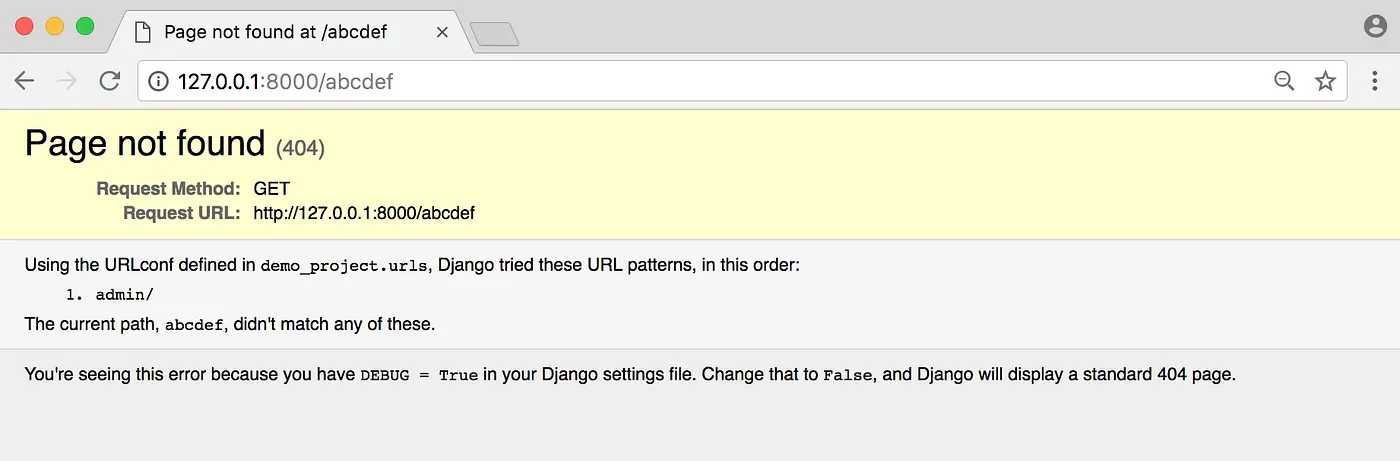
The screenshot shows the resulting error page, with the URLConf paths exposed.
In this case the declaration shown was exampleapi.urls, the URL declaration for the Django project, containing all the paths in the project.
Step 3: pick a path from the disclosure
Going through the disclosed paths, the researcher found:
^dataportal/views/?$
Step 4: request the dataportal path
Visiting that path returned credentials:
The system disclosed the credentials of their Amazon S3 bucket, Jira account, FTP account, and the credentials of their Admin account.
Root cause
The mistake is a configuration one. DEBUG was left at True in the Django settings module, so any request for a path that does not resolve produced the framework's debug error page rather than a plain 404. That page includes the full URLConf, which is what turned a harmless 404 into a map of the application.
The second failure compounded the first: one of the paths revealed in that map, ^dataportal/views/?$, returned sensitive credentials when requested directly. The report does not describe how that view was implemented, so the reason it exposes credentials is not stated.
No custom 404.html template was in place, so Django used its default handler, which under DEBUG is the verbose one.
Impact
A request for a non-existent path returned the complete list of URL paths in the project. From that list, the dataportal/views path yielded credentials for an Amazon S3 bucket, a Jira account, an FTP account and an Admin account. The report does not state what those credentials granted access to, nor whether they were used further.
Fix
The report gives its guidance as takeaways rather than describing a change that was made:
- Debug output will always contain sections inappropriate for public consumption. File paths, configuration options and the like give attackers extra information about the server.
- When you are not using
DEBUGmode, turn it off. - Always have a
404.htmlfile in thetemplatesfolder under the root directory. - Even when
DEBUGisFalse, properly set and take care of theALLOWED_HOSTSsetting.
Variants to test
- Django hosts with
DEBUGleft on. Request a path that certainly does not exist and look for the framework's debug page. A positive result is a 404 response whose body lists URLConf entries, settings or file paths instead of a plain error message. - Hosts without a custom 404 template. Check whether the default handler is in use at all; a default handler plus
DEBUGis the combination that leaks. - Paths harvested from a disclosure. For each path in a leaked URLConf, request it directly. A positive result is a view that returns configuration, credentials or other data it should not expose, as
dataportal/viewsdid here. ALLOWED_HOSTShandling. WithDEBUGoff, test whether the application correctly restricts the hosts it answers for, since the report lists this as a separate setting to get right.
What happened, in plain words
A security researcher was invited to a private vulnerability disclosure programme, a scheme where companies invite selected researchers to look for weaknesses in their systems and report them. One of the programme's web addresses, apisandbox.example.com, showed nothing more than a page saying ok. By requesting a path that did not exist, the researcher got the site to reveal a list of every path it contains, and then found that one of those paths disclosed credentials for several of the company's other services. The whole thing came down to a single setting that had been left switched on by mistake.
This walk-through explains each step from scratch, so you only need to be able to use a browser to follow it.
Background: what the pieces are
Before the steps, a few ideas that come up again and again.
- A sub-domain is a smaller address inside a company's main web address. If the main site is
example.com, thenapisandbox.example.comis a separate machine or service that the company runs under the same name. Companies often have many of these, and they are easy to forget about. - A status page is a very simple web page whose only job is to say whether a service is alive. Here it just printed the word
ok. - A framework is a ready-made toolkit that programmers use to build a website, so they do not have to write every piece from nothing. This site was built with Django, a framework for the Python programming language. Django has its own rules for how web addresses map to pieces of code.
- A URLConf is Django's master list of addresses. Think of it as the table of contents of a book: every chapter (every page or feature of the site) is listed with the address that leads to it. The report calls it "a URL configuration for Django which contains all the paths of the project".
- A 404 error is the standard message a web server sends when you ask for an address that does not exist. You have almost certainly seen "Page not found" on the web.
DEBUGmode is a switch in Django's settings. When it is on, Django shows programmers very detailed error pages, full of technical information, so they can fix problems while building the site. When it is off, visitors get a short, plain error instead. The idea is thatDEBUGis on during development and off on the live site.- Credentials are the usernames and passwords (or similar secret keys) that let you log in to a service.
Setting up
In March 2019 a new, private vulnerability disclosure programme was launched on HackerOne, a well-known platform where such programmes are run. The researcher was invited to join on 2 July 2019. The scope, meaning the list of systems the researcher was allowed to test, was limited, and everything here concerns one sub-domain within it, apisandbox.example.com.
The tools used were deliberately simple:
- A Google Image search using one of the programme's sub-domains, to surface hosts. Image search indexes pictures that live on websites, so searching it can turn up addresses that a normal web search might not show.
- Manual research into the technology stack in use, which identified Django. In other words, the researcher read up on what the site was built with.
- dirsearch, run with a curated custom wordlist, against the discovered host.
dirsearch is a free tool that automatically tries a long list of common file and folder names against a website and reports which ones exist. A wordlist is simply that list of names. A curated custom wordlist means the researcher picked and adjusted the names by hand rather than using a generic list, which makes the guessing more targeted.
No accounts, roles or special versions are described beyond this.
Finding it
The researcher found apisandbox.example.com while working within the program's sub-domains. Visiting it returned only a status page with the message ok, which on its own tells you nothing. So the researcher looked into which stack the host depended on and found Django.
Knowing the framework matters because it tells you what kinds of mistakes to look for. Django has particular habits, and one of them is how it behaves when a page is missing. With that in mind, a directory search was started with dirsearch and a curated custom wordlist. Exactly 17 minutes into the run, the tool flagged an HTTP 200 OK success status for the directory NpcTrackFrame_UpdateTarget.php.
HTTP 200 OK is the code a web server sends when a request succeeds. The tool flagged this status for the name it had guessed.
Exploitation
Step 1: request the flagged path
Visiting the flagged path returned a Page not found (404) error:
Line by line:
GET /NpcTrackFrame_UpdateTarget.php HTTP/1.1is the request a browser sends when you open that address.GETmeans "give me this page", the middle part is the path being asked for, andHTTP/1.1is the version of the language browsers and servers use to talk to each other.Host: apisandbox.example.comtells the server which website you are asking for. One server can host many sites, so it needs to know which one you mean.
The path does not exist. Because the developers had not placed a custom 404.html template, Django served the default "Not Found" message from django.views.defaults.page_not_found() for this missing request_path. A template is a ready-made page layout; 404.html is the file a site can supply to control what visitors see when a page is missing. request_path is simply the address that was asked for. django.views.defaults.page_not_found() is the name of the built-in piece of Django that produces the standard missing-page response.
Alongside that message, the response disclosed all the URLConf data.
Step 2: read the URLConf disclosure
The URLConf is the URL configuration for a Django project: it contains all the paths of the project. It was being disclosed because the developers had initially forgotten to set DEBUG mode to False. With DEBUG set to True in the settings module, a missing request_path raises an exception, and Django rendered the debug page listing every path in the URLConf.
An exception is what a program raises when it hits something it cannot handle, such as being asked for a page that is not there. Normally that is caught and turned into a tidy error. With DEBUG on, Django instead shows the full technical detail to whoever asked, which is helpful to a programmer and very unhelpful to security.
The screenshot shows the resulting error page, with the URLConf paths exposed.
In this case the declaration shown was exampleapi.urls, the URL declaration for the Django project, containing all the paths in the project.
Step 3: pick a path from the disclosure
Going through the disclosed paths, the researcher found:
^dataportal/views/?$
This is one entry from the list. The ^ marks the start of the address and the $ marks the end, while /? means an optional trailing slash. In plain terms it describes a page at dataportal/views. The researcher did not guess this name; it was printed on the error page.
Step 4: request the dataportal path
Visiting that path returned credentials:
As before, GET asks for the page, the path is the one taken from the leaked list, and Host names the site. The system disclosed the credentials of their Amazon S3 bucket, Jira account, FTP account, and the credentials of their Admin account.
To unpack those services:
- Amazon S3 is Amazon's online file storage. A "bucket" is a folder in it. Its credentials are the keys that let software read and write those files.
- Jira is a tool teams use to track tasks and bugs. Its credentials are a login for that tool.
- FTP is an older way of transferring files to and from a server. Its credentials are a login for that file server.
- Admin account means an account with the highest level of control over the system.
Root cause
The mistake is a configuration one. DEBUG was left at True in the Django settings module, so any request for a path that does not resolve produced the framework's debug error page rather than a plain 404. That page includes the full URLConf, which is what turned a harmless 404 into a map of the application.
The second failure compounded the first: one of the paths revealed in that map, ^dataportal/views/?$, returned sensitive credentials when requested directly. The report does not describe how that view was implemented, so the reason it exposes credentials is not stated.
No custom 404.html template was in place, so Django used its default handler, which under DEBUG is the verbose one.
Impact
A request for a non-existent path returned the complete list of URL paths in the project. From that list, the dataportal/views path yielded credentials for an Amazon S3 bucket, a Jira account, an FTP account and an Admin account. The report does not state what those credentials granted access to, nor whether they were used further.
Fix
The report gives its guidance as takeaways rather than describing a change that was made:
- Debug output will always contain sections inappropriate for public consumption. File paths, configuration options and the like give attackers extra information about the server.
- When you are not using
DEBUGmode, turn it off. - Always have a
404.htmlfile in thetemplatesfolder under the root directory. - Even when
DEBUGisFalse, properly set and take care of theALLOWED_HOSTSsetting.
ALLOWED_HOSTS is the Django setting that lists which web addresses the site is willing to answer for. Getting it right stops the site from responding to requests aimed at names it does not own.
Variants to test
- Django hosts with
DEBUGleft on. Request a path that certainly does not exist and look for the framework's debug page. A positive result is a 404 response whose body lists URLConf entries, settings or file paths instead of a plain error message. - Hosts without a custom 404 template. Check whether the default handler is in use at all; a default handler plus
DEBUGis the combination that leaks. - Paths harvested from a disclosure. For each path in a leaked URLConf, request it directly. A positive result is a view that returns configuration, credentials or other data it should not expose, as
dataportal/viewsdid here. ALLOWED_HOSTShandling. WithDEBUGoff, test whether the application correctly restricts the hosts it answers for, since the report lists this as a separate setting to get right.
Glossary
- Bug bounty programme: a scheme where a company invites researchers to look for weaknesses in its systems and report them, sometimes for a reward.
- Vulnerability disclosure programme: a programme for receiving reports of security weaknesses; it may or may not pay a reward.
- HackerOne: a platform on which companies run bug bounty and disclosure programmes.
- Scope: the list of systems a researcher is allowed to test.
- Sub-domain: a smaller address inside a company's main web address, such as
apisandbox.example.comunderexample.com. - Status page: a very simple page that reports whether a service is working.
- Framework: a ready-made toolkit programmers use to build a website.
- Django: a framework for building websites in the Python programming language.
- URLConf: Django's master list of the addresses in a project and the code each one leads to.
- 404 error: the standard response when a requested address does not exist.
DEBUGmode: a Django setting that, when on, shows detailed technical error pages instead of plain ones.- Settings module: the file in a Django project where settings such as
DEBUGare configured. - Template: a ready-made page layout used by a website.
404.html: the template a site can supply to control what visitors see when a page is missing.request_path: the address that was asked for in a request.django.views.defaults.page_not_found(): the built-in Django piece that produces the standard missing-page response.- Exception: what a program raises when it hits something it cannot handle.
- Credentials: usernames, passwords or secret keys that let you log in to a service.
- dirsearch: a free tool that tries a long list of common file and folder names against a website and reports which exist.
- Wordlist: the list of names such a tool tries.
HTTP 200 OK: the code a web server sends when a request succeeds.GET: the kind of request a browser sends when it asks for a page.Hostheader: the part of a request that tells the server which website you are asking for.- Amazon S3: Amazon's online file storage service; a bucket is a folder in it.
- Jira: a tool teams use to track tasks and bugs.
- FTP: an older way of transferring files to and from a server.
- Admin account: an account with the highest level of control over a system.
ALLOWED_HOSTS: the Django setting listing which web addresses the site will answer for.- Information disclosure: a weakness where a system reveals data it should keep private.