A tale of Html to Pdf converter ssrf and various bypasses
The HTML-to-PDF converter fetched user-supplied URLs without proper validation, allowing server-side request forgery. An attacker could read local files, access AWS metadata credentials, and reach an internal Chrome debugging port to view other users' session tokens and payment details.
 Published on bughunter25.medium.com
Hey hackers, hope you are all doing good in this pandemic, this is a story of a ssrf I found in a private program through the html to pdf converter functionality and was able to read internal files, aws metadata and some internal debug ports with juicy customer information. I will divide the various bypasses and…
The full write-up lives on its author's site
It belongs to its author, so we link to it rather than copy it. The other two tabs are our own rewrites, checked against it.
Context
This is a story about a server-side request forgery (SSRF) found in a private bug bounty program, reached through an HTML to PDF converter feature. The application took a URL from a remote location and rendered it into a PDF. The researcher used that behaviour to read local files, reach the AWS instance metadata service, and finally reach an internal Chrome debugging port that was leaking live customer data. The report is split into three parts: the original SSRF, the bypasses after the first fix, and a second SSRF in a different parameter.
Setup
No accounts, roles or tool versions are described. The only precondition mentioned is that the application fetched the URL from a remote location, so the researcher set up a remote HTTP server and hosted an HTML file on it. The parameter under test was source, which was set to the URL of that server.
Finding it
The first payload was a simple iframe pointing at a local file, hosted on the researcher's own server:
<iframe src=”file:///etc/passwd” />
Nothing appeared in the converted PDF. The researcher then sent an invalid URL in the source parameter, dasdad, and got back an error message that was a strong hint for the next steps. The error also showed a Doctype, which suggested XXE as a second possible route, but XXE was not possible here; the researcher guesses the application had protection in place for it. HTML, however, could be sent directly in the parameter.
Exploitation
Step 1: local file read through the source parameter
Instead of pointing source at a hosted file, the researcher sent the HTML itself in the parameter:
source=<html><iframe+src=”file:///etc/passwd”+style=”width:100%;+height:100%” /></html>
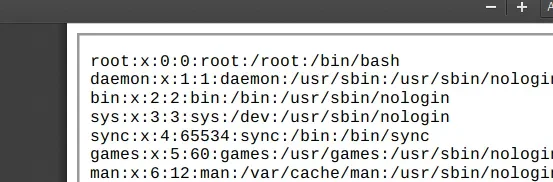
The style attribute makes the iframe fill the page so the content renders properly in the generated PDF. The content of the passwd file appeared in the converted PDF.
Step 2: enumerating users and reading their files
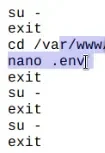
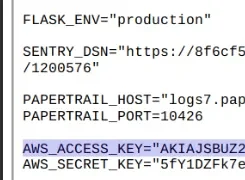
Rather than stopping at /etc/passwd, the researcher looked up the users listed there and read the files in their home directories. In one user's .bash_history there were commands that pointed to two things: an interesting port and an environment file. The environment file /var/www/<REDACTED>/.env contained working AWS keys for the organisation. With those keys the researcher could place files, delete files and read customer data in the organisation's buckets. An attempt at RCE did not work.
Step 3: the Chrome debugging port
The interesting port was 9192, a Chrome debugging port. The researcher remembered the h1-415 2020 challenge, which involved a Chrome debug port with an interesting endpoint, read some writeups and found the endpoint [redacted]:9222/json/list. The default port is 9222; here it had been changed to 9192, and the .env file is how the researcher found it. The payload was:
source=<html><iframe+src=”http://[redacted]:9192/json/list”+style=”width:100%;+height:100%” /></html>
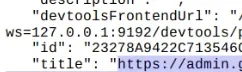
Again the style attribute was used so the generated PDF rendered properly and fitted the page. The response listed URLs submitted by all users of the live PDF conversion application. Among them were payment receipts with names, numbers, addresses and emails, plus session tokens in URLs, and the list was continuously updating.
At that point the researcher stopped, wrote the report and received a bounty. That was the first part.
Step 4: bypassing the first fix
After some time the program fixed the vulnerability and asked for a retest. The fix blocked the file:/// protocol and local addresses such as http://[redacted] and http://localhost.
Bypass 1. The localhost restriction was bypassed with http://[redacted]:9192/json/list and http://0:9192/json/list:
source=<html><iframe+src=”http://[redacted]:9192/json/list”+style=”width:100%;+height:100%” /></html>
Bypass 2. The program fixed it again by blocking all 0.* and 127.* addresses. The researcher also shared various bypass techniques from the swisskyrepo PayloadsAllTheThings SSRF list, but the alternate IP encoding was missed. This time the /json/list endpoint on the Chrome debug port was disabled. The researcher then tried [redacted], which had not worked in the first phase, and to their surprise its IP-encoded equivalent worked and the AWS keys could be fetched again. The guess is that the AWS metadata had been made accessible, or that some configuration was disturbed during the fix of the previous SSRF. The bypasses looked like this:
The next fix was much stronger. The researcher tried many bypasses, including the dawgyg SSRF trick, and none worked.
Step 5: a second SSRF in header[source]
With source fixed, the researcher looked at other parameters. One that stood out was header[source], used to add a remotely hosted image to the header of the generated PDF. The AWS metadata was reachable through it again:
&header[source]=http://[redacted]/latest/meta-data/iam/security-credentials/aws-elasticbeanstalk-ec2-role&header(height)=111
The height was used to render the generated PDF properly so it fitted the page and showed the required data. All the fixes from the first SSRF were applied to this parameter as well, and it was made very secure. A bounty was awarded for the second and third issues combined.
Root cause
The converter fetched whatever URL it was given, including file:/// URLs and loopback or link-local addresses, and rendered the result into a PDF that the user could download. The same trust was extended to the header[source] parameter, which fetched a remote image for the PDF header. The first fix blocked the file:/// scheme and local addresses such as [redacted] and localhost, then 0.* and 127.*. Alternate representations of the same address, such as [redacted], 0, and the decimal encodings of [redacted], passed the blocklist. The next fix was very secured; the bypasses the researcher tried did not work.
Impact
Through the original SSRF the researcher could read local files, including /etc/passwd and files in users' home directories, and reach the .env file with working AWS keys. The Chrome debugging port exposed URLs submitted by all users of the live PDF conversion application, including payment receipts with names, numbers, addresses and emails and session tokens in URLs, and the data was continuously updating. RCE was attempted and did not work. The impact depends on the converter being able to reach the internal services and on the credentials and debugging port being present on the host.
Fix
The program blocked the file:/// protocol and local addresses, then extended the blocklist to 0.* and 127.*, then applied a stronger fix that withstood the bypass attempts. All the fixes from the first SSRF were applied to header[source] as well. The report does not describe the final implementation. A robust fix would resolve the hostname and validate the resolved IP address against private, loopback and link-local ranges, reject non-HTTP schemes, and disable or authenticate the Chrome debugging port rather than relying on blocklists of host strings.
Variants to test
- Send an invalid value in a URL-fetching parameter and read the error. A positive result is a stack trace or framework name that reveals the fetching library and possible schemes.
- Send HTML directly in a parameter that normally takes a URL. A positive result is that the HTML is rendered, as with the
sourceparameter here. - Try
file:///etc/passwdin an iframe. A positive result is the file content in the rendered output. - Enumerate users from
/etc/passwdand read.bash_history,.envand configuration files in their home directories. A positive result is credentials, ports or internal hostnames. - Try alternate representations of loopback and link-local addresses:
[redacted],0, decimal encodings such as2852039166and7147006462, and other encodings from PayloadsAllTheThings. A positive result is that a blocked address becomes reachable. - Try the AWS metadata path
/latest/meta-data/iam/security-credentials/<role>through every URL-fetching parameter, including secondary ones such asheader[source]. A positive result is temporary credentials in the response. - Probe common debugging ports such as 9222 and non-default variants, and request
/json/list. A positive result is a list of URLs or tabs from other users. - After a fix, retest every parameter that fetches a remote resource, not just the one originally reported. A positive result is that the same class of request still works through a parameter the fix missed.
What happened, in plain words
A security researcher found a way to make a website's PDF generator fetch things it should not have been able to reach. The website had a feature that turned a web address into a PDF: you gave it a link, and it downloaded that page and produced a PDF for you. The researcher discovered that the feature would also accept special addresses that point inside the company's own servers, and even addresses that point at files on the server itself. By doing that, the researcher could read private files, find secret cloud credentials, and eventually see live data belonging to other users, including payment receipts and session tokens. The company fixed the problem, the researcher found ways around the fix, and then found a second, similar problem in a different part of the same feature. This article explains each step from scratch, including the exact requests that were sent.
The setup
The researcher was testing a private bug bounty program. In a bug bounty program, a company invites independent researchers to look for security problems in its systems and pays them for reporting what they find. This particular program is not named in the report.
The feature under test was an HTML to PDF converter. In plain terms, it is a service that takes a web page (HTML is the language web pages are written in) and turns it into a PDF document that you can download. The application did this by fetching a URL from a remote location. A URL is just a web address, like https://example.com/page. The application had a parameter called source that told it which URL to fetch. A parameter is a named value you send to a web application, usually in the address bar or in the body of a request; think of it as a form field with a label.
Because the application fetched the URL from a remote location, the researcher set up a remote HTTP server. An HTTP server is a computer program that answers requests for web pages. The researcher hosted an HTML file on that server and set the source parameter to the server's URL. The idea was to see whether the application would fetch the researcher's page and render it into a PDF.
No accounts, roles or software versions are described in the report. The only precondition mentioned is that the application fetched the URL from a remote location.
Finding it
The first payload was a simple iframe pointing at a local file, hosted on the researcher's own server:
<iframe src=”file:///etc/passwd” />
An iframe is an HTML element that embeds another page inside the current page, like a small window within a window. The src attribute tells the iframe what to load. Here it points to file:///etc/passwd. The file:/// part is a URL scheme that means "a file on this computer", not a web address. /etc/passwd is a standard file on Linux systems that lists user accounts. The researcher wanted the PDF generator to load that local file and show its contents in the PDF.
Nothing appeared in the converted PDF. The researcher then sent an invalid URL in the source parameter, dasdad, and got back an error message that was a strong hint for the next steps. The error also showed a Doctype, which suggested XXE as a second possible route. XXE stands for XML External Entity: a class of attack where an XML parser is tricked into reading local files or making network requests. But XXE was not possible here; the researcher guesses the application had protection in place for it. HTML, however, could be sent directly in the parameter.
Exploitation
Step 1: local file read through the source parameter
Instead of pointing source at a hosted file, the researcher sent the HTML itself in the parameter:
source=<html><iframe+src=”file:///etc/passwd”+style=”width:100%;+height:100%” /></html>
This is a URL-encoded form. In a URL, spaces and some special characters are written as a plus sign (+) or a percent-encoded sequence. So + here stands for a space. The value of source is an HTML document containing an iframe. The iframe's src is file:///etc/passwd, the same local file as before. The style attribute sets the iframe to fill the page: width:100%; height:100% means 100% of the available width and height. The researcher added this so the content would render properly in the generated PDF, making it visible and readable.
The content of the passwd file appeared in the converted PDF.
Step 2: enumerating users and reading their files
Rather than stopping at /etc/passwd, the researcher looked up the users listed there and read the files in their home directories. On Linux, each user has a home directory, usually /home/username, where personal files and configuration live. In one user's .bash_history there were commands that pointed to two things: an interesting port and an environment file. .bash_history is a file that records the commands a user has typed in the shell (the command-line interface). An environment file, often named .env, is a file that stores configuration values, frequently including secrets such as passwords and API keys.
The environment file /var/www/<REDACTED>/.env contained working AWS keys for the organisation. AWS stands for Amazon Web Services, a cloud platform. Keys are like passwords for programs: they let a program access cloud resources. With those keys the researcher could place files, delete files and read customer data in the organisation's buckets. A bucket is a storage container in AWS's S3 service, similar to a folder in the cloud. An attempt at RCE did not work. RCE stands for Remote Code Execution: the ability to run your own commands on the target server. It is usually the most severe outcome, but here it was not achieved.
Step 3: the Chrome debugging port
The interesting port was 9192, a Chrome debugging port. A port is a numbered channel on a computer that network services listen on; think of it as an apartment number in a building, where the building is the server's address. Chrome is Google's web browser. It has a debugging feature that lets developers inspect what the browser is doing, and that feature listens on a port. The researcher remembered the h1-415 2020 challenge, which involved a Chrome debug port with an interesting endpoint, read some writeups and found the endpoint [redacted]:9222/json/list. An endpoint is a specific URL path that a service responds to. [redacted] is the loopback address: it always means "this computer", so it lets a program talk to services on the same machine. The default port for Chrome debugging is 9222; here it had been changed to 9192, and the .env file is how the researcher found it. The payload was:
source=<html><iframe+src=”http://[redacted]:9192/json/list”+style=”width:100%;+height:100%” /></html>
Again the style attribute was used so the generated PDF rendered properly and fitted the page. The response listed URLs submitted by all users of the live PDF conversion application. Among them were payment receipts with names, numbers, addresses and emails, plus session tokens in URLs, and the list was continuously updating. A session token is a short string that a website gives you after you log in, and that your browser sends back with each request so the site knows who you are. If someone else gets your session token, they can act as you without knowing your password.
At that point the researcher stopped, wrote the report and received a bounty. That was the first part.
Step 4: bypassing the first fix
After some time the program fixed the vulnerability and asked for a retest. The fix blocked the file:/// protocol and local addresses such as http://[redacted] and http://localhost. A protocol (or scheme) is the part of a URL before the colon, like http:// or file:///. localhost is a hostname that means the same as [redacted]: this computer.
Bypass 1. The localhost restriction was bypassed with http://[redacted]:9192/json/list and http://0:9192/json/list:
source=<html><iframe+src=”http://[redacted]:9192/json/list”+style=”width:100%;+height:100%” /></html>
[redacted] is a special address that, in many contexts, means "all addresses on this machine" or "this machine". 0 is a shorthand that some systems treat the same way. The fix was checking for the strings [redacted] and localhost, but not for these other ways of writing the same destination.
Bypass 2. The program fixed it again by blocking all 0.* and 127.* addresses. The researcher also shared various bypass techniques from the swisskyrepo PayloadsAllTheThings SSRF list, but the alternate IP encoding was missed. This time the /json/list endpoint on the Chrome debug port was disabled. The researcher then tried [redacted], which had not worked in the first phase, and to their surprise its IP-encoded equivalent worked and the AWS keys could be fetched again. [redacted] is a special address used by cloud providers: it is the instance metadata service, a small internal service that gives a virtual machine information about itself, including temporary credentials. The guess is that the AWS metadata had been made accessible, or that some configuration was disturbed during the fix of the previous SSRF. The bypasses looked like this:
These are decimal encodings of the same address. An IP address like [redacted] is four numbers between 0 and 255. You can convert the whole address into a single large number, and some software accepts that form. 2852039166 and 7147006462 are two such representations that resolve to [redacted]. The blocklist was checking for the dotted form, so the decimal form slipped through.
This payload uses the decimal form of the metadata address and requests the path /latest/meta-data/iam/security-credentials/aws-elasticbeanstalk-ec2-role. That path is part of the AWS metadata API: it returns the temporary credentials for the role attached to the machine. The style attribute again makes the iframe fill the page so the credentials are visible in the PDF.
The next fix was much stronger. The researcher tried many bypasses, including the dawgyg SSRF trick, and none worked.
Step 5: a second SSRF in header[source]
With source fixed, the researcher looked at other parameters. One that stood out was header[source], used to add a remotely hosted image to the header of the generated PDF. The AWS metadata was reachable through it again:
&header[source]=http://[redacted]/latest/meta-data/iam/security-credentials/aws-elasticbeanstalk-ec2-role&header(height)=111
This is a fragment of a request. The & separates parameters. header[source] is a parameter whose name includes square brackets; the brackets are just part of the name, often used to group related settings. Its value is the metadata URL. header(height) sets the height of the header to 111 (the unit is not stated). The height was used to render the generated PDF properly so it fitted the page and showed the required data. All the fixes from the first SSRF were applied to this parameter as well, and it was made very secure. A bounty was awarded for the second and third issues combined.
Root cause
The converter fetched whatever URL it was given, including file:/// URLs and loopback or link-local addresses, and rendered the result into a PDF that the user could download. The same trust was extended to the header[source] parameter, which fetched a remote image for the PDF header. The first fix blocked the file:/// scheme and local addresses such as [redacted] and localhost, then 0.* and 127.*. Alternate representations of the same address, such as [redacted], 0, and the decimal encodings of [redacted], passed the blocklist. The next fix was very secured; the bypasses the researcher tried did not work.
Impact
Through the original SSRF the researcher could read local files, including /etc/passwd and files in users' home directories, and reach the .env file with working AWS keys. The Chrome debugging port exposed URLs submitted by all users of the live PDF conversion application, including payment receipts with names, numbers, addresses and emails and session tokens in URLs, and the data was continuously updating. RCE was attempted and did not work. The impact depends on the converter being able to reach the internal services and on the credentials and debugging port being present on the host.
Fix
The program blocked the file:/// protocol and local addresses, then extended the blocklist to 0.* and 127.*, then applied a stronger fix that withstood the bypass attempts. All the fixes from the first SSRF were applied to header[source] as well. The report does not describe the final implementation. A robust fix would resolve the hostname and validate the resolved IP address against private, loopback and link-local ranges, reject non-HTTP schemes, and disable or authenticate the Chrome debugging port rather than relying on blocklists of host strings.
Variants to test
- Send an invalid value in a URL-fetching parameter and read the error. A positive result is a stack trace or framework name that reveals the fetching library and possible schemes.
- Send HTML directly in a parameter that normally takes a URL. A positive result is that the HTML is rendered, as with the
sourceparameter here. - Try
file:///etc/passwdin an iframe. A positive result is the file content in the rendered output. - Enumerate users from
/etc/passwdand read.bash_history,.envand configuration files in their home directories. A positive result is credentials, ports or internal hostnames. - Try alternate representations of loopback and link-local addresses:
[redacted],0, decimal encodings such as2852039166and7147006462, and other encodings from PayloadsAllTheThings. A positive result is that a blocked address becomes reachable. - Try the AWS metadata path
/latest/meta-data/iam/security-credentials/<role>through every URL-fetching parameter, including secondary ones such asheader[source]. A positive result is temporary credentials in the response. - Probe common debugging ports such as 9222 and non-default variants, and request
/json/list. A positive result is a list of URLs or tabs from other users. - After a fix, retest every parameter that fetches a remote resource, not just the one originally reported. A positive result is that the same class of request still works through a parameter the fix missed.
Glossary
- SSRF (Server-Side Request Forgery): a vulnerability where an attacker makes a server send a request to a destination the attacker chooses, often to internal systems.
- Bug bounty program: a scheme where organisations pay independent researchers for reporting security vulnerabilities.
- HTML: the language used to structure web pages.
- PDF: a file format for documents that look the same on any device.
- URL: a web address, like
https://example.com/page. - Parameter: a named value sent to a web application, often in the URL or request body.
- HTTP server: a program that serves web pages and responds to HTTP requests.
- Iframe: an HTML element that embeds another page inside the current page.
srcattribute: the part of an HTML tag that specifies what to load.file:///scheme: a URL scheme that refers to a file on the local computer./etc/passwd: a standard Linux file listing user accounts.- XXE (XML External Entity): an attack that abuses XML parsers to read local files or make network requests.
- URL encoding: a way to represent special characters in a URL, e.g.
+for space. styleattribute: an HTML attribute that sets visual properties such as width and height.- Home directory: the folder on a Linux system where a user's personal files are stored.
.bash_history: a file that records commands typed in the shell.- Environment file (
.env): a configuration file often containing secrets like passwords and API keys. - AWS (Amazon Web Services): a cloud computing platform.
- Keys: credentials that allow access to cloud resources.
- Bucket: a storage container in AWS S3, similar to a folder in the cloud.
- RCE (Remote Code Execution): the ability to run arbitrary commands on a target server.
- Port: a numbered channel on a computer that network services listen on.
- Chrome debugging port: a port exposed by the Chrome browser for developer debugging.
- Endpoint: a specific URL path that a service responds to.
[redacted]: the loopback address, meaning "this computer".localhost: a hostname that resolves to[redacted].- Session token: a string that identifies a logged-in user; if stolen, it can be used to impersonate them.
- Protocol/scheme: the part of a URL before the colon, like
http://orfile:///. [redacted]: a special address often meaning "all addresses on this machine" or "this machine".[redacted]: the AWS instance metadata service address, which provides information and credentials to the machine.- Decimal encoding of an IP address: representing an IP address as a single large number, e.g.
2852039166for[redacted]. - Blocklist: a list of things to block; here, strings like
[redacted]. - Payload: the malicious input sent to a vulnerable system.
- Bypass: a way to get around a security fix.
- Metadata service: an internal service that provides information about a cloud instance, including credentials.
- Role: an AWS identity with permissions, attached to a machine or user.
- Header (of a PDF): the top section of a page, often containing a logo or title.
- Root cause: the underlying reason a vulnerability exists.
- Impact: the harm that could result from exploiting a vulnerability.
- Fix: a change that removes or mitigates a vulnerability.
- Stack trace: an error message showing the sequence of function calls that led to an error, often revealing internal details.
- Framework: a software library that provides structure for building applications.
- Loopback address: an address that refers to the local machine, like
[redacted]. - Link-local address: an address used for communication on a local network segment, like
[redacted]/16. - Private IP address: an address used inside private networks, not routable on the public internet.
- PayloadsAllTheThings: a public collection of payloads and techniques for various vulnerabilities.
- h1-415 2020 challenge: a capture-the-flag style challenge referenced in the report.
- dawgyg SSRF trick: a specific SSRF bypass technique referenced in the report.
- CTF (Capture The Flag): a security challenge where participants find vulnerabilities in purpose-built systems.




