A Weird Price Tampering Vulnerability
The price of a product in the shopping cart was controlled by a numeric identifier parameter, and changing that identifier to one belonging to a cheaper product caused the cart to show the cheaper price. An attacker could buy an expensive item for the price of a low-cost one.

It’s time for another write-up. So today I will be sharing a write-up on a “Critical Price Tampering Vulnerability” that I found then reported and got bounty for that.
The full write-up lives on its author's site
It belongs to its author, so we link to it rather than copy it. The other two tabs are our own rewrites, checked against it.
Context
The target was a site selling different products and services. The researcher does not name it, and deliberately hides the product names because they would identify the site; the report says the issue was patched. In the article the two products used are called "Product S", worth $30, and "Product C", worth $800.
The feature involved is the ordinary add-to-cart flow: a POST request that puts a chosen product into the shopping basket, followed by the normal checkout and payment pages. The report does not describe the stack, the framework or the payment provider.
Setup
The only tool mentioned is Burp Suite, used as an intercepting proxy with the browser traffic routed through it. No accounts, roles or special preconditions are described: the researcher simply picked a product and tried to buy it. The report gives no versions.
Finding it
The researcher picked a product at random and started a purchase with Burp intercepting. The captured POST request that adds the product to the cart was examined for a price parameter, so that the $30 could be changed to something like $1. There was no parameter carrying the value 30.
After some trial and error, one parameter, referred to as AVeryLongParameter, stood out. Its value was a number, 334436, and the researcher concluded it was responsible for the item's price. The name is a placeholder: the real parameter name is not disclosed.
Exploitation
Step 1: change the identifier on the $30 product
The value of AVeryLongParameter in the add-to-cart POST request was changed from 334436 to 1:
AVeryLongParameter=1
With that value forwarded, the item worth $30 was added to the cart at a price of $9987. That is the opposite direction from the intended tampering, but it confirmed the parameter drives pricing: the value is a numerical identifier that maps to a price.

The mapping observed so far:
AVeryLongParameter=334436 -> $30
AVeryLongParameter=1 -> $9987

Step 2: pick a more expensive product
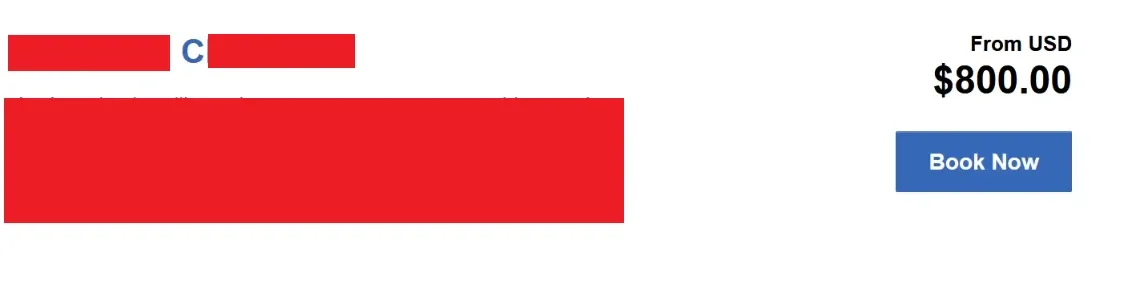
A second product, "Product C", priced at $800, was chosen for the real test.
Step 3: read the identifier for Product C
With the proxy on, the add-to-cart request for Product C was intercepted. It contained the same parameter, this time set to 334460, which gives the mapping:
AVeryLongParameter=334460 -> $800
Step 4: swap in the cheap identifier
The value 334460 was replaced with 334436, the identifier already known to correspond to $30:
AVeryLongParameter=334436
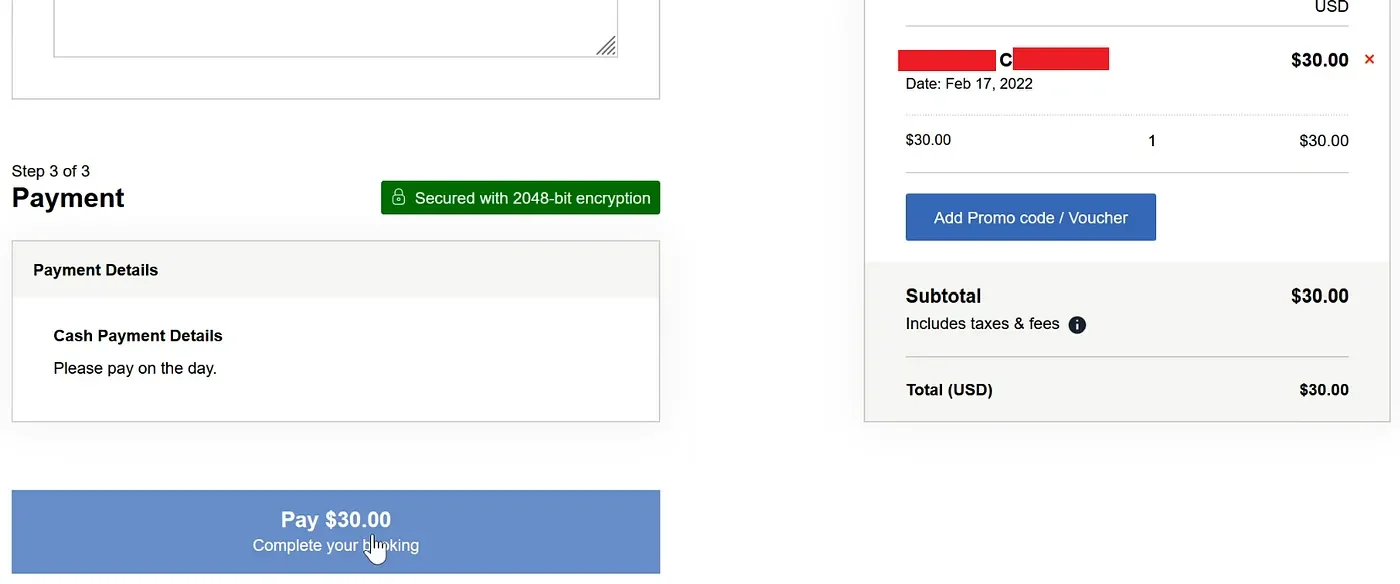
After forwarding, the cart in the browser contained Product C at a price of $30. The $800 product had been bought down to the price of Product S.
Step 5: complete the purchase
The buying process was carried through to the end. The $30 price persisted on every page, including the payment process app, which also showed $30.

Root cause
The client-supplied add-to-cart request carries a numeric identifier for the price, and the server appears to trust it when building the cart and when passing the order on to the payment flow. Nothing in the request ties the identifier to the product being added: the identifier for Product S was accepted for Product C. The wrong price survived every subsequent page and the payment app, so the tampered value was carried through rather than recomputed. Whether the server looked the price up from the identifier or simply echoed it is not stated; the observable behaviour is consistent with the price being selected by an identifier the client controls.
Impact
An attacker who can intercept and modify their own add-to-cart request can set a product's price to the price behind another identifier they know, paying less than the real amount. In the demonstrated case an $800 product was purchased for $30, and the reduced price held through checkout and the payment app. The report does not discuss other users, accounts or quantities, so the impact described is limited to the attacker's own orders. The researcher reported it ethically and it was accepted as critical.
Fix
The evident requirement is that the price must not be selectable by a client-supplied identifier: the server should derive the price from the product being added and re-validate it at checkout and before payment, rather than trusting a value from the request.
Variants to test
- Look for numeric or opaque parameters in add-to-cart and checkout requests that do not obviously carry the price, and change them to values seen on cheaper products. A positive result is the cart showing a different price from the product's listed one.
- Change the identifier to an arbitrary value such as
1and observe the resulting price. A positive result is any price other than the product's real price, which confirms the parameter selects the price. - Carry a tampered price all the way through checkout and into the payment step. A positive result is the reduced amount surviving every page and the payment app, as it did here.
- Try identifiers taken from other products, including cheaper ones, on an expensive item. A positive result is the expensive item appearing in the cart at the cheaper item's price.
Outcome
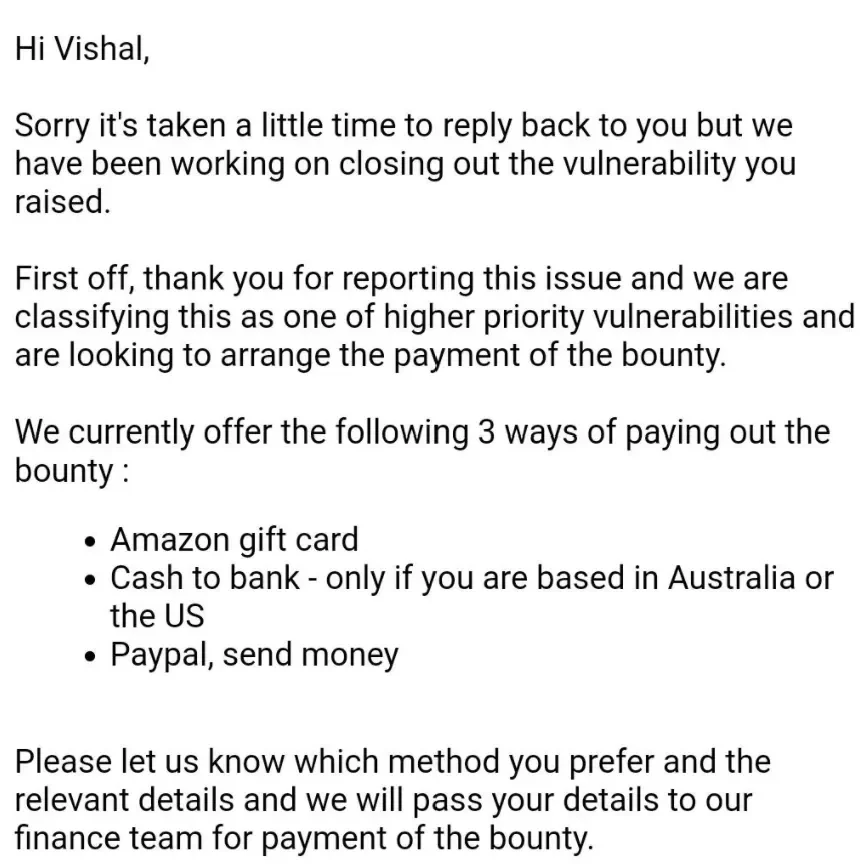
The report was accepted as a critical vulnerability. The maximum payout for the program was $200, and $200 was awarded.
What happened, in plain words
A security researcher found an online shop and discovered that the price of a product could be changed by editing one hidden number in the request the browser sends when you add something to your basket. By swapping the number that belonged to a cheap product into the request for an expensive product, an $800 item ended up in the basket at $30, and that wrong price stayed all the way through checkout and the payment step. The report was accepted as critical and the researcher was paid $200, which was the maximum the programme offered.
This article walks through the same story from the beginning, explaining every idea as it comes up, so you can follow it even if you have never done any security testing before.

The target and the feature
The target was a website that sells different products and services. The researcher does not name the site. The researcher hides the product names too, because a product name can be enough to work out which shop it is. In the article the two products used are given stand-in names: "Product S", which cost $30, and "Product C", which cost $800.
The feature involved is the most ordinary thing a shop does: the add-to-cart flow. When you click a button to put an item in your basket, your browser sends a message to the shop's server saying which product you want. That message is called a request, and the specific kind used here is a POST request. A POST request is how a browser sends information to a server to make something happen, rather than just asking to see a page. After the item is in the basket, the normal checkout and payment pages follow.
The report does not describe what technology the site was built with, which framework it used, or which payment provider handled the money.
The tool: an intercepting proxy
The only tool mentioned is Burp Suite. To understand why it matters, imagine you post a letter and, before it reaches the recipient, someone at the post office opens it, reads it, can rewrite parts of it, and then sends it on. That is what an intercepting proxy does for web traffic. You tell your browser to send all its traffic through Burp Suite instead of straight to the website. Burp then shows you each request before it leaves, lets you read it, change it if you want, and then forward it to the server.
This is the key idea of the whole article: the request that adds an item to the basket is created by your own browser, and with a proxy you can edit it before the server ever sees it. If the server trusts what the browser sends, you can make it do things the shop never intended.
No accounts, special roles or preconditions are described. The researcher simply picked a product and tried to buy it. The report gives no software versions.
Finding it
The researcher picked a product at random and started a purchase, with Burp intercepting the traffic. The captured POST request that adds the product to the cart was examined for a price parameter. A parameter is a named piece of information inside a request, written as a name, an equals sign and a value, like colour=red. The plan was to find a parameter carrying the price, so that the $30 could be changed to something like $1.
There was no parameter carrying the value 30. This is worth pausing on: many shops do send the price from the browser, and then the fix is as simple as editing it. Here the shop was not that naive, so the obvious attack failed.
After some trial and error, one parameter stood out. The researcher refers to it as AVeryLongParameter. That is a placeholder name: the real parameter name is not disclosed, for the same reason the site and products are hidden. Its value was a number, 334436, and the researcher concluded that this number was responsible for the item's price.
Why would a number stand in for a price? Because shops often store their prices in a database, and each price row has an identifier, a unique number that points at that row. Instead of sending "$30" in the request, the browser sends the identifier of the price record, and the server looks it up. It is like a restaurant menu where each dish has a number: you order "number 12", not "the soup", and the kitchen knows what number 12 means. If you can change the number in your order, you can order a different dish at the same counter.
Exploitation
Step 1: change the identifier on the $30 product
The value of AVeryLongParameter in the add-to-cart POST request was changed from 334436 to 1:
AVeryLongParameter=1
Line by line: AVeryLongParameter is the name of the field in the request, the placeholder for whatever the real field was called. The = separates the name from the value. The 1 is the new value the researcher typed in place of 334436. Nothing else in the request was touched.
With that value forwarded, the item worth $30 was added to the cart at a price of $9987. That is the opposite direction from the intended tampering, but it proved the point: the parameter drives pricing. The value is a numerical identifier that maps to a price, and changing the identifier changes which price the server picks.
The mapping observed so far:
AVeryLongParameter=334436 -> $30
AVeryLongParameter=1 -> $9987
This block is a simple record of two experiments. The first line says: when the parameter was 334436, the item cost $30. The second line says: when the parameter was 1, the item cost $9987. The arrow just means "resulted in". Seeing both results side by side is what turned a guess into knowledge: the number selects the price, and different numbers select different prices.
Step 2: pick a more expensive product
A second product, "Product C", priced at $800, was chosen for the real test. The first experiment had shown the mechanism worked, but making a cheap item expensive is not useful to an attacker. The interesting direction is making an expensive item cheap, so a higher-priced product was needed.
Step 3: read the identifier for Product C
With the proxy on, the add-to-cart request for Product C was intercepted. It contained the same parameter, this time set to 334460, which gives the mapping:
AVeryLongParameter=334460 -> $800
In plain words: the shop's own request for Product C used the identifier 334460, and the shop's own price for Product C is $800. So 334460 is the number that means "the $800 price". The researcher now had two known pairs: 334436 means $30, and 334460 means $800.
Step 4: swap in the cheap identifier
The value 334460 was replaced with 334436, the identifier already known to correspond to $30:
AVeryLongParameter=334436
Line by line: the field name is unchanged, the equals sign is unchanged, and the value is now 334436, the number that the shop itself uses for the $30 price. The request still says "add Product C to the basket"; only the price identifier has been swapped for a cheaper one.
After forwarding, the cart in the browser contained Product C at a price of $30. The $800 product had been brought down to the price of Product S. This is the moment the flaw becomes real: the server accepted a price identifier that does not belong to the product being added, and used it anyway.
Step 5: complete the purchase
The buying process was carried through to the end. The $30 price persisted on every page, including the payment process app, which also showed $30. This matters because a shop might catch a wrong price at checkout even if it missed it in the basket. Here nothing caught it: the tampered price travelled from the basket through checkout and into the payment step unchanged.
Why it worked
The client-supplied add-to-cart request carries a numeric identifier for the price, and the server appears to trust it when building the cart and when passing the order on to the payment flow. "Client-supplied" means the value comes from your browser, which you control, rather than being worked out by the server. Nothing in the request ties the identifier to the product being added: the identifier for Product S was accepted for Product C.
The wrong price survived every subsequent page and the payment app, so the tampered value was carried through rather than recomputed. Whether the server looked the price up from the identifier or simply echoed it back is not stated. What can be observed is consistent with the price being selected by an identifier the client controls.
A useful comparison: a cloakroom that hands you a ticket with a number on it, and later gives you whatever coat matches the number you present, without checking that the ticket is yours. Change the number and you get someone else's coat. Here the "coat" is a price, and the shop handed over the expensive one for the cheap ticket's number.
Impact
An attacker who can intercept and modify their own add-to-cart request can set a product's price to the price behind another identifier they know, paying less than the real amount. In the demonstrated case an $800 product was purchased for $30, and the reduced price held through checkout and the payment app.
The report does not discuss other users, accounts or quantities, so the impact described is limited to the attacker's own orders. The researcher reported it ethically and it was accepted as critical.
The fix
The evident requirement is that the price must not be selectable by a client-supplied identifier. The server should derive the price from the product being added, and re-validate it at checkout and before payment, rather than trusting a value from the request. In the cloakroom comparison: the attendant should look up your coat from your own ticket in the shop's records, not from whatever number you write on a scrap of paper.
Variants to test
These are the same ideas generalised, so you can look for similar flaws on other sites. Each one describes what to try and what a positive result looks like.
- Look for numeric or opaque parameters in add-to-cart and checkout requests that do not obviously carry the price, and change them to values seen on cheaper products. A positive result is the cart showing a different price from the product's listed one.
- Change the identifier to an arbitrary value such as
1and observe the resulting price. A positive result is any price other than the product's real price, which confirms the parameter selects the price. - Carry a tampered price all the way through checkout and into the payment step. A positive result is the reduced amount surviving every page and the payment app, as it did here.
- Try identifiers taken from other products, including cheaper ones, on an expensive item. A positive result is the expensive item appearing in the cart at the cheaper item's price.
Outcome
The report was accepted as a critical vulnerability. The maximum payout for the programme was $200, and $200 was awarded.
Glossary
- Add-to-cart request: the message your browser sends to a shop's server when you click the button to put an item in your basket.
- Burp Suite: a tool that sits between your browser and a website, letting you read and edit requests before they are sent.
- Checkout: the series of pages where you confirm your order, give delivery details and pay.
- Client: your side of the conversation, meaning your browser and the computer it runs on.
- Client-supplied: a value that comes from your browser, and therefore can be changed by you, rather than being worked out by the server.
- Critical: the highest severity label a report can be given, meaning the flaw is serious enough to need urgent fixing.
- Echo: to send a value back unchanged, without checking or recalculating it.
- Identifier: a number or code that uniquely points at one record, such as one particular price in a database.
- Impact: the harm a flaw could cause if someone abused it.
- Intercepting proxy: a tool placed in the path of your web traffic that can pause, show and modify each request; Burp Suite is one.
- Mapping: a known pairing between an input and its result, such as a particular identifier producing a particular price.
- Parameter: a named piece of information inside a request, written as a name, an equals sign and a value, like
colour=red. - Payment app: the part of the checkout, run by the payment provider, where the card or payment details are entered and the amount is shown.
- POST request: a request that sends information to a server in order to make something happen, such as adding an item to a basket.
- Price tampering: changing the price a shop charges by editing values in the request your browser sends.
- Proxy: a go-between that traffic passes through on its way to a destination.
- Request: a message your browser sends to a server asking it to do something or return something.
- Root cause: the underlying reason a flaw exists, as opposed to its visible symptoms.
- Server: the computer, run by the shop, that receives requests and decides what to do with them.
- Server-side validation: checks the server performs itself on incoming values, instead of trusting what the browser sent.
- Signature: a cryptographic stamp attached to a value so the server can tell it was not edited in transit.
- Vulnerability: a weakness in a system that someone could abuse to make it behave in a way its owners did not intend.
- Write-up: a public account of a security finding, usually published after it has been fixed.




