Account Take Over (Via an API)
An API endpoint exposed user records including password hashes, and a password reset mechanism sent a four-digit temporary password whose SHA-512 hash was also exposed via the API. By brute-forcing the four-digit space and comparing hash prefixes, an attacker could recover the temporary password and take over any account.
 Published on medium.com
Hi. This is my first story.
The full write-up lives on its author's site
It belongs to its author, so we link to it rather than copy it. The other two tabs are our own rewrites, checked against it.
Context
This is a write-up about an account takeover (ATO) on a subdomain of a reputable site in the researcher's country. The subdomain exposes an API that, at least in the paths the researcher found, returns user records without proper authentication. The records are JSON key-value objects containing user details, including a password value and an AD login user name. The site also has a login form and a "forget password" function that emails a temporary, digit-only password.
The chain in the report combines three weaknesses: an unauthenticated API that discloses user records and password hashes, hashes stored with characters omitted, and a password reset mechanism that issues a short numeric temporary password.
Setup
Tools used, as listed in the report:
- python 3
- hashes.com
- burp community
- https://10015.io/
- subfinder
- httpx
The researcher describes this as their first story and says they have been doing this actively since the COVID-19 pandemic, on and off. No account roles, versions or specific preconditions beyond access to the subdomain and its login form are given.
Finding it
Subdomain enumeration
The starting point was subdomain enumeration against the parent domain, piping subfinder output into httpx to get status codes, titles and detected technologies:
subfinder -d redacted.co.za | httpx -sc -title -tech-detect
Going over the results, the researcher spotted a subdomain of interest.
Intercepting the login
With Burp running, the researcher pasted the subdomain URL, attempted a login and intercepted the request. The observation was that the subdomain has an exposed API, or at least exposes the API without proper authentication. The report names two routes seen at this stage, api/Auth?.. and api/Users?email=….
The idea was to remove routes. Stripping the path down to api/users worked and listed all users. The response was a comprehensive list of user records, each a key-value JSON object. Skimming through it, the researcher noticed that the password value was always null in this listing.
Fetching a single user
Because the collection endpoint nulled the password, the researcher tried addressing a single user by ID, for example api/Users/1. This returned the same key-value JSON object, but this time the password field had a value.
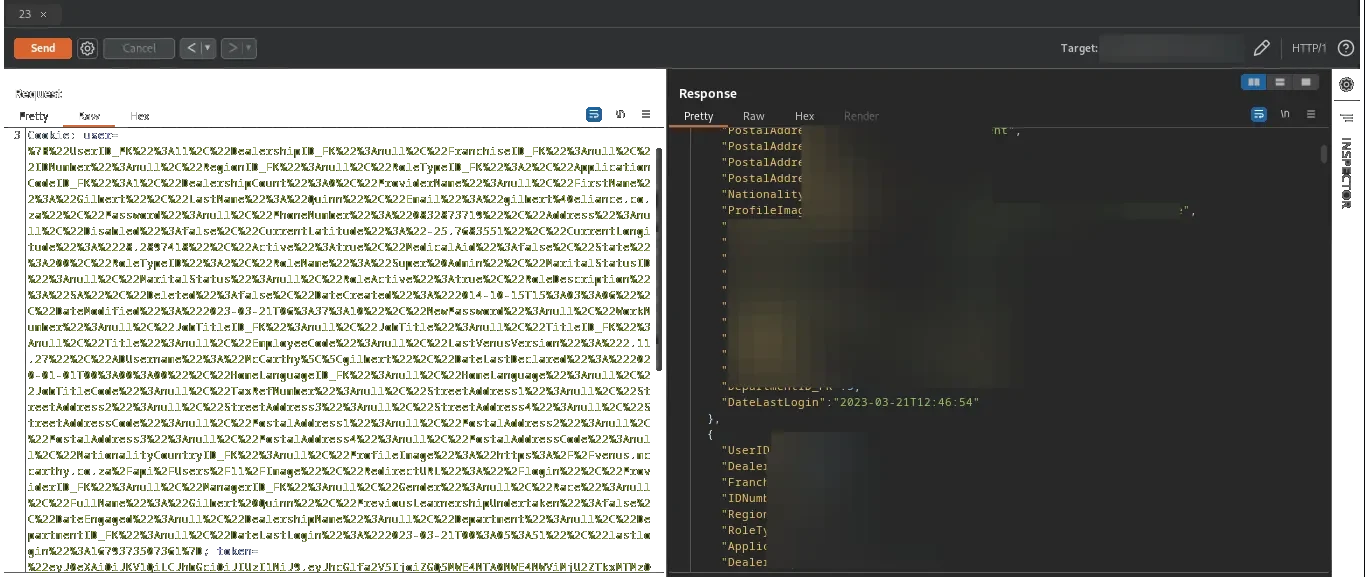
The screenshot shows the request and response pair for this single-user lookup, with the password value populated in the returned JSON.
Exploitation
Step 1: Identify the hash
The password value was hashed. The researcher assumed it was an NTLM hash, since the JSON object also exposed the AD login user name. hashcat and online tools were tried to decrypt the hashes, but they could not identify the hash type.
Several password hashes were retrieved from the same subdomain, still without identifying the type. The initial thought was that an extra layer had been added to make cracking harder.
After more research, the researcher compared all the collected hashes and noticed that their lengths varied: some were 123 characters long, some 127, and some 125. Research into recovering the omitted characters, including on forums, produced nothing useful.
Step 2: Look at the first user
Going back to the API, the researcher decided to get the details of the first user on the system, which usually means the sysadmin. The JSON object came back, but it was not the system administrator.
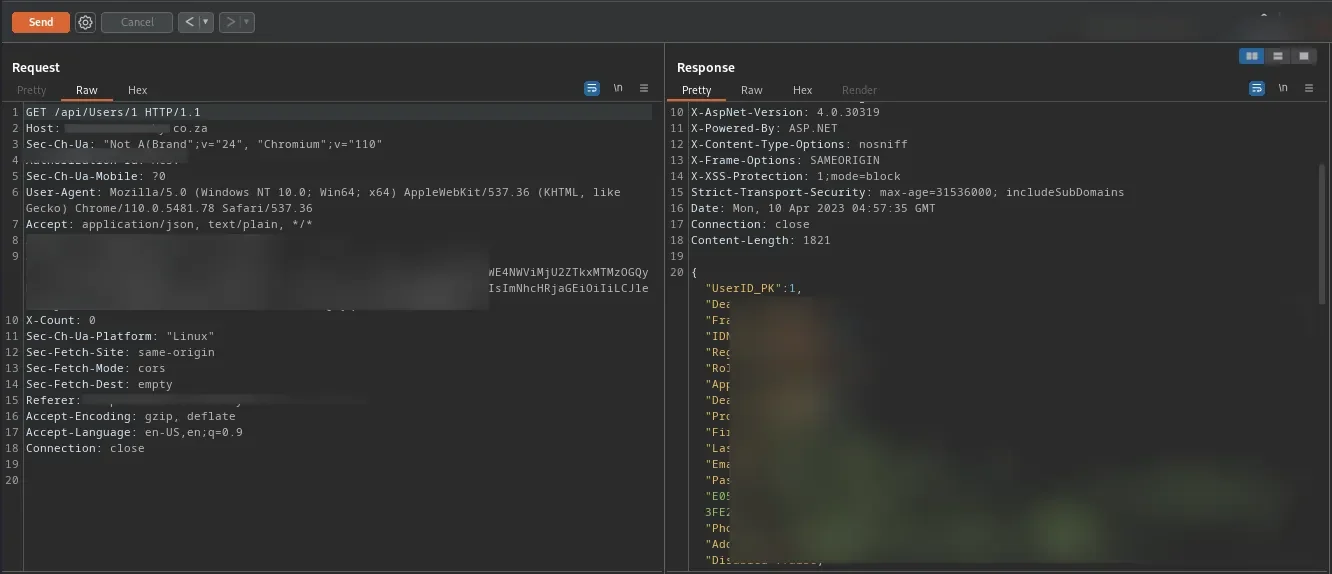
The screenshot shows the returned JSON object for that first user.
Looking through the object, the researcher copied the password hash and counted the characters: 127. That is not far from the SHA-512 character limit. hash ID and hash identifier tools were tried, without luck; they reported the hash as invalid.
Step 3: Add the missing leading character
SHA-512 examples were looked up online and counted: they are 128 characters long. The researcher noticed that the examples all started with the letter e. The decision was to add the letter e at the beginning of the retrieved hash, then verify and identify it on hashes.com. The hash was successfully identified as SHA-512, and not only identified but also decrypted. The plain text was 11 characters long. Trying it on the login form worked.
Step 4: Study the omission
Now knowing the original password string, the researcher encrypted it using https://10015.io/, which produced a 128-character SHA-512 hash. Comparing the hash that was missing characters with the newly generated one was meant to reveal how the web app was omitting characters. The researcher could not figure it out; it looked random.
Step 5: The password reset mechanism
Since the hashes had omitted characters, the researcher wanted a way to find them. The next idea was to examine how the site's "forget password" function worked.
Before resetting the password, the researcher changed the email address of the user they had managed to log in as. Then they hit forget password and entered their own registered user email. The password reset was successfully sent, and the email arrived.
The reset mechanism sends a temporary, digit-only password when a reset is requested. The temporary password in the email was only four digits. The researcher noted it could be brute-forced depending on whether the password expires, but brute-forcing is not fun, so a faster way was needed.
Requesting the "forget password" option repeatedly and studying the temporary passwords showed they were four digits, random, and ranged from 1000 to 2000.
Step 6: Generate candidate hashes
A for-loop Node.js function was written that counts from 1 to 2000 and saves the output to a file. To compare quickly, the output had to be encrypted to SHA-512.
A bash script was written for this, but it was not accurate and the researcher could not make it accurate. The move was to Python: a quick script that encrypts the contents of a text file line by line. Each line must be encoded before encryption, otherwise the hash will be different. The script worked as expected.
The omitted hashes collected earlier were used with this script to identify the missing characters by comparing the first 5 to 6 characters of the SHA-512 hash.
Step 7: Take over the account
To take over an account, the researcher requested a password reset on behalf of the user, since all their details were known except the clear text password. After requesting the reset from the forget password endpoint, the next step was the API route:
GET api/Users/theUserIdOfTheUserWhoRequestedThePasswordReset
This was done through Burp Suite's proxy. The GET request returned JSON objects of the user with the same details but a different password hash, because the reset had been requested.
The first six characters of the new hash were copied and passed to the Python script, which hashes the for-loop output and searches for the first six characters, comparing them to the hashes of the for-loop contents. The script writes to a file like this:
 6734: sha512-hash
 6735: sha512-hash
 6736: sha512-hash
 6737: sha512-hash
 etc : etc
If a line has the passed six characters at the beginning, the program returns that line, which has the hashes, and assumes the omitted hash is the same as the hash matched on file. According to the report, this turned out to be the case 100% of the time.
The researcher is explicit that this is not a general method for recovering omitted characters from a SHA-512 hash, but a method for this particular web app, made possible by having enough information to understand how it works. After a hash was matched, the digits before the semicolon were copied; this was indeed the temporary password the web app sends to the user's email on reset. Using the user's email as the username and the copied digits as the password, the login succeeded.
Root cause
The report does not describe the server-side code, so the following is inferred from behaviour.
The API exposes user records, including password hashes and AD login user names, without proper authentication. The collection route nulls the password field, but the single-user route returns it, which suggests the nulling is applied per route rather than at the data layer. The stored hash is a SHA-512 digest with characters omitted, and the omission looked random to the researcher. Because the reset mechanism issues a four-digit temporary password in the range 1000 to 2000, the space of possible plain texts is tiny, so a truncated hash can be matched against a precomputed set of candidate hashes by comparing only the first few characters. The reset also replaces the stored hash, which lets an attacker trigger a fresh hash for any user whose record they can read.
Impact
An attacker who can reach the API can list users, read individual user records including password hashes and AD login user names, and, by triggering a password reset and matching the new hash against a small candidate set, obtain the temporary password and log in as that user. The researcher demonstrated this on their own account after changing its email address. The report does not state how many users were affected, what privileges the taken-over accounts held, or whether the issue was fixed or a bounty paid.
Fix
Based on the behaviour described, the API should require authentication and authorisation on every user route, including single-user lookups, and should never return password hashes to clients. Password hashes should be stored in full and with a slow, salted algorithm rather than a bare SHA-512 digest, and temporary passwords should be long, random and expire quickly.
Variants to test
- Route stripping on API paths seen in login traffic: remove segments from paths such as
api/Authandapi/Users?email=…and see whether a shorter path such asapi/usersreturns a collection without authentication. - Collection versus single-record behaviour: compare a list endpoint with an item endpoint such as
api/Users/1. A positive result is the list nulling a sensitive field while the item endpoint returns it. - Hash length analysis: collect several hashes from the same application and compare their lengths. Varying lengths that fall just short of a known digest length suggest truncation.
- Leading-character recovery: take a known plain text, hash it with the suspected algorithm, and compare with the stored value to see which characters are missing. A positive result is a consistent offset across samples.
- Reset token space: request several password resets and study the temporary passwords. A small, predictable range such as four digits between 1000 and 2000 makes offline matching feasible.
- Hash matching by prefix: generate candidate hashes for the observed range and match the first five or six characters against a freshly issued hash. A positive result is a unique match that logs in successfully.
What happened, in plain words
A researcher found a website in their country that had a small extra piece of itself, called a subdomain, sitting on the internet. A subdomain is a name like shop.example.com when the main site is example.com: same owner, separate address. That subdomain had a programming interface behind it that was supposed to be private but was answering anyone who asked. Through it, the researcher could read the details of every user on the system, including a scrambled version of each user's password. The scrambling had a flaw: characters were being dropped from each scrambled password. Once the researcher worked out which scrambling method was used, they could unscramble one password and log in as that user, and then use the site's "forget password" feature to take over an account. The temporary passwords that feature emailed out were only four digits long, which made them easy to guess once you had the scrambled version to compare against.
This article walks through the whole chain slowly, explaining each idea as it appears. You only need to know how to use a browser and a computer to follow it.
The pieces you need to know first
Before the steps make sense, here are a few everyday ideas.
A server and a request. When you type an address into your browser, your computer sends a request to another computer (the server) and the server sends back a response. Think of it as posting a letter and getting a reply.
An API. An API is a way for one piece of software to ask another for data, without a human clicking anything. Think of a restaurant: the menu is the API, the kitchen is the server, and the waiter carries your order and brings back the food. A website's own pages often use an API behind the scenes, and so can anyone else who knows the address.
JSON. The reply from an API is often written in JSON, which is just a way of writing data as labelled pairs. It looks like {"name": "Alex", "age": 30}. Each label is called a key and each value is called a value, hence "key-value object".
Authentication. Authentication means proving who you are, usually with a username and password. If an API answers without asking you to prove anything, it is unauthenticated, and that is a problem when the data is private.
A hash. A hash is a one-way scramble of some text. You can turn a password into a hash easily, but turning the hash back into the password is meant to be very hard. Websites store hashes instead of passwords so that a thief who steals the database does not get the passwords directly. SHA-512 is one particular hashing method; its output is always 128 characters long.
Account takeover (ATO). Account takeover means logging in as somebody else without their permission. It is the goal of the whole chain here.
Broken access control. This is the name for the class of bug where a system lets someone reach data or actions they should not be allowed to reach. The unauthenticated API here is an example.
Information disclosure. This means private information leaking out to someone who should not see it. The user records coming back from the API are an example.
Cryptographic issues. This covers mistakes in how scrambling, encryption or randomness is used. Dropping characters from a hash and issuing four-digit temporary passwords both fall under this heading.
The tools used
The report lists these tools:
- python 3
- hashes.com
- burp community
- https://10015.io/
- subfinder
- httpx
In plain terms: subfinder and httpx are command-line programs that help you discover which subdomains exist and what they look like. Burp Suite is a program that sits between your browser and the website so you can see and edit every request and response. Python is a programming language used here to write a small script. hashes.com and 10015.io are websites that identify and generate hashes.
The researcher says this is their first story and that they have been learning actively since the COVID-19 pandemic, on and off.
Finding it
Step 1: Look for subdomains
The starting point was to ask which subdomains exist under the main domain. The command pipes one tool's output into another:
subfinder -d redacted.co.za | httpx -sc -title -tech-detect
Line by line: subfinder -d redacted.co.za asks subfinder to find subdomains of redacted.co.za. The vertical bar | means "take the output of the left command and feed it to the right command". httpx -sc -title -tech-detect then visits each subdomain it is given and reports the status code (-sc, the number the server replies with, such as 200 for success), the page title (-title) and the technologies it can detect (-tech-detect, for example which web framework is in use).
Why do this? Because big sites often have forgotten corners, and a forgotten corner is more likely to be badly protected than the main site. Going over the results, the researcher spotted a subdomain of interest.
Step 2: Watch a login
With Burp running, the researcher pasted the subdomain URL into the browser, attempted a login, and intercepted the request. Intercepting means Burp pauses the request before it leaves your computer so you can read it.
The observation was that the subdomain has an exposed API, or at least exposes the API without proper authentication. The report names two routes seen at this stage, api/Auth?.. and api/Users?email=…. A route is just a path in the address, like a corridor in a building.
The idea was to remove routes. In other words, take the address and chop pieces off the end to see what else the server will answer. Stripping the path down to api/users worked and listed all users. The response was a comprehensive list of user records, each a key-value JSON object. Skimming through it, the researcher noticed that the password value was always null in this listing. Null means empty or nothing there.
Why does this matter? Because the server was willing to hand over the full user list to anyone who asked, with no login required. That is the broken access control and information disclosure in one step.
Step 3: Ask for one user
Because the collection endpoint nulled the password, the researcher tried addressing a single user by ID, for example api/Users/1. This returned the same key-value JSON object, but this time the password field had a value.
The screenshot shows the request and response pair for this single-user lookup, with the password value populated in the returned JSON.
Why try this? Because the list was hiding the password on purpose, and a single-record view is often written by a different piece of code that forgets to hide it. That difference between the list and the single record is the crack the whole chain goes through.
Exploitation
Step 4: Work out what the hash is
The password value was hashed. The researcher assumed it was an NTLM hash, since the JSON object also exposed the AD login user name. NTLM is a Microsoft hashing method, and AD (Active Directory) is Microsoft's system for managing users in an organisation, so seeing an AD username made NTLM a reasonable first guess.
hashcat (a program for cracking hashes) and online tools were tried to decrypt the hashes, but they could not identify the hash type. Several password hashes were retrieved from the same subdomain, still without identifying the type. The initial thought was that an extra layer had been added to make cracking harder.
After more research, the researcher compared all the collected hashes and noticed that their lengths varied: some were 123 characters long, some 127, and some 125. Research into recovering the omitted characters, including on forums, produced nothing useful.
Why does length matter? Because a hash method always produces output of a fixed length. If the lengths vary, something is being cut off, and a cut-off hash will not be recognised by any tool.
Step 5: Look at the first user
Going back to the API, the researcher decided to get the details of the first user on the system, which usually means the sysadmin. The sysadmin is the person with the most power over the system, so their account is the most valuable one to reach.
The JSON object came back, but it was not the system administrator.
The screenshot shows the returned JSON object for that first user, which the researcher then examined field by field.
Looking through the object, the researcher copied the password hash and counted the characters: 127. That is not far from the SHA-512 character limit. hash ID and hash identifier tools were tried, without luck; they reported the hash as invalid.
Why count characters? Because 127 is one short of 128, and 128 is exactly the length of a SHA-512 hash. That one missing character is the clue.
Step 6: Add the missing first character
SHA-512 examples were looked up online and counted: they are 128 characters long. The researcher noticed that the examples all started with the letter e. The decision was to add the letter e at the beginning of the retrieved hash, then verify and identify it on hashes.com.
The hash was successfully identified as SHA-512, and not only identified but also decrypted. The plain text was 11 characters long. Trying it on the login form worked.
Why did adding e work? Because the retrieved hash was one character short of a SHA-512 hash, and adding e made it a valid SHA-512 value that the online tool could recognise and crack. Putting it back made the hash a valid SHA-512 value that the online tool could recognise and crack.
Step 7: Study the omission
Now knowing the original password string, the researcher encrypted it using https://10015.io/, which produced a 128-character SHA-512 hash. Comparing the hash that was missing characters with the newly generated one was meant to reveal how the web app was omitting characters. The researcher could not figure it out; it looked random.
Why try this? Because if the missing character followed a pattern, every hash could be repaired the same way. It did not, so a different approach was needed.
Step 8: Look at the password reset
Since the hashes had omitted characters, the researcher wanted a way to find them. The next idea was to examine how the site's "forget password" function worked.
Before resetting the password, the researcher changed the email address of the user they had managed to log in as. Then they hit forget password and entered their own registered user email. The password reset was successfully sent, and the email arrived.
Why change the email first? So that the reset email would land in the researcher's own inbox, letting them study exactly what the site sends without touching a real user's mailbox.
The reset mechanism sends a temporary, digit-only password when a reset is requested. The temporary password in the email was only four digits. The researcher noted it could be brute-forced depending on whether the password expires, but brute-forcing is not fun, so a faster way was needed. Brute-forcing means trying every possible value one by one until one works.
Requesting the "forget password" option repeatedly and studying the temporary passwords showed they were four digits, random, and ranged from 1000 to 2000.
Why does the range matter? Because if the temporary password is always a number between 1000 and 2000, there are only about a thousand possibilities. A thousand is small enough to list in full on an ordinary computer.
Step 9: Generate candidate hashes
A for-loop Node.js function was written that counts from 1 to 2000 and saves the output to a file. A for-loop is simply a way of telling a computer to repeat something for every number in a range.
To compare quickly, the output had to be encrypted to SHA-512. A bash script was written for this, but it was not accurate and the researcher could not make it accurate. The move was to Python: a quick script that encrypts the contents of a text file line by line. Each line must be encoded before encryption, otherwise the hash will be different. The script worked as expected.
The omitted hashes collected earlier were used with this script to identify the missing characters by comparing the first 5 to 6 characters of the SHA-512 hash.
Why compare only the first few characters? Because the stored hash is missing characters, so matching a prefix of a freshly generated hash is enough to pick out the candidate. If you generate the hash of every possible password and keep only the first few characters, you can look up a stored hash by its beginning and find the password that produced it.
Step 10: Take over the account
To take over an account, the researcher requested a password reset on behalf of the user, since all their details were known except the clear text password. After requesting the reset from the forget password endpoint, the next step was the API route:
GET api/Users/theUserIdOfTheUserWhoRequestedThePasswordReset
Line by line: GET is the type of request that asks the server to send something back. api/Users/ is the path, and theUserIdOfTheUserWhoRequestedThePasswordReset is a placeholder for the number that identifies the user. So this asks the API for one user's record, by their ID.
This was done through Burp Suite's proxy. The GET request returned JSON objects of the user with the same details but a different password hash, because the reset had been requested.
Why does the hash change? Because a password reset replaces the stored password with the new temporary one, and therefore replaces the stored hash too. That gives the attacker a fresh hash to work with, one that corresponds to a password they know is in the small 1000 to 2000 range.
The first six characters of the new hash were copied and passed to the Python script, which hashes the for-loop output and searches for the first six characters, comparing them to the hashes of the for-loop contents. The script writes to a file like this:
 6734: sha512-hash
 6735: sha512-hash
 6736: sha512-hash
 6737: sha512-hash
 etc : etc
Line by line: each line has a number, a colon, and the SHA-512 hash of that number. So line 6734: sha512-hash means "the hash of the number 6734 is this". The file is a lookup table from number to hash.
If a line has the passed six characters at the beginning, the program returns that line, which has the hashes, and assumes the omitted hash is the same as the hash matched on file. According to the report, this turned out to be the case 100% of the time.
The researcher is explicit that this is not a general method for recovering omitted characters from a SHA-512 hash, but a method for this particular web app, made possible by having enough information to understand how it works. After a hash was matched, the digits before the semicolon were copied; this was indeed the temporary password the web app sends to the user's email on reset. Using the user's email as the username and the copied digits as the password, the login succeeded.
Why does this work? Because the set of possible temporary passwords is tiny, the attacker can pre-compute the hash of every one of them. The stored hash is missing characters, but the first six characters that remain are enough to pick out the right line in the lookup table. The number on that line is the temporary password.
Why it worked
The report does not describe the server-side code, so the following is inferred from behaviour.
The API exposes user records, including password hashes and AD login user names, without proper authentication. The collection route nulls the password field, but the single-user route returns it, which suggests the nulling is applied per route rather than at the data layer. The stored hash is a SHA-512 digest with characters omitted, and the omission looked random to the researcher. Because the reset mechanism issues a four-digit temporary password in the range 1000 to 2000, the space of possible plain texts is tiny, so a truncated hash can be matched against a precomputed set of candidate hashes by comparing only the first few characters. The reset also replaces the stored hash, which lets an attacker trigger a fresh hash for any user whose record they can read.
What it means
An attacker who can reach the API can list users, read individual user records including password hashes and AD login user names, and, by triggering a password reset and matching the new hash against a small candidate set, obtain the temporary password and log in as that user. The researcher demonstrated this on their own account after changing its email address. The report does not state how many users were affected, what privileges the taken-over accounts held, or whether the issue was fixed or a bounty paid.
How to fix it
Based on the behaviour described, the API should require authentication and authorisation on every user route, including single-user lookups, and should never return password hashes to clients. Password hashes should be stored in full and with a slow, salted algorithm rather than a bare SHA-512 digest, and temporary passwords should be long, random and expire quickly.
Things to try on other sites
- Route stripping on API paths seen in login traffic: remove segments from paths such as
api/Authandapi/Users?email=…and see whether a shorter path such asapi/usersreturns a collection without authentication. - Collection versus single-record behaviour: compare a list endpoint with an item endpoint such as
api/Users/1. A positive result is the list nulling a sensitive field while the item endpoint returns it. - Hash length analysis: collect several hashes from the same application and compare their lengths. Varying lengths that fall just short of a known digest length suggest truncation.
- Leading-character recovery: take a known plain text, hash it with the suspected algorithm, and compare with the stored value to see which characters are missing. A positive result is a consistent offset across samples.
- Reset token space: request several password resets and study the temporary passwords. A small, predictable range such as four digits between 1000 and 2000 makes offline matching feasible.
- Hash matching by prefix: generate candidate hashes for the observed range and match the first five or six characters against a freshly issued hash. A positive result is a unique match that logs in successfully.
Glossary
- Account takeover (ATO): logging in as another person without their permission.
- Active Directory (AD): Microsoft's system for managing users and their logins inside an organisation.
- API: a way for software to ask another piece of software for data, without a human clicking.
- Authentication: proving who you are, usually with a username and password.
- Authorisation: deciding what a proven user is allowed to do.
- Bash script: a small program written for the command line on Linux and similar systems.
- Broken access control: a bug where a system lets someone reach data or actions they should not be allowed to reach.
- Brute-forcing: trying every possible value one by one until one works.
- Burp Suite: a program that sits between your browser and a website so you can see and edit requests and responses.
- Collection endpoint: an API address that returns a list of records rather than one record.
- Cryptographic issues: mistakes in how scrambling, encryption or randomness is used.
- Endpoint: a specific address on a server that accepts requests, like a door in a building.
- For-loop: a way of telling a computer to repeat something for every number in a range.
- Hash: a one-way scramble of some text, easy to produce and meant to be hard to reverse.
- hashcat: a program for cracking hashes by trying many candidate passwords.
- httpx: a command-line tool that visits a list of addresses and reports status codes, titles and technologies.
- Information disclosure: private information leaking out to someone who should not see it.
- Intercepting: pausing a request before it leaves your computer so you can read or change it.
- JSON: a way of writing data as labelled pairs, such as
{"name": "Alex"}. - Key-value object: a JSON structure where each label (key) has a value.
- Node.js: a way of running JavaScript programs outside a browser.
- NTLM: a Microsoft hashing method used in Windows environments.
- Null: empty, nothing there.
- Plain text: the readable, unscrambled version of a value, such as the actual password.
- Proxy: a program that sits in the middle of a connection and passes messages through, so it can watch them.
- Python: a programming language, used here for a small hashing script.
- Request: a message your computer sends to a server asking for something.
- Response: the message the server sends back.
- Route: a path in an address, like a corridor in a building.
- SHA-512: a hashing method whose output is always 128 characters long.
- Status code: the number a server replies with, such as 200 for success.
- Subdomain: a name like
shop.example.comwhen the main site isexample.com. - subfinder: a command-line tool that discovers subdomains of a domain.
- Sysadmin: the person with the most power over a computer system.
- Temporary password: a short-lived password issued by a reset feature so the user can log in and choose a new one.
- Truncation: cutting characters off the end or start of a value.
- Unauthenticated: answering without asking the requester to prove who they are.


