Account Takeover (User + Admin) Via Password Reset
Password reset tokens were five-digit numbers assigned sequentially, so an attacker could request a reset for their own account and then guess the next token to reset another user's password, including an admin's. This allowed account takeover of any user.
 Published on infosecwriteups.com
I’m Hemant Patidar, Final Year B.Tech - Civil Engineering Student at SRMIST, Chennai.
The full write-up lives on its author's site
It belongs to its author, so we link to it rather than copy it. The other two tabs are our own rewrites, checked against it.
Context
This is a write-up about a password reset flow on a web application hosted at dashboard.example.com. The feature in question is the standard self-service password reset: a user enters their email address, the server generates a reset token, and a link containing that token is emailed to the user. The link points at a form where the token is supplied as a query parameter:
https://dashboard.example.com/password-reset/form?token=12345
The application also has an administrative user. According to the author, there is no separate login page for the admin user, which suggests the admin account lives on the same login page as ordinary users. The author does not name the product or the program.
Setup
The write-up describes no special tooling. The work was done in a browser with two tabs open, plus a text editor (Notepad) to hold the reset links. The preconditions are:
- A normal account on the target (the attacker's own account, referred to as account A).
- Knowledge of the admin user's email address. The author obtained this from the site's "about-us" page, which listed the Founder's email address.
- The ability to trigger a password reset for both accounts in quick succession.
No versions, headers or request captures are shown in the report.
Finding it
While resetting the password on their own account, the author noticed that the token in the emailed reset link was a five-digit number. That alone is a weak token, but the more interesting observation was about how tokens were assigned. The author concluded that when two different users request a password reset one after the other, the server assigns tokens to both users in consecutive numbers. In other words, the token is not random per request but appears to be drawn from a sequential counter.
If that holds, an attacker who controls account A can take the token from their own reset link, increment it by one, and land on the reset form for account B, the victim. The author illustrates it as follows: if account A receives
https://dashboard.example.com/password-reset/form?token=28604
then account B receives
https://dashboard.example.com/password-reset/form?token=28605
The author's reasoning is that the token identifies the account being reset, so guessing the neighbour's token should reset the neighbour's password.
Exploitation
Step 1: Trigger two resets in a row
Open https://dashboard.example.com/login in two different tabs and perform a password reset for both accounts in a consecutive manner, using the email address of each. Account A is the attacker's own account; account B is the admin account whose email was found on the about-us page.
Step 2: Capture your own reset link
Copy the password reset link received for account A into Notepad:
https://dashboard.example.com/password-reset/form?token=12345
Step 3: Increment the token
Change the token ID to the next consecutive number. Since the tokens are assigned consecutively, if yours is 12345, the admin's token is 12346.
Step 4: Use the modified link
Open the modified link and reset the admin password:
https://dashboard.example.com/password-reset/form?token=12346
Step 5: Result
The author states the result as an admin account takeover. The screenshot below shows the modified link and the resulting takeover.

The impact is stated plainly: "Account Takeover Of Anyone".
Root cause
The reset token was a five-digit number, and tokens for consecutive requests appeared to follow one another. The token is exposed in the URL as a query parameter, and the author's reasoning is that an attacker who obtains one valid token can derive the next one. The report does not describe any server-side check that ties the token to the requesting session, nor any rate limiting or attempt counter on the reset form. The author does not show the server-side code, so the exact mechanism (a counter in the database, an auto-increment column, or similar) is inferred from behaviour rather than observed.
Impact
An attacker with a normal account can take over another account whose reset was requested immediately after their own, including administrative accounts. The author demonstrates this against the admin account and summarises the impact as "Account Takeover Of Anyone". The report does not discuss how the attack scales beyond adjacent tokens, whether tokens expire, or whether the victim is notified.
Fix
The report does not state what the vendor changed. Based on the root cause, the token should be generated with a cryptographically secure random number generator and be long enough that guessing is infeasible, and the reset form should bind the token to the account and to the reset request rather than relying on a guessable identifier. Rate limiting and single-use tokens would add defence in depth. The report does not confirm which of these were applied.
Variants to test
- Sequential numeric tokens. Request a reset for your own account, note the token, and request another. If the second token is the first plus one, try the neighbours on a second account you control. A positive result is a reset form that accepts a token you never received.
- Short tokens with low entropy. If the token is a short number or a short alphanumeric string, try brute-forcing the reset form with a script. A positive result is any token that returns a valid reset form for an account you do not own.
- Token reuse. After completing a reset, replay the same link. A positive result is a second successful reset with the same token.
- Token in URL and referrer leakage. Check whether the token appears in the
Refererheader sent to third-party resources on the reset page. A positive result is the token showing up in an outbound request log. - Cross-account token acceptance. Request a reset for account A, then submit the token with account B's email in the form body. A positive result is a password change on B using A's token.

Timeline
| Event | Date |
|---|---|
| Bug reported | 2 June 2021 |
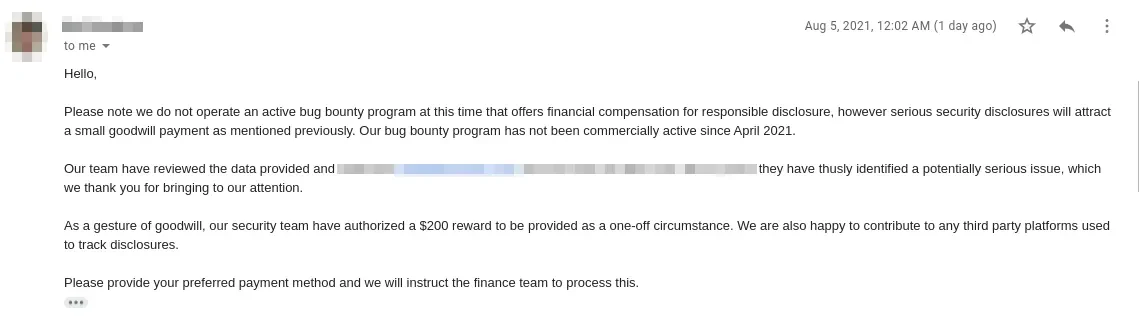
| Bounty rewarded | 5 August 2021 |
The bounty was $200.
What happened, in plain words
A website had a "forgot my password" feature. When you forget your password, you type your email address into the site, and the site emails you a special link. Clicking that link lets you set a new password. The link contains a code, called a token, that stands in for proof that the person clicking owns that email address.
On this site, the token was a short number, five digits long, and, more importantly, the numbers were handed out in order. If one person asked for a reset and got the number 28604, the next person to ask got 28605. So if two users asked for a reset one after the other, their links would contain neighbouring numbers. You could take your own link, add one to the number, and end up on the page that resets the other person's password. The author's target in this case was the site's administrator, the user with the most power over the site.
This kind of problem is called a logic flaw: nothing crashed, no clever code was injected, the site simply did something in a predictable order that let one user reach another user's account. The result is called account takeover, because the attacker ends up in full control of someone else's account.
The author is Hemant Patidar, a final year civil engineering student at SRMIST in Chennai who hunts for bugs at night. The report was filed on 2 June 2021 and paid a $200 bounty on 5 August 2021.
The feature being attacked
Before the details, it helps to know what a password reset actually is, because the whole bug lives inside it.
Most websites store, for each user, an email address and a password. The password is not stored as plain text; the site keeps a scrambled version of it, called a hash, so that even if the database leaks, the passwords are not directly readable. When you log in, the site scrambles what you typed and compares it with the stored hash. If they match, you are in.
Because the site cannot tell you your password (it only has the hash), the standard recovery route is a reset. You tell the site your email address. The site creates a one-time code, the token, and emails you a link containing it. The link points at a page where you type a new password. When you submit, the site checks the token, works out which account it belongs to, and saves the new password for that account.
The link in this report looks like this:
https://dashboard.example.com/password-reset/form?token=12345
Line by line:
https://is the secure version of the protocol browsers use to fetch web pages. Thesmeans the traffic between your browser and the server is encrypted.dashboard.example.comis the address of the server, the name that gets translated into the numeric address of the machine hosting the site.example.comis a placeholder domain used in documentation; the real site's name is not given in the report./password-reset/formis the path, the part that tells the server which page you want. Here it is the page with the form for choosing a new password.?starts the query string, the part of a URL that carries extra information to the server.[redacted] is one item in that query string: a name (token) and a value (12345`). The server reads the value to know which reset request this is.
A token, in this context, is a secret code that stands in for proof of identity. Think of a cloakroom ticket: you hand in your coat, you get a numbered ticket, and whoever holds the ticket can collect the coat. The site does not ask for your password on the reset page, because you have forgotten it. The token is the ticket. Whoever holds a valid ticket gets the coat.
The site also has an administrative user, usually called the admin. An admin can typically see and change things ordinary users cannot: other users' data, site settings, content. The author noticed there was no separate login page for the admin, which suggests the admin signs in through the same login page as everyone else, with an ordinary email address and password. That matters because it means the admin's account can be reached through the same password reset feature.
The report does not name the product or the bug bounty program.
Setting up
No special tools were needed. The author used a browser with two tabs and a plain text editor, Notepad, to keep the reset links. That is worth stressing for a beginner: this bug was found by paying attention, not by running an exploit framework.
Three things had to be true before the attack could work:
- The author needed a normal account on the site. This is the attacker's own account, called account A in the report. Having a legitimate account is normal in bug bounty work: you are allowed to use the site as a customer and see what it does.
- The author needed the admin's email address. The report says this was found on the site's "about-us" page, which listed the Founder's email address. Company websites often publish contact addresses for exactly this reason, to let people get in touch. Here the same public address was also the login name of a powerful account.
- The author needed to be able to request a password reset for both accounts, one right after the other.
The report shows no software versions, no HTTP headers and no captured requests, so there is nothing more to describe about the setup.
Finding the flaw
While resetting the password on their own account, the author looked at the link that arrived by email and noticed the token was a five-digit number. A short number is already a weak secret: there are only 90,000 five-digit numbers from 10000 to 99999, and a computer can try all of them quickly if the site lets it. But the more interesting discovery was about the order in which the numbers were handed out.
The author concluded that when two different users request a password reset one after the other, the server assigns tokens to both in consecutive numbers. In plain terms, the site was not picking a fresh random number for each request. It was counting: 28604, then 28605, then 28606. This is like a deli counter that gives out numbered tickets in order. If you know your ticket is 42, you know the next customer holds 43.
If that holds, an attacker who controls account A can take the token from their own reset link, add one, and land on the reset page for account B, the victim. The author illustrates it like this: if account A receives
https://dashboard.example.com/password-reset/form?token=28604
then account B receives
https://dashboard.example.com/password-reset/form?token=28605
Line by line:
- The two URLs are identical except for the last digit of the token value.
28604is the token the author's own account received.28605is the token the next reset request received, which in this example belongs to account B.- Nothing else in the URL identifies the account. There is no username, no email address, no session identifier in the link. The token alone tells the server whose password is about to be changed.
That last point is the heart of the bug. If the token is the only thing the reset page uses to decide which account it is working on, and the token can be guessed by counting, then the attacker can reset anyone's password. The site is effectively asking "which account?" and accepting a number that anyone can work out.
Carrying out the attack
Step 1: Ask for two resets, one after the other
Open https://dashboard.example.com/login in two different tabs and request a password reset for both accounts in a consecutive manner, using the email address of each. Account A is the attacker's own account; account B is the admin account whose email was found on the about-us page.
Why two tabs and why back to back? Because the whole trick depends on the two tokens being neighbours in the sequence. If you request your reset, wait an hour, and then request the admin's, other users may have requested resets in between and the numbers will no longer be adjacent. Doing both in quick succession makes it likely that your token and the admin's token differ by exactly one.
Step 2: Keep your own link
Copy the password reset link received for account A into Notepad:
https://dashboard.example.com/password-reset/form?token=12345
Line by line:
- This is the link from the email sent to the author's own address.
12345is the token value in this example. In the real attempt it would have been whatever number the site actually issued.- The link is saved in a text editor so it can be edited by hand. You could edit it in the browser's address bar, but keeping it in Notepad makes it easy to change one digit and paste it back.
Step 3: Add one to the number
Change the token ID to the next consecutive number. Since the tokens are assigned consecutively, if yours is 12345, the admin's token is 12346.
Why does this work? Because the site's counter moved forward by one between the two requests. Your request took the current value; the admin's request, made immediately afterwards, took the next value. You never received the admin's email, but you can work out the number it contained.
Step 4: Open the changed link
Open the modified link and set a new password for the admin:
https://dashboard.example.com/password-reset/form?token=12346
Line by line:
- The URL is the same reset form as before.
- The only change is the token value, from
12345to12346. - When the browser requests this page, the server looks up the token
12346, finds the reset request it belongs to, and shows the form for that account. From the server's point of view this is a perfectly normal reset request; it has no way to tell that the person holding the link is not the person who received the email.
Step 5: The result
The author states the result as an admin account takeover. The screenshot below shows the modified link and the resulting takeover.
The impact is stated plainly: "Account Takeover Of Anyone". In other words, you can reach an account whose reset was requested shortly after yours.
Why the site was vulnerable
Put simply, the reset token was a five-digit number handed out in order rather than generated at random. Three things combine to make that serious:
- The token is predictable. A random token is like a lottery number: knowing one tells you nothing about the next. A sequential token is like a queue number: knowing yours tells you everyone else's.
- The token is the only identifier. The token is what the reset link carries, and the author's reasoning is that it identifies the account.
- The token travels in the URL. It sits in the query string, visible in the address bar, in browser history and in any log that records full URLs.
The report does not describe any server-side check that ties the token to the requesting session, nor any rate limiting or attempt counter on the reset form. Rate limiting means refusing to answer after too many tries in a short time; without it, even a random five-digit token could be guessed by trying all 90,000 values. The author does not show the server-side code, so the exact mechanism behind the counter, whether a database counter, an auto-increment column or something similar, is inferred from behaviour rather than observed.
Impact
An attacker with a normal account can take over another account whose reset was requested immediately after their own, including administrative accounts. The author demonstrates this against the admin account and summarises the impact as "Account Takeover Of Anyone".
Why is admin takeover worse than taking over one user? Because the admin account is the one with the keys to the building. An admin can often read other users' data, change settings, and sometimes reach the server itself. The author's aim was to use an ordinary account as a route into the admin account.
The report does not discuss how the attack scales beyond adjacent tokens, whether tokens expire, or whether the victim is notified.
How it should have been fixed
Based on the root cause, the fixes would be:
- Generate the token with a cryptographically secure random number generator, the kind of randomness used for encryption keys, and make it long enough that guessing is infeasible. A long random string has no neighbours to count to.
- Bind the reset form to the account and to the reset request, rather than relying on a guessable identifier alone.
- Add rate limiting and make tokens single-use, so a token cannot be replayed and repeated guessing is blocked.
The report does not confirm which of these were applied.
Similar things to test on other sites
These are variations on the same idea, useful when you have your own account on a site and permission to test it:
- Sequential numeric tokens. Request a reset for your own account, note the token, and request another. If the second token is the first plus one, try the neighbours on a second account you control. A positive result is a reset form that accepts a token you never received.
- Short tokens with low entropy. Entropy here means unpredictability. If the token is a short number or a short mix of letters and digits, try brute-forcing the reset form with a script. A positive result is any token that returns a valid reset form for an account you do not own.
- Token reuse. After completing a reset, open the same link again. A positive result is a second successful reset with the same token.
- Token in URL and referrer leakage. When a page loads images or scripts from another site, the browser sends a
Refererheader telling that site where the request came from. If the reset page loads third-party resources, the token in the URL can leak to those third parties. A positive result is the token showing up in an outbound request log. - Cross-account token acceptance. Request a reset for account A, then submit the token with account B's email in the form body. A positive result is a password change on B using A's token.
Timeline
| Event | Date |
|---|---|
| Bug reported | 2 June 2021 |
| Bounty rewarded | 5 August 2021 |
The bounty was $200.
Glossary
- Account takeover: a situation where an attacker gains full control of another person's account, usually by changing its password or session.
- Admin (administrator): a user account with extra powers over a website, such as managing other users or settings.
- Bounty: a reward, usually money, paid by a company to someone who reports a security bug to it responsibly.
- Brute force: trying many possible values automatically until one works.
- Bug bounty program: a scheme run by a company that invites outside researchers to test its systems and pays for valid reports.
- Consecutive: following one after another in order, like 4, 5, 6.
- Cryptographically secure random number generator: a source of randomness strong enough for secrets such as keys and tokens, where past values do not help predict future ones.
- Email address (as login name): the identifier a user types to sign in; here it is also what the reset feature uses to find the account.
- Entropy: the amount of unpredictability in a value; more entropy means harder to guess.
- Hash: a scrambled, fixed-length value computed from a password or other data, used so the original is not stored directly.
- HTTP / HTTPS: the protocol browsers use to talk to web servers; HTTPS is the encrypted version.
- Impact: the real-world harm a vulnerability could cause.
- Logic flaw: a bug where the site works as coded but the rules or order of operations can be abused, as opposed to a crash or an injection.
- Notepad: a basic text editor included with Windows, used here to hold and edit links.
- Password reset: a feature that lets a user set a new password after proving control of their email address.
- Path: the part of a URL after the domain that names the page, such as
/password-reset/form. - Query parameter / query string: the part of a URL after
?, made of name=value pairs, carrying extra data to the server. - Rate limiting: restricting how many requests can be made in a period, to slow down guessing.
- Referer header: an HTTP header in which the browser tells the destination site which page the request came from.
- Root cause: the underlying reason a vulnerability exists, as opposed to its symptoms.
- Session: a period during which the server remembers who you are, usually via a cookie.
- Single-use token: a token that stops working after it has been used once.
- Token: a secret code that stands in for proof of identity, here the code in the reset link that identifies which account is being reset.
- URL: the address of a resource on the web, such as a page or an image.
- Vulnerability: a weakness in a system that an attacker can use to cause harm.
- Write-up: a public account of how a bug was found and reported.



