Account takeover using CSRF json based
The API endpoint for updating user data lacked CSRF protection beyond an API key, and a separate endpoint leaked API keys of other users. An attacker could use a stored XSS to make a victim's browser send a JSON PUT request, modifying the victim's email, password, and username.
 Published on medium.com
Hey All, I’m sil3nt4unt3r, a bug hunter on HackerOne and Bugcrowd.This blog is my first foray into the world of writing,
The full write-up lives on its author's site
It belongs to its author, so we link to it rather than copy it. The other two tabs are our own rewrites, checked against it.
Context
This write-up covers a private Bugcrowd program, referred to throughout as Redacted.com. The application had four user roles:
- Admin, with full privileges
- H-User, with some privileges
- L-User, with low privileges
- Guest, with very low privileges
The backend transferred data as JSON. Changes to site information were made through API requests following a pattern like https://redacted.com/api/*. The feature that mattered most here was the shared file and chat endpoint, https://redacted.com/office/[unique-Key]/story, which let users upload a file and share it with everyone. That sharing flow produced notifications in the sidebar and generated API traffic under /api/story*, covering group chat, note sharing and file sharing across all four roles.
Setup
The researcher started by logging in with the admin account to explore the application's functionality. Testing was done with Burp Suite, using its listeners to capture traffic and a filter for requests containing story*. The attack itself required an API key belonging to any user, which is the precondition that shaped the whole chain.
Finding it
While exploring account settings, specifically the location field, the researcher fuzzed the API endpoints behind the settings changes. The API endpoint lacked additional CSRF protection. An API key was present and acted as a basic protection layer, but it was not enough to fully secure the endpoint.
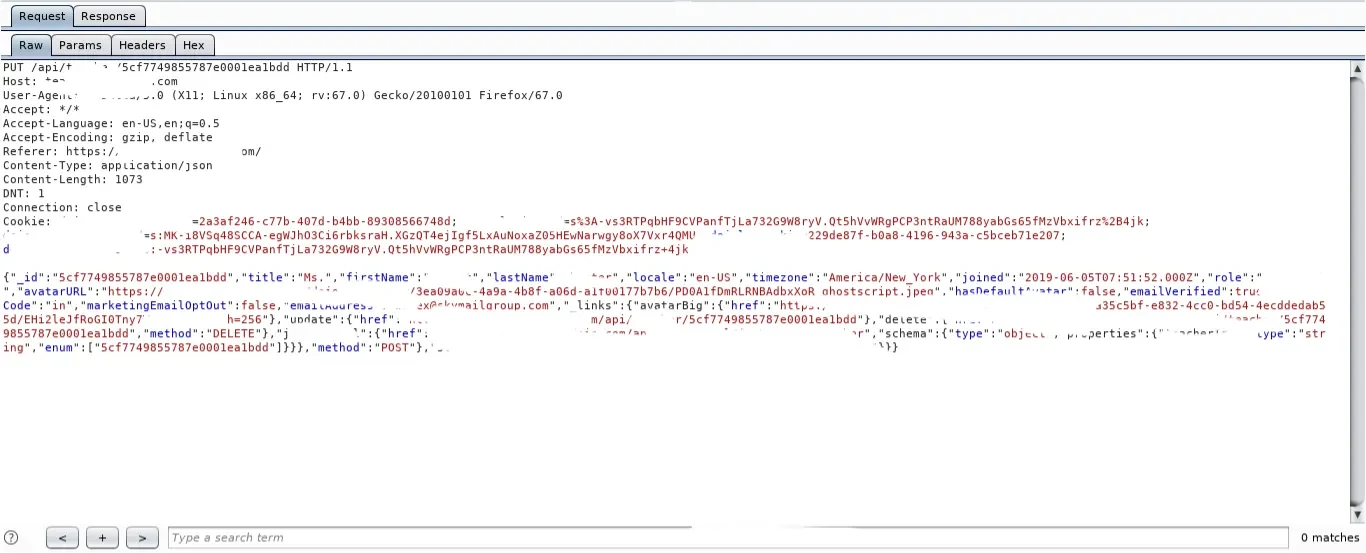
The screenshot shows the API request.
The problem was that the researcher needed an API key to exploit the CSRF, and the key of any user would do. The shared file and chat endpoint offered a way to obtain one: uploading a file and sharing it with everyone.
Exploitation
Step 1: Share a file with everyone as admin
The researcher uploaded a file and shared it with everyone through https://redacted.com/office/[unique-Key]/story, while logged in as the admin.
Step 2: Switch to the L-user account
Logging in as the L-user produced a notification in the sidebar indicating a document shared by the admin. Opening the notification likely triggered an API request.
Step 3: Capture the notification traffic
With Burp Suite listeners running, the researcher refreshed the page and set a Burp filter for requests containing story* to narrow the traffic down to the relevant requests.
Step 4: Identify the leaking endpoint
Analysing the captured requests revealed a vulnerable endpoint:
/API/officename/[id]/storyPost/[L-user-office-id]/comments
This endpoint appeared to leak data belonging to the admin and potentially other users.
Step 5: Fuzz further
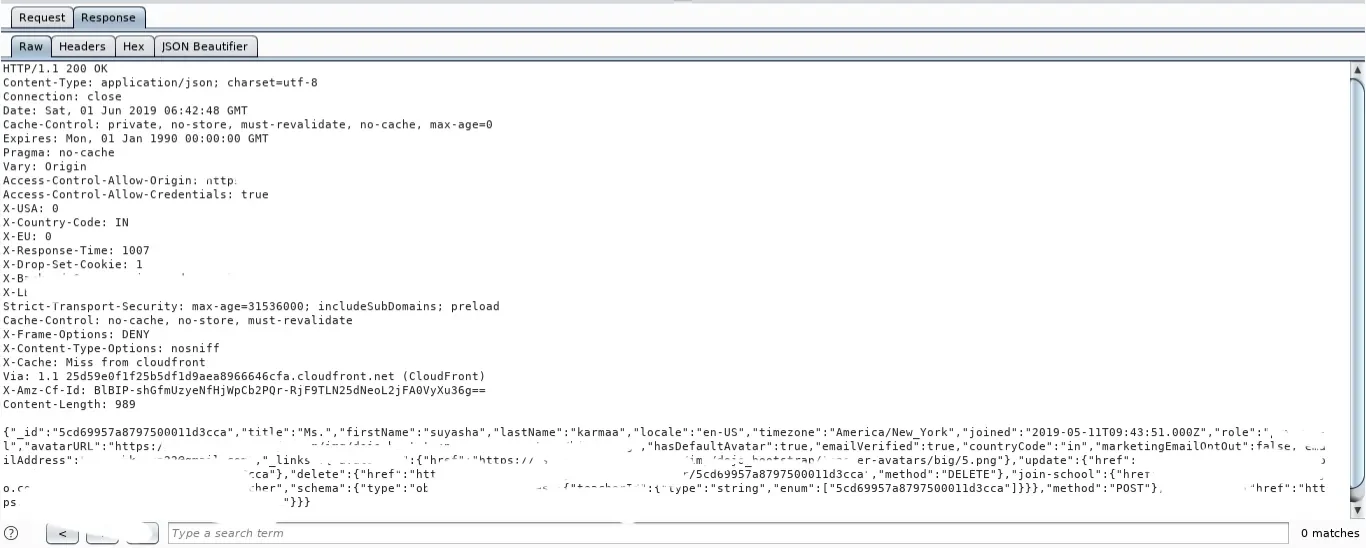
Further fuzzing revealed another endpoint leaking sensitive information, including user IDs, usernames, emails, API keys, office keys and potentially more.
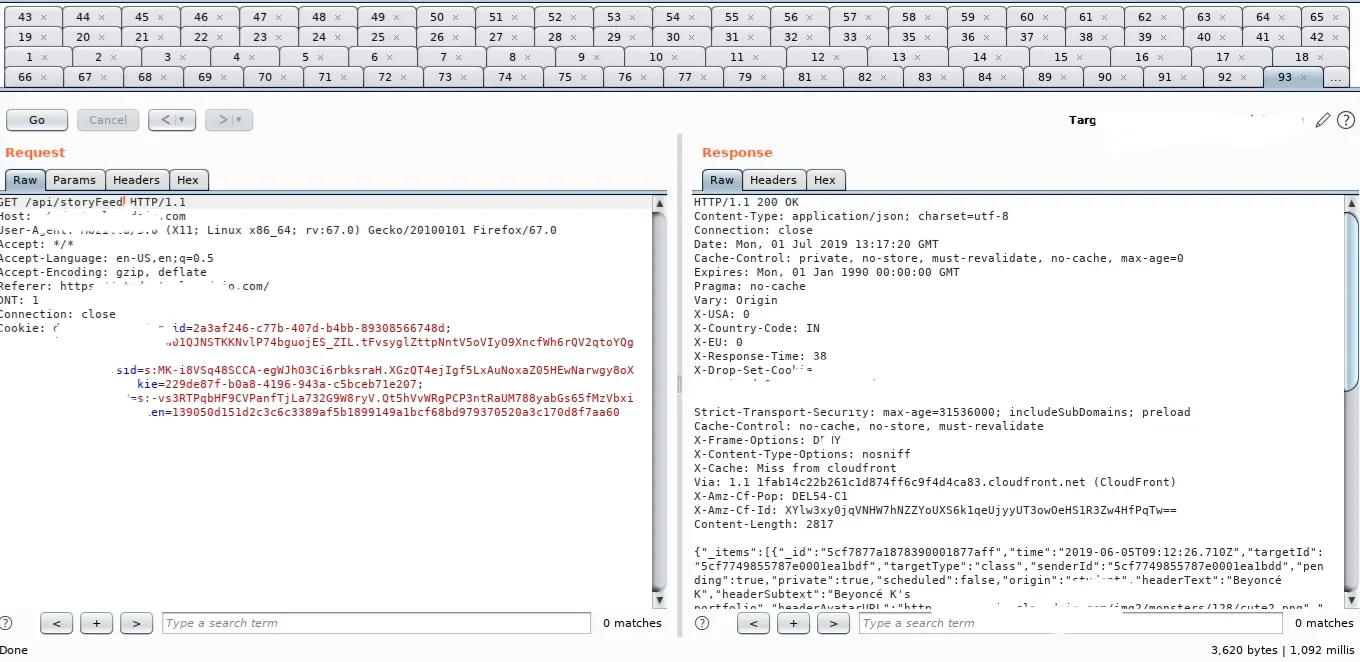
The screenshot shows leaked information belonging to other users.
Step 6: Build the CSRF exploit
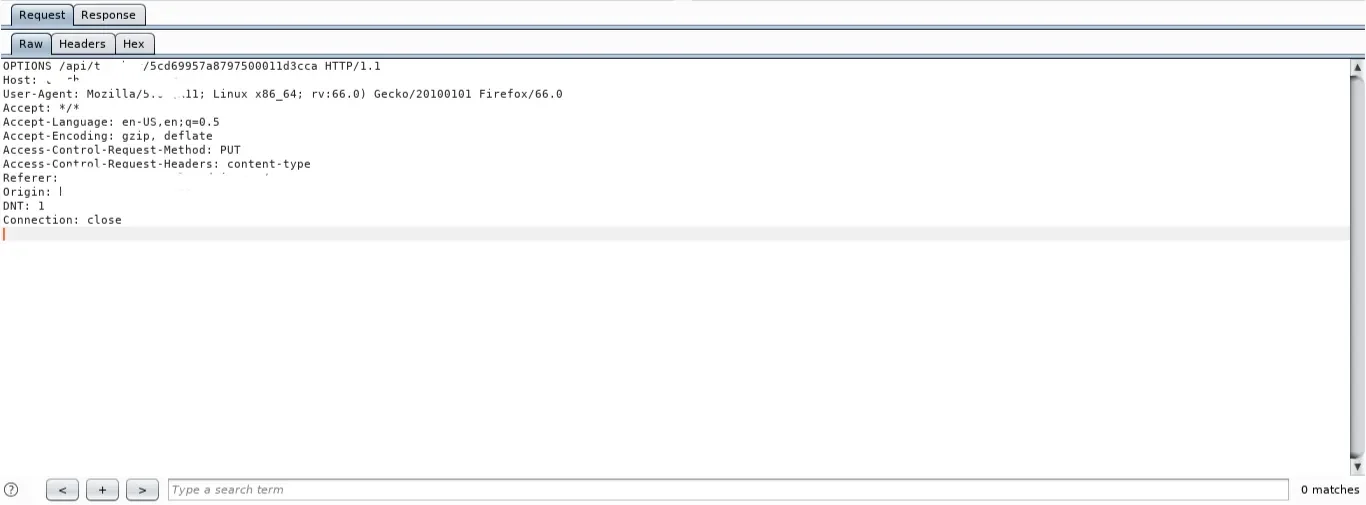
JSON-based CSRF can be achieved through two primary methods: Flash and XMLHttpRequest (XHR). Because the server relied on PUT requests for data updates, the Flash method was not applicable. The XHR route depends on two factors: a CORS misconfiguration and the presence of XSS. The researcher had already found a stored XSS vulnerability in the program, so the XSS was available to drive the XHR.
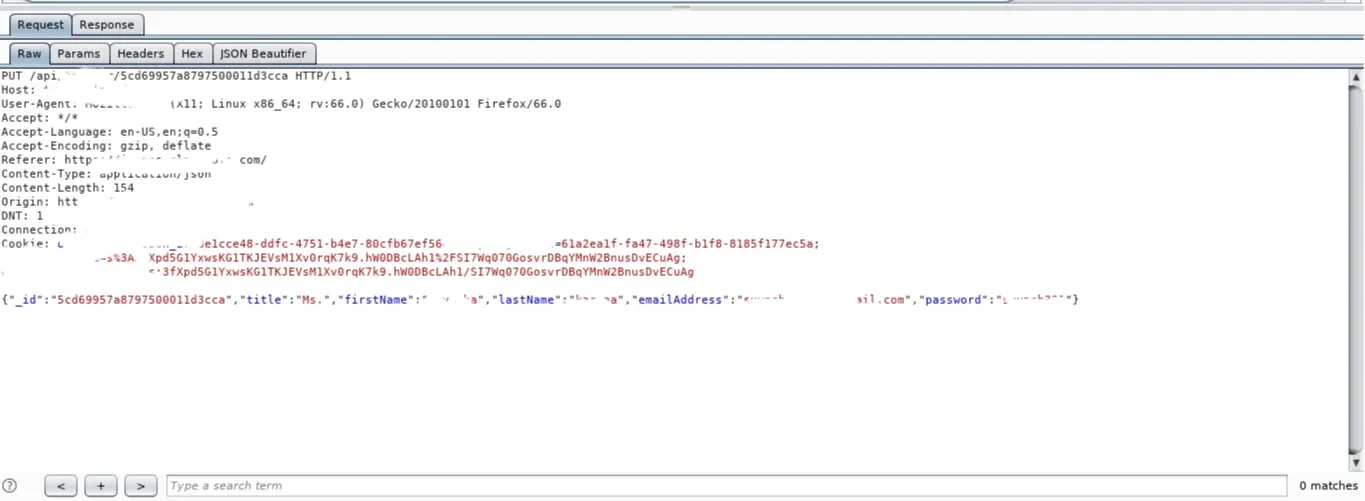
Using the XSS, the researcher constructed a CSRF exploit file. Sent to the admin as a link, it could trigger the vulnerability when clicked. The impact could have been unauthorised modification of the admin's user data, including email, password and username.
Root cause
The API endpoint accepted state-changing requests without additional CSRF protection. The API key was the only barrier, and since any user's key was sufficient, an attacker who could obtain one key could forge requests on behalf of other users. The API key was the only barrier, and any user's key was sufficient. The JSON body and the use of PUT ruled out the simple form-based CSRF techniques, which is why the exploit needed XHR, and XHR in turn needed the CORS misconfiguration and the stored XSS to work. The report does not describe the exact CORS configuration or the server-side validation logic.
Impact
Exploiting the CSRF gave the ability to modify user data, including passwords, usernames and email addresses. The impact extended not only to the admin account but potentially to all users across the main domain and its subdomains. The separate endpoint leak exposed user IDs, usernames, emails, API keys and office keys, providing a key for the CSRF.
Fix
The report does not describe the fix that was applied. The bug was resolved on 29 May 2019. Based on the root cause, the endpoint should require a per-session anti-CSRF token in addition to the API key, and the CORS policy should not allow cross-origin requests from untrusted origins. The stored XSS that made the XHR route possible should also be fixed, since it removed the main obstacle to the attack.
Variants to test
- Fuzz group communication features such as file sharing and chat endpoints. A positive result is a response containing other users' tokens, usernames or API keys.
- Test settings endpoints that accept JSON with PUT. A positive result is a state change accepted without an anti-CSRF token when the request carries a valid API key.
- Check whether an API key from a low-privileged account is accepted for actions belonging to a higher-privileged account. A positive result is a successful modification performed with the lower-privileged key.
- Look for permissive CORS on API endpoints. A positive result is an
Access-Control-Allow-Originthat reflects an attacker-controlled origin alongside credentials. - Combine any stored XSS with the JSON CSRF. A positive result is a crafted page that, when clicked by a victim, performs a state-changing request on their behalf.
Timeline
| Event | Date |
|---|---|
| Report submitted | 9 May 2019 |
| Report triaged | 16 May 2019 |
| Bounty awarded | 27 May 2019 |
| Bug resolved | 29 May 2019 |
The researcher also thanked the company's co-founder, who contacted them directly when the platform was not responsive to initial inquiries.
What happened, in plain words
A security researcher was testing a private bug bounty program on Bugcrowd. A bug bounty program is a deal where a company invites independent testers to look for security holes in its website, and pays for the ones they find. The company in this story is called Redacted.com throughout, because the real name is kept private.
The website had four kinds of user accounts, each with a different amount of power:
- Admin, with full privileges
- H-User, with some privileges
- L-User, with low privileges
- Guest, with very low privileges
"Privileges" just means what an account is allowed to do. An admin can change everything; a guest can barely do anything. Think of a building: the admin has keys to every room, the guest can only stand in the lobby.
The website's pages talked to its servers using something called an API. An API is the set of addresses a website uses behind the scenes to fetch and save data. When you click a button on a modern site, your browser often sends a small message to one of these addresses and the server replies with data. The messages here were in a format called JSON, which is just a way of writing data as text so both sides understand it, a bit like a very strict shopping list.
The researcher found that one of these API addresses would accept a change without checking properly where the request came from. That weakness is called CSRF, short for Cross-Site Request Forgery. In plain terms: a website can be tricked into accepting an instruction that the logged-in user never meant to give, because the instruction arrives from a page the user did not write. Imagine someone forging your signature on a form because the bank only checks that you are standing at the counter, not that you actually signed.
To pull this off, the researcher needed an API key. An API key is a long secret string, like a password, that identifies a user or an application to the server. The researcher found a way to get one: a file-sharing and chat feature leaked other users' data, including API keys. With a key in hand, the researcher built a trap page that, when the admin clicked a link, would quietly change the admin's account details.
The company paid a bounty and the bug was resolved. The report was submitted on 9 May 2019 and the bug was resolved on 29 May 2019.
The application and its moving parts
Before the attack, a few pieces of the website need explaining, because the whole story depends on them.
The backend transferred data as JSON. "Backend" means the servers behind the website, the part you never see. JSON is a text format for structured data, for example a list of field names and values. When you save a setting on a website, your browser often sends a JSON message like a small parcel with labelled items inside.
Changes to site information were made through API requests following a pattern like https://redacted.com/api/*. The * is a wildcard meaning "any address that starts with this". So the site had many API addresses under /api/, one for each kind of change.
The feature that mattered most was the shared file and chat endpoint, https://redacted.com/office/[unique-Key]/story. An endpoint is one specific address on a server that does one specific job. The [unique-Key] part is a placeholder for a value that differs per office or workspace. This endpoint let users upload a file and share it with everyone. That sharing flow produced notifications in the sidebar, the little panel at the side of the screen, and generated API traffic under /api/story*, covering group chat, note sharing and file sharing across all four roles.
Why does this matter? Because a notification is the website telling another user "something happened". To show that notification, the site has to fetch data about the shared file, and that fetch is an API request. If that request returns more than it should, data leaks.
Setting up
The researcher started by logging in with the admin account to explore the application's functionality. Starting as the most powerful user is a common testing habit: you see every feature, then you check what a weaker user can still reach.
Testing was done with Burp Suite. Burp Suite is a tool that sits between your browser and the website and records every request and response, so you can read them, change them and replay them. Think of it as a recording device on the phone line between you and the site.
Two Burp features are named in the report: listeners, which capture traffic, and a filter for requests containing story*. The filter is just a search box that hides everything except the requests whose address contains the word "story", so the relevant traffic is easy to spot among hundreds of requests.
The attack itself required an API key belonging to any user. That is the precondition that shaped the whole chain: without a key, the forged request would be rejected. Any user's key would do, which is the weak point.
Finding it
While exploring account settings, specifically the location field, the researcher fuzzed the API endpoints behind the settings changes. Fuzzing means sending many slightly different inputs automatically and watching for unusual responses, like trying every key on a keyring to see which one opens a door.
The API endpoint lacked additional CSRF protection. An API key was present and acted as a basic protection layer, but it was not enough to fully secure the endpoint.
The screenshot shows the API request.
The problem was that the researcher needed an API key to exploit the CSRF, and the key of any user would do. The shared file and chat endpoint offered a way to obtain one: uploading a file and sharing it with everyone.
Exploitation
Step 1: Share a file with everyone as admin
The researcher uploaded a file and shared it with everyone through https://redacted.com/office/[unique-Key]/story, while logged in as the admin.
Why: this creates the situation that produces a notification for other users. The researcher is deliberately generating the traffic that will later be inspected.
Step 2: Switch to the L-user account
Logging in as the L-user produced a notification in the sidebar indicating a document shared by the admin. Opening the notification likely triggered an API request.
Why: the researcher wants to see what a low-privileged user receives when the admin shares something. If that request carries more data than the L-user should see, that is the leak.
Step 3: Capture the notification traffic
With Burp Suite listeners running, the researcher refreshed the page and set a Burp filter for requests containing story* to narrow the traffic down to the relevant requests.
Why: a page refresh fires many requests at once. Filtering by story* removes the noise so the notification-related requests stand out.
Step 4: Identify the leaking endpoint
Analysing the captured requests revealed a vulnerable endpoint:
/API/officename/[id]/storyPost/[L-user-office-id]/comments
Line by line, in plain words:
/API/is the part of the site that handles data requests rather than web pages.officenameis the name of the resource being asked about, here an office or workspace.[id]is a placeholder for the office's identifier, a number or code that names it.storyPostis the specific item inside that office, here a post in the story or chat feed.[L-user-office-id]is a placeholder for the office identifier belonging to the L-user.commentsis the sub-resource being requested, the comments attached to that post.
This endpoint appeared to leak data belonging to the admin and potentially other users. In other words, asking for the comments as a low-privileged user returned information that should have stayed with the admin.
Step 5: Fuzz further
Further fuzzing revealed another endpoint leaking sensitive information, including user IDs, usernames, emails, API keys, office keys and potentially more.
The screenshot shows leaked information belonging to other users.
Step 6: Build the CSRF exploit
JSON-based CSRF can be achieved through two primary methods: Flash and XMLHttpRequest (XHR).
Some background, because both terms are new. Flash was a browser plugin, now retired, that could send certain kinds of requests that ordinary web pages could not. XMLHttpRequest, usually shortened to XHR, is the browser feature that lets a page fetch data from a server in the background without reloading. It is the machinery behind almost every modern web app.
Because the server relied on PUT requests for data updates, the Flash method was not applicable. A PUT request is one of the standard verbs of the web: GET asks for data, POST sends new data, PUT replaces existing data. The server here expected PUT for updates, and the Flash route did not fit that, so the researcher went with XHR.
The XHR route depends on two factors: a CORS misconfiguration and the presence of XSS.
CORS, short for Cross-Origin Resource Sharing, is the browser rule that decides whether a page from one site may read responses from another site. "Origin" means the combination of scheme, host and port, roughly "which site". A misconfiguration means the server says yes to origins it should refuse, so a page on an attacker's site can read data from the victim's site.
XSS, short for Cross-Site Scripting, is when an attacker gets their own JavaScript to run inside someone else's page. JavaScript is the programming language browsers run to make pages interactive. If a site stores text you typed and later shows it to other users without cleaning it, your text can become code that runs in their browser. That is called stored XSS, because the malicious text is stored on the server first.
The researcher had already found a stored XSS vulnerability in the program, so the XSS was available to drive the XHR. In other words, the attacker's script could run inside the trusted site, which is exactly the position needed to send a request that the browser treats as coming from the site itself.
Using the XSS, the researcher constructed a CSRF exploit file. Sent to the admin as a link, it could trigger the vulnerability when clicked. The impact could have been unauthorised modification of the admin's user data, including email, password and username.
Root cause
The API endpoint accepted state-changing requests without additional CSRF protection. "State-changing" means the request alters something on the server, such as a password or an email address, rather than just reading it.
The API key was the only barrier, and since any user's key was sufficient, an attacker who could obtain one key could forge requests on behalf of other users. The API key was the only barrier, and any user's key was sufficient. A session is the server's memory of "this browser is logged in as this user", usually carried by a cookie, a small piece of data the browser stores and sends back automatically. If the server only checks that some valid key is present, and not that the key belongs to the person making the request, the check is weak.
The JSON body and the use of PUT ruled out the simple form-based CSRF techniques, which is why the exploit needed XHR, and XHR in turn needed the CORS misconfiguration and the stored XSS to work. A plain HTML form can only send simple requests; JSON with PUT is not one of them, so the attacker needs JavaScript running in the right place.
The report does not describe the exact CORS configuration or the server-side validation logic. An anti-CSRF token is a random value the server gives the page and expects back with every state-changing request, so a forged request from elsewhere cannot guess it.
Impact
Exploiting the CSRF gave the ability to modify user data, including passwords, usernames and email addresses. Changing a password is the classic account takeover: once the attacker sets a new password, the original owner is locked out and the attacker holds the account.
The impact extended not only to the admin account but potentially to all users across the main domain and its subdomains. A subdomain is a site like shop.example.com under the main example.com; if the same weak check applies there, the same trick works there.
The separate endpoint leak exposed user IDs, usernames, emails, API keys and office keys, providing a key for the CSRF.
Fix
The report does not describe the fix that was applied. The bug was resolved on 29 May 2019.
Based on the root cause, the endpoint should require a per-session anti-CSRF token in addition to the API key, and the CORS policy should not allow cross-origin requests from untrusted origins. The stored XSS that made the XHR route possible should also be fixed, since it removed the main obstacle to the attack. In everyday terms: check not just that a key exists, but that it belongs to this user, this session and this request; and stop other sites from reading your responses.
Variants to test
These are the same checks, phrased as things a beginner can try in a lab or an authorised program:
- Fuzz group communication features such as file sharing and chat endpoints. A positive result is a response containing other users' tokens, usernames or API keys.
- Test settings endpoints that accept JSON with PUT. A positive result is a state change accepted without an anti-CSRF token when the request carries a valid API key.
- Check whether an API key from a low-privileged account is accepted for actions belonging to a higher-privileged account. A positive result is a successful modification performed with the lower-privileged key.
- Look for permissive CORS on API endpoints. A positive result is an
Access-Control-Allow-Originthat reflects an attacker-controlled origin alongside credentials.Access-Control-Allow-Originis the response header that names which sites may read the response; "reflects" means it echoes back whatever origin asked, which is effectively saying yes to everyone. - Combine any stored XSS with the JSON CSRF. A positive result is a crafted page that, when clicked by a victim, performs a state-changing request on their behalf.
Timeline
| Event | Date |
|---|---|
| Report submitted | 9 May 2019 |
| Report triaged | 16 May 2019 |
| Bounty awarded | 27 May 2019 |
| Bug resolved | 29 May 2019 |
"Triaged" means the company confirmed the report was worth investigating. The researcher also thanked the company's co-founder, who contacted them directly when the platform was not responsive to initial inquiries.
Glossary
- API: the set of addresses a website uses behind the scenes to fetch and save data.
- API key: a long secret string, like a password, that identifies a user or application to a server.
- Backend: the servers behind a website, the part users never see.
- Bounty: a payment a company makes for a valid security report.
- Bug bounty program: a scheme where a company invites independent testers to find security holes and pays for them.
- Burp Suite: a tool that sits between browser and website, recording and letting you edit requests and responses.
- Cookie: a small piece of data the browser stores for a site and sends back automatically, often used to remember a login.
- CORS (Cross-Origin Resource Sharing): the browser rule deciding whether a page from one site may read responses from another site.
- CSRF (Cross-Site Request Forgery): tricking a logged-in user's browser into sending an instruction the user never meant to give.
- Endpoint: one specific address on a server that does one specific job.
- Filter (in Burp): a search that hides requests not matching a word, so relevant traffic stands out.
- Flash: a retired browser plugin that could send certain requests ordinary pages could not.
- Fuzzing: sending many slightly different inputs automatically and watching for unusual responses.
- GET / POST / PUT: standard web request verbs; GET asks for data, POST sends new data, PUT replaces existing data.
- JSON: a text format for structured data, like a strict shopping list of names and values.
- Listener (in Burp): a setting that captures traffic passing through the tool.
- Notification: a message the site shows a user to say something happened, such as a file being shared.
- Origin: the combination of scheme, host and port, roughly "which site".
- Privileges: what an account is allowed to do.
- Session: the server's memory of which user a browser is logged in as.
- State-changing request: a request that alters something on the server rather than only reading it.
- Stored XSS: cross-site scripting where the malicious text is saved on the server and later shown to other users.
- Subdomain: a site under a main domain, such as
shop.example.comunderexample.com. - Token (anti-CSRF): a random value the server gives a page and expects back with state-changing requests, so forged requests cannot guess it.
- Triaged: confirmed by the company as worth investigating.
- XHR (XMLHttpRequest): the browser feature that lets a page fetch data in the background without reloading.
- XSS (Cross-Site Scripting): getting an attacker's JavaScript to run inside someone else's page.

