Account Takeover via Access Token Leakage | by M’BAREK Imad
The application used a static access token in a custom header for authenticated requests, and this token was leaked in the Referer header when a user added an image from a third-party URL to an email template. An attacker who controlled the third-party site could obtain the token from their logs and take over the victim's account.

infosecwriteups.com
Published on infosecwriteups.com
Bug Bounty
The full write-up lives on its author's site
It belongs to its author, so we link to it rather than copy it. The other two tabs are our own rewrites, checked against it.
Context
The target was a marketing automation website, referred to throughout as target.com, where users automate marketing work. The researcher had already found more than 10 bugs on the target before this one. The finding described here concerns two features: the profile update feature, which lets a logged-in user change their account details, and the email template builder under email marketing, where users create their own email templates and add images to them either from their device or via an image URL.
Setup
The researcher tested with two accounts of their own: a primary account and a second account used to check whether one account's token could act on another account's data. A Burp Collaborator link was used to observe the outbound request. No specific product versions are given beyond the browser user agent shown in the captured request.
Finding it
While testing the profile update feature, the researcher came across this request:
PUT /api/account/general-info/ HTTP/1.1Host: services.target.comUser-Agent: Mozilla/5.0 (Windows NT 10.0; Win64; x64; rv:91.0) Gecko/20100101 Firefox/91.0Accept: application/json, text/plain, */*Accept-Language: en-US,en;q=0.5Accept-Encoding: gzip, deflateReferer: https://bo.target.com/Content-Type: application/jsonaccessToken: [redacted]-Length: 213Origin: https://bo.target.comDNT: 1Connection: closeSec-Fetch-Dest: emptySec-Fetch-Mode: corsSec-Fetch-Site: cross-site{"company":"DSPH","domain":"https://darksocietypenetration.com","cellphone":"+91-83xxxxxx36","companySize":"2","businessSector":20,"logo":{"height":0,"base64":"","square":true,"width":0}}
The request changes general account information: company, domain, cellphone, company size, business sector and a logo object. Authentication for this action is carried in an accessToken header rather than the usual session mechanism. The researcher notes that other authenticated actions on the site do not use this header.
Two properties of the token stood out. First, swapping the accessToken value for the second account's token caused the second account's details to be changed, and adding the header to other authenticated requests also succeeded in changing the second account's details. Second, the value of accessToken is static: it stays the same even after logout. The researcher reasoned that if he could obtain a victim's accessToken, he could take over the account, and because the token survives logout, it would keep working after the victim signs out. The value itself is non-guessable, so the remaining problem was how to obtain a victim's token. At that point the researcher could not, and moved on to other functionality for three or four days.
Exploitation
Step 1: confirm the token is a bearer credential
By replacing the accessToken header value with the token belonging to the researcher's second account, the request modified the second account's details. Adding the same header to other authenticated requests also worked. This showed that the header value determined whose details were changed.
Step 2: confirm the token outlives logout
The researcher observed that the accessToken value is static and remains the same after logout. A leaked token therefore keeps the same value even after the user logs out.
Step 3: find a leak path in the template builder
In the email marketing section, users can build their own email templates and add an image either from their device or via an image URL. The researcher tried DoS, SSRF, XSS and file upload tricks against this feature. File type validation was strong, and because the image is fetched from the client side, SSRF was not possible.
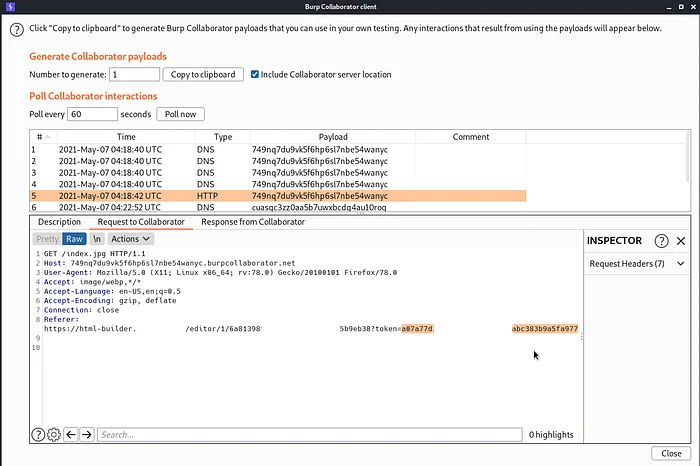
The researcher then supplied a Burp Collaborator link as the image URL to observe the request. The result was that the accessToken was leaked in the Referer header via the token parameter.
Step 4: the attack scenario
- The victim is creating a manual template.
- The victim adds an image to the template from a third-party website.
- The owner of that third-party website, or its employees, receives the victim's access token in their logs and can take over the victim's complete account.
Step 5: report and response
The researcher built a proof of concept and sent it to the vendor. After one week the vendor replied:

The timeline given is:
| Date | Event |
|---|---|
| 06/05/21 | Vulnerability reported |
| 14/05/21 | Vendor replied with the bounty email |
Root cause
The application uses a static accessToken header value as the credential for authenticated actions, and that value is not rotated on logout. The token was leaked in the Referer header via the token parameter when the client fetched a remote image. Any party controlling that host sees the token in its logs and can replay it. The existing defences did not help: file type validation blocked upload tricks, and client-side fetching removed the SSRF angle, but neither addresses credential leakage through the Referer header. The report does not describe any server-side check that would have prevented the token from being sent to a third party.
Impact
An attacker who controls a third-party image host, or who can read its logs, obtains the victim's accessToken whenever the victim adds an image from that host to a template. With the token, the attacker can take over the victim's complete account, and the token's value does not change on logout. The attack requires the victim to add an image from an attacker-controlled or attacker-observable third-party site to a template; the report does not describe any other precondition.
Fix
Based on the described behaviour, the token should not be carried in a URL parameter that can appear in the Referer header, and the static token should be rotated on logout so a leaked value stops working.
Variants to test
- Token in URL parameters on other features. Look for authenticated actions that pass a token in a query string, then trigger a request to an external host from that page. A positive result is the token appearing in the
Refererheader in the external host's logs. - Static tokens that survive logout. Capture a token, log out, and replay it. A positive result is the token still being accepted after logout.
- Alternate authentication headers. Try adding a token header observed on one endpoint to other authenticated endpoints. A positive result is the header being accepted where it was not intended.
- Client-side image fetching. Supply a Collaborator or attacker-controlled URL as an image source in any feature that fetches remote images. A positive result is an outbound request carrying credentials or other sensitive data.
What happened, in plain words
A security researcher was testing a website that helps companies run marketing campaigns automatically. Let's call it target.com. While using the site like a normal customer, he noticed that one particular request, the one that saves your profile details, carried a special password-like value in a header called accessToken. That value was not guessable, but it never changed, not even after logging out. If someone could get hold of it, they could act as the account owner, and the value does not change on logout.
The researcher then found a way to make the victim's own browser hand that value to a stranger. The site has an email template builder where you can add an image by pasting a link to an image hosted somewhere else. When the browser fetched that image, the accessToken leaked in the Referer header via the token parameter, which the owner of the image host can read in their server logs. With that token, the image host owner can take over the victim's account.
He reported it, and the company replied with a bounty email a week later.
The pieces you need to know first
Before walking through the steps, here are the ideas the report relies on, explained from scratch.
- A website and its API. When you use a modern website, your browser often does not load a whole new page for every click. Instead, small programs running in the page send messages to the server in the background and update the screen with the answer. Those messages go to an API (Application Programming Interface), which is just a set of addresses on the server that accept specific kinds of messages. Think of a restaurant: the menu is the API, the kitchen is the server, and the waiter carrying your order back and forth is the browser. The address of each dish on the menu is an endpoint, for example
/api/account/general-info/. - HTTP requests and methods. Each message to the server is an HTTP request. It has a method that says what kind of action it is:
GETasks for something,POSTcreates something,PUTreplaces something. It also has a path (the endpoint), headers (small labelled pieces of information attached to the request), and sometimes a body (the actual data being sent). - Headers. Headers are like the label on a parcel: they tell the server who is sending it, what format the contents are in, and so on.
Hostsays which site the request is for,Content-Typesays the body is JSON,User-Agentsays which browser is asking,Referersays which page the request came from, andOriginsays which site the request was started from. Custom headers, likeaccessTokenhere, are invented by the site's developers for their own purposes. - JSON. A simple text format for structured data, using curly braces and quoted names.
{"company":"DSPH"}means "the field called company has the value DSPH". It is how the browser and server exchange the profile details in this report. - Authentication and tokens. When you log in, the server needs a way to recognise you on every later request. One common way is a session cookie, a small value the browser stores and sends automatically. Another way is a token: a long random string the site gives you, which you must attach to each request yourself. A token is like a cloakroom ticket: whoever holds the ticket gets the coat, no questions asked. That is why it is called a bearer credential: possession is enough.
- Static versus rotating tokens. A good token changes when you log out, so a stolen one stops working. A static token stays the same forever, so a stolen one keeps working.
- The
Refererheader. When your browser loads something from another site (an image, a script, a font), it usually tells that other site which page you were on, in theRefererheader. This is meant to help sites understand where their traffic comes from, but it also means anything in the address of the page you came from can end up in a stranger's logs. - URL parameters. The part of a web address after a question mark, like
?token=abc, is a set of parameters. They are visible in the address bar and in logs, and they travel with theRefererheader. - Burp Suite and Burp Collaborator. Burp Suite is a tool that sits between your browser and the server so you can read and edit every request before it is sent. Burp Collaborator is a companion service that gives you a unique web address you control; if you make the target site contact that address, you can see the incoming request on Collaborator's side, including its headers. It is a way of watching what a server or browser sends to the outside world.
- The vulnerability classes mentioned. XSS (cross-site scripting) means getting your own code to run inside someone else's page. SSRF (server-side request forgery) means tricking the server into making a request to an address of your choosing. DoS (denial of service) means making a service unavailable. File upload tricks means trying to sneak a dangerous file past the checks that decide what kind of file is allowed.
- Account takeover. The end result here: an attacker gains full control of someone else's account, as if they had the password.
The target and the two features
The target was a marketing automation website: a service where a company sets up marketing campaigns, emails and templates, and the platform runs them. The researcher had already found more than 10 bugs on this target before this one, so he knew the site well.
Two features matter for this story:
- Profile update. A logged-in user can change their account details: company name, website domain, phone number, company size, business sector, and a logo.
- Email template builder. Under email marketing, users create their own email templates. Inside a template they can add an image in two ways: upload it from their own device, or paste a link to an image hosted elsewhere (an image URL).
He tested with two accounts of his own: a main account and a second account. The second account is the trick used throughout: if you can make account A's request change account B's data, you have proven that the credential, not the login session, decides whose data is touched.
Finding it: the profile update request
While testing the profile update feature, he captured this request:
PUT /api/account/general-info/ HTTP/1.1Host: services.target.comUser-Agent: Mozilla/5.0 (Windows NT 10.0; Win64; x64; rv:91.0) Gecko/20100101 Firefox/91.0Accept: application/json, text/plain, */*Accept-Language: en-US,en;q=0.5Accept-Encoding: gzip, deflateReferer: https://bo.target.com/Content-Type: application/jsonaccessToken: [redacted]-Length: 213Origin: https://bo.target.comDNT: 1Connection: closeSec-Fetch-Dest: emptySec-Fetch-Mode: corsSec-Fetch-Site: cross-site{"company":"DSPH","domain":"https://darksocietypenetration.com","cellphone":"+91-83xxxxxx36","companySize":"2","businessSector":20,"logo":{"height":0,"base64":"","square":true,"width":0}}
Line by line, in plain words:
PUT /api/account/general-info/ HTTP/1.1says: replace the general account information at this endpoint, using version 1.1 of the HTTP protocol.PUTis the "replace this record" method.Host: services.target.comsays which server the request is addressed to. Notice it is aservices.subdomain, not the main site.User-Agent: ...Firefox/91.0...says the request came from Firefox 91 on Windows. This is just the browser identifying itself.Accept: application/json, text/plain, */*says the browser is happy to receive JSON, plain text, or anything else.Accept-LanguageandAccept-Encodingsay which languages and compression formats the browser understands.Referer: https://bo.target.com/says the request was made from a page onbo.target.com. Thebo.prefix suggests a back-office or admin interface.Content-Type: application/jsonsays the body is JSON.accessToken: [redacted]is the interesting one. This is the credential for the action. The middle is masked in the write-up, but the shape shows a long random string.Content-Length: 213says the body is 213 bytes long.Origin: https://bo.target.comsays the request was started from that site. Browsers add this automatically for cross-site requests.DNT: 1is the old "do not track" preference.Connection: closesays to close the connection after this request.- The
Sec-Fetch-*headers are added by modern browsers to describe what kind of request this is: an empty destination, a cross-site origin, and so on. - The body is the JSON with the new profile values: company
DSPH, domainhttps://darksocietypenetration.com, a masked phone number, company size2, business sector20, and a logo object with height, base64 data, square flag and width.
The key observation: this action is authenticated by the accessToken header, not by the usual session mechanism. The researcher also noted that other authenticated actions on the site do not use this header at all. That is unusual, and unusual is worth testing.
Two properties that turn a header into a master key
He then did two simple experiments.
First, swap the token. He replaced the accessToken value with the token belonging to his second account, and the second account's details were changed. He also added the accessToken header to other authenticated requests, and those succeeded too, again changing the second account's details. This showed that the header value decided whose details were changed.
Second, log out and check. The value of accessToken is static: it stays the same even after logout. So a leaked token keeps the same value when the victim signs out.
The token itself is non-guessable, so brute force is out. The only remaining question was: how do you get a victim's token? At that point he could not, and after three or four days of hunting he moved on to other parts of the site.
Getting the victim's accessToken
Then he came back to the email template builder. Under email marketing, users can create their own templates and add an image either from their device or via an image URL. He tried DoS, SSRF, XSS and file upload tricks against this feature. None worked: file type validation was strong, and because the image is fetched from the client side (the browser, not the server), SSRF was not possible either. The server never makes the outbound request, so there is nothing to forge.
So he tried a different angle: he put a Burp Collaborator link in as the image URL, just to watch what request the browser would make. That is when he noticed something interesting:
The accessToken was being leaked in the Referer header, via the token parameter. In other words, the accessToken was leaked in the Referer header via the token parameter when the browser fetched the remote image.
Why does this happen? Because the Referer header is sent automatically by the browser on most cross-site requests, and it includes the full address of the page you came from, including its parameters. The image host does not need to do anything clever. It just needs to write down the requests it receives, which every web server does by default.
The attack scenario
Putting it together, the attack needs three things to line up:
- The victim is creating a manual template.
- The victim adds an image to the template from a third-party website.
- The owner of that third-party website, or its employees, receives the victim's access token in their logs, and can take over the victim's complete account.
Notice what the attacker does not need: no password, no phishing page, no malware. Just a website that hosts an image, and a victim who pastes its link into a template. The token does the rest, and its value does not change when the victim logs out.
The response
He built a proof of concept and sent it to the vendor. After one week, they replied:
The timeline:
| Date | Event |
|---|---|
| 06/05/21 | Vulnerability reported |
| 14/05/21 | Vendor replied with the bounty email |
Why it worked, and what would have stopped it
The root cause is a combination of small decisions that each looked harmless:
- The site used a static
accessTokenheader as the credential for authenticated actions. - That token was not rotated on logout, so a leaked value stayed valid.
- The token was leaked in the
Refererheader via a parameter calledtoken. - The page then made the browser fetch a remote image, and the
accessTokenleaked in theRefererheader via thetokenparameter to the third party.
The existing defences did not help. File type validation blocked upload tricks. Client-side fetching removed the SSRF angle. Neither of those addresses credential leakage through the Referer header. The report does not describe any server-side check that would have stopped the token from being sent to a third party.
The fix follows from the cause: do not carry the token in a URL parameter that can appear in the Referer header, and rotate the static token on logout so a leaked value stops working. The report does not say what the vendor actually changed.
What to look for on other sites
If you want to practise this kind of thinking on sites you are allowed to test, here are the patterns to watch for:
- Tokens in URL parameters. Look for authenticated actions that put a token in a query string, then trigger a request to an external host from that page. A positive result is the token appearing in the
Refererheader in the external host's logs. - Static tokens that survive logout. Capture a token, log out, and replay it. A positive result is the token still being accepted after logout.
- Alternate authentication headers. Try adding a token header you saw on one endpoint to other authenticated endpoints. A positive result is the header being accepted where it was not intended.
- Client-side image fetching. Supply a Collaborator or attacker-controlled URL as an image source in any feature that fetches remote images. A positive result is an outbound request carrying credentials or other sensitive data.
Glossary
- API: the set of addresses on a server that a website's pages send messages to, so the page can read and change data without reloading.
- Endpoint: one specific address in an API, such as
/api/account/general-info/. - HTTP request: a message from a browser (or tool) to a server, made of a method, a path, headers and sometimes a body.
- HTTP method: the verb of a request.
GETreads,POSTcreates,PUTreplaces. - Header: a labelled piece of information attached to a request or response, such as
HostorContent-Type. - Body: the actual data carried by a request, here a JSON object with the new profile values.
- JSON: a text format for structured data using curly braces and quoted field names.
- Session cookie: a small value the browser stores after login and sends automatically with each request, so the server knows who you are.
- Token: a long random string used as a credential. Whoever holds it is treated as the account owner.
- Bearer credential: a credential where possession alone is enough, like a cloakroom ticket.
- Static token: a token whose value never changes, including after logout.
- Token rotation: replacing a token with a new value at a defined moment, such as logout, so old copies stop working.
accessTokenheader: the custom header this site used to authenticate the profile update action.Refererheader: a header the browser sends to tell a site which page the request came from. It can include URL parameters.- URL parameter: the part of an address after a question mark, like
?token=abc. - Burp Suite: a tool that sits between browser and server so requests can be read, edited and replayed.
- Burp Collaborator: a service that gives you a unique address you control, so you can see requests sent to it from elsewhere.
- Proof of concept (POC): a small, repeatable demonstration that a vulnerability is real.
- XSS (cross-site scripting): getting your own code to run inside someone else's page.
- SSRF (server-side request forgery): tricking the server into making a request to an address of your choosing.
- DoS (denial of service): making a service unavailable to its users.
- File upload tricks: attempts to sneak a dangerous file past the checks that decide which file types are allowed.
- Client-side fetching: the browser, not the server, makes the outbound request. This is why SSRF was not possible here.
- Account takeover: gaining full control of someone else's account, as if you had their password.
- Bug bounty: a programme where a company pays researchers for reporting vulnerabilities responsibly.



