Account Takeover via CSRF | by Hacking articles | Infosec Writeups
The application lacked a CSRF token when updating account details, allowing an attacker to change a victim's email address. The attacker could then use the forgot password feature to reset the password and take over the account.

infosecwriteups.com
Published on infosecwriteups.com
Csrf
The full write-up lives on its author's site
It belongs to its author, so we link to it rather than copy it. The other two tabs are our own rewrites, checked against it.
Context
This is a write-up of a cross-site request forgery (CSRF) flaw that led to account takeover on a responsible disclosure program the author found through a Google dork. The report does not name the target, the product or the specific feature beyond the fact that it involved updating a record in an account. What it does say is that the record update endpoint had no CSRF token, so a request that changed account details could be forged from another site.
The author opens with a short definition of the class of bug: CSRF is a web application attack where an attacker tricks or forces the client into presenting a malicious request that the client did not intend to make. Put simply, if a server does not validate that a request genuinely came from the client, an attacker can craft a malicious request and get the client to trigger it, resulting in changes to the user's account such as the password or email address.
Setup
The report describes a minimal setup. The author created an account as an attacker, filled in all the fields of the form, and checked the information in the Account Detail view. No specific tools, versions or browser details are given. The precondition for the attack is that a victim is logged in to the application while the attacker's forged request is delivered to them.
Finding it
While looking at the account detail update flow, the author noticed that there was no CSRF token present when updating the record. That absence is what made the endpoint look wrong: a state-changing request that carries no anti-CSRF token can be replayed from a page the attacker controls, as long as the victim's browser attaches their session automatically.
Exploitation
Step 1: Create an attacker account
The author registers an account as the attacker, fills in all the form fields, and confirms the data in the Account Detail view. This establishes a baseline of what a normal update request looks like.
Step 2: Change the email and capture the request
The author changes the email address on the account and captures the resulting request. From that captured request a CSRF exploit is built. The report does not reproduce the raw captured request, only the resulting exploit page.
Step 3: Build the CSRF exploit
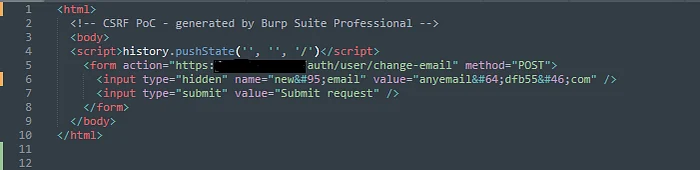
The exploit page is shown below. In it the author replaced the email value with anyemail@*******.com and then submitted the request in the victim's account.
Step 4: Forward the request
The author forwards the request and the exploit works. By this means the author changed the email on the account, then used the forgot password method to have the password reset link delivered to that email. With the reset link in hand, the author had full control over the victim's account.
Root cause
The mistake is the one the author states directly: the record update endpoint had no CSRF token, so the server did not verify that the request originated from the application itself. Because the browser sends the victim's session with any request to the site, a forged request from an attacker-controlled page is indistinguishable from a legitimate one. The report does not describe any other defence, such as origin checking or a custom header requirement, so it is likely that none was in place on that endpoint.
Impact
An attacker who can get a logged-in victim to load the exploit page can change the email address on the victim's account. Combined with the forgot password flow, that change lets the attacker receive the password reset link and take over the account. The attack depends on the victim being authenticated at the time and on the victim's browser issuing the forged request; the report does not discuss any further conditions.
Fix
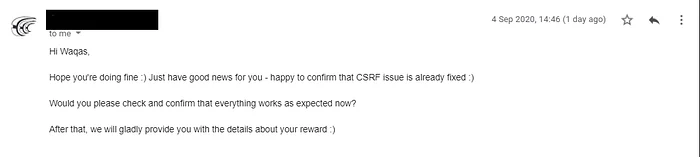
The report records the timeline rather than the code change. The report was submitted on Mon, 1 Jun 2020, and the fix was confirmed on Sep 4, 2020. The author does not state what was changed. The natural remediation for this class of bug is to require and validate an anti-CSRF token on the record update endpoint, and to reject state-changing requests that do not carry it.
Variants to test
- Other account update endpoints. Try changing the email, password, display name or recovery settings and check whether each request carries a token. A positive result is a state-changing request that succeeds when replayed from a page on another origin.
- Forgot password and reset flows. Check whether the reset request itself can be forged. A positive result is a reset email being sent to an address the attacker controls without the victim's intent.
- Token present but not validated. Submit the request with the token removed or with a token from a different session. A positive result is the server accepting the request anyway.
- Token tied to the wrong scope. Reuse a valid token from one account against another account's request. A positive result is the update being applied to the second account.
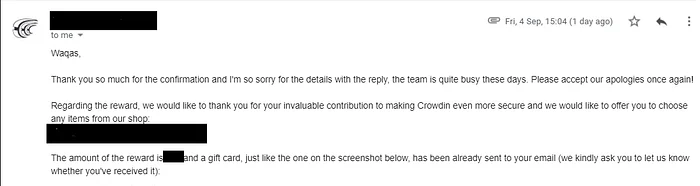
Finally, the author notes that a gift card was awarded for the report.
I still have to learn a lot and this motivated me to keep continuing the journey. Hope you find this useful, I tried my best to explain. Please share so that others can learn from it.
Thank You.
What happened, in plain words
A security researcher found a website that let people create accounts and change the details on those accounts, such as the email address. The site had a bug: when you changed a detail on your account, the site did not check that the request really came from you. It accepted the change from anyone who asked, as long as the request arrived with your logged-in session attached.
That kind of bug is called cross-site request forgery, or CSRF. Because of it, the researcher could make a page that, when a logged-in victim opened it, quietly asked the site to change the email address on the account. The researcher then used the site's "forgot password" feature, which sends a password reset link to whatever email address is on the account. The researcher used the forgot password method to retrieve the password reset link to their email and had full control over the victim's account.
The researcher found the site through a Google dork, which is a search query crafted to surface pages that were not meant to be found easily. The report does not name the site or the product. It was a responsible disclosure program, meaning a place where researchers can report bugs to the owner instead of using them for harm. The report was submitted on Mon, 1 Jun 2020 and the fix was confirmed on Sep 4, 2020. A gift card was awarded for the report.
The idea behind the bug
The researcher starts with a short explanation of CSRF: it is a web application attack where an attacker tricks or forces the client into presenting a malicious request that the client did not intend to make. In simpler words, if a server does not check that a request genuinely came from its own pages, an attacker can build a malicious request and get the victim's browser to send it. The result can be a change to the victim's account, such as a new password or a new email address.
To follow this, you need three ideas:
- A web application is a website that does more than show text: you log in, fill in forms, and it stores things for you. Think of it as a shop counter where the assistant recognises you by a stamp on your hand.
- A session is that stamp. When you log in, the server gives your browser a small piece of data, usually stored in a cookie, and your browser sends it back with every request to that site. The server uses it to know which account the request belongs to. You never see this happen; it is automatic.
- A request is what your browser sends when you click a button or submit a form. It is a short message to the server saying what you want, for example "change the email on my account to this new address".
The danger is that the browser attaches your session cookie to requests automatically, even when the request was triggered by a page on a completely different site. If the server only looks at the cookie and never asks "did this request really come from my own pages?", then a page controlled by an attacker can make your browser send a request you never intended.
A common defence is a CSRF token: a random value that the site puts into each form and checks when the form is submitted. A page on another site cannot know that value, so it cannot produce a valid request. The site in this report had no such token on the record update, which is what made the attack possible.
Setting up
The setup was minimal. The researcher created an account as the attacker, filled in all the fields of the form, and checked the information in the Account Detail view. No specific tools, versions or browser details are given in the report.
Why do this? Because you first need to see what a normal, honest request looks like before you can tell what is missing from it. Filling in the form and looking at the result gives you a baseline. The other precondition is that a victim must be logged in to the application at the moment the attacker's forged request reaches them. Without a live session, the server has no account to apply the change to.
Finding it
While looking at the account detail update flow, the researcher noticed that there was no CSRF token present when updating the record. That absence is what made the endpoint look wrong.
An endpoint is simply a specific address on the server that does a specific job, like a particular counter in a large office. One endpoint shows your account details, another saves changes to them. A state-changing request is one that alters something, as opposed to just reading it. A state-changing request with no anti-CSRF token can be replayed from a page the attacker controls, as long as the victim's browser attaches their session automatically. That is the whole bug in one sentence.
Exploitation
Step 1: Create an attacker account
The researcher registers an account as the attacker, fills in all the form fields, and confirms the data in the Account Detail view. This establishes a baseline of what a normal update request looks like. You cannot spot an abnormal request until you have seen a normal one.
Step 2: Change the email and capture the request
The researcher changes the email address on the account and captures the resulting request. From that captured request a CSRF exploit is built. The report does not reproduce the raw captured request, only the resulting exploit page.
Capturing a request means watching the message your browser sends to the server, so you can see exactly what it contains and then rebuild it yourself. The reason to change the email specifically is that email is the key to the forgot password feature: whoever controls the email on the account can receive the reset link.
Step 3: Build the CSRF exploit
The exploit page is shown below. In it the researcher replaced the email value with anyemail@*******.com and then submitted the request in the victim's account.
An exploit page is a page the attacker hosts. It looks harmless, but it contains a form or a script that sends the captured request to the target site. When a logged-in victim opens it, their browser sends the request with their session attached, and the server cannot tell it apart from a request the victim made themselves. The email value in the request was replaced with anyemail@*******.com.
Step 4: Forward the request
The researcher forwards the request and the exploit works. By this means the researcher changed the email on the account to the victim's email address, then used the forgot password method to have the password reset link delivered to that email. With the reset link in hand, the researcher had full control over the victim's account.
Forwarding here means letting the forged request go through to the server. The forgot password feature is a normal, helpful feature: you type your email, the site sends a link to it, and the link lets you set a new password. It becomes dangerous when the email on the account has already been changed by someone else, because the link then goes to that someone else. That is the chain: change the email, request a reset, receive the link, set a new password, own the account.
Why it worked
The mistake is the one the researcher states directly: the record update endpoint had no CSRF token, so the server did not verify that the request originated from the application itself. Because the browser sends the victim's session with any request to the site, a forged request from an attacker-controlled page is indistinguishable from a legitimate one. The report does not describe any other defence, such as origin checking or a custom header requirement, so it is likely that none was in place on that endpoint.
Origin checking means the server looks at which site the request came from and refuses requests from other sites. A custom header requirement means the server insists on a header that a cross-site form cannot set. Either would have blocked this attack. Neither is mentioned.
What the impact was
An attacker who can get a logged-in victim to load the exploit page can change the email address on the victim's account. Combined with the forgot password flow, that change lets the attacker receive the password reset link and take over the account. The attack depends on the victim being authenticated at the time and on the victim's browser issuing the forged request. The report does not discuss any further conditions.
Account takeover is the serious part. Once the attacker controls the email and the password, they have full control over the account.
The fix and the timeline
The report records the timeline rather than the code change.
The natural remediation for this class of bug is to require and validate an anti-CSRF token on the record update endpoint, and to reject state-changing requests that do not carry it. In plain terms: put a random value in the form, check it on the server, and refuse anything that does not match.
Other places to look
- Other account update endpoints. Try changing the email, password, display name or recovery settings and check whether each request carries a token. A positive result is a state-changing request that succeeds when replayed from a page on another origin.
- Forgot password and reset flows. Check whether the reset request itself can be forged. A positive result is a reset email being sent to an address the attacker controls without the victim's intent.
- Token present but not validated. Submit the request with the token removed or with a token from a different session. A positive result is the server accepting the request anyway.
- Token tied to the wrong scope. Reuse a valid token from one account against another account's request. A positive result is the update being applied to the second account.
These are variations on the same question: does the server actually check that the request came from where it claims? Each test changes one thing and watches whether the server still says yes.
Finally, the researcher notes that a gift card was awarded for the report.
I still have to learn a lot and this motivated me to keep continuing the journey. Hope you find this useful, I tried my best to explain. Please share so that others can learn from it.
Thank You.
Glossary
- Web application: a website you can log in to and interact with, which stores data for you, rather than a page that only displays text.
- Request: the message your browser sends to a server when you click, submit a form or load a page, saying what you want it to do.
- Endpoint: a specific address on a server that performs a specific job, such as showing account details or saving changes to them.
- State-changing request: a request that alters stored data, such as changing an email address, as opposed to one that only reads data.
- Session: the server's record of who you are after you log in, kept alive by a value your browser sends back on each request.
- Cookie: a small piece of data a site stores in your browser and your browser sends back automatically with requests to that site; often used to carry the session.
- CSRF (cross-site request forgery): an attack where a page on another site makes your browser send a request to a site you are logged in to, without your intent.
- CSRF token: a random value placed in a form and checked by the server, which a page on another site cannot know, so it cannot forge a valid request.
- Origin checking: a defence where the server looks at which site a request came from and refuses requests from other sites.
- Custom header requirement: a defence where the server insists on a header that a cross-site form cannot set, so forged requests are rejected.
- Google dork: a search query crafted to surface pages or programs that are not easy to find with ordinary searching.
- Responsible disclosure program: a channel where researchers report bugs to the owner of a system instead of exploiting them, so they can be fixed.
- Account takeover: gaining control of someone else's account, for example by changing its email and password so the real owner is locked out.
- Forgot password flow: the feature where you enter your email, the site sends a reset link to it, and the link lets you set a new password.
- Exploit page: a page the attacker hosts that sends a forged request to the target site when a logged-in victim opens it.
- Baseline: the record of what a normal, honest request looks like, used to spot what is missing or wrong in another request.
- Remediation: the change made to a system to close a vulnerability.

