Account Takeover via Response Manipulation worth 1800$..
The login and OTP verification responses were trusted by the client, so an attacker could change an error response into a success response to bypass the password check and then the OTP check, gaining access to any account.
 Published on ashutoshmishra00x0.medium.com
To People who don’t know me , I Ashutosh Mishra , 3rd Year Btech Computer Science Student, A cybersecurity Researcher by day and bug hunter by night,Mainly love to find Business logic bugs.
The full write-up lives on its author's site
It belongs to its author, so we link to it rather than copy it. The other two tabs are our own rewrites, checked against it.
Context
In early January 2021 I picked a target for a hunt. I started with Google dorking to find a bitcoin website, and ended up with three bitcoin websites to work on. After around five weeks I had found some low hanging fruit, but those reports were marked as duplicate. That was disappointing enough that I closed the laptop and went out with friends.
Two or three days later I got a private invite on Bugcrowd to hunt on a cryptocurrency website. I started the laptop, fired up Burp Suite and began exploring. In this write-up the website is referred to as redacted.io.
The feature at the centre of the report is the login flow. When you enter correct credentials, the site does not log you in directly: it redirects you to an OTP page, and a one-time code is sent to your phone number as multifactor authentication. The login endpoint answers with a JSON body that tells the front end what to do next.
Setup
- A private Bugcrowd programme for a cryptocurrency website, referred to as redacted.io.
- Burp Suite as the intercepting proxy.
- An account I registered myself, with a phone number that receives the OTP.
- A second email address, referred to in the report as the victim's address, used to show that the flow could be pointed at another user.
No versions of the site, framework or proxy are given in the report.
Finding it
I decided to test the login form and the authentication mechanism. I made an account, then tried to log in. With correct credentials the site redirects to the OTP page and sends the code to the registered phone number.
For reference I saved my own correct login response (password plus OTP), so that I could later compare it against other responses and understand the workflow.
Then I tried an incorrect login, intercepted the response, and compared it with the correct one. The two bodies differ in a very specific way.
Wrong password response:
<wrong_password_response>{token:91a1d5f4a8s5d1a2g1a5dfa15,”error”:”Please update the above field.”,”error_code”:”ErrFormFieldIncorrect”,”error_action”:{},”field_errors”:{“email”:”Password incorrect, please try again”}}
Correct password response:
<correct_password_response>{token:91a1d5f4a8s5d1a2g1a5dfa15,”next”:”OTP”,”otp_step”:{“heading”:”Check your email”,”description”:”Enter the 4-digit code we sent to \u003cb\****[redacted]****\u003c/b\u003e to signin”,”num_digits”:4,”error”:””,”popup_message”:”Code sent to****[redacted]****”,”can_request_sms”:false}}
The failed response carries an error with error_code set to ErrFormFieldIncorrect and a field_errors.email message saying the password is incorrect. The successful response instead carries next set to OTP and an otp_step object with the heading, the description containing the email address, num_digits set to 4, an empty error, a popup_message and can_request_sms set to false.
What stood out is that the client is told what to do next purely by fields in the response body. The server's decision about whether the password was right is expressed as data the browser then acts on. That made me want to try manipulating the response.
Exploitation
Step 1: turn a failed login into an OTP prompt
I took the wrong-password response and replaced it with the correct-password response, keeping the token as it was in the wrong response and putting the victim's email address in the body.
Note from the report: let the token be the same as whatever is present in the wrong response, and enter your victim email address.
The manipulated response:
{token:91a1d5f4a8s5d1a2g1a5dfa15,”next”:”OTP”,”otp_step”:{“heading”:”Check your email”,”description”:”Enter the 4-digit code we sent to \u003cb\****[redacted]****\u003c/b\u003e to signin”,”num_digits”:4,”error”:””,”popup_message”:”Code sent to****[redacted]****”,”can_request_sms”:false}}
As soon as I forwarded it, the website redirected me to the OTP page. The front end had accepted the injected next: OTP and the otp_step object and moved the browser on to the code entry screen, even though the password check on the server had failed.

The screenshot is captioned authentication bypassed and shows the OTP page reached this way.
Step 2: brute force is blocked
On the OTP page I tried to brute force the code. After several attempts the website blocked me for 24 hours. So the OTP itself was not trivially guessable within the allowed attempts, at least not from that session.
Step 3: manipulate the OTP verification response
The next day I applied the same trick I had used on the password step. I intercepted the OTP request and found a parameter in the body:
{“success”:”false”}
I changed false to true, and the site let me into the victim account.
The OTP request body carried a success parameter set to false, and changing it to true completed the login. Flipping it to true was enough to complete the login.
Root cause
The application makes authorisation decisions on the client side. The login response tells the browser whether to advance to the OTP step (next: OTP plus the otp_step object), and the OTP request body carried a success value the client acted on. In both cases the client acts on a value that the user can edit in transit, so the server's actual verdict is never enforced at the point where the session is established.
The report does not describe the server-side session handling, so this part is inferred.
The only defence that visibly worked was rate limiting: several wrong OTP attempts led to a 24 hour block. That defends the code space, not the response handling, so it did nothing against editing the response body.
Impact
An attacker who knows a victim's email address can reach the OTP screen without the password, and can then complete the login by editing the verification response, taking over the account. The precondition is the ability to intercept and modify their own traffic, which is normal for an attacker using a proxy. The report does not describe any additional precondition such as a leaked token or an existing session.
Fix
The fix that follows from the root cause is to stop letting the client decide: the server should keep the authentication state for the login attempt, advance to the OTP step only when the password check passed, and mark the session authenticated only after the OTP was verified server-side. The success value returned to the client should be a report of a decision already made and stored on the server, never the decision itself. The existing rate limit on OTP attempts should stay.
Variants to test
- Login step responses. Intercept the failed-login response and replace the error body with the success body, keeping the token and changing the email. A positive result is the client moving to the OTP or second-factor screen without a valid password.
- Verification booleans. Look for
success,verified,valid,okor similar fields in the body of OTP, email-code or security-question checks and flip them. A positive result is a session that reaches the authenticated area. - Status codes and redirects. Change a
401or403to200, or add or edit aLocationheader on the login response. A positive result is the client following the redirect into a protected page. - Role and step fields. Look for fields such as
next,step,mfa_requiredorrolein authentication responses and change them. A positive result is skipping a factor or landing in a higher-privileged view. - Server-side confirmation. After any successful manipulation, reload the protected page directly without the proxy rewriting anything. If the page still loads, the bypass is server-side and the impact is real; if it fails, only the client was fooled.
Timeline
| Event | Date |
|---|---|
| Bug reported | 5 January 2021 |
| Bug triaged | 8 January 2021 |
| Bounty rewarded | $1800 |
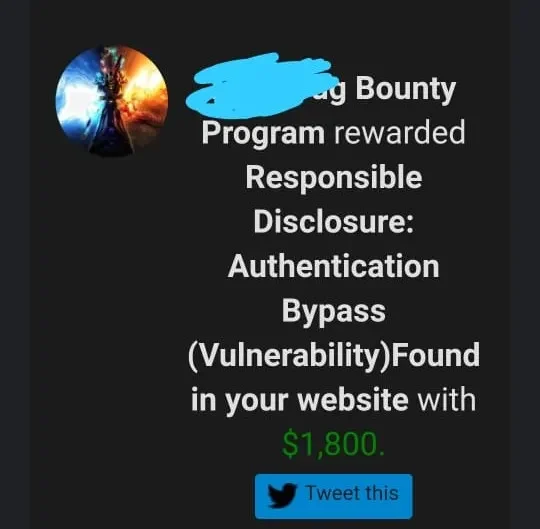
The final image is the proof section of the write-up.
My tip from this one: always understand the workflow of the website, and keep it very simple.
What happened, in plain words
A website let people log in with an email address and a password, and then asked for a short one-time code (an OTP) as a second check. The researcher found that editing the replies the server sent back made the browser page move on as if the password and the code were correct. By editing the replies the server sent back, he could make the page believe the password was right and the code was right, and so get into another person's account without knowing either. He reported it, the report was confirmed, and he was paid $1800.
This article walks through the same steps for someone who has never done security testing. You only need to be comfortable using a browser and a computer. Every technical word is explained where it first appears, and there is a glossary at the end.
The background
In early January 2021 the researcher was looking for a target to test. He used Google dorking, which means typing special search queries into Google to find pages that match a pattern (for example pages with particular words in the address or title), to look for a bitcoin website. He ended up with three bitcoin websites to work on. After around five weeks he had found some easy issues, but the reports were marked as duplicate, meaning someone else had already reported the same thing, so they did not count. That was disappointing enough that he closed the laptop and went out with friends.
Two or three days later he got a private invite on Bugcrowd, a bug bounty platform where companies invite researchers to test their systems and pay for valid findings, to hunt on a cryptocurrency website. He started the laptop, opened Burp Suite, and began exploring. Burp Suite is a tool that sits between your browser and a website and lets you see and change the traffic going in both directions. In the write-up the website is called redacted.io.
The feature at the centre of the report is the login flow. When you enter correct credentials, the site does not log you in directly: it redirects you to an OTP page, and a one-time code is sent to your phone number as multifactor authentication. Multifactor authentication means proving who you are with more than one thing, for example a password plus a code sent to your phone. The login endpoint, meaning the specific web address the browser sends the login details to, answers with a JSON body. JSON is a text format for structured data, made of names and values in curly braces, which programs can read easily. That body tells the front end, meaning the part of the website that runs in your browser, what to do next. The OTP step answers with a JSON body that says whether the code was accepted.
Setting up
- A private Bugcrowd programme for a cryptocurrency website, referred to as redacted.io.
- Burp Suite as the intercepting proxy. A proxy is a middleman: your browser sends its requests to the proxy, and the proxy forwards them to the website. Intercepting means the proxy pauses each request or response so you can read it and edit it before it continues.
- An account the researcher registered himself, with a phone number that receives the OTP.
- A second email address, referred to in the report as the victim's address, used to show that the flow could be pointed at another user.
The report gives no versions of the site, the framework or the proxy.
Finding it
The researcher decided to test the login form and the authentication mechanism. Authentication is the process of proving who you are when you log in. He made an account, then tried to log in. With correct credentials the site redirects to the OTP page and sends the code to the registered phone number.
For reference he saved his own correct login response (password plus OTP), so that he could later compare it against other responses and understand the workflow. A response is what the server sends back after your browser sends a request. Saving a known-good copy is like keeping the receipt from a successful purchase so you can compare it with a failed one later.
Then he tried an incorrect login, intercepted the response, and compared it with the correct one. The two bodies differ in a very specific way.
Wrong password response:
<wrong_password_response>{token:91a1d5f4a8s5d1a2g1a5dfa15,”error”:”Please update the above field.”,”error_code”:”ErrFormFieldIncorrect”,”error_action”:{},”field_errors”:{“email”:”Password incorrect, please try again”}}
Line by line, in plain words:
<wrong_password_response>is a label the researcher put in front of the body so the reader knows which case this is. It is not part of what the server sent.{ ... }are the curly braces that hold a JSON object, a collection of named values.token:91a1d5f4a8s5d1a2g1a5dfa15is a token: a short string the server gives the browser so it can recognise this login attempt later. Think of it as a claim ticket you get at a cloakroom; you show it again to collect your coat.”error”:”Please update the above field.”is a message telling the user something went wrong.”error_code”:”ErrFormFieldIncorrect”is a machine-readable label for the same problem, so the page can react without reading English text.”error_action”:{}is an empty object, meaning no extra action is attached.”field_errors”:{“email”:”Password incorrect, please try again”}nests another object inside: it says the problem is with the email field, and the message is that the password is incorrect.
Correct password response:
<correct_password_response>{token:91a1d5f4a8s5d1a2g1a5dfa15,”next”:”OTP”,”otp_step”:{“heading”:”Check your email”,”description”:”Enter the 4-digit code we sent to \u003cb\****[redacted]****\u003c/b\u003e to signin”,”num_digits”:4,”error”:””,”popup_message”:”Code sent to****[redacted]****”,”can_request_sms”:false}}
Line by line:
<correct_password_response>is again the researcher's label, not part of the server's data.token:91a1d5f4a8s5d1a2g1a5dfa15is the same kind of claim ticket as before.”next”:”OTP”tells the browser what the next screen should be: the OTP screen.”otp_step”:{ ... }is a nested object holding everything the OTP screen needs.”heading”:”Check your email”is the title to show on that screen.”description”:”Enter the 4-digit code we sent to \u003cb\****[redacted]****\u003c/b\u003e to signin”is the instruction text. The\u003cb\u003eand\u003c/b\u003eare escaped angle brackets, which is how JSON writes the HTML tags for bold text without breaking the format. The email address is partly masked with asterisks in the report.”num_digits”:4says the code has four digits.”error”:””is an empty error, meaning no error to show.”popup_message”:”Code sent to****[redacted]****”is the text for a pop-up telling the user where the code went.”can_request_sms”:falsesays the user cannot ask for the code by SMS in this step.
What stood out is that the client is told what to do next purely by fields in the response body. The server's decision about whether the password was right is expressed as data the browser then acts on. That made him want to try manipulating the response. Manipulating here means editing the data in the proxy before it reaches the browser.
Exploitation
Step 1: turn a failed login into an OTP prompt
He took the wrong-password response and replaced it with the correct-password response, keeping the token as it was in the wrong response and putting the victim's email address in the body.
Note from the report: let the token be the same as whatever is present in the wrong response, and enter your victim email address.
The manipulated response:
{token:91a1d5f4a8s5d1a2g1a5dfa15,”next”:”OTP”,”otp_step”:{“heading”:”Check your email”,”description”:”Enter the 4-digit code we sent to \u003cb\****[redacted]****\u003c/b\u003e to signin”,”num_digits”:4,”error”:””,”popup_message”:”Code sent to****[redacted]****”,”can_request_sms”:false}}
Line by line:
- The outer braces still hold one JSON object.
token:91a1d5f4a8s5d1a2g1a5dfa15is the token from the failed attempt, kept unchanged as the report instructs.”next”:”OTP”is the field that was added: it tells the browser to move to the OTP screen.”otp_step”:{ ... }is the block of data for that screen, copied from the successful response.”heading”:”Check your email”is the title the OTP screen will show.”description”:”Enter the 4-digit code we sent to \u003cb\****[redacted]****\u003c/b\u003e to signin”is the instruction, now naming the victim's address.”num_digits”:4says four digits.”error”:””is empty, so no error is displayed.”popup_message”:”Code sent to****[redacted]****”is the pop-up text.”can_request_sms”:falsesays SMS is not offered at this step.
As soon as he forwarded it, the website redirected him to the OTP page. Forwarding means letting the proxy send the edited response on to the browser. The front end had accepted the injected next: OTP and the otp_step object and moved the browser on to the code entry screen, even though the password check on the server had failed.
The screenshot is captioned authentication bypassed and shows the OTP page reached this way.
Step 2: brute force is blocked
On the OTP page he tried to brute force the code. Brute forcing means trying many possible values in the hope that one is right; with four digits there are only ten thousand possibilities, so a computer can try them quickly. After several attempts the website blocked him for 24 hours. So the OTP itself was not trivially guessable within the allowed attempts, at least not from that session. A session is the period during which the site remembers who you are, usually tied to a cookie or token.
Step 3: manipulate the OTP verification response
The next day he applied the same trick he had used on the password step. He intercepted the OTP request and found a parameter in the body. A parameter is simply a named value sent along with a request.
{“success”:”false”}
Line by line:
- The curly braces hold one JSON object.
”success”is the name of the value.”false”is the value, written as text inside quotes, meaning the check did not pass.
He changed false to true, and the site let him into the victim account.
The OTP request body carried a success parameter set to false, and changing it to true completed the login. A boolean is a value that can only be true or false. Flipping it to true was enough to complete the login.
Why it worked
The application makes authorisation decisions on the client side. Authorisation is the decision about what you are allowed to do, as opposed to authentication, which is about who you are. The login response tells the browser whether to advance to the OTP step (next: OTP plus the otp_step object), and the OTP request body carried a success value the client acted on. In both cases the client acts on a value that the user can edit in transit, meaning while the data is travelling between browser and server. So the server's actual verdict is never enforced at the point where the session is established.
The report does not describe the server-side session handling, so this part is inferred.
The only defence that visibly worked was rate limiting: several wrong OTP attempts led to a 24 hour block. Rate limiting means capping how many attempts are allowed in a period. That defends the code space, meaning it makes guessing the four digits impractical, but it does nothing against editing the response body.
What an attacker could do
An attacker who knows a victim's email address can reach the OTP screen without the password, and can then complete the login by editing the verification response, taking over the account. The precondition is the ability to intercept and modify their own traffic, which is normal for an attacker using a proxy. The report does not describe any additional precondition such as a leaked token or an existing session.
How to fix it
The fix that follows from the root cause is to stop letting the client decide: the server should keep the authentication state for the login attempt, advance to the OTP step only when the password check passed, and mark the session authenticated only after the OTP was verified server-side. The success value returned to the client should be a report of a decision already made and stored on the server, never the decision itself. The existing rate limit on OTP attempts should stay.
Other places to look
- Login step responses. Intercept the failed-login response and replace the error body with the success body, keeping the token and changing the email. A positive result is the client moving to the OTP or second-factor screen without a valid password.
- Verification booleans. Look for
success,verified,valid,okor similar fields in the body of OTP, email-code or security-question checks and flip them. A positive result is a session that reaches the authenticated area. - Status codes and redirects. Change a
401or403to200, or add or edit aLocationheader on the login response. A status code is the three-digit number a server sends to say how a request went;401and403mean not allowed,200means fine. ALocationheader is the instruction telling the browser where to go next. A positive result is the client following the redirect into a protected page. - Role and step fields. Look for fields such as
next,step,mfa_requiredorrolein authentication responses and change them. A positive result is skipping a factor or landing in a higher-privileged view. - Server-side confirmation. After any successful manipulation, reload the protected page directly without the proxy rewriting anything. If the page still loads, the bypass is server-side and the impact is real; if it fails, only the client was fooled.
Timeline
| Event | Date |
|---|---|
| Bug reported | 5 January 2021 |
| Bug triaged | 8 January 2021 |
| Bounty rewarded | $1800 |
The final image is the proof section of the write-up.
My tip from this one: always understand the workflow of the website, and keep it very simple.
Glossary
- API: the set of addresses and rules a program uses to talk to another program, here the login and OTP endpoints the browser calls.
- Authentication: proving who you are, for example with a password.
- Authorisation: deciding what you are allowed to do once you are known.
- Boolean: a value that is either true or false.
- Brute force: trying many possible values until one works.
- Bug bounty: a programme that pays people for reporting security problems.
- Bugcrowd: a platform that runs bug bounty programmes.
- Burp Suite: a tool that sits between browser and website so you can read and edit traffic.
- Client side: work done in the browser, on the user's machine.
- Cookie: a small piece of data a site stores in your browser to remember you.
- Credentials: the details you log in with, such as email and password.
- Duplicate: a report for a problem someone else already reported.
- Endpoint: a specific web address that a program sends requests to.
- Escaped characters: special codes in text, such as
\u003cfor a less-than sign, used so the text does not break the format. - Forward: in a proxy, to send the edited request or response on to its destination.
- Front end: the part of a website that runs in your browser.
- Google dorking: using special search queries to find pages matching a pattern.
- Header: extra information attached to a request or response, such as where to redirect.
- HTML: the language that describes the structure of a web page, including bold text.
- Intercept: pause traffic in a proxy so you can read or change it.
- JSON: a text format for structured data made of names and values.
- Location header: the part of a response that tells the browser where to go next.
- Multifactor authentication: proving who you are with more than one thing, such as a password plus a code.
- OTP: one-time password, a short code valid for a single login.
- Parameter: a named value sent with a request.
- Proxy: a middleman that forwards traffic between your browser and a website.
- Rate limiting: capping how many attempts are allowed in a period.
- Redirect: an instruction to the browser to go to a different page.
- Request: what the browser sends to a server.
- Response: what the server sends back.
- Session: the period during which a site remembers who you are.
- Status code: the three-digit number a server sends to say how a request went.
- Token: a short string the server gives the browser so it can recognise a login attempt or session.
- Workflow: the sequence of steps a feature goes through, here password then OTP.



