Alternative link
The login page for an admin panel sent credentials in a Base64-encoded Authorization header, and the backend inserted the decoded username and password directly into a SQL query. An attacker could inject SQL through that header to bypass authentication and log in as an administrator.

medium.com
Published on medium.com
Bug Bounty
The full write-up lives on its author's site
It belongs to its author, so we link to it rather than copy it. The other two tabs are our own rewrites, checked against it.
Context
The target is a private bug bounty program whose identity the author does not reveal, in line with the company policy. The application runs on PHP, which the author noticed with the Wappalyzer plugin. The feature at the centre of the write-up is the login flow of an admin area: the site exposes an admin page, and inside it an events page that presents a login form with two ways to sign in, one for an author and one for the super admin. Authentication is carried in an Authorization header rather than in a POST body or JSON payload.
The author opens with a short explanation of what an authorization token is: the server generates and signs it, uses it to verify users by unique tokens, and after a successful login sends it to the client, where developers often keep it in local storage or session storage. Modern sites frequently use JWT for this, but not every authorization token is a JWT; it depends on the backend and the framework.
Setup
The author describes himself as a seasonal rather than a regular bug bounty hunter. He found the program through Google dorks while looking for private programs and picked one at random. No subdomain enumeration or other dorking was done: he started directly on the main target. The tools used were Burp Suite (proxy, Repeater and the decoder), Dirsearch for directory brute-forcing, Wappalyzer for fingerprinting, and sqlmap, which was tried but did not end up being the path to exploitation. No account was provisioned in advance; the two login roles, author and super admin, are simply the two links offered by the login page.
Finding it
The initial recon followed the author's usual routine: directory brute-forcing and checking robots.txt early. Dirsearch turned up nothing interesting apart from an admin page. Requesting the admin page directly returned an error:
The response was 403 Forbidden.
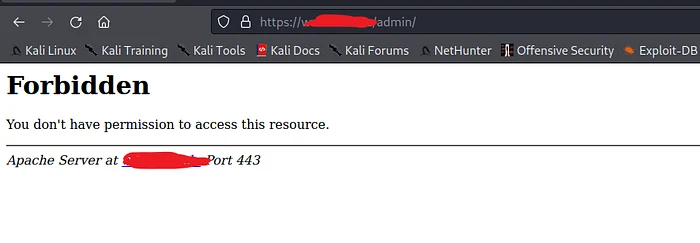
Rather than stopping there, he fuzzed inside the admin directory with Dirsearch again. This time the events page returned 200 responses, so he opened target/admin/events/. It was a regular login page offering two ways to log in, one for the author and one for the super admin.
Exploitation
Step 1: reach the login form
He chose the first link, the author login, which redirected to:
target/admin/events/?classic_login=true
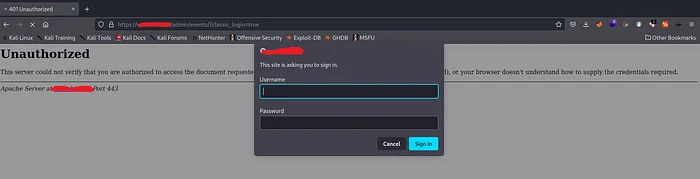
A popup then asked for a username and password.
Step 2: provoke an error with a quote
He began submitting wrong credentials and watching the server's responses. After some attempts he supplied the username and password as:
The application displayed an SQL error.

He tried to reproduce it, but it did not work, and the login popup disappeared entirely. Even after refreshing the page the error message stayed on screen, which he took to be some backend error. Looking at the Burp proxy history, he noticed that no regular POST form data and no JSON data had been sent.
Step 3: find the credential carrier
After a blank period he reopened the link in Incognito mode, the popup appeared again, and he observed the request and response once more. This time he noticed an Authorization header carrying a token.
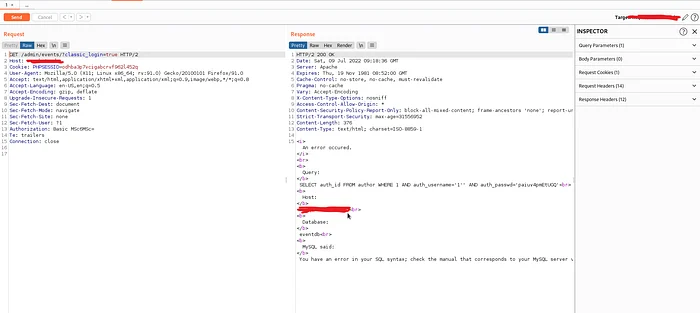
The header had the shape:
Authorization: Basic Base64Values
He sent the request to Repeater, selected the token and decoded it with the Burp decoder. Judging by its length and nature he had guessed the encoding; it was not a JWT but the base64 value of 1':1'. In other words, the application takes the username and password, joins them with a colon and base64-encodes the pair, so the decoded credential string is username:password.
He also offers a general observation for this kind of header: on the backend, in most cases the Bearer prefix is ignored and developers compare the token with the issued token; if the value is a JWT, developers often decode it instead of verifying it, which is where improper access control and account takeover can arise.
Step 4: try sqlmap and hit the encoding problem
He captured the entire request and saved it to a text file for sqlmap. The attempt ran into the base64 encoding: although sqlmap supports base64 encoding, the scenario here has a colon between the two values, because the application encodes username and password together, separated by :. Manual exploitation was therefore the route, with the payload applied in Repeater and base64-encoded live.
Step 5: count the columns
To find the number of columns he supplied the payload for username and password as:
1' Order By 1 — -:1' Order By 1 — -
which produced the following header:
Authorization: Basic [redacted]=
This was base64-encoded and sent. There was no SQL error; a regular unauthorized error was displayed. He incremented the column count, but an error was thrown, from which he concluded there was only one column. He then moved to union statements.
Step 6: union-based login bypass
The payload for username and password was:
1' Union Select 1 — -:1' Union Select 1 — -
with the header:
Authorization: Basic [redacted]==
With this he was successfully logged in to the admin panel and able to modify the content.
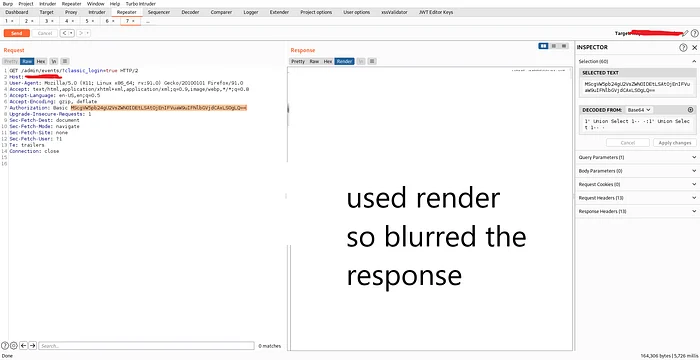
Some information in the screenshot is blurred. The unblurred proof of concept follows.
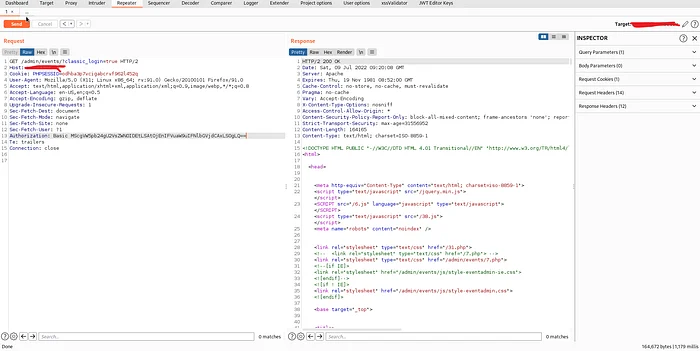
Root cause
The credentials are concatenated as username:password, base64-encoded and placed in the Authorization: Basic header. The backend decodes that value and uses the two parts in a query; a quote in either field produced a database error in the response. With a union select payload that returned a row, the author was logged in to the admin panel. The base64 layer is only an encoding, not a defence: it hides the payload from casual inspection and complicates tooling such as sqlmap, but it does not stop the injection. The report does not describe the query, the framework's query builder or any server-side validation, so the exact code path is not shown.
Impact
With the union payload the author logged in to the admin panel and could modify the content. The author used the union payload to log in to the admin panel and modify the content. The report does not state which data beyond content editing was reachable, nor whether the same injection allowed reading arbitrary tables.
Fix
The measure implied by the finding is to stop building the authentication query by string concatenation: use parameterised queries or prepared statements for the username and password lookup, and treat the base64 header purely as a transport encoding rather than as any form of protection.
Variants to test
- Decode any
Authorization: Basicvalue you see on a login request. A positive result is a decoded string of the formuser:pass, which tells you the credentials are travelling in a reversible encoding and can be edited in place. - Put a single quote in the username and in the password separately. A positive result is a database error in the response, or a change in behaviour compared with a normal wrong-credential response.
- Send
1' Order By N — -in both fields, incrementing N, with the whole pair base64-encoded. A positive result is a change from the unauthorised response to an error or a different response at the column count boundary. - Send
1' Union Select 1 — -in both fields, base64-encoded. A positive result is a successful login or a response that differs from the unauthorised one. - A positive result is the same error or bypass behaviour on the other role.
- Where sqlmap is impractical because of a separator such as the colon, encode the payload manually and replay it in Repeater, as done here. A positive result is a response that confirms injection without the tool.
What happened, in plain words
A security researcher found a login page on a private bug bounty target and discovered that the username and password were being sent to the server inside a request header, encoded with base64. By putting a single quote character into the username and password fields, he made the database show an error message. That error told him his input was reaching a database query. He then sent a union select payload, and the application logged him in to the admin panel. He ended up inside the admin panel and could change the site's content.
The whole story is a good example of a beginner-friendly lesson: a login form is not just a form. Behind it there is a database, and if the application builds its database questions by gluing text together, a user can change the question.
A short introduction to authorization tokens
Before the story, the author explains what an authorization token is, because the whole bug lives inside one.
When you log in to a website, the server needs a way to remember that you are you on the next request. Browsers and servers do not keep a conversation open like a phone call; every request is separate. So after a successful login the server hands your browser a small piece of text called a token. Your browser sends that token back with every following request, and the server checks it to decide who you are.
A useful everyday comparison: a token is like the wristband you get at a festival. The gate staff do not check your ID every time you walk back in; they look at the wristband. The wristband is issued by the organisers, and if you can forge one, you get in anywhere.
The author notes three things about these tokens:
- The server generates and signs them, and uses them to verify users by unique tokens.
- After a successful login the server sends the token, and developers often store it in the browser's local storage or session storage.
- Modern websites often use JWT (JSON Web Tokens) for user authorization, but not every authorization token is a JWT. It depends on the backend and the framework the site uses.
That last point matters later: the token in this story looks like a token but is not a JWT at all.
Setting up
The author describes himself as a seasonal rather than a regular bug bounty hunter. He was bored, searched for private bug bounty programs through Google dorks, and picked one at random. He did no basic recon such as subdomain enumeration or other dorking; he started straight on the main target. As per the company policy, he does not reveal the target.
A quick word on the tools he names, since a complete beginner will not know them:
- Burp Suite is a program that sits between your browser and a website and lets you see, pause and edit every request and response. It has a proxy (the part that intercepts traffic), a Repeater (a part where you can resend a request over and over with edits) and a decoder (a part that converts text between formats such as base64).
- Dirsearch is a tool that tries a long list of common folder and file names against a website to find pages that are not linked anywhere.
- Wappalyzer is a browser plugin that guesses which technologies a site is built with, such as the programming language or the framework.
- sqlmap is a tool that automates finding and exploiting SQL injection. It was tried here but did not end up being the path to exploitation.
With Wappalyzer he noticed the target runs on PHP. He explains that for him PHP is vulnerable by nature, and that as a web developer he has plenty of experience building PHP sites and fixing vulnerabilities in them.
No account was provisioned in advance. The two login roles, author and super admin, are simply the two links the login page offers.
Finding it
The author's usual routine at the start of recon is directory brute-forcing and checking the robots.txt file. robots.txt is a small text file at the root of a site that tells search engines which pages they may crawl; it is public, and it sometimes lists folders the owner would rather not advertise.
He ran Dirsearch to find hidden directories, but had no luck. Nothing fishy turned up other than an admin page. He tried opening the admin page by visiting target/admin/, and it threw an error:
That request line says: use the GET method (the normal method for asking a server for a page) to fetch the path /admin/ using version 1.1 of the HTTP protocol. The response was 403 Forbidden, which means the server understood the request but refused to serve that page to him.
He did not give up quickly. He fuzzed inside the admin page with Dirsearch again, and this time the events page returned 200 responses. A 200 status code means the server served the page successfully. So he opened target/admin/events/.
It was a regular login page with two ways to log in: one for the author and one for the super admin.
Exploitation
Step 1: reach the login form
He chose the first link, the author login, and it redirected him to:
target/admin/events/?classic_login=true
This is a URL. The part after the question mark is the query string, a set of name and value pairs the browser sends along with the request. Here the pair is classic_login=true, which looks like a switch telling the page to show the classic login form.
A popup then asked for a username and password.
Step 2: provoke an error with a quote
He started giving wrong credentials and watching how the server responded. After playing for a while, he supplied the username and password as:
That is the digit one followed by a single quote. The single quote is the character that starts and ends a piece of text inside an SQL query. If the application pastes your input directly into a query, a quote you supply can end the text early and leave the rest of the query broken, which the database reports as an error.
Luckily, the application displayed an SQL error.
He tried to reproduce it, but it did not work, and the login popup was completely gone. Even after refreshing the page, the error message stayed on screen, which he thought might be some backend error. Looking at the Burp proxy history, he noticed that no regular POST form data and no JSON data had been sent.
This is an important clue. A normal login form sends the username and password in the body of a POST request, either as form fields or as JSON. Here, nothing like that appeared, so the credentials had to be travelling somewhere else.
Step 3: find where the credentials travel
He went blank for a while, then opened the link in Incognito mode. Incognito is a private browsing window that starts without your saved cookies and logins, so the site treats you as a brand new visitor. The popup appeared again, and he observed the request and response once more.
This time he noticed an Authorization header carrying a token.
A header is a line of extra information attached to an HTTP request or response, separate from the body. The Authorization header is the standard place for a client to prove who it is. The header had the shape:
Authorization: Basic Base64Values
Line by line: Authorization is the header name; Basic is the scheme, a label telling the server what kind of credential follows; Base64Values is a placeholder for the actual encoded credential. Base64 is not encryption. It is a way of writing arbitrary bytes using only letters, digits and a couple of symbols, so that data survives being carried in text-based protocols. Anyone can decode it, which is exactly what he did next.
He sent the request to Repeater, selected the token and decoded it with the Burp decoder. He had guessed the encoding from its length and nature. It was not a JWT but the base64 value of 1':1'.
That single decoded string explains the whole mechanism. The application takes the username and the password, joins them with a colon, and base64-encodes the pair. So the decoded credential string has the form username:password. The colon is the separator, and everything before it is the username, everything after it the password.
He also offers a general observation about this kind of header. On the backend, in most cases the Bearer prefix is ignored and developers compare the token with the issued token. If the value is a JWT, developers often decode it instead of verifying it, and that is where improper access control and account takeover can arise. In plain words: a token that is only decoded and trusted, never checked for a valid signature, can be edited by anyone.
Step 4: try sqlmap and hit the encoding problem
He captured the entire request and saved it to a text file for sqlmap. The attempt ran into the base64 encoding. Although sqlmap supports base64 encoding, the scenario here has a colon between the two values, because the application encodes the username and password together, separated by :. The report says the problem was the colon between the two values.
So manual exploitation was the route: apply the payload in Repeater and base64-encode it live. This is a useful lesson for a beginner: when a tool does not fit, you can do the same job by hand, one request at a time.
Step 5: count the columns
To find the number of columns, he supplied the payload for username and password as:
1' Order By 1 — -:1' Order By 1 — -
Line by line: 1' closes the text value early, as before. Order By 1 is an SQL instruction that sorts the result by its first column. — - is a comment marker written with a long dash and a hyphen, which tells the database to ignore everything after it, so the rest of the original query does not cause a syntax error. The colon in the middle is the separator between the username part and the password part, and the same payload is repeated on both sides.
Why Order By? Because you can only sort by a column that exists. If you ask to sort by column 1 and it works, there is at least one column. If you ask for a column number that does not exist, the database complains. That is how you count columns without seeing the query.
The resulting header was:
Authorization: Basic [redacted]=
Line by line: Authorization is the header name, Basic is the scheme, and the long string is the base64 encoding of the payload above. The trailing = is padding that base64 uses to make the length come out right. This was sent, and there was no SQL error; a regular unauthorized error was displayed.
He incremented the column count, but an error was thrown, from which he concluded there was only one column. He then moved to union statements.
Step 6: union-based login bypass
The payload for username and password was:
1' Union Select 1 — -:1' Union Select 1 — -
Line by line: 1' closes the text value. Union Select 1 is an SQL instruction that appends an extra row to the result of the original query, and that row contains the value 1. — - comments out the rest. The colon separates the username side from the password side, and the payload is repeated on both.
The report does not describe the login query; it only shows that this payload logged him in. The union adds a row of our own making, so a row always comes back, and the application concludes the login succeeded. The database was never asked whether the password was right; it was told to return a row regardless.
The header was:
Authorization: Basic [redacted]==
Line by line: Authorization is the header name, Basic is the scheme, and the string is the base64 encoding of the payload above. The == at the end is base64 padding.
With this he was successfully logged in to the admin panel and able to modify the content.
Some information in the screenshot is blurred. The unblurred proof of concept follows.
Why it worked
The credentials are concatenated as username:password, base64-encoded and placed in the Authorization: Basic header. The backend decodes that value and uses the two parts in a query; a quote in either field produced a database error in the response. With a union select payload that returned a row, the author was logged in to the admin panel.
The base64 layer is only an encoding, not a defence. It hides the payload from casual inspection and complicates tooling such as sqlmap, but it does not stop the injection. Think of it as writing a rude note in a simple code: anyone who knows the code can read it, and the person receiving it still reads it.
The report does not describe the query, the framework's query builder or any server-side validation, so the exact code path is not shown.
What an attacker could do
With the union payload the author logged in to the admin panel and could modify the content. The author used the union payload to log in to the admin panel and modify the content.
How to fix it
The measure implied by the finding is to stop building the authentication query by string concatenation: use parameterised queries or prepared statements for the username and password lookup, and treat the base64 header purely as a transport encoding rather than as any form of protection.
In everyday terms: a parameterised query is like a form with fixed boxes. The database is told in advance that box one is a username and box two is a password, and whatever you type stays inside its box. It can never become part of the instruction.
Variants to test
If you want to practise this on a target you are allowed to test, here is the same sequence as a checklist. Each item says what to do and what a positive result looks like.
- Decode any
Authorization: Basicvalue you see on a login request. A positive result is a decoded string of the formuser:pass, which tells you the credentials are travelling in a reversible encoding and can be edited in place. - Put a single quote in the username and in the password separately. A positive result is a database error in the response, or a change in behaviour compared with a normal wrong-credential response.
- Send
1' Order By N — -in both fields, incrementing N, with the whole pair base64-encoded. A positive result is a change from the unauthorised response to an error or a different response at the column count boundary. - Send
1' Union Select 1 — -in both fields, base64-encoded. A positive result is a successful login or a response that differs from the unauthorised one. - A positive result is the same error or bypass behaviour on the other role.
- Where sqlmap is impractical because of a separator such as the colon, encode the payload manually and replay it in Repeater, as done here. A positive result is a response that confirms injection without the tool.
Glossary
- API: a way for one piece of software to ask another for data or actions, using agreed requests and responses.
- Authorization header: an HTTP header in which a client sends proof of identity, such as a token or a username and password pair.
- Base64: an encoding that turns arbitrary data into letters, digits and a few symbols so it can travel in text. It is reversible by anyone and is not encryption.
- Bearer: a token scheme label meaning "whoever holds this token is treated as the owner".
- Bug bounty program: a scheme in which an organisation invites researchers to report security flaws, often for a reward.
- Burp Suite: a tool that intercepts, inspects and edits traffic between a browser and a website.
- Column: a named field in a database table, for example the username field of a users table.
- Comment (SQL): a marker that tells the database to ignore the rest of a query, used to stop leftover query text from causing errors.
- Cookie: a small piece of data a website stores in your browser and receives back on later requests, often used to keep you logged in.
- Dirsearch: a tool that tries many common folder and file names against a website to find unlinked pages.
- Directory brute-forcing: systematically requesting many possible folder names to discover hidden ones.
- Dork / Google dork: a search query crafted to find specific pages or exposed information through a search engine.
- Framework: a collection of prebuilt code a developer uses as the foundation of an application.
- GET: the HTTP method used to ask a server for a page or resource.
- Header: a line of extra information attached to an HTTP request or response, separate from the body.
- HTTP: the protocol browsers and servers use to exchange requests and responses.
- Incognito mode: a private browsing window that starts without saved cookies and logins.
- Injection: a flaw where user input is treated as part of an instruction, so the user can change what the program does.
- JWT (JSON Web Token): a structured token format whose contents can be read by anyone and whose signature should be verified by the server.
- Local storage / session storage: places in a browser where a website can keep small pieces of data, often used for tokens.
- Parameterised query / prepared statement: a way of sending a database query where user input is kept separate from the instruction, so it cannot change the query.
- PHP: a programming language commonly used to build websites.
- POST: the HTTP method normally used to submit data, such as a login form, to a server.
- Query string: the part of a URL after the question mark, made of name and value pairs.
- Recon: the information-gathering phase of a security test.
- Repeater: the part of Burp Suite where you can resend a request repeatedly with edits.
- robots.txt: a public text file at a site's root that tells search engines which pages they may crawl.
- SQL: the language used to ask questions of a relational database.
- SQL injection: a flaw where user input becomes part of an SQL query, letting the user change the query.
- sqlmap: a tool that automates finding and exploiting SQL injection.
- Status code: a number in an HTTP response saying what happened, such as 200 for success or 403 for forbidden.
- Subdomain enumeration: finding subdomains of a target, such as shop.example.com, to widen the attack surface.
- Token: a piece of text issued by a server to identify a user on later requests.
- Union Select: an SQL instruction that appends the result of a second query to the first, used here to add a row of the attacker's choosing.
- Wappalyzer: a browser plugin that guesses which technologies a website is built with.
- 403 Forbidden: an HTTP status code meaning the server understood the request but refused to serve it.
- 200 OK: an HTTP status code meaning the server served the request successfully.


