Alternative link
GitHub's MathJax integration in Markdown allowed rendering of restricted HTML tags and style attributes through crafted math expressions, enabling an attacker to alter page CSS and create fake login forms. The author found multiple bypasses after initial fixes, ultimately earning a $10,000 bounty.

infosecwriteups.com
Published on infosecwriteups.com
Bug Bounty
The full write-up lives on its author's site
It belongs to its author, so we link to it rather than copy it. The other two tabs are our own rewrites, checked against it.
Context
GitHub added a feature that renders mathematical expressions written in TeX and LaTeX style syntax inside Markdown files, using the open-source MathJax JavaScript display engine. MathJax renders LaTeX, MathML and AsciiMath notation in modern browsers and includes support for assistive technology such as screen readers. The researcher learned about the feature from a tweet by @github and decided to look for ways to abuse the rendering path.
The goal was to get HTML tags rendered through math expressions in a Markdown file, starting with basic tags and then escalating to advanced ones. The reasoning given is that sites commonly deploy WAFs and filters against advanced tags such as <script> and <iframe> but are more permissive with basic tags like <b>, <i> and <u>, so a basic-tag bypass is a foothold for a bigger impact.
Setup
The only setup described is a test repository containing a Markdown file, referred to as test.md, where payloads were placed. No accounts, roles, tool versions or special tooling are mentioned. The relevant precondition is that the target renders Markdown with MathJax, and that $$...$$ are the math delimiters.
Finding it
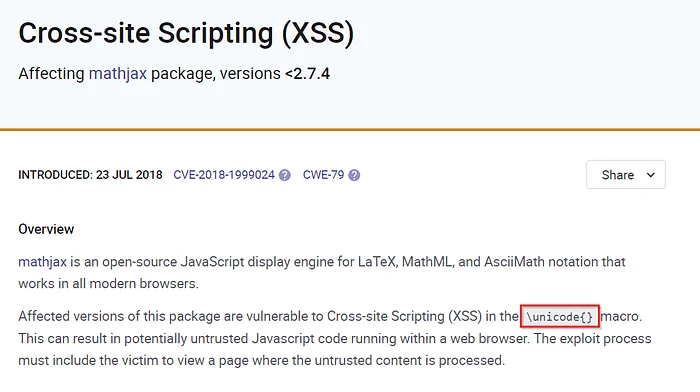
The first step was to look for known bugs in MathJax, specifically previous XSS or HTML injection CVEs. The researcher found a known XSS issue in MathJax affecting versions <2.7.4, where the payload has to be in Unicode form to work:
\unicode{}
That CVE was tried in the test repository with payloads such as:
$$\\u003cu\\u003eHello\\u003c/u\\u003e{}$$
$$\\u003cu\\u003eWhy\\u003c\uffofu\\u003e{}$$
Nothing rendered. The researcher's own explanation is that the CVE only affects versions below 2.7.4 while GitHub was running a newer version, so a fresh bypass had to be found.
Exploitation
Step 1: a backslash before a basic tag
After trying Unicode, URL encoding and other methods without success, the researcher noticed that a basic tag placed after a backslash is rendered without an error and without being filtered:
$$\<u>HELLO</u>{}$$
Replacing <u> with advanced tags such as <script>, <iframe> and <style> showed that GitHub's Markdown files apply further filters: advanced tags were filtered except <style>. A <style> tag could be added by putting a backslash before it, in the form \<style>{property:value}</style>. The following payloads were used in test.md:
$$\<style>*{display:none}</style>{}$$
$$\<style>div{background-color:#66f3e6}</style>{}$$
$$\<style>*{font-size:23px;}</style>{}$$
$$\<style>body{padding: 50px;background-color: #4b6bb7;}</style>{}$$
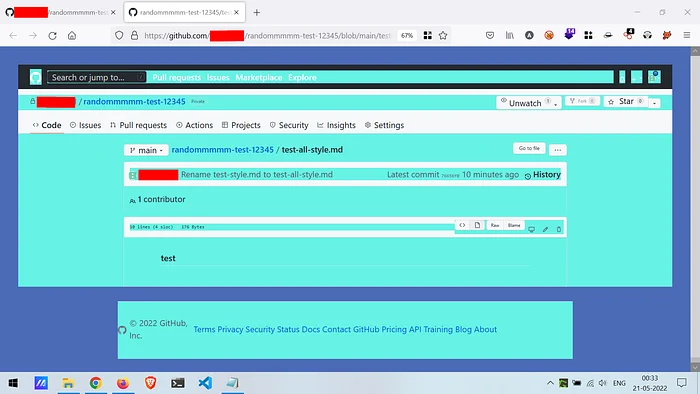
The result was that the CSS of the whole page could be changed.
A first report was submitted to GitHub's HackerOne program. It was closed within 5 minutes by a bot, stating that it was a previously identified issue being tracked internally. The researcher asked whether the quick response came from a bot or a real person, and GitHub's triager confirmed that the report had been reviewed by a real person. The first report to GitHub was closed as a duplicate.
Step 2: normal tags and the style attribute
GitHub fixed the issue within 24 hours. Retesting with the previous method and payloads showed that advanced tags could no longer be used that way. A new way to render tags was found, but this time only normal tags such as <div>, <span>, <section>, <input>, <label> and <button>, not <style> or <script>:
$$<div>Test</div>{}$$
$$<input type=text>{}$$
$$<button>Click Here</button>{}$$
The researcher notes that <div>, <span> and <section> can also be used in Markdown files without math expressions, but tags like <input> and <button> normally cannot, so rendering them through math expressions was considered a win. This was not reported on its own because no impact beyond the use of restricted tags was seen.
The next attempt was to modify CSS again. After the fix, <style> was no longer usable, so the only option left was the style attribute, which GitHub restricts. The researcher notes that class, id and a few other attributes can be used in .md files but not style, because it may change the CSS of the page. Surprisingly, the style attribute could be used with math expressions, and it was described as impossible to use it in Markdown files without math expressions. The general payload shape was:
$$<tag style="property:value" acceptedAttribute="True"></tag>{}$$
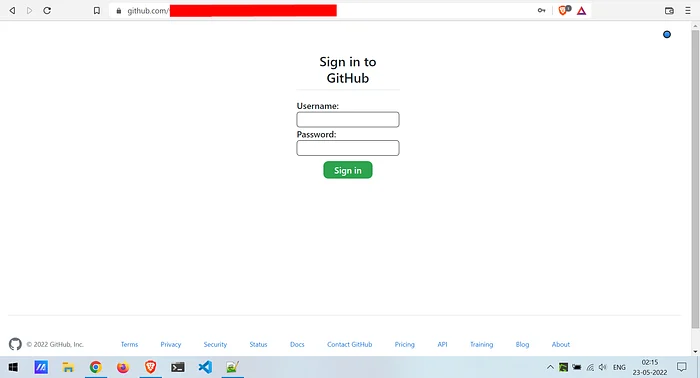
A payload was built that made the Markdown page look like a login page:
$$<div style="position:fixed;padding:10%;padding-right:100%;left:-9%;top:-20%;background:white;padding-bottom:100%;"><section style="margin-left:500px;padding:30px;"><h2 style="text-align:center;">Sign in to GitHub</h2><div><label>Username: </label><input type=text style="border-radius:5px;border:1px solid;"><label>Password: </label><input type=password style="border-radius:5px;border:1px solid;"><div style="text-align:center;"><button style="background:#2da44e;color:white;margin:10px;border-radius:9px;border:none;font-weight:500;padding:4px;padding-right:20px;padding-left:20px;" type=submit>Sign in</button></div></section></div></div><!--{}$$
No new report was created at this point. The bypass had been found the next day, and the team had stated in the previous report that they were working on the issue internally, so the researcher expected a duplicate closure. Instead, a comment was left on the previous report saying that a bypass had been found that could again change the CSS of the whole page, asking whether the internal team had fixed the issue, noting that the last method could no longer be reproduced, and offering to create a new report as a bypass if the issue was fixed. GitHub staff replied with a statement shown in an image.
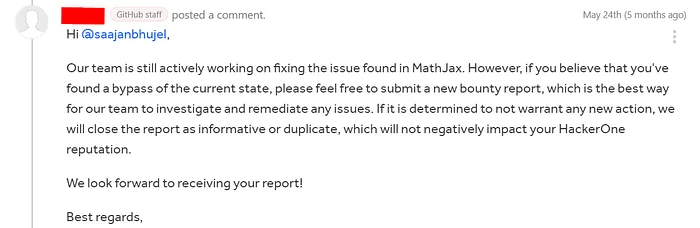
The next day the new payload no longer worked, which the researcher took as confirmation that the team had been working on MathJax internally.
Step 3: tag inside curly brackets as HTML entities
After the second fix, none of the advanced tags could be rendered with the previous payloads. The researcher noted that both earlier methods used a backslash before the tag, in the form \<tagName>{}, and changed the payload position from $$\<tagName>{}$$ to $$\{<tagName>}$$. Tags were still filtered. After more time, a method was found to render tags such as <input>, <svg>, <button> and <textarea> using MathJax:
$$\<script>{<renderTag>}$$
The mechanics, as described:
- The first tag after the backslash should be a malicious tag that gets filtered out of the payload, such as
\<script>or\<style>. - The tag that should actually be rendered goes between the curly brackets as
{<renderTag>}, with the greater-than and less-than signs written as HTML entities.
So in $$\<script>{<renderTag>}$$, the <script> or any tag written before the curly bracket is filtered out, and MathJax then renders only the tag inside the curly brackets. The following payloads were used in test.md for proof of concept:
$$\<script>{<div><section><h2>Sign in to GitHub</h2><label>Username: </label><input><br><label>Password: </label><input><br><button>Sign in</button></section></div><!--}$$
## Input tag:
$$\<script>{<input><!--}$$
## Button tag:
$$\<script>{<button>Test Button</button><!--}$$
## Textarea tag:
$$\<script>{<textarea>Write something...</textarea><!--}$$
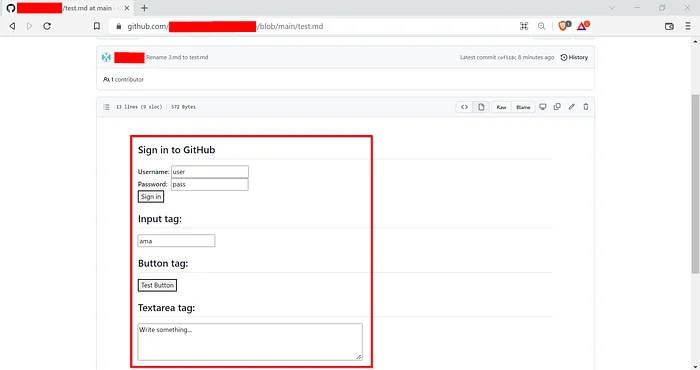
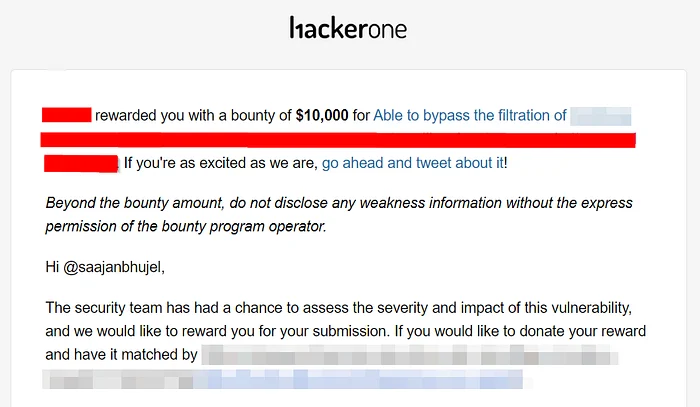
An attempt to increase the impact of this issue failed. The issue was reported to GitHub as Low severity. GitHub accepted it as Medium severity and paid a bounty of $10,000, with SWAG and GitHub Pro free of charge.

Root cause
The report frames the problem as a misconfiguration introduced by the new MathJax feature. The filters applied to Markdown content did not account for the way MathJax processes its input: a backslash before a tag, a tag placed inside curly brackets, and HTML entities for the angle brackets all let content through that the filters were meant to block. After the first fix the previous method and payloads no longer worked, and after the second fix the new payload no longer worked. The exact implementation of the filters is not described in the report, so the precise parsing mismatch is likely a difference between the filter's view of the math expression and MathJax's own interpretation of it.
Impact
With the first method, an attacker could change the CSS of the whole page through <style> tags. With the second method, the style attribute allowed a Markdown page to be made to look like a GitHub login page, using <input type=password>, labels and a submit button. With the third method, tags such as <input>, <svg>, <button> and <textarea> could be rendered through math expressions. The researcher tried to escalate the impact of the third method but failed, and reported it as Low severity; GitHub rated it Medium. The report does not describe any case of stealing credentials or executing script, and the impact is limited to what the rendered tags and CSS can do on a page that displays attacker-controlled Markdown.
Fix
GitHub fixed the issue within 24 hours after the first report, and the second method's payload stopped working the next day. The timeline lists the issue as resolved on August 20th. The report does not describe the code changes themselves.
Variants to test
- Put a backslash before a tag inside math delimiters, for example
$$\<tag>{}$$, and check whether the tag renders. A positive result is a rendered tag where the filter should have removed it. - Put a tag inside curly brackets with HTML entities for the angle brackets, for example
$$\<script>{<tag>}$$, and check whether the tag inside the brackets renders while the tag before them is filtered. A positive result is a rendered tag from the bracketed section. - Try the
styleattribute on tags rendered through math expressions, for example$$<tag style="property:value" acceptedAttribute="True"></tag>{}$$, and check whether the attribute survives. A positive result is a visible CSS change on the page. - Try
<style>tags with a backslash before them, for example$$\<style>*{display:none}</style>{}$$, and check whether page-wide CSS changes. A positive result is the page's styling being altered. - Try normal tags such as
<input>,<button>and<textarea>inside math expressions, for example$$<input type=text>{}$$, and check whether they render where Markdown alone would not allow them. A positive result is an interactive element appearing on the page. - Try Unicode-escaped payloads in the form
$$\\u003cu\\u003eHello\\u003c/u\\u003e{}$$against older MathJax versions below 2.7.4. A positive result is a rendered tag on a target running an affected version.
What happened, in plain words
GitHub is a website where people store code and text files. One of the things it lets you do is write a file in a simple text format called Markdown, and GitHub turns that text into a nicely formatted web page. For example, if you type **hello**, GitHub shows it in bold.
GitHub added a new ability: if you write a mathematical formula in a Markdown file, GitHub will draw it properly, the way a maths textbook would. To do that, GitHub uses a free piece of software called MathJax, which runs inside your browser and turns the formula text into a picture of the formula.
A security researcher saw the announcement on Twitter and wondered whether this new feature could be tricked. The idea was simple: if you can sneak ordinary web-page instructions (called HTML tags) into a Markdown file through the maths feature, you might be able to change how the page looks, or worse. He found several ways to do it, and in the end GitHub paid him $10,000 for the last one.
This article walks through exactly what he tried, in the order he tried it, and explains every term along the way. You only need to know how to use a browser.
The background: what MathJax is and why it matters
Before the details, three ideas need explaining, because everything else builds on them.
HTML tags. A web page is written in a language called HTML. It is made of instructions in angle brackets, called tags. For example, <b>hello</b> means "show the word hello in bold". The <b> opens the bold and the </b> closes it. Some tags do more than style text: <input> creates a box you can type into, <button> creates a clickable button, and <script> runs a small program inside the page. That last one is the dangerous one, because a program running in someone else's page can do things the page owner did not intend.
Filters. Because tags like <script> are dangerous, websites that let users write content usually run that content through a filter first. A filter is a piece of software that looks at the text and removes or blocks anything it considers unsafe. Think of it like an airport scanner: it looks at your bag and takes out anything on the banned list. The problem with scanners, and with filters, is that they only catch what they recognise. If you can present the same object in a shape the scanner does not expect, it goes through.
MathJax. MathJax is an open-source JavaScript display engine for LaTeX, MathML and AsciiMath notation. In plain words: it is a program that runs in the browser, reads formula text, and draws the formula. It works in all modern browsers and includes support for assistive technology such as screen readers, which read pages aloud for blind users. The important part for this story is that MathJax has its own rules for reading its input, and those rules are not the same as the filter's rules. That gap is where the whole bug lives.
When you write a formula in Markdown, you wrap it in dollar signs: $$...$$. Those are the math delimiters, meaning "everything between these two pairs of dollar signs is a formula, not ordinary text".
The setup
The researcher did not need anything special. He created a test repository (a folder on GitHub that holds files) and inside it a Markdown file he calls test.md. He then put his payloads into that file and looked at the rendered page in his browser. A payload, in security language, is the piece of text you feed to a system to see how it reacts.
The only precondition is that the target renders Markdown with MathJax, and that $$...$$ are the math delimiters.
Step one: looking for known bugs
The first move was not to attack GitHub directly but to look up whether MathJax already had known problems. This is standard practice: if a piece of software has a published bug, you check whether the site you are testing is running a version that still has it. The researcher specifically looked for previous XSS or HTML injection CVEs.
XSS stands for cross-site scripting. It means getting your own instructions to run inside someone else's web page. HTML injection is the milder cousin: getting your own HTML tags onto someone else's page, without necessarily running a program. CVE stands for Common Vulnerabilities and Exposures: it is a public catalogue number given to a known security flaw, so that everyone can refer to the same bug by the same name.
He found a known XSS issue in MathJax affecting versions below 2.7.4. The version number matters: software is released in numbered versions, and "below 2.7.4" means older releases that had not yet been fixed. The report also notes that the payload has to be in Unicode form to work.
Unicode is the standard way computers represent characters from every writing system. It gives every character a number, and you can write that number in text as an escape sequence, for example \u003c. That particular number happens to be the less-than sign <. So writing \u003c is another way of writing <, one that a filter might not recognise as a tag.
\unicode{}
This is the shape of the known payload: the word unicode followed by a pair of curly brackets. In MathJax, \unicode{} is a command that lets you insert a character by its Unicode number. The curly brackets are where the number goes. The point of the known bug was that this command could be abused to smuggle characters past a filter.
He then tried that idea in his test repository with payloads such as:
$$\\u003cu\\u003eHello\\u003c/u\\u003e{}$$
$$\\u003cu\\u003eWhy\\u003c\uffofu\\u003e{}$$
Line by line, the first one reads: $$ opens the formula; \\u003c is an escaped less-than sign; u is the letter u; \\u003e is an escaped greater-than sign; Hello is the text; \\u003c/u\\u003e is an escaped closing </u> tag; {} is an empty pair of curly brackets; $$ closes the formula. If it worked, the page would show the word Hello underlined, because <u> is the underline tag. The second payload is the same idea with a different word and a deliberately mangled escape in the middle, to see whether a partial escape would slip through.
Nothing rendered. The researcher's own explanation is that the CVE only affects versions below 2.7.4, while GitHub was running a newer version. So the known bug was closed, and a fresh bypass had to be found by hand.
Step two: a backslash before a basic tag
He then tried Unicode, URL encoding and other methods, all without success. URL encoding is another way of writing characters: in a web address, certain characters are written as a percent sign followed by two digits, for example %3C for <. The idea is the same as with Unicode: present the character in a shape the filter does not recognise.
Eventually he noticed something: a basic tag placed after a backslash is rendered without an error and without being filtered.
$$\<u>HELLO</u>{}$$
Line by line: $$ opens the formula. \ is a single backslash. In MathJax, a backslash starts a command, so the backslash is telling MathJax "treat what follows specially". <u> is the underline tag. HELLO is the text. </u> closes the underline. {} is an empty pair of curly brackets, which MathJax expects after some commands. $$ closes the formula. The result was that HELLO appeared underlined, even though the filter should have removed the tag.
Why does this matter? Because it proves the filter and MathJax disagree about what the text means. The filter sees a backslash and a tag; MathJax sees a command and then a tag it is happy to render. That disagreement is the foothold.
He then replaced <u> with advanced tags such as <script>, <iframe> and <style>, to find out whether GitHub had more filters for the dangerous ones. An iframe is a tag that embeds another web page inside the current one. A style tag is a tag that contains CSS, the language that controls how a page looks: colours, sizes, positions, and whether things are visible at all.
The answer was yes: GitHub's Markdown files apply further filters, and advanced tags were filtered, with one exception: <style>. A <style> tag could be added by putting a backslash before it, in the form \<style>{property:value}</style>. Here property:value is a CSS instruction, for example color:red.
The following payloads were used in test.md:
$$\<style>*{display:none}</style>{}$$
$$\<style>div{background-color:#66f3e6}</style>{}$$
$$\<style>*{font-size:23px;}</style>{}$$
$$\<style>body{padding: 50px;background-color: #4b6bb7;}</style>{}$$
Line by line:
$$\<style>*{display:none}</style>{}$$opens a formula, then a backslash, then a style tag. Inside the style tag,*means "every element on the page", and{display:none}means "do not display it". So this rule hides everything on the page.$$\<style>div{background-color:#66f3e6}</style>{}$$sets the background colour of everydiv(a rectangular block on the page) to a light turquoise, written as the hex colour#66f3e6.$$\<style>*{font-size:23px;}</style>{}$$makes all text on the page 23 pixels tall.$$\<style>body{padding: 50px;background-color: #4b6bb7}</style>{}$$adds 50 pixels of space around the body of the page and gives it a blue background.
The result was that the CSS of the whole page could be changed.
This is a real impact, not just a curiosity. If an attacker can control the styling of a page, they can hide parts of it, move buttons around, or make a page look like something it is not. That is the beginning of a phishing attack: a fake page that looks genuine.
He submitted a first report to GitHub's HackerOne program. HackerOne is a platform where companies publish bug bounty programs: rules and rewards for people who find and report security problems in their products. A bug bounty is the money paid for a valid report.
The report was closed within 5 minutes by a bot, stating that it was a previously identified issue being tracked internally. A bot is an automated program that acts without a human. The researcher asked whether the quick response came from a bot or a real person, and GitHub's triager confirmed that the report had been reviewed by a real person. A triager is the person at the company who reads incoming reports and decides what to do with them. The first report to GitHub was closed as a duplicate, meaning the company considered it the same issue as one it already knew about.
Step three: normal tags and the style attribute
GitHub fixed the issue within 24 hours. He retested with the previous method and payloads and found that advanced tags could no longer be used that way. A new way to render tags was found, but this time only normal tags such as <div>, <span>, <section>, <input>, <label> and <button>, not <style> or <script>:
$$<div>Test</div>{}$$
$$<input type=text>{}$$
$$<button>Click Here</button>{}$$
Line by line:
$$<div>Test</div>{}$$puts the word Test inside adiv, a plain rectangular block.divis short for division: a section of the page.$$<input type=text>{}$$creates a text input box, the kind you type your name into.type=textsays it accepts ordinary text.$$<button>Click Here</button>{}$$creates a clickable button labelled Click Here.
He notes that <div>, <span> and <section> can also be used in Markdown files without math expressions. A span is an inline section, a piece of text treated as a unit; a section is a larger grouping. But tags like <input> and <button> normally cannot be used, because they create interactive elements that a page author should not be able to inject into someone else's page. So rendering them through math expressions was considered a win.
This was not reported on its own, because no impact beyond the use of restricted tags was seen. That is an important habit in security work: a strange behaviour is not a bug until you can say what harm it causes.
The next attempt was to modify CSS again. After the fix, <style> was no longer usable, so the only option left was the style attribute. An attribute is extra information written inside a tag, for example <div class="box"> gives the div a class called box. The style attribute lets you put CSS directly on one element, for example <div style="color:red">.
GitHub restricts the style attribute. The researcher notes that class, id and a few other attributes can be used in .md files but not style, because it may change the CSS of the page. Surprisingly, the style attribute could be used with math expressions, and it was described as impossible to use it in Markdown files without math expressions. The general payload shape was:
$$<tag style="property:value" acceptedAttribute="True"></tag>{}$$
Line by line: $$ opens the formula. <tag ...> is a placeholder for any tag name. style="property:value" is the style attribute with a CSS instruction inside. acceptedAttribute="True" is a second, made-up attribute, there to test whether other attributes survive alongside style. </tag> closes the tag. {} and $$ close the formula.
A payload was built that made the Markdown page look like a login page:
$$<div style="position:fixed;padding:10%;padding-right:100%;left:-9%;top:-20%;background:white;padding-bottom:100%;"><section style="margin-left:500px;padding:30px;"><h2 style="text-align:center;">Sign in to GitHub</h2><div><label>Username: </label><input type=text style="border-radius:5px;border:1px solid;"><label>Password: </label><input type=password style="border-radius:5px;border:1px solid;"><div style="text-align:center;"><button style="background:#2da44e;color:white;margin:10px;border-radius:9px;border:none;font-weight:500;padding:4px;padding-right:20px;padding-left:20px;" type=submit>Sign in</button></div></section></div></div><!--{}$$
This is one long line, so it helps to break it into pieces:
$$opens the formula.<div style="position:fixed;padding:10%;padding-right:100%;left:-9%;top:-20%;background:white;padding-bottom:100%;">creates a big white box that is fixed in place on the screen (position:fixed), pushed around with padding and offsets so that it covers the page.<section style="margin-left:500px;padding:30px;">creates a section inside it, shifted 500 pixels from the left and with 30 pixels of internal space.<h2 style="text-align:center;">Sign in to GitHub</h2>is a centred heading reading Sign in to GitHub.<div>opens another block.<label>Username: </label>is a text label reading Username:.<input type=text style="border-radius:5px;border:1px solid;">is a text box with rounded corners and a thin border.<label>Password: </label>is a label reading Password:.<input type=password style="border-radius:5px;border:1px solid;">is a password box: the characters you type are hidden as dots. This is the key element, because it is designed to look like a real password field.<div style="text-align:center;">centres what follows.<button style="background:#2da44e;color:white;margin:10px;border-radius:9px;border:none;font-weight:500;padding:4px;padding-right:20px;padding-left:20px;" type=submit>Sign in</button>is a green button with white text reading Sign in.type=submitmarks it as a form-submitting button.</div></section></div></div>closes all the blocks that were opened.<!--starts an HTML comment. A comment is text the browser ignores. It is used here to swallow whatever comes after, so the rest of the formula does not break the page.{}$$closes the formula.
No new report was created at this point. The bypass had been found the next day, and the team had stated in the previous report that they were working on the issue internally, so the researcher expected a duplicate closure. Instead, a comment was left on the previous report saying that a bypass had been found that could again change the CSS of the whole page, asking whether the internal team had fixed the issue, noting that the last method could no longer be reproduced, and offering to create a new report as a bypass if the issue was fixed. GitHub staff replied with a statement shown in an image.
The next day the new payload no longer worked, which the researcher took as confirmation that the team had been working on MathJax internally.
Step four: a tag inside curly brackets as HTML entities
After the second fix, none of the advanced tags could be rendered with the previous payloads. He noted that both earlier methods used a backslash before the tag, in the form \<tagName>{}, and changed the payload position from $$\<tagName>{}$$ to $$\{<tagName>}$$. Tags were still filtered. After more time, a method was found to render tags such as <input>, <svg>, <button> and <textarea> using MathJax. An svg tag draws vector graphics, shapes and diagrams; a textarea is a larger multi-line text box.
$$\<script>{<renderTag>}$$
The mechanics, as described:
- The first tag after the backslash should be a malicious tag that gets filtered out of the payload, such as
\<script>or\<style>. - The tag that should actually be rendered goes between the curly brackets as
{<renderTag>}, with the greater-than and less-than signs written as HTML entities.
An HTML entity is a code that stands for a character. < stands for the less-than sign <, and > stands for the greater-than sign >. Browsers turn entities back into the real characters when they display the page. So <renderTag> is a way of writing <renderTag> that a filter may not recognise as a tag.
So in $$\<script>{<renderTag>}$$, the <script> or any tag written before the curly bracket is filtered out, and MathJax then renders only the tag inside the curly brackets. The trick is a decoy: the filter sees the obvious dangerous tag and removes it, and does not notice the disguised one hiding in the brackets.
The following payloads were used in test.md for proof of concept. A proof of concept is a demonstration that the bug really works, not just a theory.
$$\<script>{<div><section><h2>Sign in to GitHub</h2><label>Username: </label><input><br><label>Password: </label><input><br><button>Sign in</button></section></div><!--}$$
Line by line: $$ opens the formula. \<script> is the decoy tag that gets filtered. { opens the curly brackets. Inside them, every tag is written with entities: <div> is <div>, <section> is <section>, <h2>Sign in to GitHub</h2> is a heading, <label>Username: </label> is a label, <input> is a text box, <br> is a line break, <label>Password: </label> is a password label where is a non-breaking space, another entity, <input> is a second box, <br> another line break, <button>Sign in</button> is a button, and the closing tags </section></div> close the blocks. <!-- starts a comment to swallow the rest. } closes the curly brackets and $$ closes the formula.
## Input tag:
$$\<script>{<input><!--}$$
Line by line: ## Input tag: is a Markdown heading, so the reader knows what is being demonstrated. $$ opens the formula. \<script> is the decoy. { opens the brackets. <input> is an input box written as entities. <!-- starts a comment. } and $$ close the formula.
## Button tag:
$$\<script>{<button>Test Button</button><!--}$$
Line by line: a Markdown heading, then the formula, then the decoy \<script>, then {, then <button>Test Button</button> which is a button labelled Test Button, then a comment, then the closing brackets and dollars.
## Textarea tag:
$$\<script>{<textarea>Write something...</textarea><!--}$$
Line by line: a Markdown heading, then the formula, then the decoy, then {, then <textarea>Write something...</textarea> which is a multi-line text box containing the words Write something... then a comment, then the closing brackets and dollars.
An attempt to increase the impact of this issue failed. The issue was reported to GitHub as Low severity. Severity is the company's rating of how serious a bug is, usually on a scale from low to critical. GitHub accepted it as Medium severity and paid a bounty of $10,000, with SWAG and GitHub Pro free of charge. SWAG means free branded merchandise, such as a T-shirt; GitHub Pro is a paid subscription tier of GitHub.
Why it worked
The report frames the problem as a misconfiguration introduced by the new MathJax feature. The filters applied to Markdown content did not account for the way MathJax processes its input: a backslash before a tag, a tag placed inside curly brackets, and HTML entities for the angle brackets all let content through that the filters were meant to block. After the first fix the previous method and payloads no longer worked, and after the second fix the new payload no longer worked. The exact implementation of the filters is not described in the report, so the precise parsing mismatch is likely a difference between the filter's view of the math expression and MathJax's own interpretation of it.
A useful comparison: imagine a security guard who checks bags by looking for the word "knife". If you write "knife" on a piece of paper, the guard takes the paper. But if you write it in a different alphabet, or hide it inside a folded note, the guard may miss it. The filter and MathJax are reading the same text in two different alphabets.
What harm it could do
With the first method, an attacker could change the CSS of the whole page through <style> tags. With the second method, the style attribute allowed a Markdown page to be made to look like a GitHub login page, using <input type=password>, labels and a submit button. With the third method, tags such as <input>, <svg>, <button> and <textarea> could be rendered through math expressions. The researcher tried to escalate the impact of the third method but failed, and reported it as Low severity; GitHub rated it Medium. The report does not describe any case of stealing credentials or executing script, and the impact is limited to what the rendered tags and CSS can do on a page that displays attacker-controlled Markdown.
That last point is worth pausing on. A fake login page is only dangerous if a victim is tricked into typing into it and the typed values go somewhere. The report does not show that happening. What it shows is that the page can be made to look convincing, which is the first half of a phishing attack.
How it was fixed
GitHub fixed the issue within 24 hours after the first report, and the second method's payload stopped working the next day. The timeline lists the issue as resolved on August 20th.
Things you could try yourself
These are the same tests the researcher ran, written as a checklist. Each one is a question with a clear answer: did the tag render or not?
- Put a backslash before a tag inside math delimiters, for example
$$\<tag>{}$$, and check whether the tag renders. A positive result is a rendered tag where the filter should have removed it. - Put a tag inside curly brackets with HTML entities for the angle brackets, for example
$$\<script>{<tag>}$$, and check whether the tag inside the brackets renders while the tag before them is filtered. A positive result is a rendered tag from the bracketed section. - Try the
styleattribute on tags rendered through math expressions, for example$$<tag style="property:value" acceptedAttribute="True"></tag>{}$$, and check whether the attribute survives. A positive result is a visible CSS change on the page. - Try
<style>tags with a backslash before them, for example$$\<style>*{display:none}</style>{}$$, and check whether page-wide CSS changes. A positive result is the page's styling being altered. - Try normal tags such as
<input>,<button>and<textarea>inside math expressions, for example$$<input type=text>{}$$, and check whether they render where Markdown alone would not allow them. A positive result is an interactive element appearing on the page. - Try Unicode-escaped payloads in the form
$$\\u003cu\\u003eHello\\u003c/u\\u003e{}$$against older MathJax versions below 2.7.4. A positive result is a rendered tag on a target running an affected version.
Glossary
- Attribute: extra information written inside an HTML tag, such as
classorstyle. - Bot: an automated program that acts without a human.
- Bug bounty: money paid by a company for a valid security report.
- CSS: the language that controls how a web page looks: colours, sizes, positions, visibility.
- CVE: a public catalogue number given to a known security flaw.
- Duplicate: a report that the company considers the same issue as one it already knows about.
- Filter: software that inspects user content and removes or blocks anything it considers unsafe.
- HackerOne: a platform where companies publish bug bounty programs.
- HTML: the language web pages are written in, made of tags in angle brackets.
- HTML entity: a code that stands for a character, such as
<for<. - HTML injection: getting your own HTML tags onto someone else's page.
- Iframe: a tag that embeds another web page inside the current one.
- Markdown: a simple text format that turns into a formatted page.
- MathJax: an open-source JavaScript display engine that draws mathematical formulas in the browser.
- Payload: the piece of text you feed to a system to see how it reacts.
- Phishing: a fake page or message designed to trick someone into giving away information.
- Proof of concept: a demonstration that a bug really works.
- Repository: a folder on GitHub that holds files.
- Severity: a company's rating of how serious a bug is.
- Style attribute: an attribute that puts CSS directly on one element.
- SWAG: free branded merchandise.
- Tag: an instruction in angle brackets, such as
<b>for bold. - Triager: the person at a company who reads incoming reports and decides what to do with them.
- Unicode: the standard way computers represent characters, with escape sequences such as
\u003cfor<. - URL encoding: writing characters in a web address as a percent sign and two digits, such as
%3Cfor<. - XSS: cross-site scripting, getting your own instructions to run inside someone else's web page.



