Alternative link
The user account update endpoint lacked CSRF protection and accepted requests with arbitrary origins, allowing an attacker to change a victim's email or password via a crafted form. This led to full account takeover.

retr02332.medium.com
Published on retr02332.medium.com
Bug Bounty
The full write-up lives on its author's site
It belongs to its author, so we link to it rather than copy it. The other two tabs are our own rewrites, checked against it.
Context
The target was a Yahoo! subdomain that the author refers to throughout as vulnerable.com. He had enumerated domains and filtered out the ones containing the word Yahoo! on the hunch that the less obviously branded hosts offered a better chance of a serious flaw. The feature in scope was the account data update functionality: the part of the application where a signed-in user changes their profile details, including the email address.
The author states that he found and exploited the issue in about 30 minutes. The write-up was published on 16 June 2022.

Setup
The only tooling the report names is Wappalyzer, used later to fingerprint the backend. No accounts, roles or versions are described beyond the ordinary user account whose email is changed during testing.
Finding it
The author deliberately skipped low-severity bugs and went straight at the account update form. He changed the email on his own account from [redacted] to [redacted] and captured the resulting request. The original email change request looked as follows:
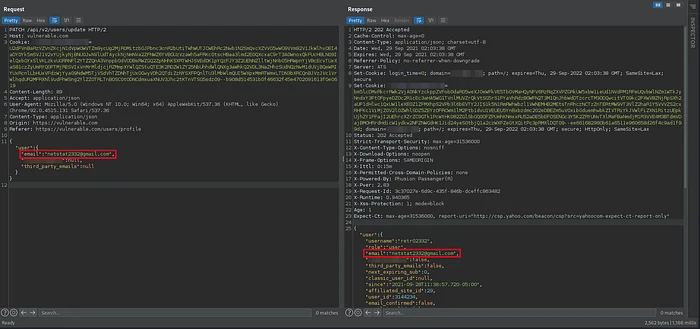
The important observation is that the update is issued as an HTTP PATCH, and the Content-type was application/json. Two things follow from that: a plain HTML form cannot produce a PATCH, and a plain HTML form cannot send application/json. Both are obstacles to a CSRF, so the rest of the work is about removing them one at a time.
Exploitation
Step 1: check whether arbitrary origins are accepted
Before building anything, the author tested whether the server would accept the request when it came from an arbitrary origin. Some servers reject cross-origin requests outright. This one did not: it allowed any domain to send HTTP requests to it.
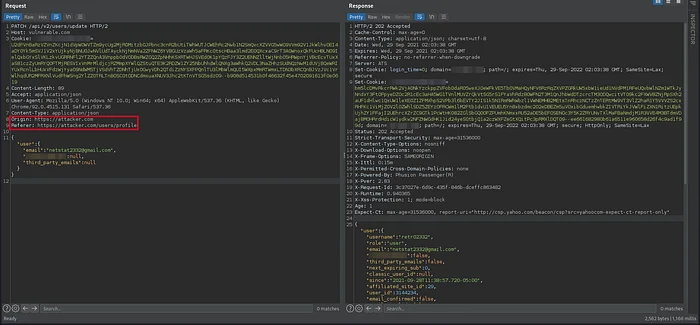
With no origin restriction in place, the only remaining barriers were the HTTP method and the body format.
Step 2: try POST instead of PATCH
HTTP forms only accept a limited set of methods, so the first idea was to swap PATCH for POST directly. That did not work:
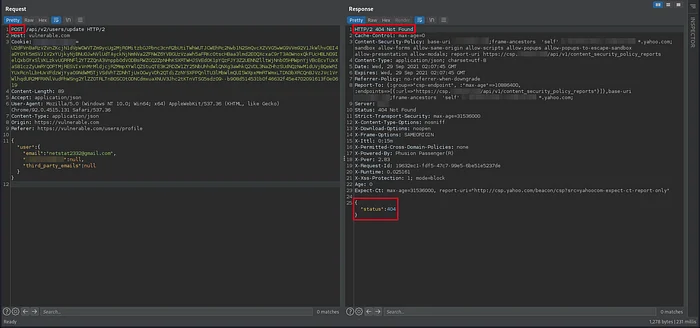
The backend expects the update to arrive as PATCH, and changing the method to POST did not work.
Step 3: change the Content-Type
The next experiment was to change the Content-type header from application/json to application/x-www-form-urlencoded:
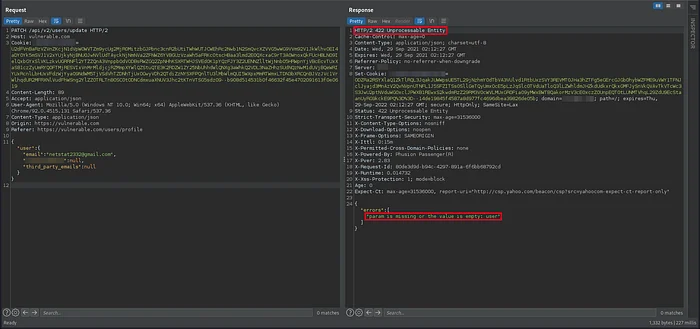
Having seen that the server tolerated the different content type, the author rewrote the request body from JSON to urlencoded form data to confirm the error was still present in the server responses. This matters because a urlencoded body is exactly what an HTML form produces.
Step 4: override the HTTP method
The request can now be sent as a form, but the backend still wants PATCH. The author used Wappalyzer to fingerprint the stack and found the backend was written in Ruby on Rails. Rails offers HTTP method override through a parameter, which is precisely the missing piece. Combining the accepted origin, the form-encodable content type and the method override removed every restriction, giving a CSRF that steals arbitrary accounts with a single click.
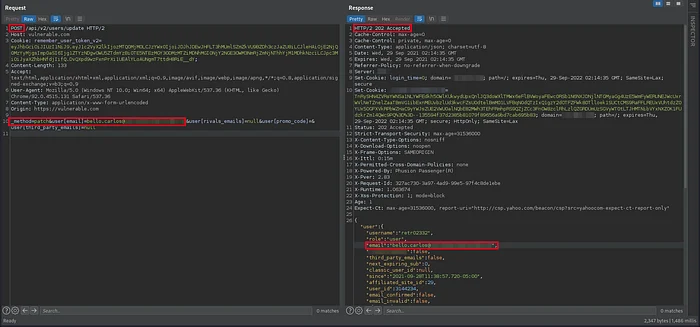
Step 5: the email change exploit
The resulting exploit page is:
The form posts to the update endpoint. The hidden _method field with the value patch is the Rails method override that turns the form POST into the PATCH the backend expects. The user[email] field carries the attacker's chosen address, and the remaining user[...] fields reproduce the other parameters the original request contained. The script submits the form automatically as soon as the page loads, so the victim needs to do nothing beyond visiting the page while signed in.
Step 6: the password change exploit
After reporting the bug, the author realised the same technique changes the password, because the application did not ask for the current password:
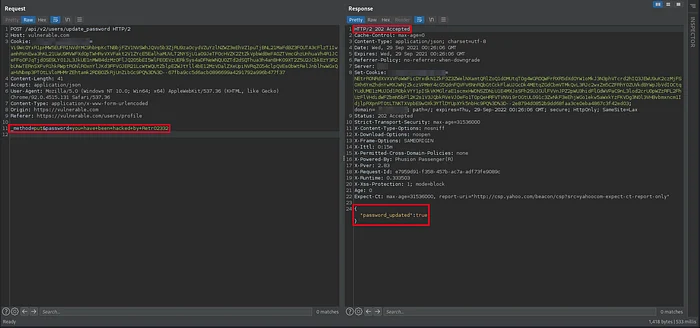
With the ability to change both the password and the email, and therefore to use the password recovery flow, an attacker obtains complete control of any user's account with one click.
Root cause
The application had no anti-CSRF token on the account update endpoint, and it accepted requests from arbitrary origins. On its own that would still be hard to exploit, because the endpoint required PATCH with a JSON body, neither of which an HTML form can produce. The design weakness is that the backend also honoured Rails' _method parameter override and accepted a urlencoded body, so an attacker could reconstruct the same state-changing request from a form. The report suggests the developers apparently assumed every browser would treat the session cookie as LAX and therefore considered an anti-CSRF token unnecessary.
That assumption does not hold everywhere. Yahoo! did not set an explicit SameSite attribute on the session cookie. Firefox defaults such cookies to LAX, which blocks the attack in that browser. Chrome, for compatibility reasons, temporarily treated cookies without an explicit SameSite as None for a two-minute window before falling back to LAX; Chrome called this feature LAX+POST. The author notes techniques exist to stretch that window, and links to a write-up on them, but says he is not sure the trick still works in current Chrome versions.
Impact
An attacker who gets a signed-in victim to load the exploit page can change that user's email address and password, and then take over the account through password recovery. This applies to any user of the application, with a single click and no interaction beyond visiting the page. In practice the attack depends on the browser: it does not work in Firefox because of the LAX default, and in Chrome it relies on the LAX+POST behaviour described above.
Fix
The report does not describe any remediation applied by the vendor. The report mentions the absence of an anti-CSRF token and of an explicit SameSite attribute on the session cookie. The author's general point is that several layers of security are needed: it is better to be cautious than confident.
Variants to test
- Method override on other frameworks. Look for state-changing endpoints that require
PUT,PATCHorDELETE, then try submitting them as a formPOSTwith a framework-specific override field such as Rails'_method. A positive result is the update being applied even though the request arrived as a formPOST. - Content-Type downgrade. Take a JSON endpoint and resend the same parameters as
application/x-www-form-urlencoded. A positive result is the server parsing the urlencoded body and performing the same action. - Origin checks. Replay a state-changing request with an arbitrary
Originheader. A positive result is the server processing it without rejecting the foreign origin. - Missing current-password check. On password change endpoints, submit a new password without the current one. A positive result is the password being changed, which turns any CSRF into full account takeover.
- Cookie SameSite defaults. Inspect the session cookie for an explicit
SameSiteattribute. If it is absent, test the flow in browsers that treat unset cookies asNonefor a short window, and check whether the window can be extended.


What happened, in plain words
A security researcher spent his free time hunting for bugs in big companies' websites, and he had read a lot of stories from people who had found bugs in Yahoo!. That made him want to try Yahoo! himself. He looked at a long list of Yahoo!-owned web addresses (domains) and picked one that did not have the word Yahoo! in its name, because he felt a less obvious name might hide a bigger problem. He calls that site vulnerable.com in his write-up. He says he managed to hack them in only 30 minutes, and he published the story on 16 June 2022.
The bug is called CSRF, short for Cross-Site Request Forgery. To understand it, imagine you are signed in to your bank in one browser tab. In another tab you open a page someone sent you. That page contains a hidden form that quietly sends a request to the bank, and because your browser still has your bank login attached, the bank thinks the request came from you. The attacker never learns your password; they just borrow your logged-in state. That is CSRF: a request you did not intend, forged from another site.
The feature he attacked
The site had a page where a signed-in user can update their account details, including their email address. In web terms this is an API endpoint: a URL that the page's JavaScript calls behind the scenes to save changes. An API is just a way for programs to talk to each other over the web, like a service counter where you hand over a form and get a result back, rather than a page you look at.
When you change your email, your browser sends a small message to that endpoint. The message has three parts worth knowing:
- The URL, which says where it goes.
- The HTTP method, a verb that says what kind of action it is.
GETmeans "give me something",POSTmeans "here is new data, create something",PATCHmeans "change part of something that already exists". - The body and its Content-Type. The body is the data itself, and the Content-Type header tells the server how that data is formatted, for example as JSON (a structured text format that looks like
{"key": "value"}) or as urlencoded form data (thekey=value&key2=value2style you see in a web address).
There is also the session cookie. When you log in, the site gives your browser a small piece of text, the cookie, and your browser sends it back with every request. It works like a wristband at an event: show it at the door and you get in without showing your ID again. If an attacker can make your browser send a request while you are wearing that wristband, the server treats the request as yours.
Finding it
The researcher skipped small, low-impact bugs on purpose and went straight for the account update form. He changed the email on his own test account from [redacted] to [redacted], and captured the request his browser sent. The original email change request looked as follows:
What matters in that captured request is that the update is sent as an HTTP PATCH with a JSON body. That creates two problems for anyone trying to build a CSRF attack:
- A normal HTML form on a web page can only send
GETorPOST, notPATCH. - A normal HTML form sends its data urlencoded, not as JSON.
So the rest of the work is about removing those two obstacles one at a time, until the request can be rebuilt as an ordinary form that any web page can submit.
Exploitation
Step 1: check whether arbitrary origins are accepted
Before building anything, he tested whether the server would accept the request when it came from a different website. This is the Origin concept: browsers tell the server which site a request came from, and well-configured servers refuse requests from sites they do not trust. Think of a club that only lets in guests from a known list; a server that checks Origin is doing the same.
Some servers reject such cross-site requests outright. This one did not: it allowed any domain to send HTTP requests to it.
With no origin restriction in place, the only remaining barriers were the HTTP method and the body format.
Step 2: try POST instead of PATCH
Since an HTML form can only send GET or POST, the first idea was simply to swap PATCH for POST and see whether the server would still accept the update. That did not work:
The backend expects the update to arrive as PATCH, and changing the method to POST did not work. The server is like a counter that only accepts one specific form; hand it a different one and it turns you away.
Step 3: change the Content-Type
The next experiment was to change the Content-type header from application/json to application/x-www-form-urlencoded:
Having seen that the server tolerated the different content type, he rewrote the request body from JSON to urlencoded form data to confirm the error was still present in the server responses. This matters because a urlencoded body is exactly what an HTML form produces. In other words, the second obstacle was gone: the server would now accept the same data in the format a form can send.
Step 4: override the HTTP method
The request can now be sent as a form, but the backend still wants PATCH. Here he needed to know what software the site was built with, so he used a browser extension called Wappalyzer, which looks at a site and guesses the technologies behind it. It showed the backend was written in Ruby on Rails, a popular web framework (a toolkit developers use to build sites).
Rails has a feature called HTTP method override: if a form sends a special field named _method with the value patch, Rails treats the incoming POST as if it had been a PATCH. It is a workaround for exactly the limitation we hit in step 2. Combining the accepted origin, the form-encodable content type and the method override removed every restriction, giving a CSRF that steals arbitrary accounts with a single click.
Step 5: the email change exploit
The resulting exploit page is:
Line by line:
<!DOCTYPE html>tells the browser this is a modern HTML page.<html>and<body>are the usual outer tags of any page.<form action=”https://vulnerable.com/api/v2/users/update" method=”POST”>starts a form.actionis the URL the form will be sent to, the account update endpoint.method=”POST”is the only method a form can use here.<input type=”hidden” name=”_method” value=”patch” />is the Rails method override. The field is hidden, so the victim never sees it, and it tells Rails to treat thisPOSTas aPATCH.<input type=”hidden” name=”user[email]” value=”[redacted]” />is the new email address the attacker wants on the account. Theuser[email]name is the parameter name the server expects.- The next three hidden fields,
user[something],user[promo_code]anduser[third_party_emails], reproduce the other parameters the original request contained, so the server sees a request that looks complete. </form>closes the form.<script>anddocument.forms[0].submit();run a tiny piece of JavaScript that finds the first form on the page and submits it automatically, without the victim clicking anything.</script>,</body>and</html>close the page.
The victim needs to do nothing beyond visiting the page while signed in. Their browser attaches the session cookie, and the server processes the request as a PATCH.
Step 6: the password change exploit
After reporting the bug, he realised the same technique changes the password, because the application did not ask for the current password:
This page is the same idea, shorter. The _method field again turns the POST into a PATCH, and the single password field carries the new password the attacker wants. Because the site never asked for the old password, nothing stops the change. Normally a password change form asks you to type your current password first, precisely so that someone who borrows your session cannot lock you out. Here that safety check was missing.
With the ability to change both the password and the email, and therefore to use the password recovery flow, an attacker obtains complete control of any user's account with one click. Password recovery is the "forgot my password" feature: it sends a reset link to the email on file. If the attacker has already changed the email to their own address, the reset link arrives in their inbox, and the account is theirs.
Why the site had no anti-CSRF token
A common defence against CSRF is an anti-CSRF token: a random value the site puts in each form, which the server checks on arrival. An attacker's page cannot guess it, so the forged request is rejected. Think of a cloakroom ticket that must match the coat: without the matching ticket, no coat.
The application had no such token on the account update endpoint, and it accepted requests from arbitrary origins. On its own that would still be hard to exploit, because the endpoint required PATCH with a JSON body, neither of which an HTML form can produce. The design weakness is that the backend also honoured Rails' _method parameter override and accepted a urlencoded body, so an attacker could reconstruct the same state-changing request from a form.
The report suggests the developers apparently assumed every browser would treat the session cookie as LAX and therefore considered an anti-CSRF token unnecessary. SameSite is a cookie setting that controls when the browser sends the cookie: LAX means it is not sent on cross-site requests of this kind, None means it is sent everywhere. If every browser behaved as LAX, the forged request would arrive without the wristband and be ignored.
That assumption does not hold everywhere. Yahoo! did not set an explicit SameSite attribute on the session cookie. Firefox defaults such cookies to LAX, which blocks the attack in that browser. Chrome, for compatibility reasons, temporarily treated cookies without an explicit SameSite as None for a two-minute window before falling back to LAX; Chrome called this feature LAX+POST. The author notes techniques exist to stretch that window, and links to a write-up on them, but says he is not sure the trick still works in current Chrome versions.
Impact
An attacker who gets a signed-in victim to load the exploit page can change that user's email address and password, and then take over the account through password recovery. This applies to any user of the application, with a single click and no interaction beyond visiting the page. In practice the attack depends on the browser: it does not work in Firefox because of the LAX default, and in Chrome it relies on the LAX+POST behaviour described above.
Fix
The report does not describe any remediation applied by the vendor. The report mentions the absence of an anti-CSRF token and of an explicit SameSite attribute on the session cookie. The author's general point is that several layers of security are needed: it is better to be cautious than confident. One lock can fail; several locks in a row are much harder to get past.
Variants to test
If you want to look for similar bugs yourself, these are the same ideas applied elsewhere:
- Method override on other frameworks. Look for endpoints that change data and require
PUT,PATCHorDELETE, then try submitting them as a formPOSTwith a framework-specific override field such as Rails'_method. A positive result is the update being applied even though the request arrived as a formPOST. - Content-Type downgrade. Take a JSON endpoint and resend the same parameters as
application/x-www-form-urlencoded. A positive result is the server parsing the urlencoded body and performing the same action. - Origin checks. Replay a request that changes data with an arbitrary
Originheader. A positive result is the server processing it without rejecting the foreign origin. - Missing current-password check. On password change endpoints, submit a new password without the current one. A positive result is the password being changed, which turns any CSRF into full account takeover.
- Cookie SameSite defaults. Inspect the session cookie for an explicit
SameSiteattribute. If it is absent, test the flow in browsers that treat unset cookies asNonefor a short window, and check whether the window can be extended.
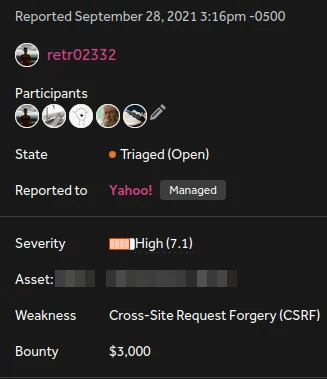
Report accepted and rewarded
Once he reported the error, it was accepted within a few days and rewarded after 3 months:
Goodbye
This was all for now, and the author hopes you enjoyed and learned as much as he did.
Glossary
- API: a URL that a web page's code calls behind the scenes to read or change data, rather than a page you look at.
- Anti-CSRF token: a random value placed in a form and checked by the server, so a forged request from another site cannot succeed.
- Content-Type: a header that says how a request body is formatted, for example JSON or urlencoded form data.
- Cookie: a small piece of text a site stores in your browser after you log in, sent back with each request so the server recognises you.
- CSRF (Cross-Site Request Forgery): tricking a signed-in user's browser into sending a request they did not intend, to a site where they are logged in.
- Domain: a web address such as
example.com. - Endpoint: a specific URL on a server that performs a particular action.
- Framework: a toolkit developers use to build a website, such as Ruby on Rails.
- HTTP method: the verb of a request, such as
GET(fetch),POST(create),PATCH(change part of something) orDELETE(remove). - HTTP method override: a framework feature where a form
POSTcarries a special field such as_method=patchand the server treats it as that other method. - JSON: a structured text format for data, written as
{"key": "value"}. - LAX / None (SameSite): cookie settings that control whether the cookie is sent on requests coming from other sites.
LAXrestricts it,Noneallows it everywhere. - LAX+POST: a Chrome behaviour that temporarily treated cookies without an explicit
SameSiteasNonefor two minutes. - Origin: the site a request came from, which browsers report to the server so it can accept or reject cross-site requests.
- Parameter: a named value sent with a request, such as
user[email]. - Password recovery: the "forgot my password" flow that sends a reset link to the email address on the account.
- PATCH: an HTTP method meaning "change part of an existing thing".
- POST: an HTTP method meaning "here is data, create or submit something".
- Ruby on Rails: a web framework written in the Ruby programming language.
- Session: the period during which a site remembers you as logged in, tracked by the session cookie.
- Subdomain: a smaller address under a main domain, such as
shop.example.comunderexample.com. - Urlencoded: a way of writing form data as
key=value&key2=value2. - Wappalyzer: a browser extension that guesses which technologies a website is built with.
- XSS / SQL injection / etc.: other bug classes not covered here; this report is about CSRF only.

