An Old Password Reset Link Was Enough to Take Back the Account
A password reset token issued before a user changed their password remained valid afterwards, so an attacker holding an old reset link could set a new password and take over the account even after the victim had changed their password.

medium.com
Published on medium.com
Bug Bounty Writeup
The full write-up lives on its author's site
It belongs to its author, so we link to it rather than copy it. The other two tabs are our own rewrites, checked against it.
Context
UXCam is a mobile analytics platform, and the feature under test here is its authentication flow, specifically the password reset mechanism. A password reset link is meant to behave like a temporary credential: you request one, use it once, and once your password changes, any previously issued recovery link should stop working. The researcher's premise is that this is what users expect, and that a reset token should not survive a manual password change.
While testing UXCam's authentication flow, the researcher found a password reset token that did survive exactly that event. A reset link issued before the password was changed could still be used afterwards to set a completely new password. In the right circumstances, that turns a stale email link into an account takeover primitive.
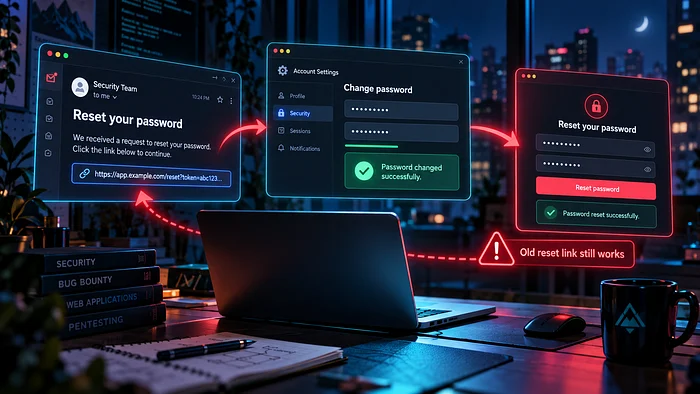
Setup
All testing was performed only against researcher-controlled accounts. No real user accounts or data were accessed, and the testing did not intentionally disrupt the service. The researcher notes that this matters especially for authentication vulnerabilities, where demonstrating impact does not require interacting with another person's account.
The scenario the researcher had in mind is a sequence in which a user requests a password reset email and somebody else obtains that reset URL. The report lists possible routes for that: a compromised mailbox, browser history, a shared device, accidental link exposure, or another leak outside the application itself. The legitimate user then realises something might be wrong and does what most security guidance would tell them to do: they change their password, and reasonably believe the account has been secured. The question the researcher wanted to test was whether the old reset link still works after that.
Finding it
The researcher started from the normal login page and triggered the Forgot Password flow. A password reset email was generated successfully. Instead of using the link immediately, the researcher saved it. At that point, the reset URL represented a valid recovery token associated with the account.
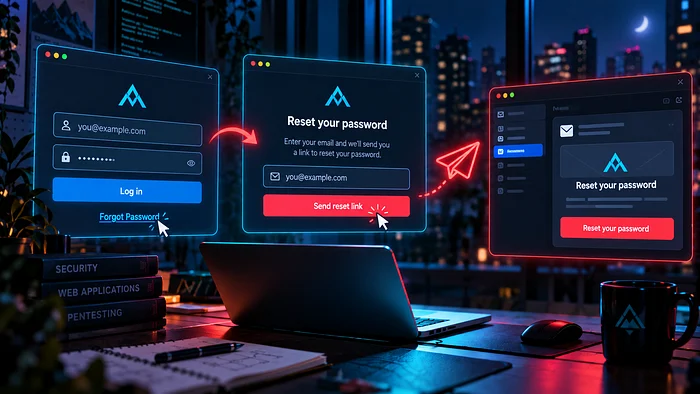
Nothing unusual yet. The interesting part came next.
The researcher logged back into the same test account using valid credentials and, from the account settings, changed the password through the legitimate authenticated password-change functionality. The application confirmed that the password had been updated successfully.
From a security perspective this is an important event. A password change usually indicates one of two things: the user is rotating credentials normally, or the user suspects that their previous credentials may have been compromised. In both cases, previously issued password recovery tokens should no longer remain valid.
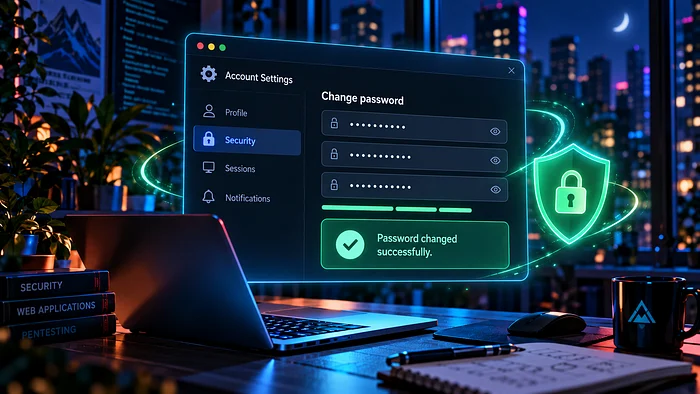
So now the account had a new password, and the old reset link had been generated before that change. It should have been dead.
Exploitation
Step 1: Requesting a password reset
The researcher triggered the Forgot Password flow from the normal login page. A password reset email was generated successfully, and the link was saved rather than used. At this point the reset URL represented a valid recovery token associated with the account.
Step 2: Changing the password normally
The researcher logged back into the same test account with valid credentials and changed the password through the legitimate authenticated password-change functionality in account settings. The application confirmed the password had been updated successfully. The old reset link had been generated before that change and should have been dead.
Step 3: Reopening the old reset link
The researcher opened the reset URL from Step 1 in a separate incognito session. Instead of returning an invalid or expired token message, the password reset page loaded normally. The application still accepted the previously issued token.
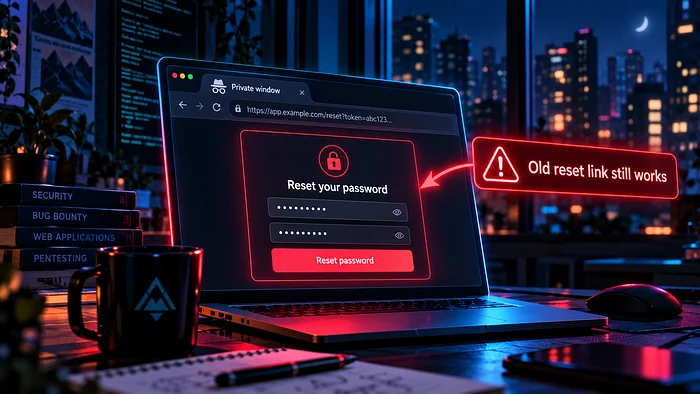
That alone showed that changing the account password had not invalidated the outstanding reset token. But the important question was whether the token could still actually change the password.
Step 4: Using the stale token
The researcher entered another new password through the old reset link. The reset completed successfully.
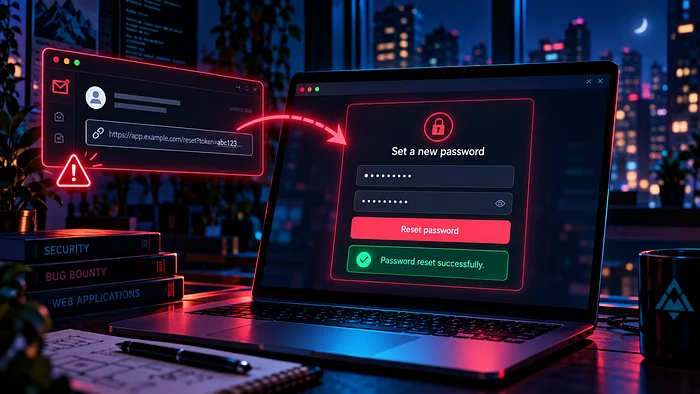
The researcher then attempted to authenticate using the password that had been manually configured from the account settings. It no longer worked. Finally, the researcher logged in using the password set through the old reset link. It worked.
At this point the impact was clear: a password reset URL issued before the legitimate password change could still overwrite the user's newly chosen password afterwards.
Root cause
The underlying problem appeared to be related to password reset token lifecycle management. The reset token was apparently being validated based on properties such as expiration and usage state, but its validity was not tied strongly enough to the current password state of the account.
In other words, the application knew whether the reset token was still valid, but it did not sufficiently ask whether something security-sensitive had happened to the account since the token was issued. A password change should be one of those events.
Impact
The vulnerability is not simply that a link lives longer than expected. The problem is the security assumption surrounding a password change. Consider an attacker who already obtained a reset link but has not used it yet. The victim notices suspicious activity and changes their password. Normally that should cut off previously acquired recovery credentials. But if the old token remains valid, the attacker can simply wait, open the stale reset URL after the victim changes the password, and choose another password.
The attack chain becomes:
Reset link obtained
↓
Victim changes password
↓
Victim believes the account is secure
↓
Old reset link remains valid
↓
Attacker resets password again
↓
Account takeover
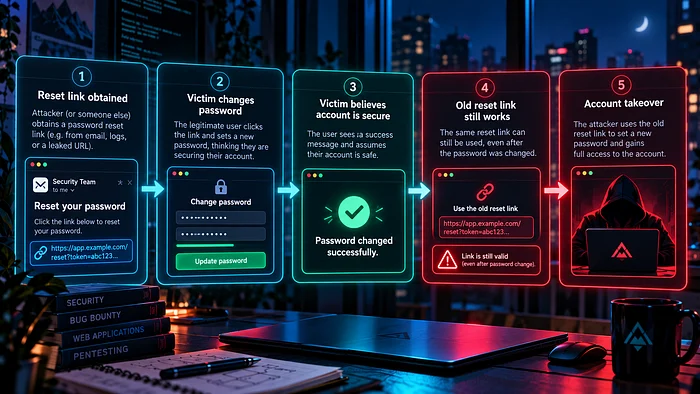
This creates an especially dangerous form of false security: the victim takes the correct defensive action, but that action does not actually revoke the attacker's recovery capability.
A successfully exploited stale reset token could result in complete account takeover. For a platform such as UXCam, unauthorised account access may expose sensitive workspace information, analytics, dashboards, and other data available to the compromised user. The issue also weakens an important account-recovery assumption: changing the password may not terminate previously issued recovery paths, which can make incident response significantly less effective for the affected user.
Fix
The report describes what should happen rather than what was changed: whenever a user changes their password, previously issued password reset tokens for that account should be invalidated.
One possible implementation is straightforward token revocation:
On successful password change:
Invalidate all outstanding password-reset tokensbelonging to that user.
Another common pattern is tying tokens to an account-level security version. For example:
reset_token.password_version = 5user.password_version = 6
Token rejected because the user's password statehas changed since token issuance.
The exact implementation depends on the authentication architecture. The security property is what matters: a recovery credential issued for an old password state should not survive a new password state.
Disclosure
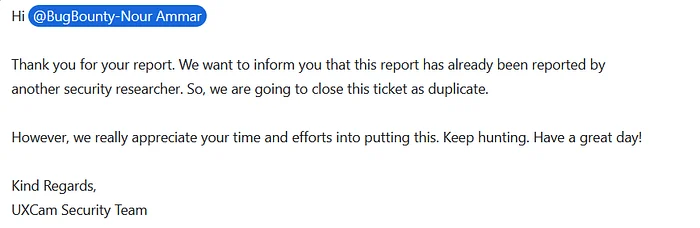
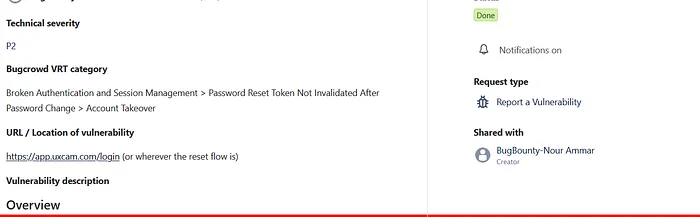
The researcher reported the issue to the UXCam security team through their bug bounty program. The report was categorised as Broken Authentication and Session Management → Password Reset Token Not Invalidated After Password Change → Account Takeover, with a reported technical severity of P2. The security team later informed the researcher that the vulnerability had already been reported by another researcher, and the submission was closed as a duplicate.
Duplicate or not, the researcher considers the behaviour worth documenting because it highlights an authentication mistake that can easily be overlooked.
The bigger lesson is that password reset URLs should be treated like temporary credentials, and credentials should have a lifecycle. Issuing a token is only one half of that lifecycle; applications also need to know when that token must stop being trusted. Expiration helps. Single-use enforcement helps. But those controls are not enough when the account's security state changes before the token is used. A successful password change should represent a security boundary, and anything capable of changing the password that was issued before that boundary should normally die with it. Sometimes the dangerous part of a password reset link is not how it was created, but how long the application continues to trust it.
- Password change after reset request. Request a reset link, change the password through authenticated settings, then open the link in a fresh session. A positive result is the reset page loading normally instead of showing an invalid or expired token message.
- Full reset after password change. Continue from the previous step and submit a new password through the stale link. A positive result is the reset completing and the new password working at login while the manually set password no longer does.
- Email change after reset request. Request a reset link, change the account email, then use the old link. A positive result is the token still being accepted, which would suggest the token is not bound to the account's current identity state.
- Second reset request. Request two reset links, use one, then try the other. A positive result is the second link still working, which would show that issuing a new token does not revoke outstanding ones.
- Logout and session revocation. Request a reset link, then log out of all sessions or revoke sessions. A positive result is the reset link still working, indicating the token is not tied to session state.
- MFA changes. Request a reset link, then enable or disable multi-factor authentication. A positive result is the token still being accepted after a security-sensitive account change.
- Token reuse. Use a reset link once, then open it again. A positive result is the link being accepted a second time, which would show single-use enforcement is missing as well as revocation on password change.
What happened, in plain words
UXCam is a mobile analytics platform whose authentication flow the researcher tested. It offers a "forgot my password" flow that emails you a special link so you can set a new password.
That link is meant to be a temporary key. You ask for it, you use it once, and once your password has changed, any older link should stop working. The researcher who wrote this report tested whether that last part was actually true, and found it was not: a reset link created before a password change still worked after the password change, and could be used to set yet another new password.
If someone else had got hold of that link, they could wait for the real owner to change their password, then use the old link to take the account back. That is what security people call account takeover: someone else ends up in control of your account.
The scenario the researcher had in mind
Before touching anything, it helps to picture the situation the researcher wanted to test.
- A user asks the site to send them a password reset email.
- Somebody else gets hold of that email or its link. The report lists possible ways: a mailbox that has been broken into, browser history on a shared computer, a shared device, a link accidentally posted somewhere, or any other leak outside the application itself.
- The real user suspects something is wrong and does what security advice says: they change their password.
- They now believe the account is safe again.
The question the researcher wanted to answer was simple: after step 3, does the link from step 2 still work?
A quick comparison: think of a reset link as a spare key you have cut for a locksmith. If you change the lock, the spare key should stop opening the door. Here the researcher wanted to know whether the old spare key still worked after the lock was changed.
Ground rules: testing only your own accounts
All testing was done on accounts the researcher controlled. No real user accounts or data were touched, and the testing did not deliberately disrupt the service.
This matters more than usual for sign-in features. To prove a problem with a password reset, you do not need to break into somebody else's account: you can show the whole thing on an account you own, and the result still tells you what would happen to a real user.
Step 1: Asking for a password reset link
The researcher went to the normal login page and used the Forgot Password option. The site sent a password reset email successfully. Instead of clicking the link straight away, the researcher saved it for later.
At that moment, the link represented a valid recovery token associated with the account. You can think of a token as a cloakroom ticket: whoever holds the ticket gets the coat, no questions asked. That is exactly why a reset link must be handled carefully and must stop working quickly.
Nothing looked wrong at this point. The interesting part came next.
Step 2: Changing the password the normal way
The researcher signed in to the same test account with the correct email and password, went to the account settings, and used the ordinary "change password" feature. The site confirmed the password had been updated.
Why does this step matter so much? A password change usually means one of two things:
- the user is simply rotating their password as good practice, or
- the user thinks their old password may have leaked and is trying to shut out anyone who has it.
In both cases, any reset link handed out earlier should stop working. Otherwise the password change gives a false sense of safety: the front door lock has been changed, but the old spare key still opens it.
So the account now had a new password, and the saved reset link had been created before that change. It should have been dead.
Step 3: Opening the old link again
The researcher opened the saved reset link in a separate incognito browser window. Incognito (private browsing) is a mode where the browser starts with no saved cookies or sign-in state, so it behaves like a completely fresh visitor. Using it proves the result does not depend on still being signed in.
Instead of showing a message like "this link is invalid or has expired", the password reset page loaded normally. The site still accepted the old token.
That alone showed that changing the password had not cancelled the outstanding reset link. But there was a bigger question: could the old link actually change the password, or would it only display the page?
Step 4: Using the old link to set a new password
The researcher typed yet another new password into the form reached through the old reset link. The reset completed successfully.
Then came the checks that prove what really happened:
- The researcher tried to sign in with the password that had been set manually in account settings. It no longer worked.
- The researcher signed in with the password set through the old reset link. It worked.
So the impact was clear: a reset link created before the legitimate password change could still overwrite the password the user had just chosen.
Why this becomes account takeover
The problem is not just that a link lives longer than expected. The problem is the assumption people make about changing a password.
Picture an attacker who already has a reset link but has not used it yet. The victim notices something suspicious and changes their password. Normally that should cut off every previously obtained way back in. But if the old token still works, the attacker simply waits, opens the stale link after the password change, and picks a new password.
The attack chain in the report looks like this:
Reset link obtained
↓
Victim changes password
↓
Victim believes the account is secure
↓
Old reset link remains valid
↓
Attacker resets password again
↓
Account takeover
This is a particularly unpleasant kind of false security. The victim does exactly the right thing, but that action does not actually take away the attacker's ability to get back in.
The root cause
The underlying issue was in how the site managed the lifecycle of password reset tokens, meaning the full story of a token from creation to death.
The token was apparently checked for things like whether it had expired and whether it had already been used. But its validity was not tied closely enough to the current password state of the account.
In plain words: the application knew whether the reset token was still valid, but it did not ask a second, equally important question: has anything security-sensitive happened to this account since this token was created? A password change should count as one of those events.
What should happen instead
Whenever a user changes their password, previously issued password reset tokens for that account should be invalidated, meaning cancelled so they can never be used again.
One possible implementation is straightforward token revocation:
On successful password change:
Invalidate all outstanding password-reset tokensbelonging to that user.
Line by line:
On successful password change:sets the moment when the rule fires: only after the site has confirmed the new password was saved.Invalidate all outstanding password-reset tokensbelonging to that user.says that every reset token still alive for that account should be cancelled. "Outstanding" means issued but not yet used or expired. The wordstokensbelongingrun together in the report exactly as shown.
Another common pattern is tying tokens to an account-level security version. For example:
reset_token.password_version = 5user.password_version = 6
Token rejected because the user's password statehas changed since token issuance.
Line by line:
reset_token.password_version = 5means the token remembers which version of the password existed when it was created: version 5.user.password_version = 6means the account is now on version 6, because the password was changed once since then.Token rejected because the user's password statehas changed since token issuance.is the result: the two numbers no longer match, so the token is refused. "Issuance" means the moment the token was created.
The exact implementation depends on how the sign-in system is built. What matters is the security property: a recovery credential issued for an old password state should not survive a new password state.
Business impact
A stale reset token that can still be used could lead to complete account takeover. For a platform such as UXCam, unauthorised access to an account may expose sensitive workspace information, analytics, dashboards, and other data available to the compromised user.
The issue also weakens an important assumption about account recovery: changing the password may not end previously issued recovery paths. That can make incident response, the process of reacting to a suspected break-in, much less effective for the affected user.
Responsible testing
All testing was performed only against researcher-controlled accounts. No real user accounts or data were accessed, and the testing did not intentionally disrupt the service. This is especially important with authentication vulnerabilities, where demonstrating impact does not require interacting with another person's account.
Disclosure
The researcher reported the issue to the UXCam security team through their bug bounty program. A bug bounty program is a scheme where a company invites outside researchers to report security problems, often with a reward, instead of punishing them for looking.
The report was categorised as:
Broken Authentication and Session Management → Password Reset Token Not Invalidated After Password Change → Account Takeover
with a reported technical severity of P2. Severity ratings like P2 are a company's way of ranking how serious a finding is; the report gives the label but not the scale behind it.
The security team later told the researcher that the vulnerability had already been reported by another researcher, and the submission was closed as a duplicate, meaning the same issue had been reported before.
Duplicate or not, the researcher considers the behaviour worth documenting because it highlights an authentication mistake that can easily be overlooked.
The bigger lesson
Password reset URLs should be treated like temporary credentials, and credentials should have a lifecycle. Issuing a token is only one half of that lifecycle; applications also need to know when that token must stop being trusted.
Expiration helps: a link that dies after a set time limits the damage. Single-use enforcement helps: a link that only works once cannot be replayed. But those controls are not enough when the account's security state changes before the token is used.
A successful password change should represent a security boundary, a line in time after which old permissions no longer count. Anything capable of changing the password that was issued before that boundary should normally die with it.
Sometimes the dangerous part of a password reset link is not how it was created, but how long the application continues to trust it.
Each one changes one thing and watches whether the old link still works.
- Password change after reset request. Request a reset link, change the password through the signed-in settings, then open the link in a fresh session. A positive result is the reset page loading normally instead of showing an invalid or expired token message.
- Full reset after password change. Continue from the previous step and submit a new password through the stale link. A positive result is the reset completing and the new password working at login while the manually set password no longer does.
- Email change after reset request. Request a reset link, change the account email, then use the old link. A positive result is the token still being accepted, which would suggest the token is not bound to the account's current identity state.
- Second reset request. Request two reset links, use one, then try the other. A positive result is the second link still working, which would show that issuing a new token does not revoke outstanding ones.
- Logout and session revocation. Request a reset link, then log out of all sessions or revoke sessions. A positive result is the reset link still working, indicating the token is not tied to session state.
- MFA changes. Request a reset link, then enable or disable multi-factor authentication. A positive result is the token still being accepted after a security-sensitive account change.
- Token reuse. Use a reset link once, then open it again. A positive result is the link being accepted a second time, which would show single-use enforcement is missing as well as revocation on password change.
Glossary
- Account takeover: a situation where someone other than the account owner gains control of the account, for example by setting a new password.
- Authentication: the process of proving who you are when signing in, usually with an email address and password.
- Bug bounty program: a scheme where a company invites outside researchers to report security problems, often with a reward.
- Cookie: a small piece of data a website stores in your browser so it can remember you between page loads, such as keeping you signed in.
- Credential: anything that proves identity or grants access, such as a password, a reset link or a token.
- Duplicate: a bug report describing an issue that has already been reported by someone else.
- Expiration: the point at which a token or link stops being valid because a set amount of time has passed.
- Incognito / private browsing: a browser mode that starts without saved cookies or sign-in state, so it behaves like a fresh visitor.
- Invalidate: to cancel something so it can no longer be used.
- Lifecycle (of a token): the full story of a token from creation to death, including when it must stop being trusted.
- MFA (multi-factor authentication): signing in with more than one proof, for example a password plus a code from a phone.
- Outstanding token: a token that has been issued but not yet used or expired.
- P2: a severity label used by the company to rank the finding; the report gives the label but not the scale behind it.
- Password reset token: a long, hard-to-guess string inside a reset link that proves the holder is allowed to set a new password for an account.
- Revocation: cancelling a token or permission so it can no longer be used.
- Session: the period during which a website remembers that you are signed in.
- Severity: a ranking of how serious a security finding is.
- Single-use enforcement: a rule that a token or link can only be used once.
- Stale token: an old token that should no longer be valid but still is.
- Token: a string of characters used as proof of permission, like a cloakroom ticket: whoever holds it gets access.
- UXCam: a mobile analytics platform that shows app developers how people use their apps through dashboards and reports.
- Vulnerability: a weakness in a system that someone could abuse to do something the owner did not intend.



