An unexpected bug
A Remote Desktop Web Access login page was exposed on a subdomain and allowed repeated password guesses without lockout. By spraying a small set of common passwords against usernames harvested from LinkedIn, the hunter obtained valid credentials and logged into the service.
 Published on cyberhacks200.medium.com
I am Nitin yadav from India with my first ever write up so please ignore my mistakes. So without wasting time lets roll to the bug and how i found it.
The full write-up lives on its author's site
It belongs to its author, so we link to it rather than copy it. The other two tabs are our own rewrites, checked against it.
Context
This is a first write-up from Nitin Yadav (@Nitinydv14), published on 31 January 2021, about his first time hunting on a live website. The program and the real domain are not disclosed: the author refers to the target only as site.com, saying he cannot disclose it under the program rules. The asset involved is a subdomain, terminal.epm.site.com, which the author later associates with an RDS login page. RD Web Access is the web front end that lets users sign in with a domain account and then launch published RemoteApp or desktop sessions, so the login form is the entry point to a corporate Windows environment.
Setup
The author was new to bug hunting and had no particular bug class in mind. After three or four days without results his excitement had turned into boredom, and he turned to reconnaissance material: a tweet about recon, then a video on bug hunter methodology by Jason Haddix, whose steps he followed.

The tools and resources used were:
- The recon methodology from the video, which led him to the subdomain.
- The RD Web Access login page itself, whose source disclosed the internal domain name.
- LinkedIn, to collect employee names for the company.
- A tool called linkdin2usernames, cloned from a blog post, to turn those names into a username list.
sed, to rewrite the list into the username format the company uses.- Burp Suite Intruder, to run the password spraying attack.
No versions, account roles or prior credentials are given.
Finding it
Following the methodology video, the author ended up with a subdomain, terminal.epm.site.com.
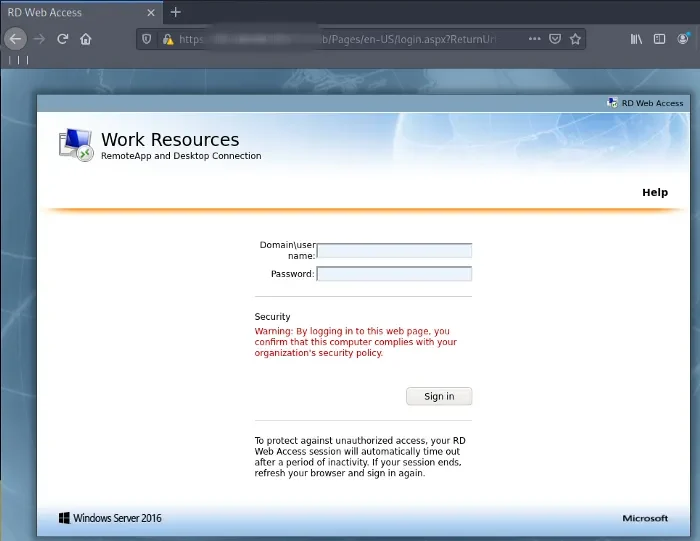
He did not know what the host was, and had no credentials for it. Rather than look for another bug class, he decided to obtain valid usernames and passwords for the login, and when he could not find any, he settled on a password spraying attack.
A spray needs two things: the internal domain name and a list of usernames. The first was easy. The internal domain name of the target, he found, can be read quickly from the source of the RDS login page as the WorkSpaceId.

The second was harder. Searching for the company on social media gave nothing useful. He then checked LinkedIn and found some employee names for the company, but still needed a way to turn names into the account naming scheme.
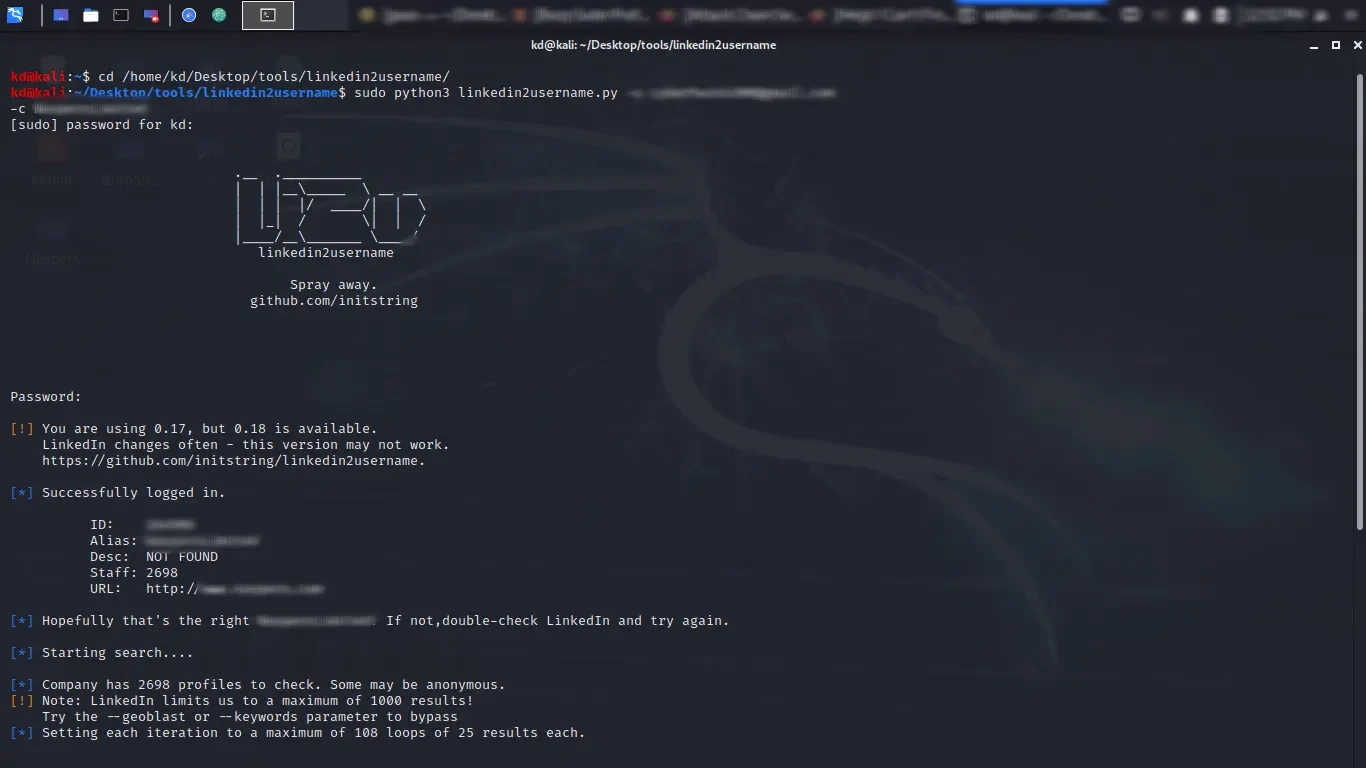
He remembered a blog post about a tool called linkdin2usernames and cloned it. The tool generates usernames from LinkedIn names, but not in the format this company uses for RD Web Access, which is first_last. The same blog post contained a tip for converting the generated list, and he applied it with sed:
$sed -i 's/\./_/g' site-first.last.txt
The substitution replaces every dot in the file with an underscore, turning names of the form first.last into first_last, which matches the company's account format.

Exploitation
Step 1: capture the login request
He captured the login POST request to the RD Web Access form and left a placeholder where the username goes, loading the list produced by linkdin2usernames (after the sed rewrite) as the payload set. Burp Intruder was chosen over other spraying methods for the flexibility and control it gives over the attack.
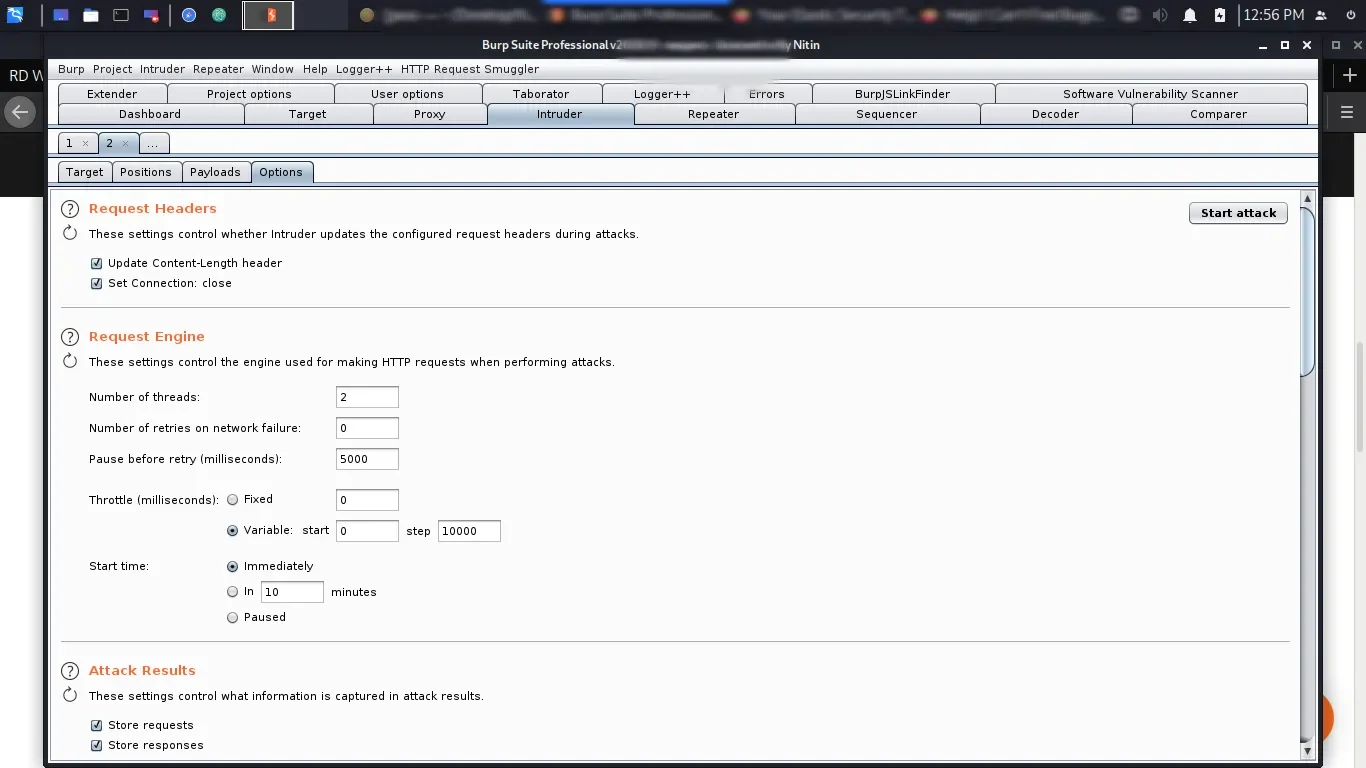
He notes explicitly that it is important to tune the attack to minimise impact and load on the service. The report does not give the request itself, the placeholder name, the number of threads, the delay or the password or password list used.
Step 2: launch the spray
With the request and the list in place, he launched the attack. After two hours he got a 302 redirection, which he took as confirmation that a set of credentials was valid.

A 302 on a login POST is the usual signal that authentication succeeded and the application is redirecting the client onwards.
Step 3: use the credentials
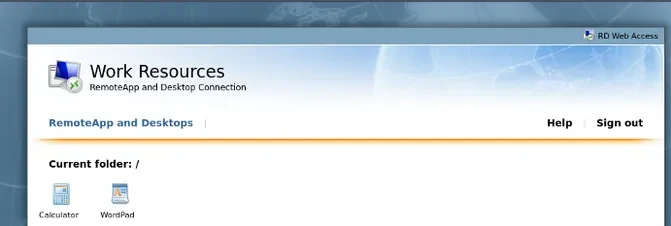
He then logged in to the RD Web Access service with the credentials obtained from the spray. The account had only a little access, but as he puts it, that was not what concerned him.
Root cause
The report does not describe the server-side implementation, so the cause can only be inferred. Because spraying tries a small number of passwords against many accounts rather than many passwords against one account, per-account lockout thresholds alone would not have stopped it. The internal domain name was readable from the login page source as WorkSpaceId.
Impact
With a valid set of domain credentials, the author could authenticate to the RD Web Access service. The account he obtained had limited access, and he does not describe what it could reach beyond that. The wider risk of a successful spray against such a service is access to the corporate environment under a legitimate employee identity, but the report only demonstrates the login itself and the small amount of access that account had.
He reported the bug to the company and was awarded within some days.

Fix
Measures that would address this class of issue on an internet-facing RD Web Access login include rate limiting and alerting on authentication attempts spread across many accounts, restricting the service to clients that need it (VPN or allow-listed ranges) rather than exposing it publicly, and removing internal identifiers such as the domain name from page source where they are not needed. Multi-factor authentication on the RD gateway would also make a sprayed password far less useful.
Variants to test
- Other internet-facing RD Web Access or RemoteApp portals. Look for login pages that accept domain credentials directly. A positive result is a login form that returns a redirect or session cookie on valid credentials and shows no throttling after a modest number of attempts across different usernames.
- Domain name disclosure in page source. Check login pages and client-side configuration for internal domain names, workspace or tenant identifiers. A positive result is an internal domain or realm value that can be used to build
first_laststyle usernames. - Username format discovery. Compare generated name lists against the target's documented or observed account format. A positive result is a format that produces authentication responses distinguishable from invalid usernames.
- Spray tuning against lockout policy. Test a small number of passwords per account with delays, watching for lockout messages. A positive result is successful authentication without triggering lockout, which shows the policy does not cover distributed attempts.
- Response differentiation. Compare status codes, headers and body length for valid and invalid logins. A positive result is a reliable signal such as a 302 for success against a different response for failure, which makes the spray results readable.
What happened, in plain words
A security researcher named Nitin Yadav tried bug hunting on a real company website for the first time. He could not name the company or the real domain, so throughout his write-up he calls the target site.com. He found a subdomain, terminal.epm.site.com, and later worked against an RDS login page. He did not have a username or a password for it. So he collected employee names from LinkedIn, turned them into a list of likely usernames, and tried a small number of common passwords against every username in that list. This technique is called password spraying. After two hours he got a 302 redirection, which he took as confirmation that a set of credentials was valid. He signed in, saw that the account had only a little access, and reported the bug to the company. Within some days he was awarded for it.
This article walks through the same steps for someone who has never done security work before. Every technical word is explained the first time it appears, and there is a glossary at the end.
Background: what he was doing and why
Bug hunting (also called bug bounty hunting) means looking for security mistakes in a company's systems and reporting them, usually in exchange for a reward. Companies that run a bug bounty program publish rules: which systems you may test, what you may not do, and how to report what you find. One common rule is that you must not publicly reveal the company's identity or the exact addresses you tested. That is why this write-up only ever says site.com.
The photo above is a stock image by Gia Oris on Unsplash, used as decoration at the start of the post.
For his first few days he had no results, and his initial excitement turned into boredom. He then went looking for material about reconnaissance. Reconnaissance (recon) is the first phase of any security test: gathering information about the target before trying anything. It is like casing a building before you try the doors: you learn the layout, the entrances and the names on the mailboxes first.
He watched a video on bug hunter methodology by Jason Haddix and followed the steps shown in it.
Following that methodology led him to a subdomain: terminal.epm.site.com.
A subdomain is a name that sits under a main domain. If site.com is the company's main address, then terminal.epm.site.com is a separate machine or service the company runs under its name. Finding subdomains matters because each one is a separate service, and services that are forgotten or poorly configured are common places to find weaknesses.
What he found on that subdomain
He did not recognise what the host was, and he had no credentials for it. Rather than move on to a different kind of bug, he decided to try to obtain valid usernames and passwords for the login. When he could not find any, he settled on a password spraying attack.
What password spraying is
A normal brute-force attack tries many passwords against one account. That is easy for a defender to stop: after a few wrong guesses the account locks, or the server starts slowing down the answers.
Password spraying flips the approach. It takes one or a few common passwords and tries each of them against a long list of usernames, once per account. Each individual account sees only a handful of failed attempts, so per-account lockout rules often never trigger. The bet is that at least one employee uses a weak, widely used password. The comparison: instead of trying every key on one lock, you try one common key on every door in the building.
A spray needs two ingredients: the internal domain name and a list of usernames.
Ingredient one: the internal domain name
The internal domain name is the name the company uses for its own network and accounts, for example the part after the @ in an employee's login. It is not usually the same as the public website address. Knowing it lets an attacker build usernames in the right form.
He found it quickly by reading the source of the RDS login page, where it appeared as the WorkSpaceId.
"Reading the source" means using the browser's View Source or developer tools to look at the raw HTML that the server sent, rather than the rendered page. Web pages often carry hidden values in their HTML, such as identifiers the page needs to talk to the server. Here, the internal domain name was sitting in that HTML as a value called WorkSpaceId. The lesson: information a page does not visibly show can still be readable by anyone who looks.
Ingredient two: a list of usernames
This was the harder part. Searching for the company on social media gave him nothing useful. He then checked LinkedIn and found some employee names for the company, but he still needed to know the account naming scheme: does the company use firstname.lastname, flastname, first_last, or something else?
He remembered a blog post about a tool called linkdin2usernames and cloned it. "Cloning" a tool means downloading a copy of its source code, usually from a code hosting site, so you can run it on your own machine. The tool generates possible usernames from LinkedIn names.
But the tool did not produce the format this company uses for RD Web Access, which is first_last: the first name, an underscore, then the last name. The same blog post contained a tip for converting the generated list, and he applied it with sed.
sed is a command-line text editing tool available on Linux and macOS. It can find a pattern in a text file and replace it, across every line, without opening an editor. The command he ran was:
$sed -i 's/\./_/g' site-first.last.txt
Line by line:
sedis the program being run.-imeans "in place": the file is edited directly, and the result is saved back into the same file rather than printed to the screen.'s/\./_/g'is the instruction.smeans substitute. The first part,\., is the pattern to find: a literal dot (the backslash tellssedthe dot is a dot, not a special character). The second part,_, is what to put in its place: an underscore. Thegat the end means "globally", so every dot on every line is replaced, not just the first one per line.site-first.last.txtis the file being edited: the username list the tool produced.
So every name of the form first.last became first_last, matching the company's account format. The file name in the command is the author's own example; the real company name is not given.
The photo above is a stock image by Attentie Attentie on Unsplash, used as decoration between sections.
Setting up the attack
He chose Burp Suite to run the spray. Burp Suite is a tool that sits between your browser and a website, letting you capture a request, inspect it, change it, and send it again many times with different values. It is widely used in security testing because it gives fine control over exactly what is sent.
He captured the login POST request to the RD Web Access form. A POST request is the way a browser sends data to a server, for example the contents of a login form. Capturing it means recording the exact request the browser made when he submitted the form, so it can be replayed.
He then left a placeholder where the username goes and loaded the list produced by linkdin2usernames, after the sed rewrite, as the payload set. A placeholder is a marker in the request that the tool replaces with each item from the list in turn. The payload set is simply that list of values to try.
He notes explicitly that it is important to tune the attack to minimise impact and load on the service. In plain terms: do not hammer a live company system. Sending too many requests too fast can slow the service for real users, look like a denial-of-service attack, and break the program's rules. Tuning means adjusting how many requests run at once and how much delay there is between them.
The write-up does not give the request itself, the placeholder name, the number of threads, the delay, or the password or password list used.
Launching the password spraying attack
With the request and the list in place, he launched the attack.
The photo above is a stock image by Windows on Unsplash, used as decoration for this section.
Why a 302 matters
HTTP status codes are three-digit numbers a server sends back with every response. A 302 means "Found": the server is telling the browser to go somewhere else, a redirect. On a login form, a 302 after a successful sign-in is the normal behaviour: the server accepts the credentials and redirects the browser to the logged-in area. A failed login usually gets a different answer, such as the same page returned again with an error message, or a different status code.
That difference is what makes a spray readable. If success and failure look different in the response, the attacker can tell which attempts worked. Here, the 302 stood out against the failed attempts, and it meant one username and password pair was correct.
Accessing the RDS service with the obtained credentials
He then logged in to the RD Web Access service with the credentials obtained from the spray. The account had only a little access, but as he puts it, that was not what concerned him.
RD Web Access is the web front end for Remote Desktop Services. In everyday terms, it is a web page where an employee signs in with their company account and then launches a remote Windows desktop or a published application, so they can work on the company's systems from a browser. Because it accepts company accounts, a working set of credentials on that page lets someone sign in, even if the particular account is not powerful.
Reporting and the result
He reported the bug to the company and was awarded within some days.
The photo above is a stock image by Crawford Jolly on Unsplash, used as decoration at the end of the post.
The write-up does not state the reward amount or what the company changed afterwards.
Why this worked
- Because spraying tries a small number of passwords against many accounts rather than many passwords against one account, per-account lockout thresholds alone would not have stopped it.
- The internal domain name was readable from the login page source as
WorkSpaceId.
What the impact was
With a valid set of domain credentials, the author could sign in to the RD Web Access service. The account he obtained had limited access, and he does not describe what it could reach beyond that. The wider risk of a successful spray against such a service is access to the corporate environment under a legitimate employee identity, but the write-up only demonstrates the login itself and the small amount of access that account had.
How this class of issue is fixed
Measures that would address this kind of issue on an internet-facing RD Web Access login include:
- Rate limiting and alerting on authentication attempts spread across many accounts, not just many attempts on one account.
- Restricting the service to clients that need it, such as a VPN or allow-listed network ranges, rather than exposing it publicly.
- Removing internal identifiers such as the domain name from page source where they are not needed.
- Multi-factor authentication on the RD gateway, which makes a sprayed password far less useful on its own.
Variants to test
If you want to look for similar issues, these are the directions the write-up points to:
- Other internet-facing RD Web Access or RemoteApp portals. Look for login pages that accept domain credentials directly. A positive result is a login form that returns a redirect or session cookie on valid credentials and shows no throttling after a modest number of attempts across different usernames.
- Domain name disclosure in page source. Check login pages and client-side configuration for internal domain names, workspace or tenant identifiers. A positive result is an internal domain or realm value that can be used to build
first_laststyle usernames. - Username format discovery. Compare generated name lists against the target's documented or observed account format. A positive result is a format that produces authentication responses distinguishable from invalid usernames.
- Spray tuning against lockout policy. Test a small number of passwords per account with delays, watching for lockout messages. A positive result is successful authentication without triggering lockout, which shows the policy does not cover distributed attempts.
- Response differentiation. Compare status codes, headers and body length for valid and invalid logins. A positive result is a reliable signal such as a 302 for success against a different response for failure, which makes the spray results readable.
Glossary
- 302: An HTTP status code meaning "Found"; the server tells the browser to go to a different address, a redirect. On a login form it often signals success.
- Brute-force attack: Trying many passwords against one account until one works.
- Bug bounty program: A scheme where a company invites security researchers to find and report weaknesses in its systems, usually for a reward, under published rules.
- Burp Suite: A tool that sits between a browser and a website so requests can be captured, inspected, changed and replayed many times.
- Clone (a tool): To download a copy of a tool's source code so you can run it yourself.
- Credentials: A username and password pair used to sign in.
- Domain name: The name that identifies a site or network, such as
site.com; the internal domain name is the one a company uses for its own accounts and network. - HTML: The code a web page is written in; the browser turns it into the page you see.
- HTTP status code: A three-digit number a server sends with each response to say what happened, such as 302 for a redirect.
- Internal domain name: The name a company uses inside its own network for accounts and machines, often different from its public website address.
- linkdin2usernames: A tool that generates possible usernames from LinkedIn names.
- Lockout: A defence where an account is temporarily disabled after too many failed sign-in attempts.
- Multi-factor authentication (MFA): Signing in with something more than a password, such as a code from a phone, so a stolen password alone is not enough.
- Password spraying: Trying one or a few common passwords against many usernames, once per account, so per-account lockout rules are not triggered.
- Payload set: The list of values a tool substitutes into a request, one at a time.
- Placeholder: A marker left in a request that a tool replaces with each value from a list.
- POST request: The way a browser sends data to a server, for example the contents of a login form.
- Rate limiting: A defence that slows down or blocks clients that send too many requests in a given time.
- RD Web Access: The web front end for Remote Desktop Services, where an employee signs in with a company account and launches a remote Windows desktop or published application from a browser.
- Reconnaissance (recon): The information-gathering phase of a security test, done before trying anything.
- Redirect: A server response that sends the browser to a different address.
- Remote Desktop Services (RDS): Microsoft's technology for running a Windows desktop or application on a remote machine and using it over the network.
- sed: A command-line text editing tool that can find and replace patterns across a file.
- Source (page source): The raw HTML a server sends, which a browser can display, including values not shown on the rendered page.
- Subdomain: A name under a main domain, such as
terminal.epm.site.comundersite.com, usually pointing to a separate service. - Tuning (an attack): Adjusting speed, concurrency and delays so an attack does not overload or disrupt the target.
- Username format: The pattern a company uses to build account names, such as
first_last. - VPN: A private, encrypted connection into a network, often used to restrict who can reach internal services.
- WorkSpaceId: The name of the value in the login page source from which the author read the internal domain name.



