Anatomy of a Phishing Link: How I Traced a Suspicious Email Back to a Compromised Domain
A suspicious email contained a link to a compromised legitimate domain that used a delayed JavaScript redirect and request validation to evade automated analysis. The author traced the infrastructure and reported it, but no specific vulnerability in a product was identified.
 Published on medium.com
It started with an email that felt slightly off. Nothing dramatic, no urgent subject line screaming that my account had been suspended, no panicked “click here immediately” energy.
The full write-up lives on its author's site
It belongs to its author, so we link to it rather than copy it. The other two tabs are our own rewrites, checked against it.
A message arrived that felt slightly off. No urgent subject line, no claim that an account had been suspended, no pressure to click immediately. Just an email with an embedded link that did not sit right. Rather than click it, open it in a new tab or download anything, I treated it as a small investigation. What follows is the path I took and what each step showed.
Context
The target here is not a product feature in the usual sense. It is a phishing email and the infrastructure behind it: a link with a long randomised path on an otherwise ordinary-looking domain, danielledovas.com. That pattern, a long random path appended to a normal domain, is typical of single-use or per-recipient tracking links, the kind campaigns use to tie a click back to a specific target or batch. The page behind the link combined a decoy message with a delayed JavaScript redirect, and the domain's age against its certificate suggested a legitimate site that had been compromised rather than one registered by the attacker.
Setup
The investigation used only public analysis services and manual inspection:
- The raw email body, read by hand so that the mail client would not render or follow the link.
- VirusTotal, for multi-vendor URL reputation and the underlying HTTP response detail.
- Hybrid Analysis, a sandbox that loads a page and observes its behaviour.
- urlscan.io, for a live scan that logs every network request.
- Cisco Talos reputation lookup, for the resolved IP addresses.
- The email headers themselves.
No account details, tool versions or special access are described. The precondition is simply that the link is never opened in a normal browser session.
Finding it
The first rule of looking into a suspicious email is not to interact with the live infrastructure until you know what it does: no clicking, no previewing, no opening attachments in a normal browser session. I extracted the embedded URL from the email body by hand instead of letting the mail client render or follow it.

The long randomised path on a normal-looking domain was enough on its own to justify a closer look before going anywhere near it in a live browser.
Exploitation
Step 1: VirusTotal, one flag among many
The first stop was VirusTotal, which runs a URL against dozens of vendors at once. Out of roughly sixty engines, only one returned a verdict: LevelBlue, the vendor formerly known as AlienVault, flagged the URL as "Suspicious". Every other vendor returned clean or no result.
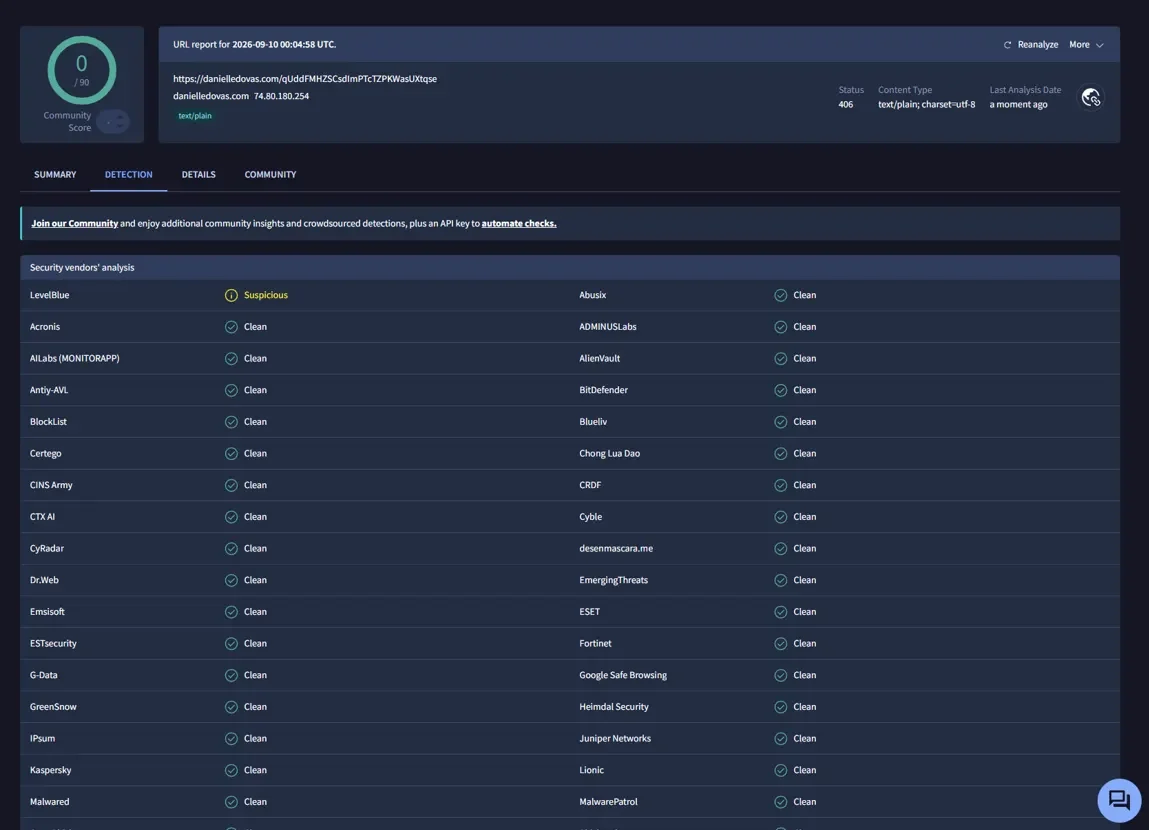
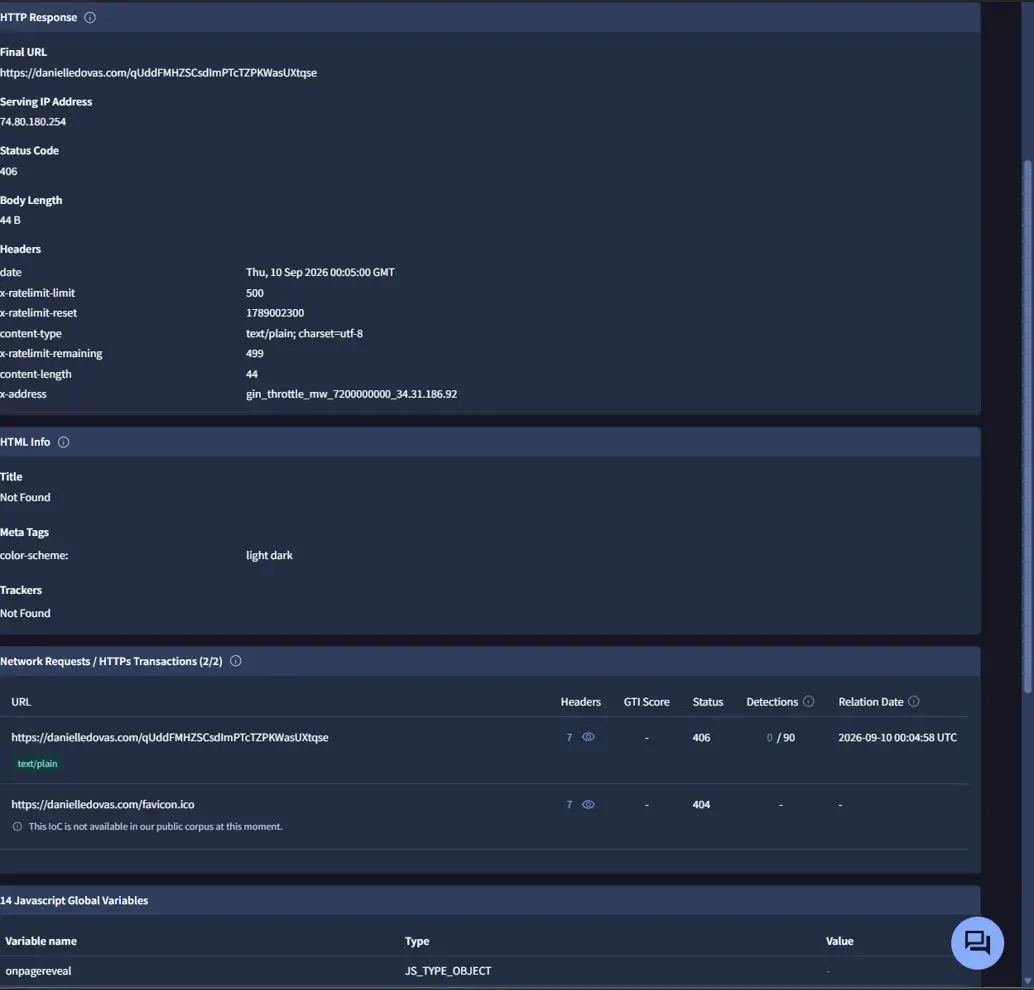
VirusTotal's URL analysis view also broke down the underlying HTTP response: a 406 status code on the primary request, the same [redacted] serving IP seen elsewhere, and rate-limit headers on the response. It showed zero out of ninety community detections for that specific transaction, consistent with the single-vendor flag being the only real signal in an otherwise quiet report.
One flag out of sixty could easily be a false positive and is not enough on its own to call something malicious, but it was enough to want a second opinion from a sandbox rather than a static reputation check.
Step 2: Hybrid Analysis and the hidden redirect
I submitted the URL to Hybrid Analysis, which loads a page and observes its behaviour instead of only checking reputation databases. The overall threat score came back at 0 out of 100, which sounds reassuring. Buried in the report, however, was one high-relevance indicator: the HTML contained a suspicious external redirect pattern. The page used a delayed JavaScript redirect, a setTimeout() call that, after a short pause, rewrote window.location.href to send the browser somewhere else. In the meantime the visible page displayed a fake "this link is not allowed to be clicked" message, presumably to stall automated scanners or to make a human visitor think the link had already been neutralised.
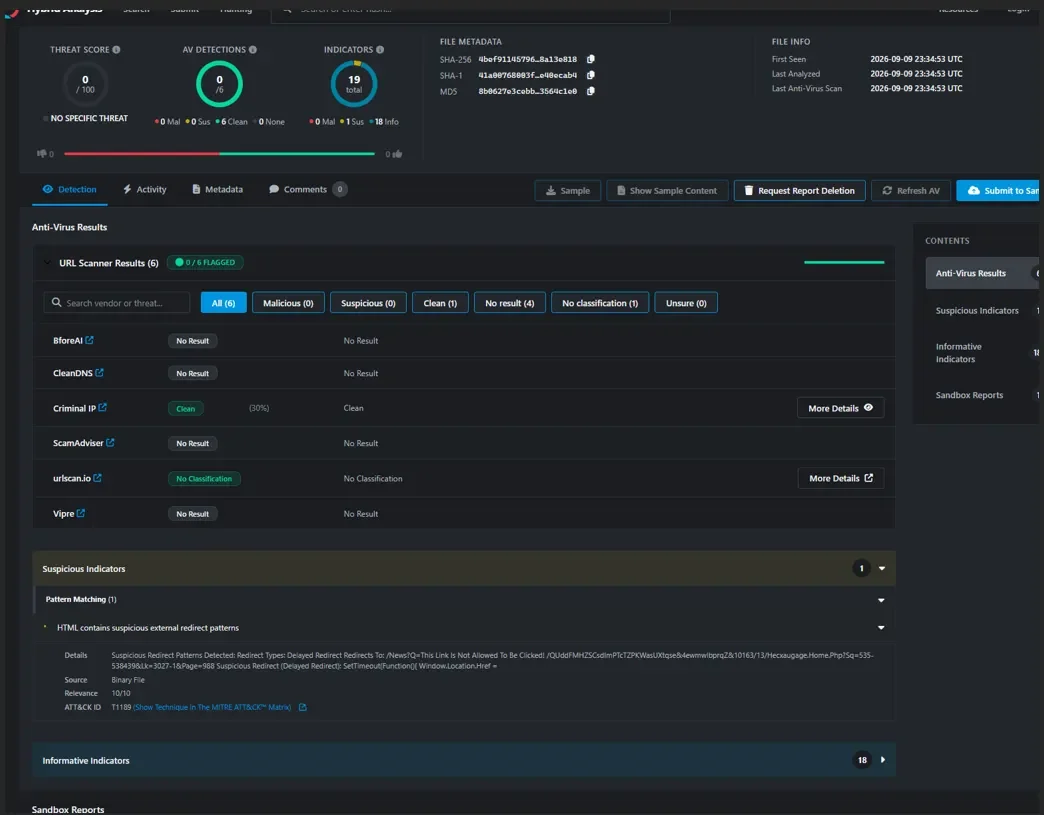
A decoy message paired with a timed redirect is a well-documented way of evading quick automated scans while still working normally for a real visitor who waits a few seconds. A reputation check alone will never catch it, because the behaviour only appears once something actually executes the page.
This maps onto MITRE ATT&CK technique T1189, Drive-by Compromise, under the Initial Access tactic. In general terms the technique covers cases where the victim does not need to download or execute anything: loading a compromised or malicious page in a browser is enough to trigger the next stage. MITRE distinguishes it from Exploit Public-Facing Application by noting that drive-by compromise targets the software running in the victim's browser, not server-side infrastructure. That distinction mattered here, since everything observed was client-side JavaScript behaviour rather than anything aimed at a server.
Step 3: Working around sandbox evasion
My first attempt at getting Hybrid Analysis to follow the delayed redirect did not work. The sandbox loaded the page, sat through its normal runtime window and never triggered the setTimeout() callback. That is a common sign of sandbox-aware evasion: some malicious pages check for signs of automation, such as no mouse movement, no scrolling or an unusually short session, and simply wait out the observation window without doing anything suspicious.
To work around it I reran the analysis with a longer runtime and rotated the sandbox's simulated environment. Rather than rely on the sandbox to execute and follow the redirect live, I ended up pulling the raw HTTP response directly. That gave a "final URL" field that differed from the URL I had submitted, confirming the actual redirect target without needing the JavaScript to execute at all. Sometimes the most reliable way to see where a link goes is to sidestep its evasion logic and read the response headers.
Step 4: urlscan.io and a domain that does not add up
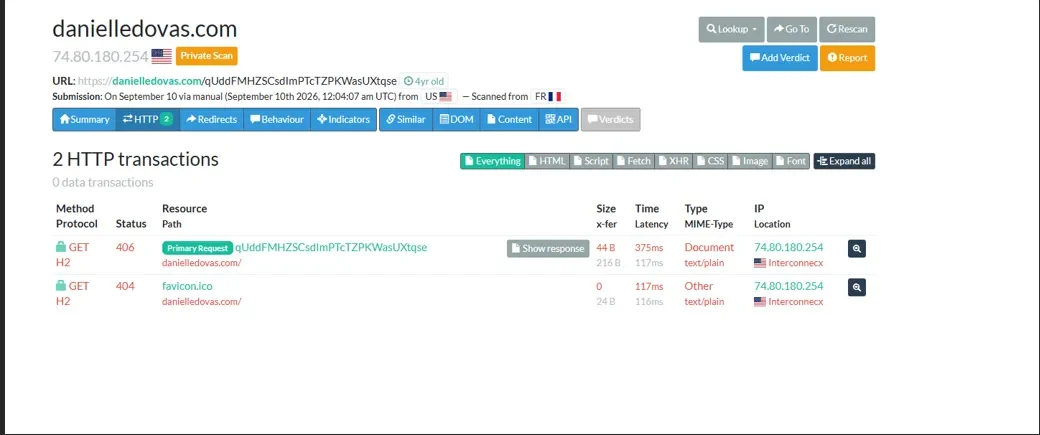
Next I ran the domain through urlscan.io, which captures a live scan and logs every network request. The scan for danielledovas.com showed only two HTTP transactions and a single resolved IP address, [redacted], registered to an entity called Interconnecx LLC in the United States. The primary request returned HTTP 406, likely a sign that the server was detecting and blocking automated or sandboxed traffic. The favicon request returned 404, which on its own is not unusual.
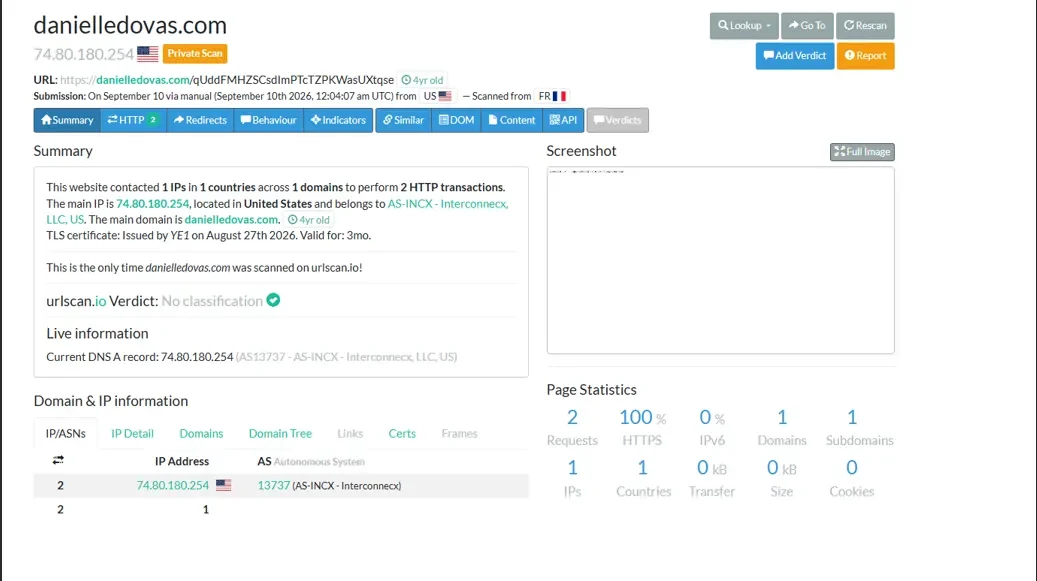
When urlscan.io rendered the page itself, rather than just logging the network requests, it came back with a blunt "Invalid url!" message referencing the random path from the original link.
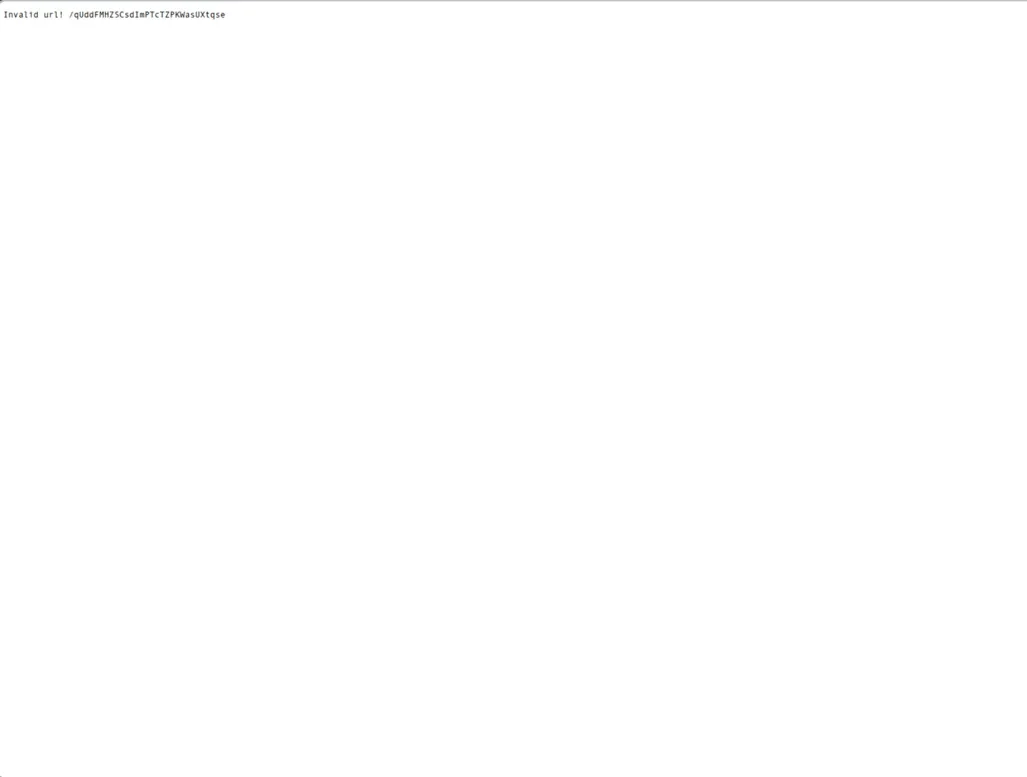
That is a small but telling detail. It suggests the page carries its own validation logic on top of the delayed-redirect trick, likely checking something like a referrer header, a session token or the specific way the link was accessed, and returning a generic rejection to anything that does not look like a legitimate click-through from the original email. So the page was not only trying to dodge automated sandboxes with a timing trick; it also appears to reject requests that do not arrive the way it expects, another layer aimed at making outside analysis harder while still working for an actual targeted recipient.
The detail that stood out most came from comparing the domain's registration history with its TLS certificate. The domain itself was about four years old, well past the age of most brand-new phishing domains. The SSL certificate currently attached to it had been issued only a couple of weeks earlier.
That mismatch is a meaningful signal. A domain that has existed for years but suddenly has a freshly issued certificate is consistent with a legitimate, previously benign domain being compromised and repurposed for phishing, rather than an attacker registering a brand-new lookalike from scratch. Reusing an aged domain with an existing reputation is deliberate: it inherits whatever trust and lack of blocklist history the domain has already built up. It is also exactly the scenario MITRE's T1189 documentation describes as a common initial-access vector, a legitimate website compromised to host adversary-controlled content.
Step 5: Cross-checking IP reputation with Cisco Talos
I looked up the resolved IP addresses through Cisco Talos's reputation lookup. The primary IP, [redacted], came back with a neutral sender and web reputation and was not currently listed on any blocklists. A second IP associated with the infrastructure, [redacted], registered to GoDaddy and geolocated to Tempe, Arizona, also showed a neutral reputation, but with one notable detail: Talos listed its blocklist status as "expired", meaning it had been flagged and blocklisted at some point in the past but was no longer actively listed.
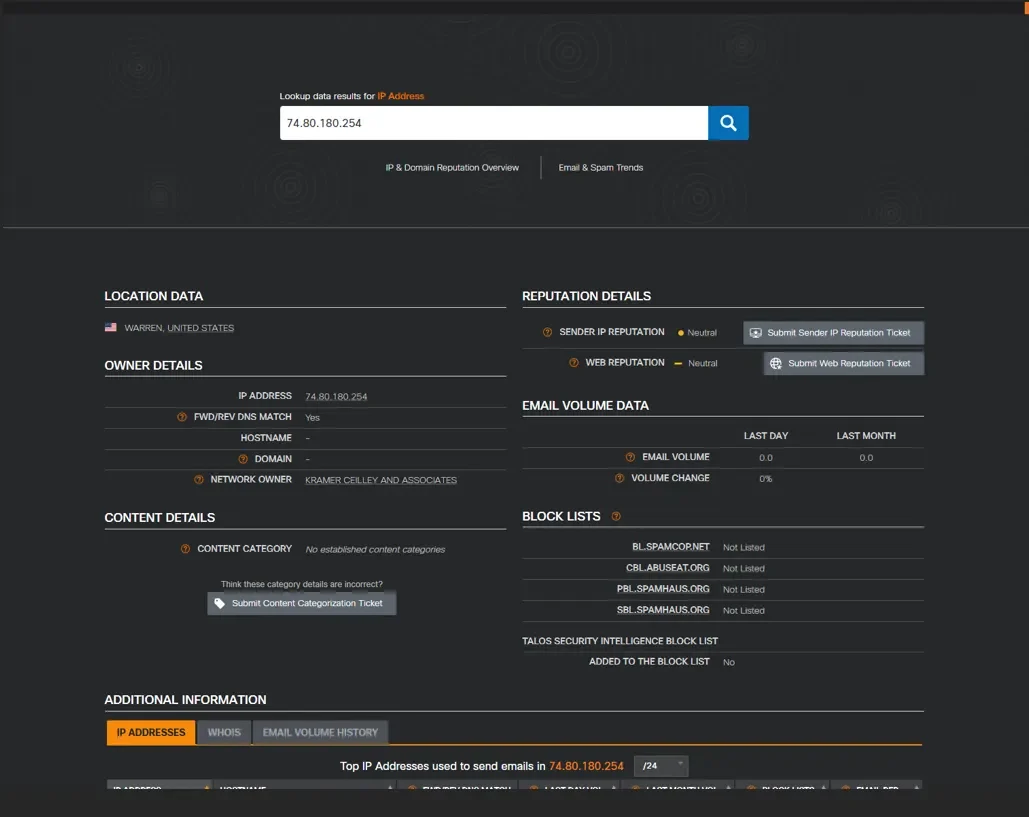
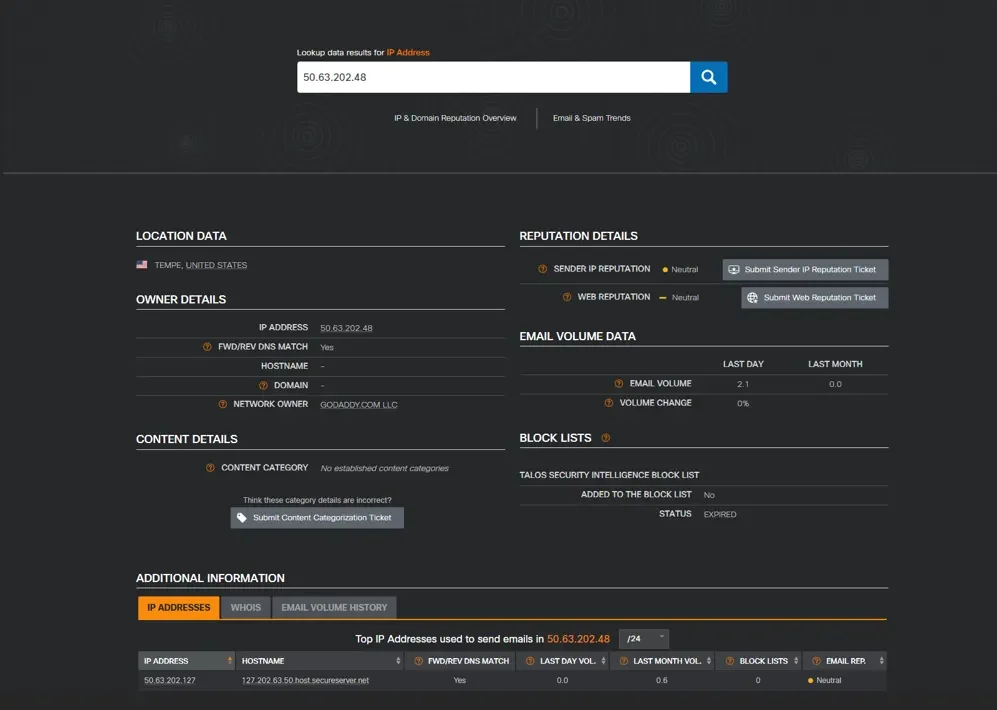
That expired blocklist history lines up with the compromised-domain theory. Infrastructure that has been flagged before and later cleared is often infrastructure that has cycled through legitimate and abused use, a pattern you would expect from shared hosting or a domain that has changed hands or been compromised more than once.
Step 6: A closer look at the sender
The last piece was the email header. The "From" address used plus-addressing, a format like [redacted] that is often used to tag or track batches of outgoing mail. It sat on a long subdomain chain and referenced a secondary Gmail address alongside an unrelated .cc domain. None of this is conclusive on its own, but together it is consistent with a compromised mail-sending setup being used for a mass phishing run, where plus-addressing is likely used internally to track which recipient list or campaign a message came from.
I did not go much further down this thread. The redirect chain, the domain-versus-certificate mismatch and the sandbox findings already told a consistent, well-supported story, and there is a point of diminishing returns where you have enough evidence to act on.
Root cause
The weakness is in the design of the phishing infrastructure rather than in a single line of code. The page combines several layers that each defeat a different kind of check:
- A delayed
setTimeout()redirect so that a quick automated scan sees only a harmless page. - A decoy "this link is not allowed to be clicked" message to stall scanners and reassure a human visitor.
- Its own validation logic, likely on referrer, session token or access path, that returns a generic rejection to requests that do not look like a genuine click-through.
- A 406 response to automated or sandboxed traffic, likely a sign that the server was detecting and blocking such traffic.
- An aged domain with a fresh certificate, so reputation based on domain age looks clean while the certificate is new.
Existing defences did not stop it because reputation checks only see the static state of the URL, and the malicious behaviour appears only after execution. Even the sandbox missed it on the first pass, because the redirect did not fire within the default runtime window. The single vendor flag was the only external signal, and on its own it would have been easy to dismiss.
Impact
A recipient who clicks the link and waits a few seconds is redirected elsewhere, with no download or local execution needed on their part. Because the domain is aged, it inherits whatever trust and lack of blocklist history it has already built up. and because the page rejects requests that do not look like a genuine click, analysis by scanners is made harder. The plus-addressing and subdomain chain in the sender suggest a compromised mail-sending setup used for a mass run, which is consistent with a compromised mail-sending setup used for a mass run.. The report does not identify the final redirect destination or what happens there.
Fix
No fix is described, because the infrastructure is attacker-controlled. The actions taken were:
- Reported the domain to Google Safe Browsing and PhishTank so it is flagged for other users and security tooling.
- Reported it to the domain's registrar, since it appears to be a compromised legitimate site rather than an attacker-owned one.
- Deleted and reported the original email through the mail provider's phishing report feature.
- Did not open the original attachment. The link analysis alone provided sufficient evidence, and there was no need to add risk by executing anything locally.
For defenders, the practical lesson is to treat a single vendor flag as a lead rather than a verdict, to treat a failed sandbox run as information in itself, and to compare domain age with certificate age when judging whether a site has been compromised.
Variants to test
- Delayed redirect with a decoy page. Submit a suspicious URL to a sandbox with the default runtime, then rerun with a longer runtime and a rotated environment. A positive result is the
setTimeout()callback firing only on the second run, or a "final URL" in the raw HTTP response that differs from the submitted URL. - Referrer or token gating. Request the URL directly with a generic client and then with a plausible referrer or the original path intact. A positive result is a generic rejection such as "Invalid url!" for the first and normal content for the second.
- Automation blocking. Compare a scripted request with a browser-like one. A positive result is a 406 or similar block for the scripted client and a normal response for the browser-like one.
- Domain age versus certificate age. For any suspicious domain, check registration date against the current certificate's issue date. A positive result is an old domain with a certificate issued days or weeks ago, which suggests compromise rather than a new registration.
- Expired blocklist history. Look up each resolved IP in a reputation service and check the blocklist status field. A positive result is a neutral current reputation with a status of "expired", indicating past abuse.
- Sender header anomalies. Inspect the From address for plus-addressing, long subdomain chains and unrelated secondary domains. A positive result is a combination consistent with a compromised sending setup used for batch mail.
What happened, in plain words
An email arrived that felt slightly off. There was no urgent subject line, no claim that an account had been suspended, no pressure to click immediately. Just a message with a link inside it that did not sit right. Instead of clicking it, opening it in a new tab or downloading anything, the researcher treated it as a small investigation.
This article walks through that investigation from the beginning, for someone who has never done security work before. Every tool and every term is explained where it first appears. The goal is not to turn you into an analyst overnight, but to show you that the basic method is something you can follow: do not touch the link, look it up in public services, and let the evidence build up step by step.
A few ideas come up again and again, so here they are at the start.
A URL is the address of a page on the internet, the thing you type into the address bar of a browser. A domain is the main part of that address, for example example.com. A path is the part after the domain, for example /some/page. A link in an email is just a URL that the email asks you to open.
A phishing email is a message that tries to get you to do something on the sender's behalf: open a link, sign in on a fake page, download a file. The sender is not who they claim to be.
A sandbox is a safe, isolated computer that opens a suspicious page or file and watches what happens, so that a real person does not have to take the risk. Think of it as a sealed glass room where you can watch an animal behave without letting it into your house.
Reputation means what the security industry already knows about an address: has it been reported before, is it on a list of bad sites, do vendors consider it clean. A blocklist is one of those lists of known-bad addresses.
An IP address is the numeric address of a server on the internet, the equivalent of a street address for a building. A domain name is the friendly name that gets translated into an IP address when your browser connects.
HTTP is the language browsers and servers use to talk to each other. Every time you load a page, your browser sends an HTTP request and the server sends back an HTTP response. The response carries a status code, a three-digit number that says how it went: 200 usually means fine, 404 means not found, 406 means the server refuses to serve the request in the form it arrived.
JavaScript is the programming language that runs inside web pages in your browser. It is what makes pages interactive. It can also, as you will see, send your browser somewhere else after a delay.
TLS (often still called SSL) is the encryption that protects the connection between your browser and a website, the padlock in the address bar. A site's TLS certificate is a document that proves the site's identity and has an issue date. Certificates expire and get renewed, so the issue date tells you when the current setup was put in place.
With those ideas in hand, here is the investigation, in the order it happened.
The starting point
The thing being investigated is not a product feature in the usual sense. It is a phishing email and the infrastructure behind it: a link with a long randomised path on an otherwise ordinary-looking domain, danielledovas.com.
That pattern, a long random path appended to a normal domain, is typical of single-use or per-recipient tracking links. A tracking link is a link whose address is unique to one recipient or one batch of emails, so that whoever sent it can tell exactly who clicked. Campaigns use them to tie a click back to a specific target.
The page behind the link combined a decoy message with a delayed JavaScript redirect. A redirect is when a page sends your browser to a different address than the one you asked for. The domain's age against its certificate suggested a legitimate site that had been compromised, meaning someone else took it over, rather than one registered by the attacker.
What was used
The investigation relied only on public analysis services and manual inspection:
- The raw email body, read by hand so that the mail client would not render or follow the link.
- VirusTotal, for multi-vendor URL reputation and the underlying HTTP response detail.
- Hybrid Analysis, a sandbox that loads a page and observes its behaviour.
- urlscan.io, for a live scan that logs every network request.
- Cisco Talos reputation lookup, for the resolved IP addresses.
- The email headers themselves.
No account details, tool versions or special access are described. The only precondition is that the link is never opened in a normal browser session.
A word on the tools, since they are new here. VirusTotal is a free public service that takes a URL, a file or an IP address and asks dozens of security companies what they think of it, then shows you all the answers side by side. Hybrid Analysis is a sandbox service: you give it a URL and it opens the page in an isolated environment and records what the page does. urlscan.io is a service that loads a page in a controlled browser and records every network request the page makes, like a security camera for web traffic. Cisco Talos is Cisco's threat intelligence group, and its reputation lookup tells you what is known about an IP address or domain.
Email headers are the hidden technical part of an email, the equivalent of the envelope and postmarks rather than the letter inside. They record where the message came from and how it travelled.
Step one: do not touch the link
The first rule of looking into a suspicious email is not to interact with the live infrastructure until you know what it does. That means no clicking, no previewing and no opening attachments in a normal browser session.
Why does this matter so much? The report's rule is simply not to interact with the live infrastructure until you know what it does.
Instead, the researcher extracted the embedded URL from the email body by hand, rather than letting the mail client render or follow it.
What this shows is the raw link as it appears in the message: a normal-looking domain followed by a long, random-looking path. The point of reading it by hand is that the mail client never gets the chance to turn it into a clickable object that might be previewed or fetched automatically.
The long randomised path on a normal-looking domain was enough on its own to justify a closer look before going anywhere near it in a live browser. A tidy, meaningful path like /about or /contact is what a normal site uses. A long string of random characters is what a system uses when it wants every link to be unique and hard to guess.
Step two: VirusTotal, one flag among many
The first stop was VirusTotal, which runs a URL against dozens of vendors at once. A vendor here means a security company with its own detection engine. Out of roughly sixty engines, only one returned a verdict: LevelBlue, the vendor formerly known as AlienVault, flagged the URL as "Suspicious". Every other vendor returned clean or no result.
This is the vendor results page. Each row is one company's opinion. Reading it is a lesson in itself: sixty opinions, one of them negative. That could be a false positive, meaning a legitimate thing wrongly flagged as bad, and on its own it is not enough to call something malicious. But it was enough to want a second opinion from a sandbox rather than a static reputation check.
A static reputation check is a lookup against what is already known. It does not open anything; it just asks the databases. A sandbox actually runs the page. The difference matters, as the next step shows.
VirusTotal's URL analysis view also broke down the underlying HTTP response: a 406 status code on the primary request, the same [redacted] serving IP seen elsewhere, and rate-limit headers on the response. It showed zero out of ninety community detections for that specific transaction, consistent with the single-vendor flag being the only real signal in an otherwise quiet report.
Here is what that view contains, piece by piece. The primary request is the first HTTP request the service made when it fetched the URL. The 406 status code means the server refused to serve the request in the form it arrived. The serving IP, [redacted], is the numeric address of the machine that answered. Rate-limit headers are small pieces of information in the response that say how often you are allowed to ask; they are a normal part of web traffic, but their presence here is part of the record. The community detections figure, zero out of ninety, is the count of VirusTotal users who had marked this particular transaction as malicious. Nobody had.
So the picture at this point: one vendor out of roughly sixty says suspicious, ninety community members say nothing, and the server answered with a refusal code. That is a lead, not a verdict.
Step three: Hybrid Analysis and the hidden redirect
The URL was submitted to Hybrid Analysis, which loads a page and observes its behaviour instead of only checking reputation databases. The overall threat score came back at 0 out of 100, which sounds reassuring.
A threat score is the sandbox's summary judgement, a single number meant to tell you at a glance how dangerous the page is. Zero out of a hundred sounds like a clean bill of health. This is exactly why you read the details and not just the headline number.
Buried in the report, however, was one high-relevance indicator: the HTML contained a suspicious external redirect pattern. HTML is the language web pages are written in, the structure and content of the page. The page used a delayed JavaScript redirect, a setTimeout() call that, after a short pause, rewrote window.location.href to send the browser somewhere else.
Two terms need unpacking. setTimeout() is a JavaScript function that runs some code after a delay, like setting an alarm. window.location.href is the browser's current address; assigning a new value to it is the JavaScript way of telling the browser to go to a different page. Put together, the page says: wait a moment, then send the visitor elsewhere.
In the meantime the visible page displayed a fake "this link is not allowed to be clicked" message, presumably to stall automated scanners or to make a human visitor think the link had already been neutralised.
This is the sandbox's detection page, showing the threat score and the delayed redirect indicator. The decoy message is the part a human sees. The redirect is the part that happens quietly in the background.
A decoy message paired with a timed redirect is a well-documented way of evading quick automated scans while still working normally for a real visitor who waits a few seconds. A reputation check alone will never catch it, because the behaviour only appears once something actually executes the page. Think of a shop that puts up a "closed" sign for the first ten seconds after the inspector walks in, then opens for real customers.
This maps onto a named technique in the MITRE ATT&CK framework: T1189, Drive-by Compromise, under the Initial Access tactic. MITRE ATT&CK is a public catalogue of techniques attackers use, maintained so that defenders can talk about them by name. Initial Access is the phase where an attacker first gets a foothold. Drive-by compromise covers cases where the victim does not need to download or execute anything: loading a compromised or malicious page in a browser is enough to trigger the next stage.
MITRE distinguishes it from a related technique, Exploit Public-Facing Application, by noting that drive-by compromise targets the software running in the victim's browser, not server-side infrastructure. Client-side means it happens in your browser, on your machine. Server-side means it happens on the website's own computers. That distinction mattered here, since everything observed was client-side JavaScript behaviour rather than anything aimed at a server.
Working around sandbox evasion
The first attempt at getting Hybrid Analysis to follow the delayed redirect did not work. The sandbox loaded the page, sat through its normal runtime window and never triggered the setTimeout() callback. A callback is simply the code that runs when the timer goes off.
That is a common sign of sandbox-aware evasion. Evasion means deliberately behaving differently when you think you are being watched. Some malicious pages check for signs of automation, such as no mouse movement, no scrolling or an unusually short session, and simply wait out the observation window without doing anything suspicious. A session here means one visit to the page, from opening it to closing it.
To work around it, the analysis was rerun with a longer runtime and a rotated simulated environment. Rotating the environment means changing the details the sandbox presents to the page, so that it looks like a different machine or a different kind of visitor.
Rather than rely on the sandbox to execute and follow the redirect live, the researcher ended up pulling the raw HTTP response directly. That gave a "final URL" field that differed from the URL that had been submitted, confirming the actual redirect target without needing the JavaScript to execute at all.
A raw HTTP response is the server's answer exactly as it comes off the wire, before any browser turns it into a visible page. The final URL field records where the request ended up after any redirects. Sometimes the most reliable way to see where a link goes is to sidestep its evasion logic and read the response headers. Response headers are the labelled pieces of information at the top of a response, before the page content itself.
Step four: urlscan.io and a domain that does not add up
Next the domain was run through urlscan.io, which captures a live scan and logs every network request. The scan for danielledovas.com showed only two HTTP transactions and a single resolved IP address, [redacted], registered to an entity called Interconnecx LLC in the United States.
An HTTP transaction is one request and its response, a single exchange between browser and server. Resolved means the domain name was translated into an IP address. Registered to means the IP address block is officially assigned to that organisation, according to the public records.
The primary request returned HTTP 406, likely a sign that the server was detecting and blocking automated or sandboxed traffic. The favicon request returned 404, which on its own is not unusual. A favicon is the little icon shown in a browser tab; a 404 means it was not found, and plenty of sites do not have one.
This is the transaction list: every request the scan made and what came back.
This is the summary view, showing the domain, the IP address and the TLS certificate details. It is the page where the domain's identity and its certificate can be compared at a glance.
When urlscan.io rendered the page itself, rather than just logging the network requests, it came back with a blunt "Invalid url!" message referencing the random path from the original link.
Rendering means actually drawing the page as a browser would, rather than only recording the traffic. This is the rendered result: a rejection message instead of content.
That is a small but telling detail. It suggests the page carries its own validation logic on top of the delayed-redirect trick, likely checking something like a referrer header, a session token or the specific way the link was accessed, and returning a generic rejection to anything that does not look like a legitimate click-through from the original email.
Three terms there. A referrer header is information your browser sends saying which page you came from. A session token is a short piece of data, like a temporary ticket, that a site gives you so it can recognise you on later requests. Validation logic is code that checks whether a request meets certain conditions before serving content. So the page was not only trying to dodge automated sandboxes with a timing trick; it also appears to reject requests that do not arrive the way it expects, another layer aimed at making outside analysis harder while still working for an actual targeted recipient.
The detail that stood out most came from comparing the domain's registration history with its TLS certificate. The domain itself was about four years old, well past the age of most brand-new phishing domains. The SSL certificate currently attached to it had been issued only a couple of weeks earlier.
That mismatch is a meaningful signal. A domain that has existed for years but suddenly has a freshly issued certificate is consistent with a legitimate, previously benign domain being compromised and repurposed for phishing, rather than an attacker registering a brand-new lookalike from scratch. Benign means harmless. Repurposed means given a new use. A lookalike domain is a new domain registered to resemble a real one.
Reusing an aged domain with an existing reputation is deliberate: it inherits whatever trust and lack of blocklist history the domain has already built up. It is also exactly the scenario MITRE's T1189 documentation describes as a common initial-access vector, a legitimate website compromised to host adversary-controlled content. An initial-access vector is the route an attacker uses to get in. Adversary-controlled means the attacker decides what is on it.
Step five: cross-checking IP reputation with Cisco Talos
The resolved IP addresses were looked up through Cisco Talos's reputation lookup. The primary IP, [redacted], came back with a neutral sender and web reputation and was not currently listed on any blocklists. Sender reputation and web reputation are scores for how trustworthy an address is as a source of mail and as a website. Neutral means neither good nor bad.
A second IP associated with the infrastructure, [redacted], registered to GoDaddy and geolocated to Tempe, Arizona, also showed a neutral reputation, but with one notable detail: Talos listed its blocklist status as "expired", meaning it had been flagged and blocklisted at some point in the past but was no longer actively listed. Geolocated means mapped to a physical location.
This is the Talos lookup for the primary IP, [redacted]: neutral reputation, no current blocklist entries.
This is the lookup for [redacted], where the blocklist status reads "expired". That single word is the interesting part: the address has a history.
That expired blocklist history lines up with the compromised-domain theory. Infrastructure that has been flagged before and later cleared is often infrastructure that has cycled through legitimate and abused use, a pattern you would expect from shared hosting or a domain that has changed hands or been compromised more than once. Shared hosting means many websites living on the same server, so one address can have a mixed history.
Step six: a closer look at the sender
The last piece was the email header. The "From" address used plus-addressing, a format like [redacted] that is often used to tag or track batches of outgoing mail. It sat on a long subdomain chain and referenced a secondary Gmail address alongside an unrelated .cc domain.
Plus-addressing is a feature of many mail systems: everything after the plus sign is ignored for delivery, so [redacted] still reaches [redacted], but the sender can see which tag was used. A subdomain chain is a series of names stacked in front of the main domain, like a.b.c.example.com. A .cc domain is simply a domain ending in .cc, a country-code ending.
None of this is conclusive on its own, but together it is consistent with a compromised mail-sending setup being used for a mass phishing run, where plus-addressing is likely used internally to track which recipient list or campaign a message came from. Conclusive means proving the point on its own.
The investigation did not go much further down this thread. The redirect chain, the domain-versus-certificate mismatch and the sandbox findings already told a consistent, well-supported story, and there is a point of diminishing returns where you have enough evidence to act on. Diminishing returns means each extra step gives you less new information than the one before.
Why it worked
The weakness is in the design of the phishing infrastructure rather than in a single line of code. The page combines several layers that each defeat a different kind of check:
- A delayed
setTimeout()redirect so that a quick automated scan sees only a harmless page. - A decoy "this link is not allowed to be clicked" message to stall scanners and reassure a human visitor.
- Its own validation logic, likely on referrer, session token or access path, that returns a generic rejection to requests that do not look like a genuine click-through.
- A 406 response to automated or sandboxed traffic, likely a sign that the server was detecting and blocking such traffic.
- An aged domain with a fresh certificate, so reputation based on domain age looks clean while the certificate is new.
Existing defences did not stop it because reputation checks only see the static state of the URL, and the malicious behaviour appears only after execution. Even the sandbox missed it on the first pass, because the redirect did not fire within the default runtime window. The single vendor flag was the only external signal, and on its own it would have been easy to dismiss.
What it means for a recipient
A recipient who clicks the link and waits a few seconds is redirected elsewhere, with no download or local execution needed on their part. Because the domain is aged, it inherits whatever trust and lack of blocklist history it has already built up. and because the page rejects requests that do not look like a genuine click, analysis by scanners is made harder.
The plus-addressing and subdomain chain in the sender suggest a compromised mail-sending setup used for a mass run, which is consistent with a compromised mail-sending setup used for a mass run.. The report does not identify the final redirect destination or what happens there.
What was done about it
No fix is described, because the infrastructure is attacker-controlled. The actions taken were:
- Reported the domain to Google Safe Browsing and PhishTank so it is flagged for other users and security tooling.
- Reported it to the domain's registrar, since it appears to be a compromised legitimate site rather than an attacker-owned one.
- Deleted and reported the original email through the mail provider's phishing report feature.
- Did not open the original attachment. The link analysis alone provided sufficient evidence, and there was no need to add risk by executing anything locally.
Google Safe Browsing is the service behind the warning screens browsers show before known-bad sites. PhishTank is a public database of reported phishing URLs. A registrar is the company where a domain name is registered, the equivalent of the office that keeps the record of who owns an address.
For defenders, the practical lesson is to treat a single vendor flag as a lead rather than a verdict, to treat a failed sandbox run as information in itself, and to compare domain age with certificate age when judging whether a site has been compromised.
Things worth trying yourself
These are patterns you can look for if you ever want to repeat the exercise, each described as a check and what a positive result looks like.
- Delayed redirect with a decoy page. Submit a suspicious URL to a sandbox with the default runtime, then rerun with a longer runtime and a rotated environment. A positive result is the
setTimeout()callback firing only on the second run, or a "final URL" in the raw HTTP response that differs from the submitted URL. - Referrer or token gating. Request the URL directly with a generic client and then with a plausible referrer or the original path intact. A positive result is a generic rejection such as "Invalid url!" for the first and normal content for the second.
- Automation blocking. Compare a scripted request with a browser-like one. A positive result is a 406 or similar block for the scripted client and a normal response for the browser-like one.
- Domain age versus certificate age. For any suspicious domain, check registration date against the current certificate's issue date. A positive result is an old domain with a certificate issued days or weeks ago, which suggests compromise rather than a new registration.
- Expired blocklist history. Look up each resolved IP in a reputation service and check the blocklist status field. A positive result is a neutral current reputation with a status of "expired", indicating past abuse.
- Sender header anomalies. Inspect the From address for plus-addressing, long subdomain chains and unrelated secondary domains. A positive result is a combination consistent with a compromised sending setup used for batch mail.
Glossary
- API: a way for one piece of software to ask another for information or an action, like a service counter where you make a request and get a defined answer.
- Benign: harmless.
- Blocklist: a list of addresses or domains known or believed to be bad, used to block them.
- Callback: code that runs when a timer or event fires.
- Certificate (TLS/SSL): a document that proves a website's identity and carries an issue date; the padlock in the address bar depends on it.
- Client-side: happening in your browser, on your machine.
- Conclusive: proving the point on its own.
- Decoy: a fake element meant to mislead or stall whoever is looking.
- Diminishing returns: the point where each extra step gives less new information than the one before.
- Domain: the main part of a web address, such as
example.com. - Drive-by compromise (T1189): an attack where simply loading a malicious or compromised page in a browser is enough to trigger the next stage.
- Email headers: the hidden technical part of an email recording where it came from and how it travelled.
- Evasion: deliberately behaving differently when you think you are being watched.
- Favicon: the small icon shown in a browser tab.
- False positive: a legitimate thing wrongly flagged as bad.
- Final URL: the address a request ended up at after any redirects.
- Geolocation: mapping an IP address to a physical location.
- HTML: the language web pages are written in.
- HTTP: the language browsers and servers use to exchange requests and responses.
- HTTP transaction: one request and its response.
- Hybrid Analysis: a public sandbox service that opens a URL and observes its behaviour.
- Initial Access: the phase of an attack where the attacker first gets a foothold.
- IP address: the numeric address of a machine on the internet.
- JavaScript: the programming language that runs inside web pages in your browser.
- Link: a URL presented in a message or page that you can open.
- Lookalike domain: a newly registered domain made to resemble a real one.
- MITRE ATT&CK: a public catalogue of attacker techniques, used so defenders can refer to them by name.
- Path: the part of a URL after the domain, such as
/some/page. - Phishing: a message that impersonates someone to get you to open a link, sign in on a fake page or download something.
- PhishTank: a public database of reported phishing URLs.
- Plus-addressing: a mail feature where
[redacted]still reaches[redacted], letting the sender tag batches. - Primary request: the first HTTP request made when fetching a URL.
- Rate-limit headers: response information saying how often you may ask.
- Redirect: when a page sends your browser to a different address than the one requested.
- Referrer header: information your browser sends saying which page you came from.
- Registrar: the company where a domain name is registered.
- Rendering: drawing a page as a browser would, rather than only recording its traffic.
- Reputation: what the security industry already knows about an address, good or bad.
- Resolved: translated from a domain name into an IP address.
- Response headers: labelled pieces of information at the top of an HTTP response.
- Sandbox: an isolated environment that opens a suspicious page or file and watches what happens.
- Sender reputation: a score for how trustworthy an address is as a source of mail.
- Server-side: happening on the website's own computers.
- Session: one visit to a page, from opening to closing.
- Session token: a short piece of data a site gives you so it can recognise you on later requests.
- Shared hosting: many websites living on the same server.
- Static reputation check: a lookup against existing databases, without opening or running anything.
- Status code: the three-digit number in an HTTP response saying how the request went (200 fine, 404 not found, 406 refused).
- Subdomain chain: a series of names stacked in front of the main domain, like
a.b.c.example.com. setTimeout(): a JavaScript function that runs code after a delay.- Threat score: a sandbox's single summary number for how dangerous a page is.
- Tracking link: a link whose address is unique to one recipient or batch, so clicks can be attributed.
- TLS/SSL: the encryption protecting the connection between your browser and a website.
- URL: the address of a page on the internet.
- urlscan.io: a public service that loads a page in a controlled browser and records every network request.
- Validation logic: code that checks whether a request meets certain conditions before serving content.
- Vendor: a security company with its own detection engine.
- VirusTotal: a public service that asks dozens of security vendors about a URL, file or IP address.
- Web reputation: a score for how trustworthy an address is as a website.
window.location.href: the browser's current address; assigning to it tells the browser to go elsewhere.



