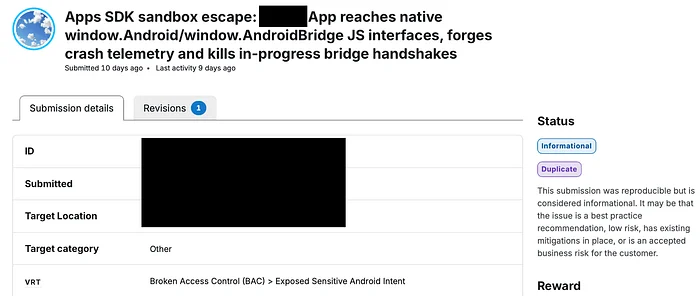
Apps SDK sandbox escape: *** App reaches native window.Android/window.AndroidBridge JS interfaces — mobile application
The editor's WebView exposed native JavaScript bridge objects to every frame, including sandboxed third-party app iframes on a different origin. A malicious app could call bridge methods without any origin check, injecting fabricated build and release metadata into the crash-reporting pipeline and disrupting pending message-port handshakes.
 Published on medium.com
Bug Bounty
The full write-up lives on its author's site
It belongs to its author, so we link to it rather than copy it. The other two tabs are our own rewrites, checked against it.
Context
The target is the *** editor's WebView on Android, and specifically the boundary between the editor's trusted top-level document at www.***.com and the third-party apps that run inside it. *** Apps (Google Drive, Brandfetch, anything built with the public Apps SDK and @***/cli) are loaded as sandboxed iframes inside that same WebView, served from their own origin, https://app-id.***-apps.com. The design intent is that an app's JavaScript stays inside its iframe and cannot touch the editor's native bridge.
The editor's WebView registers two native @JavascriptInterface objects using the old, frame-unscoped addJavascriptInterface() API:
webView.addJavascriptInterface(webViewJavascriptInterface.new JsInterface(), "Android");
// com/***/crossplatform/core/bus/WebXMessageBusNegotiator.java
webView.addJavascriptInterface(new JsInterface(), "AndroidBridge");
addJavascriptInterface() exposes the object to every frame of the WebView, not just the top document. That is the whole problem: the bridge was meant for the trusted top-level document, but every app iframe on a different origin gets the same objects injected into its window.
Setup
The researcher built an ordinary *** App through the public Apps SDK and Developer Portal, installed it like any real third-party app, and tested from inside its normal sandboxed iframe on a real device. No scopes, permissions or special configuration were needed; the app was opened the way a user would open any third-party app. The testing was done on a real device, and the researcher also read the Java sources (WebViewJavascriptInterface.java, WebXMessageBusNegotiator.java, h.java, WebViewRenderProcessGoneHandler.java) to trace what the JavaScript calls actually reach.
Finding it
The starting point was the two addJavascriptInterface() calls above. Because that API is not frame-scoped, the researcher expected window.Android and window.AndroidBridge to be present in the app iframe, and went to check whether the native side did anything to reject calls coming from the untrusted origin. Reading WebViewJavascriptInterface.java line by line, there is no origin check in that class at all.
Exploitation
Step 1: confirm the bridge is reachable from the app iframe
From inside the app's normal sandboxed iframe, the researcher checked for the object and called a method that returns a value from native code:
typeof window.Android
This returned "object", so the interface is injected into the untrusted frame. The next call was:
Android.getPageLocation()
This returned "editor", a real value produced by *** own native code rather than undefined, which confirms the call reached the native implementation. None of the methods on window.Android check where the call came from.
Step 2: write forged build metadata through the bridge
The researcher then called Android.onPageBuildIdentityReady() with a made-up JSON payload. The call completed with no exception and no rejection. The payload carried fake stack, variant, version, releaseName and deploymentGroup fields.
On the native side, onPageBuildIdentityReady() writes that data into a shared AtomicReference<PageBuildIdentity> (field jc.j). The only other place that reference is read is WebViewRenderProcessGoneHandler.b(), which runs whenever the WebView's renderer is killed or reclaimed. That is a routine low-memory event on Android, not a rare crash. The handler pulls the value with getAndSet(null) and passes it to ReportWebViewCrashWorker, which WorkManager enqueues to persist and send as a crash-telemetry report to *** backend. The forged fields therefore end up attributed as real build metadata in the telemetry that reaches ***.
Step 3: probe window.AndroidBridge
window.AndroidBridge is reachable from the same untrusted frame as well, and requestMessagePort() can be called without throwing. This path behaves differently from window.Android: the handshake logic in h.java does check the origin before handing over a real MessagePort, comparing webView.getUrl() against a trusted ***.com URI. The researcher set up a listener before calling requestMessagePort() and waited 4 seconds; no port ever arrived, so there is no full bypass of the handshake to claim here.
Step 4: the synchronous side effect before the origin check
The synchronous part of requestMessagePort() runs before the origin check. It unconditionally calls webXMessageBusNegotiator.f9409j.a(), which the researcher traced to RxJava's Disposable.dispose() (via the xs.d EmptyDisposable class), on a single shared field that holds whatever handshake is currently pending. Any call to this method, from any frame regardless of origin, kills whatever handshake was already in progress, including potentially a legitimate one that *** own trusted code has just started. That is a cross-frame denial of service that does not need the origin check to fail, because it happens before the check ever runs.
Root cause
Both issues come from the same mistake: a native bridge that should only be reachable from *** own top-level document is instead exposed to every iframe in the WebView, because addJavascriptInterface() is not frame-scoped. The frame-aware replacement, WebViewCompat.addWebMessageListener(), takes an explicit allowed-origins list and would have stopped both of these. The origin check in h.java protects only the MessagePort handover, not the synchronous cleanup that runs ahead of it, and WebViewJavascriptInterface.java has no origin check at all.
Impact
Any third-party *** App, with no scopes, no permissions and no user interaction beyond being opened, can write fake build and release metadata into *** own crash-reporting pipeline. Because the renderer-reclaim event that triggers the report is routine rather than limited to hard crashes, it is easy to hit during normal use. A malicious app publisher could use this to pollute *** own crash dashboards and release-health data with fabricated attribution. The AndroidBridge issue is a separate, narrower impact: a cross-frame denial of service against in-progress handshakes, not a full bypass of the port handover.
Fix
Replace the frame-unscoped addJavascriptInterface() registration with WebViewCompat.addWebMessageListener(), which takes an explicit allowed-origins list, so the bridge is only exposed to the trusted top-level origin.
- Enumerate
windowkeys inside a sandboxed iframe on a different origin and look for injected native objects (typeof window.X === "object"). A positive result is an object whose methods return real native values rather thanundefined. - Call a read-only native method that returns a known value (for example a page or screen identifier) from the iframe. A positive result is a real value from native code, proving the call crossed the boundary.
- Call a native method that writes into shared state with a forged payload and watch for an exception. A positive result is a silent success, followed by the forged data appearing in telemetry or logs.
- For bridges that do check origin before handing over a channel, call the entry method and observe side effects that run before the check, such as disposal of a pending handshake. A positive result is a legitimate handshake being cancelled by an untrusted frame.
- Repeat the checks from nested iframes and from frames created after page load, since frame-unscoped injection applies to all of them. A positive result is the same object being reachable in every frame regardless of origin.
What happened, in plain words
A mobile app has a built-in browser window. Inside that window, the app shows its own trusted pages, and it also lets other people's mini-apps run. Those mini-apps are supposed to be locked in a small box (a sandbox) so they cannot reach the app's private machinery. The researcher found that the lock was not working: a mini-app could reach two hidden control panels that belong to the app itself, and one of them let the mini-app write fake information into the app's crash reports.
To follow the rest of this article you only need to know a few everyday ideas. A browser is the program that shows web pages. A WebView is a browser engine embedded inside another app, so the app can show web content without opening Chrome or Safari. A web page is made of HTML (structure), CSS (looks) and JavaScript (behaviour, the code that runs in the page). A frame (or iframe) is a web page shown inside another web page, like a picture-in-picture window. An origin is the combination of protocol, host and port that a browser uses to decide whether two pages are the same site; https://www.example.com and https://app.example.net are different origins, and browsers normally stop JavaScript from one origin from touching the other. A sandbox is a set of restrictions that keeps code in a box so it can only do what it is allowed to do.
A native interface (also called a bridge) is a doorway that lets JavaScript inside a WebView call code written in the app's own language, here Java on Android. The app deliberately builds these doorways so its own trusted page can ask the phone to do things a web page cannot do alone. The danger is who else can walk through the doorway.
The setup: what the app is and what was tested
The target is the editor's WebView on Android. The editor is the app's main trusted page, served from www.***.com. Third-party apps (the report names Google Drive, Brandfetch, and anything built with the public Apps SDK and @***/cli) are loaded as sandboxed iframes inside that same WebView, served from their own origin, https://app-id.***-apps.com. The design intent is that an app's JavaScript stays inside its iframe and cannot touch the editor's native bridge.
An SDK (software development kit) is a set of tools a company publishes so other developers can build things that plug into its product. The Apps SDK is how outside developers build mini-apps for this editor. A Developer Portal is the website where those developers register and publish their apps.
The researcher built an ordinary app through the public Apps SDK and Developer Portal, installed it like any real third-party app, and tested from inside its normal sandboxed iframe on a real device. No scopes, permissions or special configuration were needed; the app was opened the way a user would open any third-party app. A scope is a permission an app asks for, such as access to your files; the point here is that the test app asked for nothing. The testing was done against the shipped mobile application, and the researcher also read the decompiled Java sources to trace what the JavaScript calls actually reach. Decompiling means turning a compiled app back into readable source code so you can study how it works.
Finding it: the two doorways
The editor's WebView registers two native objects using an old Android API called addJavascriptInterface(). An API is simply a defined way for one piece of software to talk to another, like a menu of allowed requests. addJavascriptInterface() takes a Java object and a name, and makes that object appear inside the WebView's JavaScript under that name.
webView.addJavascriptInterface(webViewJavascriptInterface.new JsInterface(), "Android");
Line by line: webView is the embedded browser. .addJavascriptInterface(...) is the call that installs a bridge. Inside the brackets, webViewJavascriptInterface.new JsInterface() creates the Java object that will be exposed. The final "Android" is the name the JavaScript will use, so page code can write window.Android and reach that object.
// com/***/crossplatform/core/bus/WebXMessageBusNegotiator.java
webView.addJavascriptInterface(new JsInterface(), "AndroidBridge");
Line by line: the first line is a comment showing which source file this code lives in, WebXMessageBusNegotiator.java. The second line installs a second bridge object, this time under the name "AndroidBridge", so page code can write window.AndroidBridge. The name suggests it negotiates a message bus, meaning a channel for passing messages between the web page and the native app.
The problem is that addJavascriptInterface() is not frame-scoped. Frame-scoped means the bridge would only be visible to the frame that is supposed to have it. This API instead exposes the object to every frame of the WebView, not just the top document. So the bridge was meant for the trusted top-level document, but every app iframe on a different origin gets the same objects injected into its window.
The starting point was those two calls. Because the API is not frame-scoped, the researcher expected window.Android and window.AndroidBridge to be present in the app iframe, and went to check whether the native side did anything to reject calls coming from the untrusted origin. Reading WebViewJavascriptInterface.java line by line, there is no origin check in that class at all. An origin check is code that looks at which site a request came from and refuses it if the site is not on a trusted list.
Exploitation
Step 1: confirm the bridge is reachable from the app iframe
From inside the app's normal sandboxed iframe, the researcher checked for the object and called a method that returns a value from native code:
typeof window.Android
Line by line: typeof is a JavaScript operator that tells you what kind of value something is, for example "string", "number" or "object". window is the global object of the current frame, the place where browser-provided things live. window.Android is the bridge name installed earlier. The whole expression asks: does this frame have an Android object, and what type is it? This returned "object", so the interface is injected into the untrusted frame. If the bridge had not been there, the answer would have been "undefined".
The next call was:
Android.getPageLocation()
Line by line: Android is the bridge object. .getPageLocation() is a method on it, a function the native side provides. The brackets call it with no arguments. This returned "editor", a real value produced by the app's own native code rather than undefined, which confirms the call reached the native implementation. None of the methods on window.Android check where the call came from. The reason for this step is simple: before claiming a boundary is broken, you prove that code on the wrong side of the boundary can actually reach the other side and get a real answer back.
Step 2: write forged build metadata through the bridge
The researcher then called Android.onPageBuildIdentityReady() with a made-up JSON payload. JSON is a text format for structured data, made of names and values in curly brackets, like a very simple form. The call completed with no exception and no rejection. An exception is an error that stops code and is reported; a rejection here means the native side refusing the call. The payload carried fake stack, variant, version, releaseName and deploymentGroup fields. In plain terms, those are labels describing which build of the app is running: its version, its release channel, and similar build details.
On the native side, onPageBuildIdentityReady() writes that data into a shared AtomicReference<PageBuildIdentity> (field jc.j). An AtomicReference is a small holder for one value that several threads can read and replace safely. A thread is one line of execution inside a program; Android apps run several at once. PageBuildIdentity is the type of object being held, the bundle of build labels.
The only other place that reference is read is WebViewRenderProcessGoneHandler.b(), which runs whenever the WebView's renderer is killed or reclaimed. The renderer is the separate process that draws and runs the web page; Android may kill it when memory runs low, and the WebView then reloads it. That is a routine low-memory event on Android, not a rare crash. The handler pulls the value with getAndSet(null) and passes it to ReportWebViewCrashWorker, which WorkManager enqueues to persist and send as a crash-telemetry report to the app's backend. getAndSet(null) means read the current value and immediately replace it with nothing, so it is consumed once. WorkManager is Android's scheduler for background jobs that should survive the app being closed. Telemetry is data an app sends back to its maker about how it is behaving. The forged fields therefore end up attributed as real build metadata in the telemetry that reaches the app's maker.
Why does this matter? Crash reports are how a company decides whether a release is healthy. If an outside app can write fake build labels into those reports, the company's dashboards and release-health numbers can be polluted with fabricated attribution.
Step 3: probe window.AndroidBridge
window.AndroidBridge is reachable from the same untrusted frame as well, and requestMessagePort() can be called without throwing. A MessagePort is one end of a private two-way message channel between two pieces of code; once you have a port, you can send messages through it. This path behaves differently from window.Android: the handshake logic in h.java does check the origin before handing over a real MessagePort, comparing webView.getUrl() against a trusted ***.com URI. A handshake is the back-and-forth where two sides agree to open a channel. webView.getUrl() returns the address the WebView is currently showing, and a URI is another word for a web address.
The researcher set up a listener before calling requestMessagePort() and waited 4 seconds; no port ever arrived, so there is no full bypass of the handshake to claim here. A listener is code that waits for an event, here the arrival of a port. The reason for this step is to be honest about scope: the origin check did its job for the port itself, so the researcher reports only what was actually observed.
Step 4: the synchronous side effect before the origin check
The synchronous part of requestMessagePort() runs before the origin check. Synchronous means it happens immediately, in order, before the function returns, as opposed to work scheduled for later. It unconditionally calls webXMessageBusNegotiator.f9409j.a(), which the researcher traced to RxJava's Disposable.dispose() (via the xs.d EmptyDisposable class), on a single shared field that holds whatever handshake is currently pending. RxJava is a library for handling streams of events; a Disposable is a handle to something in progress that you can cancel, and dispose() cancels it. A field is a variable that belongs to an object, and here it is shared, meaning every caller sees the same one.
Any call to this method, from any frame regardless of origin, kills whatever handshake was already in progress, including potentially a legitimate one that the app's own trusted code has just started. That is a cross-frame denial of service that does not need the origin check to fail, because it happens before the check ever runs. A denial of service (DoS) means making a feature stop working for legitimate users, without needing to steal anything. Cross-frame means the effect crosses from one frame into another.
Root cause
Both issues come from the same mistake: a native bridge that should only be reachable from the app's own top-level document is instead exposed to every iframe in the WebView, because addJavascriptInterface() is not frame-scoped. The frame-aware replacement, WebViewCompat.addWebMessageListener(), takes an explicit allowed-origins list and would have stopped both of these. Frame-aware means the API lets you say which frames or origins are allowed. The origin check in h.java protects only the MessagePort handover, not the synchronous cleanup that runs ahead of it, and WebViewJavascriptInterface.java has no origin check at all.
Impact
Any third-party app, with no scopes, no permissions and no user interaction beyond being opened, can write fake build and release metadata into the app's own crash-reporting pipeline. Because the renderer-reclaim event that triggers the report is routine rather than limited to hard crashes, it is easy to hit during normal use. A malicious app publisher could use this to pollute the app's own crash dashboards and release-health data with fabricated attribution. The AndroidBridge issue is a separate, narrower impact: a cross-frame denial of service against in-progress handshakes, not a full bypass of the port handover.
Fix
Replace the frame-unscoped addJavascriptInterface() registration with WebViewCompat.addWebMessageListener(), which takes an explicit allowed-origins list, so the bridge is only exposed to the trusted top-level origin.
These are general techniques the researcher lists for anyone testing a similar setup. Each one is a small experiment with a clear pass or fail.
- Enumerate
windowkeys inside a sandboxed iframe on a different origin and look for injected native objects (typeof window.X === "object"). Enumerating keys means listing the names of everything available on an object. A positive result is an object whose methods return real native values rather thanundefined. - Call a read-only native method that returns a known value (for example a page or screen identifier) from the iframe. A positive result is a real value from native code, proving the call crossed the boundary.
- Call a native method that writes into shared state with a forged payload and watch for an exception. A positive result is a silent success, followed by the forged data appearing in telemetry or logs.
- For bridges that do check origin before handing over a channel, call the entry method and observe side effects that run before the check, such as disposal of a pending handshake. A positive result is a legitimate handshake being cancelled by an untrusted frame.
- Repeat the checks from nested iframes and from frames created after page load, since frame-unscoped injection applies to all of them. A positive result is the same object being reachable in every frame regardless of origin.
Glossary
- API: a defined way for one piece of software to talk to another, like a menu of allowed requests.
- AtomicReference: a small holder for one value that several threads can read and replace safely.
- Bridge: a doorway that lets JavaScript inside a WebView call code written in the app's own language.
- Cross-frame: an effect that crosses from one frame into another.
- Decompiling: turning a compiled app back into readable source code.
- Denial of service (DoS): making a feature stop working for legitimate users, without stealing anything.
- Developer Portal: the website where outside developers register and publish apps for a platform.
- Disposable: in RxJava, a handle to something in progress that can be cancelled.
- Exception: an error that stops code and is reported.
- Field: a variable that belongs to an object.
- Frame (iframe): a web page shown inside another web page.
- Frame-aware: an API that lets you say which frames or origins are allowed.
- Frame-scoped: visible only to the frame that is supposed to have it.
- Handshake: the back-and-forth where two sides agree to open a channel.
- JSON: a text format for structured data, made of names and values in curly brackets.
- Listener: code that waits for an event to happen.
- MessagePort: one end of a private two-way message channel between two pieces of code.
- Native interface: see bridge.
- Origin: the combination of protocol, host and port that a browser uses to decide whether two pages are the same site.
- Origin check: code that looks at which site a request came from and refuses it if the site is not trusted.
- Renderer: the separate process that draws and runs a web page.
- RxJava: a library for handling streams of events.
- Sandbox: a set of restrictions that keeps code in a box so it can only do what it is allowed to do.
- Scope: a permission an app asks for, such as access to your files.
- SDK: a set of tools a company publishes so other developers can build things that plug into its product.
- Synchronous: happening immediately, in order, before the function returns.
- Telemetry: data an app sends back to its maker about how it is behaving.
- Thread: one line of execution inside a program.
- URI: another word for a web address.
- WebView: a browser engine embedded inside another app.
- WorkManager: Android's scheduler for background jobs that should survive the app being closed.



