**Two-Factor Authentication Bypass on *** — Access Token Issued Before Second Factor Is Ever Checked**
The login endpoint issued a fully valid API access token in the same response that redirected the user to the second-factor page, before any TOTP code was checked. An attacker who knew only the account password could take that token and use it directly against the REST API to read account data and payment credentials, invite themselves as admin staff, and change payout settings, with 2FA enabled or not.
 Published on medium.com
Bug Bounty
The full write-up lives on its author's site
It belongs to its author, so we link to it rather than copy it. The other two tabs are our own rewrites, checked against it.
Context
The target is a web application, referred to throughout as (target), that offers a dashboard with a REST API behind it. The dashboard covers features such as API keys, invoices, staff and team management, payment settings and IP whitelisting. The application also has two-factor authentication (2FA), and it exposes a server-rendered page protected by a session cookie alongside the API, which is authenticated with a Bearer token.
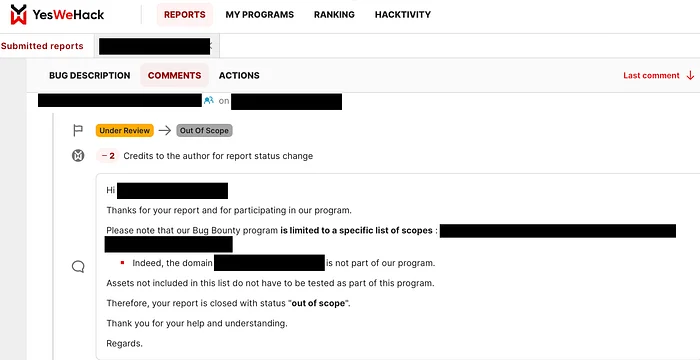
The report was submitted to a bug bounty programme. The person reviewing it stated that the issue was outside the scope. The researcher's position is that it is an important matter that warrants the attention of, and serves as a learning opportunity for, every application owner, while keeping all sensitive information confidential.
Setup
The testing was done on a test account, with 2FA enabled on it. The researcher then logged out, or otherwise started a fresh session, and logged in again with the correct email and password to observe how the second-factor check actually worked.
Finding it
After enabling 2FA and logging in fresh, the POST /login response redirects to /second_factor, as expected. What looked wrong is that the same response already sets a fully valid token, referred to in the report as the ***-token. That token is the real session token, the one every actual feature on the dashboard runs on. It is minted the moment the password checks out, not after 2FA passes.
The researcher took that token straight out of the redirect response, before ever touching the /second_factor page, and used it against the API that powers the entire dashboard. It worked immediately, giving full account access with no TOTP code ever supplied.
Exploitation
Step 1: enable 2FA
On a test account, enable 2FA.
Step 2: start a fresh session
Log out, or start a fresh session, and grab the ***_token and the fresh **_sesssion cookie from the response.
Step 3: log in with the correct credentials
Log in with the correct email and password.
Step 4: inspect the login response
The response is a 302 to /second_factor, but the Set-Cookie headers in the same response are the interesting part. At this point the user has not seen or been prompted for a 2FA code at any point yet. /second_factor is just where the browser gets redirected next; it has no bearing on whether the token in this response actually works.
Step 5: use the token directly against the API
Take that **_token value and use it directly, with no cookies at all, against the API that backs every real feature on the target. The response is 200, with full account data, including confirmation that 2FA is in fact turned on. No TOTP code was ever entered, submitted, or even known to the researcher at the point this request succeeded.
Root cause
The second factor does not gate the thing that actually matters. The researcher checked for a partial mitigation and did not find one:
- The classic server-rendered page (
GET /***target, using the***_sessioncookie) does correctly302-redirect back to/second_factorif the challenge has not been completed. That specific page-level gate works. - The REST API behind every real feature of the target only checks the Bearer token, and that token is valid from the moment
/loginsucceeds. It is never revoked or downgraded if/second_factoris never completed.
So the second factor is decorative: the real session token is issued before the second factor is ever checked.
Impact
Anyone who has a target password, whether phished, reused, breached or obtained some other way, gets full API access to that target account regardless of whether they have 2FA enabled and regardless of whether they can produce a valid code. An attacker with a password does not need a browser or the Rails pages at all. They POST /login, take the **_token out of the response, and script whatever they want directly against the API: reading the target client_key/server_key (payment API credentials), inviting themselves as an admin staff member, changing payout/withdrawal-adjacent settings, and everything else the researcher was able to reach as a legitimate account owner across the engagement. As implemented, 2FA adds zero friction to that path.
Fix
The report does not describe any fix that was applied.
Variants to test
- On other targets, log in with 2FA enabled and inspect the
Set-Cookieheaders on the302to the second-factor page. A positive result is a session or access token in that response that the API accepts before any code is submitted. - Try the pre-2FA token against the API with no cookies at all. A positive result is a
200with account data, including confirmation that 2FA is enabled. - Check whether the token is revoked or downgraded when
/second_factoris never completed. A positive result is that it remains valid. - Compare the server-rendered page gate with the API gate. A positive result is that the page redirects to the second-factor page while the API accepts the Bearer token.
What happened, in plain words
A website, called (target) throughout this article, gives its users a dashboard. Behind that dashboard sits an API: a way for programs, not just browsers, to talk to the site and ask it to do things. The dashboard covers features such as API keys, invoices, staff and team management, payment settings and IP whitelisting. The site also offers two-factor authentication (2FA), where you log in with your password and then supply a second factor.
The researcher enabled 2FA on a test account and logged in again to watch what the site actually did. The login step behaved as expected: the site sent the browser on to a page called /second_factor, where the code is meant to be typed. But the same reply that sent the browser there also handed out a fully valid access token. That token is the real key to the account, the one every feature on the dashboard runs on. It was created the moment the password was accepted, before any code was ever checked.
The researcher took that token out of the login reply, never opened the /second_factor page, and used the token against the API. It worked straight away: full account access, with no TOTP code ever supplied. The second factor, in other words, is decorative. Anyone who has a (target) password, whether phished, reused, breached or obtained some other way, gets full API access to that account whether or not 2FA is enabled and whether or not they can produce a valid code.
The report was submitted to a bug bounty programme, a scheme where people who find security problems report them and may be rewarded. The person reviewing the report stated that this was outside the scope. In the researcher's view it is an important matter that warrants the attention of, and serves as a learning opportunity for, every application owner, while keeping all sensitive information confidential.
The pieces you need to know first
Before walking through the steps, here are the ideas the report leans on. None of them require any security background.
- A web page versus an API. A web page is what you see in a browser: buttons, forms, text. An API is the same site talking to a program instead of drawing a page. Think of a restaurant: the dining room is the web page, and the kitchen door where waiters hand in orders is the API. Both reach the same kitchen, but one is meant for people and the other for staff.
- A cookie. A small piece of text a website asks your browser to store and send back with every request. It is how a site remembers who you are between page loads. Think of a cloakroom ticket: you show it and get your coat back.
- A token. A longer piece of text that acts like a key. Instead of a cookie, a program can send a token in a request header, a small labelled line attached to the request. The report calls the one used here a Bearer token, meaning "whoever bears (carries) this token is treated as the account holder". Think of a hotel key card: whoever holds it gets into the room, no questions asked.
- A session. The period during which the site treats you as logged in. A fresh session means starting over, as if you had just arrived.
- HTTP status codes. Numbers a server sends back to say how a request went.
200means "here is what you asked for".302means "the thing you asked for is somewhere else, go there instead", which is called a redirect. Set-Cookie. A header in a server's reply that tells the browser to store a cookie. It is how a site hands out the cloakroom ticket.POST /login. A request that sends data (here, the email and password) to the address/login.POSTis the method used when you are submitting something rather than just asking to view a page.GET. The method used when you simply ask to view something.- Server-rendered page. A page the server builds and sends whole, as opposed to a page that a program fetches data for. The report contrasts the classic server-rendered page with the API.
- Rails. A toolkit many websites are built with. The report mentions Rails pages as the browser-facing side of the site.
- The vulnerability class. This is an authentication bypass: a way to get past a login check without satisfying it. More precisely, it is a 2FA bypass, because the check that gets skipped is the second factor. The everyday comparison is a building with a reception desk and a locked inner door. The receptionist checks your password and, correctly, says "now go and show your code at the second desk". But while saying it, the receptionist also hands you the key to every office. You never visit the second desk, and the key still opens everything.
Setting up the test
The testing was done on a test account. The precondition is that 2FA is enabled on that account. The researcher then logged out, or otherwise started a fresh session, and logged in again with the correct email and password, to observe how the second-factor check actually worked.
Finding it
After enabling 2FA and logging in fresh, the POST /login response redirects to /second_factor, as expected. That redirect is the site saying "password accepted, now prove you have the code".
What looked wrong is that the same response already sets a fully valid token, referred to in the report as the ***-token. That token is the real session token, the one every actual feature on the dashboard runs on. It is minted the moment the password checks out, not after 2FA passes.
The researcher took that token straight out of the redirect response, before ever touching the /second_factor page, and used it against the API that powers the entire dashboard. It worked immediately, giving full account access with no TOTP code ever supplied.
Walking through the steps
Step 1: enable 2FA
On a test account, enable 2FA.
Turning it on means the site should now demand a code before letting anyone in.
Step 2: start a fresh session
Log out, or start a fresh session, and grab the ***_token and the fresh **_sesssion cookie from the response.
The researcher then noted two things from the response: the token and the session cookie. The cookie is the browser's cloakroom ticket for the ordinary pages. The token is the key for the API. Keeping both in view matters later, because the test shows that the token alone is enough.
Step 3: log in with the correct credentials
Log in with the correct email and password.
The whole point is to see what the site hands back when the password is right but the second factor has not yet been supplied.
Step 4: inspect the login response
The response is a 302 to /second_factor, but the Set-Cookie headers in the same response are the interesting part. At this point the user has not seen or been prompted for a 2FA code at any point yet. /second_factor is just where the browser gets redirected next; it has no bearing on whether the token in this response actually works.
In plain words: the server says "go to the code page", and in the very same breath hands over the key. A browser follows the redirect and shows the code page, so a normal user never notices the key. But the key is already in the reply, and anything that reads the reply can take it. The redirect has no bearing on whether the token in this response actually works.
Step 5: use the token directly against the API
Take that **_token value and use it directly, with no cookies at all, against the API that backs every real feature on the target. The response is 200, with full account data, including confirmation that 2FA is in fact turned on. No TOTP code was ever entered, submitted, or even known to the researcher at the point this request succeeded.
Two details here carry the weight. First, no cookies at all: the request did not rely on the browser's cloakroom ticket, only on the token. Second, the reply was 200, meaning the API answered normally and returned account data. That data even confirmed 2FA was switched on, which is the clearest possible sign that the second factor was supposed to be protecting this account and was not.
Why this matters
The second factor does not gate the thing that actually matters. The researcher checked for a partial mitigation, some other check that might still have stopped the token from being useful, and did not find one:
- The classic server-rendered page (
GET /***target, using the***_sessioncookie) does correctly302-redirect back to/second_factorif the challenge has not been completed. That specific page-level gate works. - The REST API behind every real feature of the target only checks the Bearer token, and that token is valid from the moment
/loginsucceeds. It is never revoked or downgraded if/second_factoris never completed.
So the second factor is decorative: the real session token is issued before the second factor is ever checked. The page gate and the API gate disagree with each other: the page redirects to the second-factor page while the API accepts the Bearer token.
Impact
Anyone who has a target password, whether phished, reused, breached or obtained some other way, gets full API access to that target account regardless of whether they have 2FA enabled and regardless of whether they can produce a valid code. An attacker with a password does not need a browser or the Rails pages at all. They POST /login, take the **_token out of the response, and script whatever they want directly against the API: reading the target client_key/server_key (payment API credentials), inviting themselves as an admin staff member, changing payout/withdrawal-adjacent settings, and everything else the researcher was able to reach as a legitimate account owner across the engagement. As implemented, 2FA adds zero friction to that path.
Put simply: as implemented, 2FA adds zero friction to that path.
Fix
The report does not describe any fix that was applied. In the reception-desk comparison: do not hand over the office key until the second desk has seen the code, and make the inner doors refuse any key that was handed out too early.
Variants to test
These are the same checks, phrased so they can be tried on other sites:
- On other targets, log in with 2FA enabled and inspect the
Set-Cookieheaders on the302to the second-factor page. A positive result is a session or access token in that response that the API accepts before any code is submitted. - Try the pre-2FA token against the API with no cookies at all. A positive result is a
200with account data, including confirmation that 2FA is enabled. - Check whether the token is revoked or downgraded when
/second_factoris never completed. A positive result is that it remains valid. - Compare the server-rendered page gate with the API gate. A positive result is that the page redirects to the second-factor page while the API accepts the Bearer token.
Glossary
- 2FA (two-factor authentication): logging in with two separate proofs, usually a password plus a short code, so that a stolen password alone is not enough.
- API: the part of a website that programs talk to, as opposed to the pages a browser displays.
- Authentication bypass: getting past a login check without satisfying it.
- Bearer token: a token where whoever carries it is treated as the account holder, with no further proof required.
- Bug bounty programme: a scheme where people who find security problems report them, often for a reward.
- Cookie: a small piece of text a site asks the browser to store and send back with each request, used to remember who you are.
GET: the request method used to ask to view something.- Header: a small labelled line attached to a request or reply, carrying extra information such as a token or a cookie instruction.
- HTTP status code: a number in a server's reply saying how the request went, such as
200for success or302for a redirect. - IP whitelisting: allowing access only from a pre-approved list of network addresses.
POST: the request method used to submit data, such as a login form.- Redirect: a reply telling the browser to go to a different address instead.
- REST API: an API organised around addresses and standard request methods, which programs can call directly.
- Revoked: cancelled, so that a token stops working.
- Scope: the boundary of what a bug bounty programme accepts as a valid report.
- Server-rendered page: a page the server builds and sends whole to the browser.
- Session: the period during which a site treats you as logged in.
Set-Cookie: the header a server uses to tell the browser to store a cookie.- TOTP code: a short numeric code from an app that changes every so often, used as a second factor.
- Token: a piece of text that acts as a key, letting its holder act as the account.

