Authentication Bypass via Password Reset Flow Manipulation
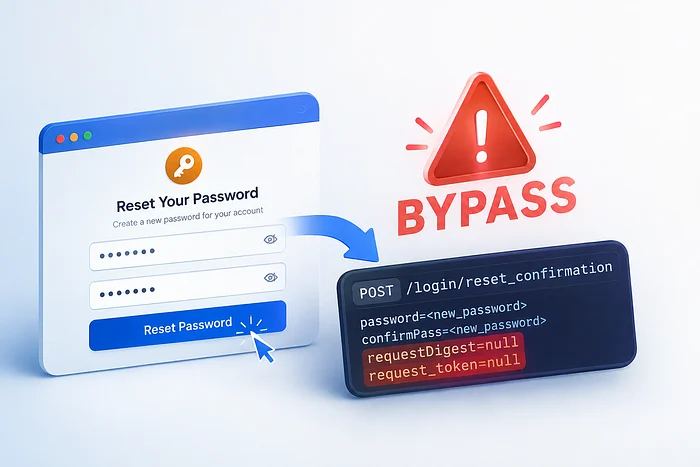
The password reset confirmation endpoint accepted requests where the security-related parameters requestDigest and request_token were set to null, allowing an attacker to change the account password without proper validation. This could lead to unauthorised account access.

medium.com
Published on medium.com
Ato
The full write-up lives on its author's site
It belongs to its author, so we link to it rather than copy it. The other two tabs are our own rewrites, checked against it.
Context
The target was the account recovery functionality of a site the author calls Target, on the host account.target.com. The feature under test is the password reset flow: a user requests a reset, follows the emailed link, lands on a page to choose a new password, and submits it. The endpoint that processes the final step is:
- Host:
account.target.com - Endpoint:
POST /login/reset_confirmation - Vulnerability Type: Authentication Bypass
- CWE: CWE-288, Authentication Bypass Using an Alternate Path or Channel
The point of this endpoint is to accept a new password only after the user has completed the verification steps that the reset flow requires. The request body carries the new password together with security-related validation values, and the server is supposed to check those values before it changes anything.
Setup
The testing was done against an account the author was authorised to use, described as an authorised test account. The only tool named in the report is Burp Suite, used with Intercept enabled to capture and modify the reset confirmation request. No versions, browser details or other tooling are given.
The precondition is simply that a reset has been started for the test account and the emailed reset link has been opened, so that the password creation page is loaded and ready to submit.
Finding it
While testing the account recovery functionality, the author looked at the POST request that the password creation page sends. The body contains four parameters:
password: the new password.confirmPass: the password confirmation.requestDigest: a security-related request validation value.request_token: a request validation token.
The two validation values are described in the report as security-related request validation values. What looked wrong was that the application appeared to accept the request even when both requestDigest and request_token were explicitly set to null. That suggested the server was not enforcing validation of these security-related parameters before processing the password reset.
Exploitation
Step 1: reach the login page
Navigate to the Target login page:
https://account.Target.com/login
Step 2: start a reset
Select the Reset Password option.
Step 3: supply the account
Enter the email address associated with your authorised test account.
Step 4: open the reset link
Open the password reset link and navigate to the password creation page.
Step 5: choose a new password
Enter a new password and confirm it.
Step 6: prepare to intercept
Open Burp Suite and enable Intercept.
Step 7: capture the confirmation request
Click the Reset Password button and intercept the following request:
POST /login/reset_confirmation
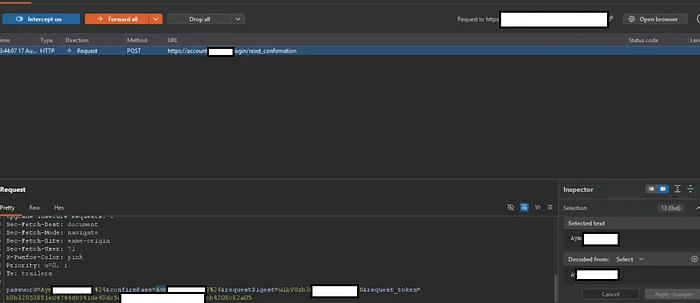
Step 8: inspect the body
Locate the parameters in the request body. The original request was:
[redacted]&confirmPass=NewPassword123%40&requestDigest=[VALID_DIGEST]&request_token=[VALID_TOKEN]
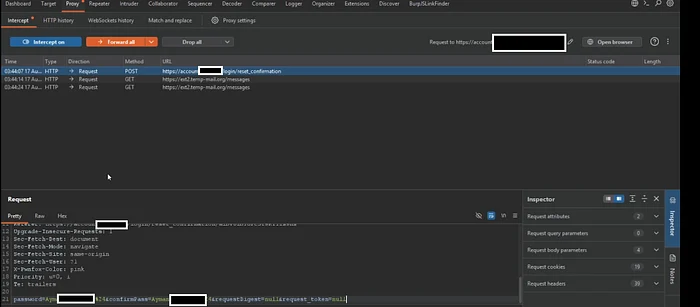
password and confirmPass hold the new password, with %40 being the URL encoding of @. requestDigest and request_token hold the original validation values.
Step 9: null the validation values
Modify the security-related parameters by replacing their values with null:
[redacted]&confirmPass=NewPassword123%40&requestDigest=null&request_token=null
Step 10: forward it
Forward the modified request to the server.
Step 11: observe the result
The password reset operation is successfully processed despite the modified parameters.
Step 12: confirm the outcome
The test account's password is changed, and the application authenticates the user and redirects them to the internal dashboard.
Root cause
The server did not properly enforce validation of the security-related parameters in the reset confirmation request. The two values that should prove the request belongs to a verified reset attempt, requestDigest and request_token, were accepted as the literal string null, and the password change went ahead anyway. In practice the check was either absent or written so that a null value passes it; the report does not show the server-side code, so the exact mistake is not stated.
Because the validation values were not actually required, the security checks that the reset flow is meant to perform before a password change did not stand in the way of the request.
Impact
Improper validation of password reset security parameters can have severe consequences. An attacker who can exploit this behaviour may be able to bypass the intended password reset verification mechanism and gain unauthorised access to a victim's account. In the author's own test, nulling the two values was enough to change the test account's password, and the application authenticated the user and redirected them to the internal dashboard.
The report does not describe the conditions an attacker would need in order to reach this endpoint on behalf of another user, so the practical reach of the bypass beyond the author's own test account is not established here.
Fix
The fix it points to is server-side enforcement: the reset confirmation endpoint should reject a request whose requestDigest or request_token is missing, null or otherwise not a valid value issued for a completed reset attempt, and should refuse the password change in that case.
Variants to test
- Send the confirmation request with
requestDigestandrequest_tokenremoved entirely rather than set tonull. A positive result is the same successful password change and redirect. - Send empty values (
requestDigest=&request_token=) and whitespace values. A positive result is the reset being processed anyway. - Reuse a valid digest and token from an earlier reset attempt, or from a different account, on a fresh confirmation request. A positive result is acceptance of values that do not belong to this attempt.
- Try the same null substitution on other parameters that gate the flow, such as any step or verification flag in the body. A positive result is the server skipping the corresponding check.
- Repeat the flow on other account-management endpoints that take a digest or token, such as email or password change forms. A positive result is a state change without a valid validation value.
What happened, in plain words
A website had a "forgot my password" feature. When you forget your password, the site emails you a link, you click it, and you land on a page where you type a new password. That page then sends your new password to the site's server so it can be saved.
The researcher who wrote this report noticed that the request carrying the new password also carried two security-related validation values. When those two values were replaced with the word null, the server still accepted the request, changed the password, and logged the user in.
That is a security problem because the server did not enforce validation of these security-related parameters before processing the password reset. The report calls this an authentication bypass: getting past a login or identity check without doing what the check expects.
The screenshot above is the title card of the write-up, showing the article heading "Authentication Bypass via Password Reset Flow Manipulation" and the author's name and publication date.
The pieces you need to know first
Before walking through the steps, here are the basic ideas the report relies on. None of them require any prior security knowledge.
- A server and a browser. Your browser (Chrome, Firefox, and so on) is the program on your computer that shows web pages. The server is the computer somewhere else that stores the website and answers your browser's requests. When you fill in a form and press a button, your browser sends a message to the server, and the server replies.
- A request. That message from browser to server is called a request. It has a method (such as
GETto fetch a page orPOSTto send data), a path (which part of the site it is aimed at), and often a body (the data being sent, such as the contents of a form). - An endpoint. An endpoint is a specific address on the server that accepts requests, for example
POST /login/reset_confirmation. Think of it as a particular counter in a large office: the building is the website, and the counter is where a specific job is handled. - Parameters. When a form is submitted, the data travels as a list of name and value pairs called parameters, joined with
&. For examplepassword=abc&confirmPass=abcmeans the parameterpasswordhas the valueabcandconfirmPassalso hasabc. It looks like a shopping list: item name, then what is in it. - URL encoding. Some characters cannot travel safely inside a request body, so they are written in a coded form.
%40is the coded form of the@character. The server decodes it back to@when it reads the value. It is like writing a postcode instead of a full address so the sorting machine can read it. - A token. A token is a short piece of text that a server hands out and later expects to see again, to prove that a request belongs to a particular session or action. A cinema ticket works the same way: you get it at the counter, and the door checks it before letting you in. If the door stops checking tickets, anyone can walk in.
- A digest. In this report,
requestDigestis described as a security-related request validation value. It plays the same role as the token: a value the server issues and should verify before acting. The report does not explain how it is generated. null. In programming,nullmeans "nothing" or "no value". It is not the same as an empty text box; it is the explicit absence of a value. Sendingnullis a way of saying "here is a value, and that value is nothing".- Burp Suite and Intercept. Burp Suite is a tool that sits between your browser and the server. With Intercept turned on, it pauses each request before it leaves your computer, lets you read and edit it, and then forwards it. Think of a mailroom that holds each letter for a moment so you can change the address before it goes out.
- Authentication. Authentication is how a site decides who you are, usually by checking a password. Authorisation is what you are then allowed to do. This report is about authentication: proving you are the account owner.
- CWE-288. CWE is a public catalogue of weakness types. CWE-288 is titled "Authentication Bypass Using an Alternate Path or Channel": reaching a protected action through a route that skips the intended check. The report uses this label for the bug.
The target and the feature
The site is referred to in the report as Target, and the account feature lives on the host account.target.com. A host is the name of the server, the part of a web address before the first slash.
The feature under test is the password reset flow. In normal use it goes like this:
- You click "forgot password" and type your email address.
- The site emails you a link.
- You open the link and land on a page where you choose a new password.
- You submit the new password, and the site saves it.
The endpoint that handles the final step is:
- Host:
account.target.com - Endpoint:
POST /login/reset_confirmation - Vulnerability Type: Authentication Bypass
- CWE: CWE-288, Authentication Bypass Using an Alternate Path or Channel
The whole point of this endpoint is to accept a new password only after the user has completed the verification steps the reset flow requires. The request body carries the new password together with security-related validation values, and the server is supposed to check those values before it changes anything. If it does not, the verification steps are decorative.
Setting up the test
The testing was done against an account the author was authorised to use, described as an authorised test account. Testing only on accounts you own or have written permission to use is the basic rule of security work; otherwise you are attacking someone.
The only tool named in the report is Burp Suite, used with Intercept enabled to capture and modify the reset confirmation request. No versions, browser details or other tooling are given.
The precondition is simple: a reset has been started for the test account and the emailed reset link has been opened, so the password creation page is loaded and ready to submit. In other words, the researcher first did everything a normal user does, up to the moment before pressing the final button.
Finding the problem
While testing the account recovery functionality, the author looked at the POST request that the password creation page sends. The body contains four parameters:
password: the new password.confirmPass: the password confirmation.requestDigest: a security-related request validation value.request_token: a request validation token.
The report describes the digest and token as security-related request validation values; the password and confirmation are the new password and its confirmation.
What looked wrong was that the application appeared to accept the request even when both requestDigest and request_token were explicitly set to null. That suggested the server was not enforcing validation of these security-related parameters before processing the password reset. In everyday terms: the door staff were handed tickets that said "nothing" and still waved everyone through.
Reproducing it, step by step
Each step below says what was done and why, so you can follow the reasoning, not just the clicks.
Step 1: reach the login page
Navigate to the Target login page:
https://account.Target.com/login
This is the starting point of the flow. The login page is where the "forgot password" option lives, so you need to be there before you can begin a reset.
Step 2: start a reset
Select the Reset Password option.
This tells the site you want to recover an account rather than sign in. It is the normal first move for any user who has lost their password.
Step 3: supply the account
Enter the email address associated with your authorised test account.
The site needs to know which account to reset. Using your own test account keeps the test legal and safe: you are changing a password you are allowed to change.
Step 4: open the reset link
Open the password reset link and navigate to the password creation page.
The site sends this link by email to prove that whoever is resetting the password can read that mailbox. Opening it is what moves the flow from "someone asked" to "the owner confirmed".
Step 5: choose a new password
Enter a new password and confirm it.
This fills the form with the values that will be sent to the server. The confirmation field exists to catch typing mistakes; both fields should match.
Step 6: prepare to intercept
Open Burp Suite and enable Intercept.
Without this, the request would go straight to the server and you would never see it. Intercept pauses it so you can read the body and change it before it is sent. This is the key move of the whole test.
Step 7: capture the confirmation request
Click the Reset Password button and intercept the following request:
POST /login/reset_confirmation
POST means "here is data for you to process", and the path tells you which endpoint is handling it. This is the request that actually changes the password, so it is the one worth inspecting.
Step 8: inspect the body
Locate the parameters in the request body. The original request was:
[redacted]&confirmPass=NewPassword123%40&requestDigest=[VALID_DIGEST]&request_token=[VALID_TOKEN]
Line by line, in plain words:
[redacted] sets the new password.%40is the URL encoding of@, so the actual password ends in@`.confirmPass=NewPassword123%40repeats the same password in the confirmation field.requestDigest=[VALID_DIGEST]is the digest value in the original request.request_token=[VALID_TOKEN]is the token value in the original request.- The
&between each pair separates one parameter from the next, like commas in a list.
These are the values in the original request. Seeing them first is what lets you recognise what a tampered request looks like.
Step 9: null the validation values
Modify the security-related parameters by replacing their values with null:
[redacted]&confirmPass=NewPassword123%40&requestDigest=null&request_token=null
Line by line:
- The
passwordandconfirmPassparameters are unchanged, so the new password is still the one you chose. requestDigest=nullreplaces the real digest with the literal textnull.request_token=nullreplaces the real token with the literal textnull.
The purpose of this change is to test whether the server actually checks these values. If the server rejects the request, the check works. If it accepts it, the check is missing or broken. You are not guessing at a complex attack; you are simply asking the server "do you really need these?" and watching the answer.
Step 10: forward it
Forward the modified request to the server.
In Burp Suite, forwarding releases the paused request so it continues to the server. This is the moment the server sees the tampered values instead of the real ones.
Step 11: observe the result
The password reset operation is successfully processed despite the modified parameters.
The server did not complain. That is the finding: the validation values were not actually required, so the checks they were supposed to enforce did not stand in the way.
Step 12: confirm the outcome
The test account's password is changed, and the application authenticates the user and redirects them to the internal dashboard.
The password really changed, and the application authenticated the user and redirected them to the internal dashboard.
Why it works
The server did not properly enforce validation of the security-related parameters in the reset confirmation request. The two values that should prove the request belongs to a verified reset attempt, requestDigest and request_token, were accepted as the literal string null, and the password change went ahead anyway.
In practice the check was either absent or written so that a null value passes it. The report does not show the server-side code, so the exact mistake is not stated. What is clear is the effect: because the validation values were not actually required, the security checks the reset flow is meant to perform before a password change did not stand in the way of the request.
A useful comparison is a form at an office reception. The receptionist is supposed to check your appointment letter before letting you upstairs. If the receptionist only glances at the letter and waves through anyone holding a blank sheet of paper, the appointment system exists on paper but not in practice.
Impact
Improper validation of password reset security parameters can have severe consequences. An attacker who can exploit this behaviour may be able to bypass the intended password reset verification mechanism and gain unauthorised access to a victim's account. In the author's own test, nulling the two values was enough to change the password and be authenticated and redirected to the internal dashboard.
In plain terms: an attacker who can exploit this behaviour may be able to bypass the intended password reset verification mechanism and gain unauthorised access to a victim's account.
How to fix it
The fix it points to is server-side enforcement: the reset confirmation endpoint should reject a request whose requestDigest or request_token is missing, null or otherwise not a valid value issued for a completed reset attempt, and should refuse the password change in that case.
The important word is server-side. Checks done only in the browser can be edited away by anyone using a tool like Burp Suite, as this test shows. The server is the only place a check cannot be bypassed by the person making the request.
Other things worth testing
Once you understand the pattern, the same idea can be tried in a few nearby places. Each item below is a variation on the same question: does the server really require this value?
- Send the confirmation request with
requestDigestandrequest_tokenremoved entirely rather than set tonull. A positive result is the same successful password change and redirect. - Send empty values (
requestDigest=&request_token=) and whitespace values. A positive result is the reset being processed anyway. - Reuse a valid digest and token from an earlier reset attempt, or from a different account, on a fresh confirmation request. A positive result is acceptance of values that do not belong to this attempt.
- Try the same null substitution on other parameters that gate the flow, such as any step or verification flag in the body. A positive result is the server skipping the corresponding check.
- Repeat the flow on other account-management endpoints that take a digest or token, such as email or password change forms. A positive result is a state change without a valid validation value.
Glossary
- Authentication: the process of proving who you are to a site, usually with a password.
- Authentication bypass: getting past an identity check without completing what the check requires.
- Authorisation: what a site allows you to do once it knows who you are.
- Body: the part of a request that carries data, such as form fields.
- Browser: the program on your computer that displays web pages and sends requests to servers.
- Burp Suite: a tool that sits between your browser and a server so you can inspect and edit requests.
- CWE: a public catalogue of weakness types used to label security bugs.
- CWE-288: the catalogue entry for authentication bypass using an alternate path or channel.
- Digest: in this report, a security-related request validation value the server issues and should verify.
- Endpoint: a specific address on a server that accepts requests, such as
POST /login/reset_confirmation. - Host: the server name in a web address, the part before the first slash.
- Intercept: a Burp Suite mode that pauses requests so you can read and change them before they are sent.
- Method: the type of a request, such as
GETto fetch a page orPOSTto send data. null: a programming value meaning "nothing" or "no value", distinct from an empty text box.- Parameter: a name and value pair sent in a request, such as
password=abc. - Password reset flow: the sequence of steps a user follows to set a new password after forgetting the old one.
- POST: a request method used to send data to the server for processing.
- Request: the message a browser sends to a server asking it to do something.
- Server: the remote computer that stores a website and answers requests.
- Token: a short piece of text a server issues and later expects back, to prove a request belongs to a particular session or action.
- URL encoding: a way of writing characters that cannot travel safely in a request, such as
%40for@. - Validation: checking that a value is present, well formed and legitimate before acting on it.



