Authorization token leak from verify email endpoint
The email verification endpoint returned a valid authorization token for any already-verified email address when only the email parameter was supplied, without requiring the verification code. An attacker who knew a victim's email address could obtain that user's token and act as them, including the admin account.

As the program had one domain in its scope. I opened the burp suite in the background to collect all the requests and responses so I could review them later.
The full write-up lives on its author's site
It belongs to its author, so we link to it rather than copy it. The other two tabs are our own rewrites, checked against it.
Context
The target was a website with a single domain in scope. The author does not name it and refers to it as example.com throughout. The feature involved is the email verification flow: after registering, a user submits an email address and a verification code, and the application confirms the address and returns account information, including an authorization token.
The bug is that the verify email endpoint returned the authorization token of any already verified user to anyone who supplied that user's email address. No code, no session, nothing else was needed.
Setup
The only tool mentioned is Burp Suite, running in the background to capture every request and response for later review. No versions are given. The author first used the site as an ordinary user to understand its functionality and flow, then registered a new account. The only input needed for the attack is a verified user's email address.
Finding it
Registration triggered an email verification step, implemented as a POST request carrying two parameters, email and code:
POST /api/user/verifymail HTTP/1.1
Host: www.example.com
…
…

{
  “email”:”[redacted]”
  “code”:”[redacted]”
}
The response confirmed the verification and, alongside other information, displayed a token. That token in the response is what made the endpoint worth a second look.
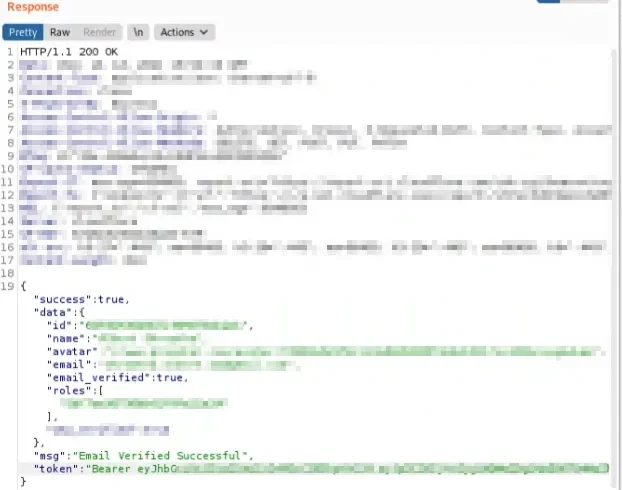
The screenshot shows the verify request and its response: verification succeeded and the token came back with the rest of the account data.
The email parameter stood out. The author's first hypothesis was a code reuse problem: register two users with different emails and check whether the code issued for the first user's email would verify the second user. That failed. The next attempt removed the code parameter entirely and sent the request with only the email. The application did not verify the email, so that path was closed too. The author moved on to other functionality.
Exploitation
Step 1: revisit an old request in Repeater
While closing tabs in Burp Repeater, the author came across the /api/user/verifymail request that carried only the email parameter, the one left over from the earlier failed test. Sending it again returned 200 OK with an email verified successful message, the token and other information. Because that email had already been verified earlier, the application simply reported success again, with no error such as "email already verified" or "verification failed".
Step 2: confirm the pattern
Testing the endpoint further showed the rule: when an already verified email is passed as the value of the email parameter, the application responds with the token. The author notes that with the token obtained this way, any action can be performed on behalf of the victim.
Step 3: target the administrator
During testing the author had found the application's admin account. Submitting that account's email to the same endpoint leaked the admin token in the response.
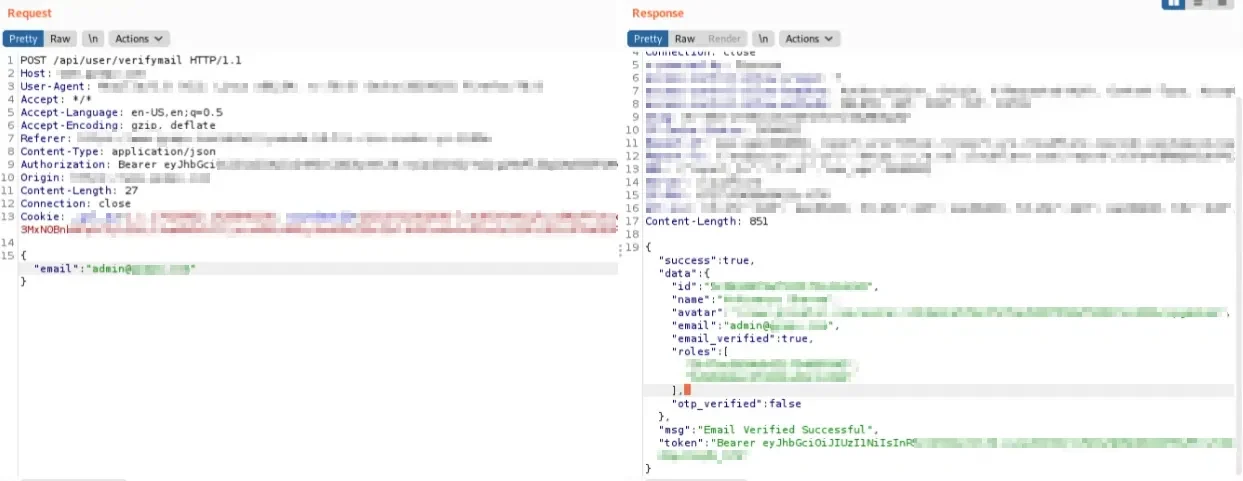
Step 4: proof of concept and report
The author built a PoC and reported the vulnerability. The summary in the report is that an attacker could obtain tokens of any verified users by using only the victim's email address.
Root cause
The endpoint appears to treat the presence of a verified email as sufficient proof of identity: it looks up the account by the supplied email, sees that it is already verified, and returns the success response, token included, without requiring the verification code or any other credential. The report does not describe the server-side code, so the exact cause is not confirmed. The report does not describe the server-side code, so this is likely rather than confirmed.
The earlier tests failed: a code issued for one email did not verify another, and a request with no code did not verify the email. The flaw only appears on the already-verified branch, which the author reached by accident when resending an old request.
Impact
Any verified user's token can be retrieved by anyone who knows that user's email address. With the token, the attacker can perform any action on behalf of the victim. The author demonstrated this against the application's admin account, so the exposure extends to privileged accounts.
Fix
The behaviour it describes points to the following: never return an authorization token from an unauthenticated verification endpoint, require the verification code (or another proof of control of the address) on every call including the already-verified case, and respond to an already-verified email with a neutral message that carries no account data.
Variants to test
- Resend verification requests with only the email parameter on other applications and look for a
200that includes a token or session data. A positive result is a token in the body for an account you did not authenticate to. - Submit an already-verified email to the verification endpoint and compare the response with the first-time verification response. A positive result is a success message with account data instead of an "already verified" error.
- Try the same endpoint with the email of a privileged account found during testing. A positive result is a token for that account.
- Look for sibling endpoints (password reset, resend confirmation, magic link) that accept an email and return more than a generic acknowledgement. A positive result is any token, code or account detail in the response.
- Replay old requests captured in Burp Repeater against the same endpoint after the account state has changed. A positive result is a success response where an error is expected.
What happened, in plain words
A website had a feature that checks whether an email address belongs to a new user. The check was done by sending the email address and a secret code to the website's API. The API would reply with a message saying the email was verified, and it also included a special key called an authorization token. That token is like an ID card: whoever holds it can act as that user on the website.
The bug was that the API would give out that token for any email address that was already verified, to anyone who asked, without needing the secret code. So if an attacker knew a victim's email address, they could ask the API to verify that email again, and the API would hand over the victim's token. With that token, the attacker could perform any action on behalf of the victim. The author even tried it with the administrator's email and got the admin token.
This kind of flaw is called an authorization token leak (or information disclosure) because a secret that proves who you are is exposed to someone who should not have it. It leads to account takeover because the attacker can use the token to impersonate the victim.
Background: what you need to know
Before diving into the steps, here are a few basic ideas that will make everything clearer.
- API (Application Programming Interface): A way for two computer programs to talk to each other. Think of it as a waiter in a restaurant: you (the app) tell the waiter (API) what you want, and the waiter brings it from the kitchen (server). In a website, the API is often accessed via URLs like
/api/user/verifymail. - HTTP request: A message a browser (or tool) sends to a server asking for something. It has a method (like GET or POST), a URL, headers (extra info), and sometimes a body (data).
- POST request: A type of HTTP request used to send data to the server, often to create or update something. The data is in the request body.
- Parameter: A piece of data sent in a request, like
emailorcode. It's like a form field. - Token (authorization token): A long string of characters that acts like a temporary password or ID card. When you log in, the server gives you a token; you include it in later requests to prove who you are. If someone else gets your token, they can pretend to be you.
- Email verification: A common step after signing up: the website sends a code to your email, and you enter it to prove the email is yours. This prevents fake accounts.
- Burp Suite: A tool used by security testers to intercept and inspect the requests and responses between a browser and a server. It can capture traffic, let you modify requests, and resend them. Burp Repeater is a part of Burp that lets you manually send a request over and over and see the response each time.
- Endpoint: A specific URL path that performs a function, like
/api/user/verifymail. - 200 OK: An HTTP status code meaning the request succeeded.
- PoC (Proof of Concept): A simple demonstration that the vulnerability is real and can be exploited, often a small script or a set of steps.
The target and setup
The author was testing a website (name undisclosed, referred to as example.com) that had one domain in scope for a bug bounty program. A bug bounty program is a scheme where organisations reward security researchers for finding and reporting vulnerabilities.
The only tool mentioned is Burp Suite, which the author ran in the background to capture all requests and responses for later review. No version numbers are given.
First, the author used the website like a normal user to understand how it works and what it does. This is a common first step: you need to know the normal behaviour before you can spot abnormal behaviour.
Then the author registered a new user account. The registration process triggered an email verification step. The verification was done by sending a POST request to /api/user/verifymail with two parameters: email and code. The request looked like this:
POST /api/user/verifymail HTTP/1.1
Host: www.example.com
…
…

{
  “email”:”[redacted]”
  “code”:”[redacted]”
}
Let's break it down line by line:
POST /api/user/verifymail HTTP/1.1: This is the request line.POSTis the method,/api/user/verifymailis the endpoint path, andHTTP/1.1is the protocol version.Host: www.example.com: This header tells the server which website the request is for. It's like the address on an envelope.…and…: These represent other headers that were omitted for brevity (like cookies, content type, etc.). The report does not list them.- The blank line separates headers from the body.
- The body is JSON (JavaScript Object Notation), a common format for sending data. It contains two key-value pairs:
"email":"[redacted]"and"code":"[redacted]". The email is the address to verify, and the code is the secret code sent to that email.
In response, the server confirmed that the email was verified and also included an authorization token along with other information. The token is the key that allows actions on behalf of the user.
The screenshot shows the request and response: the verification succeeded and the token was displayed with other account details.
First attempts and dead ends
Seeing the email parameter, the author wondered if the verification code was tied to the email address. The idea: register two users with different emails, get the code for the first user's email, and try to use that same code to verify the second user's email. If that worked, it would be a different bug (code reuse). But the test failed: the code did not work for the other email.
Next, the author tried removing the code parameter entirely and sending only the email. The application did not verify the email. So that path was closed too. The author moved on to test other parts of the application.
The accidental discovery
Later, while closing tabs in Burp Repeater, the author noticed a request to /api/user/verifymail that had only the email parameter (the one from the earlier failed test). The author clicked "Send" again, and to their surprise, the response was 200 OK with a message saying the email was verified successfully, along with the token and other information. Since that email had already been verified before, the application simply reported success again, without any error like "email already verified" or "verification failed".
This was the key: the endpoint did not require the code when the email was already verified. It just returned the token.
Confirming the pattern
The author then tested further and found that if an already verified email is passed as the value of the email parameter, the application responds with the token. Using that token, any action can be performed on behalf of the victim. In other words, the token is a full account takeover.
Targeting the administrator
During testing, the author had found the application's admin account. Submitting that admin email to the same endpoint leaked the admin token in the response.
This showed that even privileged accounts were vulnerable.
Proof of concept and report
The author created a PoC (proof of concept) and reported the vulnerability. The summary: an attacker could obtain tokens of any verified users by using only the victim's email address.
Why did this happen?
The report does not describe the server-side code, so the exact cause is not confirmed. The code check that exists on the first verification is skipped on the already-verified path, and the token is placed in the response body rather than being delivered only to the address owner. The report does not describe the server-side code, so this is likely rather than confirmed.
The earlier tests failed: a code issued for one email did not verify another, and a request with no code did not verify the email. The flaw only appears on the already-verified branch, which the author reached by accident when resending an old request.
Impact
Any verified user's token can be retrieved by anyone who knows that user's email address. With the token, the attacker can perform any action on behalf of the victim. The author demonstrated this against the application's admin account, so the exposure extends to privileged accounts.
Fix
The behaviour it describes points to the following: never return an authorization token from an unauthenticated verification endpoint, require the verification code (or another proof of control of the address) on every call including the already-verified case, and respond to an already-verified email with a neutral message that carries no account data.
Variants to test
If you want to look for similar bugs in other applications, here are some ideas:
- Resend verification requests with only the email parameter on other applications and look for a
200that includes a token or session data. A positive result is a token in the body for an account you did not authenticate to. - Submit an already-verified email to the verification endpoint and compare the response with the first-time verification response. A positive result is a success message with account data instead of an "already verified" error.
- Try the same endpoint with the email of a privileged account found during testing. A positive result is a token for that account.
- Look for sibling endpoints (password reset, resend confirmation, magic link) that accept an email and return more than a generic acknowledgement. A positive result is any token, code or account detail in the response.
- Replay old requests captured in Burp Repeater against the same endpoint after the account state has changed. A positive result is a success response where an error is expected.
Glossary
- API (Application Programming Interface): A set of rules that allows different software programs to communicate with each other.
- HTTP request: A message sent by a client (like a browser) to a server to request a resource or action.
- POST request: An HTTP method used to send data to a server, often to create or update a resource.
- Parameter: A piece of data sent in a request, typically as a key-value pair.
- Token (authorization token): A string that represents a user's authenticated session or identity, used to authorize requests.
- Email verification: A process to confirm that an email address belongs to the user, usually by sending a code or link.
- Burp Suite: A tool for intercepting and modifying HTTP traffic between a browser and a server.
- Burp Repeater: A Burp Suite tool that allows manual sending and resending of HTTP requests.
- Endpoint: A specific URL path that provides a function in an API.
- 200 OK: An HTTP status code indicating that the request was successful.
- PoC (Proof of Concept): A demonstration that a vulnerability exists and can be exploited.
- Account takeover: A type of attack where an attacker gains unauthorized access to a user's account.
- Information disclosure: The exposure of sensitive information to unauthorized parties.
- Authorization: The process of determining whether a user has permission to perform an action.
- Authentication: The process of verifying a user's identity.
- Session: A period of interaction between a user and a system, often tracked by a token or cookie.
- Cookie: A small piece of data stored by the browser and sent with requests to maintain state.
- JSON: A lightweight data-interchange format using key-value pairs.
- Header: Part of an HTTP request or response that carries metadata.
- Body: The part of an HTTP request or response that contains the actual data.
- Host: The domain name of the server being contacted.
- Bug bounty program: A program where organizations reward researchers for finding and reporting security vulnerabilities.
- Scope: The set of targets (domains, applications) that are allowed to be tested in a bug bounty program.
- Admin account: A user account with elevated privileges to manage the application.
- Replay: Sending the same request again, often after some time or state change.
- Sibling endpoint: Another endpoint that performs a related function, like password reset or resend confirmation.



