Behind the Delay: Discovering Time-Based Blind SQL Injection in a Live Web Application
A GET parameter on a live web application was found to be injectable via time-based blind SQL injection, confirmed by observing consistent response delays when a conditional database delay was supplied. Using SQLMap, the tester then fingerprinted the database and enumerated database names.
 Published on medium.com
Bug Bounty Tips
The full write-up lives on its author's site
It belongs to its author, so we link to it rather than copy it. The other two tabs are our own rewrites, checked against it.
Not every vulnerability announces itself with a database error, an unexpected response, or a visible change in the application's behaviour. Some require a different approach: you send a request, get a normal-looking response, and the only thing that gives the game away is how long the server takes to answer.
That was the behaviour I investigated during a security assessment of a publicly accessible web application. The investigation led to a time-based blind SQL injection vulnerability, followed by database fingerprinting and database-name enumeration using SQLMap.
Context
The target was a live, publicly accessible web application. The investigation focused on an endpoint that accepted user-controlled parameters through a GET request. A simplified representation of the request looked like this:
GET /index.aspx?id=products&thematic=High_Performance_Computing HTTP/1.1Host: [REDACTED]
The request carries an id value and a thematic value. The thematic parameter caught my attention because it appeared to influence the application's response. Whenever an application accepts user-controlled input and uses it in backend database operations, it becomes important to understand how that input is processed. The primary question was whether the application was handling the parameter safely, or whether it was being incorporated into a database query without proper protection.
Setup
The assessment was carried out against the live application with no special access described. The main tool was SQLMap, the open-source penetration-testing tool designed to detect and assess SQL injection vulnerabilities. Testing was deliberately scoped to the thematic GET parameter, with the objective of determining whether it was injectable while minimising unnecessary requests.
Finding it
At first glance the request looked ordinary. Nothing unusual appeared on screen: no SQL error, no database information, no obvious indication that anything was wrong. The signal was timing. By modifying the parameter and observing the application's response time, a pattern emerged:
- Normal request: response in approximately 1 second.
- Request containing a conditional database delay: response in approximately 5 seconds.
- Repeated controlled tests: similar response-time differences.
A consistent delay can indicate that the database is processing an injected condition. The technique is particularly interesting because the application may return an ordinary HTTP response without revealing any database errors at all. The open question was whether the delay was a coincidence, a server-side processing issue, or the application executing an SQL query it was never intended to execute.
Exploitation
Step 1: Confirm the parameter is worth testing
The thematic parameter was singled out because it appeared to influence the application's response. The working assumption was that it might reach a backend query, and the timing behaviour was the first evidence in favour of that.
Step 2: Run SQLMap against the parameter
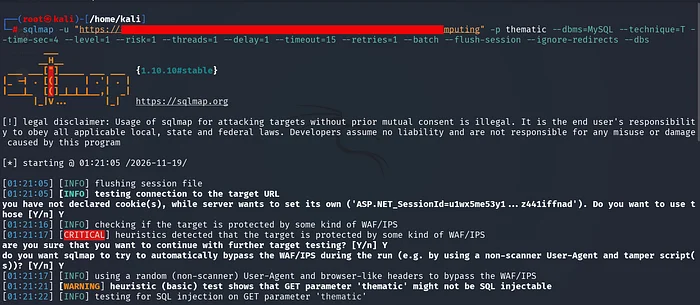
SQLMap initially performed connection checks and identified behaviour consistent with a possible Web Application Firewall (WAF) or Intrusion Prevention System (IPS). Interestingly, the initial heuristic test suggested that the parameter might not be injectable. Further time-based testing produced a different result: the parameter appeared to respond to a database delay condition.
Step 3: Read the confirmation
After completing its time-based testing, SQLMap reported:
[INFO] testing 'MySQL >= 5.0.12 AND time-based blind (query SLEEP)'
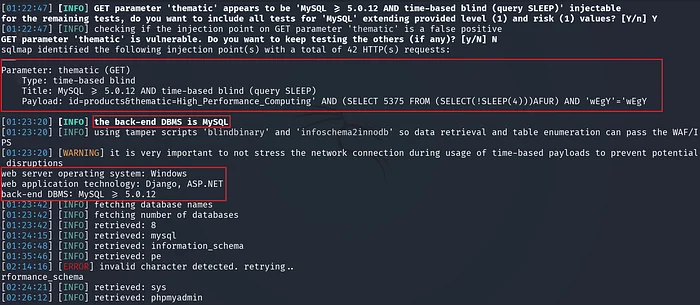
[INFO] GET parameter 'thematic' appears to be'MySQL >= 5.0.12 AND time-based blind(query SLEEP)' injectable[INFO] checking if the injection point on GETparameter 'thematic' is a false positive[INFO] GET parameter 'thematic' is vulnerable.
The first line shows the payload family being tried: a MySQL time-based blind technique using SLEEP, applicable to MySQL 5.0.12 and later. The second block records the verdict on the thematic GET parameter, the false-positive check that followed, and the final confirmation that the parameter is vulnerable. This was the most important observation during the assessment.
Step 4: Validate and enumerate
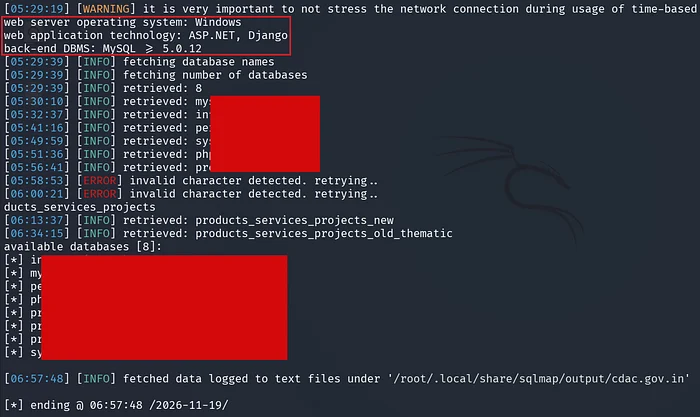
SQLMap had identified a potential time-based injection point and subsequently performed additional checks to validate the finding. It then fetched the database names, and the issue was reported to the organisation.

Root cause
User-controlled input from the thematic GET parameter was reaching a backend database query without adequate protection, so an injected conditional expression such as a SLEEP-based condition was executed by the database. Because the application returned an ordinary HTTP response and disclosed no database errors, the injection was invisible in the response body and only observable through response timing. The report does not describe the specific query construction or the exact defensive coding mistake, so the precise flaw in the code is not stated; the behaviour is consistent with string concatenation of the parameter into a query rather than parameterised statements.
Impact
With a confirmed time-based blind injection, an attacker can ask the database yes/no questions through response delays and reconstruct information without ever seeing an error or a result set. In this assessment SQLMap fetched the database names. The report does not quantify how much data could ultimately be extracted, nor which data the application stores, so the full blast radius is not established here. The exposure applies to anyone who can reach the endpoint, since it is publicly accessible.
Fix
The report does not state which remediation was applied. The appropriate fix is to stop building the query by concatenating the thematic value and to use parameterised queries or prepared statements so that user input is treated as data and never as SQL syntax. Input validation and allow-listing of expected thematic values add defence in depth, and The possible WAF/IPS behaviour observed during testing should not be relied on as the primary control.
Variants to test
- Other parameters on the same endpoint. Apply the same timing methodology to
idand any other GET or POST parameter. A positive result is a reproducible, parameter-dependent difference in response time when a conditional delay is injected. - Different database backends. The confirmed payload family was MySQL
SLEEP. On other targets, try the equivalent delay primitives for the backend in use (for examplepg_sleepon PostgreSQL orWAITFOR DELAYon MSSQL). A positive result is the same consistent delay pattern. - Endpoints behind a WAF. The initial heuristic test here suggested the parameter was not injectable, and only time-based testing confirmed it. On other targets, do not stop at a negative heuristic result; repeat the timing tests with varied request pacing. A positive result is a delay that survives the WAF and correlates with the injected condition.
- Blind spots with no visible output. Any feature that filters, sorts or looks up records by a user-supplied value is a candidate. A positive result is a response that is normal in content but measurably slower only when the injected condition is true.
What happened, in plain words
A security researcher was testing a website that anyone on the internet can reach. The website had a page that took a value from the visitor and used it to decide what to show. The researcher suspected that this value was being passed straight into a database query, the kind of instruction a website sends to its database to fetch or change information. If that were true, a visitor could sneak extra database instructions in through that value.
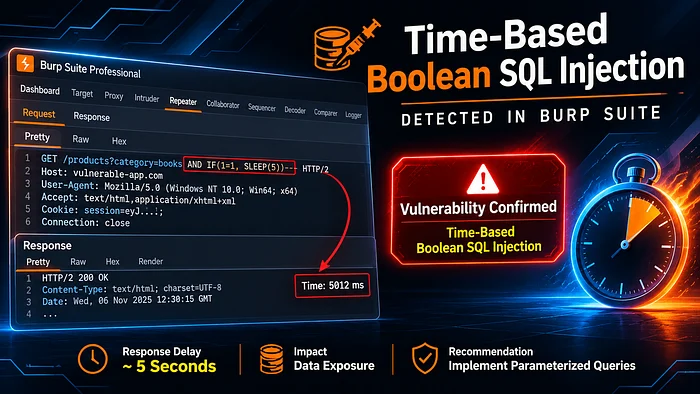
The tricky part is that the website never showed an error. No warning appeared on screen, no database details leaked, nothing looked different. The only clue was time: when the researcher changed the value in a particular way, the page took much longer to answer. That delay was the database being told to pause on purpose. This kind of problem is called a time-based blind SQL injection: "blind" because you cannot see the result, and "time-based" because you measure the answer with a stopwatch instead of reading it on the page.
The researcher then used a free tool called SQLMap to confirm the suspicion, and SQLMap also pulled out the names of the databases on the server. The issue was reported to the organisation that runs the website.
The idea in everyday terms
Think of a restaurant. You order by filling in a small card: "one soup, table 4". The kitchen reads the card and makes the soup. Now imagine the card has a blank line and the kitchen reads whatever is written there as part of the order. If you write "one soup, table 4, and also close the restaurant for an hour", a careless kitchen might actually do it, because it cannot tell your order apart from its own instructions.
A database works the same way. A website builds a query, which is a sentence in a database language called SQL, and sends it to the database. If the website glues the visitor's value into that sentence without separating it properly, the visitor can add their own SQL words. That is SQL injection.
Normally an attacker would like to see the database's reply. But some pages never show it. In that case the attacker can ask yes/no questions and watch the clock: "if this is true, wait five seconds; if not, answer immediately". That is the blind, time-based variant.
The target and the request
The assessment was against a live, publicly accessible web application. The researcher focused on one endpoint, which is simply a particular address on a website that does one job, like a page that lists products. The endpoint accepted values through a GET request. A GET request is the ordinary kind your browser makes when you type an address or click a link: the values travel in the address itself, after a question mark.
A simplified version of the request looked like this:
GET /index.aspx?id=products&thematic=High_Performance_Computing HTTP/1.1Host: [REDACTED]
Line by line:
GET /index.aspx?id=products&thematic=High_Performance_Computing HTTP/1.1is the request line.GETis the method, meaning "give me something"./index.aspxis the page being asked for. After the?come two values, separated by&:id=productsandthematic=High_Performance_Computing.HTTP/1.1is the version of the web protocol being spoken.Host: [REDACTED]tells the server which website name the request is for. The real name has been hidden here.
The request carries an id value and a thematic value. A parameter is just a named value in the address, like a form field. The thematic parameter caught the researcher's attention because changing it seemed to change what the application returned. That is a strong hint: if a value affects the page, the page is probably doing something with it behind the scenes, possibly asking the database about it.
The question the researcher wanted answered was simple: is the application handling this value safely, or is it dropping it into a database query without protection?
Setting up
The assessment was carried out against the live application, and no special access is described. The main tool was SQLMap, a free, open-source program used by security testers to detect and assess SQL injection. You run it from a command line, point it at a request, and it tries many techniques automatically.
Testing was deliberately limited to the thematic GET parameter. The aim was to find out whether that one value was injectable, while sending as few requests as possible. Keeping the scope narrow matters: every extra request is load on someone else's live system.
Finding it
At first glance the request looked completely ordinary. Nothing unusual appeared on screen: no SQL error, no database information, no obvious sign that anything was wrong. The signal was timing. By modifying the parameter and watching how long the application took to answer, a pattern emerged:
- Normal request: response in approximately 1 second.
- Request containing a conditional database delay: response in approximately 5 seconds.
- Repeated controlled tests: similar response-time differences.
A conditional database delay means the injected instruction tells the database: if some condition is true, pause for a while. A consistent delay can indicate that the database is processing an injected condition. The technique is interesting precisely because the application may return a perfectly ordinary web response without revealing any database errors at all.
The open question was whether the delay was a coincidence, a server-side processing issue, or the application executing an SQL query it was never meant to execute. Repeating the test is what separates a fluke from a finding: a one-off slow response could be anything, but the same difference appearing again and again points at the injected condition.
Exploitation
Step 1: Confirm the parameter is worth testing
The thematic parameter was singled out because it appeared to influence the application's response. The working assumption was that it might reach a backend query, and the timing behaviour was the first evidence in favour of that. This step is about choosing where to spend effort: a value that changes the page is a far better candidate than one that does nothing.
Step 2: Run SQLMap against the parameter
SQLMap initially performed connection checks and identified behaviour consistent with a possible Web Application Firewall (WAF) or Intrusion Prevention System (IPS). A WAF is a filter that sits in front of a website and inspects incoming requests, blocking ones that look like attacks. An IPS does a similar job at the network level. Their presence matters because they can block or distort test traffic, and they can also make a vulnerable parameter look safe.
Interestingly, the initial heuristic test suggested that the parameter might not be injectable. A heuristic test is a quick, rule-of-thumb check rather than a full proof. Further time-based testing produced a different result: the parameter appeared to respond to a database delay condition. In other words, the quick check said no, and the slower, more careful check said yes. That is why a negative quick result is not the end of the story.
Step 3: Read the confirmation
After completing its time-based testing, SQLMap reported:
[INFO] testing 'MySQL >= 5.0.12 AND time-based blind (query SLEEP)'
This single line says which family of test payloads SQLMap was trying. A payload is the piece of text it inserts into the parameter. MySQL is the database product being tested for. >= 5.0.12 means the technique applies to MySQL version 5.0.12 and later. time-based blind names the technique. query SLEEP means the payload uses a database function called SLEEP, which makes the database pause for a given number of seconds. If the page is slow only when the injected condition is true, the database is running the injected SLEEP.
[INFO] GET parameter 'thematic' appears to be'MySQL >= 5.0.12 AND time-based blind(query SLEEP)' injectable[INFO] checking if the injection point on GETparameter 'thematic' is a false positive[INFO] GET parameter 'thematic' is vulnerable.
This block records the verdict on the thematic GET parameter, the false-positive check that followed, and the final confirmation that the parameter is vulnerable. In plain words:
GET parameter 'thematic' appears to be ... injectablemeans SQLMap thinks the value can carry injected SQL.checking if the injection point ... is a false positivemeans it is now double-checking, because a slow response can have innocent causes. A false positive is a finding that looks real but is not.GET parameter 'thematic' is vulnerableis the final answer after that check.
This was the most important observation during the assessment.
Step 4: Validate and enumerate
SQLMap had identified a potential time-based injection point and subsequently performed additional checks to validate the finding. It then fetched the database names, and the issue was reported to the organisation. Fetching database names is called enumeration: listing what exists on the server, starting with the names of its databases. It is the first step in showing what an attacker could reach, without yet pulling out actual records.
Why it works
User-controlled input from the thematic GET parameter was reaching a backend database query without adequate protection, so an injected conditional expression such as a SLEEP-based condition was executed by the database. Because the application returned an ordinary web response and disclosed no database errors, the injection was invisible in the page content and only observable through response timing. The report does not describe the specific query construction or the exact defensive coding mistake, so the precise flaw in the code is not stated; the behaviour is consistent with string concatenation of the parameter into a query rather than parameterised statements. String concatenation means gluing the visitor's text directly into the query sentence; parameterised statements mean handing the value over separately so the database treats it purely as data.
What an attacker could do
With a confirmed time-based blind injection, an attacker can ask the database yes/no questions through response delays and reconstruct information without ever seeing an error or a result set. It is slow, like reading a book one yes/no question at a time, but it works. In this assessment SQLMap fetched the database names. Fingerprinting means working out which database product and version is running.
The report does not quantify how much data could ultimately be extracted, nor which data the application stores, so the full blast radius is not established here. The exposure applies to anyone who can reach the endpoint, since it is publicly accessible. Authentication means proving who you are, for example with a login; the request above carries no such proof.
How to fix it
The report does not state which remediation was applied. The appropriate fix is to stop building the query by concatenating the thematic value and to use parameterised queries or prepared statements, so that user input is treated as data and never as SQL syntax. Input validation and allow-listing of expected thematic values add defence in depth: validation means checking that a value looks like what you expect, and an allow-list means accepting only a known set of values. The possible WAF/IPS behaviour observed during testing should not be relied on as the primary control.
Other places to look
- Other parameters on the same endpoint. Apply the same timing methodology to
idand any other GET or POST parameter. A positive result is a reproducible, parameter-dependent difference in response time when a conditional delay is injected. - Different database backends. The confirmed payload family was MySQL
SLEEP. On other targets, try the equivalent delay primitives for the backend in use (for examplepg_sleepon PostgreSQL orWAITFOR DELAYon MSSQL). A positive result is the same consistent delay pattern. - Endpoints behind a WAF. The initial heuristic test here suggested the parameter was not injectable, and only time-based testing confirmed it. On other targets, do not stop at a negative heuristic result; repeat the timing tests with varied request pacing. A positive result is a delay that survives the WAF and correlates with the injected condition.
- Blind spots with no visible output. Any feature that filters, sorts or looks up records by a user-supplied value is a candidate. A positive result is a response that is normal in content but measurably slower only when the injected condition is true.
Glossary
- API: a defined way for one piece of software to ask another for something, like a service counter with set request forms.
- Authentication: proving who you are, usually by logging in.
- Backend: the part of a website that runs on the server and talks to the database, out of sight of the visitor.
- Blind SQL injection: SQL injection where the result is not shown on the page, so the attacker infers it indirectly.
- Conditional delay: an instruction that makes the database pause only if a stated condition is true.
- Database: organised storage for a website's information, queried with a language such as SQL.
- Database fingerprinting: working out which database product and version a server runs.
- Database-name enumeration: listing the names of the databases on a server.
- Endpoint: a particular address on a website that performs one job.
- False positive: a finding that looks real but is not.
- GET request: the ordinary browser request where values travel in the address after a question mark.
- Heuristic test: a quick rule-of-thumb check, not a full proof.
- HTTP response: the reply a server sends back to a browser request.
- IPS (Intrusion Prevention System): a network-level filter that inspects and blocks suspicious traffic.
- MySQL: a popular open-source database product.
- Parameter: a named value in a request, like a form field.
- Parameterised query / prepared statement: a way of sending a query where user values are handed over separately and never treated as SQL syntax.
- Payload: the piece of text an attacker inserts into a parameter.
- Remediation: the fix applied to remove a vulnerability.
- Response time: how long a server takes to answer a request.
- SLEEP: a MySQL function that pauses the database for a given number of seconds.
- SQL: the language used to ask a database for information or to change it.
- SQL injection: tricking an application into running database instructions hidden inside user input.
- SQLMap: a free, open-source tool that detects and assesses SQL injection.
- String concatenation: gluing pieces of text together, here gluing user input directly into a query.
- Time-based blind SQL injection: blind SQL injection where the answer is read from how long the server takes to respond.
- WAF (Web Application Firewall): a filter in front of a website that inspects requests and blocks ones that look like attacks.



